Solved QTTabBar


Hello everybody, un saludo desde Espana!

i made an account here to jump into QTTabBar,

at first:
there are NEW community driven builds and website:

take a look:

QTTabBar – Tabbed File Explorer for Windows 11

i uninstalled old and very outdated Quizo build, cleaned my system and installed the new one, but it won't show up.
you guys out there just try and report, maybe you've more luck.

I wrote an email to the new developers with detailled informations and waiting for response.
in the meantime I'm helping myself with XYplorer, but's not the same...
Tablacus is kinda crap...

haven't tried explorer tab utility yet.

i have some perfect configuration backups if needed, i use my own frequently used programs in QTT and still haven't found any kind of replacement..

W11 build is 26200.7309

please try the new builds on this site, looking forward to get it back again, using QTT for over 10 years.
I'm from spain.
 
Last edited:

My Computer My Computer

At a glance

W11x6425H2 build 26.200 7309I7 670064GB CorsairIntel Arc A 380
OS
W11x6425H2 build 26.200 7309
Computer type
PC/Desktop
Manufacturer/Model
Self build
CPU
I7 6700
Motherboard
Prime Z-270
Memory
64GB Corsair
Graphics Card(s)
Intel Arc A 380
Sound Card
Terratec 5.1 USB
Monitor(s) Displays
Philipps PHL351
Screen Resolution
2k
Hard Drives
2 SSD M2 + 3USB, 15TB together
Case
to old
Cooling
coolermaster 6 fans
Keyboard
Logitech iluminated
Mouse
Logitech
Internet Speed
1000mega
Browser
FF Nigthly
Antivirus
MS included
Other Info
EX IT worker...long time ago
This is fantastic, since the tabs and the double-click in space is the primary thing that helps with vanilla Windows Explorer navigation.
I'll definitely be looking at this later on. But, will keep checking in here if there's any further updates of an alternate, or if QTTabBar works again, by some miracle.

I've now been using ExplorerTabUtility for full three days and works fine, eating only 41 MB of RAM.

I asked Google AI for replacements for Qttabbar and the AI told me to check ExplorerTabUtility, among other apps. I had never heard of it. ExplorerTabUtility could easily be called Qttabbar Lite.

Bummer! :(
I might make a clean image and try to put 2048 on !
And, screen record it!
@Dan Dare You're on 26200.7309 right?

QTTabBar may not be the most powerfully featured utility of it's kind, but, it has a style of it's own..., comfortably powerful without being too complicated.
I've grown so accustomed to it that I can't function without it anymore!

View attachment 155923

Yes, I'm on 26200.7309.

I had been using Qttabbar since agust 2014 (I know because of the Qttabbar folder on my HDD creation date) and also never had any problem with it.

Next week I will virtualize a new install of the 26200.7309 ISO and quickly check if Qttabbar and Open Shell Explorer work from start on a fresly installed Windows 11 Pro or not.
 

My Computer My Computer

At a glance

Windows 11 Pro13900KRTX 4090
OS
Windows 11 Pro
Computer type
PC/Desktop
CPU
13900K
Graphics Card(s)
RTX 4090
Screen Resolution
4K
PSU
Corsair 2500 W
Hello everybody, un saludo desde Espana!

i made an account here to jump into QTTabBar,

at first:
there are NEW community driven builds and website:

take a look:

QTTabBar – Tabbed File Explorer for Windows 11

i uninstalled old and very outdated Quizo build, cleaned my system and installed the new one, but it won't show up.
you guys out there just try and report, maybe you've more luck.

I wrote an email to the new developers with detailled informations and waiting for response.
in the meantime I'm helping myself with XYplorer, but's not the same...
Tablacus is kinda crap...

haven't tried explorer tab utility yet.

i have some perfect configuration backups if needed, i use my own frequently used programs in QTT and still haven't found any kind of replacement..

W11 build is 26200.7309

please try the new builds on this site, looking forward to get it back again, using QTT for over 10 years.
I'm from spain.

Hi

I already tried the chinese fork versions days ago and they didn't work for me.

I also tried all kind of Windows file explorer replacements like Tablacus, Explorer++, XYplorer, etc and didn't like them.

I only like the original Windows file explorer, so for now I will stick with ExplorerTabUtility, until Microsoft releases a new Windows update that breaks it too. :tears:
 
Last edited:

My Computer My Computer

At a glance

Windows 11 Pro13900KRTX 4090
OS
Windows 11 Pro
Computer type
PC/Desktop
CPU
13900K
Graphics Card(s)
RTX 4090
Screen Resolution
4K
PSU
Corsair 2500 W

My Computers My Computers

  • At a glance

    Windows 11 Pro
    OS
    Windows 11 Pro
    Computer type
    PC/Desktop
    Manufacturer/Model
    ASUS ROG Strix
  • At a glance

    Windows 11 Pro
    Operating System
    Windows 11 Pro
    Computer type
    Laptop
    Manufacturer/Model
    ASUS VivoBook
  • ASUS VivoBook 'Lite' ~ Windows 11 Home
Japanese blogger wenbang posted yesterday a windows register file that he says should fix the Qttabbar problem with the latest Windows 11 update. I've tried that REG file but Qttabbar still doesn't work for me. :tears:

[Added 2025/12/06: The reason why QTTabBar disappeared (no longer displayed) has been discovered]
After some investigation, we discovered the reason why the QTTabBar was not displayed. The cause was that the registry value that manages the toolbar settings for Explorer had been reset to the default value (which means the QTTabBar is not displayed) ITBar7Layout at some point (such as when an update was applied) .

"ITBar7Layout" is a registry value that is automatically created when you open the old Explorer.

Normally, QTTabBarEnabler.exe this value should be restored using the "Restore" function, but it seems that it may not be written correctly depending on the environment.

Therefore, I created a repair file (.reg) that forcibly rewrites this registry value to "Display QTTabBar." If the command or reinstallation does not fix the problem, please try the following steps.

Everybody else, try it:
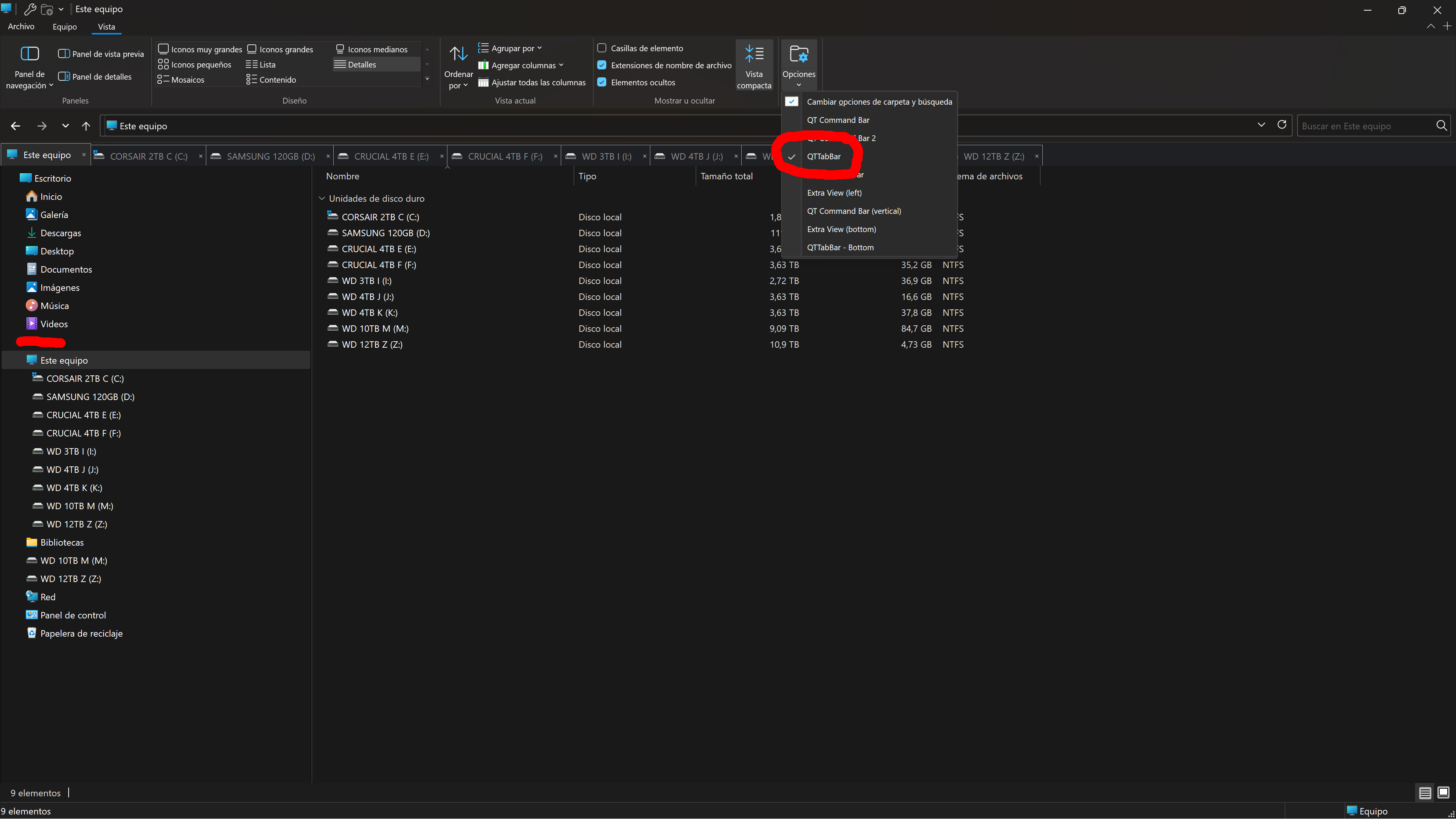
  1. Just download, unzip and run the REG file you will find inside this zip file (right click Save as...) QTTabBar_Restore.zip
  2. or it can also be downloaded from the bottom of 更新プログラムKB5070311で「QTTabBar」が消える不具合と解決法【旧エクスプローラー環境】 | Windows 技!
  3. restart Windows 11.
  4. check if Qttabbar works now for you.
 

My Computer My Computer

At a glance

Windows 11 Pro13900KRTX 4090
OS
Windows 11 Pro
Computer type
PC/Desktop
CPU
13900K
Graphics Card(s)
RTX 4090
Screen Resolution
4K
PSU
Corsair 2500 W
do i need old explorer for this fix?
 

My Computer My Computer

At a glance

W11x6425H2 build 26.200 7309I7 670064GB CorsairIntel Arc A 380
OS
W11x6425H2 build 26.200 7309
Computer type
PC/Desktop
Manufacturer/Model
Self build
CPU
I7 6700
Motherboard
Prime Z-270
Memory
64GB Corsair
Graphics Card(s)
Intel Arc A 380
Sound Card
Terratec 5.1 USB
Monitor(s) Displays
Philipps PHL351
Screen Resolution
2k
Hard Drives
2 SSD M2 + 3USB, 15TB together
Case
to old
Cooling
coolermaster 6 fans
Keyboard
Logitech iluminated
Mouse
Logitech
Internet Speed
1000mega
Browser
FF Nigthly
Antivirus
MS included
Other Info
EX IT worker...long time ago
do i need old explorer for this fix?

You can try this fix on Windows 11 file explorer from this week's latest update 26200.7309

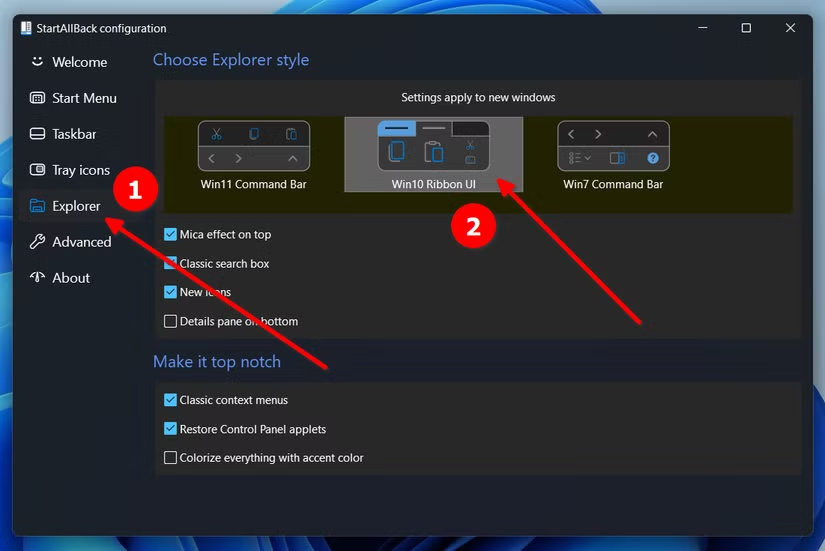
You need to have a ribbon that allows you to see the VIEW menu on file explorer. I use StartAllBack Windows 10 ribbon.

2a588gS.png
 

My Computer My Computer

At a glance

Windows 11 Pro13900KRTX 4090
OS
Windows 11 Pro
Computer type
PC/Desktop
CPU
13900K
Graphics Card(s)
RTX 4090
Screen Resolution
4K
PSU
Corsair 2500 W
You can try this fix on Windows 11 file explorer from this week's latest update 26200.7309

You need to have a ribbon that allows you to see the VIEW menu on file explorer. I use StartAllBack Windows 10 ribbon.

2a588gS.png
 

My Computer My Computer

At a glance

W11x6425H2 build 26.200 7309I7 670064GB CorsairIntel Arc A 380
OS
W11x6425H2 build 26.200 7309
Computer type
PC/Desktop
Manufacturer/Model
Self build
CPU
I7 6700
Motherboard
Prime Z-270
Memory
64GB Corsair
Graphics Card(s)
Intel Arc A 380
Sound Card
Terratec 5.1 USB
Monitor(s) Displays
Philipps PHL351
Screen Resolution
2k
Hard Drives
2 SSD M2 + 3USB, 15TB together
Case
to old
Cooling
coolermaster 6 fans
Keyboard
Logitech iluminated
Mouse
Logitech
Internet Speed
1000mega
Browser
FF Nigthly
Antivirus
MS included
Other Info
EX IT worker...long time ago
Now it becomes tricky, as i read startallback doesn't go along with start11 (purchased), am i right with this?
 

My Computer My Computer

At a glance

W11x6425H2 build 26.200 7309I7 670064GB CorsairIntel Arc A 380
OS
W11x6425H2 build 26.200 7309
Computer type
PC/Desktop
Manufacturer/Model
Self build
CPU
I7 6700
Motherboard
Prime Z-270
Memory
64GB Corsair
Graphics Card(s)
Intel Arc A 380
Sound Card
Terratec 5.1 USB
Monitor(s) Displays
Philipps PHL351
Screen Resolution
2k
Hard Drives
2 SSD M2 + 3USB, 15TB together
Case
to old
Cooling
coolermaster 6 fans
Keyboard
Logitech iluminated
Mouse
Logitech
Internet Speed
1000mega
Browser
FF Nigthly
Antivirus
MS included
Other Info
EX IT worker...long time ago

My Computer My Computer

At a glance

Windows 11 Pro13900KRTX 4090
OS
Windows 11 Pro
Computer type
PC/Desktop
CPU
13900K
Graphics Card(s)
RTX 4090
Screen Resolution
4K
PSU
Corsair 2500 W

My Computers My Computers

  • At a glance

    Windows 11 Pro
    OS
    Windows 11 Pro
    Computer type
    PC/Desktop
    Manufacturer/Model
    ASUS ROG Strix
  • At a glance

    Windows 11 Pro
    Operating System
    Windows 11 Pro
    Computer type
    Laptop
    Manufacturer/Model
    ASUS VivoBook
  • ASUS VivoBook 'Lite' ~ Windows 11 Home
It bugs me that the Hide Menu option is dickered on some PC's and not others!!! 🤷‍♂️

11286.gif
 

My Computers My Computers

  • At a glance

    Windows 11 Pro
    OS
    Windows 11 Pro
    Computer type
    PC/Desktop
    Manufacturer/Model
    ASUS ROG Strix
  • At a glance

    Windows 11 Pro
    Operating System
    Windows 11 Pro
    Computer type
    Laptop
    Manufacturer/Model
    ASUS VivoBook
  • ASUS VivoBook 'Lite' ~ Windows 11 Home

My Computer My Computer

At a glance

W11x6425H2 build 26.200 7309I7 670064GB CorsairIntel Arc A 380
OS
W11x6425H2 build 26.200 7309
Computer type
PC/Desktop
Manufacturer/Model
Self build
CPU
I7 6700
Motherboard
Prime Z-270
Memory
64GB Corsair
Graphics Card(s)
Intel Arc A 380
Sound Card
Terratec 5.1 USB
Monitor(s) Displays
Philipps PHL351
Screen Resolution
2k
Hard Drives
2 SSD M2 + 3USB, 15TB together
Case
to old
Cooling
coolermaster 6 fans
Keyboard
Logitech iluminated
Mouse
Logitech
Internet Speed
1000mega
Browser
FF Nigthly
Antivirus
MS included
Other Info
EX IT worker...long time ago
you missunderstood me, not WIN11, i mentioned START11 from stardock, and startallback overwrites taskbar settings and more...that does not work togehter.

so i will try oldnewexplorer, th reg fix and then reinstall qttabar, will see what happens...

Oh yes, I missunderstood you. 😀

You could also use Explorer Patcher to get the Windows 10 ribbon: GitHub - valinet/ExplorerPatcher: This project aims to enhance the working environment on Windows

By the way, the japanese blogger added a new, once again, solution yesterday. 更新プログラムKB5070311で「QTTabBar」が消える不具合と解決法【旧エクスプローラー環境】 | Windows 技!

My Qttabbar 2048 keeps not saving settings and not loading at the top of the file explorer.
 

My Computer My Computer

At a glance

Windows 11 Pro13900KRTX 4090
OS
Windows 11 Pro
Computer type
PC/Desktop
CPU
13900K
Graphics Card(s)
RTX 4090
Screen Resolution
4K
PSU
Corsair 2500 W
Oh yes, I missunderstood you. 😀

You could also use Explorer Patcher to get the Windows 10 ribbon: GitHub - valinet/ExplorerPatcher: This project aims to enhance the working environment on Windows
i will try them.
By the way, the japanese blogger added a new, once again, solution yesterday. 更新プログラムKB5070311で「QTTabBar」が消える不具合と解決法【旧エクスプローラー環境】 | Windows 技!

My Qttabbar 2048 keeps not saving settings and not loading at the top of the file explorer.

question: does this solution works only with Quizos build or with the other chinese fork?

the build in tranlator for those japanese sites isn't that good, cannot find the solution
 

My Computer My Computer

At a glance

W11x6425H2 build 26.200 7309I7 670064GB CorsairIntel Arc A 380
OS
W11x6425H2 build 26.200 7309
Computer type
PC/Desktop
Manufacturer/Model
Self build
CPU
I7 6700
Motherboard
Prime Z-270
Memory
64GB Corsair
Graphics Card(s)
Intel Arc A 380
Sound Card
Terratec 5.1 USB
Monitor(s) Displays
Philipps PHL351
Screen Resolution
2k
Hard Drives
2 SSD M2 + 3USB, 15TB together
Case
to old
Cooling
coolermaster 6 fans
Keyboard
Logitech iluminated
Mouse
Logitech
Internet Speed
1000mega
Browser
FF Nigthly
Antivirus
MS included
Other Info
EX IT worker...long time ago
Another thing that baffles me:
Preview on Mouse Hover has existed in Windows since The Dawn Of Time..., and still does!...


View attachment 0008277.mp4

only now, they suggest to install some chintzy, convoluted app from the Store which requires the item to be rendered in a dedicated window anyway, so what's the point! 🤷‍♂️

QTTabBar for the win, AGAIN!!!

11309.gif
 
Last edited:

My Computers My Computers

  • At a glance

    Windows 11 Pro
    OS
    Windows 11 Pro
    Computer type
    PC/Desktop
    Manufacturer/Model
    ASUS ROG Strix
  • At a glance

    Windows 11 Pro
    Operating System
    Windows 11 Pro
    Computer type
    Laptop
    Manufacturer/Model
    ASUS VivoBook
  • ASUS VivoBook 'Lite' ~ Windows 11 Home
BREAKING NEWS!!!

Qttabbar is working again on Windows 11. :party: :party: :party:

MWalwU4.png


Japanese blogger wenbang posted a final new update that this time really works. You just need to use the Vibetool.exe to disable a Windows 11 file explorer update. The root cause is Explorer's new AI features.


My Computer My Computer

At a glance

Windows 11 Pro13900KRTX 4090
OS
Windows 11 Pro
Computer type
PC/Desktop
CPU
13900K
Graphics Card(s)
RTX 4090
Screen Resolution
4K
PSU
Corsair 2500 W
Japanese blogger wenbang posted a final new update that this time really works. You just need to use the Vibetool.exe to disable a Windows 11 file explorer update. The root cause is Explorer's new AI features.
...just another reason to get rid of AI?
 

My Computer My Computer

At a glance

Windows 11 Pro 25H2 (26200.8875)AMD Ryzen 7 7800X3D32gb Team Group (T-Force) DDR5-6000Zotac nVidia GeForce RTX 4070 SUPER - 12gb
OS
Windows 11 Pro 25H2 (26200.8875)
Computer type
PC/Desktop
Manufacturer/Model
Pre-built
CPU
AMD Ryzen 7 7800X3D
Motherboard
MSI Pro B650-VC WiFi
Memory
32gb Team Group (T-Force) DDR5-6000
Graphics Card(s)
Zotac nVidia GeForce RTX 4070 SUPER - 12gb
Sound Card
Sound BlasterX G6
Monitor(s) Displays
Koorui G2421V and ViewSonic VX2453
Screen Resolution
P:2560x1440 S:1920x1080
Hard Drives
WD Blue SN5000 - 500gb NVME
WD Blue SN580 - 2TB NVME
Seagate 4TB HDD - ST4000VN008-2DR166
Keyboard
Mountain Everest
Mouse
Logitech G502 Hero
Internet Speed
T-Mobile Home Internet
Browser
Firefox
Other Info
QNAP TS-469 Pro NAS
TP-Link W7200 (2 unit mesh network)
Elgato Streamdeck
BREAKING NEWS!!!

Qttabbar is working again on Windows 11. :party: :party: :party:

MWalwU4.png


Japanese blogger wenbang posted a final new update that this time really works. You just need to use the Vibetool.exe to disable a Windows 11 file explorer update. The root cause is Explorer's new AI features.

So yes, running the command:
Code:
vivetool /disable /id:57048216
temporarily resolved the problem.

And I mean temporarily, as sooner or later MS disallows disabling this feature via ViveTool, like with any other feature they attempt to force.

So we either need another workaround or the MS's grip on QTTabBar will tighten irrevocably.
 

My Computer My Computer

At a glance

Windows 11 22H2
OS
Windows 11 22H2
Here's a setting I keep forgetting about:
In the Preview-Text section, set the KiB to maximum, (16 I believe)...,

11386.webp

... that will allow you to Mouse Hover read/scan a large supported document in it's entirety...

11388.gif
 

My Computers My Computers

  • At a glance

    Windows 11 Pro
    OS
    Windows 11 Pro
    Computer type
    PC/Desktop
    Manufacturer/Model
    ASUS ROG Strix
  • At a glance

    Windows 11 Pro
    Operating System
    Windows 11 Pro
    Computer type
    Laptop
    Manufacturer/Model
    ASUS VivoBook
  • ASUS VivoBook 'Lite' ~ Windows 11 Home
Back
Top Bottom