
Quick Launch Toolbar


leerm

Member
Local time
12:18 PM
Posts
4
OS
Windows 11
I updated to Windows 11 yesterday and the first thing I looked for was how to get Quick Launch Toolbar. I found out how to do that, and everything I had in Windows 10 is there, BUT, it's all clumped together next to the notification area. I click on it and all the folders are there in a window that pops up, I click on one, then a window flies out to the left. Is there a way to have them visible under (I think it was) the taskbar? This is helpful, but certainly not as convenient as it was in W10.
 

My Computer My Computer

At a glance

Windows 11AMD Ryzen 3 3350U with Radeon Vega Mobile Gfx...20.0 GB (17.9 GB usable)AMD Radeon(TM) Vega 6 Graphics (2 GB)
OS
Windows 11
Computer type
Laptop
Manufacturer/Model
Acer
CPU
AMD Ryzen 3 3350U with Radeon Vega Mobile Gfx (2.10 GHz
Memory
20.0 GB (17.9 GB usable)
Graphics Card(s)
AMD Radeon(TM) Vega 6 Graphics (2 GB)
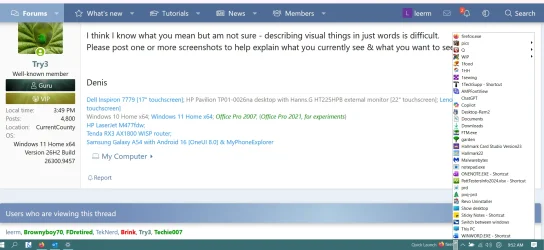
I think I know what you mean but am not sure - describing visual things in just words is difficult.
Please post one or more screenshots to help explain what you currently see & what you want to see.


Denis
 

My Computer My Computer

At a glance

Windows 11 Home x64 Version 26H2 Build 26300....
OS
Windows 11 Home x64 Version 26H2 Build 26300.9457
1790780020278.webp
This is what I see. My icons in W10 were along the bottom, either to the right of those 6 icons on the left, or maybe they were underneath the open apps? I've had Quick Launch for so long (W7??) that it was just there, I don't remember the details.
 

My Computer My Computer

At a glance

Windows 11AMD Ryzen 3 3350U with Radeon Vega Mobile Gfx...20.0 GB (17.9 GB usable)AMD Radeon(TM) Vega 6 Graphics (2 GB)
OS
Windows 11
Computer type
Laptop
Manufacturer/Model
Acer
CPU
AMD Ryzen 3 3350U with Radeon Vega Mobile Gfx (2.10 GHz
Memory
20.0 GB (17.9 GB usable)
Graphics Card(s)
AMD Radeon(TM) Vega 6 Graphics (2 GB)

Right-click on your Taskbar, click on Lock the taskbar to unlock it [your diagram shows that it is currently locked].
Single marker double lines.webp
Double-lines will appear on the left-hand side of your QuickLaunch icon, select and drag those lines to the left & your QuickLaunch contents will spread out to fill the space you are making. When you've finished, right-click on the Taskbar again and click on Lock the Taskbar again to lock it in the position you have chosen.

I am responding to what you've asked for but I never do that myself as I think it just wastes Taskbar space.
On my Taskbar Toolbars [QuickLaunch is merely a built-in example of them], I want it to act like yours currently acts - a pop-up menu.
You'll see examples in my posts
My ExplorerPatcher guide to Windows 11 Taskbar Toolbars [post #2225] - ElevenForum
Taskbar Toolbars - Creating and naming, customising, moving [post #20] - TenForumsTutorials

Just out of interest, which add-in did you install in order to be able to show your QuickLaunch toolbar? I use ExplorerPatcher.


Denis
 

My Computer My Computer

At a glance

Windows 11 Home x64 Version 26H2 Build 26300....
OS
Windows 11 Home x64 Version 26H2 Build 26300.9457
I saw a post of yours that suggested ExplorerPatcher, I found and used that.
Perfect!! That's exactly what I want! I like having them there, it saves a step. Is there any way to eliminate the title "Quick Launch?1790783182270.webp"?
 

My Computer My Computer

At a glance

Windows 11AMD Ryzen 3 3350U with Radeon Vega Mobile Gfx...20.0 GB (17.9 GB usable)AMD Radeon(TM) Vega 6 Graphics (2 GB)
OS
Windows 11
Computer type
Laptop
Manufacturer/Model
Acer
CPU
AMD Ryzen 3 3350U with Radeon Vega Mobile Gfx (2.10 GHz
Memory
20.0 GB (17.9 GB usable)
Graphics Card(s)
AMD Radeon(TM) Vega 6 Graphics (2 GB)
Is there any way to eliminate the title "Quick Launch?
Yes.
I have just tried this to make sure I was advising you well.
1 Unlock the taskbar.
2 Right-click on the label QuickLaunch, click on Show title to un-select that.
3 Lock the taskbar.


Denis
 

My Computer My Computer

At a glance

Windows 11 Home x64 Version 26H2 Build 26300....
OS
Windows 11 Home x64 Version 26H2 Build 26300.9457
That did it! I am now very happy. I put off installing W11 as long as possible, but this has gone a long way to getting me to where I like things.
Thank you!!!
 

My Computer My Computer

At a glance

Windows 11AMD Ryzen 3 3350U with Radeon Vega Mobile Gfx...20.0 GB (17.9 GB usable)AMD Radeon(TM) Vega 6 Graphics (2 GB)
OS
Windows 11
Computer type
Laptop
Manufacturer/Model
Acer
CPU
AMD Ryzen 3 3350U with Radeon Vega Mobile Gfx (2.10 GHz
Memory
20.0 GB (17.9 GB usable)
Graphics Card(s)
AMD Radeon(TM) Vega 6 Graphics (2 GB)
I am now very happy
I felt the same as you when I first ran Windows 11 - I wanted the Taskbar Toolbars I'd been using for over a decade. Having Taskbar Toolbars lets me have two-click access to everything I routinely need and saves me having to deal with the Windows Start menu's limitations.
Like you, I've had Taskbar Toolbars since soon after installing Windows 7 [Taskbar Toolbars worked but weren't really needed in WinXP because its Start menu was so readily customisable].


Denis


Oh, and welcome to ElevenForum.

It's really worth making time to browse through the ElevenForum Tutorial index - there's a shortcut to it at the top of every ElevenForum page [within the Tutorials dropdown list].
- At the foot of the ElevenForum Tutorial index is a shortcut to download it as a spreadsheet.
- I download a new copy each month.
- By downloading it as a spreadsheet I can benefit from Excel's excellent filtering capabilities when I search for topics of interest.
- ElevenForum tutorials are also listed at Tutorials and there's a shortcut to that at the top of every page.

You can search ElevenForum using the search box in the top-right corner of all ElevenForum webpages or using Advanced Search - ElevenForum
You can also search ElevenForum threads in many general search engines, such as Google, by adding site:elevenforum.com after your search term. For example,
Taskbar setup site:elevenforum.com
 

My Computer My Computer

At a glance

Windows 11 Home x64 Version 26H2 Build 26300....
OS
Windows 11 Home x64 Version 26H2 Build 26300.9457

Latest Support Threads

Back
Top Bottom




