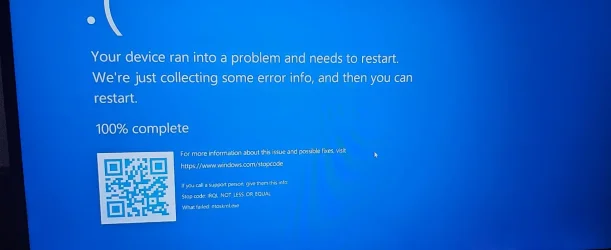
Random crashes after upgrading to Win11


I've also removed and disabled a lot of unnecessary Asus and AmouryCrate services.
Which method(s) was /were used?

Please make a new restore point.
 

My Computer My Computer

At a glance

Windows 10Intel(R) Core(TM) i7-4800MQ CPU @ 2.70GHz16 GB Total: Manufacturer : Samsung MemoryTyp...NVIDIA Quadro K3100M; Intel(R) HD Graphics 4600
OS
Windows 10
Computer type
Laptop
Manufacturer/Model
HP
CPU
Intel(R) Core(TM) i7-4800MQ CPU @ 2.70GHz
Motherboard
Product : 190A Version : KBC Version 94.56
Memory
16 GB Total: Manufacturer : Samsung MemoryType : DDR3 FormFactor : SODIMM Capacity : 8GB Speed : 1600
Graphics Card(s)
NVIDIA Quadro K3100M; Intel(R) HD Graphics 4600
Sound Card
IDT High Definition Audio CODEC; PNP Device ID HDAUDIO\FUNC_01&VEN_111D&DEV_76E0
Hard Drives
Model Hitachi HTS727575A9E364
Antivirus
Microsoft Defender
Other Info
Mobile Workstation
I've ran the uninstall tool from the ASUS website.
And using Services.msc Ive disabled the following:
ASUS Software Manager.
Armoury Crate Control Interface.
Checked if any apps are installed, found none.

New restore point is created.
 

My Computer My Computer

At a glance

windows 11AMD Ryzen 7 4800H with Radeon Graphics16 GBNVIDIA GeForce RTX 3050 Ti Laptop GPU
OS
windows 11
Computer type
Laptop
Manufacturer/Model
Asus Strix G713IE
CPU
AMD Ryzen 7 4800H with Radeon Graphics
Motherboard
ASUSTeK COMPUTER INC. G713IE 1.0
Memory
16 GB
Graphics Card(s)
NVIDIA GeForce RTX 3050 Ti Laptop GPU
Sound Card
Speakers (Realtek(R) Audio)
Monitor(s) Displays
Model INTEL SSDPEKNU010TZ Size1024203640320
Hard Drives
Model: INTEL SSDPEKNU010TZ
Size: 1024203640320

My Computer My Computer

At a glance

windows 11AMD Ryzen 7 4800H with Radeon Graphics16 GBNVIDIA GeForce RTX 3050 Ti Laptop GPU
OS
windows 11
Computer type
Laptop
Manufacturer/Model
Asus Strix G713IE
CPU
AMD Ryzen 7 4800H with Radeon Graphics
Motherboard
ASUSTeK COMPUTER INC. G713IE 1.0
Memory
16 GB
Graphics Card(s)
NVIDIA GeForce RTX 3050 Ti Laptop GPU
Sound Card
Speakers (Realtek(R) Audio)
Monitor(s) Displays
Model INTEL SSDPEKNU010TZ Size1024203640320
Hard Drives
Model: INTEL SSDPEKNU010TZ
Size: 1024203640320
1) Read this link on Windows Driver Verifier (WDV):

Enable and Disable Driver Verifier in Windows 10


2) Create a new restore point:


3) Learn the methods to recover from BSOD caused by WDV by booting into safe mode and running one or more of these commands:

verifier /reset

verifier /bootmode resetonbootfail


4) Plan to run the tool with mulriple customized test settings.

a) Test all non-Microsoft drivers

b) Test no Microsoft drivers

c) For the first run of WDV select the 3 customized tests displayed in the TF tutorial


5) Whenever the WDV tool is started if there is no immediate BSOD then open administrative command prompt and copy and paste:

verifier /querysettings

Post a share link.


Customized tests will then be posted for the next run of WDV.


WDV can run continuously during the testing.


For any BSOD post a new V2 share link into the newest post.
 

My Computer My Computer

At a glance

Windows 10Intel(R) Core(TM) i7-4800MQ CPU @ 2.70GHz16 GB Total: Manufacturer : Samsung MemoryTyp...NVIDIA Quadro K3100M; Intel(R) HD Graphics 4600
OS
Windows 10
Computer type
Laptop
Manufacturer/Model
HP
CPU
Intel(R) Core(TM) i7-4800MQ CPU @ 2.70GHz
Motherboard
Product : 190A Version : KBC Version 94.56
Memory
16 GB Total: Manufacturer : Samsung MemoryType : DDR3 FormFactor : SODIMM Capacity : 8GB Speed : 1600
Graphics Card(s)
NVIDIA Quadro K3100M; Intel(R) HD Graphics 4600
Sound Card
IDT High Definition Audio CODEC; PNP Device ID HDAUDIO\FUNC_01&VEN_111D&DEV_76E0
Hard Drives
Model Hitachi HTS727575A9E364
Antivirus
Microsoft Defender
Other Info
Mobile Workstation

Latest Support Threads

Back
Top Bottom