Random reboots, BlueSOD & BlackSOD, Event Viewer show random events


My Computer My Computer

At a glance

Windows 11I9192GBRTX4090
OS
Windows 11
Computer type
Laptop
Manufacturer/Model
MSI Titan HV 18
CPU
I9
Motherboard
MSI
Memory
192GB
Graphics Card(s)
RTX4090
Monitor(s) Displays
Hisense 40, Hisense 48, VGA 32
Hard Drives
2tb SSD
Autoboot


This: PS C:\Users\phyzx> Set-CimInstance -ClassName Win32_OSRecoveryConfiguration `
>> -Property @{AutoReboot = $false}
Set-CimInstance: A parameter cannot be found that matches parameter name 'ClassName'.
 

My Computer My Computer

At a glance

Windows 11I9192GBRTX4090
OS
Windows 11
Computer type
Laptop
Manufacturer/Model
MSI Titan HV 18
CPU
I9
Motherboard
MSI
Memory
192GB
Graphics Card(s)
RTX4090
Monitor(s) Displays
Hisense 40, Hisense 48, VGA 32
Hard Drives
2tb SSD
1) For all commands post images with commands and results.

2) Also post a copy and paste result into notepad.

3) Every command will be have results in a PS window and a text file (notepad).


Code:
Get-CimInstance -ClassName Win32_OSRecoveryConfiguration | Select-Object AutoReboot
Get-CimInstance -ClassName Win32_OSRecoveryConfiguration | Set-CimInstance -Property @{AutoReboot=$false}
Get-CimInstance -ClassName Win32_OSRecoveryConfiguration | Select-Object AutoReboot

Get-CimInstance -ClassName Win32_OSRecoveryConfiguration | Select-Object DebugInfoType
Get-CimInstance -ClassName Win32_OSRecoveryConfiguration | Set-CimInstance -Property @{DebugInfoType=7}
Get-CimInstance -ClassName Win32_OSRecoveryConfiguration | Select-Object DebugInfoType

Get-CimInstance -ClassName Win32_PageFileUsage | Format-List *

Get-CimInstance -ClassName Win32_ComputerSystem | Select-Object AutomaticManagedPagefile
Get-CimInstance -ClassName Win32_ComputerSystem | Set-CimInstance -Property @{AutomaticManagedPagefile=$true}
Get-CimInstance -ClassName Win32_ComputerSystem | Select-Object AutomaticManagedPagefile

bcdedit /enum '{badmemory}'



4) Post a new V2 share link into the newest post.
 

My Computer My Computer

At a glance

Windows 10Intel(R) Core(TM) i7-4800MQ CPU @ 2.70GHz16 GB Total: Manufacturer : Samsung MemoryTyp...NVIDIA Quadro K3100M; Intel(R) HD Graphics 4600
OS
Windows 10
Computer type
Laptop
Manufacturer/Model
HP
CPU
Intel(R) Core(TM) i7-4800MQ CPU @ 2.70GHz
Motherboard
Product : 190A Version : KBC Version 94.56
Memory
16 GB Total: Manufacturer : Samsung MemoryType : DDR3 FormFactor : SODIMM Capacity : 8GB Speed : 1600
Graphics Card(s)
NVIDIA Quadro K3100M; Intel(R) HD Graphics 4600
Sound Card
IDT High Definition Audio CODEC; PNP Device ID HDAUDIO\FUNC_01&VEN_111D&DEV_76E0
Hard Drives
Model Hitachi HTS727575A9E364
Antivirus
Microsoft Defender
Other Info
Mobile Workstation

Attachments

My Computer My Computer

At a glance

Windows 11I9192GBRTX4090
OS
Windows 11
Computer type
Laptop
Manufacturer/Model
MSI Titan HV 18
CPU
I9
Motherboard
MSI
Memory
192GB
Graphics Card(s)
RTX4090
Monitor(s) Displays
Hisense 40, Hisense 48, VGA 32
Hard Drives
2tb SSD
1) Please reinstall the chipset drivers


2) Create a new restore point


3) For any new BSOD > post a new V2 share link into the newest post


4) Download to a new desktop folder:


5) Create a bootable Windows 11 MCT / iso:


Code:
iastorvd    Intel(R) Chipset VMD RST Controller service    c:\windows\system32\drivers\iastorvd.sys    Kernel Driver    Yes    Boot    Running    OK    Normal    No    Yes


Code:
Name    Intel RST VMD Managed Controller 09AB
Manufacturer    Intel Corporation
Status    Unknown
PNP Device ID    PCI\VEN_8086&DEV_09AB&SUBSYS_00000000&REV_00\3&11583659&1&D0
    
Name    Intel RST VMD Controller A77F
Manufacturer    Intel Corporation
Status    OK
PNP Device ID    PCI\VEN_8086&DEV_A77F&SUBSYS_00008086&REV_00\3&11583659&1&70
Driver    C:\WINDOWS\SYSTEM32\DRIVERS\IASTORVD.SYS (20.2.8.1028, 1.55 MB (1,624,152 bytes), 8/15/2026 7:25 PM)


Code:
iaStorVD.sys Mon Jun 23 04:49:46 2025 (6859233A)
 

My Computer My Computer

At a glance

Windows 10Intel(R) Core(TM) i7-4800MQ CPU @ 2.70GHz16 GB Total: Manufacturer : Samsung MemoryTyp...NVIDIA Quadro K3100M; Intel(R) HD Graphics 4600
OS
Windows 10
Computer type
Laptop
Manufacturer/Model
HP
CPU
Intel(R) Core(TM) i7-4800MQ CPU @ 2.70GHz
Motherboard
Product : 190A Version : KBC Version 94.56
Memory
16 GB Total: Manufacturer : Samsung MemoryType : DDR3 FormFactor : SODIMM Capacity : 8GB Speed : 1600
Graphics Card(s)
NVIDIA Quadro K3100M; Intel(R) HD Graphics 4600
Sound Card
IDT High Definition Audio CODEC; PNP Device ID HDAUDIO\FUNC_01&VEN_111D&DEV_76E0
Hard Drives
Model Hitachi HTS727575A9E364
Antivirus
Microsoft Defender
Other Info
Mobile Workstation
I am at the iastorVD.sys part. What do I do to see that in the code blocks?
 

My Computer My Computer

At a glance

Windows 11I9192GBRTX4090
OS
Windows 11
Computer type
Laptop
Manufacturer/Model
MSI Titan HV 18
CPU
I9
Motherboard
MSI
Memory
192GB
Graphics Card(s)
RTX4090
Monitor(s) Displays
Hisense 40, Hisense 48, VGA 32
Hard Drives
2tb SSD
The code blocks are for reference.

For each step indicate its progress.

Indicate the progress with post # 15 step # 3.

After completing all steps in post #45 post a new V2 share link into the newest post.
 
Last edited:

My Computer My Computer

At a glance

Windows 10Intel(R) Core(TM) i7-4800MQ CPU @ 2.70GHz16 GB Total: Manufacturer : Samsung MemoryTyp...NVIDIA Quadro K3100M; Intel(R) HD Graphics 4600
OS
Windows 10
Computer type
Laptop
Manufacturer/Model
HP
CPU
Intel(R) Core(TM) i7-4800MQ CPU @ 2.70GHz
Motherboard
Product : 190A Version : KBC Version 94.56
Memory
16 GB Total: Manufacturer : Samsung MemoryType : DDR3 FormFactor : SODIMM Capacity : 8GB Speed : 1600
Graphics Card(s)
NVIDIA Quadro K3100M; Intel(R) HD Graphics 4600
Sound Card
IDT High Definition Audio CODEC; PNP Device ID HDAUDIO\FUNC_01&VEN_111D&DEV_76E0
Hard Drives
Model Hitachi HTS727575A9E364
Antivirus
Microsoft Defender
Other Info
Mobile Workstation
1790002828781.webp
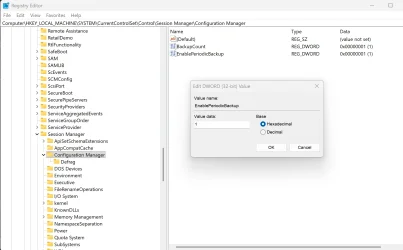
The number of OS reboots has dropped to zero for the last week. I did get 2 Blacksod-s yesterday. I believe wdm is still turned off as verifier reports.
Thanks for the help so far.
1790003457048.webp
 

My Computer My Computer

At a glance

Windows 11I9192GBRTX4090
OS
Windows 11
Computer type
Laptop
Manufacturer/Model
MSI Titan HV 18
CPU
I9
Motherboard
MSI
Memory
192GB
Graphics Card(s)
RTX4090
Monitor(s) Displays
Hisense 40, Hisense 48, VGA 32
Hard Drives
2tb SSD
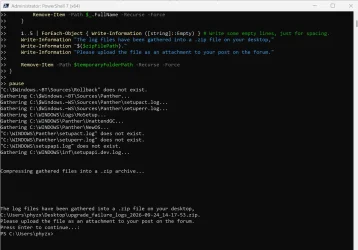
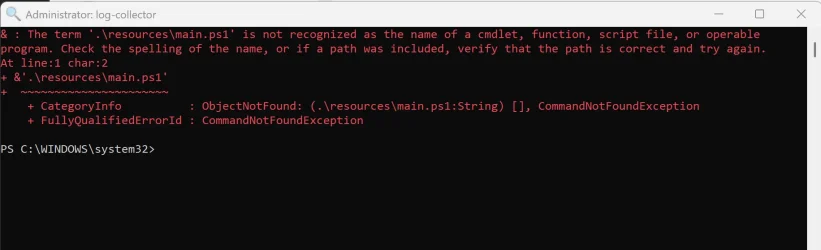
I tried running V2 by rclick>Run as admin> .lnk file but get this error:
1790183852286.webp
 

My Computer My Computer

At a glance

Windows 11I9192GBRTX4090
OS
Windows 11
Computer type
Laptop
Manufacturer/Model
MSI Titan HV 18
CPU
I9
Motherboard
MSI
Memory
192GB
Graphics Card(s)
RTX4090
Monitor(s) Displays
Hisense 40, Hisense 48, VGA 32
Hard Drives
2tb SSD
Double click is what works on the .lnk:
V2 Log
 

My Computer My Computer

At a glance

Windows 11I9192GBRTX4090
OS
Windows 11
Computer type
Laptop
Manufacturer/Model
MSI Titan HV 18
CPU
I9
Motherboard
MSI
Memory
192GB
Graphics Card(s)
RTX4090
Monitor(s) Displays
Hisense 40, Hisense 48, VGA 32
Hard Drives
2tb SSD
1) For each step please indicate its progress:

a) post # 15 step # 3

b) post # 45 steps #1 - #5


2) Run: > post share links


Code:
Get-Item C:\Windows\System32\drivers\iaStorVD.sys |
    Select-Object FullName, Length, CreationTime, LastWriteTime,
        @{Name="FileVersion";Expression={$_.VersionInfo.FileVersion}},
        @{Name="ProductVersion";Expression={$_.VersionInfo.ProductVersion}}


Code:
<# : batch script
@echo off
PowerShell.exe -NoProfile Invoke-Expression ([System.IO.File]::ReadAllText('%0'))
goto :eof
#>

[CmdletBinding(SupportsShouldProcess=$false)]
Param()

Set-StrictMode -Version 'latest'

function Test-RunningAsAdmin
{
    [System.Security.Principal.WindowsIdentity]$currentIdentity = [System.Security.Principal.WindowsIdentity]::GetCurrent()
    [System.Security.Principal.WindowsPrincipal]$currentPrincipal = [System.Security.Principal.WindowsPrincipal]::new($currentIdentity)

    Write-Output ($currentPrincipal.IsInRole([System.Security.Principal.WindowsBuiltInRole]::Administrator))
}

$InformationPreference = [Management.Automation.ActionPreference]::Continue

if (-not (Test-RunningAsAdmin))
{
    Write-Warning 'This script requires administrator privileges! Please restart it by running it as an administrator.'
}
else
{
    [string]$temporaryFolderPath = [string]::Empty
    do
    {
        $temporaryFolderPath = [IO.Path]::GetTempFileName()
        if (Test-Path $temporaryFolderPath) { Remove-Item -Path $temporaryFolderPath -Recurse -Force }
    } while ((-not ([string]::IsNullOrEmpty($temporaryFolderPath))) -and (Test-Path -Path $temporaryFolderPath))

    # Create the temporary folder if it does not exist.
    if (-not (Test-Path -Path $temporaryFolderPath)) { New-Item -Path $temporaryFolderPath -ItemType 'Directory' | Out-Null }

    # Clear any existing contents of the temporary folder.
    Get-ChildItem -Path $temporaryFolderPath -Force | Remove-Item -Recurse -Force

    # Gather specific files and folders into the temporary logging folder.
    @(
    (Join-Path ($env:SystemDrive) '$Windows.~BT\Sources\Rollback'),
    (Join-Path ($env:SystemDrive) '$Windows.~BT\Sources\Panther'),
    (Join-Path ($env:SystemDrive) '$Windows.~WS\Sources\Panther\setupact.log'),
    (Join-Path ($env:SystemDrive) '$Windows.~WS\Sources\Panther\setuperr.log'),
    (Join-Path ($env:SystemRoot) 'Logs\MoSetup'),
    (Join-Path ($env:SystemRoot) 'Panther\UnattendGC'),
    (Join-Path ($env:SystemRoot) 'Panther\NewOS'),
    (Join-Path ($env:SystemRoot) 'Panther\setupact.log'),
    (Join-Path ($env:SystemRoot) 'Panther\setuperr.log'),
    (Join-Path ($env:SystemRoot) 'setupapi.log'),
    (Join-Path ($env:SystemRoot) 'inf\setupapi.dev.log')
    ) |
    ForEach-Object {
        [string]$sourcePath = $_
        if (Test-Path -Path $sourcePath)
        {
            Write-Information "Gathering $($sourcePath)..."
            [string]$destinationPath = Join-Path $temporaryFolderPath ($sourcePath.Substring([IO.Path]::GetPathRoot($sourcePath).Length))
            $destinationPathParent = Split-Path -Path $destinationPath -Parent
            if (-not (Test-Path -Path $destinationPathParent)) { New-Item -Path $destinationPathParent -ItemType 'Directory' | Out-Null }
            Copy-Item -Path $sourcePath -Destination $destinationPath -Force -Recurse
        }
        else
        {
            Write-Information "`"$($sourcePath)`" does not exist."
        }
    }

    [string]$zipFilePath = "upgrade_failure_logs_$(Get-Date -Format 'yyyy-MM-dd_HH-mm-ss').zip"
    [System.IO.Path]::GetInvalidFileNameChars() | ForEach-Object { $zipFilePath = $zipFilePath -replace "\$($_)", [string]::Empty }
    $zipFilePath = Join-Path ([Environment]::GetFolderPath([Environment+SpecialFolder]::DesktopDirectory)) $zipFilePath

    1..2 | ForEach-Object { Write-Information ([string]::Empty) } # Write some empty lines, just for spacing.
    Write-Information "Compressing gathered files into a .zip archive..."
    Get-ChildItem -Path $temporaryFolderPath -Directory |
    ForEach-Object {
        Compress-Archive -Path ($_.FullName) -Update -DestinationPath $zipFilePath
        Start-Sleep -Seconds 1
        Remove-Item -Path $_.FullName -Recurse -Force
    }

    1..5 | ForEach-Object { Write-Information ([string]::Empty) } # Write some empty lines, just for spacing.
    Write-Information "The log files have been gathered into a .zip file on your desktop,"
    Write-Information "$($zipFilePath)."
    Write-Information "Please upload the file as an attachment to your post on the forum."

    Remove-Item -Path $temporaryFolderPath -Recurse -Force
}

pause


Code:
pnputil /enum-drivers | findstr /i "iaStor VMD Intel"


Code:
dism /online /get-drivers /format:table >c:\drivers.txt
 
Last edited:

My Computer My Computer

At a glance

Windows 10Intel(R) Core(TM) i7-4800MQ CPU @ 2.70GHz16 GB Total: Manufacturer : Samsung MemoryTyp...NVIDIA Quadro K3100M; Intel(R) HD Graphics 4600
OS
Windows 10
Computer type
Laptop
Manufacturer/Model
HP
CPU
Intel(R) Core(TM) i7-4800MQ CPU @ 2.70GHz
Motherboard
Product : 190A Version : KBC Version 94.56
Memory
16 GB Total: Manufacturer : Samsung MemoryType : DDR3 FormFactor : SODIMM Capacity : 8GB Speed : 1600
Graphics Card(s)
NVIDIA Quadro K3100M; Intel(R) HD Graphics 4600
Sound Card
IDT High Definition Audio CODEC; PNP Device ID HDAUDIO\FUNC_01&VEN_111D&DEV_76E0
Hard Drives
Model Hitachi HTS727575A9E364
Antivirus
Microsoft Defender
Other Info
Mobile Workstation
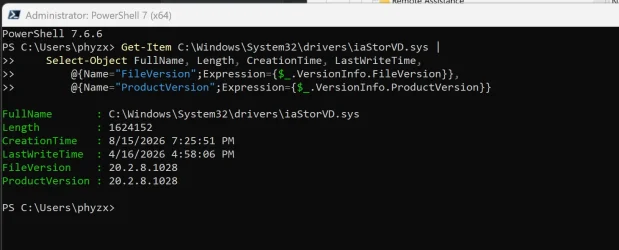
Post #15, Step #3 results:
1790280650022.webp

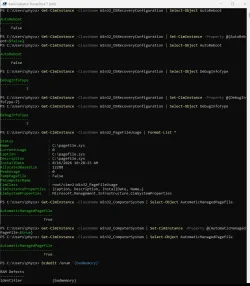
Post 45 1-5 done. No screens to report. I have a Win11 mct USB built on a 12gb stick.
1790281032237.webp
1790281282910.webp
PS C:\Users\phyzx> pnputil /enum-drivers | findstr /i "iaStor VMD Intel"
Provider Name: INTEL
Provider Name: Intel(R) Corporation
Provider Name: Intel
Provider Name: INTEL
Provider Name: Intel Corporation
Provider Name: intelliGo
Provider Name: Intel
Provider Name: Intel(R) Corporation
Provider Name: Intel Corporation
Original Name: iastorhsa_ext.inf
Provider Name: Intel Corporation
Original Name: iastorvd.inf
Provider Name: Intel Corporation
Original Name: iastorvd.inf
Provider Name: Intel Corporation
Provider Name: INTEL
Provider Name: Intel Corporation
Provider Name: Intel(R) Corporation
Provider Name: intelliGo
Provider Name: Intelligo
Provider Name: Intel(R) Corporation
Original Name: intelmvaextension.inf
Provider Name: Intel(R) Corporation
Provider Name: Intel
Provider Name: INTEL
Provider Name: Intel Corporation
Provider Name: INTEL
Provider Name: Intel(R) Corporation
Provider Name: INTEL
Provider Name: Intel
Provider Name: INTEL
Provider Name: Intel(R) Corporation
Provider Name: INTEL
Provider Name: Intel Corporation
Provider Name: Intel
Original Name: iastorhsacomponent21.inf
Provider Name: Intel Corporation
Original Name: iastorhsacomponent21.inf
Provider Name: Intel Corporation
Provider Name: Intel
Provider Name: Intel Corporation
Provider Name: intelliGo
Provider Name: Intel Corporation
Provider Name: Intel(R) Corporation
Provider Name: Intel
Provider Name: Intel Corporation
Provider Name: Intel
Provider Name: Intel Corporation
Provider Name: Intel
Provider Name: Intel Corporation
Provider Name: Intel(R) Corporation
PS C:\Users\phyzx>

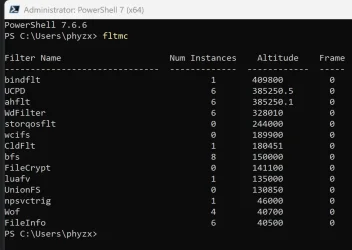
What best tool can I run to show the Intel drivers all reinstalled?
 

Attachments

My Computer My Computer

At a glance

Windows 11I9192GBRTX4090
OS
Windows 11
Computer type
Laptop
Manufacturer/Model
MSI Titan HV 18
CPU
I9
Motherboard
MSI
Memory
192GB
Graphics Card(s)
RTX4090
Monitor(s) Displays
Hisense 40, Hisense 48, VGA 32
Hard Drives
2tb SSD
1) Please search for (this is a large file) > Zip > post as a separate share link

LastWriteTime Size (MB) FullName
------------- --------- --------
9/23/2026 2:31:45 PM 5334.97 C:\WINDOWS\MEMORY.DMP


2) During the thread maintain the files in the earlier posts (V2, etc.) so that they are available for comparison.

3) For each step reply in kind indicating its progress.


4) Results seen in PS can be copied to a text file.


5) For these please post text share links:


Code:
Get-Item C:\Windows\System32\drivers\iaStorVD.sys |
Select Name,Length,CreationTime,LastWriteTime,
@{N="FileVersion";E={$_.VersionInfo.FileVersion}},
@{N="ProductVersion";E={$_.VersionInfo.ProductVersion}}


Code:
Get-FileHash C:\Windows\System32\drivers\iaStorVD.sys -Algorithm SHA256


Code:
pnputil /enum-devices /class SCSIAdapter /drivers


6) Search for C:\Windows\INF

Look for: > if available post share links

setupapi.dev.log
setupapi.app.log


7) Run> post text share links

pnputil /enum-devices /instanceid "PCI\VEN_8086&DEV_A77F&SUBSYS_00008086&REV_00\3&11583659&1&70" /drivers

pnputil /enum-devices /class SCSIAdapter /drivers
 

My Computer My Computer

At a glance

Windows 10Intel(R) Core(TM) i7-4800MQ CPU @ 2.70GHz16 GB Total: Manufacturer : Samsung MemoryTyp...NVIDIA Quadro K3100M; Intel(R) HD Graphics 4600
OS
Windows 10
Computer type
Laptop
Manufacturer/Model
HP
CPU
Intel(R) Core(TM) i7-4800MQ CPU @ 2.70GHz
Motherboard
Product : 190A Version : KBC Version 94.56
Memory
16 GB Total: Manufacturer : Samsung MemoryType : DDR3 FormFactor : SODIMM Capacity : 8GB Speed : 1600
Graphics Card(s)
NVIDIA Quadro K3100M; Intel(R) HD Graphics 4600
Sound Card
IDT High Definition Audio CODEC; PNP Device ID HDAUDIO\FUNC_01&VEN_111D&DEV_76E0
Hard Drives
Model Hitachi HTS727575A9E364
Antivirus
Microsoft Defender
Other Info
Mobile Workstation

My Computer My Computer

At a glance

Windows 11I9192GBRTX4090
OS
Windows 11
Computer type
Laptop
Manufacturer/Model
MSI Titan HV 18
CPU
I9
Motherboard
MSI
Memory
192GB
Graphics Card(s)
RTX4090
Monitor(s) Displays
Hisense 40, Hisense 48, VGA 32
Hard Drives
2tb SSD
When available:

1) Please search for (this is a large file) > Zip > post as a separate share link

LastWriteTime Size (MB) FullName
------------- --------- --------
9/23/2026 2:31:45 PM 5334.97 C:\WINDOWS\MEMORY.DMP


2) During the thread maintain the files in the earlier posts (V2, etc.) so that they are available for comparison.


3) For each step reply in kind indicating its progress


4) For any new BSOD > post a new V2 share link into the newest post


Why were there no comments for the above steps from post #53 in post #54?

Make sure that there is a comment for each step.
 
Last edited:

My Computer My Computer

At a glance

Windows 10Intel(R) Core(TM) i7-4800MQ CPU @ 2.70GHz16 GB Total: Manufacturer : Samsung MemoryTyp...NVIDIA Quadro K3100M; Intel(R) HD Graphics 4600
OS
Windows 10
Computer type
Laptop
Manufacturer/Model
HP
CPU
Intel(R) Core(TM) i7-4800MQ CPU @ 2.70GHz
Motherboard
Product : 190A Version : KBC Version 94.56
Memory
16 GB Total: Manufacturer : Samsung MemoryType : DDR3 FormFactor : SODIMM Capacity : 8GB Speed : 1600
Graphics Card(s)
NVIDIA Quadro K3100M; Intel(R) HD Graphics 4600
Sound Card
IDT High Definition Audio CODEC; PNP Device ID HDAUDIO\FUNC_01&VEN_111D&DEV_76E0
Hard Drives
Model Hitachi HTS727575A9E364
Antivirus
Microsoft Defender
Other Info
Mobile Workstation
Memory.Dump
There are posts for the steps. Not sure which ones you are referring to. I posted files for each one.
 

My Computer My Computer

At a glance

Windows 11I9192GBRTX4090
OS
Windows 11
Computer type
Laptop
Manufacturer/Model
MSI Titan HV 18
CPU
I9
Motherboard
MSI
Memory
192GB
Graphics Card(s)
RTX4090
Monitor(s) Displays
Hisense 40, Hisense 48, VGA 32
Hard Drives
2tb SSD
1) Create a new restore point:


2) See if you can install this driver:


3) During the thread maintain the files in the earlier posts (V2, etc.) so that they are available for comparison.


4) For each step reply in kind indicating its progress


5) For any new BSOD > post a new V2 share link into the newest post


Code:
Name    Intel RST VMD Controller A77F
Manufacturer    Intel Corporation
Status    OK
PNP Device ID    PCI\VEN_8086&DEV_A77F&SUBSYS_00008086&REV_00\3&11583659&1&70
Driver    C:\WINDOWS\SYSTEM32\DRIVERS\IASTORVD.SYS (20.2.8.1028, 1.55 MB (1,624,152 bytes), 8/15/2026 7:25 PM)

Code:
iastorvd    Intel(R) Chipset VMD RST Controller service    c:\windows\system32\drivers\iastorvd.sys    Kernel Driver    Yes    Boot    Running    OK    Normal    No    Yes

Code:
Intel(R) Storage Middleware Service    RstMwService    Running    Auto    Own Process    c:\windows\system32\driverstore\filerepository\iastorvd.inf_amd64_7ece1ebc2c408c36\rstmwservice.exe    Normal    LocalSystem    0


Code:
start             end                 module name
fffff807`84f60000 fffff807`85340000   iaStorVD   (no symbols)         
    Loaded symbol image file: iaStorVD.sys
    Image path: \SystemRoot\System32\drivers\iaStorVD.sys
    Image name: iaStorVD.sys
    Browse all global symbols  functions  data
    Timestamp:        Mon Jun 23 04:49:46 2025 (6859233A)
    CheckSum:         00198917
    ImageSize:        003E0000
    File version:     20.2.8.1028
    Product version:  20.2.8.1028
    File flags:       8 (Mask 3F) Private
    File OS:          40004 NT Win32
    File type:        3.7 Driver
    File date:        00000000.00000000
    Translations:     0409.04b0
    Information from resource tables:
        CompanyName:      Intel Corporation
        ProductName:      Intel(R) Rapid Storage Technology driver
        InternalName:     iaStorVD.sys
        OriginalFilename: iaStorVD.sys
        ProductVersion:   20.2.8.1028
        FileVersion:      20.2.8.1028
        PrivateBuild:     20.2.8.1028
        SpecialBuild:     20.2.8.1028
        FileDescription:  Intel(R) Rapid Storage Technology driver - x64
        LegalCopyright:   Copyright (C), Intel Corporation. All rights reserved.
        LegalTrademarks:  Copyright (C), Intel Corporation. All rights reserved.
        Comments:         -x64


Code:
iaStorVD.sys Mon Jun 23 04:49:46 2025 (6859233A)
 

My Computer My Computer

At a glance

Windows 10Intel(R) Core(TM) i7-4800MQ CPU @ 2.70GHz16 GB Total: Manufacturer : Samsung MemoryTyp...NVIDIA Quadro K3100M; Intel(R) HD Graphics 4600
OS
Windows 10
Computer type
Laptop
Manufacturer/Model
HP
CPU
Intel(R) Core(TM) i7-4800MQ CPU @ 2.70GHz
Motherboard
Product : 190A Version : KBC Version 94.56
Memory
16 GB Total: Manufacturer : Samsung MemoryType : DDR3 FormFactor : SODIMM Capacity : 8GB Speed : 1600
Graphics Card(s)
NVIDIA Quadro K3100M; Intel(R) HD Graphics 4600
Sound Card
IDT High Definition Audio CODEC; PNP Device ID HDAUDIO\FUNC_01&VEN_111D&DEV_76E0
Hard Drives
Model Hitachi HTS727575A9E364
Antivirus
Microsoft Defender
Other Info
Mobile Workstation
V2 Log
This is from the overnight Blacksod that I arrived to this morning. Will proceed with post #57 in a bit.
 

My Computer My Computer

At a glance

Windows 11I9192GBRTX4090
OS
Windows 11
Computer type
Laptop
Manufacturer/Model
MSI Titan HV 18
CPU
I9
Motherboard
MSI
Memory
192GB
Graphics Card(s)
RTX4090
Monitor(s) Displays
Hisense 40, Hisense 48, VGA 32
Hard Drives
2tb SSD
Please run: > post a share link


Code:
<# : batch script
@echo off
PowerShell.exe -NoProfile Invoke-Expression ([System.IO.File]::ReadAllText('%0'))
goto :eof
#>


[CmdletBinding(SupportsShouldProcess=$false)]
Param()

Set-StrictMode -Version 'latest'

function Test-RunningAsAdmin
{
    [System.Security.Principal.WindowsIdentity]$currentIdentity = [System.Security.Principal.WindowsIdentity]::GetCurrent()
    [System.Security.Principal.WindowsPrincipal]$currentPrincipal = [System.Security.Principal.WindowsPrincipal]::new($currentIdentity)

    Write-Output ($currentPrincipal.IsInRole([System.Security.Principal.WindowsBuiltInRole]::Administrator))
}

$InformationPreference = [Management.Automation.ActionPreference]::Continue

if (-not (Test-RunningAsAdmin))
{
    Write-Warning 'This script requires administrator privileges! Please restart it by running it as an administrator.'
}
else
{
    [string]$kernelReportsFolderPath = Join-Path ([Environment]::GetFolderPath([Environment+SpecialFolder]::Windows)) 'LiveKernelReports'
    if (-not (Test-Path -Path $kernelReportsFolderPath))
    {
        Write-Warning "`"$($kernelReportsFolderPath)`" does not exist."
    }
    else
    {
        if (0 -ge @(Get-ChildItem -Path $kernelReportsFolderPath -Filter '*.dmp' -File -Recurse -Force -ErrorAction SilentlyContinue).Count)
        {
            Write-Information "`"$($kernelReportsFolderPath)`" contains no .dmp files."
        }
        else
        {
            [string]$temporaryFolderPath = [string]::Empty
            do
            {
                $temporaryFolderPath = [IO.Path]::GetTempFileName()
                if (Test-Path $temporaryFolderPath) { Remove-Item -Path $temporaryFolderPath -Recurse -Force }
            } while ((-not ([string]::IsNullOrEmpty($temporaryFolderPath))) -and (Test-Path -Path $temporaryFolderPath))

            # Create the temporary folder if it does not exist.
            if (-not (Test-Path -Path $temporaryFolderPath)) { New-Item -Path $temporaryFolderPath -ItemType 'Directory' | Out-Null }

            # Clear any existing contents of the temporary folder.
            Get-ChildItem -Path $temporaryFolderPath -Force | Remove-Item -Recurse -Force

            # NOTE: The original batch script removed old "LiveKernel Reports*.zip" files from the user's desktop.
            # We're not doing that here, in order to let the user decide if and when they want those files deleted.

            [string]$logFilePath = Join-Path -Path $temporaryFolderPath -ChildPath "dump_file_log.txt"
            if (Test-Path -Path $logFilePath) { Remove-Item -Path $logFilePath -ErrorAction SilentlyContinue }

            # Display all of the .dmp files on the screen, and log them to the log file.
            Get-ChildItem -Path $kernelReportsFolderPath -Recurse -Force -Filter '*.dmp' -File |
            Format-Table -AutoSize -Property @(@{Name = 'Relative Path'; Expr = {($_.FullName.ToLowerInvariant() -split '\\' | Select-Object -Skip 3) -join '\'}}, @{ Name = 'Size (MB)'; Expression = {[Math]::Round(($_.Length/1MB),2)} }, @{Name = 'Creation Time'; Expression = {$_.CreationTime}; Format = 'u'}, @{Name = 'Age'; Expr = {(Get-Date).Subtract($_.CreationTime).TotalDays}; Format = 'N2'}) |
            Out-String |
            Tee-Object -FilePath $logFilePath

            [bool]$dumpFilesFound = $false
            for ([int]$maxAge = 30; ($maxAge -le 90) -and (-not $dumpFilesFound); $maxAge += 30)
            { # Keep looking for dump files younger than $maxAge. When you find some, break out.

                ## TODO: Remove this line for production.
                Write-Host "$($maxAge) days." -ForegroundColor Cyan

                Get-ChildItem -Path $kernelReportsFolderPath -Recurse -Force -Filter '*.dmp' -File |
                Where-Object { ((Get-Date).Subtract($_.CreationTime).TotalDays -le $maxAge) -and ($_.Length -le (1.5 * 1GB)) } |
                ForEach-Object {
                    $dumpFilesFound = $true
                    [string]$sourcePath = $_.FullName
                    [string]$destinationPath = Join-Path $temporaryFolderPath ($sourcePath.Substring([IO.Path]::GetPathRoot($sourcePath).Length))
                    $destinationPathParent = Split-Path -Path $destinationPath -Parent
                    if (-not (Test-Path -Path $destinationPathParent)) { New-Item -Path $destinationPathParent -ItemType 'Directory' | Out-Null }
                    Copy-Item -Path $sourcePath -Destination $destinationPath -Force -Recurse
                }
            }

            # If there are .dmp files in the temporary folder, create a .zip archive of those files.
            if (0 -lt @(Get-ChildItem -Path $temporaryFolderPath -Recurse -Force -Filter '*.dmp' -File).Count)
            {
                [string]$zipFilePath = "live_kernel_reports_$(Get-Date -Format 'yyyy-MM-dd_HH-mm-ss').zip"
                [System.IO.Path]::GetInvalidFileNameChars() | ForEach-Object { $zipFilePath = $zipFilePath -replace "\$($_)", [string]::Empty }
                $zipFilePath = Join-Path ([Environment]::GetFolderPath([Environment+SpecialFolder]::DesktopDirectory)) $zipFilePath

                1..2 | ForEach-Object { Write-Information ([string]::Empty) } # Write some empty lines, just for spacing.

                Write-Information "Compressing gathered files into a .zip archive..."
                Get-ChildItem -Path $temporaryFolderPath |
                ForEach-Object {
                    Compress-Archive -Path ($_.FullName) -Update -DestinationPath $zipFilePath
                    Start-Sleep -Seconds 1
                    Remove-Item -Path $_.FullName -Recurse -Force
                }

                1..5 | ForEach-Object { Write-Information ([string]::Empty) } # Write some empty lines, just for spacing.

                Write-Information "The .dmp files have been gathered into a .zip file on your desktop,"
                Write-Information "$($zipFilePath)."
                Write-Information "Please upload the file as an attachment to your post on the forum."
            }

            Remove-Item -Path $temporaryFolderPath -Recurse -Force
        }
    }
}

pause
 

My Computer My Computer

At a glance

Windows 10Intel(R) Core(TM) i7-4800MQ CPU @ 2.70GHz16 GB Total: Manufacturer : Samsung MemoryTyp...NVIDIA Quadro K3100M; Intel(R) HD Graphics 4600
OS
Windows 10
Computer type
Laptop
Manufacturer/Model
HP
CPU
Intel(R) Core(TM) i7-4800MQ CPU @ 2.70GHz
Motherboard
Product : 190A Version : KBC Version 94.56
Memory
16 GB Total: Manufacturer : Samsung MemoryType : DDR3 FormFactor : SODIMM Capacity : 8GB Speed : 1600
Graphics Card(s)
NVIDIA Quadro K3100M; Intel(R) HD Graphics 4600
Sound Card
IDT High Definition Audio CODEC; PNP Device ID HDAUDIO\FUNC_01&VEN_111D&DEV_76E0
Hard Drives
Model Hitachi HTS727575A9E364
Antivirus
Microsoft Defender
Other Info
Mobile Workstation
Back
Top Bottom