- Local time
- 3:17 PM
- Posts
- 29
- OS
- Windows 11

Follow along with the video below to see how to install our site as a web app on your home screen.
Note: This feature may not be available in some browsers.
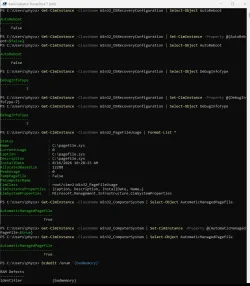
Get-CimInstance -ClassName Win32_OSRecoveryConfiguration | Select-Object AutoReboot
Get-CimInstance -ClassName Win32_OSRecoveryConfiguration | Set-CimInstance -Property @{AutoReboot=$false}
Get-CimInstance -ClassName Win32_OSRecoveryConfiguration | Select-Object AutoReboot

Get-CimInstance -ClassName Win32_OSRecoveryConfiguration | Select-Object DebugInfoType
Get-CimInstance -ClassName Win32_OSRecoveryConfiguration | Set-CimInstance -Property @{DebugInfoType=7}
Get-CimInstance -ClassName Win32_OSRecoveryConfiguration | Select-Object DebugInfoType

Get-CimInstance -ClassName Win32_PageFileUsage | Format-List *

Get-CimInstance -ClassName Win32_ComputerSystem | Select-Object AutomaticManagedPagefile
Get-CimInstance -ClassName Win32_ComputerSystem | Set-CimInstance -Property @{AutomaticManagedPagefile=$true}
Get-CimInstance -ClassName Win32_ComputerSystem | Select-Object AutomaticManagedPagefile

bcdedit /enum '{badmemory}'
 www.elevenforum.com
 www.elevenforum.com
iastorvd Intel(R) Chipset VMD RST Controller service c:\windows\system32\drivers\iastorvd.sys Kernel Driver Yes Boot Running OK Normal No YesName Intel RST VMD Managed Controller 09AB
Manufacturer Intel Corporation
Status Unknown
PNP Device ID PCI\VEN_8086&DEV_09AB&SUBSYS_00000000&REV_00\3&11583659&1&D0
Name Intel RST VMD Controller A77F
Manufacturer Intel Corporation
Status OK
PNP Device ID PCI\VEN_8086&DEV_A77F&SUBSYS_00008086&REV_00\3&11583659&1&70
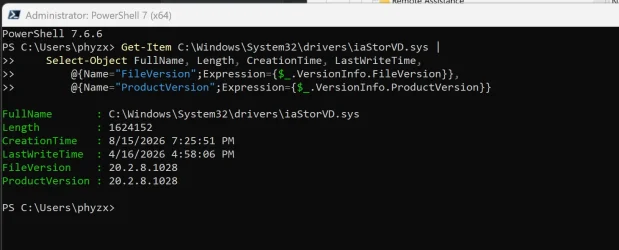
Driver C:\WINDOWS\SYSTEM32\DRIVERS\IASTORVD.SYS (20.2.8.1028, 1.55 MB (1,624,152 bytes), 8/15/2026 7:25 PM)iaStorVD.sys Mon Jun 23 04:49:46 2025 (6859233A)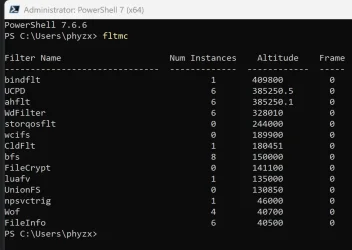
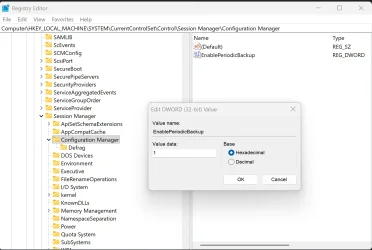
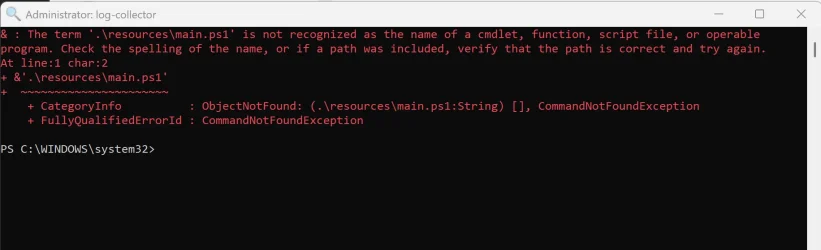
Get-Item C:\Windows\System32\drivers\iaStorVD.sys |
    Select-Object FullName, Length, CreationTime, LastWriteTime,
        @{Name="FileVersion";Expression={$_.VersionInfo.FileVersion}},
@{Name="ProductVersion";Expression={$_.VersionInfo.ProductVersion}}<# : batch script
@echo off
PowerShell.exe -NoProfile Invoke-Expression ([System.IO.File]::ReadAllText('%0'))
goto :eof
#>
[CmdletBinding(SupportsShouldProcess=$false)]
Param()
Set-StrictMode -Version 'latest'
function Test-RunningAsAdmin
{
[System.Security.Principal.WindowsIdentity]$currentIdentity = [System.Security.Principal.WindowsIdentity]::GetCurrent()
[System.Security.Principal.WindowsPrincipal]$currentPrincipal = [System.Security.Principal.WindowsPrincipal]::new($currentIdentity)
Write-Output ($currentPrincipal.IsInRole([System.Security.Principal.WindowsBuiltInRole]::Administrator))
}
$InformationPreference = [Management.Automation.ActionPreference]::Continue
if (-not (Test-RunningAsAdmin))
{
Write-Warning 'This script requires administrator privileges! Please restart it by running it as an administrator.'
}
else
{
[string]$temporaryFolderPath = [string]::Empty
do
{
$temporaryFolderPath = [IO.Path]::GetTempFileName()
if (Test-Path $temporaryFolderPath) { Remove-Item -Path $temporaryFolderPath -Recurse -Force }
} while ((-not ([string]::IsNullOrEmpty($temporaryFolderPath))) -and (Test-Path -Path $temporaryFolderPath))
# Create the temporary folder if it does not exist.
if (-not (Test-Path -Path $temporaryFolderPath)) { New-Item -Path $temporaryFolderPath -ItemType 'Directory' | Out-Null }
# Clear any existing contents of the temporary folder.
Get-ChildItem -Path $temporaryFolderPath -Force | Remove-Item -Recurse -Force
# Gather specific files and folders into the temporary logging folder.
@(
(Join-Path ($env:SystemDrive) '$Windows.~BT\Sources\Rollback'),
(Join-Path ($env:SystemDrive) '$Windows.~BT\Sources\Panther'),
(Join-Path ($env:SystemDrive) '$Windows.~WS\Sources\Panther\setupact.log'),
(Join-Path ($env:SystemDrive) '$Windows.~WS\Sources\Panther\setuperr.log'),
(Join-Path ($env:SystemRoot) 'Logs\MoSetup'),
(Join-Path ($env:SystemRoot) 'Panther\UnattendGC'),
(Join-Path ($env:SystemRoot) 'Panther\NewOS'),
(Join-Path ($env:SystemRoot) 'Panther\setupact.log'),
(Join-Path ($env:SystemRoot) 'Panther\setuperr.log'),
(Join-Path ($env:SystemRoot) 'setupapi.log'),
(Join-Path ($env:SystemRoot) 'inf\setupapi.dev.log')
) |
ForEach-Object {
[string]$sourcePath = $_
if (Test-Path -Path $sourcePath)
{
Write-Information "Gathering $($sourcePath)..."
[string]$destinationPath = Join-Path $temporaryFolderPath ($sourcePath.Substring([IO.Path]::GetPathRoot($sourcePath).Length))
$destinationPathParent = Split-Path -Path $destinationPath -Parent
if (-not (Test-Path -Path $destinationPathParent)) { New-Item -Path $destinationPathParent -ItemType 'Directory' | Out-Null }
Copy-Item -Path $sourcePath -Destination $destinationPath -Force -Recurse
}
else
{
Write-Information "`"$($sourcePath)`" does not exist."
}
}
[string]$zipFilePath = "upgrade_failure_logs_$(Get-Date -Format 'yyyy-MM-dd_HH-mm-ss').zip"
[System.IO.Path]::GetInvalidFileNameChars() | ForEach-Object { $zipFilePath = $zipFilePath -replace "\$($_)", [string]::Empty }
$zipFilePath = Join-Path ([Environment]::GetFolderPath([Environment+SpecialFolder]::DesktopDirectory)) $zipFilePath
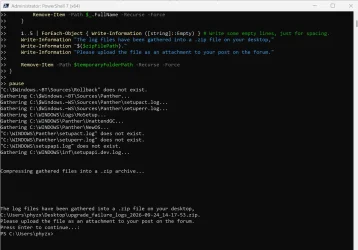
1..2 | ForEach-Object { Write-Information ([string]::Empty) } # Write some empty lines, just for spacing.
Write-Information "Compressing gathered files into a .zip archive..."
Get-ChildItem -Path $temporaryFolderPath -Directory |
ForEach-Object {
Compress-Archive -Path ($_.FullName) -Update -DestinationPath $zipFilePath
Start-Sleep -Seconds 1
Remove-Item -Path $_.FullName -Recurse -Force
}
1..5 | ForEach-Object { Write-Information ([string]::Empty) } # Write some empty lines, just for spacing.
Write-Information "The log files have been gathered into a .zip file on your desktop,"
Write-Information "$($zipFilePath)."
Write-Information "Please upload the file as an attachment to your post on the forum."
Remove-Item -Path $temporaryFolderPath -Recurse -Force
}
pausepnputil /enum-drivers | findstr /i "iaStor VMD Intel"dism /online /get-drivers /format:table >c:\drivers.txt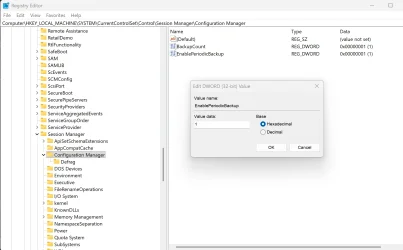
Get-Item C:\Windows\System32\drivers\iaStorVD.sys |
Select Name,Length,CreationTime,LastWriteTime,
@{N="FileVersion";E={$_.VersionInfo.FileVersion}},
@{N="ProductVersion";E={$_.VersionInfo.ProductVersion}}Get-FileHash C:\Windows\System32\drivers\iaStorVD.sys -Algorithm SHA256pnputil /enum-devices /class SCSIAdapter /drivers www.elevenforum.com

 www.intel.com
Name    Intel RST VMD Controller A77F
Manufacturer    Intel Corporation
Status    OK
PNP Device ID    PCI\VEN_8086&DEV_A77F&SUBSYS_00008086&REV_00\3&11583659&1&70
Driver C:\WINDOWS\SYSTEM32\DRIVERS\IASTORVD.SYS (20.2.8.1028, 1.55 MB (1,624,152 bytes), 8/15/2026 7:25 PM)iastorvd Intel(R) Chipset VMD RST Controller service c:\windows\system32\drivers\iastorvd.sys Kernel Driver Yes Boot Running OK Normal No YesIntel(R) Storage Middleware Service RstMwService Running Auto Own Process c:\windows\system32\driverstore\filerepository\iastorvd.inf_amd64_7ece1ebc2c408c36\rstmwservice.exe Normal LocalSystem 0start end module name
fffff807`84f60000 fffff807`85340000 iaStorVD (no symbols)
Loaded symbol image file: iaStorVD.sys
Image path: \SystemRoot\System32\drivers\iaStorVD.sys
Image name: iaStorVD.sys
Browse all global symbols functions data
Timestamp: Mon Jun 23 04:49:46 2025 (6859233A)
CheckSum: 00198917
ImageSize: 003E0000
File version: 20.2.8.1028
Product version: 20.2.8.1028
File flags: 8 (Mask 3F) Private
File OS: 40004 NT Win32
File type: 3.7 Driver
File date: 00000000.00000000
Translations: 0409.04b0
Information from resource tables:
CompanyName: Intel Corporation
ProductName: Intel(R) Rapid Storage Technology driver
InternalName: iaStorVD.sys
OriginalFilename: iaStorVD.sys
ProductVersion: 20.2.8.1028
FileVersion: 20.2.8.1028
PrivateBuild: 20.2.8.1028
SpecialBuild: 20.2.8.1028
FileDescription: Intel(R) Rapid Storage Technology driver - x64
LegalCopyright: Copyright (C), Intel Corporation. All rights reserved.
LegalTrademarks: Copyright (C), Intel Corporation. All rights reserved.
Comments: -x64iaStorVD.sys Mon Jun 23 04:49:46 2025 (6859233A)<# : batch script
@echo off
PowerShell.exe -NoProfile Invoke-Expression ([System.IO.File]::ReadAllText('%0'))
goto :eof
#>
[CmdletBinding(SupportsShouldProcess=$false)]
Param()
Set-StrictMode -Version 'latest'
function Test-RunningAsAdmin
{
[System.Security.Principal.WindowsIdentity]$currentIdentity = [System.Security.Principal.WindowsIdentity]::GetCurrent()
[System.Security.Principal.WindowsPrincipal]$currentPrincipal = [System.Security.Principal.WindowsPrincipal]::new($currentIdentity)
Write-Output ($currentPrincipal.IsInRole([System.Security.Principal.WindowsBuiltInRole]::Administrator))
}
$InformationPreference = [Management.Automation.ActionPreference]::Continue
if (-not (Test-RunningAsAdmin))
{
Write-Warning 'This script requires administrator privileges! Please restart it by running it as an administrator.'
}
else
{
[string]$kernelReportsFolderPath = Join-Path ([Environment]::GetFolderPath([Environment+SpecialFolder]::Windows)) 'LiveKernelReports'
if (-not (Test-Path -Path $kernelReportsFolderPath))
{
Write-Warning "`"$($kernelReportsFolderPath)`" does not exist."
}
else
{
if (0 -ge @(Get-ChildItem -Path $kernelReportsFolderPath -Filter '*.dmp' -File -Recurse -Force -ErrorAction SilentlyContinue).Count)
{
Write-Information "`"$($kernelReportsFolderPath)`" contains no .dmp files."
}
else
{
[string]$temporaryFolderPath = [string]::Empty
do
{
$temporaryFolderPath = [IO.Path]::GetTempFileName()
if (Test-Path $temporaryFolderPath) { Remove-Item -Path $temporaryFolderPath -Recurse -Force }
} while ((-not ([string]::IsNullOrEmpty($temporaryFolderPath))) -and (Test-Path -Path $temporaryFolderPath))
# Create the temporary folder if it does not exist.
if (-not (Test-Path -Path $temporaryFolderPath)) { New-Item -Path $temporaryFolderPath -ItemType 'Directory' | Out-Null }
# Clear any existing contents of the temporary folder.
Get-ChildItem -Path $temporaryFolderPath -Force | Remove-Item -Recurse -Force
# NOTE: The original batch script removed old "LiveKernel Reports*.zip" files from the user's desktop.
# We're not doing that here, in order to let the user decide if and when they want those files deleted.
[string]$logFilePath = Join-Path -Path $temporaryFolderPath -ChildPath "dump_file_log.txt"
if (Test-Path -Path $logFilePath) { Remove-Item -Path $logFilePath -ErrorAction SilentlyContinue }
# Display all of the .dmp files on the screen, and log them to the log file.
Get-ChildItem -Path $kernelReportsFolderPath -Recurse -Force -Filter '*.dmp' -File |
Format-Table -AutoSize -Property @(@{Name = 'Relative Path'; Expr = {($_.FullName.ToLowerInvariant() -split '\\' | Select-Object -Skip 3) -join '\'}}, @{ Name = 'Size (MB)'; Expression = {[Math]::Round(($_.Length/1MB),2)} }, @{Name = 'Creation Time'; Expression = {$_.CreationTime}; Format = 'u'}, @{Name = 'Age'; Expr = {(Get-Date).Subtract($_.CreationTime).TotalDays}; Format = 'N2'}) |
Out-String |
Tee-Object -FilePath $logFilePath
[bool]$dumpFilesFound = $false
for ([int]$maxAge = 30; ($maxAge -le 90) -and (-not $dumpFilesFound); $maxAge += 30)
{ # Keep looking for dump files younger than $maxAge. When you find some, break out.
## TODO: Remove this line for production.
Write-Host "$($maxAge) days." -ForegroundColor Cyan
Get-ChildItem -Path $kernelReportsFolderPath -Recurse -Force -Filter '*.dmp' -File |
Where-Object { ((Get-Date).Subtract($_.CreationTime).TotalDays -le $maxAge) -and ($_.Length -le (1.5 * 1GB)) } |
ForEach-Object {
$dumpFilesFound = $true
[string]$sourcePath = $_.FullName
[string]$destinationPath = Join-Path $temporaryFolderPath ($sourcePath.Substring([IO.Path]::GetPathRoot($sourcePath).Length))
$destinationPathParent = Split-Path -Path $destinationPath -Parent
if (-not (Test-Path -Path $destinationPathParent)) { New-Item -Path $destinationPathParent -ItemType 'Directory' | Out-Null }
Copy-Item -Path $sourcePath -Destination $destinationPath -Force -Recurse
}
}
# If there are .dmp files in the temporary folder, create a .zip archive of those files.
if (0 -lt @(Get-ChildItem -Path $temporaryFolderPath -Recurse -Force -Filter '*.dmp' -File).Count)
{
[string]$zipFilePath = "live_kernel_reports_$(Get-Date -Format 'yyyy-MM-dd_HH-mm-ss').zip"
[System.IO.Path]::GetInvalidFileNameChars() | ForEach-Object { $zipFilePath = $zipFilePath -replace "\$($_)", [string]::Empty }
$zipFilePath = Join-Path ([Environment]::GetFolderPath([Environment+SpecialFolder]::DesktopDirectory)) $zipFilePath
1..2 | ForEach-Object { Write-Information ([string]::Empty) } # Write some empty lines, just for spacing.
Write-Information "Compressing gathered files into a .zip archive..."
Get-ChildItem -Path $temporaryFolderPath |
ForEach-Object {
Compress-Archive -Path ($_.FullName) -Update -DestinationPath $zipFilePath
Start-Sleep -Seconds 1
Remove-Item -Path $_.FullName -Recurse -Force
}
1..5 | ForEach-Object { Write-Information ([string]::Empty) } # Write some empty lines, just for spacing.
Write-Information "The .dmp files have been gathered into a .zip file on your desktop,"
Write-Information "$($zipFilePath)."
Write-Information "Please upload the file as an attachment to your post on the forum."
}
Remove-Item -Path $temporaryFolderPath -Recurse -Force
}
}
}
pause