
Recycle Bin Error


jimhow4545

Well-known member
Member
Local time
4:17 PM
Posts
217
OS
Wind 11 Pro 24H2 (Dev Channel)/23H2Beta (offline)
Here is the problem.
I have 2 SSD drives, one with windows 11 24H2 OS and the other with windows 11 23H2 OS installed.
From the BIO I configured one of the SSD drives as a bootup. Everything bootup and working fine but I kept getting Recycle Bin error on windows desktop. Error like “….cannot empty recycle bin….” Sound like the recycle bins from both hard drive are fighting each other.
 

My Computer My Computer

At a glance

Wind 11 Pro 24H2 (Dev Channel)/23H2Beta (offl...2 Intel Xeon 5680120 GbMSI(Nvidia) GeForce GTX 970
OS
Wind 11 Pro 24H2 (Dev Channel)/23H2Beta (offline)
Computer type
PC/Desktop
Manufacturer/Model
DELL T7500
CPU
2 Intel Xeon 5680
Memory
120 Gb
Graphics Card(s)
MSI(Nvidia) GeForce GTX 970
Monitor(s) Displays
Dell S2719DGF
Screen Resolution
2560 x 1440 (155Hz)
Hard Drives
Samsung 2TB 870 (24H2 Device)
Samsung 1TB 860 (23H2 Beta)
PSU
Dell 1100W
Antivirus
Premium Malwarebyte, AdwCleaner (Malwarebyte)
Recycle Bins on a Separate drives in Separate Windows installs would not conflict.

Open a Command Prompt window as administrator:
(Click your Start Button, type cmd, right click Command Prompt in the resulting list and choose 'Run as Administrator')

Paste the following command and hit Enter:

rd /s /q C:\$Recycle.bin

Close the Command Prompt window and restart your system

When your system starts up:

Create a new text file on your desktop and delete it to recreate a new recycle bin on your C Drive
 

My Computer My Computer

At a glance

Windows 11 Pro Insider 64 bit 25H2 26200.5742Intel Core i7 9700K 3.6016 GBnVidia GEForce RTX 2060 Super
OS
Windows 11 Pro Insider 64 bit 25H2 26200.5742
Computer type
PC/Desktop
Manufacturer/Model
Gigabyte Z390 UD
CPU
Intel Core i7 9700K 3.60
Motherboard
Gigabyte Z390 UD
Memory
16 GB
Graphics Card(s)
nVidia GEForce RTX 2060 Super
Sound Card
onboard
Monitor(s) Displays
Two 27" Dell 4K monitors
Screen Resolution
3840 x 2160
Hard Drives
M.2 NVME SSD, 500 GB; Two 2TB Mechanical HDD's
PSU
850w PSU
Case
Cyberpower PC
Cooling
Water cooled
Keyboard
Backlit Cyberpower gaming keyboard
Mouse
Backlit Cyberpower gaming mouse
Internet Speed
1 GB mbps
Browser
Brave
Antivirus
Windows Security
Thank. I will give it a try
 

My Computer My Computer

At a glance

Wind 11 Pro 24H2 (Dev Channel)/23H2Beta (offl...2 Intel Xeon 5680120 GbMSI(Nvidia) GeForce GTX 970
OS
Wind 11 Pro 24H2 (Dev Channel)/23H2Beta (offline)
Computer type
PC/Desktop
Manufacturer/Model
DELL T7500
CPU
2 Intel Xeon 5680
Memory
120 Gb
Graphics Card(s)
MSI(Nvidia) GeForce GTX 970
Monitor(s) Displays
Dell S2719DGF
Screen Resolution
2560 x 1440 (155Hz)
Hard Drives
Samsung 2TB 870 (24H2 Device)
Samsung 1TB 860 (23H2 Beta)
PSU
Dell 1100W
Antivirus
Premium Malwarebyte, AdwCleaner (Malwarebyte)
Recycle Bins on a Separate drives in Separate Windows installs would not conflict.

Open a Command Prompt window as administrator:
(Click your Start Button, type cmd, right click Command Prompt in the resulting list and choose 'Run as Administrator')

Paste the following command and hit Enter:

rd /s /q C:\$Recycle.bin

Close the Command Prompt window and restart your system

When your system starts up:

Create a new text file on your desktop and delete it to recreate a new recycle bin on your C Drive
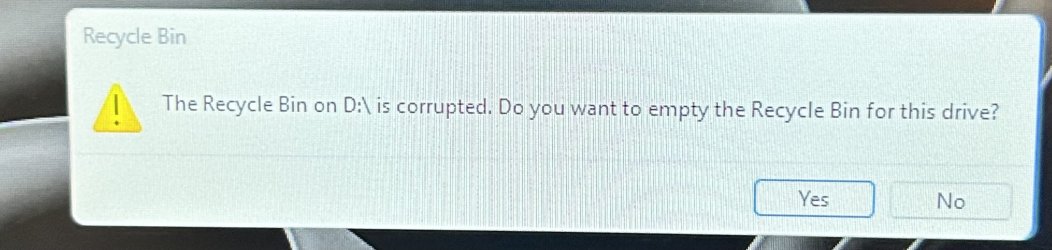
This is what I get every time I open the recycle bin
 

Attachments

  • IMG_2541.jpeg
    IMG_2541.jpeg
    250.3 KB · Views: 3

My Computer My Computer

At a glance

Wind 11 Pro 24H2 (Dev Channel)/23H2Beta (offl...2 Intel Xeon 5680120 GbMSI(Nvidia) GeForce GTX 970
OS
Wind 11 Pro 24H2 (Dev Channel)/23H2Beta (offline)
Computer type
PC/Desktop
Manufacturer/Model
DELL T7500
CPU
2 Intel Xeon 5680
Memory
120 Gb
Graphics Card(s)
MSI(Nvidia) GeForce GTX 970
Monitor(s) Displays
Dell S2719DGF
Screen Resolution
2560 x 1440 (155Hz)
Hard Drives
Samsung 2TB 870 (24H2 Device)
Samsung 1TB 860 (23H2 Beta)
PSU
Dell 1100W
Antivirus
Premium Malwarebyte, AdwCleaner (Malwarebyte)
Did you Run the Command As Admin?
Did you Restart the Computer afterward?
 

My Computer My Computer

At a glance

Windows 11 Pro Insider 64 bit 25H2 26200.5742Intel Core i7 9700K 3.6016 GBnVidia GEForce RTX 2060 Super
OS
Windows 11 Pro Insider 64 bit 25H2 26200.5742
Computer type
PC/Desktop
Manufacturer/Model
Gigabyte Z390 UD
CPU
Intel Core i7 9700K 3.60
Motherboard
Gigabyte Z390 UD
Memory
16 GB
Graphics Card(s)
nVidia GEForce RTX 2060 Super
Sound Card
onboard
Monitor(s) Displays
Two 27" Dell 4K monitors
Screen Resolution
3840 x 2160
Hard Drives
M.2 NVME SSD, 500 GB; Two 2TB Mechanical HDD's
PSU
850w PSU
Case
Cyberpower PC
Cooling
Water cooled
Keyboard
Backlit Cyberpower gaming keyboard
Mouse
Backlit Cyberpower gaming mouse
Internet Speed
1 GB mbps
Browser
Brave
Antivirus
Windows Security
Did you Run the Command As Admin?
Did you Restart the Computer afterward?
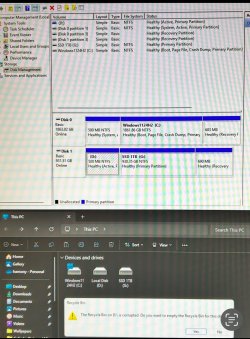
I did. Look like there is a problem with disk D.
And disk D is part of disk G.
 

Attachments

  • IMG_2543.jpeg
    IMG_2543.jpeg
    267.9 KB · Views: 4

My Computer My Computer

At a glance

Wind 11 Pro 24H2 (Dev Channel)/23H2Beta (offl...2 Intel Xeon 5680120 GbMSI(Nvidia) GeForce GTX 970
OS
Wind 11 Pro 24H2 (Dev Channel)/23H2Beta (offline)
Computer type
PC/Desktop
Manufacturer/Model
DELL T7500
CPU
2 Intel Xeon 5680
Memory
120 Gb
Graphics Card(s)
MSI(Nvidia) GeForce GTX 970
Monitor(s) Displays
Dell S2719DGF
Screen Resolution
2560 x 1440 (155Hz)
Hard Drives
Samsung 2TB 870 (24H2 Device)
Samsung 1TB 860 (23H2 Beta)
PSU
Dell 1100W
Antivirus
Premium Malwarebyte, AdwCleaner (Malwarebyte)
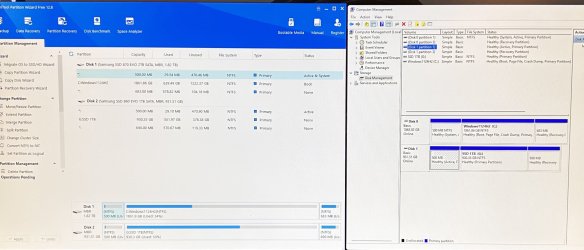
Drive D: on Disk #1 should not have a drive letter, it should look like the small partition to the Left of the C: drive.
In Disk Management, Right click the D: drive and choose Change Drive Letter or Paths.
Choose None as the drive letter.
If that is not possible, download a 3rd party partitioning app like Minitool Partition Wizard and Right click the partition and choose Change Letter, Chose None. Be sure to click Apply to keep the changes.

I don't that is the problem, but this should be done anyways.
 

My Computer My Computer

At a glance

Windows 11 Pro Insider 64 bit 25H2 26200.5742Intel Core i7 9700K 3.6016 GBnVidia GEForce RTX 2060 Super
OS
Windows 11 Pro Insider 64 bit 25H2 26200.5742
Computer type
PC/Desktop
Manufacturer/Model
Gigabyte Z390 UD
CPU
Intel Core i7 9700K 3.60
Motherboard
Gigabyte Z390 UD
Memory
16 GB
Graphics Card(s)
nVidia GEForce RTX 2060 Super
Sound Card
onboard
Monitor(s) Displays
Two 27" Dell 4K monitors
Screen Resolution
3840 x 2160
Hard Drives
M.2 NVME SSD, 500 GB; Two 2TB Mechanical HDD's
PSU
850w PSU
Case
Cyberpower PC
Cooling
Water cooled
Keyboard
Backlit Cyberpower gaming keyboard
Mouse
Backlit Cyberpower gaming mouse
Internet Speed
1 GB mbps
Browser
Brave
Antivirus
Windows Security
Drive D: on Disk #1 should not have a drive letter, it should look like the small partition to the Left of the C: drive.
In Disk Management, Right click the D: drive and choose Change Drive Letter or Paths.
Choose None as the drive letter.
If that is not possible, download a 3rd party partitioning app like Minitool Partition Wizard and Right click the partition and choose Change Letter, Chose None. Be sure to click Apply to keep the changes.

I don't that is the problem, but this should be done anyways.
That worked! Disk Management can’t do it but Minitool Partition Wizard does. Now no more recycle bin error. Thanks!
 

Attachments

  • IMG_2544.jpeg
    IMG_2544.jpeg
    291.3 KB · Views: 1

My Computer My Computer

At a glance

Wind 11 Pro 24H2 (Dev Channel)/23H2Beta (offl...2 Intel Xeon 5680120 GbMSI(Nvidia) GeForce GTX 970
OS
Wind 11 Pro 24H2 (Dev Channel)/23H2Beta (offline)
Computer type
PC/Desktop
Manufacturer/Model
DELL T7500
CPU
2 Intel Xeon 5680
Memory
120 Gb
Graphics Card(s)
MSI(Nvidia) GeForce GTX 970
Monitor(s) Displays
Dell S2719DGF
Screen Resolution
2560 x 1440 (155Hz)
Hard Drives
Samsung 2TB 870 (24H2 Device)
Samsung 1TB 860 (23H2 Beta)
PSU
Dell 1100W
Antivirus
Premium Malwarebyte, AdwCleaner (Malwarebyte)
Glad you got it sorted.
 

My Computer My Computer

At a glance

Windows 11 Pro Insider 64 bit 25H2 26200.5742Intel Core i7 9700K 3.6016 GBnVidia GEForce RTX 2060 Super
OS
Windows 11 Pro Insider 64 bit 25H2 26200.5742
Computer type
PC/Desktop
Manufacturer/Model
Gigabyte Z390 UD
CPU
Intel Core i7 9700K 3.60
Motherboard
Gigabyte Z390 UD
Memory
16 GB
Graphics Card(s)
nVidia GEForce RTX 2060 Super
Sound Card
onboard
Monitor(s) Displays
Two 27" Dell 4K monitors
Screen Resolution
3840 x 2160
Hard Drives
M.2 NVME SSD, 500 GB; Two 2TB Mechanical HDD's
PSU
850w PSU
Case
Cyberpower PC
Cooling
Water cooled
Keyboard
Backlit Cyberpower gaming keyboard
Mouse
Backlit Cyberpower gaming mouse
Internet Speed
1 GB mbps
Browser
Brave
Antivirus
Windows Security

Latest Support Threads

Back
Top Bottom





