Solved Resending of the PIN for Bluetooth Keyboard


Helmar

New member
Local time
10:43 AM
Posts
9
Location
Veneta Oregon
OS
Windows 11
I have searched and found a couple of articles on Bluetooth keyboards but nothing about my issue.

So here goes. Windows 11 Pro on a Mini PC Kamrui AP1 Pro, 16gb Ram, 512 Rom

I went to install the Bluetooth keyboard (which I have used on the iPhone and Rasberry Pi) which shows its Windows compatible.

When installing it, I followed the directions, Windows recognized the keyboard, then popped up with a PIN number. Well, had to go pee and when I came back to the screen, it was gone with the cursor blinking on a blank line were the pin was supposed to be.
I tried again to install it, no PIN just a place for me to put it.

Went to the Internet and found several possible fixes, still no new PIN shows up. When installing, it will See the keyboard, but wants the PIN number.
Tried shutting off Bluetooth over night, went to look for it in the windows system, but it shows nothing. The only place it shows up in when I go to install it.
No pin on the keyboard but tried 0000, 1234, nodda it wants the Windows pin. I even turned off the IPVanish just in case Windows has to communicate with its mothership.

Anyone else have a issue like this as I really Really hate the USB keyboard I am using.
 
Windows Build/Version
21H2 (OS Build 22000,1936)

My Computer

System One

  • OS
    Windows 11
    Computer type
    PC/Desktop
    Manufacturer/Model
    Kamrui AP1 Pro
    CPU
    Jasper Lake N5105
    Motherboard
    Mini PC
    Memory
    16GB
    Monitor(s) Displays
    TV/Monitor Combo
    Hard Drives
    512GB Rom and 2TB Western Digital USB
    Case
    Mini PC
    Cooling
    Fan, Heat sink
    Keyboard
    Standard USB
    Mouse
    Logitech
    Internet Speed
    Spectrum 1Gb?
    Browser
    Chrome, DuckDuckGo
    Antivirus
    Nortons 360
    Other Info
    Going to use this to run my cameras for security system for the most part, but, we shall see.
Welcome to the forum. Restart and try again.

If still no luck, run settings>system>troubleshoot>other troubleshooters>bluetooth>RUN
 

My Computers

System One System Two

  • OS
    Windows 11 Pro 25H2
    Computer type
    PC/Desktop
    Manufacturer/Model
    Dell Optiplex 7080
    CPU
    i9-10900 10 core 20 threads
    Motherboard
    DELL 0J37VM
    Memory
    32 gb
    Graphics Card(s)
    none-Intel UHD Graphics 630
    Sound Card
    Integrated Realtek
    Monitor(s) Displays
    Benq 27
    Screen Resolution
    2560x1440
    Hard Drives
    2x1tb Solidigm m.2 nvme /External drives 512gb Samsung m.2 sata+2tb Kingston m2.nvme
    PSU
    500w
    Case
    MT
    Cooling
    Dell Premium
    Keyboard
    Logitech wired
    Mouse
    Logitech wireless
    Internet Speed
    so slow I'm too embarrassed to tell
    Browser
    #1 Edge #2 Firefox
    Antivirus
    Defender+MWB Premium
  • Operating System
    Windows 11 Pro 24H2 26200.8457
    Computer type
    PC/Desktop
    Manufacturer/Model
    Beelink Mini PC SER5
    CPU
    AMD Ryzen 7 6800U
    Memory
    32 gb
    Graphics card(s)
    integrated
    Sound Card
    integrated
    Monitor(s) Displays
    Benq 27
    Screen Resolution
    2560x1440
    Hard Drives
    1TB Crucial nvme
    Keyboard
    Logitech wired
    Mouse
    Logitech wireless
    Internet Speed
    still too embarrassed to tell
    Browser
    Firefox
    Antivirus
    Defender
    Other Info
    System 3 is non compliant Dell 9020 i7-4770/24gb ram Win11 PRO 26200.8457
Thanks for the quick reply.
I did try it several times to no avail.
I also did the trouble shoot Bluetooth. It said it fixed something, not sure what, but still, no PIN number given.
 

My Computer

System One

  • OS
    Windows 11
    Computer type
    PC/Desktop
    Manufacturer/Model
    Kamrui AP1 Pro
    CPU
    Jasper Lake N5105
    Motherboard
    Mini PC
    Memory
    16GB
    Monitor(s) Displays
    TV/Monitor Combo
    Hard Drives
    512GB Rom and 2TB Western Digital USB
    Case
    Mini PC
    Cooling
    Fan, Heat sink
    Keyboard
    Standard USB
    Mouse
    Logitech
    Internet Speed
    Spectrum 1Gb?
    Browser
    Chrome, DuckDuckGo
    Antivirus
    Nortons 360
    Other Info
    Going to use this to run my cameras for security system for the most part, but, we shall see.
Try any suggestions here that you haven;t already tried, especially turn off and on bluetooth.
 

My Computers

System One System Two

  • OS
    Windows 11 Pro 25H2
    Computer type
    PC/Desktop
    Manufacturer/Model
    Dell Optiplex 7080
    CPU
    i9-10900 10 core 20 threads
    Motherboard
    DELL 0J37VM
    Memory
    32 gb
    Graphics Card(s)
    none-Intel UHD Graphics 630
    Sound Card
    Integrated Realtek
    Monitor(s) Displays
    Benq 27
    Screen Resolution
    2560x1440
    Hard Drives
    2x1tb Solidigm m.2 nvme /External drives 512gb Samsung m.2 sata+2tb Kingston m2.nvme
    PSU
    500w
    Case
    MT
    Cooling
    Dell Premium
    Keyboard
    Logitech wired
    Mouse
    Logitech wireless
    Internet Speed
    so slow I'm too embarrassed to tell
    Browser
    #1 Edge #2 Firefox
    Antivirus
    Defender+MWB Premium
  • Operating System
    Windows 11 Pro 24H2 26200.8457
    Computer type
    PC/Desktop
    Manufacturer/Model
    Beelink Mini PC SER5
    CPU
    AMD Ryzen 7 6800U
    Memory
    32 gb
    Graphics card(s)
    integrated
    Sound Card
    integrated
    Monitor(s) Displays
    Benq 27
    Screen Resolution
    2560x1440
    Hard Drives
    1TB Crucial nvme
    Keyboard
    Logitech wired
    Mouse
    Logitech wireless
    Internet Speed
    still too embarrassed to tell
    Browser
    Firefox
    Antivirus
    Defender
    Other Info
    System 3 is non compliant Dell 9020 i7-4770/24gb ram Win11 PRO 26200.8457
Try any suggestions here that you haven;t already tried, especially turn off and on bluetooth.
I think I tried this as I have been there and tried all that showed, then even the links. Might have missed one but still, nothing direct about missing PIN or resending or restoring the MS PIN.
Thank you for the link
 

My Computer

System One

  • OS
    Windows 11
    Computer type
    PC/Desktop
    Manufacturer/Model
    Kamrui AP1 Pro
    CPU
    Jasper Lake N5105
    Motherboard
    Mini PC
    Memory
    16GB
    Monitor(s) Displays
    TV/Monitor Combo
    Hard Drives
    512GB Rom and 2TB Western Digital USB
    Case
    Mini PC
    Cooling
    Fan, Heat sink
    Keyboard
    Standard USB
    Mouse
    Logitech
    Internet Speed
    Spectrum 1Gb?
    Browser
    Chrome, DuckDuckGo
    Antivirus
    Nortons 360
    Other Info
    Going to use this to run my cameras for security system for the most part, but, we shall see.
Try any suggestions here that you haven;t already tried, especially turn off and on bluetooth.
Ok, I tried each and every step in that Microsoft link.
Even the options below it about Adding a Bluetooth item.

How hard can this be and how can I be the Only one that is having this problem
So far, no reply’s from the Microsoft Forum either. Like this issue never exists ??

I just need Windows 11 Pro to Resend, Replace, the PIN while installing the recognized keyboard.
The Only place this keyboard shows up is just when I am trying to install it.
Its not in the registery or anyplace that I can see.
 

My Computer

System One

  • OS
    Windows 11
    Computer type
    PC/Desktop
    Manufacturer/Model
    Kamrui AP1 Pro
    CPU
    Jasper Lake N5105
    Motherboard
    Mini PC
    Memory
    16GB
    Monitor(s) Displays
    TV/Monitor Combo
    Hard Drives
    512GB Rom and 2TB Western Digital USB
    Case
    Mini PC
    Cooling
    Fan, Heat sink
    Keyboard
    Standard USB
    Mouse
    Logitech
    Internet Speed
    Spectrum 1Gb?
    Browser
    Chrome, DuckDuckGo
    Antivirus
    Nortons 360
    Other Info
    Going to use this to run my cameras for security system for the most part, but, we shall see.
. Make sure there is no bluetooth keyboard listed in Device Manager. If so, uninstall it (right-click etc)
- Check the bluetooth device listing in Device Manager. Uninstall it

Reboot your computer. Run Windows update, especially Advanced options > Optional updates for driver updates

(Try to re)Connect bluetooth keyboard.

.... it wants the Windows pin.
... As in the Windows PIN you log into Windows 11 with ???
 

My Computers

System One System Two

  • OS
    Windows 11 2xH2 (latest update ... forever anal)
    Computer type
    PC/Desktop
    Manufacturer/Model
    HP Slim S01
    CPU
    Intel i5-12400
    Memory
    8GB
    Graphics Card(s)
    NVIDIA GeForce GT730
    Sound Card
    OOBE
    Monitor(s) Displays
    Acer 32"
    Screen Resolution
    1920x1080
    Hard Drives
    512GB KIOXIA NVMe
    1TB SATA SSD
    PSU
    OOBE
    Case
    OOBE
    Cooling
    OOBE
    Keyboard
    BT
    Mouse
    BT
    Browser
    Brave FFox Chrome Opera
    Antivirus
    KIS
  • Operating System
    Windows 11 Pro 2xH2 (latest update ... 4ever anal)
    Computer type
    Laptop
    Manufacturer/Model
    HP Pavillion 15
    CPU
    i7-1165G7 @ 2.80GHz
    Graphics card(s)
    Intel Iris Xe Graphics
    Hard Drives
    Samsung NVMe 512GB
    + numerous/multiple SSD Type C USB enclosures
    Internet Speed
    NBN FTTN 50
    Browser
    Brave
    Antivirus
    KIS
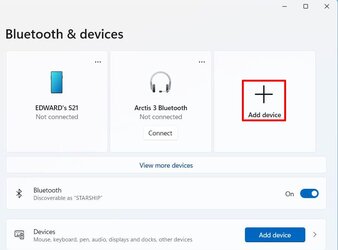
There has been confusion about this. Here is how I added a Logitech K380 Bluetooth keyboard to my laptop with Windows 11 Pro.

1. In Bluetooth & devices select Add device

bluetooth1.jpg

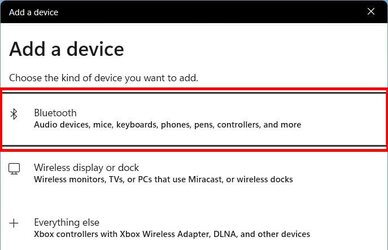
2. Select Bluetooth

bluetooth2.jpg

3. Start pairing on keyboard and wait for it to appear here

bluetooth3.jpg

4. When keyboard appears select it

bluetooth4.jpg

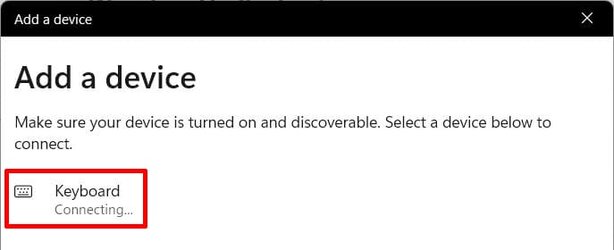
5. Wait while keyboard is connecting

bluetooth5.jpg

6. Type PIN shown here on keyboard. Hit Enter key on keyboard if needed.

bluetooth6.jpg

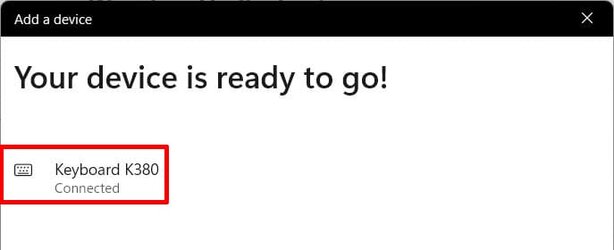
7. When pairing complete status will show as connected. Click on Done.

bluetooth7.jpg

8. Logitech K380 keyboard will show in devices. If it is not shown click on View more devices.

bluetooth8.jpg

Important: Sometimes even if the device is shown it will not connect. Many times that can be fixed by selecting Remove device and go through the pairing process again.

bluetooth9.jpg
 

My Computers

System One System Two

  • OS
    Windows 11 Pro 25H2 (26200.6901)
    Computer type
    Laptop
    Manufacturer/Model
    ASUS TUF Gaming A15 (2022)
    CPU
    AMD Ryzen 7 6800H with Radeon 680M GPU (486MB RAM)
    Memory
    Crucial DDR5-4800 (2400MHz) 32GB (2 x 16GB)
    Graphics Card(s)
    NVIDIA RTX 3060 Laptop (6GB RAM)
    Sound Card
    n/a
    Monitor(s) Displays
    15.6-inch
    Screen Resolution
    1920x1080 300Hz
    Hard Drives
    2 x Samsung 990 Evo Plus (2TB M.2 NVME SSD)
    PSU
    n/a
    Mouse
    Wireless Mouse M510
    Internet Speed
    2100Mbps/300Mbps
    Browser
    Firefox
    Antivirus
    Malwarebytes
  • Operating System
    Windows 11 Pro 25H2 (26200.8246)
    Computer type
    PC/Desktop
    Manufacturer/Model
    Custom build
    CPU
    AMD Ryzen 7 5700X3D
    Motherboard
    ASUS ROG Strix B550-F Gaming WiFi II
    Memory
    G.SKILL Flare X 32GB (2x16GB) DDR4
    Graphics card(s)
    ASUS ROG-STRIX-RTX3060TI-08G-V2-GAMING (RTX 3060-Ti, 8GB RAM)
    Monitor(s) Displays
    Samsung G50D IPS 27"
    Screen Resolution
    1440p/180Hz
    Hard Drives
    SAMSUNG 990 EVO Plus (2TB] M.2 NVME SSD
    SAMSUNG 990 EVO Plus (4TB) M.2 NVME SSD
    PSU
    Corsair RM750x (750 watts)
    Case
    Cooler Master MasterCase 5
    Cooling
    Scythe Mugen 6
    Keyboard
    Logitech K520 (MK540 keyboard/mouse combo)
    Mouse
    Logitech M310 (MK540 keyboard/mouse combo)
    Internet Speed
    2100 Mbps down / 300 Mbps up
    Browser
    Firefox, Edge, Chrome
    Antivirus
    Malwarebytes (Premium)
    Other Info
    ASUS Blu-ray Burner BW-16D1HT (SATA) || Western Digital Easystore 20TB USB 3.0 external hard drive used with Acronis True Image 2025 backup software || HP OfficeJet Pro 6975 Printer/Scanner
. Make sure there is no bluetooth keyboard listed in Device Manager. If so, uninstall it (right-click etc)
- Check the bluetooth device listing in Device Manager. Uninstall it

Reboot your computer. Run Windows update, especially Advanced options > Optional updates for driver updates

(Try to re)Connect bluetooth keyboard.


... As in the Windows PIN you log into Windows 11 with ???
Ok, running the updates now. I was thrown off by it doing its Automatic updates, so getting everything available right now and will shut down, start back up.
I don’t understand the, As in the Windows PIN you log into Windows 11 with ???
 

My Computer

System One

  • OS
    Windows 11
    Computer type
    PC/Desktop
    Manufacturer/Model
    Kamrui AP1 Pro
    CPU
    Jasper Lake N5105
    Motherboard
    Mini PC
    Memory
    16GB
    Monitor(s) Displays
    TV/Monitor Combo
    Hard Drives
    512GB Rom and 2TB Western Digital USB
    Case
    Mini PC
    Cooling
    Fan, Heat sink
    Keyboard
    Standard USB
    Mouse
    Logitech
    Internet Speed
    Spectrum 1Gb?
    Browser
    Chrome, DuckDuckGo
    Antivirus
    Nortons 360
    Other Info
    Going to use this to run my cameras for security system for the most part, but, we shall see.
Important: Sometimes even if the device is shown it will not connect. Many times that can be fixed by selecting Remove device and go through the pairing process again.

View attachment 61489

Best uninstall (remove) device from Control Panel > Device Manager. I've found that sometimes removing from Windows Settings > Bluetooth and Devices > etc can sometimes be "cosmetic" only.
 

My Computers

System One System Two

  • OS
    Windows 11 2xH2 (latest update ... forever anal)
    Computer type
    PC/Desktop
    Manufacturer/Model
    HP Slim S01
    CPU
    Intel i5-12400
    Memory
    8GB
    Graphics Card(s)
    NVIDIA GeForce GT730
    Sound Card
    OOBE
    Monitor(s) Displays
    Acer 32"
    Screen Resolution
    1920x1080
    Hard Drives
    512GB KIOXIA NVMe
    1TB SATA SSD
    PSU
    OOBE
    Case
    OOBE
    Cooling
    OOBE
    Keyboard
    BT
    Mouse
    BT
    Browser
    Brave FFox Chrome Opera
    Antivirus
    KIS
  • Operating System
    Windows 11 Pro 2xH2 (latest update ... 4ever anal)
    Computer type
    Laptop
    Manufacturer/Model
    HP Pavillion 15
    CPU
    i7-1165G7 @ 2.80GHz
    Graphics card(s)
    Intel Iris Xe Graphics
    Hard Drives
    Samsung NVMe 512GB
    + numerous/multiple SSD Type C USB enclosures
    Internet Speed
    NBN FTTN 50
    Browser
    Brave
    Antivirus
    KIS
There has been confusion about this. Here is how I added a Logitech K380 Bluetooth keyboard to my laptop with Windows 11 Pro.

1. In Bluetooth & devices select Add device

View attachment 61481

2. Select Bluetooth

View attachment 61482

3. Start pairing on keyboard and wait for it to appear here

View attachment 61483

4. When keyboard appears select it

View attachment 61484

5. Wait while keyboard is connecting

View attachment 61485

6. Type PIN shown here on keyboard. Hit Enter key on keyboard if needed.

View attachment 61486

7. When pairing complete status will show as connected. Click on Done.

View attachment 61487

8. Logitech K380 keyboard will show in devices. If it is not shown click on View more devices.

View attachment 61488

Important: Sometimes even if the device is shown it will not connect. Many times that can be fixed by selecting Remove device and go through the pairing process again.

View attachment 61489
Hi and thanks.
This is the process that i did to start with. Like in my original post, the PIN was on the screen, but had to make a mad dash to go pee adn when I came back, the PIN number was gone.
Tried to reinstall it and it is not giving me the PIN number, just asking me to enter it.
Its not showing up in the device manager, but when doing the steps above, it does see it.
Running all new updates on it now.
News at 11 :-)
 

My Computer

System One

  • OS
    Windows 11
    Computer type
    PC/Desktop
    Manufacturer/Model
    Kamrui AP1 Pro
    CPU
    Jasper Lake N5105
    Motherboard
    Mini PC
    Memory
    16GB
    Monitor(s) Displays
    TV/Monitor Combo
    Hard Drives
    512GB Rom and 2TB Western Digital USB
    Case
    Mini PC
    Cooling
    Fan, Heat sink
    Keyboard
    Standard USB
    Mouse
    Logitech
    Internet Speed
    Spectrum 1Gb?
    Browser
    Chrome, DuckDuckGo
    Antivirus
    Nortons 360
    Other Info
    Going to use this to run my cameras for security system for the most part, but, we shall see.
I don’t understand the, As in the Windows PIN you log into Windows 11 with ???
Because that's the trem you used ("Windows PIN") in an earlier post. The Windows PIN and the Logitech bluetooth connection PIN are (should be) different things. I was just wanting to make sure you weren't being prompted for your Windows login PIN.
 

My Computers

System One System Two

  • OS
    Windows 11 2xH2 (latest update ... forever anal)
    Computer type
    PC/Desktop
    Manufacturer/Model
    HP Slim S01
    CPU
    Intel i5-12400
    Memory
    8GB
    Graphics Card(s)
    NVIDIA GeForce GT730
    Sound Card
    OOBE
    Monitor(s) Displays
    Acer 32"
    Screen Resolution
    1920x1080
    Hard Drives
    512GB KIOXIA NVMe
    1TB SATA SSD
    PSU
    OOBE
    Case
    OOBE
    Cooling
    OOBE
    Keyboard
    BT
    Mouse
    BT
    Browser
    Brave FFox Chrome Opera
    Antivirus
    KIS
  • Operating System
    Windows 11 Pro 2xH2 (latest update ... 4ever anal)
    Computer type
    Laptop
    Manufacturer/Model
    HP Pavillion 15
    CPU
    i7-1165G7 @ 2.80GHz
    Graphics card(s)
    Intel Iris Xe Graphics
    Hard Drives
    Samsung NVMe 512GB
    + numerous/multiple SSD Type C USB enclosures
    Internet Speed
    NBN FTTN 50
    Browser
    Brave
    Antivirus
    KIS

My Computers

System One System Two

  • OS
    Windows 11 2xH2 (latest update ... forever anal)
    Computer type
    PC/Desktop
    Manufacturer/Model
    HP Slim S01
    CPU
    Intel i5-12400
    Memory
    8GB
    Graphics Card(s)
    NVIDIA GeForce GT730
    Sound Card
    OOBE
    Monitor(s) Displays
    Acer 32"
    Screen Resolution
    1920x1080
    Hard Drives
    512GB KIOXIA NVMe
    1TB SATA SSD
    PSU
    OOBE
    Case
    OOBE
    Cooling
    OOBE
    Keyboard
    BT
    Mouse
    BT
    Browser
    Brave FFox Chrome Opera
    Antivirus
    KIS
  • Operating System
    Windows 11 Pro 2xH2 (latest update ... 4ever anal)
    Computer type
    Laptop
    Manufacturer/Model
    HP Pavillion 15
    CPU
    i7-1165G7 @ 2.80GHz
    Graphics card(s)
    Intel Iris Xe Graphics
    Hard Drives
    Samsung NVMe 512GB
    + numerous/multiple SSD Type C USB enclosures
    Internet Speed
    NBN FTTN 50
    Browser
    Brave
    Antivirus
    KIS
I don't use bluetooth myself, but you are not alone in having bluetooth problems. There's been a number of threads about BT recently though the problems are not the same.

I found this. Try using one of the codes that are listed. https://www.techwalla.com/articles/how-to-find-out-your-bluetooth-pin

Still no joy, for grins and giggles stop and then start the Bluetooth service.

Press Windows Key + R
-Type Services.msc and hit enter
-Look for "Bluetooth Support Service"
-Make sure it's set to automatic. Stop the service. Then Start the service.
 

My Computers

System One System Two

  • OS
    Windows 11 Pro 25H2
    Computer type
    PC/Desktop
    Manufacturer/Model
    Dell Optiplex 7080
    CPU
    i9-10900 10 core 20 threads
    Motherboard
    DELL 0J37VM
    Memory
    32 gb
    Graphics Card(s)
    none-Intel UHD Graphics 630
    Sound Card
    Integrated Realtek
    Monitor(s) Displays
    Benq 27
    Screen Resolution
    2560x1440
    Hard Drives
    2x1tb Solidigm m.2 nvme /External drives 512gb Samsung m.2 sata+2tb Kingston m2.nvme
    PSU
    500w
    Case
    MT
    Cooling
    Dell Premium
    Keyboard
    Logitech wired
    Mouse
    Logitech wireless
    Internet Speed
    so slow I'm too embarrassed to tell
    Browser
    #1 Edge #2 Firefox
    Antivirus
    Defender+MWB Premium
  • Operating System
    Windows 11 Pro 24H2 26200.8457
    Computer type
    PC/Desktop
    Manufacturer/Model
    Beelink Mini PC SER5
    CPU
    AMD Ryzen 7 6800U
    Memory
    32 gb
    Graphics card(s)
    integrated
    Sound Card
    integrated
    Monitor(s) Displays
    Benq 27
    Screen Resolution
    2560x1440
    Hard Drives
    1TB Crucial nvme
    Keyboard
    Logitech wired
    Mouse
    Logitech wireless
    Internet Speed
    still too embarrassed to tell
    Browser
    Firefox
    Antivirus
    Defender
    Other Info
    System 3 is non compliant Dell 9020 i7-4770/24gb ram Win11 PRO 26200.8457
Hi and thanks.
This is the process that i did to start with. Like in my original post, the PIN was on the screen, but had to make a mad dash to go pee adn when I came back, the PIN number was gone.
Tried to reinstall it and it is not giving me the PIN number, just asking me to enter it.
Its not showing up in the device manager, but when doing the steps above, it does see it.
Running all new updates on it now.
News at 11 :-)
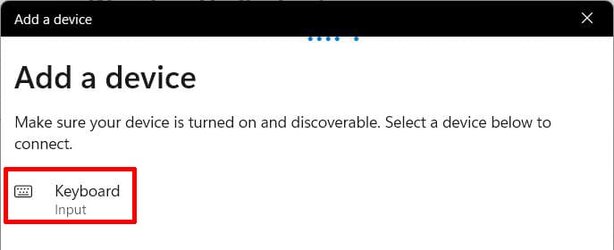
Is the keyboard shown in Bluetooth & devices? Look closely and click on View more devices if you don't see it. If you see it then click on the three dots on the right and select Remove device. If you go through the pairing process again it should show the PIN again. Make sure you type this PIN on the Bluetooth keyboard and hit the enter key on it if needed.

BTW, what model keyboard do you have? I normally use my Logitech K380 keyboard with my Raspberry Pi 3B+ or Raspberry Pi 4B.
 

My Computers

System One System Two

  • OS
    Windows 11 Pro 25H2 (26200.6901)
    Computer type
    Laptop
    Manufacturer/Model
    ASUS TUF Gaming A15 (2022)
    CPU
    AMD Ryzen 7 6800H with Radeon 680M GPU (486MB RAM)
    Memory
    Crucial DDR5-4800 (2400MHz) 32GB (2 x 16GB)
    Graphics Card(s)
    NVIDIA RTX 3060 Laptop (6GB RAM)
    Sound Card
    n/a
    Monitor(s) Displays
    15.6-inch
    Screen Resolution
    1920x1080 300Hz
    Hard Drives
    2 x Samsung 990 Evo Plus (2TB M.2 NVME SSD)
    PSU
    n/a
    Mouse
    Wireless Mouse M510
    Internet Speed
    2100Mbps/300Mbps
    Browser
    Firefox
    Antivirus
    Malwarebytes
  • Operating System
    Windows 11 Pro 25H2 (26200.8246)
    Computer type
    PC/Desktop
    Manufacturer/Model
    Custom build
    CPU
    AMD Ryzen 7 5700X3D
    Motherboard
    ASUS ROG Strix B550-F Gaming WiFi II
    Memory
    G.SKILL Flare X 32GB (2x16GB) DDR4
    Graphics card(s)
    ASUS ROG-STRIX-RTX3060TI-08G-V2-GAMING (RTX 3060-Ti, 8GB RAM)
    Monitor(s) Displays
    Samsung G50D IPS 27"
    Screen Resolution
    1440p/180Hz
    Hard Drives
    SAMSUNG 990 EVO Plus (2TB] M.2 NVME SSD
    SAMSUNG 990 EVO Plus (4TB) M.2 NVME SSD
    PSU
    Corsair RM750x (750 watts)
    Case
    Cooler Master MasterCase 5
    Cooling
    Scythe Mugen 6
    Keyboard
    Logitech K520 (MK540 keyboard/mouse combo)
    Mouse
    Logitech M310 (MK540 keyboard/mouse combo)
    Internet Speed
    2100 Mbps down / 300 Mbps up
    Browser
    Firefox, Edge, Chrome
    Antivirus
    Malwarebytes (Premium)
    Other Info
    ASUS Blu-ray Burner BW-16D1HT (SATA) || Western Digital Easystore 20TB USB 3.0 external hard drive used with Acronis True Image 2025 backup software || HP OfficeJet Pro 6975 Printer/Scanner
Is the keyboard shown in Bluetooth & devices? Look closely and click on View more devices if you don't see it. If you see it then click on the three dots on the right and select Remove device. If you go through the pairing process again it should show the PIN again. Make sure you type this PIN on the Bluetooth keyboard and hit the enter key on it if needed.

BTW, what model keyboard do you have? I normally use my Logitech K380 keyboard with my Raspberry Pi 3B+ or Raspberry Pi 4B.
Its still doing the installing of the updates but for some reason, it says its repairing the D drive that I have installed in a USB port.

The keyboard is one of those 35 dollar folding keyboards that is some cheap rebranded one with no name. I did find that in some of the Q&A that someone had asked what its PIN number was and their answer was, it used the Windows PIN number. It shows up as Bluetooth 3.0 keyboard.

Just finished installing the updates.
I tried to install it again and it gave the PIN. I tried to put the PIN on the Bluetooth keyboard and nothing on the screen. It timed out before I was able to try to input it with the USB keyboard that I have installed on it.
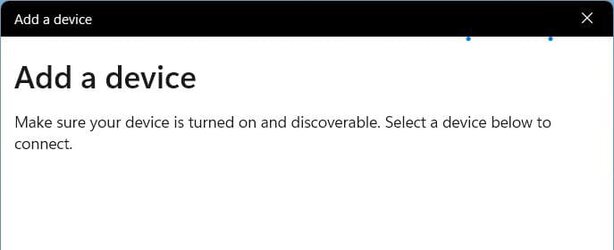
Same problem now, In reinstall now, no PIN number shows up, Just says enter the PIN.

Done for the night fighting with Microsoft.
Will get after it tomorrow.
Thanks again for your help.
 

My Computer

System One

  • OS
    Windows 11
    Computer type
    PC/Desktop
    Manufacturer/Model
    Kamrui AP1 Pro
    CPU
    Jasper Lake N5105
    Motherboard
    Mini PC
    Memory
    16GB
    Monitor(s) Displays
    TV/Monitor Combo
    Hard Drives
    512GB Rom and 2TB Western Digital USB
    Case
    Mini PC
    Cooling
    Fan, Heat sink
    Keyboard
    Standard USB
    Mouse
    Logitech
    Internet Speed
    Spectrum 1Gb?
    Browser
    Chrome, DuckDuckGo
    Antivirus
    Nortons 360
    Other Info
    Going to use this to run my cameras for security system for the most part, but, we shall see.
You must enter the PIN on the Bluetooth keyboard not the USB connected one. You have to be careful because as you type nothing will show on the computer screen. After you input the PIN did you hit the Enter key on the Bluetooth keyboard?
 

My Computers

System One System Two

  • OS
    Windows 11 Pro 25H2 (26200.6901)
    Computer type
    Laptop
    Manufacturer/Model
    ASUS TUF Gaming A15 (2022)
    CPU
    AMD Ryzen 7 6800H with Radeon 680M GPU (486MB RAM)
    Memory
    Crucial DDR5-4800 (2400MHz) 32GB (2 x 16GB)
    Graphics Card(s)
    NVIDIA RTX 3060 Laptop (6GB RAM)
    Sound Card
    n/a
    Monitor(s) Displays
    15.6-inch
    Screen Resolution
    1920x1080 300Hz
    Hard Drives
    2 x Samsung 990 Evo Plus (2TB M.2 NVME SSD)
    PSU
    n/a
    Mouse
    Wireless Mouse M510
    Internet Speed
    2100Mbps/300Mbps
    Browser
    Firefox
    Antivirus
    Malwarebytes
  • Operating System
    Windows 11 Pro 25H2 (26200.8246)
    Computer type
    PC/Desktop
    Manufacturer/Model
    Custom build
    CPU
    AMD Ryzen 7 5700X3D
    Motherboard
    ASUS ROG Strix B550-F Gaming WiFi II
    Memory
    G.SKILL Flare X 32GB (2x16GB) DDR4
    Graphics card(s)
    ASUS ROG-STRIX-RTX3060TI-08G-V2-GAMING (RTX 3060-Ti, 8GB RAM)
    Monitor(s) Displays
    Samsung G50D IPS 27"
    Screen Resolution
    1440p/180Hz
    Hard Drives
    SAMSUNG 990 EVO Plus (2TB] M.2 NVME SSD
    SAMSUNG 990 EVO Plus (4TB) M.2 NVME SSD
    PSU
    Corsair RM750x (750 watts)
    Case
    Cooler Master MasterCase 5
    Cooling
    Scythe Mugen 6
    Keyboard
    Logitech K520 (MK540 keyboard/mouse combo)
    Mouse
    Logitech M310 (MK540 keyboard/mouse combo)
    Internet Speed
    2100 Mbps down / 300 Mbps up
    Browser
    Firefox, Edge, Chrome
    Antivirus
    Malwarebytes (Premium)
    Other Info
    ASUS Blu-ray Burner BW-16D1HT (SATA) || Western Digital Easystore 20TB USB 3.0 external hard drive used with Acronis True Image 2025 backup software || HP OfficeJet Pro 6975 Printer/Scanner
You must enter the PIN on the Bluetooth keyboard not the USB connected one. You have to be careful because as you type nothing will show on the computer screen. After you input the PIN did you hit the Enter key on the Bluetooth keyboard?
Yes. I was carful to make sure I typed in the numbers correctly and did hit the enter key on the Bluetooth keyboard.
It showed it was trying to connect and then I tried it again and it gave me a second chance with a new PIN number. Same thing, tried to enter the number carefully again, and pressed the enter key. Nothing. It then timed out in I think less than 30 seconds.
 

My Computer

System One

  • OS
    Windows 11
    Computer type
    PC/Desktop
    Manufacturer/Model
    Kamrui AP1 Pro
    CPU
    Jasper Lake N5105
    Motherboard
    Mini PC
    Memory
    16GB
    Monitor(s) Displays
    TV/Monitor Combo
    Hard Drives
    512GB Rom and 2TB Western Digital USB
    Case
    Mini PC
    Cooling
    Fan, Heat sink
    Keyboard
    Standard USB
    Mouse
    Logitech
    Internet Speed
    Spectrum 1Gb?
    Browser
    Chrome, DuckDuckGo
    Antivirus
    Nortons 360
    Other Info
    Going to use this to run my cameras for security system for the most part, but, we shall see.
Yes. I was carful to make sure I typed in the numbers correctly and did hit the enter key on the Bluetooth keyboard.
It showed it was trying to connect and then I tried it again and it gave me a second chance with a new PIN number. Same thing, tried to enter the number carefully again, and pressed the enter key. Nothing. It then timed out in I think less than 30 seconds.

To be safe, enter the numbers using the numeric keys along the top of the keyboard, not the number pad on the right-hand side.
 

My Computers

System One System Two

  • OS
    Windows 11 2xH2 (latest update ... forever anal)
    Computer type
    PC/Desktop
    Manufacturer/Model
    HP Slim S01
    CPU
    Intel i5-12400
    Memory
    8GB
    Graphics Card(s)
    NVIDIA GeForce GT730
    Sound Card
    OOBE
    Monitor(s) Displays
    Acer 32"
    Screen Resolution
    1920x1080
    Hard Drives
    512GB KIOXIA NVMe
    1TB SATA SSD
    PSU
    OOBE
    Case
    OOBE
    Cooling
    OOBE
    Keyboard
    BT
    Mouse
    BT
    Browser
    Brave FFox Chrome Opera
    Antivirus
    KIS
  • Operating System
    Windows 11 Pro 2xH2 (latest update ... 4ever anal)
    Computer type
    Laptop
    Manufacturer/Model
    HP Pavillion 15
    CPU
    i7-1165G7 @ 2.80GHz
    Graphics card(s)
    Intel Iris Xe Graphics
    Hard Drives
    Samsung NVMe 512GB
    + numerous/multiple SSD Type C USB enclosures
    Internet Speed
    NBN FTTN 50
    Browser
    Brave
    Antivirus
    KIS
Something to try, make sure keyboard is in pairing mode then follow Nixea's ( answer ) post HERE .
For Windows 11 use DevicePairingWizard.exe in the run box.
 

My Computers

System One System Two

  • OS
    Win 11 Pro
    Computer type
    Laptop
    Manufacturer/Model
    ASUS Vivobook
    CPU
    AMD Ryzen™ 7 7730U
    Motherboard
    M1605YA
    Memory
    24GB Dual-Channel DDR4 @ 1596MHz (22-22-22-52)
    Graphics Card(s)
    512MB ATI AMD Radeon Graphics (ASUStek Computer Inc)
    Monitor(s) Displays
    Generic PnP Monitor (1920x1200@60Hz) - P1 PLUS (1920x1080@59Hz)
    Screen Resolution
    1920 X 1200
    Hard Drives
    953GB Western Digital WD
    PSU
    45 Watts
    Mouse
    Lenovo Bluetooth.
    Internet Speed
    500 Mbps
    Browser
    Edge
    Antivirus
    Defender
  • Operating System
    Windows 11
    Computer type
    Laptop
    Manufacturer/Model
    ACER NITRO
    CPU
    AMD Ryzen 7 5800H / 3.2 GHz
    Motherboard
    CZ Scala_CAS (FP6)
    Memory
    32 GB DDR4 SDRAM 3200 MHz
    Graphics card(s)
    NVIDIA GeForce RTX 3060 6 GB GDDR6 SDRAM
    Sound Card
    Realtek Audio. NVIDIA High Definition Audio
    Monitor(s) Displays
    15.6" LED backlight 1920 x 1080 (Full HD) 144 Hz
    Screen Resolution
    1920 x 1080 (Full HD)
    Hard Drives
    Samsung 970 Evo Plus 2TB NVMe M.2
    PSU
    180 Watt, 19.5 V
    Mouse
    Lenovo Bluetooth
    Internet Speed
    500 Mbps
    Browser
    Edge
    Antivirus
    Defender
Back
Top Bottom