Personalization Reset and Re-register Windows Spotlight in Windows 11


Windows_Spotlight-new_header.webp

This tutorial will show you how to reset and re-register Windows Spotlight for your account in Windows 11.

In Windows 11, you can have Windows Spotlight as a theme and display different background images on your desktop and lock screen, and occasionally offers suggestions on the lock screen.

If Windows Spotlights stops working and/or stops changing the background image, you can reset and re-register Windows Spotlight to fix it.


Windows Spotlight will not work while connected to a metered network (ethernet or wireless), or in Battery Saver mode.

Windows Spotlight requires Background Apps to be turned on.

Country or region and Device setup region must be the same for Spotlight to work.
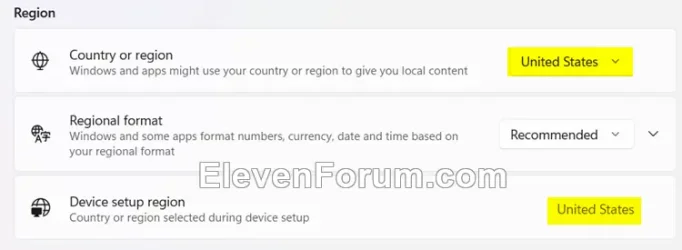
Region.webp


Sometimes it may take 24 to 48 hours after resetting for Windows Spotlight to sync again.


Another option is to use the Windows spotlight, dynamic images theme.

OR:


EXAMPLE: Windows Spotlight on Desktop and Lock screen

Windows_Spotlight_desktop_background.jpg
Windows_Spotlight_lock_screen.jpg


Here's How:

1 Change your desktop background to something other than Windows Spotlight. (see screenshot below)

This step is only available in Windows 11 build 22557 and higher.


Windows_Spotlight_desktop_background-1.png

2 Change your lock screen background to something other than Windows Spotlight. (see screenshot below)


Windows_Spotlight_lock_screen_background-1.png

3 Click/tap on the download button below to download the file below.

Reset_and_re-register_Windows_Spotlight.zip


(Contents of BAT file for reference)
Code:
:: Turn on background apps
reg delete "HKEY_CURRENT_USER\Software\Microsoft\Windows\CurrentVersion\BackgroundAccessApplications" /v GlobalUserDisabled /f
reg delete "HKEY_CURRENT_USER\Software\Microsoft\Windows\CurrentVersion\Search" /v BackgroundAppGlobalToggle /f

:: Reset Windows Spotlight
DEL /F /S /Q /A "%USERPROFILE%/AppData\Local\Packages\MicrosoftWindows.Client.CBS_cw5n1h2txyewy\LocalCache\Microsoft\IrisService"
DEL /F /S /Q /A "%USERPROFILE%/AppData\Local\Packages\Microsoft.Windows.ContentDeliveryManager_cw5n1h2txyewy\LocalCache\Microsoft\IrisService"
DEL /F /S /Q /A "%USERPROFILE%/AppData\Local\Packages\Microsoft.Windows.ContentDeliveryManager_cw5n1h2txyewy\LocalState\Assets"
DEL /F /S /Q /A "%USERPROFILE%/AppData\Local\Packages\Microsoft.Windows.ContentDeliveryManager_cw5n1h2txyewy\Settings"

:: Re-register Windows Spotlight
PowerShell -ExecutionPolicy Unrestricted -Command "& {$manifest = (Get-AppxPackage *ContentDeliveryManager*).InstallLocation + '\AppxManifest.xml' ; Add-AppxPackage -DisableDevelopmentMode -Register $manifest}"
PowerShell -ExecutionPolicy Unrestricted -Command "& {$manifest = (Get-AppxPackage *MicrosoftWindows.Client.CBS*).InstallLocation + '\AppxManifest.xml' ; Add-AppxPackage -DisableDevelopmentMode -Register $manifest}"

4 Save the ZIP file to your desktop.

5 Unblock the ZIP file.

6 Extract the BAT file from the ZIP file.

7 Run the BAT file.

8 Restart the computer to apply.

9 After you sign in, you can change your desktop background back to Windows Spotlight if wanted. (see screenshot below)


Windows_Spotlight_desktop_background-2.png

10 Change your lock screen background back to Windows Spotlight if wanted. (see screenshot below)


Windows_Spotlight_lock_screen_background-2.png


That's it,
Shawn Brink


Attachments

Last edited:
Okay, understood - I came to your post(s) late and I was not aware you elected not to have a password.
 

My Computers

System One System Two

  • OS
    Windows 11 Pro 25H2 26200.8457
    Computer type
    PC/Desktop
    Manufacturer/Model
    Dell Tower Plus EBT2250, DOB: 06/15/2025
    CPU
    Intel® Core™ Ultra 7 265 1.8GHz to 5.3GHz (Arrow Lake)
    Motherboard
    Dell Inc. 02D3NT A00 (U3E1)
    Memory
    SK Hynix 32GB DDR5 5600 Desktop RAM UDIMM Non-ECC PC5-5600B
    Graphics Card(s)
    Dell NVIDIA® GeForce RTX™ 4060 8GB GDDR6 & (iGPU) Integrated Intel® UHD Graphics
    Sound Card
    Chipset Realtek High-Definition Audio with Dolby Atmos
    Monitor(s) Displays
    Dell Ultra Sharp U2515H 25-Inch Screen LED-Lit
    Screen Resolution
    2560 X 1440
    Hard Drives
    Samsung (NVMe PM9C1a 1024GB) M.2 PCIe NVMe Solid State Drive (OS), with Samsung Piccolo (S4LY022) 6-Core 4 Channel Controller.

    Samsung T7 500GB SSD, USB-C External Drive
    PSU
    Dell 460W
    Case
    Dell Tower Plus EBT 2250
    Cooling
    Fan
    Keyboard
    Dell Wired Keyboard - KB216
    Mouse
    Logitech M510
    Internet Speed
    Intel Killer E3100G 2.5 Gigabit Ethernet Controller
    Browser
    Microsoft Edge
    Antivirus
    Microsoft Windows Security
    Other Info
    The Samsung NVMe PM9C1a 1024GB SSD does not use a Phison NAND controller. Instead, it uses Samsung's in-house developed Piccolo (S4LY022) 6-Core 4 Channel Controller. The PM9C1a utilizes a controller built using Samsung's 5-nanometer process and seventh-generation V-NAND technology. 🤔
  • Operating System
    Windows 11 Pro 25H2 26200.8457
    Computer type
    Laptop
    Manufacturer/Model
    Dell Inspiron 15 7000 (7591) 2-in-1, DOB: 11/30/2019
    CPU
    10th Generation Intel Core i7-10510U Processor (8MB Cache, up to 4.9 GHz) Comet Lake
    Motherboard
    Dell 0NNW5N
    Memory
    16GB DDR4 RAM
    Graphics card(s)
    NVIDIA® GeForce® MX250 with 2GB GDDR5 graphics memory
    Sound Card
    Chipset Realtek ALC3254 🤔🤣
    Monitor(s) Displays
    Dell 15.6-inch UHD Truelife Touch Narrow Border WVA Display with Active Pen support
    Screen Resolution
    3840 x 2160
    Hard Drives
    Intel NVME 512GB SSD with 32GB Intel Optane Memory, M.2 80mm PCIe 3.0 RAID

    SanDisk 256GB Extreme microSDXC UHS-I Memory Card
    PSU
    Dell 4-Cell Battery, 68 Whr (Integrated), 90 Watt AC Adapter
    Case
    Dell Inspiron 15 7000 2-in-1 (7591)
    Cooling
    Standard Dell Case Fan & Havit HV-F2056 USB Powered (3 Fans) Laptop Cooling Pad.
    Keyboard
    Dell
    Mouse
    Logitech Wireless Mouse M650L
    Internet Speed
    Wireless/Wired connectivity (WiFi 6 - 802.11 ax)
    Browser
    Microsoft Edge
    Antivirus
    Microsoft Windows Security
    Other Info
    From Dell: 512GB NVME Solid State Drive accelerated by 32GB Intel Optane Memory are the fastest as compared to NAND SSDs. Intel Optane H10 with SSD offers speedy storage and accelerates opening your programs.
The Spotlight picture did change late last night. The Assets folder then had 6 pictures, 3 from early morning & 3 from early evening, all are dated 3-15-2026. The new Spotlight that was being displayed is from the evening group.

I left the PC on all night & nothing has changed. The Assets folder has the same 6 photos & nothing new from today. It still displays the picture from late last night.
 

My Computer

System One

  • OS
    Windows 11 Pro 25H2
    Computer type
    PC/Desktop
    Manufacturer/Model
    ASRock B760M Pro RS/D4 motherboard
    CPU
    Intel i5-14500
    Motherboard
    ASRock
    Memory
    16 GB
    Graphics Card(s)
    Intel
    Hard Drives
    1 TB Samsung M.2 SSD
    1 TB WD HDD
FWIW the first 3 pix from yesterday morning have been automatically removed from the Assets folder.
Will wait & see what happens next.
 

My Computer

System One

  • OS
    Windows 11 Pro 25H2
    Computer type
    PC/Desktop
    Manufacturer/Model
    ASRock B760M Pro RS/D4 motherboard
    CPU
    Intel i5-14500
    Motherboard
    ASRock
    Memory
    16 GB
    Graphics Card(s)
    Intel
    Hard Drives
    1 TB Samsung M.2 SSD
    1 TB WD HDD
Here’s how it’s been the past few days.

The Assets folder always contains 6 pictures, 3 new & 3 old.

3 new are added every day and the 3 oldest are removed.

The Spotlight Lock Screen picture does not change immediately when the 3 new pictures are added to the Assets folder, but will change within a few hours to one of the new ones.

That new picture will be the only one displayed until the next day when a new set of 3 pictures are loaded into the Assets folder. It will never display the other 2 new pictures unless I manually select not for me.
 

My Computer

System One

  • OS
    Windows 11 Pro 25H2
    Computer type
    PC/Desktop
    Manufacturer/Model
    ASRock B760M Pro RS/D4 motherboard
    CPU
    Intel i5-14500
    Motherboard
    ASRock
    Memory
    16 GB
    Graphics Card(s)
    Intel
    Hard Drives
    1 TB Samsung M.2 SSD
    1 TB WD HDD
I clicked not for me on the first new picture that was displayed & got the 2nd new picture.
On the 2nd new pic I clicked not for me & got the 3rd new pic.
On the 3rd new pic I clicked not for me & got the generic blue bloom.

I'll wait & see if any new pictures will load into the Assets folder with today's date.

Update -
I just looked & there are 3 new pics from today in the Assets folder. Makes me wonder if they were there a couple minutes ago before I got the blue bloom.

I brought up the Lock Screen & it now displays a new pic from today, 3-18.
 

My Computer

System One

  • OS
    Windows 11 Pro 25H2
    Computer type
    PC/Desktop
    Manufacturer/Model
    ASRock B760M Pro RS/D4 motherboard
    CPU
    Intel i5-14500
    Motherboard
    ASRock
    Memory
    16 GB
    Graphics Card(s)
    Intel
    Hard Drives
    1 TB Samsung M.2 SSD
    1 TB WD HDD
Biased on your last few posts, I would say you have got Spotlight back to working as designed. Good job...
 

My Computers

System One System Two

  • OS
    Windows 11 Pro 25H2 26200.8457
    Computer type
    PC/Desktop
    Manufacturer/Model
    Dell Tower Plus EBT2250, DOB: 06/15/2025
    CPU
    Intel® Core™ Ultra 7 265 1.8GHz to 5.3GHz (Arrow Lake)
    Motherboard
    Dell Inc. 02D3NT A00 (U3E1)
    Memory
    SK Hynix 32GB DDR5 5600 Desktop RAM UDIMM Non-ECC PC5-5600B
    Graphics Card(s)
    Dell NVIDIA® GeForce RTX™ 4060 8GB GDDR6 & (iGPU) Integrated Intel® UHD Graphics
    Sound Card
    Chipset Realtek High-Definition Audio with Dolby Atmos
    Monitor(s) Displays
    Dell Ultra Sharp U2515H 25-Inch Screen LED-Lit
    Screen Resolution
    2560 X 1440
    Hard Drives
    Samsung (NVMe PM9C1a 1024GB) M.2 PCIe NVMe Solid State Drive (OS), with Samsung Piccolo (S4LY022) 6-Core 4 Channel Controller.

    Samsung T7 500GB SSD, USB-C External Drive
    PSU
    Dell 460W
    Case
    Dell Tower Plus EBT 2250
    Cooling
    Fan
    Keyboard
    Dell Wired Keyboard - KB216
    Mouse
    Logitech M510
    Internet Speed
    Intel Killer E3100G 2.5 Gigabit Ethernet Controller
    Browser
    Microsoft Edge
    Antivirus
    Microsoft Windows Security
    Other Info
    The Samsung NVMe PM9C1a 1024GB SSD does not use a Phison NAND controller. Instead, it uses Samsung's in-house developed Piccolo (S4LY022) 6-Core 4 Channel Controller. The PM9C1a utilizes a controller built using Samsung's 5-nanometer process and seventh-generation V-NAND technology. 🤔
  • Operating System
    Windows 11 Pro 25H2 26200.8457
    Computer type
    Laptop
    Manufacturer/Model
    Dell Inspiron 15 7000 (7591) 2-in-1, DOB: 11/30/2019
    CPU
    10th Generation Intel Core i7-10510U Processor (8MB Cache, up to 4.9 GHz) Comet Lake
    Motherboard
    Dell 0NNW5N
    Memory
    16GB DDR4 RAM
    Graphics card(s)
    NVIDIA® GeForce® MX250 with 2GB GDDR5 graphics memory
    Sound Card
    Chipset Realtek ALC3254 🤔🤣
    Monitor(s) Displays
    Dell 15.6-inch UHD Truelife Touch Narrow Border WVA Display with Active Pen support
    Screen Resolution
    3840 x 2160
    Hard Drives
    Intel NVME 512GB SSD with 32GB Intel Optane Memory, M.2 80mm PCIe 3.0 RAID

    SanDisk 256GB Extreme microSDXC UHS-I Memory Card
    PSU
    Dell 4-Cell Battery, 68 Whr (Integrated), 90 Watt AC Adapter
    Case
    Dell Inspiron 15 7000 2-in-1 (7591)
    Cooling
    Standard Dell Case Fan & Havit HV-F2056 USB Powered (3 Fans) Laptop Cooling Pad.
    Keyboard
    Dell
    Mouse
    Logitech Wireless Mouse M650L
    Internet Speed
    Wireless/Wired connectivity (WiFi 6 - 802.11 ax)
    Browser
    Microsoft Edge
    Antivirus
    Microsoft Windows Security
    Other Info
    From Dell: 512GB NVME Solid State Drive accelerated by 32GB Intel Optane Memory are the fastest as compared to NAND SSDs. Intel Optane H10 with SSD offers speedy storage and accelerates opening your programs.
Biased on your last few posts, I would say you have got Spotlight back to working as designed. Good job...

I'm confused. Your posting #135 says the picture supposed to automatically change. When the daily 3 new pictures are loaded into the Assets folder only one of them gets displayed. Unless I manually click on not for me I'll never see the other two.
 

My Computer

System One

  • OS
    Windows 11 Pro 25H2
    Computer type
    PC/Desktop
    Manufacturer/Model
    ASRock B760M Pro RS/D4 motherboard
    CPU
    Intel i5-14500
    Motherboard
    ASRock
    Memory
    16 GB
    Graphics Card(s)
    Intel
    Hard Drives
    1 TB Samsung M.2 SSD
    1 TB WD HDD
They should change automatically, but they may not change as fast as you wish they would. I have had many computers since Spotlight rolled out and I cannot remember any of them changing every day, if that is want you want to happen.

On all my computers, Spotlight seems change images somewhat erratically but eventually, if working correctly, they should change. I think that you got it as good as it will be - I don't know a way of speeding the action up, other than doing the force next image trick. If you do that too many times in a period of time Spotlight runs out of new images and you will get the bloom image.
 

My Computers

System One System Two

  • OS
    Windows 11 Pro 25H2 26200.8457
    Computer type
    PC/Desktop
    Manufacturer/Model
    Dell Tower Plus EBT2250, DOB: 06/15/2025
    CPU
    Intel® Core™ Ultra 7 265 1.8GHz to 5.3GHz (Arrow Lake)
    Motherboard
    Dell Inc. 02D3NT A00 (U3E1)
    Memory
    SK Hynix 32GB DDR5 5600 Desktop RAM UDIMM Non-ECC PC5-5600B
    Graphics Card(s)
    Dell NVIDIA® GeForce RTX™ 4060 8GB GDDR6 & (iGPU) Integrated Intel® UHD Graphics
    Sound Card
    Chipset Realtek High-Definition Audio with Dolby Atmos
    Monitor(s) Displays
    Dell Ultra Sharp U2515H 25-Inch Screen LED-Lit
    Screen Resolution
    2560 X 1440
    Hard Drives
    Samsung (NVMe PM9C1a 1024GB) M.2 PCIe NVMe Solid State Drive (OS), with Samsung Piccolo (S4LY022) 6-Core 4 Channel Controller.

    Samsung T7 500GB SSD, USB-C External Drive
    PSU
    Dell 460W
    Case
    Dell Tower Plus EBT 2250
    Cooling
    Fan
    Keyboard
    Dell Wired Keyboard - KB216
    Mouse
    Logitech M510
    Internet Speed
    Intel Killer E3100G 2.5 Gigabit Ethernet Controller
    Browser
    Microsoft Edge
    Antivirus
    Microsoft Windows Security
    Other Info
    The Samsung NVMe PM9C1a 1024GB SSD does not use a Phison NAND controller. Instead, it uses Samsung's in-house developed Piccolo (S4LY022) 6-Core 4 Channel Controller. The PM9C1a utilizes a controller built using Samsung's 5-nanometer process and seventh-generation V-NAND technology. 🤔
  • Operating System
    Windows 11 Pro 25H2 26200.8457
    Computer type
    Laptop
    Manufacturer/Model
    Dell Inspiron 15 7000 (7591) 2-in-1, DOB: 11/30/2019
    CPU
    10th Generation Intel Core i7-10510U Processor (8MB Cache, up to 4.9 GHz) Comet Lake
    Motherboard
    Dell 0NNW5N
    Memory
    16GB DDR4 RAM
    Graphics card(s)
    NVIDIA® GeForce® MX250 with 2GB GDDR5 graphics memory
    Sound Card
    Chipset Realtek ALC3254 🤔🤣
    Monitor(s) Displays
    Dell 15.6-inch UHD Truelife Touch Narrow Border WVA Display with Active Pen support
    Screen Resolution
    3840 x 2160
    Hard Drives
    Intel NVME 512GB SSD with 32GB Intel Optane Memory, M.2 80mm PCIe 3.0 RAID

    SanDisk 256GB Extreme microSDXC UHS-I Memory Card
    PSU
    Dell 4-Cell Battery, 68 Whr (Integrated), 90 Watt AC Adapter
    Case
    Dell Inspiron 15 7000 2-in-1 (7591)
    Cooling
    Standard Dell Case Fan & Havit HV-F2056 USB Powered (3 Fans) Laptop Cooling Pad.
    Keyboard
    Dell
    Mouse
    Logitech Wireless Mouse M650L
    Internet Speed
    Wireless/Wired connectivity (WiFi 6 - 802.11 ax)
    Browser
    Microsoft Edge
    Antivirus
    Microsoft Windows Security
    Other Info
    From Dell: 512GB NVME Solid State Drive accelerated by 32GB Intel Optane Memory are the fastest as compared to NAND SSDs. Intel Optane H10 with SSD offers speedy storage and accelerates opening your programs.
Greetings. First, thanks for the OP for making the thread, it was most helpful.
I have kind of hit a wall here. Both desktop and lockscreen weren't updating after a bare-metal restore and the methods on first page weren't having any notable effect, so I eventually went for the nuke option:
Powershell:
Get-AppxPackage -allusers *Microsoft.Windows.ContentDeliveryManager* | Reset-AppxPackage
Get-AppxPackage -allusers *MicrosoftWindows.Client.CBS* | Reset-AppxPackage
It deleted the ContentDeliveryManager folder in C:\Users\****\Local\Packages, but, after a reboot, everything was back in place (except for \LocalCache\Microsoft\IrisService, which I had to manually re-create) and I'm happy to say that desktop Spotlight is working again after one or two days of wait. I will be having four new images later today, if everything goes well.

However: lockscreen Spotlight is still stuck on the default blue wallpaper.
I also tried
Powershell:
Get-AppxPackage -allusers *Microsoft.LockApp* | Reset-AppxPackage
Get-AppxPackage -allusers *Microsoft.LockApp* | Add-AppxPackage -Register -DisableDevelopmentMode
just in case, but no joy. Still blue. It's been several days now just staring at the same loathsome wallpaper of static doom. /Assets/ remains stubbornly empty and any further resets and re-registers don't seem to breathe new life into it.
Any suggestions?

By the way, could someone with a working lockscreen Spotlight post their values for
Code:
Computer\HKEY_CURRENT_USER\Software\Microsoft\Windows\CurrentVersion\ContentDeliveryManager
and its subfolders? I'd like to see if there are any key values that differ from mine and require remediation. Particular attention would be given to any folder containing "338387" because I believe that is what the lockscreen leverages to retrieve online content.
I noticed that in
Code:
Computer\HKEY_CURRENT_USER\Software\Microsoft\Windows\CurrentVersion\ContentDeliveryManager\Subscriptions\338387
when you switch from Spotlight to picture or slideshow, the value of sc-mode=0 changes, so 338387 has got to be the one, no?
Optional: registry values for
Code:
Computer\HKEY_CURRENT_USER\Software\Microsoft\Windows\CurrentVersion\Lock Screen
would also be a nice bonus.

Thanks in advance. Looking forward to having a properly working lockscreen.
 
Last edited:

My Computer

System One

  • OS
    Windows 11 25H2 Pro
    Computer type
    PC/Desktop
    Manufacturer/Model
    Custom
    CPU
    AMD Ryzen 7 9700X
    Motherboard
    Gigabyte X870 AORUS Elite Wifi 7 Rev.1.1
    Memory
    32GB Crucial Pro DDR5-6000-CL36 UDIMM OC Gaming Memory (2 x CP16G60C36U5B), CL36-38-38-80
    Graphics Card(s)
    ASUS Prime GeForce RTX 4070 Super OC
    Monitor(s) Displays
    LG UltraGear 27GS85Q-B/EU 27'' Fast IPS
    Screen Resolution
    2560x1440
    Hard Drives
    1 Kingston Fury Renegade (gen4) 1TB + 1 Kingston Fury Renegade G5 2TB + 1 Samsung 870 EVO 1TB + 3 x Western Digital Green 2TB
    PSU
    Be Quiet! Pure Power 12M 850W
    Case
    Lian Li Lancool III Black
    Cooling
    Thermalright Phantom Spirit 120 SE ARGB
    Keyboard
    Logitech Deluxe 250
    Mouse
    Logitech G502X Black
Biased on your last few posts, I would say you have got Spotlight back to working as designed. Good job...
Thanks for all your help.
It's been a few weeks & everything appears to be working properly. Still amazes me that I never new my wife was toggling through the images daily & changing them. I've been saving some of the Lockscreen images that appear in the Assets folder & might make my own slideshow when I get a bunch.
 

My Computer

System One

  • OS
    Windows 11 Pro 25H2
    Computer type
    PC/Desktop
    Manufacturer/Model
    ASRock B760M Pro RS/D4 motherboard
    CPU
    Intel i5-14500
    Motherboard
    ASRock
    Memory
    16 GB
    Graphics Card(s)
    Intel
    Hard Drives
    1 TB Samsung M.2 SSD
    1 TB WD HDD
I am sure she thought no harm. then no foul. All that going on without your knowledge, although benign in practice, is what was maybe slowing down the refreshing cycle. Nothing will mess that up quicker than going through all the new images one after the other. Glad you got it all sorted out. I'm sure your wife is still a "keeper" for just that one little misstep. :-)
 
Last edited:

My Computers

System One System Two

  • OS
    Windows 11 Pro 25H2 26200.8457
    Computer type
    PC/Desktop
    Manufacturer/Model
    Dell Tower Plus EBT2250, DOB: 06/15/2025
    CPU
    Intel® Core™ Ultra 7 265 1.8GHz to 5.3GHz (Arrow Lake)
    Motherboard
    Dell Inc. 02D3NT A00 (U3E1)
    Memory
    SK Hynix 32GB DDR5 5600 Desktop RAM UDIMM Non-ECC PC5-5600B
    Graphics Card(s)
    Dell NVIDIA® GeForce RTX™ 4060 8GB GDDR6 & (iGPU) Integrated Intel® UHD Graphics
    Sound Card
    Chipset Realtek High-Definition Audio with Dolby Atmos
    Monitor(s) Displays
    Dell Ultra Sharp U2515H 25-Inch Screen LED-Lit
    Screen Resolution
    2560 X 1440
    Hard Drives
    Samsung (NVMe PM9C1a 1024GB) M.2 PCIe NVMe Solid State Drive (OS), with Samsung Piccolo (S4LY022) 6-Core 4 Channel Controller.

    Samsung T7 500GB SSD, USB-C External Drive
    PSU
    Dell 460W
    Case
    Dell Tower Plus EBT 2250
    Cooling
    Fan
    Keyboard
    Dell Wired Keyboard - KB216
    Mouse
    Logitech M510
    Internet Speed
    Intel Killer E3100G 2.5 Gigabit Ethernet Controller
    Browser
    Microsoft Edge
    Antivirus
    Microsoft Windows Security
    Other Info
    The Samsung NVMe PM9C1a 1024GB SSD does not use a Phison NAND controller. Instead, it uses Samsung's in-house developed Piccolo (S4LY022) 6-Core 4 Channel Controller. The PM9C1a utilizes a controller built using Samsung's 5-nanometer process and seventh-generation V-NAND technology. 🤔
  • Operating System
    Windows 11 Pro 25H2 26200.8457
    Computer type
    Laptop
    Manufacturer/Model
    Dell Inspiron 15 7000 (7591) 2-in-1, DOB: 11/30/2019
    CPU
    10th Generation Intel Core i7-10510U Processor (8MB Cache, up to 4.9 GHz) Comet Lake
    Motherboard
    Dell 0NNW5N
    Memory
    16GB DDR4 RAM
    Graphics card(s)
    NVIDIA® GeForce® MX250 with 2GB GDDR5 graphics memory
    Sound Card
    Chipset Realtek ALC3254 🤔🤣
    Monitor(s) Displays
    Dell 15.6-inch UHD Truelife Touch Narrow Border WVA Display with Active Pen support
    Screen Resolution
    3840 x 2160
    Hard Drives
    Intel NVME 512GB SSD with 32GB Intel Optane Memory, M.2 80mm PCIe 3.0 RAID

    SanDisk 256GB Extreme microSDXC UHS-I Memory Card
    PSU
    Dell 4-Cell Battery, 68 Whr (Integrated), 90 Watt AC Adapter
    Case
    Dell Inspiron 15 7000 2-in-1 (7591)
    Cooling
    Standard Dell Case Fan & Havit HV-F2056 USB Powered (3 Fans) Laptop Cooling Pad.
    Keyboard
    Dell
    Mouse
    Logitech Wireless Mouse M650L
    Internet Speed
    Wireless/Wired connectivity (WiFi 6 - 802.11 ax)
    Browser
    Microsoft Edge
    Antivirus
    Microsoft Windows Security
    Other Info
    From Dell: 512GB NVME Solid State Drive accelerated by 32GB Intel Optane Memory are the fastest as compared to NAND SSDs. Intel Optane H10 with SSD offers speedy storage and accelerates opening your programs.
Welp, what do you know. Spotlight finally condescended to give me a new picture on the lockscreen today.
Had to wait almost four days, though.
 

My Computer

System One

  • OS
    Windows 11 25H2 Pro
    Computer type
    PC/Desktop
    Manufacturer/Model
    Custom
    CPU
    AMD Ryzen 7 9700X
    Motherboard
    Gigabyte X870 AORUS Elite Wifi 7 Rev.1.1
    Memory
    32GB Crucial Pro DDR5-6000-CL36 UDIMM OC Gaming Memory (2 x CP16G60C36U5B), CL36-38-38-80
    Graphics Card(s)
    ASUS Prime GeForce RTX 4070 Super OC
    Monitor(s) Displays
    LG UltraGear 27GS85Q-B/EU 27'' Fast IPS
    Screen Resolution
    2560x1440
    Hard Drives
    1 Kingston Fury Renegade (gen4) 1TB + 1 Kingston Fury Renegade G5 2TB + 1 Samsung 870 EVO 1TB + 3 x Western Digital Green 2TB
    PSU
    Be Quiet! Pure Power 12M 850W
    Case
    Lian Li Lancool III Black
    Cooling
    Thermalright Phantom Spirit 120 SE ARGB
    Keyboard
    Logitech Deluxe 250
    Mouse
    Logitech G502X Black
After completing the tutorial, the "Learn about this picture" icon changed to the one shown in the attachment.

How can I change it back?
 

Attachments

  • spot.webp
    spot.webp
    1.6 KB · Views: 7

My Computer

System One

  • OS
    Windows 11
    Computer type
    PC/Desktop
    Manufacturer/Model
    Fujitu
After completing the tutorial, the "Learn about this picture" icon changed to the one shown in the attachment.

How can I change it back?
Welcome to Eleven Forum.

Microsoft have recently been making some changes to Windows 11, for example, a revised Start menu layout. One of the other changes was the look and behaviour of the desktop Spotlight icon. You have the correct updated icon.
 

My Computers

System One System Two

  • OS
    Windows 11 Home
    Computer type
    Laptop
    Manufacturer/Model
    Acer Aspire 3 A315-23-R9VY
    CPU
    AMD Athlon Silver 3050U
    Memory
    8GB
    Graphics Card(s)
    Radeon Graphics
    Monitor(s) Displays
    laptop screen
    Screen Resolution
    1366x768 native resolution, up to 2560x1440 with Radeon Virtual Super Resolution
    Hard Drives
    1TB Samsung EVO 870 SSD (from April 2026: 250GB EVO 850)
    Internet Speed
    150 Mbps
    Browser
    Edge, Firefox
    Antivirus
    Defender
    Other Info
    fully 'Windows 11 ready' laptop. Windows 10 C: partition migrated from my old unsupported 'main machine' then upgraded to 11. A test migration ran Insider builds for 2 months. When 11 was released on 5th October 2021 it was re-imaged back to 10 and was offered the upgrade in Windows Update on 20th October. Windows Update offered the 22H2 Feature Update on 20th September 2022. It got the 23H2 Feature Update on 4th November 2023 through Windows Update, 24H2 on 3rd October 2024 through Windows Update by setting the Target Release Version for 24H2, and 25H2 on 30th September 2025 through Windows Update by setting the Target Release Version for 25H2.

    UPDATE - 11 April 2026: due to mechanical deterioration this PC has been retired from active duty. The OS with all software and files has been migrated to my System Seven below to carry on as my general purpose 'main machine'.

    My SYSTEM THREE is a Dell Latitude 5410, i7-10610U, 32GB RAM, 512GB NVMe ssd, supported device running Windows 11 Pro.

    My SYSTEM FOUR is a 2-in-1 convertible Lenovo Yoga 11e 20DA, Celeron N2930, 8GB RAM, 256GB ssd. Unsupported device: currently running Win10 Pro, plus Win11 Pro RTM and Insider Dev, Beta, and RP 24H2 as native boot vhdx.

    My SYSTEM FIVE is a Dell Latitude 3190 2-in-1, Pentium Silver N5030, 8GB RAM, 1TB NVMe ssd, supported device running Windows 11 Pro, plus Insider Beta, Dev, and Canary builds (and a few others) as a native boot .vhdx.

    My SYSTEM SIX is a Dell Latitude 5550, Core Ultra 7 165H, 64GB RAM, 1TB NVMe SSD, supported device, Windows 11 Pro 24H2, Hyper-V host machine. Updated to 25H2 on 30th September 2025.

    My SYSTEM SEVEN is a Lenovo Thinkpad T580, Intel Core i7-8650U, 16GB RAM, 512GB NVMe SSD + 2nd 512GB NVMe SSD, a supported device for Windows 11. This is my current general purpose 'main machine'. The installed Windows 11 Home from my System One has been migrated to this machine.
  • Operating System
    Windows 11 Pro
    Computer type
    Laptop
    Manufacturer/Model
    Dell Latitude E4310
    CPU
    Intel® Core™ i5-520M
    Motherboard
    0T6M8G
    Memory
    8GB
    Graphics card(s)
    (integrated graphics) Intel HD Graphics
    Screen Resolution
    1366x768
    Hard Drives
    500GB Crucial MX500 SSD
    Browser
    Firefox, Edge
    Antivirus
    Defender
    Other Info
    unsupported machine: Legacy bios, MBR, TPM 1.2, upgraded from W10 to W11 using W10/W11 hybrid install media workaround. In-place upgrade to 22H2 using ISO and a workaround. Feature Update to 23H2 by manually installing the Enablement Package. In-place upgrade to 24H2 using hybrid 23H2/24H2 install media. Upgraded to 25H2 by Enablement Package. Also running Insider Dev, and Canary builds and Windows 10 as native boot .vhdx.

    My SYSTEM THREE is a Dell Latitude 5410, i7-10610U, 32GB RAM, 512GB NVMe ssd, supported device running Windows 11 Pro.

    My SYSTEM FOUR is a 2-in-1 convertible Lenovo Yoga 11e 20DA, Celeron N2930, 8GB RAM, 256GB ssd. Unsupported device: currently running Win10 Pro, plus Win11 Pro RTM and Insider Dev, Beta, and RP 24H2 as native boot vhdx.

    My SYSTEM FIVE is a Dell Latitude 3190 2-in-1, Pentium Silver N5030, 8GB RAM, 1TB NVMe ssd, supported device running Windows 11 Pro, plus Insider Beta, Dev, and Canary builds (and a few others) as a native boot .vhdx.

    My SYSTEM SIX is a Dell Latitude 5550, Core Ultra 7 165H, 64GB RAM, 1TB NVMe SSD, supported device, Windows 11 Pro 24H2, Hyper-V host machine. Updated to 25H2 on 30th September 2025.

    My SYSTEM SEVEN is a Lenovo Thinkpad T580, Intel Core i7-8650U, 16GB RAM, 512GB NVMe SSD + 2nd 512GB NVMe SSD, a supported device for Windows 11. This is my current general purpose 'main machine'. The installed Windows 11 Home from my System One has been migrated to this machine.
Welcome to Eleven Forum.

Microsoft have recently been making some changes to Windows 11, for example, a revised Start menu layout. One of the other changes was the look and behaviour of the desktop Spotlight icon. You have the correct updated icon.

Mr. Bree, thank you for your prompt reply.
I'm relieved to know that it's the correct icon.
I look forward to your continued support.
 

My Computer

System One

  • OS
    Windows 11
    Computer type
    PC/Desktop
    Manufacturer/Model
    Fujitu
Welcome to Eleven Forum.

Microsoft have recently been making some changes to Windows 11, for example, a revised Start menu layout. One of the other changes was the look and behaviour of the desktop Spotlight icon. You have the correct updated icon.
Where does this icon appear? I don't find it anywhere on the screen.
 

My Computer

System One

  • OS
    Windows 11 Pro 25H2
    Computer type
    PC/Desktop
    Manufacturer/Model
    ASRock B760M Pro RS/D4 motherboard
    CPU
    Intel i5-14500
    Motherboard
    ASRock
    Memory
    16 GB
    Graphics Card(s)
    Intel
    Hard Drives
    1 TB Samsung M.2 SSD
    1 TB WD HDD
Where does this icon appear? I don't find it anywhere on the screen.

Hey mate, :alien:

You should see the Windows Spotlight desktop icon when you have Windows Spotlight set as your desktop background like below.


My Computers

System One System Two

  • OS
    Windows 11 Pro for Workstations
    Computer type
    PC/Desktop
    Manufacturer/Model
    Custom self build
    CPU
    Intel i7-8700K 5 GHz
    Motherboard
    ASUS ROG Maximus XI Formula Z390
    Memory
    64 GB (4x16GB) G.SKILL TridentZ RGB DDR4 3600 MHz (F4-3600C18D-32GTZR)
    Graphics Card(s)
    ASUS ROG-STRIX-GTX1080TI-O11G-GAMING (11GB GDDR5X)
    Sound Card
    Integrated Digital Audio (S/PDIF)
    Monitor(s) Displays
    2 x Samsung Odyssey G75 27"
    Screen Resolution
    2560x1440
    Hard Drives
    1TB Samsung 990 PRO M.2,
    4TB Samsung 990 PRO M.2,
    TerraMaster F8 SSD Plus NAS
    PSU
    Seasonic Prime Titanium 850W
    Case
    Thermaltake Core P3 wall mounted
    Cooling
    Corsair Hydro H115i
    Keyboard
    Amazon Basics Wired Full Keyboard MD005
    Mouse
    Logitech MX Master 4
    Internet Speed
    2 Gbps Download and 100 Mbps Upload
    Browser
    Chrome and Edge
    Antivirus
    Microsoft Defender
    Other Info
    Logitech Z625 speaker system,
    Logitech BRIO 4K Pro webcam,
    HP Color LaserJet Pro MFP M477fdn,
    CyberPower CP1500PFCLCD
    Galaxy S23 Plus phone
  • Operating System
    Windows 11 Pro
    Computer type
    Laptop
    Manufacturer/Model
    Surface Laptop 7 Copilot+ PC
    CPU
    Snapdragon X Elite (12 core) 3.42 GHz
    Memory
    16 GB LPDDR5x-7467 MHz
    Monitor(s) Displays
    15" HDR
    Screen Resolution
    2496 x 1664
    Hard Drives
    1 TB SSD
    Internet Speed
    Wi-Fi 7 and Bluetooth 5.4
    Browser
    Chrome and Edge
    Antivirus
    Microsoft Defender
Hey mate, :alien:

You should see the Windows Spotlight desktop icon when you have Windows Spotlight set as your desktop background like below.

I'm using the Spotlight images for the Lockscreen not the desktop. That's probably why I've never seen that icon.
 

My Computer

System One

  • OS
    Windows 11 Pro 25H2
    Computer type
    PC/Desktop
    Manufacturer/Model
    ASRock B760M Pro RS/D4 motherboard
    CPU
    Intel i5-14500
    Motherboard
    ASRock
    Memory
    16 GB
    Graphics Card(s)
    Intel
    Hard Drives
    1 TB Samsung M.2 SSD
    1 TB WD HDD
I'm using the Spotlight images for the Lockscreen not the desktop. That's probably why I've never seen that icon.

Most definitely. :shawn:
 

My Computers

System One System Two

  • OS
    Windows 11 Pro for Workstations
    Computer type
    PC/Desktop
    Manufacturer/Model
    Custom self build
    CPU
    Intel i7-8700K 5 GHz
    Motherboard
    ASUS ROG Maximus XI Formula Z390
    Memory
    64 GB (4x16GB) G.SKILL TridentZ RGB DDR4 3600 MHz (F4-3600C18D-32GTZR)
    Graphics Card(s)
    ASUS ROG-STRIX-GTX1080TI-O11G-GAMING (11GB GDDR5X)
    Sound Card
    Integrated Digital Audio (S/PDIF)
    Monitor(s) Displays
    2 x Samsung Odyssey G75 27"
    Screen Resolution
    2560x1440
    Hard Drives
    1TB Samsung 990 PRO M.2,
    4TB Samsung 990 PRO M.2,
    TerraMaster F8 SSD Plus NAS
    PSU
    Seasonic Prime Titanium 850W
    Case
    Thermaltake Core P3 wall mounted
    Cooling
    Corsair Hydro H115i
    Keyboard
    Amazon Basics Wired Full Keyboard MD005
    Mouse
    Logitech MX Master 4
    Internet Speed
    2 Gbps Download and 100 Mbps Upload
    Browser
    Chrome and Edge
    Antivirus
    Microsoft Defender
    Other Info
    Logitech Z625 speaker system,
    Logitech BRIO 4K Pro webcam,
    HP Color LaserJet Pro MFP M477fdn,
    CyberPower CP1500PFCLCD
    Galaxy S23 Plus phone
  • Operating System
    Windows 11 Pro
    Computer type
    Laptop
    Manufacturer/Model
    Surface Laptop 7 Copilot+ PC
    CPU
    Snapdragon X Elite (12 core) 3.42 GHz
    Memory
    16 GB LPDDR5x-7467 MHz
    Monitor(s) Displays
    15" HDR
    Screen Resolution
    2496 x 1664
    Hard Drives
    1 TB SSD
    Internet Speed
    Wi-Fi 7 and Bluetooth 5.4
    Browser
    Chrome and Edge
    Antivirus
    Microsoft Defender
I've followed guides across various websites, as usual for Eleven Forums has the best guides and do know whilst this is the folder the Lock screen images. It isn't for the Wallpaper images.

My current Wallpaper images remain when I run the batch file, so know they're being stored elsewhere, but have never been able to find out which folder. The lock screen images get deleted from the folder/from the lockscreen and return in minutes.

For me it cycles through about 5 images but never downloads further ones. Lock screen images cycle fine. I've followed the instructions exactly as written three times.

Any thoughts? Thanks.

p.s. Windows 11 25H2: Build 26200.8246
 

My Computer

System One

  • OS
    Windows 11 Pro
    Computer type
    Laptop
    Manufacturer/Model
    Microsoft Surface Laptop 7
    Memory
    16GB
    Hard Drives
    512GB
Back
Top Bottom