
Good morning, I only found this thread a few days ago.
Firstly, I want to thank all OP and the rest who pitched in with scripts and help responses, really great!
Most of my newer laptops are updated to CA 2023, but I have a Dell Workstation 7960 Tower and Dell Optiplex 7010 that shows some concerns. I also have two Dell Chromebooks that were converted to Windows 11 Pro, having some concerns. Anyway, let me focus on my main device first, which is the Dell Workstation 7960 Tower.
Here's the output from "Check UEFI PK, KEK, DB and DBX":
Checking for Administrator permission...
Running as administrator - continuing execution...
12 May 2026 Manufacturer: Dell Inc. Model: Precision 7960 Tower BIOS: Dell Inc., 2.18.0, 2.18.0, INTEL - 0 Windows version: 25H2 (Build 26200.8328)
Secure Boot status: Enabled
Current UEFI PK
√ Dell Inc. Platform Key
Default UEFI PK
√ Dell Inc. Platform Key
Current UEFI KEK
√ Microsoft Corporation KEK CA 2011 (revoked: False)
√ Microsoft Corporation KEK 2K CA 2023 (revoked: False)
√ Dell Inc. Key Exchange Key (revoked: False)
√ Dell Inc. Key Exchange Key (revoked: False)
Default UEFI KEK
√ Microsoft Corporation KEK CA 2011 (revoked: False)
√ Microsoft Corporation KEK 2K CA 2023 (revoked: False)
√ Dell Inc. Key Exchange Key (revoked: False)
√ Dell Inc. Key Exchange Key (revoked: False)
Current UEFI DB
√ Microsoft Windows Production PCA 2011 (revoked: False)
√ Microsoft Corporation UEFI CA 2011 (revoked: False)
√ Windows UEFI CA 2023 (revoked: False)
√ Microsoft UEFI CA 2023 (revoked: False)
√ Microsoft Option ROM UEFI CA 2023 (revoked: False)
√ Dell Bios DB Key (revoked: False)
√ Dell Bios FW Aux Authority 2018 (revoked: False)
Default UEFI DB
√ Microsoft Windows Production PCA 2011 (revoked: False)
√ Microsoft Corporation UEFI CA 2011 (revoked: False)
√ Windows UEFI CA 2023 (revoked: False)
√ Microsoft UEFI CA 2023 (revoked: False)
√ Microsoft Option ROM UEFI CA 2023 (revoked: False)
√ Dell Bios DB Key (revoked: False)
√ Dell Bios FW Aux Authority 2018 (revoked: False)
Current UEFI DBX
2025-10-14 (v1.6.0) : FAIL: 60 failures, 371 successes detected
Windows Bootmgr SVN : None
Windows cdboot SVN : None
Windows wdsmgfw SVN : None
From BoScript.bat:
Secure Boot: ON
BitLocker on (C:) OFF
UEFI KEK Certs
--------------
Microsoft Corporation KEK CA 2011
Microsoft Corporation KEK 2K CA 2023
UEFI DB Certs
-------------
Microsoft Corporation UEFI CA 2011
Microsoft Windows Production PCA 2011
Microsoft Option ROM UEFI CA 2023
Microsoft UEFI CA 2023
Windows UEFI CA 2023
UEFI DBX Certs
--------------
Microsoft Windows PCA 2010
EFI Files
---------
Disk 8: Boot Manager [Windows UEFI CA 2023] is ALLOWED.
Registry: WindowsUEFICA2023Capable = 1
[Windows UEFI CA 2023] is in UEFI DB.
Bootable Media
--------------
USB N: "HASLEO58206"
Boot File [Windows UEFI CA 2023] is ALLOWED.
+++++++++++++++++++++++++++++++++++++++
So I tried "Apply DBX update.cmd":
Desired AvailableUpdates: 0x2
Current AvailableUpdates: 0x5944
Setting AvailableUpdates to 0x5946
The operation completed successfully.
Starting \Microsoft\Windows\PI\Secure-Boot-Update
Press any key to continue . . .
Then rerun "Check UEFI PK, KEK, DB and DBX.cmd" again, Current UEFI DBX still shows the same as above, and SVN none for all 3
+++++++++++++++++++++++++++++++++++
From Check-SecureBootCerts.ps1:
All true when ran previously. Now it doesn't show anything when I ran. Maybe my Windows 11 25H2 is screwed already. When I tried to launch Gpedit.msc, I end up with a failed error message:
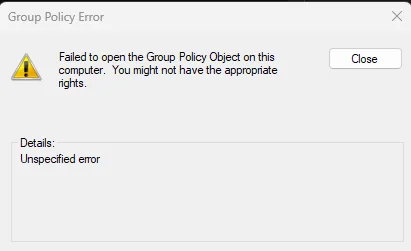
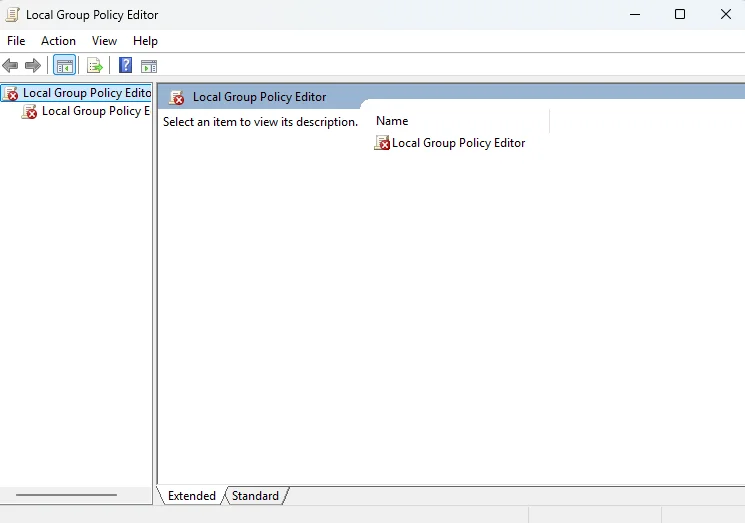
When the above happened, I did "sfc /scannow" and it did some repairs but the above still happens.
Then I did "DISM /Online /Cleanup-Image /RestoreHealth", it went through 100%, no issues reported, still the above error. Give up.
I had tried many times these few days, running Part A and Part B. Tried also rebooting twice consecutively, also waited 5 minutes and longer, still the same results.
Below are the registries:
There's no "UEFICA2023Status" under Settings.
SBAT UpdateStatus is "3", I don't have WSL2 or installed any Linux Distro on this Workstation. Understand this is related to Linux Distro, maybe can disable it later, from what I had Googled.



+++++++++++++++++++++++++++++++++++++++
Lastly:
This is the message from Settings.

Current situation:
EFI is not booting with new CA 2023 certificates.
Current DBX is empty.
All CA 2023 certificates seem installed.
Should I leave the system as it is and continue to monitor?
Thanks.
Firstly, I want to thank all OP and the rest who pitched in with scripts and help responses, really great!
Most of my newer laptops are updated to CA 2023, but I have a Dell Workstation 7960 Tower and Dell Optiplex 7010 that shows some concerns. I also have two Dell Chromebooks that were converted to Windows 11 Pro, having some concerns. Anyway, let me focus on my main device first, which is the Dell Workstation 7960 Tower.
Here's the output from "Check UEFI PK, KEK, DB and DBX":
Checking for Administrator permission...
Running as administrator - continuing execution...
12 May 2026 Manufacturer: Dell Inc. Model: Precision 7960 Tower BIOS: Dell Inc., 2.18.0, 2.18.0, INTEL - 0 Windows version: 25H2 (Build 26200.8328)
Secure Boot status: Enabled
Current UEFI PK
√ Dell Inc. Platform Key
Default UEFI PK
√ Dell Inc. Platform Key
Current UEFI KEK
√ Microsoft Corporation KEK CA 2011 (revoked: False)
√ Microsoft Corporation KEK 2K CA 2023 (revoked: False)
√ Dell Inc. Key Exchange Key (revoked: False)
√ Dell Inc. Key Exchange Key (revoked: False)
Default UEFI KEK
√ Microsoft Corporation KEK CA 2011 (revoked: False)
√ Microsoft Corporation KEK 2K CA 2023 (revoked: False)
√ Dell Inc. Key Exchange Key (revoked: False)
√ Dell Inc. Key Exchange Key (revoked: False)
Current UEFI DB
√ Microsoft Windows Production PCA 2011 (revoked: False)
√ Microsoft Corporation UEFI CA 2011 (revoked: False)
√ Windows UEFI CA 2023 (revoked: False)
√ Microsoft UEFI CA 2023 (revoked: False)
√ Microsoft Option ROM UEFI CA 2023 (revoked: False)
√ Dell Bios DB Key (revoked: False)
√ Dell Bios FW Aux Authority 2018 (revoked: False)
Default UEFI DB
√ Microsoft Windows Production PCA 2011 (revoked: False)
√ Microsoft Corporation UEFI CA 2011 (revoked: False)
√ Windows UEFI CA 2023 (revoked: False)
√ Microsoft UEFI CA 2023 (revoked: False)
√ Microsoft Option ROM UEFI CA 2023 (revoked: False)
√ Dell Bios DB Key (revoked: False)
√ Dell Bios FW Aux Authority 2018 (revoked: False)
Current UEFI DBX
2025-10-14 (v1.6.0) : FAIL: 60 failures, 371 successes detected
Windows Bootmgr SVN : None
Windows cdboot SVN : None
Windows wdsmgfw SVN : None
From BoScript.bat:
Secure Boot: ON
BitLocker on (C:) OFF
UEFI KEK Certs
--------------
Microsoft Corporation KEK CA 2011
Microsoft Corporation KEK 2K CA 2023
UEFI DB Certs
-------------
Microsoft Corporation UEFI CA 2011
Microsoft Windows Production PCA 2011
Microsoft Option ROM UEFI CA 2023
Microsoft UEFI CA 2023
Windows UEFI CA 2023
UEFI DBX Certs
--------------
Microsoft Windows PCA 2010
EFI Files
---------
Disk 8: Boot Manager [Windows UEFI CA 2023] is ALLOWED.
Registry: WindowsUEFICA2023Capable = 1
[Windows UEFI CA 2023] is in UEFI DB.
Bootable Media
--------------
USB N: "HASLEO58206"
Boot File [Windows UEFI CA 2023] is ALLOWED.
+++++++++++++++++++++++++++++++++++++++
So I tried "Apply DBX update.cmd":
Desired AvailableUpdates: 0x2
Current AvailableUpdates: 0x5944
Setting AvailableUpdates to 0x5946
The operation completed successfully.
Starting \Microsoft\Windows\PI\Secure-Boot-Update
Press any key to continue . . .
Then rerun "Check UEFI PK, KEK, DB and DBX.cmd" again, Current UEFI DBX still shows the same as above, and SVN none for all 3
+++++++++++++++++++++++++++++++++++
From Check-SecureBootCerts.ps1:
All true when ran previously. Now it doesn't show anything when I ran. Maybe my Windows 11 25H2 is screwed already. When I tried to launch Gpedit.msc, I end up with a failed error message:
When the above happened, I did "sfc /scannow" and it did some repairs but the above still happens.
Then I did "DISM /Online /Cleanup-Image /RestoreHealth", it went through 100%, no issues reported, still the above error. Give up.
I had tried many times these few days, running Part A and Part B. Tried also rebooting twice consecutively, also waited 5 minutes and longer, still the same results.
Below are the registries:
There's no "UEFICA2023Status" under Settings.
SBAT UpdateStatus is "3", I don't have WSL2 or installed any Linux Distro on this Workstation. Understand this is related to Linux Distro, maybe can disable it later, from what I had Googled.
+++++++++++++++++++++++++++++++++++++++
Lastly:
This is the message from Settings.
Current situation:
EFI is not booting with new CA 2023 certificates.
Current DBX is empty.
All CA 2023 certificates seem installed.
Should I leave the system as it is and continue to monitor?
Thanks.
My Computer
At a glance
Windows 11
- OS
- Windows 11
- Computer type
- PC/Desktop
 SObject) [Write-Error], WriteEr






