
Solved Secure boot update HowTo


Good morning, I only found this thread a few days ago.

Firstly, I want to thank all OP and the rest who pitched in with scripts and help responses, really great!

Most of my newer laptops are updated to CA 2023, but I have a Dell Workstation 7960 Tower and Dell Optiplex 7010 that shows some concerns. I also have two Dell Chromebooks that were converted to Windows 11 Pro, having some concerns. Anyway, let me focus on my main device first, which is the Dell Workstation 7960 Tower.

Here's the output from "Check UEFI PK, KEK, DB and DBX":
Checking for Administrator permission...
Running as administrator - continuing execution...
12 May 2026 Manufacturer: Dell Inc. Model: Precision 7960 Tower BIOS: Dell Inc., 2.18.0, 2.18.0, INTEL - 0 Windows version: 25H2 (Build 26200.8328)

Secure Boot status: Enabled

Current UEFI PK
√ Dell Inc. Platform Key

Default UEFI PK
√ Dell Inc. Platform Key

Current UEFI KEK
√ Microsoft Corporation KEK CA 2011 (revoked: False)
√ Microsoft Corporation KEK 2K CA 2023 (revoked: False)
√ Dell Inc. Key Exchange Key (revoked: False)

Default UEFI KEK
√ Microsoft Corporation KEK CA 2011 (revoked: False)
√ Microsoft Corporation KEK 2K CA 2023 (revoked: False)
√ Dell Inc. Key Exchange Key (revoked: False)

Current UEFI DB
√ Microsoft Windows Production PCA 2011 (revoked: False)
√ Microsoft Corporation UEFI CA 2011 (revoked: False)
√ Windows UEFI CA 2023 (revoked: False)
√ Microsoft UEFI CA 2023 (revoked: False)
√ Microsoft Option ROM UEFI CA 2023 (revoked: False)
√ Dell Bios DB Key (revoked: False)
√ Dell Bios FW Aux Authority 2018 (revoked: False)

Default UEFI DB
√ Microsoft Windows Production PCA 2011 (revoked: False)
√ Microsoft Corporation UEFI CA 2011 (revoked: False)
√ Windows UEFI CA 2023 (revoked: False)
√ Microsoft UEFI CA 2023 (revoked: False)
√ Microsoft Option ROM UEFI CA 2023 (revoked: False)
√ Dell Bios DB Key (revoked: False)
√ Dell Bios FW Aux Authority 2018 (revoked: False)

Current UEFI DBX
2025-10-14 (v1.6.0) : FAIL: 60 failures, 371 successes detected
Windows Bootmgr SVN : None
Windows cdboot SVN : None
Windows wdsmgfw SVN : None


From BoScript.bat:
Secure Boot: ON
BitLocker on (C:) OFF

UEFI KEK Certs
--------------
Microsoft Corporation KEK CA 2011
Microsoft Corporation KEK 2K CA 2023

UEFI DB Certs
-------------
Microsoft Corporation UEFI CA 2011
Microsoft Windows Production PCA 2011
Microsoft Option ROM UEFI CA 2023
Microsoft UEFI CA 2023
Windows UEFI CA 2023

UEFI DBX Certs
--------------
Microsoft Windows PCA 2010

EFI Files
---------
Disk 8: Boot Manager [Windows UEFI CA 2023] is ALLOWED.

Registry: WindowsUEFICA2023Capable = 1
[Windows UEFI CA 2023] is in UEFI DB.

Bootable Media
--------------
USB N: "HASLEO58206"
Boot File [Windows UEFI CA 2023] is ALLOWED.

+++++++++++++++++++++++++++++++++++++++

So I tried "Apply DBX update.cmd":
Desired AvailableUpdates: 0x2
Current AvailableUpdates: 0x5944
Setting AvailableUpdates to 0x5946
The operation completed successfully.
Starting \Microsoft\Windows\PI\Secure-Boot-Update
Press any key to continue . . .

Then rerun "Check UEFI PK, KEK, DB and DBX.cmd" again, Current UEFI DBX still shows the same as above, and SVN none for all 3

+++++++++++++++++++++++++++++++++++

From Check-SecureBootCerts.ps1:
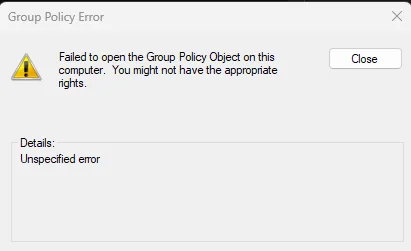
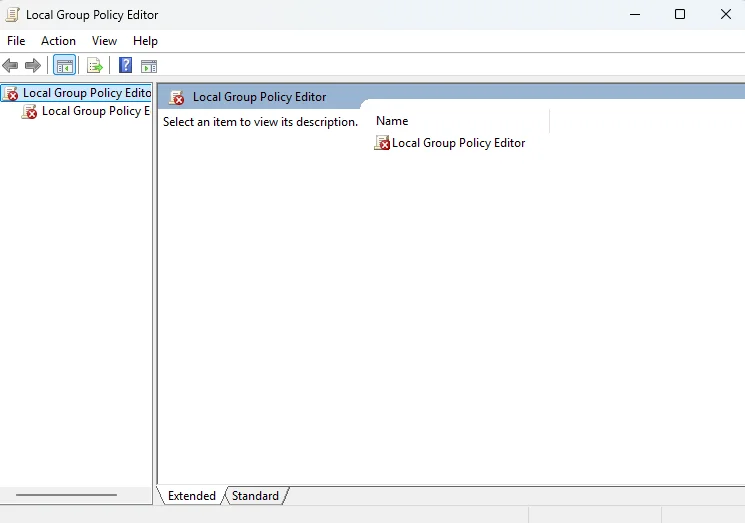
All true when ran previously. Now it doesn't show anything when I ran. Maybe my Windows 11 25H2 is screwed already. When I tried to launch Gpedit.msc, I end up with a failed error message:
Screenshot 2026-05-12 085720.webp

1778547495265.webp

When the above happened, I did "sfc /scannow" and it did some repairs but the above still happens.
Then I did "DISM /Online /Cleanup-Image /RestoreHealth", it went through 100%, no issues reported, still the above error. Give up.

I had tried many times these few days, running Part A and Part B. Tried also rebooting twice consecutively, also waited 5 minutes and longer, still the same results.

Below are the registries:
There's no "UEFICA2023Status" under Settings.
SBAT UpdateStatus is "3", I don't have WSL2 or installed any Linux Distro on this Workstation. Understand this is related to Linux Distro, maybe can disable it later, from what I had Googled.


Screenshot 2026-05-12 090303.webp
Screenshot 2026-05-12 090249.webpScreenshot 2026-05-12 090322.webpScreenshot 2026-05-12 090312.webp

+++++++++++++++++++++++++++++++++++++++

Lastly:
This is the message from Settings.
Screenshot 2026-05-12 090657.webp


Current situation:
EFI is not booting with new CA 2023 certificates.
Current DBX is empty.
All CA 2023 certificates seem installed.

Should I leave the system as it is and continue to monitor?

Thanks.
 

My Computer

System One

  • OS
    Windows 11
    Computer type
    PC/Desktop
BoScript.bat was an outdated work-in-progress script, and shouldn't be used now.

Download my updated script from here:
garlin's PowerShell scripts for updating Secure Boot CA 2023

Code:
Check_UEFI-CA2023.ps1 -Verbose
Here goes:
Set-ExecutionPolicy RemoteSigned

PS C:\Users\tengheng\Downloads\SecureBoot-CA-2023-Updates> .\Check_UEFI-CA2023.ps1
Secure Boot: ON
Virtualization Based Security: ON
BitLocker on (C:) OFF

UEFI KEK Certs
--------------
Microsoft Corporation KEK CA 2011
Microsoft Corporation KEK 2K CA 2023

UEFI DB Certs
-------------
Microsoft Corporation UEFI CA 2011
Microsoft Windows Production PCA 2011
Microsoft Option ROM UEFI CA 2023
Microsoft UEFI CA 2023
Windows UEFI CA 2023

UEFI DBX Certs
--------------
Microsoft Windows PCA 2010
Windows BootMgr SVN is MISSING.

EFI Files
---------
Get-FileHash : The file '\\.\HarddiskVolume12\EFI\Microsoft\Boot\bootmgfw.efi' cannot be read: FileStream
will not open Win32 devices such as disk partitions and tape drives. Avoid use of "\\.\" in the path.
At C:\Users\tengheng\Downloads\SecureBoot-CA-2023-Updates\Check_UEFI-CA2023.ps1:1080 char:31
+ ... $BootMgr_File_Hash = (Get-FileHash -LiteralPath $BootMgr_File).Hash
+ ~~~~~~~~~~~~~~~~~~~~~~~~~~~~~~~~~~~~~~~
+ CategoryInfo : ReadError: (\\.\HarddiskVol...ot\bootmgfw.efi:PSObject) [Write-Error], WriteEr

rorException
+ FullyQualifiedErrorId : FileReadError,Get-FileHash

Windows Boot Manager [Windows UEFI CA 2023] is ALLOWED.

Registry: "WindowsUEFICA2023Capable" = 1
[Windows UEFI CA 2023] in UEFI DB.

[OPTIONAL] SkuSiPolicy.p7b (for VBS) is MISSING.
Get-FileHash : The file '\\.\HarddiskVolume12\EFI\Microsoft\Boot\bootmgfw.efi' cannot be read: FileStream
will not open Win32 devices such as disk partitions and tape drives. Avoid use of "\\.\" in the path.
At C:\Users\tengheng\Downloads\SecureBoot-CA-2023-Updates\Check_UEFI-CA2023.ps1:961 char:27
+ ... $BootMgr_File_Hash = (Get-FileHash -LiteralPath $BootMgr_File).Hash
+ ~~~~~~~~~~~~~~~~~~~~~~~~~~~~~~~~~~~~~~~
+ CategoryInfo : ReadError: (\\.\HarddiskVol...ot\bootmgfw.efi:PSObject) [Write-Error], WriteEr

rorException
+ FullyQualifiedErrorId : FileReadError,Get-FileHash


REQUIRED ACTION
===============

OPTION 1: DO NOTHING AND WAIT. Windows will apply the UEFI updates (PC has supported BIOS).

OPTION 2: To update Windows Boot Manager [UEFI CA 2023] WITHOUT REVOKING the [PCA 2011] cert, run the command
s:

reg add HKEY_LOCAL_MACHINE\SYSTEM\CurrentControlSet\Control\Secureboot /v AvailableUpdates /t REG_DWORD /d
0x100 /f
powershell Start-ScheduledTask -TaskName "\Microsoft\Windows\PI\Secure-Boot-Update"


OPTION 3: To update Windows Boot Manager [UEFI CA 2023] and REVOKE the [PCA 2011] cert, run the commands:

reg add HKEY_LOCAL_MACHINE\SYSTEM\CurrentControlSet\Control\Secureboot /v AvailableUpdates /t REG_DWORD /d
0x382 /f
powershell Start-ScheduledTask -TaskName "\Microsoft\Windows\PI\Secure-Boot-Update"

+++++++++++++
 

My Computer

System One

  • OS
    Windows 11
    Computer type
    PC/Desktop
Here goes:
Set-ExecutionPolicy RemoteSigned

PS C:\Users\tengheng\Downloads\SecureBoot-CA-2023-Updates> .\Check_UEFI-CA2023.ps1
Secure Boot: ON
Virtualization Based Security: ON
BitLocker on (C:) OFF

UEFI KEK Certs
--------------
Microsoft Corporation KEK CA 2011
Microsoft Corporation KEK 2K CA 2023

UEFI DB Certs
-------------
Microsoft Corporation UEFI CA 2011
Microsoft Windows Production PCA 2011
Microsoft Option ROM UEFI CA 2023
Microsoft UEFI CA 2023
Windows UEFI CA 2023

UEFI DBX Certs
--------------
Microsoft Windows PCA 2010
Windows BootMgr SVN is MISSING.

EFI Files
---------
Get-FileHash : The file '\\.\HarddiskVolume12\EFI\Microsoft\Boot\bootmgfw.efi' cannot be read: FileStream
will not open Win32 devices such as disk partitions and tape drives. Avoid use of "\\.\" in the path.
At C:\Users\tengheng\Downloads\SecureBoot-CA-2023-Updates\Check_UEFI-CA2023.ps1:1080 char:31
+ ... $BootMgr_File_Hash = (Get-FileHash -LiteralPath $BootMgr_File).Hash
+ ~~~~~~~~~~~~~~~~~~~~~~~~~~~~~~~~~~~~~~~
+ CategoryInfo : ReadError: (\\.\HarddiskVol...ot\bootmgfw.efi:PSObject) [Write-Error], WriteEr

rorException
+ FullyQualifiedErrorId : FileReadError,Get-FileHash

Windows Boot Manager [Windows UEFI CA 2023] is ALLOWED.

Registry: "WindowsUEFICA2023Capable" = 1
[Windows UEFI CA 2023] in UEFI DB.

[OPTIONAL] SkuSiPolicy.p7b (for VBS) is MISSING.
Get-FileHash : The file '\\.\HarddiskVolume12\EFI\Microsoft\Boot\bootmgfw.efi' cannot be read: FileStream
will not open Win32 devices such as disk partitions and tape drives. Avoid use of "\\.\" in the path.
At C:\Users\tengheng\Downloads\SecureBoot-CA-2023-Updates\Check_UEFI-CA2023.ps1:961 char:27
+ ... $BootMgr_File_Hash = (Get-FileHash -LiteralPath $BootMgr_File).Hash
+ ~~~~~~~~~~~~~~~~~~~~~~~~~~~~~~~~~~~~~~~
+ CategoryInfo : ReadError: (\\.\HarddiskVol...ot\bootmgfw.efi:PSObject) [Write-Error], WriteEr

rorException
+ FullyQualifiedErrorId : FileReadError,Get-FileHash


REQUIRED ACTION
===============

OPTION 1: DO NOTHING AND WAIT. Windows will apply the UEFI updates (PC has supported BIOS).

OPTION 2: To update Windows Boot Manager [UEFI CA 2023] WITHOUT REVOKING the [PCA 2011] cert, run the command
s:

reg add HKEY_LOCAL_MACHINE\SYSTEM\CurrentControlSet\Control\Secureboot /v AvailableUpdates /t REG_DWORD /d
0x100 /f
powershell Start-ScheduledTask -TaskName "\Microsoft\Windows\PI\Secure-Boot-Update"


OPTION 3: To update Windows Boot Manager [UEFI CA 2023] and REVOKE the [PCA 2011] cert, run the commands:

reg add HKEY_LOCAL_MACHINE\SYSTEM\CurrentControlSet\Control\Secureboot /v AvailableUpdates /t REG_DWORD /d
0x382 /f
powershell Start-ScheduledTask -TaskName "\Microsoft\Windows\PI\Secure-Boot-Update"

+++++++++++++
Hmm, seems like my 2TB hard disk have two big partitions, C drive of 991 GB and another unknown 868 GB. There's also two other unknown partitions, which I below are WinRE partitions for both the 991 and 868 partitions. I have wasted space. I might have to attempt removing the 868 and 1.41 GB partitions and expand the 991 GB at a later stage.

I think 868 GB and 1.41 GB are from Dell's recovery image that I did previously. Such a waste of previous space. I think I should remove it.


Screenshot 2026-05-12 102009.webp

Screenshot 2026-05-12 102023.webp
 

My Computer

System One

  • OS
    Windows 11
    Computer type
    PC/Desktop
Hmm, seems like my 2TB hard disk have two big partitions, C drive of 991 GB and another unknown 868 GB. There's also two other unknown partitions, which I below are WinRE partitions for both the 991 and 868 partitions. I have wasted space. I might have to attempt removing the 868 and 1.41 GB partitions and expand the 991 GB at a later stage.

I think 868 GB and 1.41 GB are from Dell's recovery image that I did previously. Such a waste of previous space. I think I should remove it.


View attachment 171215

View attachment 171214
Rerun with -Audit:

PS C:\Users\tengheng\Downloads\SecureBoot-CA-2023-Updates> .\Check_UEFI-CA2023.ps1 -Audit
Secure Boot: ON
Virtualization Based Security: ON
BitLocker on (C:) OFF

UEFI KEK Certs
--------------
Microsoft Corporation KEK CA 2011
Microsoft Corporation KEK 2K CA 2023

UEFI DB Certs
-------------
Microsoft Corporation UEFI CA 2011
Microsoft Windows Production PCA 2011
Microsoft Option ROM UEFI CA 2023
Microsoft UEFI CA 2023
Windows UEFI CA 2023

UEFI DBX Certs
--------------
Microsoft Windows PCA 2010
Windows BootMgr SVN is MISSING.

EFI Files
---------
Get-FileHash : The file '\\.\HarddiskVolume12\EFI\Microsoft\Boot\bootmgfw.efi' cannot be read: FileStream will not open Win32 devices such as disk
partitions and tape drives. Avoid use of "\\.\" in the path.
At C:\Users\tengheng\Downloads\SecureBoot-CA-2023-Updates\Check_UEFI-CA2023.ps1:1080 char:31
+ ... $BootMgr_File_Hash = (Get-FileHash -LiteralPath $BootMgr_File).Hash
+ ~~~~~~~~~~~~~~~~~~~~~~~~~~~~~~~~~~~~~~~
+ CategoryInfo : ReadError: (\\.\HarddiskVol...ot\bootmgfw.efi:PSObject) [Write-Error], WriteErrorException
+ FullyQualifiedErrorId : FileReadError,Get-FileHash

Windows Boot Manager [Windows UEFI CA 2023] is ALLOWED.

Registry: "WindowsUEFICA2023Capable" = 1
[Windows UEFI CA 2023] in UEFI DB.

[OPTIONAL] SkuSiPolicy.p7b (for VBS) is MISSING.
Get-FileHash : The file '\\.\HarddiskVolume12\EFI\Microsoft\Boot\bootmgfw.efi' cannot be read: FileStream will not open Win32 devices such as disk
partitions and tape drives. Avoid use of "\\.\" in the path.
At C:\Users\tengheng\Downloads\SecureBoot-CA-2023-Updates\Check_UEFI-CA2023.ps1:961 char:27
+ ... $BootMgr_File_Hash = (Get-FileHash -LiteralPath $BootMgr_File).Hash
+ ~~~~~~~~~~~~~~~~~~~~~~~~~~~~~~~~~~~~~~~
+ CategoryInfo : ReadError: (\\.\HarddiskVol...ot\bootmgfw.efi:PSObject) [Write-Error], WriteErrorException
+ FullyQualifiedErrorId : FileReadError,Get-FileHash

AUDIT REPORT
============
1. [Production PCA 2011] is missing from UEFI DBX
2. DBX Updates are missing from UEFI DBX
3. Windows BootMgr SVN is missing from UEFI DBX
4. Windows Boot Manager [Windows UEFI CA 2023] is wrong version

[OPTIONAL] SkuSiPolicy.p7b (for VBS) is missing from EFI


REQUIRED ACTION
===============

OPTION 1: DO NOTHING AND WAIT. Windows will apply the UEFI updates (PC has supported BIOS).

OPTION 2: To update Windows Boot Manager [UEFI CA 2023] WITHOUT REVOKING the [PCA 2011] cert, run the commands:

reg add HKEY_LOCAL_MACHINE\SYSTEM\CurrentControlSet\Control\Secureboot /v AvailableUpdates /t REG_DWORD /d 0x100 /f
powershell Start-ScheduledTask -TaskName "\Microsoft\Windows\PI\Secure-Boot-Update"


OPTION 3: To update Windows Boot Manager [UEFI CA 2023] and REVOKE the [PCA 2011] cert, run the commands:

reg add HKEY_LOCAL_MACHINE\SYSTEM\CurrentControlSet\Control\Secureboot /v AvailableUpdates /t REG_DWORD /d 0x382 /f
powershell Start-ScheduledTask -TaskName "\Microsoft\Windows\PI\Secure-Boot-Update"

++++++++++

From the Audit Report, my highest concern is point 4, Windows Boot manager [Windows UEFI CA 2023] is wrong version. But it seems to be because the script is checking volume 12 which is the Dell Recovery Partition, not my Drive C partition.

I can go for OPTION 2 must from my previous testing of using the commands and even scripts, I think it will show the same results, unless I remove the Dell Recovery Partitions before rerunning the script.
 

My Computer

System One

  • OS
    Windows 11
    Computer type
    PC/Desktop
Your BIOS has the CA 2023 certs, but has not banned PCA 2011 (which is optional for now).

The Get-FileHash error is new for me. Can you run "bcdedit /enum"?
 

My Computer

System One

  • OS
    Windows 7
Your BIOS has the CA 2023 certs, but has not banned PCA 2011 (which is optional for now).

The Get-FileHash error is new for me. Can you run "bcdedit /enum"?
PS C:\Windows\System32> bcdedit /enum

Windows Boot Manager
--------------------
identifier {bootmgr}
device partition=\Device\HarddiskVolume12
path \EFI\Microsoft\Boot\bootmgfw.efi
description Windows Boot Manager
locale en-us
inherit {globalsettings}
default {default}
resumeobject {89f8032d-4dad-11f1-a58d-8c86dd70db27}
displayorder {default}
toolsdisplayorder {memdiag}
timeout 30

Windows Boot Loader
-------------------
identifier {default}
device partition=C:
path \Windows\system32\winload.efi
description Windows 11
locale en-us
inherit {bootloadersettings}
isolatedcontext Yes
allowedinmemorysettings 0x15000075
osdevice partition=C:
systemroot \Windows
resumeobject {89f8032d-4dad-11f1-a58d-8c86dd70db27}
nx OptIn
bootmenupolicy Standard
 

My Computer

System One

  • OS
    Windows 11
    Computer type
    PC/Desktop
This is April 2026 Preview, I don't have this release. I'm wondering if MS changed something to break "\\.\HarddiskVolume"

Does this command work in CMD?
Code:
dir \\.\HarddiskVolume12\EFI\Microsoft\Boot\bootmgfw.efi
 

My Computer

System One

  • OS
    Windows 7
This is April 2026 Preview, I don't have this release. I'm wondering if MS changed something to break "\\.\HarddiskVolume"

Does this command work in CMD?
Code:
dir \\.\HarddiskVolume12\EFI\Microsoft\Boot\bootmgfw.efi
PS C:\Windows\System32> dir \\.\HarddiskVolume12\EFI\Microsoft\Boot\bootmgfw.efi


Directory: \\.\HarddiskVolume12\EFI\Microsoft\Boot


Mode LastWriteTime Length Name
---- ------------- ------ ----
-a---- 11-May-26 6:37 PM 3010440 bootmgfw.efi


PS C:\Windows\System32>
 

My Computer

System One

  • OS
    Windows 11
    Computer type
    PC/Desktop
Are you using PowerShell 5 or 7? Is there a 3rd-party antivirus product?
I've never seen the "FileStream will not open Win32 devices such as disk partitions and tape drives." message before.

Code:
Get-FileHash \\.\HarddiskVolume12\EFI\Microsoft\Boot\bootmgfw.efi
Get-FileHash -LiteralPath \\.\HarddiskVolume12\EFI\Microsoft\Boot\bootmgfw.efi
 

My Computer

System One

  • OS
    Windows 7
Are you using PowerShell 5 or 7? Is there a 3rd-party antivirus product?
I've never seen the "FileStream will not open Win32 devices such as disk partitions and tape drives." message before.

Code:
Get-FileHash \\.\HarddiskVolume12\EFI\Microsoft\Boot\bootmgfw.efi
Get-FileHash -LiteralPath \\.\HarddiskVolume12\EFI\Microsoft\Boot\bootmgfw.efi
PS C:\Windows\System32> # Windows PowerShell (<=5.1)
PS C:\Windows\System32> Get-ItemPropertyValue -Path HKLM:\SOFTWARE\Microsoft\PowerShell\3\PowerShellEngine -Name PowerShellVersion
5.1.26100.1882
PS C:\Windows\System32> # PowerShell 7+
PS C:\Windows\System32> Get-ItemPropertyValue -Path HKLM:\SOFTWARE\Microsoft\PowerShellCore\InstalledVersions\31ab5147-9a97-4452-8443-d9709f0516e1 -Name SemanticVersion

No 3rd-party antivirus. Using Windows Defender.


Get-FileHash \\.\HarddiskVolume12\EFI\Microsoft\Boot\bootmgfw.efi
>>
>>

Algorithm Hash Path
--------- ---- ----
SHA256 187AFB2FCD0662FCEB3F4352AF1BDF751C54886DD51B0F9E21EF5E05156D5555 \\.\HarddiskVolume12\EFI\Micr...


PS C:\Windows\System32> Get-FileHash -LiteralPath \\.\HarddiskVolume12\EFI\Microsoft\Boot\bootmgfw.efi

Algorithm Hash Path
--------- ---- ----
SHA256 187AFB2FCD0662FCEB3F4352AF1BDF751C54886DD51B0F9E21EF5E05156D5555 \\.\HarddiskVolume12\EFI\Micr...
 

My Computer

System One

  • OS
    Windows 11
    Computer type
    PC/Desktop
Any way, run these commands to install the CA 2023 boot manager:
Code:
reg add HKEY_LOCAL_MACHINE\SYSTEM\CurrentControlSet\Control\Secureboot /v AvailableUpdates /t REG_DWORD /d 0x100 /f
powershell Start-ScheduledTask -TaskName "\Microsoft\Windows\PI\Secure-Boot-Update"

After the status changes to 0x0, you can use 0x282 to revoke the PCA 2011 cert and perform the other revocation tasks.
 

My Computer

System One

  • OS
    Windows 7
Any way, run these commands to install the CA 2023 boot manager:
Code:
reg add HKEY_LOCAL_MACHINE\SYSTEM\CurrentControlSet\Control\Secureboot /v AvailableUpdates /t REG_DWORD /d 0x100 /f
powershell Start-ScheduledTask -TaskName "\Microsoft\Windows\PI\Secure-Boot-Update"

After the status changes to 0x0, you can use 0x282 to revoke the PCA 2011 cert and perform the other revocation tasks.
Noted with thanks. With this device registries not showing up all the expected registries which others could, I doubt status will appear at all. I have another device with same issue of registries not appearing as well, which I am going to try running Windows setup upgrade from Windows, and see how it goes.
 

My Computer

System One

  • OS
    Windows 11
    Computer type
    PC/Desktop
Noted with thanks. With this device registries not showing up all the expected registries which others could, I doubt status will appear at all. I have another device with same issue of registries not appearing as well, which I am going to try running Windows setup upgrade from Windows, and see how it goes.
On the other device, I completed the Windows reinstall/setup. Now the registries are appearing and status is showing in progress.

+++++
PS C:\Users\tengh\Downloads\SecureBoot-CA-2023-Updates> .\Update_UEFI-CA2023.ps1
Get-FileHash : The file '\\.\HarddiskVolume1\EFI\Microsoft\Boot\bootmgfw.efi' cannot be read: FileStream will not open Win32 devices
such as disk partitions and tape drives. Avoid use of "\\.\" in the path.
At C:\Users\tengh\Downloads\SecureBoot-CA-2023-Updates\Update_UEFI-CA2023.ps1:768 char:27
+ ... $BootMgr_File_Hash = (Get-FileHash -LiteralPath $BootMgr_File).Hash
+ ~~~~~~~~~~~~~~~~~~~~~~~~~~~~~~~~~~~~~~~
+ CategoryInfo : ReadError: (\\.\HarddiskVol...ot\bootmgfw.efi:PSObject) [Write-Error], WriteErrorException
+ FullyQualifiedErrorId : FileReadError,Get-FileHash

ERROR: Failed to append "DBUpdateOROM2023.bin" to UEFI DB.
Wrong signature for this UEFI variable.

+++++

PS C:\Users\tengh\Downloads\SecureBoot-CA-2023-Updates> .\Check_UEFI-CA2023.ps1
Secure Boot: ON
Virtualization Based Security: OFF
BitLocker on (C:) OFF

UEFI KEK Certs
--------------
Microsoft Corporation KEK CA 2011
Microsoft Corporation KEK 2K CA 2023

UEFI DB Certs
-------------
Microsoft Corporation UEFI CA 2011
Microsoft Windows Production PCA 2011
Microsoft UEFI CA 2023
Windows UEFI CA 2023

UEFI DBX Certs
--------------
(NONE)
Windows BootMgr SVN is MISSING.

EFI Files
---------
Get-FileHash : The file '\\.\HarddiskVolume1\EFI\Microsoft\Boot\bootmgfw.efi' cannot be read: FileStream will not open Win32 devices
such as disk partitions and tape drives. Avoid use of "\\.\" in the path.
At C:\Users\tengh\Downloads\SecureBoot-CA-2023-Updates\Check_UEFI-CA2023.ps1:1080 char:31
+ ... $BootMgr_File_Hash = (Get-FileHash -LiteralPath $BootMgr_File).Hash
+ ~~~~~~~~~~~~~~~~~~~~~~~~~~~~~~~~~~~~~~~
+ CategoryInfo : ReadError: (\\.\HarddiskVol...ot\bootmgfw.efi:PSObject) [Write-Error], WriteErrorException
+ FullyQualifiedErrorId : FileReadError,Get-FileHash

Windows Boot Manager [Windows UEFI CA 2023] is ALLOWED.

Registry: "WindowsUEFICA2023Capable" = 2
[Windows UEFI CA 2023] in UEFI DB, and Windows starting from CA 2023 Boot Manager.
Get-FileHash : The file '\\.\HarddiskVolume1\EFI\Microsoft\Boot\bootmgfw.efi' cannot be read: FileStream will not open Win32 devices
such as disk partitions and tape drives. Avoid use of "\\.\" in the path.
At C:\Users\tengh\Downloads\SecureBoot-CA-2023-Updates\Check_UEFI-CA2023.ps1:961 char:27
+ ... $BootMgr_File_Hash = (Get-FileHash -LiteralPath $BootMgr_File).Hash
+ ~~~~~~~~~~~~~~~~~~~~~~~~~~~~~~~~~~~~~~~
+ CategoryInfo : ReadError: (\\.\HarddiskVol...ot\bootmgfw.efi:PSObject) [Write-Error], WriteErrorException
+ FullyQualifiedErrorId : FileReadError,Get-FileHash


REQUIRED ACTION
===============

OPTION 1: DO NOTHING AND WAIT. Windows will apply the UEFI updates (PC has supported BIOS).

OPTION 2: To install [UEFI CA 2023] certs WITHOUT REVOKING the [PCA 2011] cert, run the commands:

reg add HKEY_LOCAL_MACHINE\SYSTEM\CurrentControlSet\Control\Secureboot /v AvailableUpdates /t REG_DWORD /d 0x4900 /f
powershell Start-ScheduledTask -TaskName "\Microsoft\Windows\PI\Secure-Boot-Update"


OPTION 3: To install [UEFI CA 2023] certs and REVOKE the [PCA 2011] cert, run the commands:

reg add HKEY_LOCAL_MACHINE\SYSTEM\CurrentControlSet\Control\Secureboot /v AvailableUpdates /t REG_DWORD /d 0x4b82 /f
powershell Start-ScheduledTask -TaskName "\Microsoft\Windows\PI\Secure-Boot-Update"


PS C:\Users\tengh\Downloads\SecureBoot-CA-2023-Updates>

+++++

Windows PowerShell
Copyright (C) Microsoft Corporation. All rights reserved.

Install the latest PowerShell for new features and improvements! Windows PowerShell update message FAQ - PowerShell

ERROR: Failed to append "DBUpdateOROM2023.bin" to UEFI DB.
Wrong signature for this UEFI variable.

+++++++++++++++++++++++

PS C:\Users\tengh\Downloads\SecureBoot-CA-2023-Updates> .\Check-DBX.bat
Windows PowerShell
Copyright (C) Microsoft Corporation. All rights reserved.

Install the latest PowerShell for new features and improvements! Windows PowerShell update message FAQ - PowerShell

FAILED: Missing 58/278 EFI signatures from "dbxupdate.bin"
FAILED: Missing 3/3 SVN signatures from "DBXUpdate2024.bin"
FAILED: Missing 3/3 SVN signatures from "DBXUpdateSVN.bin"

+++++++++++++

Screenshot 2026-05-12 204017.webpScreenshot 2026-05-12 204004.webpScreenshot 2026-05-12 203951.webpScreenshot 2026-05-12 203932.webp1778589734740.webp
 

My Computer

System One

  • OS
    Windows 11
    Computer type
    PC/Desktop
I think I understand why you're having Secure Boot update problems. This is a Dell Latitude 7410 Chromebook ("Drallion"), running custom firmware (MrChromebox). The Secure Boot update task is probably confused and won't update it.

I still have no idea why your boot manager cannot be read by Get-FileHash, but here's two special versions of the check & update script which reverts to an older method of reading the EFI partition.

Code:
Drallion_Update_UEFI-CA2023.ps1 -Revoke

Drallion_Check_UEFI-CA2023.ps1 -Verbose
 

Attachments

My Computer

System One

  • OS
    Windows 7
I think I understand why you're having Secure Boot update problems. This is a Dell Latitude 7410 Chromebook ("Drallion"), running custom firmware (MrChromebox). The Secure Boot update task is probably confused and won't update it.

I still have no idea why your boot manager cannot be read by Get-FileHash, but here's two special versions of the check & update script which reverts to an older method of reading the EFI partition.

Code:
Drallion_Update_UEFI-CA2023.ps1 -Revoke

Drallion_Check_UEFI-CA2023.ps1 -Verbose
I’ll try on the second device.

Should I try on first device which is not a Chromebook converted to Windows 11?

The two commands, first will revoke the CA 2011, so CA 2033 cuts in, and the 3 missing files will get copied into DBX?

The second command provides more details, I believe.
 

My Computer

System One

  • OS
    Windows 11
    Computer type
    PC/Desktop
The Chromebook might have issues since it's not a factory supported BIOS.

Assuming you have a mostly working BIOS, the update script (using the -Revoke option) should be able to append the DBX certs. The script is using high-level PowerShell functions to write data to the UEFI Secure Boot variables. It doesn't care what kind of machine sits underneath.

As long as the Windows SecureBoot.Commands library can work with the BIOS, it will append new DBX entries. The worse thing than can happen is the write append fails, leaving the PC exactly as it was before.
 

My Computer

System One

  • OS
    Windows 7
I think I understand why you're having Secure Boot update problems. This is a Dell Latitude 7410 Chromebook ("Drallion"), running custom firmware (MrChromebox). The Secure Boot update task is probably confused and won't update it.

I still have no idea why your boot manager cannot be read by Get-FileHash, but here's two special versions of the check & update script which reverts to an older method of reading the EFI partition.

Code:
Drallion_Update_UEFI-CA2023.ps1 -Revoke

Drallion_Check_UEFI-CA2023.ps1 -Verbose
I’ll try on the second device.

Should I try on first device which is not a Chromebook converted to Windows 11?

The two commands, first will revoke the CA 2011, so CA 2033 cuts in, and the 3 missing files will get copied into DBX?

The second command provides more details, I believe
The Chromebook might have issues since it's not a factory supported BIOS.

Assuming you have a mostly working BIOS, the update script (using the -Revoke option) should be able to append the DBX certs. The script is using high-level PowerShell functions to write data to the UEFI Secure Boot variables. It doesn't care what kind of machine sits underneath.

As long as the Windows SecureBoot.Commands library can work with the BIOS, it will append new DBX entries. The worse thing than can happen is the write append fails, leaving the PC exactly as it was before.

Here's the result for the Chromebook/Windows 11 device.

Should I try on the first device, i.e. the Workstation?


PS C:\users\tengh\Downloads> .\Drallion_Check_UEFI-CA2023.ps1 verbose

Security warning
Run only scripts that you trust. While scripts from the internet can be useful, this script can potentially harm your
computer. If you trust this script, use the Unblock-File cmdlet to allow the script to run without this warning
message. Do you want to run C:\users\tengh\Downloads\Drallion_Check_UEFI-CA2023.ps1?
[D] Do not run [R] Run once Suspend [?] Help (default is "D"): r
Secure Boot: ON
Virtualization Based Security: OFF
BitLocker on (C:) OFF

UEFI KEK Certs
--------------
Microsoft Corporation KEK CA 2011
Microsoft Corporation KEK 2K CA 2023

UEFI DB Certs
-------------
Microsoft Corporation UEFI CA 2011
Microsoft Windows Production PCA 2011
Microsoft UEFI CA 2023
Windows UEFI CA 2023

UEFI DBX Certs
--------------
(NONE)

EFI Files
---------
Windows Boot Manager [Windows UEFI CA 2023] is ALLOWED.

Registry: "WindowsUEFICA2023Capable" = 2
[Windows UEFI CA 2023] in UEFI DB, and Windows starting from CA 2023 Boot Manager.


REQUIRED ACTION
===============

OPTION 1: DO NOTHING AND WAIT. Windows will apply the UEFI updates (PC has supported BIOS).

OPTION 2: To install [UEFI CA 2023] certs WITHOUT REVOKING the [PCA 2011] cert, run the commands:

reg add HKEY_LOCAL_MACHINE\SYSTEM\CurrentControlSet\Control\Secureboot /v AvailableUpdates /t REG_DWORD /d 0x4900 /f
powershell Start-ScheduledTask -TaskName "\Microsoft\Windows\PI\Secure-Boot-Update"


OPTION 3: To install [UEFI CA 2023] certs and REVOKE the [PCA 2011] cert, run the commands:

reg add HKEY_LOCAL_MACHINE\SYSTEM\CurrentControlSet\Control\Secureboot /v AvailableUpdates /t REG_DWORD /d 0x4b82 /f
powershell Start-ScheduledTask -TaskName "\Microsoft\Windows\PI\Secure-Boot-Update"


========

PS C:\users\tengh\Downloads> .\Drallion_Update_UEFI-CA2023.ps1 -Revoke

Security warning
Run only scripts that you trust. While scripts from the internet can be useful, this script can potentially harm your
computer. If you trust this script, use the Unblock-File cmdlet to allow the script to run without this warning
message. Do you want to run C:\users\tengh\Downloads\Drallion_Update_UEFI-CA2023.ps1?
[D] Do not run [R] Run once Suspend [?] Help (default is "D"): r
ERROR: Failed to append "DBUpdateOROM2023.bin" to UEFI DB.
Wrong signature for this UEFI variable.
 

My Computer

System One

  • OS
    Windows 11
    Computer type
    PC/Desktop
Update script called with the Revoke option will:

1. Add PCA 2011 to the DBX.
2. Add any missing EFI signatures from DBXUpdate.bin
3. Add the SVN number from DBXUpdateSVN.bin
4. Add the SBAT level

It doesn't matter which PC you try. The script ties to non-destructively append any missing certs using a PS function call. If it works, great. If you get an error, then you have some BIOS-related issue which the script cannot deal with.
 

My Computer

System One

  • OS
    Windows 7
Update script called with the Revoke option will:

1. Add PCA 2011 to the DBX.
2. Add any missing EFI signatures from DBXUpdate.bin
3. Add the SVN number from DBXUpdateSVN.bin
4. Add the SBAT level

It doesn't matter which PC you try. The script ties to non-destructively append any missing certs using a PS function call. If it works, great. If you get an error, then you have some BIOS-related issue which the script cannot deal with.
Here's the results for the first device. Seems like the CA 2011 certs had been completed, files copied. I noticed Credential Guard is on for SBAT, Illegal characters in path error. Maybe I should turn off Credential Guard via registries and re-run revoke. I am also keen to use the latest ISO to run re-install of the OS as my gpedit.msc is broken, and who knows what else is broken. That would probably solve and also the registries too.

.\Drallion_Check_UEFI-CA2023.ps1 -Verbose

Windows 11 25H2 (26200.8328)
Secure Boot: ON
Virtualization Based Security: ON
BitLocker on (C:) OFF


BIOS Firmware
-------------
Dell Inc. Precision 7960 Tower
Version: 2.18.0
Date: 2026-01-27


Factory Default UEFI PK Cert
----------------------------
Dell Inc. Platform Key

UEFI PK Cert
------------
Dell Inc. Platform Key

Factory Default UEFI KEK Certs
------------------------------
Microsoft Corporation KEK CA 2011
Microsoft Corporation KEK 2K CA 2023
Dell Inc. Key Exchange Key

UEFI KEK Certs
-------------
Microsoft Corporation KEK CA 2011
Microsoft Corporation KEK 2K CA 2023
Dell Inc. Key Exchange Key

Factory Default UEFI DB Certs
-----------------------------
Microsoft Corporation UEFI CA 2011
Microsoft Windows Production PCA 2011
Dell Bios FW Aux Authority 2018
Microsoft Option ROM UEFI CA 2023
Microsoft UEFI CA 2023
Windows UEFI CA 2023
Dell Bios DB Key

UEFI DB Certs
-------------
Microsoft Corporation UEFI CA 2011
Microsoft Windows Production PCA 2011
Dell Bios FW Aux Authority 2018
Microsoft Option ROM UEFI CA 2023
Microsoft UEFI CA 2023
Windows UEFI CA 2023
Dell Bios DB Key

Factory Default UEFI DBX Certs
------------------------------
Microsoft Windows PCA 2010
EFI_CERT_SHA256_GUID Signatures: 371

UEFI DBX Certs
--------------
Microsoft Windows PCA 2010
Windows BootMgr SVN is MISSING.
EFI_CERT_SHA256_GUID Signatures: 371

UEFI Variables
--------------
Credential Guard: ON
SBAT (Linux only): sbat,1,2024010900 / shim,4 / grub,3 / grub.debian,4
Illegal characters in path.

.\Drallion_Update_UEFI-CA2023.ps1 -Revoke:
Get-PfxCertificate : Illegal characters in path.
At C:\users\tengheng\Downloads\Drallion_Update_UEFI-CA2023.ps1:765 char:14
+ $null = (Get-PfxCertificate -LiteralPath $BootMgr_File).Issuer -m ...
+ ~~~~~~~~~~~~~~~~~~~~~~~~~~~~~~~~~~~~~~~~~~~~~
+ CategoryInfo : NotSpecified: (:) [Get-PfxCertificate], ArgumentException
+ FullyQualifiedErrorId : System.ArgumentException,Microsoft.PowerShell.Commands.GetPfxCertificateComman
d

Cannot index into a null array.
At C:\users\tengheng\Downloads\Drallion_Update_UEFI-CA2023.ps1:766 char:5
+ $PFXCert = $Matches[2]
+ ~~~~~~~~~~~~~~~~~~~~~~
+ CategoryInfo : InvalidOperation: (:) [], RuntimeException
+ FullyQualifiedErrorId : NullArray

Get-FileHash : The file '\\?\Volume{c32677f1-1917-4145-9cff-2526af9013cd}\EFI\Microsoft\Boot\bootmgfw.efi'
cannot be read: Illegal characters in path.
At C:\users\tengheng\Downloads\Drallion_Update_UEFI-CA2023.ps1:768 char:27
+ ... $BootMgr_File_Hash = (Get-FileHash -LiteralPath $BootMgr_File).Hash
+ ~~~~~~~~~~~~~~~~~~~~~~~~~~~~~~~~~~~~~~~
+ CategoryInfo : ReadError: (\\?\Volume{c326...ot\bootmgfw.efi:PSObject) [Write-Error], WriteEr
rorException
+ FullyQualifiedErrorId : FileReadError,Get-FileHash

Successfully appended "dbxupdate.bin" to UEFI DBX.
Successfully appended "DBXUpdate2024.bin" to UEFI DBX.
Successfully appended "DBXUpdateSVN.bin" (SVN 8.0) to UEFI DBX.
Get-FileHash : The file '\\?\Volume{c32677f1-1917-4145-9cff-2526af9013cd}\EFI\Microsoft\Boot\bootmgfw.efi'
cannot be read: Illegal characters in path.
At C:\users\tengheng\Downloads\Drallion_Update_UEFI-CA2023.ps1:1453 char:31
+ ... $BootMgr_File_Hash = (Get-FileHash -LiteralPath $BootMgr_File).Hash
+ ~~~~~~~~~~~~~~~~~~~~~~~~~~~~~~~~~~~~~~~
+ CategoryInfo : ReadError: (\\?\Volume{c326...ot\bootmgfw.efi:PSObject) [Write-Error], WriteEr
rorException
+ FullyQualifiedErrorId : FileReadError,Get-FileHash

Copying EFI boot files.

REQUIRED ACTION
---------------
Restart Windows, for UEFI updates to take effect.


AFTER RESTART:
PS C:\Users\tengheng\Downloads> .\Drallion_Check_UEFI-CA2023.ps1 -verbose
Windows 11 25H2 (26200.8328)

Secure Boot: ON
Virtualization Based Security: ON
BitLocker on (C:) OFF

BIOS Firmware
-------------
Dell Inc. Precision 7960 Tower
Version: 2.18.0
Date: 2026-01-27

Factory Default UEFI PK Cert
----------------------------
Dell Inc. Platform Key

UEFI PK Cert
------------
Dell Inc. Platform Key

Factory Default UEFI KEK Certs
------------------------------
Microsoft Corporation KEK CA 2011
Microsoft Corporation KEK 2K CA 2023
Dell Inc. Key Exchange Key

UEFI KEK Certs
--------------
Microsoft Corporation KEK CA 2011
Microsoft Corporation KEK 2K CA 2023
Dell Inc. Key Exchange Key

Factory Default UEFI DB Certs
-----------------------------
Microsoft Corporation UEFI CA 2011
Microsoft Windows Production PCA 2011
Dell Bios FW Aux Authority 2018
Microsoft Option ROM UEFI CA 2023
Microsoft UEFI CA 2023
Windows UEFI CA 2023
Dell Bios DB Key

UEFI DB Certs
-------------
Microsoft Corporation UEFI CA 2011
Microsoft Windows Production PCA 2011
Dell Bios FW Aux Authority 2018
Microsoft Option ROM UEFI CA 2023
Microsoft UEFI CA 2023
Windows UEFI CA 2023
Dell Bios DB Key

Factory Default UEFI DBX Certs
------------------------------
Microsoft Windows PCA 2010
EFI_CERT_SHA256_GUID Signatures: 371

UEFI DBX Certs
--------------
Microsoft Windows PCA 2010
Microsoft Windows Production PCA 2011
Windows BootMgr SVN 8.0
EFI_CERT_SHA256_GUID Signatures: 433

UEFI Variables
--------------
Credential Guard: ON
SBAT (Linux only): sbat,1,2024010900 / shim,4 / grub,3 / grub.debian,4
Illegal characters in path.
 

My Computer

System One

  • OS
    Windows 11
    Computer type
    PC/Desktop
Back
Top Bottom
