Solved Secure boot update HowTo


You're not following the instructions.

Reset All Keys -> Restores to factory defaults.
Can't use it. We cannot add the Windows OEM Devices certs when the original certs are in place.​

Delete All Keys -> No keys exist in UEFI.
We can run the upgrade script, which detects we're in Setup Mode (no certs).​

We cannot use the manual key enrollment, because this Dell BIOS wants some weird signing format which we're not going to deal with. If I knew what format that is, I might handle it but unfortunately I don't know what it is, nor do I own a Dell of that vintage for testing.

1. Delete All Keys. Disable Secure Boot. Boot into Windows.

2. Run the upgrade script with no arguments. It'll should detect the PC is in Setup Mode. If you get the instructions to manually install the KEK CA 2023, then it's not really in Setup Mode.
 

My Computer

System One

  • OS
    Windows 7
Thank you for your patience; it’s really, really appreciated.
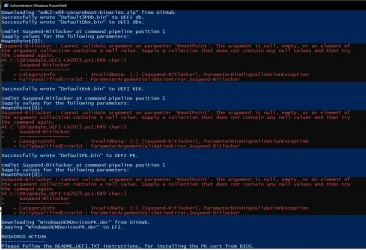
*Deleted all keys → disabled Secure Boot → booted into Windows → ran the upgrade script with no arguments.
*After every “MountPoint[0]: _” line, I waited for 3 minutes before pressing Enter.
______< log >_______

Downloading "edk2-x64-secureboot-binaries.zip" from GitHub.
Successfully wrote "Default3PDb.bin" to UEFI db.
Successfully wrote "DefaultDbx.bin" to UEFI dbx.

cmdlet Suspend-Bitlocker at command pipeline position 1
Supply values for the following parameters:
MountPoint[0]:
Suspend-Bitlocker : Cannot validate argument on parameter 'MountPoint'. The argument is null, empty, or an element of
the argument collection contains a null value. Supply a collection that does not contain any null values and then try
the command again.
At C:\SB\Update_UEFI-CA2023.ps1:649 char:5
+ Suspend-Bitlocker
+ ~~~~~~~~~~~~~~~~~
+ CategoryInfo : InvalidData: (:) [Suspend-Bitlocker], ParameterBindingValidationException
+ FullyQualifiedErrorId : ParameterArgumentValidationError,Suspend-Bitlocker

Successfully wrote "DefaultKek.bin" to UEFI KEK.

cmdlet Suspend-Bitlocker at command pipeline position 1
Supply values for the following parameters:
MountPoint[0]:
Suspend-Bitlocker : Cannot validate argument on parameter 'MountPoint'. The argument is null, empty, or an element of
the argument collection contains a null value. Supply a collection that does not contain any null values and then try
the command again.
At C:\SB\Update_UEFI-CA2023.ps1:649 char:5
+ Suspend-Bitlocker
+ ~~~~~~~~~~~~~~~~~
+ CategoryInfo : InvalidData: (:) [Suspend-Bitlocker], ParameterBindingValidationException
+ FullyQualifiedErrorId : ParameterArgumentValidationError,Suspend-Bitlocker

Successfully wrote "DefaultPk.bin" to UEFI PK.

cmdlet Suspend-Bitlocker at command pipeline position 1
Supply values for the following parameters:
MountPoint[0]:
Suspend-Bitlocker : Cannot validate argument on parameter 'MountPoint'. The argument is null, empty, or an element of
the argument collection contains a null value. Supply a collection that does not contain any null values and then try
the command again.
At C:\SB\Update_UEFI-CA2023.ps1:649 char:5
+ Suspend-Bitlocker
+ ~~~~~~~~~~~~~~~~~
+ CategoryInfo : InvalidData: (:) [Suspend-Bitlocker], ParameterBindingValidationException
+ FullyQualifiedErrorId : ParameterArgumentValidationError,Suspend-Bitlocker

Downloading "WindowsOEMDevicesPK.der" from GitHub.
Copying "WindowsOEMDevicesPK.der" to EFI.

REQUIRED ACTION
---------------
Please follow the README_UEFI.TXT instructions, for installing the PK cert from BIOS.

Restart Windows, for UEFI updates to take effect.

PS C:\Windows\system32>
 

Attachments

  • 1.webp
    1.webp
    143.7 KB · Views: 6

My Computer

System One

  • OS
    W10 PRO
    Computer type
    PC/Desktop
You can ignore the Suspend-BitLocker errors, it's a stupid bug fixed in the next version of the script.

Reboot the system. And run the check script. You should see a KEK CA 2023 listed, which was the big holdup from before.
 

My Computer

System One

  • OS
    Windows 7
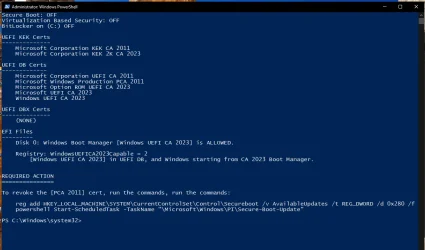
*Hope this is fine now.
*I believe I should now switch to protected boot mode and run Part 1 and Part 2?
___<< log >> ___

Secure Boot: OFF
Virtualization Based Security: OFF
BitLocker on (C:) OFF

UEFI KEK Certs
--------------
Microsoft Corporation KEK CA 2011
Microsoft Corporation KEK 2K CA 2023

UEFI DB Certs
-------------
Microsoft Corporation UEFI CA 2011
Microsoft Windows Production PCA 2011
Microsoft Option ROM UEFI CA 2023
Microsoft UEFI CA 2023
Windows UEFI CA 2023

UEFI DBX Certs
--------------
(NONE)

EFI Files
---------
Disk 0: Windows Boot Manager [Windows UEFI CA 2023] is ALLOWED.

Registry: WindowsUEFICA2023Capable = 2
[Windows UEFI CA 2023] in UEFI DB, and Windows starting from CA 2023 Boot Manager.

REQUIRED ACTION
===============

To revoke the [PCA 2011] cert, run the commands, run the commands:

reg add HKEY_LOCAL_MACHINE\SYSTEM\CurrentControlSet\Control\Secureboot /v AvailableUpdates /t REG_DWORD /d 0x280 /f
powershell Start-ScheduledTask -TaskName "\Microsoft\Windows\PI\Secure-Boot-Update"

PS C:\Windows\system32
 

Attachments

  • 2.webp
    2.webp
    57.8 KB · Views: 7

My Computer

System One

  • OS
    W10 PRO
    Computer type
    PC/Desktop
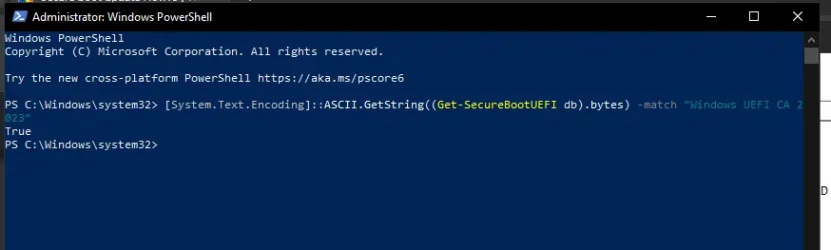
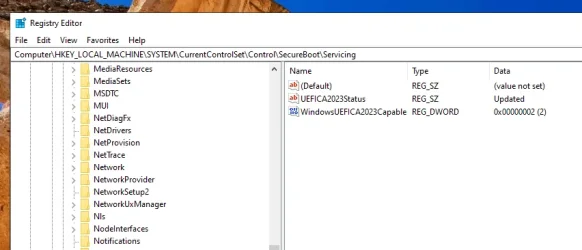
*I switched to Secure Boot, and after a few restarts but without executing any Part A or Part B commands, I now see the status “TRUE” with “UEFICA2023Status” changed to “updated.” I hope that’s fine and OK?

*If revoking now is the better option, I’ll do it right away; otherwise, I’ll wait. All I hope is that those TPM-WMI (Event ID 1801) random crashes will finally stop.

I truly cannot thank you enough for your patience in guiding me through this process.

Sir, as I already said, you are a gentleman and a scholar.
Thank you!
 

Attachments

  • 3.webp
    3.webp
    16.4 KB · Views: 4
  • 3a.webp
    3a.webp
    31.2 KB · Views: 7

My Computer

System One

  • OS
    W10 PRO
    Computer type
    PC/Desktop
You don't have the run the manual PS commands, or check the registry, since the script does all that logic.

REQUIRED ACTION
===============

To revoke the [PCA 2011] cert, run the commands, run the commands:

reg add HKEY_LOCAL_MACHINE\SYSTEM\CurrentControlSet\Control\Secureboot /v AvailableUpdates /t REG_DWORD /d 0x280 /f
powershell Start-ScheduledTask -TaskName "\Microsoft\Windows\PI\Secure-Boot-Update"
"REQUIRED ACTION" summarizes the remaining steps, which is to revoke PCA 2011 and deploy the SVN (which is also a revocation step). If you revoke now, all you need to do is to update the boot files on any Windows ISO or recovery USB drives you might have.

Otherwise, you can always temporarily disable Secure Boot, and then boot off any untouched USB drive. When Secure Boot is disabled, there is no cert checking on the device's boot file. That's always a fallback option if something goes wrong.

Most the TPM "errors" are actually informational, but the problem is Windows categorizes them as errors to get your attention. The check script doesn't need to read any event logs, since it can directly read the UEFI settings and installed EFI files to know whether the update is finished.
 

My Computer

System One

  • OS
    Windows 7
Well it's May already, started to wonder why delay of win updates for UEFI CA 2023. I have a 2024 HP Laptop, Win 25H2 updated today but was still not showing CA 2023.
So I did all of XxXxX's Part A, 1 & 2 and everything looked as it should.
So I then did Part B, 1 & 2 but after 2 more reboots, I checked and was still showing WindowscCapable 0x00000001)
So was time for supper, came back and booted it again and checked and I had a WindowscCapable 0x00000002 but Status is still InProgress.
I looked in System Info, shows BIOS version/data as Insyde version F.16, 5/16/2024 & few weeks ago was Version F.13, so something happened there.
Looks kinda like a done deal but it's still checking some things as if maybe it might reverse ? the Update if something Foobars.
I've got other Laptops (non-HP) that haven't got their's yet either. And they are running the same Insyde Bios.
Here's my registry now.
Code:
------------------------
HKEY_LOCAL_MACHINE\SYSTEM\CurrentControlSet\Control\SecureBoot\
AvailableUpdates              0x00000000
------------------------
HKEY_LOCAL_MACHINE\SYSTEM\CurrentControlSet\Control\SecureBoot\Servicing
Default                       value not set
BucketHash  8a773cec11db2d052b4eb6ffc9b4161c583c57a7c7465088bb37642a411138b3
ConfidenceLevel               Under Observation - More Data Needed
ComfidenceUpdateType          0x00000000
LastParsedBucketDataVersion   0x00000008
UEFICA2023Error               0x00000000
UEFICA2023ErrorEvent          0x00000000
UEFICA2023Status              InProgress
WindowsUEFICA2023Capable      0x00000002
 

My Computer

System One

  • OS
    Windows 11
    Computer type
    Laptop
    Manufacturer/Model
    HP 17" Laptop, Acer Aspire 5
Your PC is grouped in the "More Data Needed" bucket. Which means it's paused, while MS collects more telemetry data from other HP users.

Other models have made it to the High Confidence list with the Insyde F.16 BIOS:
Code:
HP,HP,HP,103C_5335KV HP Envy,88C2,67.34,4S325UA#ABA,HP ENVY x360 Convertible 15-ee1xxx,Type1ProductConfigId,Insyde,F.16,04/08/2025
HP,HP,HP,103C_5335M8 HP Envy,89DF,11.34,646R0UAR#ABA,HP ENVY Laptop 17-ch2xxx,Type1ProductConfigId,Insyde,F.16,11/09/2023
HP,HP,HP,103C_5335KV HP OMEN,8788,22.59,187G7EA#AB9,OMEN Laptop 15-en0xxx,System Version,"American Megatrends International, LLC.",F.16,04/07/2022
HP,HP,HP,103C_5335KV HP Spectre,86E6,01.33,3K653EA#ABD,HP Spectre x360 Convertible 15-eb0xxx,,AMI,F.16,11/02/2022
HP,HP,HP,103C_5335KV HP Notebook,8BB7,61.43,898G8PA#AB5,HP Laptop 15-fd0xxx,,AMI,F.16,03/07/2025
HP,HP,HP,103C_5336AN HP ZHAN,8A45,39.32,6E4W5PC#AB2,HP ZHAN 99 Mobile Workstation G4,,AMI,F.16,12/17/2025
HP,HP,HP,103C_53311M HP Pavilion,892C,94.33,577D4AA#ABA,HP Pavilion All-in-One Desktop 32-b0xxx,,AMI,F.16,08/12/2024
HP,HP,HP,103C_5335KV G=N L=CON B=HP,8154,KBC Version 18.0C,P4W62UA#ABA,HP ENVY Notebook,Type1ProductConfigId,Insyde,F.16,06/07/2016
HP,HP,HP,103C_5335KV G=N L=CON B=HP S=PAV,80B5,81.29,P0E23LA#ABM,HP Pavilion Notebook,,American Megatrends Inc.,F.16,11/27/2015
HP,HP,HP,103C_5335KV HP OMEN,8466,68.22,2XP32AV,OMEN by HP Laptop,,AMI,F.16,07/07/2021
HP,HP,HP,103C_53316J G=D,81BB,0000,V8N98AA#ABA,24-g012,,AMI,F.16,09/26/2016
HP,HP,HP,103C_5335KV HP Envy,86BC,89.23,9PQ90EA#ABT,HP ENVY Laptop 13-aq1xxx,Type1ProductConfigId,Insyde,F.16,08/30/2021
HP,HP,HP,103C_5335KV HP Spectre,8525,55.80,5NC13PA#AB5,HP Spectre Laptop 13-af1xx,Type1ProductConfigId,Insyde,F.16,11/23/2020
HP,HP,HP,103C_5335KV HP ENVY,878E,18.33,2T953EA#ABU,HP ENVY Laptop 15-ep0xxx,,AMI,F.16,12/03/2024

Just run my update script, which doesn't have a "More Data Needed" feature. Either it works or it doesn't. For a 2024 model year, it will probably work.
Code:
Update-UEFI.bat

garlin's PowerShell scripts for updating Secure Boot CA 2023
 

My Computer

System One

  • OS
    Windows 7
Well it's May already, started to wonder why delay of win updates for UEFI CA 2023. I have a 2024 HP Laptop, Win 25H2 updated today but was still not showing CA 2023.
So I did all of XxXxX's Part A, 1 & 2 and everything looked as it should.
So I then did Part B, 1 & 2 but after 2 more reboots, I checked and was still showing WindowscCapable 0x00000001)
So was time for supper, came back and booted it again and checked and I had a WindowscCapable 0x00000002 but Status is still InProgress.
I looked in System Info, shows BIOS version/data as Insyde version F.16, 5/16/2024 & few weeks ago was Version F.13, so something happened there.
Looks kinda like a done deal but it's still checking some things as if maybe it might reverse ? the Update if something Foobars.
I've got other Laptops (non-HP) that haven't got their's yet either. And they are running the same Insyde Bios.
Here's my registry now.
Code:
------------------------
HKEY_LOCAL_MACHINE\SYSTEM\CurrentControlSet\Control\SecureBoot\
AvailableUpdates              0x00000000
------------------------
HKEY_LOCAL_MACHINE\SYSTEM\CurrentControlSet\Control\SecureBoot\Servicing
Default                       value not set
BucketHash  8a773cec11db2d052b4eb6ffc9b4161c583c57a7c7465088bb37642a411138b3
ConfidenceLevel               Under Observation - More Data Needed
ComfidenceUpdateType          0x00000000
LastParsedBucketDataVersion   0x00000008
UEFICA2023Error               0x00000000
UEFICA2023ErrorEvent          0x00000000
UEFICA2023Status              InProgress
WindowsUEFICA2023Capable      0x00000002

it can take several hours or days for the update to complete and it will check for cert 2023 updates every 12 hours
so, just keep an eye on it and see if it updates in a few days. there seems to be no rhyme or reason for the delay
but it will update once the process has began.

best of luck Steve ..

edit. @garlin beat me to it ..
 

My Computers

System One System Two

  • OS
    Windows 11 Home
    Computer type
    PC/Desktop
    Manufacturer/Model
    HP 24" AiO
    CPU
    Ryzen 7 5825u
    Motherboard
    HP
    Memory
    64GB DDR4 3200
    Graphics Card(s)
    Ryzen 7 5825u
    Sound Card
    RealTek
    Monitor(s) Displays
    24" HP AiO
    Screen Resolution
    1920 x 1080 @60 Hz
    Hard Drives
    1TB WD Blue SN580 M2 SSD Partitioned.
    2x 1TB USB HDD External Backup/Storage.
    PSU
    90W external power brick
    Case
    24" All in One
    Cooling
    Default Air Cooling
    Keyboard
    HP WiFi UK extended
    Mouse
    HP WiFi 3 Button
    Internet Speed
    1GB full fibre
    Browser
    Edge & Firefox
    Antivirus
    AVG Internet Security/Windows Defender
    Other Info
    Mainly Open Source Software
  • Operating System
    Ubuntu 22.04.5 LTS
    Computer type
    Laptop
    Manufacturer/Model
    Dell 13" Latitude 2017
    CPU
    i5 7200u
    Motherboard
    Dell
    Memory
    16GB DDR4
    Graphics card(s)
    Intel
    Sound Card
    Intel
    Monitor(s) Displays
    13" Dell Laptop
    Hard Drives
    250GB Crucial 2.5" SSD
    Mouse
    Generic WiFi 3 button
    Internet Speed
    WiFi only
    Browser
    Firefox
    Antivirus
    ClamAV TK
    Other Info
    Mainly Open Source Software
For the benefit of enterprise customers, MS is using "attestation" to confirm their Secure Boot updates.

They could just make all the changes in one pass, and ask you to reboot... But for auditing purposes (again for the customers who need to file compliance reports), Windows makes a few changes, waits for a reboot, checks again, and then makes more changes, waits for a reboot, and then...

The reason for waiting on reboots, is special Windows auditing is done at boot time which confirms that parts of Secure Boot are actually being used, and you're not tricking the system by changing some files and registry keys to fool the audit process. Therefore it can be slow.

I can demonstrate this by taking an non-updated Windows and applying all the changes (but without rebooting). If you open Security Center, it says I'm not finished. But after a reboot, Security Center gives me the thumbs up. Only the audit data requires a reboot.
 

My Computer

System One

  • OS
    Windows 7
To all above! If you have a recently bought laptop and you are pretty sure that your system is fully updated (especially regarding bios) then you have to go into bios and reset your secure boot keys..your pc motherboard or your laptop brand official site, will have the instructions of how to do this...of course if you don't know, then give it to someone else to do so.. for example, I own a recently bought dell alienware laptop and after resetting keys on bios, no more 1801 error neither these stupid above errors... However I also own an asus pc, to which I was offered the db update via the windows updates...So, by resetting your keys your problems should be fixed!
 

My Computer

System One

  • OS
    win 11 pro 25 h2
    Computer type
    PC/Desktop
Thanks for the replies, sorry for late response we're having home repairs done, don't have much time today either but will update a few things here.
Yesterday (5-3-2026) on boot up it did another HP Bios Update, took a few minutes and reboot, then Windows started more updates (in addition to yesterday's Win Updates). Win updates went through at least 3 reboots and then finished installing.
Afterwards Sys Info now says, BIOS Insyde ver F.19, 11/26/2024 instead of the Insyde version F.16, 5/16/2024 it installed previously. The Registry still looks the same though, no changes at all. So both HP & Windows Updates are doing things but so far still Confidence Level under observation.
One curious item today, Sysinfo says BIOS Insyde ver F.19, 11/26/2024. But in the Registry key
HKEY_LOCAL_MACHINE\SYSTEM\CurrentControlSet\Control\SecureBoot\Servicing\DeviceAttributes says Firmware Version F.16 5/16/2024, so guess the registry hasn't been updated as to yesterday's new bios update version.
All I have for now, if it doesn't complete the UEFICA2023Status in the next few days, when I get some uninterrupted time I'll run Garlins bat file.
 

My Computer

System One

  • OS
    Windows 11
    Computer type
    Laptop
    Manufacturer/Model
    HP 17" Laptop, Acer Aspire 5
Any time you find "More Data Needed" for Confidence level, it means Windows is blocking the update. MS built an elaborate system to gradually roll out updates, but unless they have confidence data for your specific PC model/BIOS, it's not going to try anything.

They could simply try updating the certs (which is non-destructive) and fail. But they're waiting for someone to be the guinea pig.

It's a Catch 22. If they don't subject some users to an update attempt, they can't collect data to help all the other users. Assuming you have a supported BIOS or the OEM has worked with MS, it doesn't hurt to try. Windows won't be harmed. Unfortunately, they're sitting back for a lot of PC's.

My update script runs right away, with immediate feedback. Either it worked, or you have an unsupported PC (which needs more manual steps).
 

My Computer

System One

  • OS
    Windows 7
Any time you find "More Data Needed" for Confidence level, it means Windows is blocking the update.

What if reports "More Data Needed" but also reports "Updated"?

1777968600837.webp

This is my System 2 (Z590) for which ASUS provided an updated bios last December.

Code:
PS D:\Scripts\SecureBoot-CA-2023-Updates> .\Check_UEFI-CA2023.ps1 -verbose
Windows 11 25H2 (26200.8328)

Secure Boot: ON
Virtualization Based Security: ON
BitLocker on (C:) OFF

BIOS Firmware
-------------
    ASUS System Product Name
    Version: 2803
    Date: 2025-12-08

Factory Default UEFI PK Cert
----------------------------
    ASUSTeK MotherBoard PK Certificate

UEFI PK Cert
------------
    ASUSTeK MotherBoard PK Certificate

Factory Default UEFI KEK Certs
------------------------------
    Microsoft Corporation KEK CA 2011
    Microsoft Corporation KEK 2K CA 2023
    ASUSTeK MotherBoard KEK Certificate

UEFI KEK Certs
--------------
    Microsoft Corporation KEK CA 2011
    Microsoft Corporation KEK 2K CA 2023
    Canonical Ltd. Master Certificate Authority
    ASUSTeK MotherBoard KEK Certificate

Factory Default UEFI DB Certs
-----------------------------
    Microsoft Corporation UEFI CA 2011
    Microsoft Windows Production PCA 2011
    Microsoft Option ROM UEFI CA 2023
    Microsoft UEFI CA 2023
    Windows UEFI CA 2023
    ASUSTeK MotherBoard SW Key Certificate
    ASUSTeK Notebook SW Key Certificate

UEFI DB Certs
-------------
    Microsoft Corporation UEFI CA 2011
    Microsoft Windows Production PCA 2011
    Microsoft Option ROM UEFI CA 2023
    Microsoft UEFI CA 2023
    Windows UEFI CA 2023
    Canonical Ltd. Master Certificate Authority
    ASUSTeK MotherBoard SW Key Certificate
    ASUSTeK Notebook SW Key Certificate

Factory Default UEFI DBX Certs
------------------------------
    (NONE)
    EFI_CERT_SHA256_GUID Signatures: 430

UEFI DBX Certs
--------------
    Microsoft Windows Production PCA 2011
    Windows BootMgr SVN 8.0
    EFI_CERT_SHA256_GUID Signatures: 489

UEFI Variables
--------------
    Credential Guard: ON
    SBAT (Linux only): sbat,1,2024010900 / shim,4 / grub,3 / grub.debian,4

EFI Files
---------
    Windows Boot Manager [Windows UEFI CA 2023] is ALLOWED.
        \\.\HarddiskVolume1\EFI\Microsoft\Boot\bootmgfw.efi
        File Version: 28000.322, SVN 8.0

    Registry: WindowsUEFICA2023Capable = 2
        [Windows UEFI CA 2023] in UEFI DB, and Windows starting from CA 2023 Boot Manager.

    SkuSiPolicy.p7b is CURRENT.
        \\.\HarddiskVolume1\EFI\Microsoft\Boot\SkuSiPolicy.p7b
        Version: 3.0.0.14
    NOT RECOMMENDED for dual-boot setups.

STATUS REPORT
-------------
    Registry: UEFICA2023Status = Updated

    SUCCESS: UPDATES ARE FINISHED.
    UEFI CA 2023 certs are present, PCA 2011 cert is revoked.

PS D:\Scripts\SecureBoot-CA-2023-Updates>

1777969407044.webp
 

My Computers

System One System Two

  • OS
    Win 11 Pro 25H2 26200.8524
    Computer type
    PC/Desktop
    Manufacturer/Model
    Self Built
    CPU
    Intel® Core™ i7-14700K
    Motherboard
    ASUS TUF Z690-PLUS WIFI BIOS 4505 11/29/25
    Memory
    G.SKILL Ripjaws S5 Series 64GB (2 x 32GB) DDR5
    Graphics Card(s)
    ASUS GeForce RTX 4070 Super 12GB
    Sound Card
    Sound Blaster AE-5 Plus
    Monitor(s) Displays
    ASUS TUF Gaming 27" 2K HDR Gaming
    Screen Resolution
    2560 x 1440
    Hard Drives
    Samsung 990 Pro 1TB NVMe (Win 11 25H2)
    SK hynix P41 500GB NVMe 25H2 DEV/Games
    SK hynix P41 2TB NVMe (x3)
    Crucial P3 Plus 4TB
    PSU
    Corsair RM850x Shift
    Case
    Antec Dark Phantom DP502 FLUX
    Cooling
    Corsair Nautilus 360 RS AIO
    Keyboard
    Logitech MK 320
    Mouse
    Razer Basilisk V3
    Internet Speed
    350Mbs
    Browser
    Firefox
    Antivirus
    Winows Security
    Other Info
    MR 8.1 Home

    System 3 Specs
    Win 11 Pro 25H2 26200.8524
    ASUS PRIME Z370-P II BIOS 3004 7/12/21
    Intel Core i7-8700 CPU @ 3.20GHz
    32GB DDR4 RAM (4x8)
    iGPU Intel UHD Graphics 630
  • Operating System
    Win 11 Pro 25H2 26200.8524
    Computer type
    PC/Desktop
    Manufacturer/Model
    Self Built
    CPU
    Intel Core i7-11700F
    Motherboard
    Asus TUF Gaming Z590 Plus WiFi (BIOS 2803)
    Memory
    64 GB DDR4
    Graphics card(s)
    MSI GeForce RTX 3060 Ventus 2X 12GB
    Sound Card
    SoundBlaster Audigy Fx V2
    Monitor(s) Displays
    Samsung F27T350
    Screen Resolution
    1920x1080
    Hard Drives
    Samsung 980 Pro 1TB
    Samsung 970 EVO Plus 2TB
    Samsung 870 EVO 500GB SSD
    PSU
    Corsair HX750
    Case
    Cougar MX330-G Window
    Cooling
    Thermalright Frozen Edge 240 Black AIO
    Internet Speed
    350Mbps
    Browser
    Firefox
    Antivirus
    Windows Security
What if reports "More Data Needed" but also reports "Updated"?

View attachment 170610

This is my System 2 (Z590) for which ASUS provided an updated bios last December.

Code:
PS D:\Scripts\SecureBoot-CA-2023-Updates> .\Check_UEFI-CA2023.ps1 -verbose
Windows 11 25H2 (26200.8328)

Secure Boot: ON
Virtualization Based Security: ON
BitLocker on (C:) OFF

BIOS Firmware
-------------
    ASUS System Product Name
    Version: 2803
    Date: 2025-12-08

Factory Default UEFI PK Cert
----------------------------
    ASUSTeK MotherBoard PK Certificate

UEFI PK Cert
------------
    ASUSTeK MotherBoard PK Certificate

Factory Default UEFI KEK Certs
------------------------------
    Microsoft Corporation KEK CA 2011
    Microsoft Corporation KEK 2K CA 2023
    ASUSTeK MotherBoard KEK Certificate

UEFI KEK Certs
--------------
    Microsoft Corporation KEK CA 2011
    Microsoft Corporation KEK 2K CA 2023
    Canonical Ltd. Master Certificate Authority
    ASUSTeK MotherBoard KEK Certificate

Factory Default UEFI DB Certs
-----------------------------
    Microsoft Corporation UEFI CA 2011
    Microsoft Windows Production PCA 2011
    Microsoft Option ROM UEFI CA 2023
    Microsoft UEFI CA 2023
    Windows UEFI CA 2023
    ASUSTeK MotherBoard SW Key Certificate
    ASUSTeK Notebook SW Key Certificate

UEFI DB Certs
-------------
    Microsoft Corporation UEFI CA 2011
    Microsoft Windows Production PCA 2011
    Microsoft Option ROM UEFI CA 2023
    Microsoft UEFI CA 2023
    Windows UEFI CA 2023
    Canonical Ltd. Master Certificate Authority
    ASUSTeK MotherBoard SW Key Certificate
    ASUSTeK Notebook SW Key Certificate

Factory Default UEFI DBX Certs
------------------------------
    (NONE)
    EFI_CERT_SHA256_GUID Signatures: 430

UEFI DBX Certs
--------------
    Microsoft Windows Production PCA 2011
    Windows BootMgr SVN 8.0
    EFI_CERT_SHA256_GUID Signatures: 489

UEFI Variables
--------------
    Credential Guard: ON
    SBAT (Linux only): sbat,1,2024010900 / shim,4 / grub,3 / grub.debian,4

EFI Files
---------
    Windows Boot Manager [Windows UEFI CA 2023] is ALLOWED.
        \\.\HarddiskVolume1\EFI\Microsoft\Boot\bootmgfw.efi
        File Version: 28000.322, SVN 8.0

    Registry: WindowsUEFICA2023Capable = 2
        [Windows UEFI CA 2023] in UEFI DB, and Windows starting from CA 2023 Boot Manager.

    SkuSiPolicy.p7b is CURRENT.
        \\.\HarddiskVolume1\EFI\Microsoft\Boot\SkuSiPolicy.p7b
        Version: 3.0.0.14
    NOT RECOMMENDED for dual-boot setups.

STATUS REPORT
-------------
    Registry: UEFICA2023Status = Updated

    SUCCESS: UPDATES ARE FINISHED.
    UEFI CA 2023 certs are present, PCA 2011 cert is revoked.

PS D:\Scripts\SecureBoot-CA-2023-Updates>

View attachment 170611
Mine is exactly the same. All updates applied
 

Attachments

  • Screenshot 2026-05-05 093949.webp
    Screenshot 2026-05-05 093949.webp
    22.4 KB · Views: 1

My Computer

System One

  • OS
    Windows 11 Pro 25H2 (RP channel)
    Computer type
    PC/Desktop
    Manufacturer/Model
    MSI
    CPU
    AMD Ryzen 7 9800X3D 8-core
    Motherboard
    MEG X870E Godlike
    Memory
    64GB Corsair Titanium 6000/CL30
    Graphics Card(s)
    MSI Suprim 5080 SOC
    Sound Card
    Soundblaster AE-9
    Monitor(s) Displays
    ASUS TUF Gaming VG289Q
    Screen Resolution
    3840x2160
    Hard Drives
    Samsung 9100 Pro 4TB (gen 5 x4, system drive/games)
    Samsung 990 Pro 2TB
    Samsung 980 Pro 2TB
    Samsung 870 Evo 4TB
    Samsung 870 Evo 2TB
    Samsung T9 4TB
    PSU
    Seasonic PX-2200
    Case
    Bequiet! Dark Base Pro 901
    Cooling
    Noctua NH-D15S Chromax black
    Keyboard
    Logitech G915 X (wired)
    Mouse
    Logitech G903 with PowerPlay charger
    Internet Speed
    900Mb/sec
    Browser
    Microsoft Edge
    Antivirus
    Windows Defender
What if reports "More Data Needed" but also reports "Updated"?

View attachment 170610

This is my System 2 (Z590) for which ASUS provided an updated bios last December.

Code:
PS D:\Scripts\SecureBoot-CA-2023-Updates> .\Check_UEFI-CA2023.ps1 -verbose
Windows 11 25H2 (26200.8328)

Secure Boot: ON
Virtualization Based Security: ON
BitLocker on (C:) OFF

BIOS Firmware
-------------
    ASUS System Product Name
    Version: 2803
    Date: 2025-12-08

Factory Default UEFI PK Cert
----------------------------
    ASUSTeK MotherBoard PK Certificate

UEFI PK Cert
------------
    ASUSTeK MotherBoard PK Certificate

Factory Default UEFI KEK Certs
------------------------------
    Microsoft Corporation KEK CA 2011
    Microsoft Corporation KEK 2K CA 2023
    ASUSTeK MotherBoard KEK Certificate

UEFI KEK Certs
--------------
    Microsoft Corporation KEK CA 2011
    Microsoft Corporation KEK 2K CA 2023
    Canonical Ltd. Master Certificate Authority
    ASUSTeK MotherBoard KEK Certificate

Factory Default UEFI DB Certs
-----------------------------
    Microsoft Corporation UEFI CA 2011
    Microsoft Windows Production PCA 2011
    Microsoft Option ROM UEFI CA 2023
    Microsoft UEFI CA 2023
    Windows UEFI CA 2023
    ASUSTeK MotherBoard SW Key Certificate
    ASUSTeK Notebook SW Key Certificate

UEFI DB Certs
-------------
    Microsoft Corporation UEFI CA 2011
    Microsoft Windows Production PCA 2011
    Microsoft Option ROM UEFI CA 2023
    Microsoft UEFI CA 2023
    Windows UEFI CA 2023
    Canonical Ltd. Master Certificate Authority
    ASUSTeK MotherBoard SW Key Certificate
    ASUSTeK Notebook SW Key Certificate

Factory Default UEFI DBX Certs
------------------------------
    (NONE)
    EFI_CERT_SHA256_GUID Signatures: 430

UEFI DBX Certs
--------------
    Microsoft Windows Production PCA 2011
    Windows BootMgr SVN 8.0
    EFI_CERT_SHA256_GUID Signatures: 489

UEFI Variables
--------------
    Credential Guard: ON
    SBAT (Linux only): sbat,1,2024010900 / shim,4 / grub,3 / grub.debian,4

EFI Files
---------
    Windows Boot Manager [Windows UEFI CA 2023] is ALLOWED.
        \\.\HarddiskVolume1\EFI\Microsoft\Boot\bootmgfw.efi
        File Version: 28000.322, SVN 8.0

    Registry: WindowsUEFICA2023Capable = 2
        [Windows UEFI CA 2023] in UEFI DB, and Windows starting from CA 2023 Boot Manager.

    SkuSiPolicy.p7b is CURRENT.
        \\.\HarddiskVolume1\EFI\Microsoft\Boot\SkuSiPolicy.p7b
        Version: 3.0.0.14
    NOT RECOMMENDED for dual-boot setups.

STATUS REPORT
-------------
    Registry: UEFICA2023Status = Updated

    SUCCESS: UPDATES ARE FINISHED.
    UEFI CA 2023 certs are present, PCA 2011 cert is revoked.

PS D:\Scripts\SecureBoot-CA-2023-Updates>

View attachment 170611
I had also the same 1801 error into my event viewer (to my dell alienware ac16250 laptop OS win 11 25h2).. I resetted my secure boot keys in BIOS and after doing so, no more 1801 errors appeared... I can see now the same message as you do (regarding secure boot that keys have been updated in windows device security tab, while registry still shows exactly the same thing as yours: more data needed, but UEFI keys are already updated)...So we are fine!! Because before doing this actions, I had the "more data needed'' in the device security tab and there was not also in registry this UEFI updated status!! I am pretty sure we are fine!!
 

My Computer

System One

  • OS
    win 11 pro 25 h2
    Computer type
    PC/Desktop
[System.Text.Encoding]::ASCII.GetString((Get-SecureBootUEFI db).bytes) -match 'Windows UEFI CA 2023'

EDIT: BTW, the batch file will tell you if you already have that cert and exit if you do.

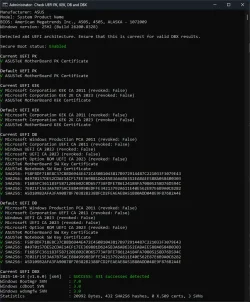
Some addition information. It seems that driver validation (on certificates) has been changed. (Secure Boot support)
In the early days it depended on the "Microsoft Windows Production PCA 2011" This wil expire on 19-10-2026 (See certlm.msc)
According from MS (See list below) it will not be replaced by a new "Microsoft Windows Production PCA 2023" certificate but by the "Windows UEFI CA 2023" certificate that is already in place now. So MS departed from the old way with certificates placing inside the Windows Certificate Store (on the hard drive) to a more secure location stored (UEFI PK, KEK, DB and DBX certificates) in non-volatile RAM (NVRAM) within the motherboard's firmware, not on the hard drive. (The PCA2011 Certificate inside the certificate store says it will expire on 19-10-2026, but the drivers says it will be on 17-6-2026)

It's too bad that Github's Check-UEFISecureBootVariables-main package doesn't show the expiration date of that already installed "Windows UEFI CA 2023" All it says "revoked=false" so still active. This change also means that the Secure boot loader on the hidden partition inside the \EFI\Microsoft\Boot\bootmgfw.efi must be renewed. That's why that UEFISecureBootVariables also checks it version; "Windows Bootmgr SVN: 7.0"

According to the list there are 4 June 2026 NVRAM certificates that will expire; but they are all replaced by MS themselves. Looking at the screendump of the latest UEFISecureBootVariables all cerificates in that NVRAM are already in place. The final step must be that all drivers point to the replacement of the current "old" intermediate certificate "Microsoft Windows Production PCA 2011" to the new "Windows/Microsoft UEFI CA 2023" certificate.
I saw with the numerous latest updates that has been done many times but they are all pointing to the old "Microsoft Windows Production PCA 2011" inside that NVRAM location. (Hence the noticeable date difference; 19-10 *old In the Cert Store* and 17-6 *new inside the NVRAM loc.*)

How that is visible inside each driver (digital signature tab) is unsure. But this will be the final step that has to be done. With an upcoming update.


Expiring CertificateExpiration dateNew CertificateStoring locationPurpose
Microsoft Corporation KEK CA 2011June 2026Microsoft Corporation KEK 2K CA 2023Stored in KEKSigns updates to DB and DBX.
Microsoft Windows Production PCA 2011Oct 2026Windows UEFI CA 2023Stored in DBUsed for signing the Windows boot loader.
Microsoft UEFI CA 2011*June 2026Microsoft UEFI CA 2023Stored in DBSigns third-party boot loaders and EFI applications.
Microsoft UEFI CA 2011*June 2026Microsoft Option ROM UEFI CA 2023Stored in DBSigns third-party option ROMs

Note: Windows keeps this PK, KEK, DB and DBX updated inside the dir: C:\Windows\system32\SecureBootUpdates. The latest update dates from 5-3-2026. (Coincides with update "2026-04 Preview-update (KB5083631) (26200.8328)" Date maybe different...)
 

Attachments

  • Latest UEFI Check.webp
    Latest UEFI Check.webp
    118.6 KB · Views: 3
Last edited:

My Computer

System One

  • OS
    Win 11 Pro "25H2" Build 26200.8524, Zorin OS Pro
    Computer type
    PC/Desktop
    Manufacturer/Model
    Self built
    CPU
    Intel® Core™ i7-12700KF 12th Gen.
    Motherboard
    ASUS Prime Z690-A, BIOS v4505
    Memory
    32GB DDR5 5600-36 Vengeance
    Graphics Card(s)
    PCIe4.0 Asus NVIDIA RTX3060Ti
    Sound Card
    Onboard; Realtek
    Monitor(s) Displays
    34" LG 34UC79G-B Curved 21:9 144Hz
    Screen Resolution
    2560x1080 (No HDR)
    Hard Drives
    250Gb Samsung 870PRO NVMe (Win 11 Pro)
    1Tb Samsung 980PRO NVMe
    1Tb Samsung 970EVO NVMe
    2Tb Samsung 990PRO NVMe with heatsink.
    4Tb WDC WD40EZRZ Blue SATA (Int.)
    4Tb WDC WD40EZRZ Blue SATA (Int.)
    3Tb WDC WD30EFRZ Red SATA (Int.)
    256Gb Samsung 840PRO SSD (RHEL 9,5)
    256Gb Samsung 850PRO SSD (Zorin OS Pro 18)
    PSU
    Coolermaster 850W V2 Gold with internal 12cm exaust fan
    Case
    Be-Quiet Pure Base 600.
    Cooling
    3x Be-Quiet! 12/14cm "Silent Wings 4" casefans, 1x Arctic Freezer i35 CPU towerblock with fan.
    Keyboard
    Steelseries APEX 7 keyboard.
    Mouse
    Logitech G-502 Hero
    Internet Speed
    1Gb
    Browser
    Brave
    Antivirus
    F-Secure
    Other Info
    No Noise system.
    256Gb Kingston Travler USB 3.0 drive.
    64Gb Sandisk USB 3.2 drive. (Ventoy)
    8Gb Philips USB 3.0 drive. (Win. Inst.)
    8Gb Philips USB 3.0 drive. (Rescue disk)
    2Tb WD USB 3.0 Passport drive.
    USB Ext. 500Gb WD SATA drive.
    External USB 3.0 C.A. CD/DVD* burner.
What if reports "More Data Needed" but also reports "Updated"?
Short answer: Don't pay attention to Confidence Level.

UEFICA2023Status is the correct indicator of success. Whenever the Secure Boot update task runs, it checks for compliance with having all of the CA 2023 certs and the updated boot manager. It will set this reg key value to 2 if you meet those requirements.

The Confidence Level is a reflection of the bucket data provided by MS to everyone. You can have an updated UEFI, and MS hasn't bothered to change your bucket's status. So it will always say the same thing, until MS thinks otherwise.

Here's a simple analogy: You installed W11 on an unsupported PC which doesn't meet HW requirements. Some parts of Windows will complain on-screen that your PC is unsupported. But your Windows is running no matter what the checks say. Which indicator should you believe?

The confidence data was one of those grand plans that looked good on paper. But by my estimation, a vast majority of the 2.4 million published bucket ID's are stuck in the "More Data Needed" as of today.

If anyone wants to explore this, you can do this exercise by:

1. Extracting the JSON fles from SecureBootUpdates\BucketConfidenceData.cab
2. Cross-indexing the GUID's for "High Confidence" buckets against the CSV files from secureboot_objects/HighConfidenceBuckets at main · microsoft/secureboot_objects

You will find roughly 358,883 GUIDs (unique combinations of PC motherboard/BIOS version) are High Confidence, out of 2.43 million GUID's. That works out to only 15% of the buckets. The buckets themselves don't tell you how many PC's fall within each bucket. Some buckets could contain a lot of active PC's. Only MS has that data, and it's highly confidential as not to get the different PC vendors upset.

To put it plainly, for a large set of non-corporate users, your reported Confidence Level is meaningless. Only PC's that fall under High Confidence will be automatically updated. MS has to figure when they'll force the remaining PC's to update, regardless of the "More Data Needed" status. The clock is ticking until the Oct 2026 deadline.
 

My Computer

System One

  • OS
    Windows 7
So MS departed from the old way with certificates placing inside the Windows Certificate Store (on the hard drive) to a more secure location stored (UEFI PK, KEK, DB and DBX certificates) in non-volatile RAM (NVRAM) within the motherboard's firmware, not on the hard drive. (The PCA2011 Certificate inside the certificate store says it will expire on 19-10-2026, but the drivers says it will be on 17-6-2026)
There are two different locations where trusted certs are stored.

1. UEFI needs to add the right cert chain (PK -> KEK -> DB), to place a trusted DB cert which matches the boot manager's cert. If Secure Boot is enabled + DB is in place + same cert isn't on the DBX, then the boot manager is allowed to boot.

From the UEFI level, there is no Windows cert store to check... because Windows hasn't booted yet! You can't check a running system's cert store when there's no OS. Once UEFI has executed the boot manager, then the running Windows doesn't need it again. Boot manager will chain into winload.efi, and Windows gets loaded.

2. Windows' own cert store will keep a parallel set of trusted certs so it can validate secure files like the boot manager. But it doesn't "ban" boot manager since it's not UEFI.

3. KEK CA 2011 expires in June 2026. That expiration has no bearing on PCA 2011, which expires in Oct 2026. As long as you have enrolled a cert in your trust store (UEFI or cert store), anything signed by that cert within the valid date range is still trusted. After June 2026, KEK CA 2011 cannot be used to sign new files. But we don't care since everything's switched to KEK CA 2023.

As long as PCA 2011 hasn't been revocated, and you have KEK CA 2011 to undersign it, then PCA 2011 is valid. Your PC doesn't magically stop working in October. But you can't run any newer boot managers that fix previously reported security holes. MS is trying to solve two problems at the same time: to close the Black Lotus UEFI hole by banning all PCA 2011-signed boot files, and support newer boot files released after Oct 2026.
 

My Computer

System One

  • OS
    Windows 7
Back
Top Bottom