Solved Secure boot update HowTo


....

But it ends up back to "NotStarted".
Any more suggestions?

JohnD
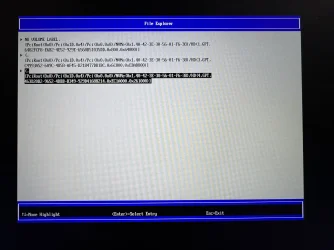
Attached Secure Boot BIOS certificate listing.
It seems that the Microsoft Corporation KEK 2K CA 2023, Windows UEFI CA 2023 and Microsoft UEFI CA 2023 are already installed as they should have.
What are you wanting to do with that 0x40 assignment? With this "command" you want to update the following certificates;
- Windows UEFI CA 2023 (already there)
- Microsoft UEFI CA 2023 (already there)
- Microsoft Option ROM UEFI CA 2023 (missing??)

Can you execute (powershell as admin) this statement? : "Get-UEFISecureBootCerts -Variable db" In the list as result it will show you what is installed in your current and active DB. It should contain the following certificates from MS; These are already there; Bold&Underline. Are you missing "Microsoft Option ROM UEFI CA 2023"? If so then this scheduled task needs to run with that 0x40 as assignment.....


77fa9abd-0359-4d32-bd60-28f4e78f784b CN=Microsoft Corporation UEFI CA 2011, O=Microsoft Corporation, L=Redmond, S=Wa...
77fa9abd-0359-4d32-bd60-28f4e78f784b CN=Microsoft Windows Production PCA 2011, O=Microsoft Corporation, L=Redmond, S...
77fa9abd-0359-4d32-bd60-28f4e78f784b CN=Microsoft Option ROM UEFI CA 2023, O=Microsoft Corporation, C=US
77fa9abd-0359-4d32-bd60-28f4e78f784b CN=Microsoft UEFI CA 2023, O=Microsoft Corporation, C=US
77fa9abd-0359-4d32-bd60-28f4e78f784b CN=Windows UEFI CA 2023, O=Microsoft Corporation, C=US

The status "NotStarted" Is this task disabled?
Can you take a look with (Win+R) taskschd.msc and goto Microsoft - Windows - PI and see the status of that task: Secure-Boot-Update? If it has the status disabled then that the reason it did not started. Set is on enabled and try again. (rightclick on the task and "execute" will start it immediately. When done the status will return to "ready" *May refresh will refresh the screen*) When it runs that confirms that this did it job.

If not then you mean "NotStarted" inside the registry value "HKLM\SYSTEM\CurrentControlSet\Control\SecureBoot\Servicing\UEFICA2023Status is stating "NotStarted" instead of "Updated"?? Can you see if there is an error key visible in this part of this tree or look at the value of "HKLM\SYSTEM\CurrentControlSet\Control\SecureBoot\AvailableUpdates (Where that 0x40 was injected to. When done it will return a value. It can be 0x4000 when successful or an other value when there was an error) What see you for value now?
 

My Computer

System One

  • OS
    Win 11 Pro "25H2" Build 26200.8524, Zorin OS Pro
    Computer type
    PC/Desktop
    Manufacturer/Model
    Self built
    CPU
    Intel® Core™ i7-12700KF 12th Gen.
    Motherboard
    ASUS Prime Z690-A, BIOS v4505
    Memory
    32GB DDR5 5600-36 Vengeance
    Graphics Card(s)
    PCIe4.0 Asus NVIDIA RTX3060Ti
    Sound Card
    Onboard; Realtek
    Monitor(s) Displays
    34" LG 34UC79G-B Curved 21:9 144Hz
    Screen Resolution
    2560x1080 (No HDR)
    Hard Drives
    250Gb Samsung 870PRO NVMe (Win 11 Pro)
    1Tb Samsung 980PRO NVMe
    1Tb Samsung 970EVO NVMe
    2Tb Samsung 990PRO NVMe with heatsink.
    4Tb WDC WD40EZRZ Blue SATA (Int.)
    4Tb WDC WD40EZRZ Blue SATA (Int.)
    3Tb WDC WD30EFRZ Red SATA (Int.)
    256Gb Samsung 840PRO SSD (RHEL 9,5)
    256Gb Samsung 850PRO SSD (Zorin OS Pro 18)
    PSU
    Coolermaster 850W V2 Gold with internal 12cm exaust fan
    Case
    Be-Quiet Pure Base 600.
    Cooling
    3x Be-Quiet! 12/14cm "Silent Wings 4" casefans, 1x Arctic Freezer i35 CPU towerblock with fan.
    Keyboard
    Steelseries APEX 7 keyboard.
    Mouse
    Logitech G-502 Hero
    Internet Speed
    1Gb
    Browser
    Brave
    Antivirus
    F-Secure
    Other Info
    No Noise system.
    256Gb Kingston Travler USB 3.0 drive.
    64Gb Sandisk USB 3.2 drive. (Ventoy)
    8Gb Philips USB 3.0 drive. (Win. Inst.)
    8Gb Philips USB 3.0 drive. (Rescue disk)
    2Tb WD USB 3.0 Passport drive.
    USB Ext. 500Gb WD SATA drive.
    External USB 3.0 C.A. CD/DVD* burner.
Once you write it, double boot and check the installation, if its allowed, you're good to go.
 

My Computers

System One System Two

  • OS
    Windows 11 Education For 25H2
    Computer type
    Laptop
    Manufacturer/Model
    HP ZBook G2
    CPU
    Intel® Core i7 5500u
    Motherboard
    HP
    Memory
    8 GB
    Graphics Card(s)
    Intel HD Family Graphics 5500 AMD Firepro 4150M
    Sound Card
    Realtek High Audio
    Hard Drives
    1 TB SSD
    Mouse
    HP USB Mouse
    Antivirus
    Windows Defender
  • Operating System
    Windows 11 Pro For Workstations 25H2
    Computer type
    Laptop
    Manufacturer/Model
    HP Zbook G4
    CPU
    Xeon 1535m v6
    Motherboard
    HP
    Memory
    32 GB
    Graphics card(s)
    AMD Quadro Pro 4100
    Sound Card
    Bang and Olufson Audio
    Hard Drives
    1TB SSD
    Mouse
    HP USB Mouse
    Antivirus
    Windows Defender
1. The command Get-UEFISecureBootCerts is not recognized. Ran in Powershell with admin.
2. But I think you hit on something. I checked my two other computers. They have been updated and they both have the "Microsoft Option ROM UEFI CA 2023" entry listed. I suspect that the BIOS update that Lenovo made available for this ThinkPad is messed up. This does not surprise me as the BIOS update for my ThinkStation was also missing an entry. I have an open question with them as to what is going on. I will check with them again.
3. I checked the Scheduled Tasks and the Secure Boot Update is enabled to run at system startup, basically to repeat indefinitely.
4. "AvailableUpdates" entry in the Registry is all zeros.
5. I have attached the entry in the Event Log referring to Secure Boot. It is similar to what shows up in "Settings" > "Privacy and security" "Windows Security" > "Device Security" .
6. My ThinkStation got an update through Windows Update (Secure Boot Allowed Signature DB Update") that got it updated. I have not received that update in the ThinkPad. My other mini computer was new enough to already have the new certificates.

JohnD
 

Attachments

My Computer

System One

  • OS
    Windows 10
You will run on the 2011 certificate until Microsoft pushes out the CA 2023-signed boot manager. Its being rolled out gradually even if the latest secure boot certificates are present.
 

My Computers

System One System Two

  • OS
    Windows 11 Education For 25H2
    Computer type
    Laptop
    Manufacturer/Model
    HP ZBook G2
    CPU
    Intel® Core i7 5500u
    Motherboard
    HP
    Memory
    8 GB
    Graphics Card(s)
    Intel HD Family Graphics 5500 AMD Firepro 4150M
    Sound Card
    Realtek High Audio
    Hard Drives
    1 TB SSD
    Mouse
    HP USB Mouse
    Antivirus
    Windows Defender
  • Operating System
    Windows 11 Pro For Workstations 25H2
    Computer type
    Laptop
    Manufacturer/Model
    HP Zbook G4
    CPU
    Xeon 1535m v6
    Motherboard
    HP
    Memory
    32 GB
    Graphics card(s)
    AMD Quadro Pro 4100
    Sound Card
    Bang and Olufson Audio
    Hard Drives
    1TB SSD
    Mouse
    HP USB Mouse
    Antivirus
    Windows Defender
Ran the script without the Option ROM. So it's done for the Chromebook?
UEFI DBX Certs
--------------
(NONE)
Windows BootMgr SVN is MISSING.
EFI_CERT_SHA256_GUID Signatures: 371
You're done adding the CA 2023 certs (except for Option ROM), but have not revoked the PCA 2011 cert. That step can be done now (by following the script's instructions).

I'm not sure why your PC can't add the Option ROM. It's signed the exact same way as the other two UEFI CA 2023 certs.
Let's try manual enrollment of the Option ROM cert.

1. Download the Option ROM cert file:
https://go.microsoft.com/fwlink/?linkid=2284009

2. Run the commands:
Code:
mountvol S: /s
mkdir S:\EFI\Certs
copy "microsoft option rom uefi ca 2023.crt" S:\EFI\Certs
mountvol S: /d

3. Enter the BIOS menu, go add a DB key. When prompted for a file, search the local drive. Look under the "EFI\Certs" folder for the copied file.

4. Restart Windows. Run the check script again.
 

My Computer

System One

  • OS
    Windows 7
Attached Secure Boot BIOS certificate listing.
From the BIOS screen, all that's missing is the Option ROM.

Download the check script from here, and run:
Release v2026.05.11 · garlin-cant-code/SecureBoot-CA-2023-Updates

Code:
Check-UEFI.bat -Verbose

I've got a theory that the last BIOS update glitched up your NVRAM. It may be possible to temporarily disable Secure Boot, and reset the Secure Boot keys to factory. This might reset the clock and force the Secure Boot task to repeat itself, but should clear any bad NVRAM data.

Before doing that, you need to check what are the current factory defaults so you know what to expect.
 

My Computer

System One

  • OS
    Windows 7
You're done adding the CA 2023 certs (except for Option ROM), but have not revoked the PCA 2011 cert. That step can be done now (by following the script's instructions).

I'm not sure why your PC can't add the Option ROM. It's signed the exact same way as the other two UEFI CA 2023 certs.
Let's try manual enrollment of the Option ROM cert.

1. Download the Option ROM cert file:
https://go.microsoft.com/fwlink/?linkid=2284009

2. Run the commands:
Code:
mountvol S: /s
mkdir S:\EFI\Certs
copy "microsoft option rom uefi ca 2023.crt" S:\EFI\Certs
mountvol S: /d

3. Enter the BIOS menu, go add a DB key. When prompted for a file, search the local drive. Look under the "EFI\Certs" folder for the copied file.

4. Restart Windows. Run the check script again.
In the Bios, when adding, it showed 3 certificates in File Explorer and I am not able to navigate anywhere.

When I tried the Commit Changes, it showed the Error of Unsupported file type!

The downloaded cert from Microsoft ends with .crt
 

Attachments

  • IMG_6049.webp
    IMG_6049.webp
    837.5 KB · Views: 1

My Computer

System One

  • OS
    Windows 11
    Computer type
    PC/Desktop
Try renaming the file to .der file extension.
Here's the latest on Chromebook converted to Windows 11 via MrChromebox's firmware summary:

1. Update the firmware via his website Updating MrChromebox Custom Firmware | MrChromebox.tech
2. Use Debian Live ISO on USB Thumb Drive (compliments of Rufus)
3. Boot to Chromebook Bios "Esc" key
4. Disable SecureBoot
5. Boot to Debian Live ISO
6. Connect Wifi to SSID
7. Launch Terminal
8. Run command "cd; curl -LOf https://mrchromebox.tech/firmware-util.sh && sudo bash firmware-util.sh"
9. After completing, reboot back to Bios
10. Maintain SecureBoot Disabled.
11. Change to Custom Mode under SecureBoot, delete everything under PK, KEK, DB and DBX. Ignore DBT (nothing inside)
12. Boot to Windows Recovery to change to option to boot Windows in Safe Mode
13. Run "Drallion_Update_UEFI-CA2023 -Revoke". There were errors but eventually, I got the messages

a. Successfully appended "DBUpdateOROM2023.bin" to UEFI DB
b. Successfully appended "dbxupdate.bin" to UEFI DBX
c. Successfully appended "DBUpdate2024.bin" to UEFI DBX
d. Successfully appended "DBUpdateSVN.bin" (SVN 8.0) to UEFI DBX

14. Reboot to Bios, enable SecureBoot
15. Ran "Drallion_Check_UEFI-CA2023 -Verbose" in Powershell Administrator mode

PS C:\users\tengheng\Downloads> .\Drallion_Check_UEFI-CA2023.ps1 -verbose
Windows 11 25H2 (26200.8457)

Secure Boot: ON
Virtualization Based Security: OFF
BitLocker on (C:) OFF

BIOS Firmware
-------------
Google Drallion360
Version: MrChromebox-2603.1
Date: 2026-04-09

Factory Default UEFI PK Cert
----------------------------
(NONE)

UEFI PK Cert
------------
Windows OEM Devices PK

Factory Default UEFI KEK Certs
------------------------------
(NONE)

UEFI KEK Certs
--------------
Microsoft Corporation KEK CA 2011
Microsoft Corporation KEK 2K CA 2023
Microsoft Option ROM UEFI CA 2023

Factory Default UEFI DB Certs
-----------------------------
(NONE)

UEFI DB Certs
-------------
Microsoft Corporation UEFI CA 2011
Microsoft Windows Production PCA 2011
Microsoft Option ROM UEFI CA 2023
Microsoft UEFI CA 2023
Windows UEFI CA 2023

Factory Default UEFI DBX Certs
------------------------------
(NONE)
EFI_CERT_SHA256_GUID Signatures: 0

UEFI DBX Certs
--------------
Microsoft Windows Production PCA 2011
Windows BootMgr SVN 8.0
EFI_CERT_SHA256_GUID Signatures: 326

UEFI Variables
--------------
Credential Guard: ON

EFI Files
---------
Windows Boot Manager [Windows UEFI CA 2023] is ALLOWED.
\\?\Volume{c1a3a1ae-1261-4bc1-bb12-fb977ec216f4}\EFI\Microsoft\Boot\bootmgfw.efi
File Version: 28000.322, SVN 8.0

Registry: "WindowsUEFICA2023Capable" = 2
[Windows UEFI CA 2023] in UEFI DB, and Windows starting from CA 2023 Boot Manager.


STATUS REPORT
-------------
Registry: "UEFICA2023Status" = Updated

SUCCESS: UPDATES ARE FINISHED.
UEFI CA 2023 certs are present, PCA 2011 cert is revoked.

16. Under Settings, Device security-Secure boot:

Secure Boot is on and all required certificate updates have been applied. No further certificate changes are needed.

16. In Registries, UEFICA2023Status shows as "Updated".

Thanks @garlin and the others for your help.
 

My Computer

System One

  • OS
    Windows 11
    Computer type
    PC/Desktop
UEFI KEK Certs
--------------
Microsoft Corporation KEK CA 2011
Microsoft Corporation KEK 2K CA 2023
Microsoft Option ROM UEFI CA 2023
Option ROM was added to the KEK list, by mistake.

It will not harm the system, but you can manually delete Option ROM from the KEK list so it looks cleaner. Great job on figuring out the firmware steps!
 

My Computer

System One

  • OS
    Windows 7
@zard2004
i see you used a Debian live USB. i used a Ubuntu 22.04 LTS live USB
and then followed these instructions to update the computers

i found it far easier to up date the secure boot via Linux then i did via Windows.
but either way all systems are now updated. good work getting it all done.
best of luck Steve ..
 

My Computers

System One System Two

  • OS
    Windows 11 Home
    Computer type
    PC/Desktop
    Manufacturer/Model
    HP 24" AiO
    CPU
    Ryzen 7 5825u
    Motherboard
    HP
    Memory
    64GB DDR4 3200
    Graphics Card(s)
    Ryzen 7 5825u
    Sound Card
    RealTek
    Monitor(s) Displays
    24" HP AiO
    Screen Resolution
    1920 x 1080 @60 Hz
    Hard Drives
    1TB WD Blue SN580 M2 SSD Partitioned.
    2x 1TB USB HDD External Backup/Storage.
    PSU
    90W external power brick
    Case
    24" All in One
    Cooling
    Default Air Cooling
    Keyboard
    HP WiFi UK extended
    Mouse
    HP WiFi 3 Button
    Internet Speed
    1GB full fibre
    Browser
    Edge & Firefox
    Antivirus
    AVG Internet Security/Windows Defender
    Other Info
    Mainly Open Source Software
  • Operating System
    Ubuntu 22.04.5 LTS
    Computer type
    Laptop
    Manufacturer/Model
    Dell 13" Latitude 2017
    CPU
    i5 7200u
    Motherboard
    Dell
    Memory
    16GB DDR4
    Graphics card(s)
    Intel
    Sound Card
    Intel
    Monitor(s) Displays
    13" Dell Laptop
    Hard Drives
    250GB Crucial 2.5" SSD
    Mouse
    Generic WiFi 3 button
    Internet Speed
    WiFi only
    Browser
    Firefox
    Antivirus
    ClamAV TK
    Other Info
    Mainly Open Source Software
Option ROM was added to the KEK list, by mistake.

It will not harm the system, but you can manually delete Option ROM from the KEK list so it looks cleaner. Great job on figuring out the firmware steps!
Oops! Didn't notice it.

I've gone back into the Bios to delete it.

Many thanks @garlin
 

My Computer

System One

  • OS
    Windows 11
    Computer type
    PC/Desktop
Windows 11 Pro, I ran the Detect-SecureBootCertUpdateStatus.ps1 script and the message below appeared in the Certificate Update Summary.

[3P] Microsoft Corporation UEFI CA 2011 (db): Present - 3P 2023 certs required

I had Garlins Scripts previously which reported everything was fine.
Do I need to do something else please?
 

My Computer

System One

  • OS
    Windows 11
    Computer type
    PC/Desktop
    Manufacturer/Model
    Generic
    CPU
    AMD Ryzen 8700G
    Motherboard
    Gigabyte B650 UD AC
    Memory
    64 GB
    Graphics Card(s)
    Onboard
    Sound Card
    Onboard
    Monitor(s) Displays
    Del U2723QE
    Screen Resolution
    3840 x 2160
    Hard Drives
    Corsiar MP600 1TB
    PSU
    Silverstone 750 GOLD
    Case
    Silverstone FARA 513
They have
From the BIOS screen, all that's missing is the Option ROM.

Download the check script from here, and run:
Release v2026.05.11 · garlin-cant-code/SecureBoot-CA-2023-Updates

Code:
Check-UEFI.bat -Verbose

I've got a theory that the last BIOS update glitched up your NVRAM. It may be possible to temporarily disable Secure Boot, and reset the Secure Boot keys to factory. This might reset the clock and force the Secure Boot task to repeat itself, but should clear any bad NVRAM data.

Before doing that, you need to check what are the current factory defaults so you know what to expect.
Attached are the results of the Check-UEFI.bat script.
 

Attachments

My Computer

System One

  • OS
    Windows 10
Windows 11 Pro, I ran the Detect-SecureBootCertUpdateStatus.ps1 script and the message below appeared in the Certificate Update Summary.

[3P] Microsoft Corporation UEFI CA 2011 (db): Present - 3P 2023 certs required

I had Garlins Scripts previously which reported everything was fine.
Do I need to do something else please?
This is MS acting rather inconsistently. Your BIOS is simply missing the optional Third Party (3P) cert for Linux.

If you run my check script, there's probably 4 certs listed under DB:
1. Microsoft Corporation UEFI CA 2011 is used by older Linux​
2. Microsoft Windows Production PCA 2011 is required for Windows​
3. Microsoft Option ROM UEFI CA 2023 is used by some HW devices, like GPU's​
4. Windows UEFI CA 2023 is required for Windows​

Microsoft UEFI CA 2023 ("3P") is used by newer Linux​

MS likes to have a serious "left hand vs right hand" problem. On one hand, the official stance is Microsoft UEFI CA 2023 is truly optional. MS provides pre-signed cert files to the OEM's with the explicit instructions that they chose whether to include the optional certs. And guess what? Some OEM's don't include the optional certs in their factory defaults.

Even more, the reg value for AvailableUpdates supports flag 0x4000 which only has one purpose. To block the install of Microsoft UEFI CA 2023, if your BIOS didn't previously include Microsoft Corporation UEFI CA 2011. Not everyone wants the Linux cert in their environment, because it makes booting a random live Linux on USB very easy.

But now the other half of MS thinks it's mandatory. Because it gets flagged in the TPM-WMI event logs and I've confirmed if you don't install all 3 new certs, then Windows Security Center doesn't give you the best message that everything's done. 🤷‍♂️

Run this command:
Code:
reg add HKEY_LOCAL_MACHINE\SYSTEM\CurrentControlSet\Control\Secureboot /v AvailableUpdates /t REG_DWORD /d 0x1000 /f
powershell Start-ScheduledTask -TaskName "\Microsoft\Windows\PI\Secure-Boot-Update"

The reason my script doesn't throw an error is it's considered an optional cert. If you're running a Windows-only environment, then you don't need the extra cert to run Linux. I can't tell what your intentions are. My script will flag the missing cert if you run it with the -Audit flag.
 

My Computer

System One

  • OS
    Windows 7
They have

Attached are the results of the Check-UEFI.bat script.

Your BIOS is missing the (optional) Option ROM cert. The script already provided you instructions in OPTION 2.
Code:
reg add HKEY_LOCAL_MACHINE\SYSTEM\CurrentControlSet\Control\Secureboot /v AvailableUpdates /t REG_DWORD /d 0x4800 /f
powershell Start-ScheduledTask -TaskName "\Microsoft\Windows\PI\Secure-Boot-Update"
 

My Computer

System One

  • OS
    Windows 7
This is MS acting rather inconsistently. Your BIOS is simply missing the optional Third Party (3P) cert for Linux.

If you run my check script, there's probably 4 certs listed under DB:
1. Microsoft Corporation UEFI CA 2011 is used by older Linux​
2. Microsoft Windows Production PCA 2011 is required for Windows​
3. Microsoft Option ROM UEFI CA 2023 is used by some HW devices, like GPU's​
4. Windows UEFI CA 2023 is required for Windows​

Microsoft UEFI CA 2023 ("3P") is used by newer Linux​

MS likes to have a serious "left hand vs right hand" problem. On one hand, the official stance is Microsoft UEFI CA 2023 is truly optional. MS provides pre-signed cert files to the OEM's with the explicit instructions that they chose whether to include the optional certs. And guess what? Some OEM's don't include the optional certs in their factory defaults.

Even more, the reg value for AvailableUpdates supports flag 0x4000 which only has one purpose. To block the install of Microsoft UEFI CA 2023, if your BIOS didn't previously include Microsoft Corporation UEFI CA 2011. Not everyone wants the Linux cert in their environment, because it makes booting a random live Linux on USB very easy.

But now the other half of MS thinks it's mandatory. Because it gets flagged in the TPM-WMI event logs and I've confirmed if you don't install all 3 new certs, then Windows Security Center doesn't give you the best message that everything's done. 🤷‍♂️

Run this command:
Code:
reg add HKEY_LOCAL_MACHINE\SYSTEM\CurrentControlSet\Control\Secureboot /v AvailableUpdates /t REG_DWORD /d 0x1000 /f
powershell Start-ScheduledTask -TaskName "\Microsoft\Windows\PI\Secure-Boot-Update"

The reason my script doesn't throw an error is it's considered an optional cert. If you're running a Windows-only environment, then you don't need the extra cert to run Linux. I can't tell what your intentions are. My script will flag the missing cert if you run it with the -Audit flag.
Thank you again Garlin, I am running Windows only. 🍻🍻
 

My Computer

System One

  • OS
    Windows 11
    Computer type
    PC/Desktop
    Manufacturer/Model
    Generic
    CPU
    AMD Ryzen 8700G
    Motherboard
    Gigabyte B650 UD AC
    Memory
    64 GB
    Graphics Card(s)
    Onboard
    Sound Card
    Onboard
    Monitor(s) Displays
    Del U2723QE
    Screen Resolution
    3840 x 2160
    Hard Drives
    Corsiar MP600 1TB
    PSU
    Silverstone 750 GOLD
    Case
    Silverstone FARA 513
Your BIOS is missing the (optional) Option ROM cert. The script already provided you instructions in OPTION 2.
Code:
reg add HKEY_LOCAL_MACHINE\SYSTEM\CurrentControlSet\Control\Secureboot /v AvailableUpdates /t REG_DWORD /d 0x4800 /f
powershell Start-ScheduledTask -TaskName "\Microsoft\Windows\PI\Secure-Boot-Update"
OK, I started it. When do I do the two reboots?

JohnD

Never mind. It finished and the Device Security screen says all is well. Thanks for your help.

JohnD
 

My Computer

System One

  • OS
    Windows 10
Just do nothing! All my PCs have been updated via Windows Update as confirmed by running the script Detect-SecureBootCertUpdateStatus.ps1 in C:\Windows\SecureBoot\ExampleRolloutScripts installed in the latest monthly update.
 

My Computer

System One

  • OS
    Windows 11 Pro
    Computer type
    PC/Desktop
    Manufacturer/Model
    Self build
    CPU
    Core i7-13700K
    Motherboard
    Asus TUF Gaming Plus WiFi Z790
    Memory
    64 GB Kingston Fury Beast DDR5
    Graphics Card(s)
    Gigabyte GeForce RTX 2060 Super Gaming OC 8G
    Sound Card
    Realtek S1200A
    Monitor(s) Displays
    Viewsonic VP2770 & Dell (secondary)
    Screen Resolution
    2560 x 1440
    Hard Drives
    Kingston KC3000 2TB NVME SSD & SATA HDDs & SSD
    PSU
    EVGA SuperNova G2 850W
    Case
    Nanoxia Deep Silence 1
    Cooling
    Noctua NH-D14
    Keyboard
    Microsoft Digital Media Pro
    Mouse
    Logitech Wireless
    Internet Speed
    80 Mb / s
    Browser
    Chrome
    Antivirus
    Defender, Malwarebytes Free & AdwCleaner
Just do nothing! All my PCs have been updated via Windows Update as confirmed by running the script Detect-SecureBootCertUpdateStatus.ps1 in C:\Windows\SecureBoot\ExampleRolloutScripts installed in the latest monthly update.
I have had cases where that is true, But Lenovo screwed up BIOS updates, which supposedly included the appropriate certificate data, on two of my systems. I don't know if that will be fixed by Microsoft in time.

JohnD
 

My Computer

System One

  • OS
    Windows 10

Latest Support Threads

Back
Top Bottom