riverofwind
Member
- Local time
- 12:53 AM
- Posts
- 30
- OS
- Windows 11

Follow along with the video below to see how to install our site as a web app on your home screen.
Note: This feature may not be available in some browsers.
reg add HKEY_LOCAL_MACHINE\SYSTEM\CurrentControlSet\Control\Secureboot /v AvailableUpdates /t REG_DWORD /d 0x200 /f
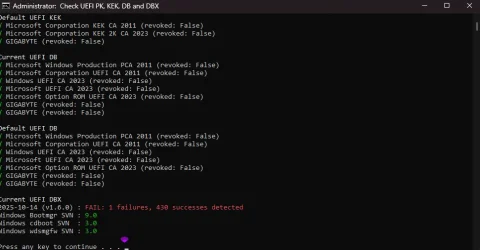
powershell Start-ScheduledTask -TaskName "\Microsoft\Windows\PI\Secure-Boot-Update"Thanks for the helpYou're not missing any certs. But you're slightly behind on the latest DBX Updates for banned EFI boot files.
Run these commands:
Code:reg add HKEY_LOCAL_MACHINE\SYSTEM\CurrentControlSet\Control\Secureboot /v AvailableUpdates /t REG_DWORD /d 0x200 /f powershell Start-ScheduledTask -TaskName "\Microsoft\Windows\PI\Secure-Boot-Update"
Update-UEFI.bat -RevokeAll works, thanks for the helpDownload the ZIP file from here, and run:
garlin's PowerShell scripts for updating Secure Boot CA 2023
Code:Update-UEFI.bat -Revoke
It's been noted the Secure Boot task sometimes doesn't apply all of the pending DBX updates. The update script uses a different method to append any missing changes, and get it done.

I believe you first need to update your BIOS to the latest version. I am assuming you're using the same OS install with the new motherboard?Hi.
So I had secure boot all working fine, then gigabyte gave me a faulty bios, so I had to return the board, I now have the board back and before I start updating the bios, as they have now messed up my Mac address. they have rolled back my bios to F9 a 2019 version for now.
My problem now is I can't boot in to windows with secure boot enabled, I get invalid secure boot keys.
I have tried the basic's, loading factory defaults etc. I now have it on Standard and set to disabled, so I can boot the pc to windows. I have tried running the original commands in Part A, yet get false.
Any advice
mountvol S: /s
copy C:\Windows\BOOT\EFI\bootmgfw.efi S:\EFI\Microsoft\Boot
mountvol S: /dYes that was what I was thanking, I will try as you said later today.More likely your Windows had the CA 2023 boot files installed, since you previously updated.
For now, you can put back the original CA 2011 boot manager.
Code:mountvol S: /s copy C:\Windows\BOOT\EFI\bootmgfw.efi S:\EFI\Microsoft\Boot mountvol S: /d
What exactly is an invalid MAC address? If you had some horrible BIOS flashing accident where they corrupted the motherboard data (like the original MAC address), I presume they might have given you a randomly assigned MAC instead of the original one.Yes that was what I was thanking, I will try as you said later today.
also would a invalid mac address cause any issues (yet it connects to the internet still)?
Last off when I enter secure boot, I enable factory defaults, and at the top it still says modified?
Check-UEFI.bat -VerboseSo Gigabyte messed up and gave me a OEM bios for Punch Tech, Then 2-3 days later the main bios just stopped working, guessing it corrupted, My backup bios was a official bios still. So from that I guess it lost the mac address on the main bios, They then RMA the board to reflash and did not redo the Mac address, now its 88:88:88:88:87:88. I still have the original mac address written down.What exactly is an invalid MAC address? If you had some horrible BIOS flashing accident where they corrupted the motherboard data (like the original MAC address), I presume they might have given you a randomly assigned MAC instead of the original one.
As long as the provided MAC isn't null or a duplicate of any existing network device on your local network, it's valid for networking purposes. When traffic is carried outside of your local network, your MAC address is no longer used (packets are gatewayed thru your ISP router). A changed MAC can mess up software licensing as a lot of HW signatures take into account the MAC as an unique ID.
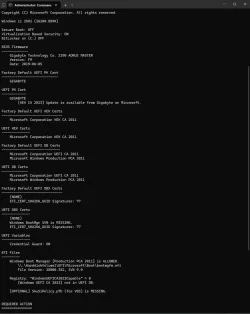
So it's a common issue with my board, gigabyte z390 aorus master, as it has a intel lan. But that's why I don't want to update the bios at mo untill I get more from Gigabyte. I have read 1-2 guides about it on Google.Sorry to hear they completely botched your BIOS. You're back to 2019 factory defaults, with only CA 2011 certs.
Hopefully it's possible to repeat whatever steps you took to install the CA 2023 certs again. But I'd be concerned if they messed up the returned BIOS, it might not be in a 100% perfect state (even if it's now an older factory default).
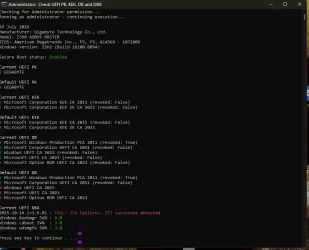
What was the error? You have a KEK CA 2023 installed, so revocation should be possible.Code:
Update-UEFI.bat -Revoke
but that did not work this time :S

Check-DBX.bat -Verbose