Solved Secure boot update HowTo


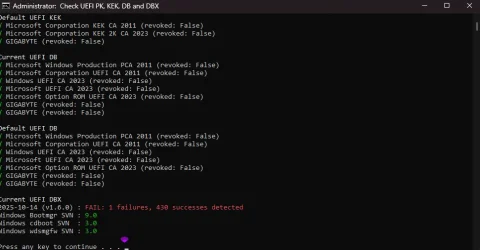
Hi all, So I got a updated bios from Gigabyte with the missing secure boot certs, but now I get the below error.
sb.webp
Thanks in advance for the help
 
Last edited:

My Computer My Computer

At a glance

Windows 11 ProIntel i7 9700k OC 5.0ghz32gb Gskill 3200mhz OC 3600mhzNvidia RTX 4070 Super FE
OS
Windows 11 Pro
Computer type
PC/Desktop
Manufacturer/Model
Self built
CPU
Intel i7 9700k OC 5.0ghz
Motherboard
Gigabyte Z390 Master, Rev1.0, F13c Custom Bios
Memory
32gb Gskill 3200mhz OC 3600mhz
Graphics Card(s)
Nvidia RTX 4070 Super FE
Sound Card
Onboard ESS Saber
Monitor(s) Displays
QHD LG 27" 165hz, OC 180hz, Asus 27" 144hz
Screen Resolution
2k
Hard Drives
Nvme SSD Samsung 990 Pro 2TB, 970 echo plus 1tb + 970 echo 256gb.
PSU
EVGA SuperNova platinum 800w
Case
NZXT H500 sweat box, modified.
Cooling
NZXT Kraken x63.
Keyboard
Logitech G810
Mouse
Logitech G403
Internet Speed
1.1gb down 110mb up
You're not missing any certs. But you're slightly behind on the latest DBX Updates for banned EFI boot files.

Run these commands:
Code:
reg add HKEY_LOCAL_MACHINE\SYSTEM\CurrentControlSet\Control\Secureboot /v AvailableUpdates /t REG_DWORD /d 0x200 /f
powershell Start-ScheduledTask -TaskName "\Microsoft\Windows\PI\Secure-Boot-Update"
 

My Computer My Computer

At a glance

Windows 7
OS
Windows 7
You're not missing any certs. But you're slightly behind on the latest DBX Updates for banned EFI boot files.

Run these commands:
Code:
reg add HKEY_LOCAL_MACHINE\SYSTEM\CurrentControlSet\Control\Secureboot /v AvailableUpdates /t REG_DWORD /d 0x200 /f
powershell Start-ScheduledTask -TaskName "\Microsoft\Windows\PI\Secure-Boot-Update"
Thanks for the help
I tried the above and still get the same.
 

My Computer My Computer

At a glance

Windows 11 ProIntel i7 9700k OC 5.0ghz32gb Gskill 3200mhz OC 3600mhzNvidia RTX 4070 Super FE
OS
Windows 11 Pro
Computer type
PC/Desktop
Manufacturer/Model
Self built
CPU
Intel i7 9700k OC 5.0ghz
Motherboard
Gigabyte Z390 Master, Rev1.0, F13c Custom Bios
Memory
32gb Gskill 3200mhz OC 3600mhz
Graphics Card(s)
Nvidia RTX 4070 Super FE
Sound Card
Onboard ESS Saber
Monitor(s) Displays
QHD LG 27" 165hz, OC 180hz, Asus 27" 144hz
Screen Resolution
2k
Hard Drives
Nvme SSD Samsung 990 Pro 2TB, 970 echo plus 1tb + 970 echo 256gb.
PSU
EVGA SuperNova platinum 800w
Case
NZXT H500 sweat box, modified.
Cooling
NZXT Kraken x63.
Keyboard
Logitech G810
Mouse
Logitech G403
Internet Speed
1.1gb down 110mb up
Download the ZIP file from here, and run:
garlin's PowerShell scripts for updating Secure Boot CA 2023

Code:
Update-UEFI.bat -Revoke

It's been noted the Secure Boot task sometimes doesn't apply all of the pending DBX updates. The update script uses a different method to append any missing changes, and get it done.
 

My Computer My Computer

At a glance

Windows 7
OS
Windows 7

My Computer My Computer

At a glance

Windows 11 ProIntel i7 9700k OC 5.0ghz32gb Gskill 3200mhz OC 3600mhzNvidia RTX 4070 Super FE
OS
Windows 11 Pro
Computer type
PC/Desktop
Manufacturer/Model
Self built
CPU
Intel i7 9700k OC 5.0ghz
Motherboard
Gigabyte Z390 Master, Rev1.0, F13c Custom Bios
Memory
32gb Gskill 3200mhz OC 3600mhz
Graphics Card(s)
Nvidia RTX 4070 Super FE
Sound Card
Onboard ESS Saber
Monitor(s) Displays
QHD LG 27" 165hz, OC 180hz, Asus 27" 144hz
Screen Resolution
2k
Hard Drives
Nvme SSD Samsung 990 Pro 2TB, 970 echo plus 1tb + 970 echo 256gb.
PSU
EVGA SuperNova platinum 800w
Case
NZXT H500 sweat box, modified.
Cooling
NZXT Kraken x63.
Keyboard
Logitech G810
Mouse
Logitech G403
Internet Speed
1.1gb down 110mb up
Hi.
So I had secure boot all working fine, then gigabyte gave me a faulty bios, so I had to return the board, I now have the board back and before I start updating the bios, as they have now messed up my Mac address. they have rolled back my bios to F9 a 2019 version for now.

My problem now is I can't boot in to windows with secure boot enabled, I get invalid secure boot keys.
I have tried the basic's, loading factory defaults etc. I now have it on Standard and set to disabled, so I can boot the pc to windows. I have tried running the original commands in Part A, yet get false.

Any advice
 

My Computer My Computer

At a glance

Windows 11 ProIntel i7 9700k OC 5.0ghz32gb Gskill 3200mhz OC 3600mhzNvidia RTX 4070 Super FE
OS
Windows 11 Pro
Computer type
PC/Desktop
Manufacturer/Model
Self built
CPU
Intel i7 9700k OC 5.0ghz
Motherboard
Gigabyte Z390 Master, Rev1.0, F13c Custom Bios
Memory
32gb Gskill 3200mhz OC 3600mhz
Graphics Card(s)
Nvidia RTX 4070 Super FE
Sound Card
Onboard ESS Saber
Monitor(s) Displays
QHD LG 27" 165hz, OC 180hz, Asus 27" 144hz
Screen Resolution
2k
Hard Drives
Nvme SSD Samsung 990 Pro 2TB, 970 echo plus 1tb + 970 echo 256gb.
PSU
EVGA SuperNova platinum 800w
Case
NZXT H500 sweat box, modified.
Cooling
NZXT Kraken x63.
Keyboard
Logitech G810
Mouse
Logitech G403
Internet Speed
1.1gb down 110mb up
Hi.
So I had secure boot all working fine, then gigabyte gave me a faulty bios, so I had to return the board, I now have the board back and before I start updating the bios, as they have now messed up my Mac address. they have rolled back my bios to F9 a 2019 version for now.

My problem now is I can't boot in to windows with secure boot enabled, I get invalid secure boot keys.
I have tried the basic's, loading factory defaults etc. I now have it on Standard and set to disabled, so I can boot the pc to windows. I have tried running the original commands in Part A, yet get false.

Any advice
I believe you first need to update your BIOS to the latest version. I am assuming you're using the same OS install with the new motherboard?
 

My Computer My Computer

At a glance

Windows 11 25H2Broadwell-e 6850K 4.5ghz @1.36v32GB Corsair LPM 3600 C16EVGA RTX 3080Ti FTW
OS
Windows 11 25H2
Computer type
PC/Desktop
Manufacturer/Model
EVGA home brew
CPU
Broadwell-e 6850K 4.5ghz @1.36v
Motherboard
EVGA X99 FTW K
Memory
32GB Corsair LPM 3600 C16
Graphics Card(s)
EVGA RTX 3080Ti FTW
Sound Card
Asus Centurion true 7.1 headset. (5 speakers in each earpeice)
Monitor(s) Displays
LG C4 55"
Screen Resolution
4K 144hz
Hard Drives
Various models of SSDs ~10TB No HDDs installed.
PSU
be quiet! BN516 Straight Power 12-1000w 80 Plus Platinum
Case
Corsair 780T modified to dual 200mm intake fans
Cooling
Corsair H110i
Keyboard
Corsair K95 Platinum
Mouse
Corsair M65 RGB Elite
Internet Speed
50Mbs
More likely your Windows had the CA 2023 boot files installed, since you previously updated.

For now, you can put back the original CA 2011 boot manager.
Code:
mountvol S: /s
copy C:\Windows\BOOT\EFI\bootmgfw.efi S:\EFI\Microsoft\Boot
mountvol S: /d
 

My Computer My Computer

At a glance

Windows 7
OS
Windows 7
More likely your Windows had the CA 2023 boot files installed, since you previously updated.

For now, you can put back the original CA 2011 boot manager.
Code:
mountvol S: /s
copy C:\Windows\BOOT\EFI\bootmgfw.efi S:\EFI\Microsoft\Boot
mountvol S: /d
Yes that was what I was thanking, I will try as you said later today.
also would a invalid mac address cause any issues (yet it connects to the internet still)?
Last off when I enter secure boot, I enable factory defaults, and at the top it still says modified?
 

My Computer My Computer

At a glance

Windows 11 ProIntel i7 9700k OC 5.0ghz32gb Gskill 3200mhz OC 3600mhzNvidia RTX 4070 Super FE
OS
Windows 11 Pro
Computer type
PC/Desktop
Manufacturer/Model
Self built
CPU
Intel i7 9700k OC 5.0ghz
Motherboard
Gigabyte Z390 Master, Rev1.0, F13c Custom Bios
Memory
32gb Gskill 3200mhz OC 3600mhz
Graphics Card(s)
Nvidia RTX 4070 Super FE
Sound Card
Onboard ESS Saber
Monitor(s) Displays
QHD LG 27" 165hz, OC 180hz, Asus 27" 144hz
Screen Resolution
2k
Hard Drives
Nvme SSD Samsung 990 Pro 2TB, 970 echo plus 1tb + 970 echo 256gb.
PSU
EVGA SuperNova platinum 800w
Case
NZXT H500 sweat box, modified.
Cooling
NZXT Kraken x63.
Keyboard
Logitech G810
Mouse
Logitech G403
Internet Speed
1.1gb down 110mb up
Yes that was what I was thanking, I will try as you said later today.
also would a invalid mac address cause any issues (yet it connects to the internet still)?
Last off when I enter secure boot, I enable factory defaults, and at the top it still says modified?
What exactly is an invalid MAC address? If you had some horrible BIOS flashing accident where they corrupted the motherboard data (like the original MAC address), I presume they might have given you a randomly assigned MAC instead of the original one.

As long as the provided MAC isn't null or a duplicate of any existing network device on your local network, it's valid for networking purposes. When traffic is carried outside of your local network, your MAC address is no longer used (packets are gatewayed thru your ISP router). A changed MAC can mess up software licensing as a lot of HW signatures take into account the MAC as an unique ID.
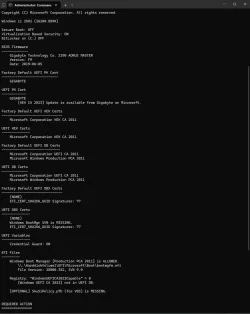
I would download my check script from here, and run:
Code:
Check-UEFI.bat -Verbose

Even if Secure Boot is currently disabled, we need to see your system's current state from a Secure Boot perspective.
 

My Computer My Computer

At a glance

Windows 7
OS
Windows 7
What exactly is an invalid MAC address? If you had some horrible BIOS flashing accident where they corrupted the motherboard data (like the original MAC address), I presume they might have given you a randomly assigned MAC instead of the original one.

As long as the provided MAC isn't null or a duplicate of any existing network device on your local network, it's valid for networking purposes. When traffic is carried outside of your local network, your MAC address is no longer used (packets are gatewayed thru your ISP router). A changed MAC can mess up software licensing as a lot of HW signatures take into account the MAC as an unique ID.
So Gigabyte messed up and gave me a OEM bios for Punch Tech, Then 2-3 days later the main bios just stopped working, guessing it corrupted, My backup bios was a official bios still. So from that I guess it lost the mac address on the main bios, They then RMA the board to reflash and did not redo the Mac address, now its 88:88:88:88:87:88. I still have the original mac address written down.

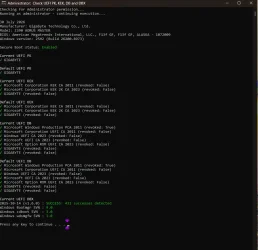
So I have done as you advised above, when I got the option yes/no/all I said yes, then rebooted the pc and run your batch file.

sb1.webp
Thank you for your time and help.
 
Last edited:

My Computer My Computer

At a glance

Windows 11 ProIntel i7 9700k OC 5.0ghz32gb Gskill 3200mhz OC 3600mhzNvidia RTX 4070 Super FE
OS
Windows 11 Pro
Computer type
PC/Desktop
Manufacturer/Model
Self built
CPU
Intel i7 9700k OC 5.0ghz
Motherboard
Gigabyte Z390 Master, Rev1.0, F13c Custom Bios
Memory
32gb Gskill 3200mhz OC 3600mhz
Graphics Card(s)
Nvidia RTX 4070 Super FE
Sound Card
Onboard ESS Saber
Monitor(s) Displays
QHD LG 27" 165hz, OC 180hz, Asus 27" 144hz
Screen Resolution
2k
Hard Drives
Nvme SSD Samsung 990 Pro 2TB, 970 echo plus 1tb + 970 echo 256gb.
PSU
EVGA SuperNova platinum 800w
Case
NZXT H500 sweat box, modified.
Cooling
NZXT Kraken x63.
Keyboard
Logitech G810
Mouse
Logitech G403
Internet Speed
1.1gb down 110mb up
Sorry to hear they completely botched your BIOS. You're back to 2019 factory defaults, with only CA 2011 certs.

Hopefully it's possible to repeat whatever steps you took to install the CA 2023 certs again. But I'd be concerned if they messed up the returned BIOS, it might not be in a 100% perfect state (even if it's now an older factory default).
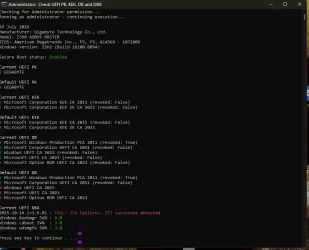
 

My Computer My Computer

At a glance

Windows 7
OS
Windows 7
Sorry to hear they completely botched your BIOS. You're back to 2019 factory defaults, with only CA 2011 certs.

Hopefully it's possible to repeat whatever steps you took to install the CA 2023 certs again. But I'd be concerned if they messed up the returned BIOS, it might not be in a 100% perfect state (even if it's now an older factory default).
So it's a common issue with my board, gigabyte z390 aorus master, as it has a intel lan. But that's why I don't want to update the bios at mo untill I get more from Gigabyte. I have read 1-2 guides about it on Google.

I will try the steps in the guide again, to see if I have more luck now.

Thanks
 

My Computer My Computer

At a glance

Windows 11 ProIntel i7 9700k OC 5.0ghz32gb Gskill 3200mhz OC 3600mhzNvidia RTX 4070 Super FE
OS
Windows 11 Pro
Computer type
PC/Desktop
Manufacturer/Model
Self built
CPU
Intel i7 9700k OC 5.0ghz
Motherboard
Gigabyte Z390 Master, Rev1.0, F13c Custom Bios
Memory
32gb Gskill 3200mhz OC 3600mhz
Graphics Card(s)
Nvidia RTX 4070 Super FE
Sound Card
Onboard ESS Saber
Monitor(s) Displays
QHD LG 27" 165hz, OC 180hz, Asus 27" 144hz
Screen Resolution
2k
Hard Drives
Nvme SSD Samsung 990 Pro 2TB, 970 echo plus 1tb + 970 echo 256gb.
PSU
EVGA SuperNova platinum 800w
Case
NZXT H500 sweat box, modified.
Cooling
NZXT Kraken x63.
Keyboard
Logitech G810
Mouse
Logitech G403
Internet Speed
1.1gb down 110mb up

My Computer My Computer

At a glance

Windows 11 ProIntel i7 9700k OC 5.0ghz32gb Gskill 3200mhz OC 3600mhzNvidia RTX 4070 Super FE
OS
Windows 11 Pro
Computer type
PC/Desktop
Manufacturer/Model
Self built
CPU
Intel i7 9700k OC 5.0ghz
Motherboard
Gigabyte Z390 Master, Rev1.0, F13c Custom Bios
Memory
32gb Gskill 3200mhz OC 3600mhz
Graphics Card(s)
Nvidia RTX 4070 Super FE
Sound Card
Onboard ESS Saber
Monitor(s) Displays
QHD LG 27" 165hz, OC 180hz, Asus 27" 144hz
Screen Resolution
2k
Hard Drives
Nvme SSD Samsung 990 Pro 2TB, 970 echo plus 1tb + 970 echo 256gb.
PSU
EVGA SuperNova platinum 800w
Case
NZXT H500 sweat box, modified.
Cooling
NZXT Kraken x63.
Keyboard
Logitech G810
Mouse
Logitech G403
Internet Speed
1.1gb down 110mb up
Code:
Update-UEFI.bat -Revoke

but that did not work this time :S
What was the error? You have a KEK CA 2023 installed, so revocation should be possible.
 

My Computer My Computer

At a glance

Windows 7
OS
Windows 7

My Computers My Computers

  • At a glance

    Win 11 Pro 25H2 26200.8973Intel® Core™ i7-14700KG.SKILL Ripjaws S5 Series 64GB (2 x 32GB) DDR5ASUS GeForce RTX 4070 Super 12GB
    OS
    Win 11 Pro 25H2 26200.8973
    Computer type
    PC/Desktop
    Manufacturer/Model
    Self Built
    CPU
    Intel® Core™ i7-14700K
    Motherboard
    ASUS TUF Z690-PLUS WIFI (BIOS 4505)
    Memory
    G.SKILL Ripjaws S5 Series 64GB (2 x 32GB) DDR5
    Graphics Card(s)
    ASUS GeForce RTX 4070 Super 12GB
    Sound Card
    Sound Blaster AE-5 Plus
    Monitor(s) Displays
    ASUS TUF Gaming 27" 2K HDR Gaming
    Screen Resolution
    2560 x 1440
    Hard Drives
    Samsung 990 Pro 1TB NVMe (Win 11 25H2)
    SK hynix P41 500GB NVMe
    SK hynix P41 2TB NVMe (x3)
    Crucial P3 Plus 4TB
    PSU
    Corsair RM850x Shift
    Case
    Antec Dark Phantom DP502 FLUX
    Cooling
    Corsair Nautilus 360 RS AIO
    Keyboard
    Logitech MK 320
    Mouse
    Razer Basilisk V3
    Internet Speed
    750Mbs
    Browser
    Firefox
    Antivirus
    Winows Security
    Other Info
    MR 8.1 Home
  • At a glance

    Win 11 Pro 25H2 26200.8973Intel Core i5-1140064 GB DDR4MSI GeForce RTX 3060 Ventus 2X 12GB
    Operating System
    Win 11 Pro 25H2 26200.8973
    Computer type
    PC/Desktop
    Manufacturer/Model
    Self Built
    CPU
    Intel Core i5-11400
    Motherboard
    Asus TUF Gaming Z590 Plus WiFi (BIOS 2803)
    Memory
    64 GB DDR4
    Graphics card(s)
    MSI GeForce RTX 3060 Ventus 2X 12GB
    Sound Card
    SoundBlaster Audigy Fx V2
    Monitor(s) Displays
    Samsung F27T350
    Screen Resolution
    1920x1080
    Hard Drives
    Samsung 980 Pro 1TB
    Samsung 970 EVO Plus 2TB
    Samsung 870 EVO 500GB SSD
    PSU
    Corsair HX750
    Case
    Cougar MX330-G Window
    Cooling
    Thermalright Frozen Edge 240 Black AIO
    Internet Speed
    350Mbps
    Browser
    Firefox
    Antivirus
    Windows Security
  • System Three
    Win 11 Pro 25H2 26200.8973
    ASUS PRIME Z370-P II BIOS 3004 7/12/21
    Intel Core i7-8700 CPU @ 3.20GHz
    32GB DDR4 RAM (4x8)
    iGPU Intel UHD Graphics 630
    Cooler Master Hyper 212
    Mid-Tower Desktop
I forgot cjee21's script doesn't understand that 154 EFI signatures that were retired in April 2026's CU. Not my problem to fix.

For a more accurate report, run:
Code:
Check-DBX.bat -Verbose
 

My Computer My Computer

At a glance

Windows 7
OS
Windows 7
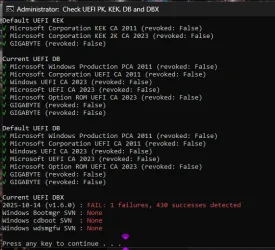
@garlin So I bought a 2nd bios chip. fixed the main bios mac address then flashed the new chip, put the original safe. then I've updated to the latest F13f bios they had for me, and all secure boot is working.

Sorted.webp
Thank you :cool:
 

My Computer My Computer

At a glance

Windows 11 ProIntel i7 9700k OC 5.0ghz32gb Gskill 3200mhz OC 3600mhzNvidia RTX 4070 Super FE
OS
Windows 11 Pro
Computer type
PC/Desktop
Manufacturer/Model
Self built
CPU
Intel i7 9700k OC 5.0ghz
Motherboard
Gigabyte Z390 Master, Rev1.0, F13c Custom Bios
Memory
32gb Gskill 3200mhz OC 3600mhz
Graphics Card(s)
Nvidia RTX 4070 Super FE
Sound Card
Onboard ESS Saber
Monitor(s) Displays
QHD LG 27" 165hz, OC 180hz, Asus 27" 144hz
Screen Resolution
2k
Hard Drives
Nvme SSD Samsung 990 Pro 2TB, 970 echo plus 1tb + 970 echo 256gb.
PSU
EVGA SuperNova platinum 800w
Case
NZXT H500 sweat box, modified.
Cooling
NZXT Kraken x63.
Keyboard
Logitech G810
Mouse
Logitech G403
Internet Speed
1.1gb down 110mb up
Back
Top Bottom