Services to Disable in Windows 11


SightUp

Well-known member
Member
Local time
12:17 AM
Posts
182
OS
Windows
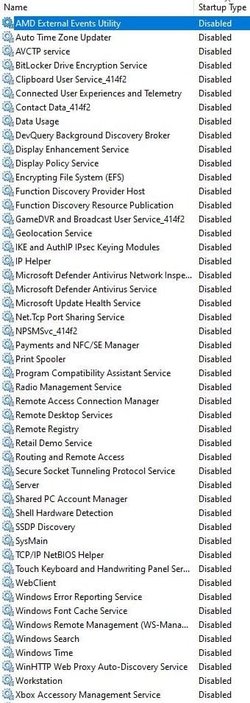
I like to trim down Windows 11 where I can including services, so I was wondering if anyone here is an expert with Windows 11 services and can look at my list of services that I am planning on disabling and tell me if there are any that I am missing or ones that I have chosen that I absolutely cannot disable for one reason or another.

Diagnostic Execution Service

Diagnostic Policy Service

Diagnostic Service Host

Diagnostic System Host

Distributed Link Tracking Client

Fax

Geolocation Service

Microsoft Store Install Service

Network Connection Broker

Network List Service

Network Location Awareness

Offline Files

Print Spooler

System Event Notification Service

SysMain

TCP/IP NetBIOS Helper

Touch Keyboard and Handwriting Panel Service

Windows Event Log

Windows Search

Windows Time

Windows Update
 

My Computer My Computer

At a glance

WindowsIntel 8086kEVGA 3080 Ti FTW3 Ultra
OS
Windows
CPU
Intel 8086k
Motherboard
Asus z370-F
Graphics Card(s)
EVGA 3080 Ti FTW3 Ultra
Sound Card
ADI-2 DAC fs
It mostly depends on how much faster you want it to be broken.
 

My Computers My Computers

  • At a glance

    11 Homei7 13650HX16GB DDR5GeForce RTX 4060 Mobile
    OS
    11 Home
    Computer type
    Laptop
    Manufacturer/Model
    Asus TUF Gaming F16 (2024)
    CPU
    i7 13650HX
    Memory
    16GB DDR5
    Graphics Card(s)
    GeForce RTX 4060 Mobile
    Sound Card
    Eastern Electric MiniMax DAC Supreme; Emotiva UMC-200; Astell & Kern AK240
    Monitor(s) Displays
    Sony Bravia XR-55X90J
    Screen Resolution
    3840×2160
    Hard Drives
    512GB SSD internal
    37TB external
    PSU
    Li-ion
    Cooling
    2× Arc Flow Fans, 4× exhaust vents, 5× heatpipes
    Keyboard
    Logitech K800
    Mouse
    Logitech G402
    Internet Speed
    30Mbit/s up, 500Mbit/s down
    Browser
    FF
    Antivirus
    What's an antivirus?
  • At a glance

    11 Homei5 1135G716GB DDR4Intel Iris Xe
    Operating System
    11 Home
    Computer type
    Laptop
    Manufacturer/Model
    Medion S15450
    CPU
    i5 1135G7
    Memory
    16GB DDR4
    Graphics card(s)
    Intel Iris Xe
    Sound Card
    Eastern Electric MiniMax DAC Supreme; Emotiva UMC-200; Astell & Kern AK240
    Monitor(s) Displays
    Sony Bravia XR-55X90J
    Screen Resolution
    3840×2160
    Hard Drives
    2TB SSD internal
    37TB external
    PSU
    Li-ion
    Keyboard
    Logitech K800
    Mouse
    Logitech G402
    Internet Speed
    30Mbit/s up, 500Mbit/s down
    Browser
    FF
Right. So I don't really want anything to break. I do not care about logs or printers or crap Windows bloatware. With that in mind, what services can I turn off without breaking anything?
 

My Computer My Computer

At a glance

WindowsIntel 8086kEVGA 3080 Ti FTW3 Ultra
OS
Windows
CPU
Intel 8086k
Motherboard
Asus z370-F
Graphics Card(s)
EVGA 3080 Ti FTW3 Ultra
Sound Card
ADI-2 DAC fs
I like to trim down Windows 11 where I can including services, so I was wondering if anyone here is an expert with Windows 11 services and can look at my list of services that I am planning on disabling....
If you open Resource Monitor, look at Services on the CPU tab and sort by Average CPU, then you'll find that of your list SysMain has the highest CPU use - of less than 0.2%. In fact my total CPU use by all running services is just 2%.

1638077430207.png

Basically you're not going to gain anything by disabling any of them, as they don't have any significant impact on CPU use.
 

My Computers My Computers

  • At a glance

    Windows 11 HomeAMD Athlon Silver 3050U8GBRadeon Graphics
    OS
    Windows 11 Home
    Computer type
    Laptop
    Manufacturer/Model
    Acer Aspire 3 A315-23-R9VY
    CPU
    AMD Athlon Silver 3050U
    Memory
    8GB
    Graphics Card(s)
    Radeon Graphics
    Monitor(s) Displays
    laptop screen
    Screen Resolution
    1366x768 native resolution, up to 2560x1440 with Radeon Virtual Super Resolution
    Hard Drives
    1TB Samsung EVO 870 SSD (from April 2026: 250GB EVO 850)
    Internet Speed
    150 Mbps
    Browser
    Edge, Firefox
    Antivirus
    Defender
    Other Info
    UPDATE - 11 April 2026: due to lid hinges starting to break up this laptop has been retired from active duty. The OS with all software and files has been migrated to my System Seven in 'Other systems' to carry on as my general purpose 'main machine'.

    I've now clean installed 25H2 and used Garlin's scripts to update Secure Boot to CA 2023 and revoke the PCA 2011 certificates. It's new role is to test secure boot issues.

    Info for 2021-2026:
    fully 'Windows 11 ready' laptop. Windows 10 C: partition migrated from my old unsupported 'main machine' then upgraded to 11. A test migration ran Insider builds for 2 months. When 11 was released on 5th October 2021 it was re-imaged back to 10 and was offered the upgrade in Windows Update on 20th October. Windows Update offered the 22H2 Feature Update on 20th September 2022. It got the 23H2 Feature Update on 4th November 2023 through Windows Update, 24H2 on 3rd October 2024 through Windows Update by setting the Target Release Version for 24H2, and 25H2 on 30th September 2025 through Windows Update by setting the Target Release Version for 25H2.
  • At a glance

    Windows 11 ProIntel® Core™ i5-520M8GB(integrated graphics) Intel HD Graphics
    Operating System
    Windows 11 Pro
    Computer type
    Laptop
    Manufacturer/Model
    Dell Latitude E4310
    CPU
    Intel® Core™ i5-520M
    Motherboard
    0T6M8G
    Memory
    8GB
    Graphics card(s)
    (integrated graphics) Intel HD Graphics
    Screen Resolution
    1366x768
    Hard Drives
    500GB Crucial MX500 SSD
    Browser
    Firefox, Edge
    Antivirus
    Defender
    Other Info
    unsupported machine: Legacy bios, MBR, TPM 1.2, upgraded from W10 to W11 using W10/W11 hybrid install media workaround.

    In-place upgrade to 22H2 using ISO and a workaround.
    Feature Update to 23H2 by manually installing the Enablement Package.
    In-place upgrade to 24H2 using hybrid 23H2/24H2 install media.
    Upgraded to 25H2 by Enablement Package.

    Also running Insider Experimental 263xx and 29xxx builds and Windows 10 as native boot .vhdx.
  • My SYSTEM THREE is a Dell Latitude 5410, i7-10610U, 32GB RAM, 512GB NVMe ssd, supported device running Windows 11 Pro.

    My SYSTEM FOUR was a 2-in-1 convertible Lenovo Yoga 11e (1st gen) type 20DA, Celeron N2930, 8GB RAM, 256GB ssd. Unsupported device. This has now been sold. It has been replaced by my System Eight.

    My SYSTEM FIVE is a Dell Latitude 3190 2-in-1, Pentium Silver N5030, 8GB RAM, 1TB NVMe ssd, supported device running Windows 11 Pro, plus Insider Beta, Experimental 263xx and 29xxx builds (and a few others) as a native boot .vhdx.

    My SYSTEM SIX is a Dell Latitude 5550, Core Ultra 7 165H, 64GB RAM, 1TB NVMe SSD, supported device, Windows 11 Pro, Hyper-V host machine. Updated to 25H2 on 30th September 2025.

    My SYSTEM SEVEN is a Lenovo Thinkpad T580, 1920x1080 touchscreen, Intel Core i7-8650U, 16GB RAM, 512GB NVMe SSD + 2nd 512GB NVMe SSD, a supported device for Windows 11. This is my current general purpose 'main machine'. The installed Windows 11 Home from my System One has been migrated to this machine. As its new home has an existing digital licence for Pro I've been able to upgrade the migrated OS from Home to Pro.

    My SYSTEM EIGHT is a 2-in-1 convertible Lenovo Yoga 11e (5th gen) type 20LN, Celeron N4120, 8GB RAM, 512GB NVMe ssd, a supported device for Windows 11. Currently running Windows 11 Pro, plus Insider Beta, Experimental 263xx and 29xxx builds as native boot vhdx.
Just because SysMain (former SuperFetch) uses up a little bit of your CPU resources and a lot of your memory, doesn't also mean that it steals the resources from your other processes like playing videogames. Read up on the concept of InvisiTasking, which allows background processes to use up only those system resources that would otherwise be left unused, so for example if you have Condusiv Diskeeper service running in the background, then it can optimize performance of your HDD (it works for SSDs too, but on a modern SSD the performance gain will typically be negligible) and 1/ you never need to defrag because it prevents HDD fragmentation before it happens, while 2/ it greatly reduces the total number of I/O operations on the HDD in addition to keeping enough free space near the outermost cylinders of the HDD which is where the write speed is higher in comparison to the innermost ones─yet another reason why dividing your HDD into separate partitions never was among bright ideas. SysMain touches on the same principle that preventing I/O at the only sacrifice of using the specific part of CPU and RAM that would otherwise just sit there, doing nothing besides costing a lot of money of course. You see, other processes don't have to wait until these background processes release the system resources that they use. There's no delay there, the other processes take immediate priority.

That being said, with a modern Intel CPU, although this greatly depends on system design, you could say that temperatures should also be seen as system resources. That's just because technologies like Turbo Boost and Speed Shift can be used to increase performance, only temporarily when needed, and in such a way that the heat energy resulting from this temporary increase in power (far above the TDP) has to be throttled back down again after a certain period of time in order not to exceed temperature constraints. These constraints are configurable and can be set by the system manufacturer. Some of the settings are accessible via the powercfg command, some aren't. But that is why I use ThrottleStop. Anyway, my point is that disabling the SysMain service isn't going to have any noticeable impact on temperatures, any more so than homeopathy is. So I'm not too worried.
 

My Computers My Computers

  • At a glance

    11 Homei7 13650HX16GB DDR5GeForce RTX 4060 Mobile
    OS
    11 Home
    Computer type
    Laptop
    Manufacturer/Model
    Asus TUF Gaming F16 (2024)
    CPU
    i7 13650HX
    Memory
    16GB DDR5
    Graphics Card(s)
    GeForce RTX 4060 Mobile
    Sound Card
    Eastern Electric MiniMax DAC Supreme; Emotiva UMC-200; Astell & Kern AK240
    Monitor(s) Displays
    Sony Bravia XR-55X90J
    Screen Resolution
    3840×2160
    Hard Drives
    512GB SSD internal
    37TB external
    PSU
    Li-ion
    Cooling
    2× Arc Flow Fans, 4× exhaust vents, 5× heatpipes
    Keyboard
    Logitech K800
    Mouse
    Logitech G402
    Internet Speed
    30Mbit/s up, 500Mbit/s down
    Browser
    FF
    Antivirus
    What's an antivirus?
  • At a glance

    11 Homei5 1135G716GB DDR4Intel Iris Xe
    Operating System
    11 Home
    Computer type
    Laptop
    Manufacturer/Model
    Medion S15450
    CPU
    i5 1135G7
    Memory
    16GB DDR4
    Graphics card(s)
    Intel Iris Xe
    Sound Card
    Eastern Electric MiniMax DAC Supreme; Emotiva UMC-200; Astell & Kern AK240
    Monitor(s) Displays
    Sony Bravia XR-55X90J
    Screen Resolution
    3840×2160
    Hard Drives
    2TB SSD internal
    37TB external
    PSU
    Li-ion
    Keyboard
    Logitech K800
    Mouse
    Logitech G402
    Internet Speed
    30Mbit/s up, 500Mbit/s down
    Browser
    FF
I like to trim down Windows 11 where I can including services, so I was wondering if anyone here is an expert with Windows 11 services and can look at my list of services that I am planning on disabling and tell me if there are any that I am missing or ones that I have chosen that I absolutely cannot disable for one reason or another.
Diagnostic Execution Service - YES
Diagnostic Policy Service - YES
Diagnostic Service Host - YES
Diagnostic System Host - YES
Distributed Link Tracking Client - YES
Fax - YES
Geolocation Service - YES
Microsoft Store Install Service - YES, - YES (IF YOU DON'T MICROSOFT STORE)
Network Connection Broker - YES
Network List Service - YES
Network Location Awareness - YES
Offline Files - YES
Print Spooler - YES (IF YOU DON'T USE PRINTERS)
System Event Notification Service
SysMain - NO
TCP/IP NetBIOS Helper - NO
Touch Keyboard and Handwriting Panel Service - YES
Windows Event Log - YES
Windows Search - YES (IF YOU DON'T STOCK SEARCH) - CAN BE REPLACED WITH "AGENT RANSACK"
Windows Time - YES
Windows Update - YES
 

My Computer My Computer

At a glance

Microsoft® Windows™ 11 Enterprise Edition 64 BitIntel® Core i3 380MHynix® 4GB Dual-Channel DDR3OnBoard Intel® HD Graphics
OS
Microsoft® Windows™ 11 Enterprise Edition 64 Bit
Computer type
Laptop
Manufacturer/Model
Lenovo® ThinkPad™ Edge
CPU
Intel® Core i3 380M
Motherboard
Intel® 0578K6A
Memory
Hynix® 4GB Dual-Channel DDR3
Graphics Card(s)
OnBoard Intel® HD Graphics
Sound Card
OnBoard High Definition Audio Device
Monitor(s) Displays
ThinkPad™ LCD
Screen Resolution
1366 x 768
Hard Drives
Seagate® SATA-III 500GB
PSU
Lenovo® Standard PSU
Case
Lenovo® Standard Laptop
Cooling
Lenovo® OnBoard Standard
Keyboard
Lenovo® USB Keyboard
Mouse
Lenovo® Optical USB
Internet Speed
Home Fixed 100Mbps
Browser
Google® Chrome™
Antivirus
Microsoft® Windows Defender™
Other Info
Not Applicable (NA)
I like to trim down Windows 11 where I can including services, so I was wondering if anyone here is an expert with Windows 11 services and can look at my list of services that I am planning on disabling and tell me if there are any that I am missing or ones that I have chosen that I absolutely cannot disable for one reason or another.

also you can follow some of mine as per below screenshot (follow the command I have set on DELAYED START, MANUAL & DISABLED);

1638094230216.png


1638094292308.png
1638094307188.png
1638094327641.png
1638094340805.png
1638094357138.png
1638094372464.png
1638094385642.png
 

My Computer My Computer

At a glance

Microsoft® Windows™ 11 Enterprise Edition 64 BitIntel® Core i3 380MHynix® 4GB Dual-Channel DDR3OnBoard Intel® HD Graphics
OS
Microsoft® Windows™ 11 Enterprise Edition 64 Bit
Computer type
Laptop
Manufacturer/Model
Lenovo® ThinkPad™ Edge
CPU
Intel® Core i3 380M
Motherboard
Intel® 0578K6A
Memory
Hynix® 4GB Dual-Channel DDR3
Graphics Card(s)
OnBoard Intel® HD Graphics
Sound Card
OnBoard High Definition Audio Device
Monitor(s) Displays
ThinkPad™ LCD
Screen Resolution
1366 x 768
Hard Drives
Seagate® SATA-III 500GB
PSU
Lenovo® Standard PSU
Case
Lenovo® Standard Laptop
Cooling
Lenovo® OnBoard Standard
Keyboard
Lenovo® USB Keyboard
Mouse
Lenovo® Optical USB
Internet Speed
Home Fixed 100Mbps
Browser
Google® Chrome™
Antivirus
Microsoft® Windows Defender™
Other Info
Not Applicable (NA)
I like to trim down Windows 11 where I can including services, so I was wondering if anyone here is an expert with Windows 11 services and can look at my list of services that I am planning on disabling and tell me if there are any that I am missing or ones that I have chosen that I absolutely cannot disable for one reason or another.

there will be some startups hogging files, for these type of startups you can use "Chameleon Startup Manager" to remove .. the trial version works fine too .. remember not to remove Microsoft Office related startups, as these will affect execution of Microsoft Office components .. Good Luck !
 

My Computer My Computer

At a glance

Microsoft® Windows™ 11 Enterprise Edition 64 BitIntel® Core i3 380MHynix® 4GB Dual-Channel DDR3OnBoard Intel® HD Graphics
OS
Microsoft® Windows™ 11 Enterprise Edition 64 Bit
Computer type
Laptop
Manufacturer/Model
Lenovo® ThinkPad™ Edge
CPU
Intel® Core i3 380M
Motherboard
Intel® 0578K6A
Memory
Hynix® 4GB Dual-Channel DDR3
Graphics Card(s)
OnBoard Intel® HD Graphics
Sound Card
OnBoard High Definition Audio Device
Monitor(s) Displays
ThinkPad™ LCD
Screen Resolution
1366 x 768
Hard Drives
Seagate® SATA-III 500GB
PSU
Lenovo® Standard PSU
Case
Lenovo® Standard Laptop
Cooling
Lenovo® OnBoard Standard
Keyboard
Lenovo® USB Keyboard
Mouse
Lenovo® Optical USB
Internet Speed
Home Fixed 100Mbps
Browser
Google® Chrome™
Antivirus
Microsoft® Windows Defender™
Other Info
Not Applicable (NA)
I don't screw around with this stuff as in W7 days..., far too many Dependencies that'll bork the system.
If you do mess around with this stuff then you're probably a power user..., if you're a power user, then you probably have a machine that can handle it.
 

My Computers My Computers

  • At a glance

    Windows 11 Pro
    OS
    Windows 11 Pro
    Computer type
    PC/Desktop
    Manufacturer/Model
    ASUS ROG Strix
  • At a glance

    Windows 11 Pro
    Operating System
    Windows 11 Pro
    Computer type
    Laptop
    Manufacturer/Model
    ASUS VivoBook
  • ASUS VivoBook 'Lite' ~ Windows 11 Home
my list of services that I am planning on disabling and tell me if there are any that I am missing or ones that I have chosen that I absolutely cannot disable for one reason or another.
That depends, I guess you are not using MS account, but a local one?
Because without some of them, you might not be able to log into Windows.

My Disabled services. MS account, store, onedrive and windows updates work.

capture_11282021_155020.jpg
 

My Computer My Computer

At a glance

Home2FH2CanAMD Ryzen 5 8600G (07/24)2x32GB Kingston FURY DDR5 5600 MHz CL36 @5200...ASROCK Radeon RX 6600 Challenger D 8G @48FPS ...
OS
Home2FH2Can
Computer type
PC/Desktop
CPU
AMD Ryzen 5 8600G (07/24)
Motherboard
ASROCK B650M-HDV/M.2 (07/24) BIOS 4.43 AGESA ComboAM5 1.3.0.1b Patch A (07/26)
Memory
2x32GB Kingston FURY DDR5 5600 MHz CL36 @5200 CL40 (07/24)
Graphics Card(s)
ASROCK Radeon RX 6600 Challenger D 8G @48FPS (08/24)
Sound Card
Creative Sound BlasterX AE-5 Plus (05/24)
Monitor(s) Displays
24" Philips 24M1N3200ZS/00 (05/24)
Screen Resolution
1920×1080@165Hz via DP1.4
Hard Drives
Kingston KC3000 NVMe 2TB (05/24)
ADATA XPG GAMMIX S11 Pro 512GB (07/19)
PSU
Seasonic Core GM 550 Gold (04/24)
Case
Fractal Design Define 7 Mini with 3x Noctua NF-P14s/12@555rpm (04/24)
Cooling
Noctua NH-U12S with Noctua NF-P12 (04/24)
Keyboard
HP Pavilion Wired Keyboard 300 (07/24) + Rabalux 76017 Parker (01/24)
Mouse
Logitech M330 Silent Plus (07/26)
Internet Speed
500/100 Mbps via RouterOS (05/21) & TCP Optimizer
Browser
Edge, Brave for YouTube, LibreWolf for FB
Antivirus
NextDNS blocking 1/3 Traffic
Other Info
Phone: Motorola Moto G86 (02/26)
Backup: Hasleo Backup Suite (PreOS)
Headphones: Sennheiser RS170 (09/10)
Chair: Huzaro Force 4.4 Grey Mesh (05/24)
Notifier: Xiaomi Mi Band 9 Milanese (10/24)
FlexCore USB-C 3.2 Gen 1 (M) to LAN (F) (08/25)
I cannot see any point in disabling any services unless they are giving you problems, they are there for a reason. As @hdmi said It mostly depends on how much faster you want it to be broken. If you have a decent spaced machine it can handle them all with no problem. Disabling may led to problems in the future.
 

My Computers My Computers

  • At a glance

    Windows 11 Pro13th Gen Core i9 13900HX32GB DDR5 @4800MHz 2x16GBGeforce RTX 4090HX 16GB
    OS
    Windows 11 Pro
    Computer type
    Laptop
    Manufacturer/Model
    Alienware M18 R1
    CPU
    13th Gen Core i9 13900HX
    Memory
    32GB DDR5 @4800MHz 2x16GB
    Graphics Card(s)
    Geforce RTX 4090HX 16GB
    Sound Card
    Nvidia HD / Realtek ALC3254
    Monitor(s) Displays
    18" QHD+
    Screen Resolution
    25660 X 1600
    Hard Drives
    C: KIOXIA (Toshiba) 2TB KXG80ZNV2T04 NVMe PCIe M.2 SSD
    D: KIOXIA (Toshiba) 2TB KXG80ZNV2T04 NVMe PCIe M.2 SSD
    Case
    Dark Metallic Moon
    Keyboard
    Alienware M Series per-key AlienFX RGB
    Mouse
    Alienware AW610M
    Browser
    Chrome and Firefox
    Antivirus
    Norton
    Other Info
    Killer E3000 Ethernet Controller
    Killer Killer AX1690 Wi-Fi Network Adaptor Wi-Fi 6E
    Bluetooth 5.2
    Alienware Z01G Graphic Amplifier
  • At a glance

    Windows 11 Pro10th Gen i-9 10900 K32Gb Dual Channel DDR4 @ 8843MHzNvidia RTX 2080 Super
    Operating System
    Windows 11 Pro
    Computer type
    Laptop
    Manufacturer/Model
    Alienware Area 51m R2
    CPU
    10th Gen i-9 10900 K
    Memory
    32Gb Dual Channel DDR4 @ 8843MHz
    Graphics card(s)
    Nvidia RTX 2080 Super
    Sound Card
    Nvidia
    Screen Resolution
    1920 x 1080
    Hard Drives
    Hard Drive C: Samsung 2TB SSD PM981a NVMe
    Hard Drive D:Samsung 2TB SSD 970 EVO Plus
    Mouse
    Alienware 610M
    Browser
    Chrome
    Antivirus
    Norton
I cannot see any point in disabling any services unless they are giving you problems, they are there for a reason. As @hdmi said It mostly depends on how much faster you want it to be broken. If you have a decent spaced machine it can handle them all with no problem. Disabling may led to problems in the future.
Hi,
Difficult to break what you don't use
All this is personal preference so saying someone is wrong is not very realistic seeing opinions are like anuses we all have one and use it as we choose crazy concept but it's fact :boom:
 

My Computer My Computer

At a glance

Win-7-10-11Pro's10900k & 9940x & 5930kTrident-Z Royal 4000c16 2x16gb & Trident-Z 36...Titan Xp & 1080ti FTW3 & evga 980ti gaming
OS
Win-7-10-11Pro's
Computer type
PC/Desktop
Manufacturer/Model
Acer 17" Nitro 7840sn/ 2x16gb 5600c40/ 4060/ stock 1tb-os/ 4tb sn850x
CPU
10900k & 9940x & 5930k
Motherboard
z490-Apex & x299-Apex & x99-Sabertooth
Memory
Trident-Z Royal 4000c16 2x16gb & Trident-Z 3600c16 4x8gb & 3200c14 4x8gb
Graphics Card(s)
Titan Xp & 1080ti FTW3 & evga 980ti gaming
Sound Card
Onboard Realtek x3
Monitor(s) Displays
1-AOC G2460PG 24"G-Sync 144Hz/ 2nd 1-ASUS VG248QE 24"/ 3rd LG 43" series
Screen Resolution
1920-1080 not sure what the t.v is besides 43" class scales from 1920-1080 perfectly
Hard Drives
2-WD-sn850x 4tb/ 970evo+500gb/ 980 pro 2tb.
PSU
1000p2 & 1200p2 & 850p2
Case
D450 x2 & 1 Test bench in cherry Entertainment center
Cooling
Custom water loops x3 with 2x mora 360mm rads only 980ti gaming air cooled
Keyboard
G710+x3
Mouse
Redragon x3
Internet Speed
xfinity gigabyte
Browser
Firefox
Antivirus
mbam pro
If you learn how to break something, you will also learn how it works and how to fix it.
Like when you take a radio or a car apart and then put it back together. It just takes time.
 

My Computer My Computer

At a glance

Home2FH2CanAMD Ryzen 5 8600G (07/24)2x32GB Kingston FURY DDR5 5600 MHz CL36 @5200...ASROCK Radeon RX 6600 Challenger D 8G @48FPS ...
OS
Home2FH2Can
Computer type
PC/Desktop
CPU
AMD Ryzen 5 8600G (07/24)
Motherboard
ASROCK B650M-HDV/M.2 (07/24) BIOS 4.43 AGESA ComboAM5 1.3.0.1b Patch A (07/26)
Memory
2x32GB Kingston FURY DDR5 5600 MHz CL36 @5200 CL40 (07/24)
Graphics Card(s)
ASROCK Radeon RX 6600 Challenger D 8G @48FPS (08/24)
Sound Card
Creative Sound BlasterX AE-5 Plus (05/24)
Monitor(s) Displays
24" Philips 24M1N3200ZS/00 (05/24)
Screen Resolution
1920×1080@165Hz via DP1.4
Hard Drives
Kingston KC3000 NVMe 2TB (05/24)
ADATA XPG GAMMIX S11 Pro 512GB (07/19)
PSU
Seasonic Core GM 550 Gold (04/24)
Case
Fractal Design Define 7 Mini with 3x Noctua NF-P14s/12@555rpm (04/24)
Cooling
Noctua NH-U12S with Noctua NF-P12 (04/24)
Keyboard
HP Pavilion Wired Keyboard 300 (07/24) + Rabalux 76017 Parker (01/24)
Mouse
Logitech M330 Silent Plus (07/26)
Internet Speed
500/100 Mbps via RouterOS (05/21) & TCP Optimizer
Browser
Edge, Brave for YouTube, LibreWolf for FB
Antivirus
NextDNS blocking 1/3 Traffic
Other Info
Phone: Motorola Moto G86 (02/26)
Backup: Hasleo Backup Suite (PreOS)
Headphones: Sennheiser RS170 (09/10)
Chair: Huzaro Force 4.4 Grey Mesh (05/24)
Notifier: Xiaomi Mi Band 9 Milanese (10/24)
FlexCore USB-C 3.2 Gen 1 (M) to LAN (F) (08/25)
@ThrashZone It may be difficult to break what you don't use but the OS may use it. who said it was wrong I wonder, but I have have seen it time and time again over the years where you disable/delete things and all is fine but then later it has caused problems further down the line, obviously that is my opinion based on years of tinkering with computers
 

My Computers My Computers

  • At a glance

    Windows 11 Pro13th Gen Core i9 13900HX32GB DDR5 @4800MHz 2x16GBGeforce RTX 4090HX 16GB
    OS
    Windows 11 Pro
    Computer type
    Laptop
    Manufacturer/Model
    Alienware M18 R1
    CPU
    13th Gen Core i9 13900HX
    Memory
    32GB DDR5 @4800MHz 2x16GB
    Graphics Card(s)
    Geforce RTX 4090HX 16GB
    Sound Card
    Nvidia HD / Realtek ALC3254
    Monitor(s) Displays
    18" QHD+
    Screen Resolution
    25660 X 1600
    Hard Drives
    C: KIOXIA (Toshiba) 2TB KXG80ZNV2T04 NVMe PCIe M.2 SSD
    D: KIOXIA (Toshiba) 2TB KXG80ZNV2T04 NVMe PCIe M.2 SSD
    Case
    Dark Metallic Moon
    Keyboard
    Alienware M Series per-key AlienFX RGB
    Mouse
    Alienware AW610M
    Browser
    Chrome and Firefox
    Antivirus
    Norton
    Other Info
    Killer E3000 Ethernet Controller
    Killer Killer AX1690 Wi-Fi Network Adaptor Wi-Fi 6E
    Bluetooth 5.2
    Alienware Z01G Graphic Amplifier
  • At a glance

    Windows 11 Pro10th Gen i-9 10900 K32Gb Dual Channel DDR4 @ 8843MHzNvidia RTX 2080 Super
    Operating System
    Windows 11 Pro
    Computer type
    Laptop
    Manufacturer/Model
    Alienware Area 51m R2
    CPU
    10th Gen i-9 10900 K
    Memory
    32Gb Dual Channel DDR4 @ 8843MHz
    Graphics card(s)
    Nvidia RTX 2080 Super
    Sound Card
    Nvidia
    Screen Resolution
    1920 x 1080
    Hard Drives
    Hard Drive C: Samsung 2TB SSD PM981a NVMe
    Hard Drive D:Samsung 2TB SSD 970 EVO Plus
    Mouse
    Alienware 610M
    Browser
    Chrome
    Antivirus
    Norton
...all is fine but then later it has caused problems further down the line...
I make a point of only disabling things that can be done through the normal options in Settings or the Control Panel. If Microsoft provide a switch to turn it off, then I'll use it (background apps, for example). But I draw the line at disabling services and the like. I like to think that's one reason I've never needed to do a clean install to fix anything. All my systems just run reliably.

My System One is running an install of Windows that started life in 2011 as Windows 7, took the upgrade to 10 in 2015, then every feature update up to 21H1. Now it's been cloned to a supported machine it has upgraded to Windows 11. I have never had any problems with failed updates, like so many others have complained about. I put that down to not tinkering beyond what MS make easily available.
 

My Computers My Computers

  • At a glance

    Windows 11 HomeAMD Athlon Silver 3050U8GBRadeon Graphics
    OS
    Windows 11 Home
    Computer type
    Laptop
    Manufacturer/Model
    Acer Aspire 3 A315-23-R9VY
    CPU
    AMD Athlon Silver 3050U
    Memory
    8GB
    Graphics Card(s)
    Radeon Graphics
    Monitor(s) Displays
    laptop screen
    Screen Resolution
    1366x768 native resolution, up to 2560x1440 with Radeon Virtual Super Resolution
    Hard Drives
    1TB Samsung EVO 870 SSD (from April 2026: 250GB EVO 850)
    Internet Speed
    150 Mbps
    Browser
    Edge, Firefox
    Antivirus
    Defender
    Other Info
    UPDATE - 11 April 2026: due to lid hinges starting to break up this laptop has been retired from active duty. The OS with all software and files has been migrated to my System Seven in 'Other systems' to carry on as my general purpose 'main machine'.

    I've now clean installed 25H2 and used Garlin's scripts to update Secure Boot to CA 2023 and revoke the PCA 2011 certificates. It's new role is to test secure boot issues.

    Info for 2021-2026:
    fully 'Windows 11 ready' laptop. Windows 10 C: partition migrated from my old unsupported 'main machine' then upgraded to 11. A test migration ran Insider builds for 2 months. When 11 was released on 5th October 2021 it was re-imaged back to 10 and was offered the upgrade in Windows Update on 20th October. Windows Update offered the 22H2 Feature Update on 20th September 2022. It got the 23H2 Feature Update on 4th November 2023 through Windows Update, 24H2 on 3rd October 2024 through Windows Update by setting the Target Release Version for 24H2, and 25H2 on 30th September 2025 through Windows Update by setting the Target Release Version for 25H2.
  • At a glance

    Windows 11 ProIntel® Core™ i5-520M8GB(integrated graphics) Intel HD Graphics
    Operating System
    Windows 11 Pro
    Computer type
    Laptop
    Manufacturer/Model
    Dell Latitude E4310
    CPU
    Intel® Core™ i5-520M
    Motherboard
    0T6M8G
    Memory
    8GB
    Graphics card(s)
    (integrated graphics) Intel HD Graphics
    Screen Resolution
    1366x768
    Hard Drives
    500GB Crucial MX500 SSD
    Browser
    Firefox, Edge
    Antivirus
    Defender
    Other Info
    unsupported machine: Legacy bios, MBR, TPM 1.2, upgraded from W10 to W11 using W10/W11 hybrid install media workaround.

    In-place upgrade to 22H2 using ISO and a workaround.
    Feature Update to 23H2 by manually installing the Enablement Package.
    In-place upgrade to 24H2 using hybrid 23H2/24H2 install media.
    Upgraded to 25H2 by Enablement Package.

    Also running Insider Experimental 263xx and 29xxx builds and Windows 10 as native boot .vhdx.
  • My SYSTEM THREE is a Dell Latitude 5410, i7-10610U, 32GB RAM, 512GB NVMe ssd, supported device running Windows 11 Pro.

    My SYSTEM FOUR was a 2-in-1 convertible Lenovo Yoga 11e (1st gen) type 20DA, Celeron N2930, 8GB RAM, 256GB ssd. Unsupported device. This has now been sold. It has been replaced by my System Eight.

    My SYSTEM FIVE is a Dell Latitude 3190 2-in-1, Pentium Silver N5030, 8GB RAM, 1TB NVMe ssd, supported device running Windows 11 Pro, plus Insider Beta, Experimental 263xx and 29xxx builds (and a few others) as a native boot .vhdx.

    My SYSTEM SIX is a Dell Latitude 5550, Core Ultra 7 165H, 64GB RAM, 1TB NVMe SSD, supported device, Windows 11 Pro, Hyper-V host machine. Updated to 25H2 on 30th September 2025.

    My SYSTEM SEVEN is a Lenovo Thinkpad T580, 1920x1080 touchscreen, Intel Core i7-8650U, 16GB RAM, 512GB NVMe SSD + 2nd 512GB NVMe SSD, a supported device for Windows 11. This is my current general purpose 'main machine'. The installed Windows 11 Home from my System One has been migrated to this machine. As its new home has an existing digital licence for Pro I've been able to upgrade the migrated OS from Home to Pro.

    My SYSTEM EIGHT is a 2-in-1 convertible Lenovo Yoga 11e (5th gen) type 20LN, Celeron N4120, 8GB RAM, 512GB NVMe ssd, a supported device for Windows 11. Currently running Windows 11 Pro, plus Insider Beta, Experimental 263xx and 29xxx builds as native boot vhdx.
@Bree I totally agree 100% , same here and also never a problem but this machine has only ever been 10 and now 11
 

My Computers My Computers

  • At a glance

    Windows 11 Pro13th Gen Core i9 13900HX32GB DDR5 @4800MHz 2x16GBGeforce RTX 4090HX 16GB
    OS
    Windows 11 Pro
    Computer type
    Laptop
    Manufacturer/Model
    Alienware M18 R1
    CPU
    13th Gen Core i9 13900HX
    Memory
    32GB DDR5 @4800MHz 2x16GB
    Graphics Card(s)
    Geforce RTX 4090HX 16GB
    Sound Card
    Nvidia HD / Realtek ALC3254
    Monitor(s) Displays
    18" QHD+
    Screen Resolution
    25660 X 1600
    Hard Drives
    C: KIOXIA (Toshiba) 2TB KXG80ZNV2T04 NVMe PCIe M.2 SSD
    D: KIOXIA (Toshiba) 2TB KXG80ZNV2T04 NVMe PCIe M.2 SSD
    Case
    Dark Metallic Moon
    Keyboard
    Alienware M Series per-key AlienFX RGB
    Mouse
    Alienware AW610M
    Browser
    Chrome and Firefox
    Antivirus
    Norton
    Other Info
    Killer E3000 Ethernet Controller
    Killer Killer AX1690 Wi-Fi Network Adaptor Wi-Fi 6E
    Bluetooth 5.2
    Alienware Z01G Graphic Amplifier
  • At a glance

    Windows 11 Pro10th Gen i-9 10900 K32Gb Dual Channel DDR4 @ 8843MHzNvidia RTX 2080 Super
    Operating System
    Windows 11 Pro
    Computer type
    Laptop
    Manufacturer/Model
    Alienware Area 51m R2
    CPU
    10th Gen i-9 10900 K
    Memory
    32Gb Dual Channel DDR4 @ 8843MHz
    Graphics card(s)
    Nvidia RTX 2080 Super
    Sound Card
    Nvidia
    Screen Resolution
    1920 x 1080
    Hard Drives
    Hard Drive C: Samsung 2TB SSD PM981a NVMe
    Hard Drive D:Samsung 2TB SSD 970 EVO Plus
    Mouse
    Alienware 610M
    Browser
    Chrome
    Antivirus
    Norton
Windows is designed to work in multiple scenarios and hence there are services and scheduled tasks that are important in some of those scenarios, while not so much in others. Disabling the services that are not necessary might not really speed things up, but for some people may give the appearance of a tidier system.

While it's a personal choice, you might keep things as they are. However, I do disable a number of the services and scheduled tasks, since I am absolutely sure I don't need them.

I certainly disable Windows Search (as well as turn off Cortana in Group Policy) - I don't need any indexing and the corresponding SSD writes.

I also disable everything Xbox related - I don't play games and I don't have an Xbox, so why should I keep those things running?

I also disable everything location-related - I cannot prevent websites to guess my location based on my IP (other than using a VPN) but I absolutely hate the idea of location-tuned search results or services provided. Information is not any different regardless of where I am currently located. If I am paying for a service, I see no reason for it to stop working just because I flew on a plane for a few hours.

I also disable telemetry - you might make a case for it if you're on an insider build, but otherwise I have a right to control which bits of information are leaving my computer.

NetBIOS was flagged as a security risk years ago - so I disable it both in the TCP/IP settings and in the services. Maybe it's no longer considered a risk, I haven't checked, but I am doing so for years and have never had a problem.

There are several services that are geared towards corporate environment: offline files, smart cards, connected devices, sync, alljoyn etc. I don't need them because I have a single computer at home and I don't want it talking to anything else on my home network (such as the TV).

Finally, there are features that I simply don't have on my desktop - bluetooth, wi-fi, etc. Again, disabling these does not bring any visible advantage, but what's the point of running a wi-fi service on a computer without wi-fi?
 

My Computer My Computer

At a glance

Windows 10i5-10600K16 GBGeForce GTX 1650
OS
Windows 10
Computer type
PC/Desktop
CPU
i5-10600K
Motherboard
Asus Rog Strix Z490-A Gaming
Memory
16 GB
Graphics Card(s)
GeForce GTX 1650
Monitor(s) Displays
Samsung U32J59x 32" 4K
Screen Resolution
3840x2160
I should also mention that the concept of computer being "idle" is not always interpreted correctly. Very often, I see that Windows thinks the computer is idle if I don't touch the mouse and keyboard for some time. However, all that time the computer may either be doing some calculation or simply showing me something on the screen. To me, that's not idle. On the contrary, that's what the computer is for. And in these circumstances I don't want sudden activity by tasks and services that work "when the computer is idle". Actually, my computer is never idle. When it's idle, it's off.
 

My Computer My Computer

At a glance

Windows 10i5-10600K16 GBGeForce GTX 1650
OS
Windows 10
Computer type
PC/Desktop
CPU
i5-10600K
Motherboard
Asus Rog Strix Z490-A Gaming
Memory
16 GB
Graphics Card(s)
GeForce GTX 1650
Monitor(s) Displays
Samsung U32J59x 32" 4K
Screen Resolution
3840x2160

My Computer My Computer

At a glance

Windows 10Intel(R) Core(TM) i7-4800MQ CPU @ 2.70GHz16 GB Total: Manufacturer : Samsung MemoryTyp...NVIDIA Quadro K3100M; Intel(R) HD Graphics 4600
OS
Windows 10
Computer type
Laptop
Manufacturer/Model
HP
CPU
Intel(R) Core(TM) i7-4800MQ CPU @ 2.70GHz
Motherboard
Product : 190A Version : KBC Version 94.56
Memory
16 GB Total: Manufacturer : Samsung MemoryType : DDR3 FormFactor : SODIMM Capacity : 8GB Speed : 1600
Graphics Card(s)
NVIDIA Quadro K3100M; Intel(R) HD Graphics 4600
Sound Card
IDT High Definition Audio CODEC; PNP Device ID HDAUDIO\FUNC_01&VEN_111D&DEV_76E0
Hard Drives
Model Hitachi HTS727575A9E364
Antivirus
Microsoft Defender
Other Info
Mobile Workstation
People just do not get it - disabling services is so XP.

I only disable 3rd party services that give annoying check for update messages all the time.

Windows 10 has been well optimised, and my laptop idles at less than 1%, with virtual no network activity, and no excess memory use.

sure you can tweak things to squeeze a teensy extra bit ou of system, but the services have a lot of interdependencies and sooner or later, you will break something and your performance will plummet.


In the end, if you have to ask for opinions, you probably do not have the knowledge. Of course, the one thing everybody neglects to tell you is to make image backups as you go along. This is where incrementals are good to enable you to wind back in a considered manner.

However, in the end the best plan is to leave services disabling well alone unless you can find any real evidence that disabling them actually helps.
 

My Computer My Computer

At a glance

Windows 11 Pro + Win11 Canary VM.I9 13th gen i9-13900H 2.60 GHZ16 GB solderedIntegrated Intel Iris XE
OS
Windows 11 Pro + Win11 Canary VM.
Computer type
Laptop
Manufacturer/Model
ASUS Zenbook 14
CPU
I9 13th gen i9-13900H 2.60 GHZ
Motherboard
Yep, Laptop has one.
Memory
16 GB soldered
Graphics Card(s)
Integrated Intel Iris XE
Sound Card
Realtek built in
Monitor(s) Displays
laptop OLED screen
Screen Resolution
2880x1800 touchscreen
Hard Drives
1 TB NVME SSD (only weakness is only one slot)
PSU
Internal + 65W thunderbolt USB4 charger
Case
Yep, got one
Cooling
Stella Artois (UK pint cans - 568 ml) - extra cost.
Keyboard
Built in UK keybd
Mouse
Bluetooth , wireless dongled, wired
Internet Speed
900 mbs (ethernet), wifi 6 typical 350-450 mb/s both up and down
Browser
Edge
Antivirus
Defender
Other Info
TPM 2.0, 2xUSB4 thunderbolt, 1xUsb3 (usb a), 1xUsb-c, hdmi out, 3.5 mm audio out/in combo, ASUS backlit trackpad (inc. switchable number pad)

Macrium Reflect Home V8
Office 365 Family (6 users each 1TB onedrive space)
Hyper-V (a vm runs almost as fast as my older laptop)

Latest Support Threads

Back
Top Bottom