Size of a win 11 installation


You are missing the point. It was noted that the tablet is locked to 32-bit mode. Windows 11 is a 64-bit only OS. UEFI / MBR is irrelavant.
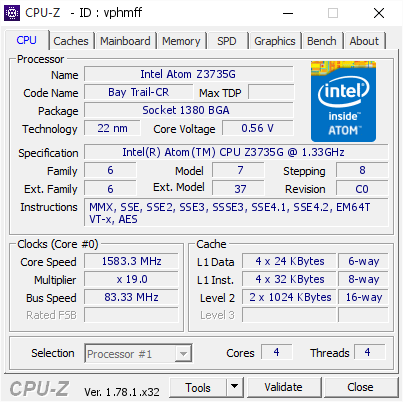
vphmff.png

support x64
 

My Computer My Computer

At a glance

Windows 11 Iot Enterprise 21h2 22000.3260xeon E5-2697v232gb 8x4gb ddr3 1333 mhzgtx 570 poit of view
OS
Windows 11 Iot Enterprise 21h2 22000.3260
Computer type
PC/Desktop
Manufacturer/Model
Asus
CPU
xeon E5-2697v2
Motherboard
rampage iv extreme
Memory
32gb 8x4gb ddr3 1333 mhz
Graphics Card(s)
gtx 570 poit of view
Sound Card
realtek HD (ALC898)
Monitor(s) Displays
samsung b2030
Screen Resolution
1600x900
Hard Drives
2tb hd 5400 rpm
3tb hd 5400 rpm
1tb nvme pcie 3.0
PSU
hx850w
Keyboard
mtek
Internet Speed
500/250 gpon
Browser
r3dfox 146.0
Antivirus
none
If UEFI doesn't work, you can install in MBR mode without any problem; the ISO in my signature works fine.
HP Stream 7 is an Intel Atom Z series 7" screen tablet with 1GB RAM and 32GB eMMC storage originally run Windows 8 32-bit, now it runs Windows 10 22H2 32-bit. I already use an SD XC card as secondary storage and have moved most of my data there but some things are still on C and cannot be moved. I have already Compact OS and compressed the whole C drive but again it is less than 200MB free, I had to manually limit the size of the swap file and disable hibernation to be able to have about 1GB free space. Every time Windows Update searches for updates it might fill the drive, so I disabled it. That's why I was amazed to see you have a less than 15GB Windows 11 installation. Apparently without any extras or updates or applications installed yet. If you add all these it should pass 20GB but still is very impressive. Imagine running Windows 11 with at least 10GB free, it would be much faster than it currently is. However HP has locked the UEFI firmware to boot in UEFI 32-bit mode only, even if the CPU is 64-bit and supports SSE4.2 to make us buy a more expensive model if we want 64-bit. I could have bypassed compatibility check and run Windows 11 25H2 now. CSM (aka Legacy BIOS mode) is not supported by the UEFI firmware, so my only choice is Windows 7 32-bit (with the hack to run in GPT UEFI mode) or Windows 8/10 32-bit. Most will say 1GB is not enough for Windows 11. Yes, I know, it is barely enough to run Windows 10 32-bit with all the updates installed, but I would do it for the experience, not for everyday use. Besides if it is already slow adding a few seconds more delay won't make noticeable difference.

PS: I have read about using 32-bit Grub or similar to run Linux 64-bit, but unfortunately this only applies to Linux. It doesn't work with Windows 64-bit. If anyone knows better, please post a guide.

PS: Yes, I know some of you would just wipe Windows and install Linux, but I don't want to do it. I prefer running Windows. I could also install some version of Android-x86 and convert it to an Android tablet, but also I don't want to do it, I already have an Android tablet. I want a Windows tablet and I cannot afford buying a new one. For checking the forum, playing some simple touch games and watching videos is perfect. I can even watch Netflix and Disney Plus if I configure the quality to standard definition. HD would not make any difference on a 7" screen anyway.
 

My Computers My Computers

  • At a glance

    Windows 11 Pro 23H2 (5699), 25H2 (8875)Mobile DualCore Intel Core 2 Duo T7250, 2000 MHz4GBMobile Intel(R) GMA 4500M (Mobile 4 series)
    OS
    Windows 11 Pro 23H2 (5699), 25H2 (8875)
    Computer type
    Laptop
    Manufacturer/Model
    Acer Extensa 5630EZ
    CPU
    Mobile DualCore Intel Core 2 Duo T7250, 2000 MHz
    Motherboard
    Acer Extensa 5630
    Memory
    4GB
    Graphics Card(s)
    Mobile Intel(R) GMA 4500M (Mobile 4 series)
    Sound Card
    Realtek ALC268 @ Intel 82801IB ICH9 - High Definition Audio Controller
    Monitor(s) Displays
    1
    Screen Resolution
    1280x800
    Hard Drives
    Samsung SSD 850 EVO 250GB SATA Device (250 GB, SATA-III)
    Internet Speed
    VDSL 50 Mbps
    Browser
    MICROSOFT EDGE
    Antivirus
    WINDOWS DEFENDER
    Other Info
    Legacy MBR installation, no TPM, no Secure Boot, no WDDM 2.0 graphics drivers, no SSE4.2, cannot get more unsupported ;) This is only my test laptop. I had installed Windows 11 here before upgrading my main PC. For my main PC I use everyday see my 2nd system specs.
  • At a glance

    Windows 11 Pro v25H2 (build 26200.8875)Intel Core-i7 3770 3.40GHz s1155 (3rd generat...2x Kingston Hyper-X Blu 8GB DDR3-1600GIGABYTE GeForce RTX 3050 WINDFORCE OC V2 6GB...
    Operating System
    Windows 11 Pro v25H2 (build 26200.8875)
    Computer type
    PC/Desktop
    Manufacturer/Model
    Custom-built PC
    CPU
    Intel Core-i7 3770 3.40GHz s1155 (3rd generation)
    Motherboard
    Asus P8H61 s1155 ATX
    Memory
    2x Kingston Hyper-X Blu 8GB DDR3-1600
    Graphics card(s)
    GIGABYTE GeForce RTX 3050 WINDFORCE OC V2 6GB (GV-N3050WF2OCV2-6GD)
    Sound Card
    Realtek HD audio (ALC887)
    Monitor(s) Displays
    Sony Bravia KDL-19L4000 19" LCD TV via VGA
    Screen Resolution
    1440x900 32-bit 60Hz
    Hard Drives
    WD Blue SA510 2.5 1000GB SSD as system disk, Western Digital Caviar Purple 4TB SATA III (WD40PURZ) as second
    PSU
    Thermaltake Litepower RGB 550W Full Wired
    Case
    SUPERCASE MIDI-TOWER
    Cooling
    Deepcool Gamma Archer CPU cooler, 1x 8cm fan at the back
    Keyboard
    Mitsumi 101-key PS/2
    Mouse
    Sunnyline OptiEye PS/2
    Internet Speed
    100Mbps
    Browser
    Microsoft Edge, Mozilla Firefox
    Antivirus
    Microsoft Windows Defender
    Other Info
    Legacy BIOS (MBR) installation, no TPM, no Secure Boot, WDDM 3.0 graphics drivers, WEI score 7.4
Copilot created this file to shrink windows.

I copied the text and saved it a batch file.
.......................................
@echo off
title Windows 11 Post‑Install Optimization (Safe + Long‑Term)
color 0A

echo ============================================
echo Windows 11 Post‑Install Optimization
echo Safe, Update‑Friendly, Long‑Term Cleanup
echo ============================================
echo.

:: 1. Disable hibernation (removes hiberfil.sys)
echo Disabling hibernation...
powercfg /hibernate off

:: 2. Set pagefile to system-managed
echo Setting pagefile to system-managed...
wmic computersystem where name="%computername%" set AutomaticManagedPagefile=True >nul

:: 3. WinSxS cleanup
echo Cleaning WinSxS component store...
Dism.exe /online /Cleanup-Image /StartComponentCleanup /ResetBase

:: 4. Windows Update leftovers
echo Cleaning Windows Update leftovers...
cleanmgr /sageset:1 >nul
cleanmgr /sagerun:1

:: 5. Clear Delivery Optimization cache
echo Clearing Delivery Optimization cache...
del /q /s %SystemRoot%\SoftwareDistribution\Download\* >nul 2>&1

:: 6. Clear Windows Event Logs
echo Clearing Windows event logs...
for /F "tokens=*" %%G in ('wevtutil el') DO wevtutil cl "%%G" >nul 2>&1

:: 7. Clear temp folders
echo Clearing TEMP folders...
del /q /f /s "%TEMP%\*" >nul 2>&1
del /q /f /s "C:\Windows\Temp\*" >nul 2>&1

:: 8. Disable Reserved Storage (saves 7GB)
echo Disabling Reserved Storage...
Dism /Online /Set-ReservedStorageState /State:Disabled

:: 9. Disable Xbox services
echo Disabling Xbox services...
for %%S in (XblAuthManager XblGameSave XboxNetApiSvc XboxGipSvc) do (
sc stop %%S >nul 2>&1
sc config %%S start= disabled >nul 2>&1
)

:: 10. Disable Copilot, Widgets, Chat
echo Disabling Copilot, Widgets, and Chat...
reg add "HKLM\SOFTWARE\Policies\Microsoft\Windows\WindowsCopilot" /v TurnOffWindowsCopilot /t REG_DWORD /d 1 /f >nul
reg add "HKLM\SOFTWARE\Policies\Microsoft\Dsh" /v AllowNewsAndInterests /t REG_DWORD /d 0 /f >nul
reg add "HKLM\SOFTWARE\Policies\Microsoft\Windows\Windows Chat" /v ChatIcon /t REG_DWORD /d 3 /f >nul

:: 11. Remove unused inbox apps
echo Removing unused inbox apps...
powershell -command "Get-AppxPackage Microsoft.3DBuilder | Remove-AppxPackage" >nul
powershell -command "Get-AppxPackage Microsoft.MSPaint | Remove-AppxPackage" >nul
powershell -command "Get-AppxPackage Microsoft.WindowsMaps | Remove-AppxPackage" >nul
powershell -command "Get-AppxPackage Microsoft.GetHelp | Remove-AppxPackage" >nul
powershell -command "Get-AppxPackage Microsoft.Getstarted | Remove-AppxPackage" >nul
powershell -command "Get-AppxPackage Microsoft.People | Remove-AppxPackage" >nul
powershell -command "Get-AppxPackage Microsoft.ZuneMusic | Remove-AppxPackage" >nul
powershell -command "Get-AppxPackage Microsoft.ZuneVideo | Remove-AppxPackage" >nul

:: 12. Clear Microsoft Store cache
echo Resetting Microsoft Store cache...
wsreset -i

:: 13. Disable telemetry
echo Disabling telemetry...
reg add "HKLM\SOFTWARE\Policies\Microsoft\Windows\DataCollection" /v AllowTelemetry /t REG_DWORD /d 0 /f >nul

:: 14. Disable background apps
echo Disabling background apps...
powershell -command "Get-AppxPackage | %% { Set-ItemProperty -Path 'HKCU:\Software\Microsoft\Windows\CurrentVersion\BackgroundAccessApplications\'+$_.Name -Name Disabled -Value 1 -ErrorAction SilentlyContinue }" >nul

echo.
echo ============================================
echo Optimization Complete
echo Restart recommended
echo ============================================
pause

 

My Computer My Computer

At a glance

windows 11 ,Ubuntu Cinnamon - for tinkering onlyIntel i51140016 GB0
OS
windows 11 ,Ubuntu Cinnamon - for tinkering only
Computer type
PC/Desktop
Manufacturer/Model
No Name - Assembled by a Compute shop in a Strip Mall.
CPU
Intel i511400
Motherboard
ASUS PRIME B560-PLUS motherboard
Memory
16 GB
Graphics Card(s)
0
Sound Card
0
Monitor(s) Displays
25 in BenQ
Screen Resolution
1920 x 1080
Hard Drives
9 SSDs 4 Nvme, 2 in M.2 slot and 2 in PCIE with adapter + 5 Sata. DVD drive
PSU
600w
Case
Antec- VSK4000E-U3 Mid Tower
Internet Speed
Bell pure fibre optic. 3 GB package. 6E Wireless adapter 750/500
Browser
Firefox, Microsoft Edge
Antivirus
Defender
Hi

I have installed a fresh win 11.
It uses 64 GB of my drive if I just look in my computer and take properties of folders.

Is there any way to minimize those 64 GB or is all file nessasary to run win11?
As an option ,after producing the ISO from UUP Dump or downloading elsewhere ,you can take a large amount of rubbish out using NT Lite.
Then create a slimmed down usb boot disk with Rufus
 

My Computers My Computers

  • At a glance

    Windows 11 Pro 25 H2 / Windows 3.11 EmulatorPentium I9 14900K64 GB Corsair Dominator DDR5Sapphire Radeon Pure RX 9060 XT , 16 GB , ARG...
    OS
    Windows 11 Pro 25 H2 / Windows 3.11 Emulator
    Computer type
    PC/Desktop
    Manufacturer/Model
    Self build Dec 2023
    CPU
    Pentium I9 14900K
    Motherboard
    Asus Rog Z790 E Wifi 7
    Memory
    64 GB Corsair Dominator DDR5
    Graphics Card(s)
    Sapphire Radeon Pure RX 9060 XT , 16 GB , ARGB Lighting ,.
    Sound Card
    Realtek Codec ALC 4080 internal + Creative Soundblaster X3 External , when former sometimes a problem
    Monitor(s) Displays
    32" Toshiba PC / TV , Corsair Xeneon Edge 14.5" screen Res : 2560 x 720
    Screen Resolution
    2560 x 1440
    Hard Drives
    4 x Corsair MP 600 Pro 500GB M2 drives ( Main ), + Samsung M2 USB 500GB +Corsair M2 1TB Ext USB+ Hitachi Sata Drive 1TB , 2 x DVD-RW
    PSU
    Corsair 1000 w
    Case
    NZXT Phantom 240 , 5 fans built in system
    Cooling
    Silentium PC Spartan 5 Max
    Keyboard
    Seenda Luminous
    Mouse
    1) Aston Martin DB9 Car , 2) McLaren Yellow P2 car , 3) Seenda Wireless
    Internet Speed
    950 mbps
    Browser
    Edge , Opera , Firefox , Brave, Samsung Browsers .
    Antivirus
    Norton 360 , 10 User
    Other Info
    Asus GT BE 98 Wifi 7 Router
    Pertelian X2040 ,
    Echo Show 8"
    Logitech Z906 5.1 speakers
    Aura Sync various LED's Internal case lighting
  • At a glance

    Windows 11 25H28GB
    Operating System
    Windows 11 25H2
    Computer type
    Laptop
    Manufacturer/Model
    Microsoft Surface Go
    Memory
    8GB
    Hard Drives
    128 GB and 256 GB Micro SD
    Internet Speed
    950 mbps

Latest Support Threads

Back
Top Bottom