StartAllBack: Windows 11 from better timeline
Get the latest version here Download
Embrace, enhance, unsweep classic UI from under the rug
Restore and improve taskbar
- Show labels on task icons
- Adjust icon size and margins
- Move taskbar to top, left or right edges
- Drag and drop stuff onto taskbar
- Center task icons but keep Start button on the left
- Split into segments, use dynamic translucency
- Separate corner icons with Windows 7/10 UI
- Auto-hide when covered by maximized window
Restore and improve File Explorer and Control Panel
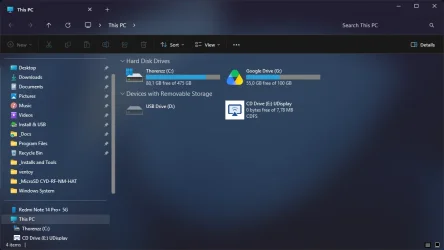
- Ribbon and Command Bar revamped with translucent effects
- Details pane on bottom
- Old search box (the one which works)
- Dark mode support for more dialogs
Restore and improve context menus
- All new look with rounded acrylic menus
- Fast and responsive taskbar menus
- New fonts, better touch support
Restore and improve start menu
- Launch apps and go to system places in one click
- Navigate dropdown menus like a boss
- Enjoy fast and reliable search
Finally, lightweight styling and UI consistency
- Enjoy Windows 7, Windows 8 and third-party taskbar and start menu styles
- Fix UI inconsistencies in Win32 apps
- Don't be blue: recolor UI in all windows apps
- Negative resource usage: fewer RAM used, fewer processes started, faster startup




StartAllBack For Windows 11 has been released.
Edit: I have now tested it. It's working quite well.
Apart from a great start menu, you can also have the Enhanced Classic Taskbar back.
This means (for example) that you can have an uncombined and unlocked Taskbar.
You will now also be able to enhance the Taskbar clock using T-Clock Redux or similar.

You can also change Windows Explorer to Ribbon UI or Simple UI.
You can get it Download
StartAllBack to fix all Windows 11 deal-breaking UI issues
StartAllBack restores taskbar, start menu, context menus, explorer, sanity, style and order!
www.startallback.com





Get


 and my way of doing it is quicker too.