StartAllBack


StartAllBack: Windows 11 from better timeline​

Get the latest version here Download

Embrace, enhance, unsweep classic UI from under the rug​

Restore and improve taskbar​

  • Show labels on task icons
  • Adjust icon size and margins
  • Move taskbar to top, left or right edges
  • Drag and drop stuff onto taskbar
  • Center task icons but keep Start button on the left
  • Split into segments, use dynamic translucency
  • Separate corner icons with Windows 7/10 UI
  • Auto-hide when covered by maximized window

Restore and improve File Explorer and Control Panel​

  • Ribbon and Command Bar revamped with translucent effects
  • Details pane on bottom
  • Old search box (the one which works)
  • Dark mode support for more dialogs

Restore and improve context menus​

  • All new look with rounded acrylic menus
  • Fast and responsive taskbar menus
  • New fonts, better touch support

Restore and improve start menu​

  • Launch apps and go to system places in one click
  • Navigate dropdown menus like a boss
  • Enjoy fast and reliable search

Finally, lightweight styling and UI consistency​

  • Enjoy Windows 7, Windows 8 and third-party taskbar and start menu styles
  • Fix UI inconsistencies in Win32 apps
  • Don't be blue: recolor UI in all windows apps
  • Negative resource usage: fewer RAM used, fewer processes started, faster startup



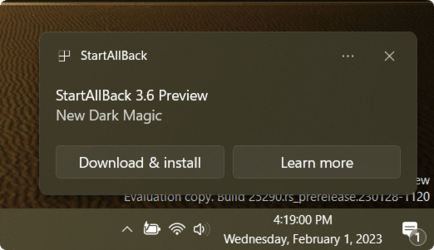
StartAllBack For Windows 11 has been released.
It's an RC release. I haven't tested it yet as I have Start11 installed.

Edit: I have now tested it. It's working quite well.
Apart from a great start menu, you can also have the Enhanced Classic Taskbar back.
This means (for example) that you can have an uncombined and unlocked Taskbar.
You will now also be able to enhance the Taskbar clock using T-Clock Redux or similar.

T-Clock Redux Tray Clock_.png

You can also change Windows Explorer to Ribbon UI or Simple UI.

You can get it Download


01 - Welcome.png
02 - Start Menu.png
04 - Taskbar.png
05 - Explorer.png
06 - Advanced.png
Get

 
Seems like some people are having trouble with ExplorerPatcher.

I think StartAllBack will be a more reliable option into the future. I just think it will be better supported.
And it's only a very small price to pay.

It's sad that we even have to do this, but Windows 11 is crippled in some ways.
 

My Computers My Computers

  • At a glance

    Windows 11 ProIntel Core i9-10900XCorsair 64 GB (4 x 16 GB) CMW64GX4M4C3000C15 ...GIGABYTE GeForce GTX 1660 Super Mini ITX 6 GB OC
    OS
    Windows 11 Pro
    Computer type
    PC/Desktop
    Manufacturer/Model
    Stigg's Build
    CPU
    Intel Core i9-10900X
    Motherboard
    GIGABYTE X299X DESIGNARE 10G
    Memory
    Corsair 64 GB (4 x 16 GB) CMW64GX4M4C3000C15 Vengeance RGB Pro 3000Mhz DDR4
    Graphics Card(s)
    GIGABYTE GeForce GTX 1660 Super Mini ITX 6 GB OC
    Sound Card
    Realtek ALC1220
    Monitor(s) Displays
    Samsung 27" FHD LED FreeSync Gaming Monitor (LS27F350FHEXXY)
    Screen Resolution
    1920 x 1080
    Hard Drives
    Samsung 970 Pro Series 1TB M.2 2280 NVMe SSD
    Western Digital Red Pro WD8003FFBX-68B9AN0 8 TB, 7200 RPM, SATA-III
    Western Digital Red Pro WD8003FFBX-68B9AN0 8 TB, 7200 RPM, SATA-III
    PSU
    Corsair HX1200 1200W 80 Plus Platinum
    Case
    Fractal Design Define 7 Black Solid Case
    Cooling
    Noctua NH-D15 Chromax Black
    Keyboard
    Razer Ornata V2
    Mouse
    Razer DeathAdder Essential
    Internet Speed
    FTTN 100Mbps / 40Mbps
    Browser
    Mozilla Firefox
    Antivirus
    N/A
    Other Info
    Logitech BRIO 4k Ultra HD USB-C Webcam
  • At a glance

    Windows 10 ProCore i7-8750HSK Hynix 32 GB (2 x 16 GB) HMA82GS6CJR8N-VK 1...NVIDIA GeForce GTX 1070
    Operating System
    Windows 10 Pro
    Computer type
    Laptop
    Manufacturer/Model
    ASUS ROG Zephyrus M GM501GS
    CPU
    Core i7-8750H
    Motherboard
    Zephyrus M GM501GS
    Memory
    SK Hynix 32 GB (2 x 16 GB) HMA82GS6CJR8N-VK 16 GB DDR4-2666 DDR4 SDRAM
    Graphics card(s)
    NVIDIA GeForce GTX 1070
    Sound Card
    Realtek ALC294
    Monitor(s) Displays
    AU Optronics B156HAN07.1 [15.6" LCD]
    Screen Resolution
    1920 x 1080
    Hard Drives
    Samsung MZVKW512HMJP-00000 512 GB, PCI-E 3.0 x4
    Samsung SSD 860 QVO 4TB 4 TB, SATA-III
    PSU
    N/A
    Case
    N/A
    Cooling
    N/A
    Keyboard
    PC/AT Enhanced PS2 Keyboard (101/102-Key)
    Mouse
    Razer DeathAdder Essential
    Internet Speed
    FTTN 100Mbps / 40Mbps
    Browser
    Mozilla Firefox
    Antivirus
    N/A
    Other Info
    USB2.0 HD UVC Webcam
Am I missing a setting buried somewhere? Thanks for any help you can offer.
Mouse middle-click will invoke the native Start Menu, that's pretty much standard with all of them...,
or, a multi-finger gesture of some pre-determined value, that emulates middle click, on a touchpad, if that happens to be the case.
 
Last edited:

My Computers My Computers

  • At a glance

    Windows 11 Pro
    OS
    Windows 11 Pro
    Computer type
    PC/Desktop
    Manufacturer/Model
    ASUS ROG Strix
  • At a glance

    Windows 11 Pro
    Operating System
    Windows 11 Pro
    Computer type
    Laptop
    Manufacturer/Model
    ASUS VivoBook
  • ASUS VivoBook 'Lite' ~ Windows 11 Home
Seems like some people are having trouble with ExplorerPatcher.

I think StartAllBack will be a more reliable option into the future. I just think it will be better supported.
And it's only a very small price to pay.

It's sad that we even have to do this, but Windows 11 is crippled in some ways.
Yes from what I've heard it doesn't work well on 22H2. I've also heard that MS removed some stuff that EP relied on.
IDK, I've never used it. It just gives you back the Win10 explorer and taskbar/start which aren't amazing at all. SAB is way better IMO. Not only does it still work, but it also gives you way more options and features.
Windows isn't crippled, all the features are still there. It just doesn't look the way I want it to.

Mouse middle-click will invoke the native Start Menu, that's pretty much standard with all of them...,
or, a multi-finger gesture of some pre-determined value, that emulates middle click, on a touchpad, if that happens to be the case.
Great find. I did not know this.
I'll still never use it since it's complete garbage though. lol
 

My Computer My Computer

At a glance

Windows 11
OS
Windows 11
Mouse middle-click will invoke the native Start Menu, that's pretty much standard with all of them...,
or, a multi-finger gesture of some pre-determined value, that emulates middle click, on a touchpad, if that happens to be the case.
Mouse middle-click can be assigned various key combinations. I can find no combinations that bring up the native Start Menu when using SAB. If I program it to the WinKey, then it does nothing more than exactly what happens when I hit the WinKey itself; i.e., bring up the SAB Menu. What am I missing? I understand I can temporarily disable the SAB Menu but that sort of defeats my purpose. If I go back to Start 11, I can active the native Start Menu without disabling Start11. Thanks for the input. Chuck
 

My Computer My Computer

At a glance

Windows 1111th Generation Intel® Core™ i7-11800H32GBNVIDIA® GeForce® RTX™ 3050
OS
Windows 11
Computer type
Laptop
Manufacturer/Model
Lenovo Legion 5 Pro
CPU
11th Generation Intel® Core™ i7-11800H
Motherboard
Lenovo
Memory
32GB
Graphics Card(s)
NVIDIA® GeForce® RTX™ 3050
Monitor(s) Displays
16" WQXGA HDR
Screen Resolution
2560 x 1600
Hard Drives
2 x 1TB SSD
Case
Laptop
Just using Winkey+x does the job with Open Shell and SAB enabled , whats the problem.........??
 

My Computers My Computers

  • At a glance

    Windows11 Pro 25H2i732GBnVidia
    OS
    Windows11 Pro 25H2
    Computer type
    PC/Desktop
    Manufacturer/Model
    Asus
    CPU
    i7
    Motherboard
    z97k
    Memory
    32GB
    Graphics Card(s)
    nVidia
    Sound Card
    Realtek
    Hard Drives
    3
    Cooling
    air
    Browser
    Edge
    Antivirus
    ESET
  • At a glance

    Windows11 ProIntel i516GBIntel
    Operating System
    Windows11 Pro
    Computer type
    PC/Desktop
    Manufacturer/Model
    ASUS
    CPU
    Intel i5
    Motherboard
    ASUS Basic
    Memory
    16GB
    Graphics card(s)
    Intel
    Sound Card
    Realtek
    Monitor(s) Displays
    Samsung
    Hard Drives
    one intern , 0ne extern, OS on SSD
    Cooling
    air
    Keyboard
    wireless Logitech
    Mouse
    wireless Logitech
    Internet Speed
    1GB
    Browser
    Edge
    Antivirus
    ESET
Just using Winkey+x does the job with Open Shell and SAB enabled , whats the problem.........??
On my machine, that key combination does the same thing as right-clicking the SAB Start icon at lower-left. It does not open the native Windows 11 Start Menu, incl. installed programs, etc. I guess that's "the problem" that I have. Thanks, Chuck
 

My Computer My Computer

At a glance

Windows 1111th Generation Intel® Core™ i7-11800H32GBNVIDIA® GeForce® RTX™ 3050
OS
Windows 11
Computer type
Laptop
Manufacturer/Model
Lenovo Legion 5 Pro
CPU
11th Generation Intel® Core™ i7-11800H
Motherboard
Lenovo
Memory
32GB
Graphics Card(s)
NVIDIA® GeForce® RTX™ 3050
Monitor(s) Displays
16" WQXGA HDR
Screen Resolution
2560 x 1600
Hard Drives
2 x 1TB SSD
Case
Laptop
Mouse middle-click can be assigned various key combinations. I can find no combinations that bring up the native Start Menu when using SAB. If I program it to the WinKey, then it does nothing more than exactly what happens when I hit the WinKey itself; i.e., bring up the SAB Menu. What am I missing? I understand I can temporarily disable the SAB Menu but that sort of defeats my purpose. If I go back to Start 11, I can active the native Start Menu without disabling Start11. Thanks for the input. Chuck
Just press the middle mouse button on the start button, nothing else is required (no key binding).
 

My Computer My Computer

At a glance

Windows 11
OS
Windows 11
I don't know what I'm doing wrong but the middle Logitech mouse button does nothing on my machine. . . . As I wrote this, I decided to go into the Logitech settings. I found where I could reset everything back to Factory Settings. Once I did that, I can now click the middle button when hovering over the SAB Start Button and bring up the native Windows 11 Start Menu. Thank you! Any other place on a web page, clicking the middle button brings up the Up/down arrow to scroll the page without rolling the wheel. Toggling the middle button turns that feature off.
I don't believe I've ever changed anything in the Logitech settings before, but a reset sure worked.
Thanks again.
Chuck
 

My Computer My Computer

At a glance

Windows 1111th Generation Intel® Core™ i7-11800H32GBNVIDIA® GeForce® RTX™ 3050
OS
Windows 11
Computer type
Laptop
Manufacturer/Model
Lenovo Legion 5 Pro
CPU
11th Generation Intel® Core™ i7-11800H
Motherboard
Lenovo
Memory
32GB
Graphics Card(s)
NVIDIA® GeForce® RTX™ 3050
Monitor(s) Displays
16" WQXGA HDR
Screen Resolution
2560 x 1600
Hard Drives
2 x 1TB SSD
Case
Laptop
I don't know what the hell this but, it ain't workin!!! 🤷‍♂️

00025t.png
 

My Computers My Computers

  • At a glance

    Windows 11 Pro
    OS
    Windows 11 Pro
    Computer type
    PC/Desktop
    Manufacturer/Model
    ASUS ROG Strix
  • At a glance

    Windows 11 Pro
    Operating System
    Windows 11 Pro
    Computer type
    Laptop
    Manufacturer/Model
    ASUS VivoBook
  • ASUS VivoBook 'Lite' ~ Windows 11 Home
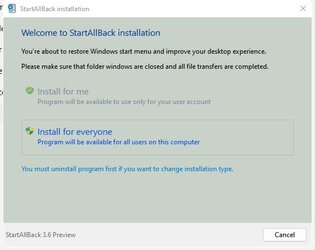
It worked for me in that it launched the 'StartAllBack installation' window but I didn't continue with it since I prefer to wait for stable version. Did you not even get this window or are you saying that the 'Install for me/Install for everyone' options didn't work?

SAB.jpg
 

My Computers My Computers

  • At a glance

    Windows 11 ProAMD Ryzen 9 8945HS32GB DDR5 SO-DIMMIntegrated AMD Radeon 780M (4.00 GHz)
    OS
    Windows 11 Pro
    Computer type
    PC/Desktop
    Manufacturer/Model
    GMKtec K11
    CPU
    AMD Ryzen 9 8945HS
    Memory
    32GB DDR5 SO-DIMM
    Graphics Card(s)
    Integrated AMD Radeon 780M (4.00 GHz)
    Monitor(s) Displays
    Benq 2250HM
    Screen Resolution
    1920 x 1080
    Hard Drives
    1 TB PCIe 4.0 NVMe M.2 SSD
  • At a glance

    Windows 11 HomeIntel® Core™ Ultra 7 - 255H processor16 GB LPDDR5 SDRAMIntel Arc 140T onboard graphics
    Operating System
    Windows 11 Home
    Computer type
    Laptop
    Manufacturer/Model
    ASUS Zenbook 14 OLED 14" Laptop - UX3405CA-QL192W
    CPU
    Intel® Core™ Ultra 7 - 255H processor
    Memory
    16 GB LPDDR5 SDRAM
    Graphics card(s)
    Intel Arc 140T onboard graphics
    Screen Resolution
    1920 x 1200 (16:10 WUXGA resolution) OLED Touchscreen
    Hard Drives
    1TB SSD
1675323394795.png
 

Attachments

My Computer My Computer

At a glance

Windows 11, Pro for Workstations, 22631.2861 ...Amd Ryzen 5 5500 ("Zen 3") (3.6GHz,45-65W,L3:...DDR4 OLOy Owl Black, 8GB, 3200MHZ, (x2)Colorful GeForce GTX 1650 Super
OS
Windows 11, Pro for Workstations, 22631.2861 (23H2)
Computer type
PC/Desktop
Manufacturer/Model
Custom
CPU
Amd Ryzen 5 5500 ("Zen 3") (3.6GHz,45-65W,L3:16M,6/12)
Motherboard
Asus Prime B450M Gaming/BR Chipset B450 AMD AM4 mATX DDR4 - BIOS 4002
Memory
DDR4 OLOy Owl Black, 8GB, 3200MHZ, (x2)
Graphics Card(s)
Colorful GeForce GTX 1650 Super
Sound Card
-
Monitor(s) Displays
Philips TV 43PFG5102/78
Screen Resolution
1920x1080
Hard Drives
SSD: 120GB, Sata III, Leitura 560MBs e Gravação 540MBs
HD: Seagate Barracuda 1TB, Sata III, 7200RPM, 64MB
PSU
Corsair ATX CV550 550W, 80 Plus Bronze, PFC Ativo
Case
Wheel Jack, Mid Tower, Vidro Temperado, Black
Cooling
default
Keyboard
common
Mouse
commom
Internet Speed
600mb
Browser
Opera
Antivirus
Windows Defender
Did you not even get this window or are you saying that the 'Install for me/Install for everyone' options didn't work?
Oh, I installed it alright! There's just nothing different about it! 🤷‍♂️

0002515.png
 

My Computers My Computers

  • At a glance

    Windows 11 Pro
    OS
    Windows 11 Pro
    Computer type
    PC/Desktop
    Manufacturer/Model
    ASUS ROG Strix
  • At a glance

    Windows 11 Pro
    Operating System
    Windows 11 Pro
    Computer type
    Laptop
    Manufacturer/Model
    ASUS VivoBook
  • ASUS VivoBook 'Lite' ~ Windows 11 Home

My Computers My Computers

  • At a glance

    Windows11 Pro 25H2i732GBnVidia
    OS
    Windows11 Pro 25H2
    Computer type
    PC/Desktop
    Manufacturer/Model
    Asus
    CPU
    i7
    Motherboard
    z97k
    Memory
    32GB
    Graphics Card(s)
    nVidia
    Sound Card
    Realtek
    Hard Drives
    3
    Cooling
    air
    Browser
    Edge
    Antivirus
    ESET
  • At a glance

    Windows11 ProIntel i516GBIntel
    Operating System
    Windows11 Pro
    Computer type
    PC/Desktop
    Manufacturer/Model
    ASUS
    CPU
    Intel i5
    Motherboard
    ASUS Basic
    Memory
    16GB
    Graphics card(s)
    Intel
    Sound Card
    Realtek
    Monitor(s) Displays
    Samsung
    Hard Drives
    one intern , 0ne extern, OS on SSD
    Cooling
    air
    Keyboard
    wireless Logitech
    Mouse
    wireless Logitech
    Internet Speed
    1GB
    Browser
    Edge
    Antivirus
    ESET
See posts #412, #413 and #417
 

My Computers My Computers

  • At a glance

    Windows 11 ProAMD Ryzen 9 8945HS32GB DDR5 SO-DIMMIntegrated AMD Radeon 780M (4.00 GHz)
    OS
    Windows 11 Pro
    Computer type
    PC/Desktop
    Manufacturer/Model
    GMKtec K11
    CPU
    AMD Ryzen 9 8945HS
    Memory
    32GB DDR5 SO-DIMM
    Graphics Card(s)
    Integrated AMD Radeon 780M (4.00 GHz)
    Monitor(s) Displays
    Benq 2250HM
    Screen Resolution
    1920 x 1080
    Hard Drives
    1 TB PCIe 4.0 NVMe M.2 SSD
  • At a glance

    Windows 11 HomeIntel® Core™ Ultra 7 - 255H processor16 GB LPDDR5 SDRAMIntel Arc 140T onboard graphics
    Operating System
    Windows 11 Home
    Computer type
    Laptop
    Manufacturer/Model
    ASUS Zenbook 14 OLED 14" Laptop - UX3405CA-QL192W
    CPU
    Intel® Core™ Ultra 7 - 255H processor
    Memory
    16 GB LPDDR5 SDRAM
    Graphics card(s)
    Intel Arc 140T onboard graphics
    Screen Resolution
    1920 x 1200 (16:10 WUXGA resolution) OLED Touchscreen
    Hard Drives
    1TB SSD
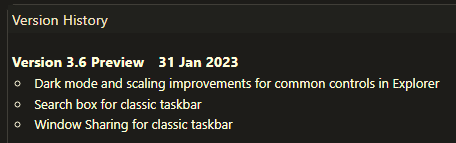
Okay..., there's something dickered with this Preview!
I get momentary black flashing on Explorer windows, that's about it...,
aside from that, I see nothing different..., certainly none of these new options...

0003927.png

I have a suspicion though, that this Preview and QTTabBar are not playing nicely together!
 

My Computers My Computers

  • At a glance

    Windows 11 Pro
    OS
    Windows 11 Pro
    Computer type
    PC/Desktop
    Manufacturer/Model
    ASUS ROG Strix
  • At a glance

    Windows 11 Pro
    Operating System
    Windows 11 Pro
    Computer type
    Laptop
    Manufacturer/Model
    ASUS VivoBook
  • ASUS VivoBook 'Lite' ~ Windows 11 Home

My Computer My Computer

At a glance

Windows 11 ProIntel Core i9 12900KFCorsair 64GB DDR5 Vengeance C40 5200MhzASUS GeForce RTX 3090 ROG Strix OC 24GB
OS
Windows 11 Pro
Computer type
PC/Desktop
Manufacturer/Model
Custom Build
CPU
Intel Core i9 12900KF
Motherboard
ASUS ROG Maximus Z690 Hero
Memory
Corsair 64GB DDR5 Vengeance C40 5200Mhz
Graphics Card(s)
ASUS GeForce RTX 3090 ROG Strix OC 24GB
Sound Card
OnBoard
Monitor(s) Displays
Acer Predator XB323UGP 32" QHD G-SYNC-C 144Hz 1MS IPS LED
Screen Resolution
2560 x 1440
Hard Drives
1x Samsung 980 Pro Series Gen4 250GB M.2 NVMe
1x Samsung 980 Pro Series Gen4 500GB M.2 NVMe
2x Samsung 980 Pro Series Gen4 2TB M.2 NVMe
PSU
Corsair AX1200i 1200W 80PLUS Titanium Modular
Case
Corsair 4000D Black Case w/ Tempered Glass Side Panel
Cooling
Noctua NH-U12A Chromax Black CPU Cooler, 4x Noctua 120mm Fans
Keyboard
Logitech MK545
Mouse
Logitech MX Master 3
Internet Speed
Fixed Wireless 150mbps/75mbps
Browser
Firefox
Antivirus
Kaspersky
Other Info
Thrustmaster TS-PC RACER
Fanatec CSL Elite Pedals with the Load Cell Kit
Yamaha Amp with Bose Speakers
Okay..., I see some changes with applets...

0002517.png 0002518.png

... it's still messin with Explorer though,
this...

0002519.png

turns to this when clicked on...

0002520.png


Some Control Center items are broken as well..., but, as I said, it could be QTTabBar! 🤷‍♂️
 
Last edited:

My Computers My Computers

  • At a glance

    Windows 11 Pro
    OS
    Windows 11 Pro
    Computer type
    PC/Desktop
    Manufacturer/Model
    ASUS ROG Strix
  • At a glance

    Windows 11 Pro
    Operating System
    Windows 11 Pro
    Computer type
    Laptop
    Manufacturer/Model
    ASUS VivoBook
  • ASUS VivoBook 'Lite' ~ Windows 11 Home
Hello, is there any plan of having the Windows 10 Start menu with live tiles included in StartAllBack? I vastly prefer it to the Windows 7/Windows XP style menus that StartAllBack offers...
Thank you in advance for the reply.
 

My Computer My Computer

At a glance

Windows 11
OS
Windows 11
... is there any plan of having the Windows 10 Start menu with live tiles included in StartAllBack?
I kinda doubt it, but, you can snoop around the SAB forums about it.
 

My Computers My Computers

  • At a glance

    Windows 11 Pro
    OS
    Windows 11 Pro
    Computer type
    PC/Desktop
    Manufacturer/Model
    ASUS ROG Strix
  • At a glance

    Windows 11 Pro
    Operating System
    Windows 11 Pro
    Computer type
    Laptop
    Manufacturer/Model
    ASUS VivoBook
  • ASUS VivoBook 'Lite' ~ Windows 11 Home

Latest Support Threads

Back
Top Bottom