StartAllBack


StartAllBack: Windows 11 from better timeline​

Get the latest version here Download

Embrace, enhance, unsweep classic UI from under the rug​

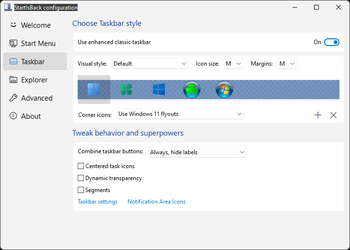
Restore and improve taskbar​

  • Show labels on task icons
  • Adjust icon size and margins
  • Move taskbar to top, left or right edges
  • Drag and drop stuff onto taskbar
  • Center task icons but keep Start button on the left
  • Split into segments, use dynamic translucency
  • Separate corner icons with Windows 7/10 UI
  • Auto-hide when covered by maximized window

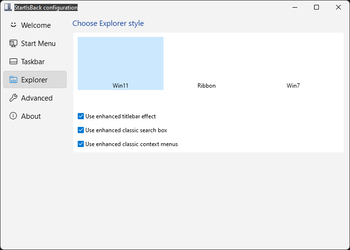
Restore and improve File Explorer and Control Panel​

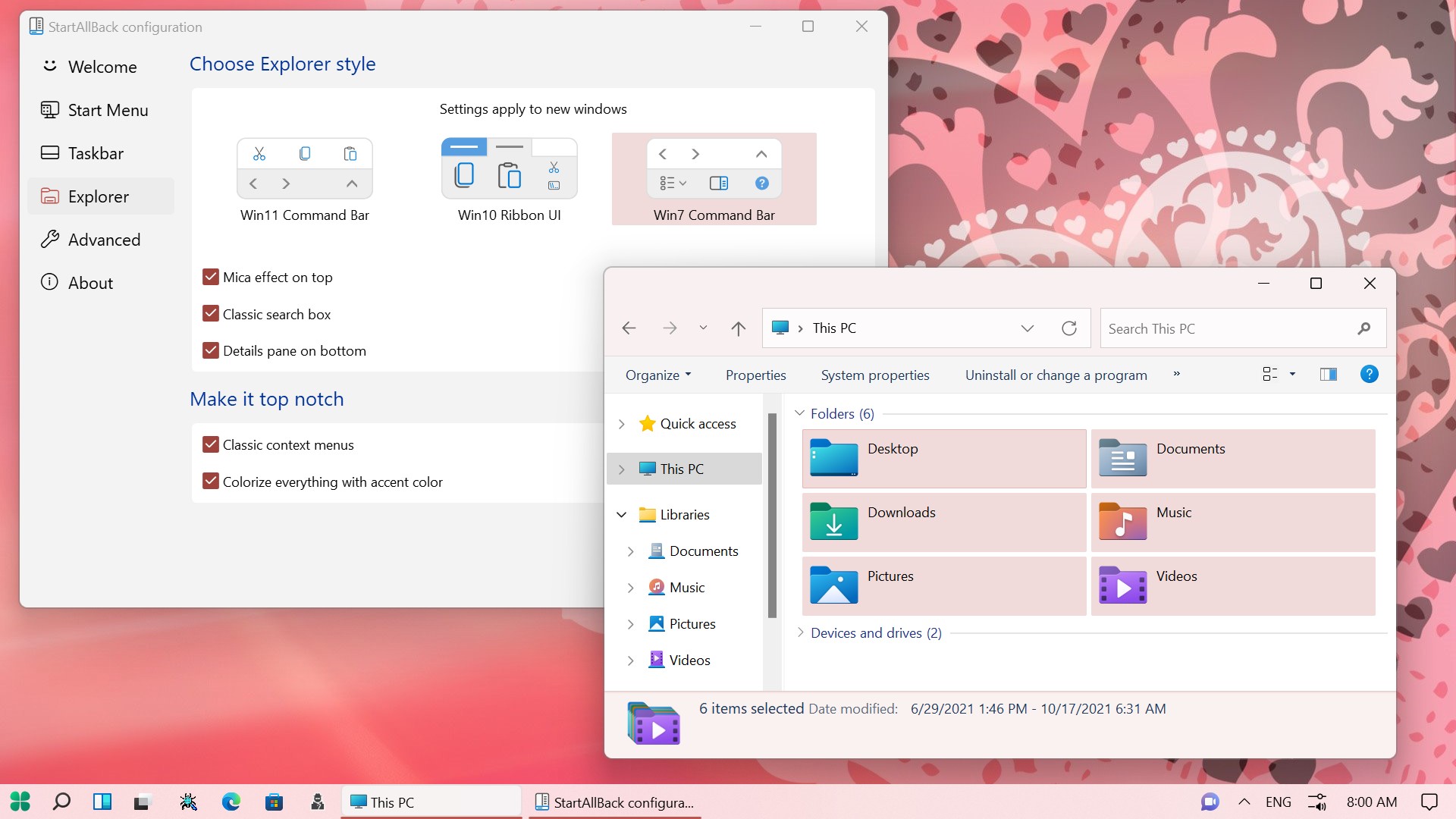
  • Ribbon and Command Bar revamped with translucent effects
  • Details pane on bottom
  • Old search box (the one which works)
  • Dark mode support for more dialogs

Restore and improve context menus​

  • All new look with rounded acrylic menus
  • Fast and responsive taskbar menus
  • New fonts, better touch support

Restore and improve start menu​

  • Launch apps and go to system places in one click
  • Navigate dropdown menus like a boss
  • Enjoy fast and reliable search

Finally, lightweight styling and UI consistency​

  • Enjoy Windows 7, Windows 8 and third-party taskbar and start menu styles
  • Fix UI inconsistencies in Win32 apps
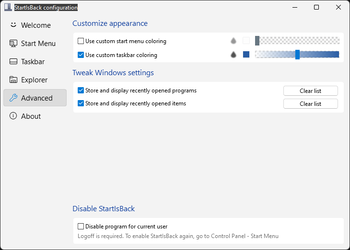
  • Don't be blue: recolor UI in all windows apps
  • Negative resource usage: fewer RAM used, fewer processes started, faster startup
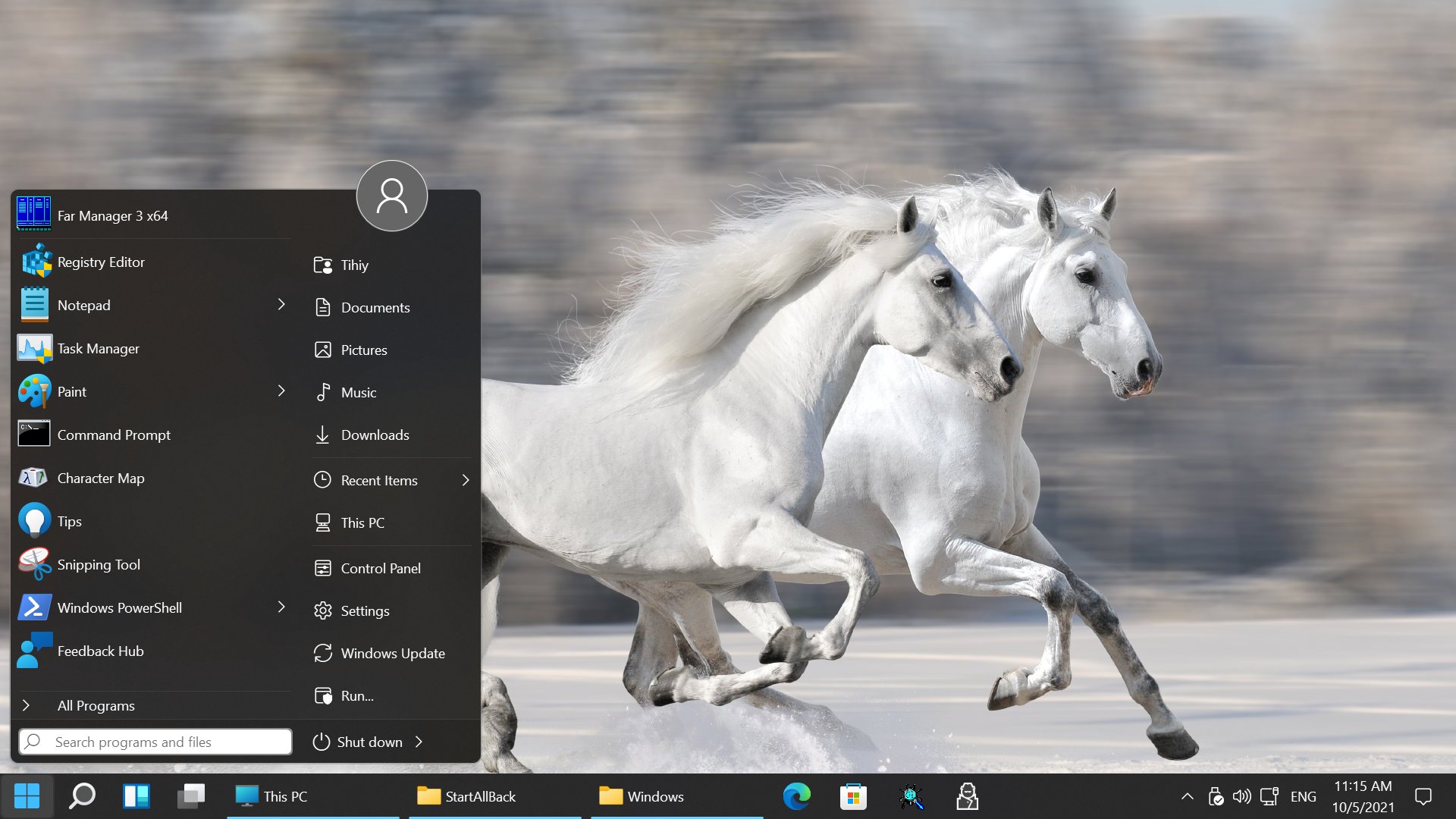


StartAllBack For Windows 11 has been released.
It's an RC release. I haven't tested it yet as I have Start11 installed.

Edit: I have now tested it. It's working quite well.
Apart from a great start menu, you can also have the Enhanced Classic Taskbar back.
This means (for example) that you can have an uncombined and unlocked Taskbar.
You will now also be able to enhance the Taskbar clock using T-Clock Redux or similar.

T-Clock Redux Tray Clock_.png

You can also change Windows Explorer to Ribbon UI or Simple UI.

You can get it Download


01 - Welcome.png
02 - Start Menu.png
04 - Taskbar.png
05 - Explorer.png
06 - Advanced.png
Get
 
Sorry, I don't know much about it.

But "CommandManager"="Context Menu Tuner" is borrowed from WinAero, since that's his Context Menu Tuner app. If you're not using it, then don't include that line.
 

My Computer

System One

  • OS
    Windows 7
Sorry, I don't know much about it.

But "CommandManager"="Context Menu Tuner" is borrowed from WinAero, since that's his Context Menu Tuner app. If you're not using it, then don't include that line.
Removed that line. Probably where that reg was originally pulled from so credit to Winaero then. But no worries. Just figured if anyone here knew how to execute it via Command or Powershell, it’d be you. Thanks.
 

My Computer

System One

  • OS
    Windows 11 Pro
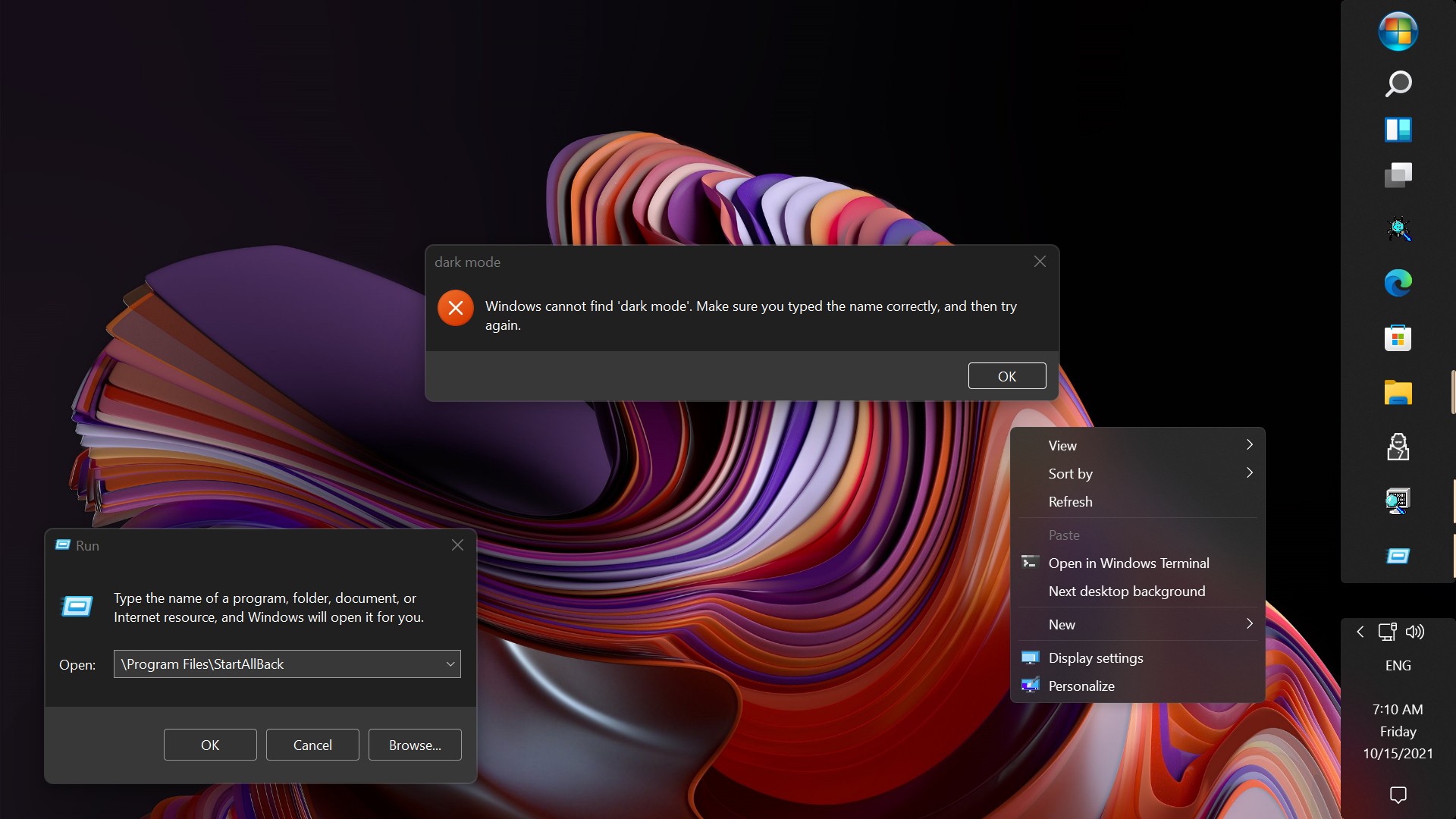
... add it to the context menu. once added, it will launch the Windows.aboutWindows CommandStore id from the registry, thus dark mode.
Only thing is... the Desktop right click, (cursor), stays in busy mode while that window is open. No biggie though.
 

My Computers

System One System Two

  • OS
    Windows 11 Pro
    Computer type
    PC/Desktop
    Manufacturer/Model
    ASUS ROG Strix
  • Operating System
    Windows 11 Pro
    Computer type
    Laptop
    Manufacturer/Model
    ASUS VivoBook
I have found a bug if it hasn't been reported on.
When applying the Win10 Ribbon UI for the Explorer style and having Classic context menus switched off, Explorer keeps crashing randomly. When the Classic context menus is switched on, Explorer doesn't crash.
Using v3.9.15 on Windows 11 25H2, but it was crashing on 24H2 also.
 

My Computer

System One

  • OS
    Windows 11 Pro 25H2
    Computer type
    PC/Desktop
    Manufacturer/Model
    Self Built
    CPU
    Intel i7 14700K
    Motherboard
    ASUS TUF GAMING B660M-E D4
    Memory
    64GB Corsair Vengeance RGB Pro 3200MT/s DDR4
    Graphics Card(s)
    ASUS RTX 3060Ti TUF Gaming OC 8GB
    Monitor(s) Displays
    Samsung CF390 Curved 24' 1080P
    Screen Resolution
    1080P
    Hard Drives
    Samsung 980 Pro M.2 PCI-E Gen4 NVME 500GB
    Samsung 980 M.2 PCI-E Gen3 NVME 1TB
    PSU
    Corsair RM850e 80+ Gold 850W
    Case
    Corsair 4000D Airflow Black
    Cooling
    Corsair iCUE Link H100i LCD + 4 case fans
    Keyboard
    Corsair K65 Plus
    Mouse
    Logitech MX Master 3S
    Internet Speed
    26Mpbs
    Browser
    Firefox
    Antivirus
    BitDefender Total Security

My Computer

System One

  • OS
    Windows 11 Pro 25H2
    Computer type
    PC/Desktop
    Manufacturer/Model
    Self Built
    CPU
    Intel i7 14700K
    Motherboard
    ASUS TUF GAMING B660M-E D4
    Memory
    64GB Corsair Vengeance RGB Pro 3200MT/s DDR4
    Graphics Card(s)
    ASUS RTX 3060Ti TUF Gaming OC 8GB
    Monitor(s) Displays
    Samsung CF390 Curved 24' 1080P
    Screen Resolution
    1080P
    Hard Drives
    Samsung 980 Pro M.2 PCI-E Gen4 NVME 500GB
    Samsung 980 M.2 PCI-E Gen3 NVME 1TB
    PSU
    Corsair RM850e 80+ Gold 850W
    Case
    Corsair 4000D Airflow Black
    Cooling
    Corsair iCUE Link H100i LCD + 4 case fans
    Keyboard
    Corsair K65 Plus
    Mouse
    Logitech MX Master 3S
    Internet Speed
    26Mpbs
    Browser
    Firefox
    Antivirus
    BitDefender Total Security

My Computers

System One System Two

  • OS
    Windows 11 Pro 25h2
    Computer type
    PC/Desktop
    CPU
    Intel 10980XE
    Motherboard
    Asus Rampage VI Extreme Encore
    Memory
    G.Skill TridentZ Royale
    Graphics Card(s)
    EVGA RTX 2080Ti Hydro Copper
    Sound Card
    Asus
    Monitor(s) Displays
    Dell 27"
    Hard Drives
    Intel Optane P5801X
    Samsung 990 Pro
    PSU
    Seasonic Prime TX 1000W
    Case
    Lian Li A77F
    Cooling
    Watercooling
    Keyboard
    Logitech MX keys
    Mouse
    Logitech MX Master 3S
    Browser
    Edge Canary
    Antivirus
    Kaspersky
  • Operating System
    Windows 11 Pro 24h2
    Computer type
    Laptop
    Manufacturer/Model
    Asus Pro

My Computer

System One

  • OS
    Windows 11 Pro 25H2
    Computer type
    PC/Desktop
    Manufacturer/Model
    Self Built
    CPU
    Intel i7 14700K
    Motherboard
    ASUS TUF GAMING B660M-E D4
    Memory
    64GB Corsair Vengeance RGB Pro 3200MT/s DDR4
    Graphics Card(s)
    ASUS RTX 3060Ti TUF Gaming OC 8GB
    Monitor(s) Displays
    Samsung CF390 Curved 24' 1080P
    Screen Resolution
    1080P
    Hard Drives
    Samsung 980 Pro M.2 PCI-E Gen4 NVME 500GB
    Samsung 980 M.2 PCI-E Gen3 NVME 1TB
    PSU
    Corsair RM850e 80+ Gold 850W
    Case
    Corsair 4000D Airflow Black
    Cooling
    Corsair iCUE Link H100i LCD + 4 case fans
    Keyboard
    Corsair K65 Plus
    Mouse
    Logitech MX Master 3S
    Internet Speed
    26Mpbs
    Browser
    Firefox
    Antivirus
    BitDefender Total Security
Only thing is... the Desktop right click, (cursor), stays in busy mode while that window is open.
Weirding me right out... 🤷‍♂️
(go full screen)


My Computers

System One System Two

  • OS
    Windows 11 Pro
    Computer type
    PC/Desktop
    Manufacturer/Model
    ASUS ROG Strix
  • Operating System
    Windows 11 Pro
    Computer type
    Laptop
    Manufacturer/Model
    ASUS VivoBook
Weirding me right out... 🤷‍♂️
(go full screen)

yeah i'm tracking. as far as i can tell its because it uses the DelegateExecute to launch that instance of it. i havent figured out a way to use that without locking out the context menu. i may try to add it to winx menu instead so it doesnt lock the desktop context. will post back later

EDIT:
whats odd is i got a python script to launch the commandstore windows.aboutwindows, but it launches in light mode :lmao:
 
Last edited:

My Computer

System One

  • OS
    Windows 11 Pro
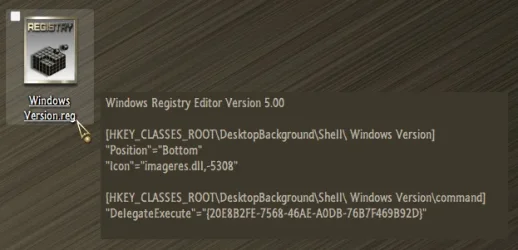
so... after a while of testing, i have only found 1 other way of executing the CommandStore About Windows instance... and that is to add it to the context menu. once added, it will launch the Windows.aboutWindows CommandStore id from the registry, thus dark mode. I cannot find a way to create a desktop shortcut (AHK, PS1, BATCH, VBS...) that will execute that instance of winver. Maybe @garlin will have a thought on it?

View attachment 146356

Code:
Windows Registry Editor Version 5.00

[HKEY_CLASSES_ROOT\DesktopBackground\Shell\Windows.aboutWindows]
"CanonicalName"="{20E8B2FE-7568-46AE-A0DB-76B7F469B92D}"
"Description"="@explorerframe.dll,-14403"
"Icon"=hex(2):69,00,6d,00,61,00,67,00,65,00,72,00,65,00,73,00,2e,00,64,00,6c,\
  00,6c,00,2c,00,2d,00,38,00,31,00,00,00
"MUIVerb"="@explorerframe.dll,-14402"

[ATTACH type="full" size="460x424"]146355[/ATTACH]

[HKEY_CLASSES_ROOT\DesktopBackground\Shell\Windows.aboutWindows\command]
"DelegateExecute"="{20E8B2FE-7568-46AE-A0DB-76B7F469B92D}"

View attachment 146357

@dacrone Thanks for posting the registry key for the dark "About Windows" context menu item which is helpful.
 

My Computers

System One System Two

  • OS
    Windows 11 Pro x 2 + Insider Dev
    Computer type
    PC/Desktop
    Manufacturer/Model
    My first abomination, I call it the Money Pit One
    CPU
    Intel Core i9 12900K @ 5.2 GHz
    Motherboard
    ASUS ROG MAXIMUS Z690 HERO
    Memory
    2 x Corsair Dominator Platinum RGB (4x16GB Total) DDR5-6200 CL36 Dual Channel Kit
    Graphics Card(s)
    EVGA GeForce RTX 3080 XC3 ULTRA GAMING 10GB GDDR6X
    Sound Card
    ROG SupremeFX ALC4082 with ESS® ES9018Q2C DAC for pinpoint positioning and dynamics
    Monitor(s) Displays
    2 x Samsung 43" HDR Neo QLED Mini-LED Tizen Smart TV (QN43QN90DAFXZC) 2024
    Screen Resolution
    1920 x 1080 @ 150 DPI & 120Hz
    Hard Drives
    2 x Samsung 980 Series - 250GB PCIe Gen3. X4 NVMe 1.4 - M.2 Internal SSD (Windows 11 Pro Dual boot)
    PSU
    Corsair HX1000i 80+ Platinum Modular Power Supply 1000W
    Case
    Phanteks Enthoo Luxe Tempered Glass Full Tower Case - Black
    Cooling
    CORSAIR iCUE H150i RGB Elite 360mm Liquid CPU Cooler
    Keyboard
    Perixx PERIBOARD-732B Wireless Mini Backlit USB Keyboard with Low Profile Keys - US Layout
    Mouse
    Logitech MX Anywhere 2S Wireless Mouse
    Internet Speed
    1000 Mbps
    Browser
    Latest Version Of Firefox & Microsoft Edge Chromium Stable
    Antivirus
    ESET Internet Security
    Other Info
    LG Electronics 14x Sata Blu-ray Disk Rewriter - WH14NS4O
    2 x OREI 4K 4x2 HDMI Matrix Switch With ARC Audio Extraction, HDR & Downscaling (UHD-402D) so I can send the output of my Cable Box, Roku, or any of my 4 computers to either of my TV's separately or simultaneously.
  • Operating System
    Windows 11 Pro x 2
    Computer type
    PC/Desktop
    Manufacturer/Model
    My second abomination, I call it the Money Pit Two
    CPU
    Intel Core i9 12900K @ 5.2 GHz
    Motherboard
    ASUS ROG STRIX Z690-F GAMING WIFI
    Memory
    2 x Vengeance RGB 32GB DDR5 6400MHz CL32 Dual Channel Kit (4x16GB Total) Black
    Graphics card(s)
    ASUS TUF Gaming GeForce RTX 3070 Ti OC Edition 8 GB GDDR6X
    Sound Card
    ROG SupremeFX ALC4082 with ESS® ES9018Q2C DAC for pinpoint positioning and dynamics
    Monitor(s) Displays
    2 x Samsung 43" HDR Neo QLED Mini-LED Tizen Smart TV (QN43QN90DAFXZC) 2024
    Screen Resolution
    1920 x 1080 @ 150 DPI & 120Hz
    Hard Drives
    2 x Samsung 980 Series - 250GB PCIe Gen3. X4 NVMe 1.4 - M.2 Internal SSD (Windows 11 Pro Dual boot)
    PSU
    Corsair AX860 - 860W Modular Power Supply
    Case
    Phanteks Enthoo Pro Tempered Glass Full Tower Case - Black
    Cooling
    CORSAIR iCUE H150i RGB Elite 360mm Liquid CPU Cooler
    Keyboard
    Perixx PERIBOARD-326 Wired Mini Backlit USB Keyboard with Low Profile Keys - US Layout
    Mouse
    Logitech MX Anywhere 2S Wireless Mouse
    Internet Speed
    1000 Mbps
    Browser
    Latest Version Of Firefox & EDGE Chromium Stable
    Antivirus
    ESET Internet Security
    Other Info
    LG Electronics 14x Sata Blu-ray Disk Rewriter - WH14NS4O
    2 x OREI 4K 4x2 HDMI Matrix Switch With ARC Audio Extraction, HDR & Downscaling (UHD-402D) so I can send the output of my Cable Box, Roku, or any of my 4 computers to either of my TV's separately or simultaneously.
Guys how do you get the "About Windows" also in Dark Mode? My is still white but i use the Wwindows Dark Mode?
 

My Computer

System One

  • OS
    Win 11
Guys how do you get the "About Windows" also in Dark Mode? My is still white but i use the Wwindows Dark Mode?
save that reg code - open notepad, copy and paste it all, file save as, choose All Files from dropdown (at very top), save it as winver.reg (.reg - not .txt), double click the file to merge it to the registry.

EDIT:
just download this .zip and use the .reg inside of it
 

Attachments

My Computer

System One

  • OS
    Windows 11 Pro
Simplified..., works for me!

10604.webp
 

My Computers

System One System Two

  • OS
    Windows 11 Pro
    Computer type
    PC/Desktop
    Manufacturer/Model
    ASUS ROG Strix
  • Operating System
    Windows 11 Pro
    Computer type
    Laptop
    Manufacturer/Model
    ASUS VivoBook
Simplified..., works for me!

View attachment 146931
ok made some progress. got a desktop shortcut for it sorted. but if trying to launch it from vbs, ps1, bat, context menu, or even using ahk to redirect winver.exe to it, it launches the light mode still. directly launching this shortcut will launch the dark mode though...

save this .reg and merge it:
Code:
Windows Registry Editor Version 5.00

[HKEY_CLASSES_ROOT\.aboutwin]
@="AboutWinFile"

[HKEY_CLASSES_ROOT\AboutWinFile]

[HKEY_CLASSES_ROOT\AboutWinFile\shell]

[HKEY_CLASSES_ROOT\AboutWinFile\shell\open]

[HKEY_CLASSES_ROOT\AboutWinFile\shell\open\command]
"DelegateExecute"="{20E8B2FE-7568-46AE-A0DB-76B7F469B92D}"

then create a .txt anywhere you want. name it (remove the .txt ext obviously):
YOURNAMEHERE.aboutwin

@garlin any ideas on how to launch this via another method? just wondering how much you know about .aboutwin files

EDIT:
ok, so made my own workaround. obviously using the Run box will launch it as its just opening the .aboutwin file. so... use the above .reg (i've attached it here), name the .aboutwin file "winverdark.aboutwin" (i've attached it here) and use the below ahk code, which i've compiled as an exe and attached here.

1) download .zip
2) extract to a folder wherever you want
3) merge the .reg file to the registry
4) use the ahk exe to launch the dark mode winver *MAY HAVE TO EXCLUDE THE EXE FROM DEFENDER*

5) *IF YOU WANT* - i opened a cmd as trustedinstaller (using @LesFerch rightclicktools) and ran:
Code:
cd C:\Windows\System32
Code:
ren winver.exe winver.exe.bak
and placed my winver.exe that i made with ahk script AND the winver.aboutwin files in C:\Windows\System32

now when you run winver from any method, it will instead run the dark mode winver
 

Attachments

Last edited:

My Computer

System One

  • OS
    Windows 11 Pro
I noticed, if you choose About Windows from the Win7 Command Bar, you get dark mode, and no expiry...

funnily enough, i just today found, by accident, a way to have the win 7 command bar and the windows 11 command bar simultaneously:

1759364811674.webp


1759364845486.webp

open FE, go to control panel or "%AppData%\Microsoft\Internet Explorer\Quick Launch\User Pinned\Search\StartApps" within that FE instance, then just click the back arrow to go back to whatever folder you were in. making a script to do that auto right now. dont need them both, but could come in handy for CommandStore entries, since you cant mod the win 11 bar
 
Last edited:

My Computer

System One

  • OS
    Windows 11 Pro
StartAllBack 3.9.16.5316 (02 October 2025) (beta)

Not sure what's been updated
 

My Computer

System One

  • OS
    Windows 11 Pro
    Computer type
    PC/Desktop
    Manufacturer/Model
    Custom Build
    CPU
    Intel Core i9 12900KF
    Motherboard
    ASUS ROG Maximus Z690 Hero
    Memory
    Corsair 64GB DDR5 Vengeance C40 5200Mhz
    Graphics Card(s)
    ASUS GeForce RTX 3090 ROG Strix OC 24GB
    Sound Card
    OnBoard
    Monitor(s) Displays
    Acer Predator XB323UGP 32" QHD G-SYNC-C 144Hz 1MS IPS LED
    Screen Resolution
    2560 x 1440
    Hard Drives
    1x Samsung 980 Pro Series Gen4 250GB M.2 NVMe
    1x Samsung 980 Pro Series Gen4 500GB M.2 NVMe
    2x Samsung 980 Pro Series Gen4 2TB M.2 NVMe
    PSU
    Corsair AX1200i 1200W 80PLUS Titanium Modular
    Case
    Corsair 4000D Black Case w/ Tempered Glass Side Panel
    Cooling
    Noctua NH-U12A Chromax Black CPU Cooler, 4x Noctua 120mm Fans
    Keyboard
    Logitech MK545
    Mouse
    Logitech MX Master 3
    Internet Speed
    Fixed Wireless 150mbps/75mbps
    Browser
    Firefox
    Antivirus
    Kaspersky
    Other Info
    Thrustmaster TS-PC RACER
    Fanatec CSL Elite Pedals with the Load Cell Kit
    Yamaha Amp with Bose Speakers

My Computers

System One System Two

  • OS
    Windows 11 Pro
    Computer type
    PC/Desktop
    Manufacturer/Model
    ASUS ROG Strix
  • Operating System
    Windows 11 Pro
    Computer type
    Laptop
    Manufacturer/Model
    ASUS VivoBook
StartAllBack 3.9.16.5317 (04 October 2025) (beta)

Another Update, again not sure what's been updated
 

My Computer

System One

  • OS
    Windows 11 Pro
    Computer type
    PC/Desktop
    Manufacturer/Model
    Custom Build
    CPU
    Intel Core i9 12900KF
    Motherboard
    ASUS ROG Maximus Z690 Hero
    Memory
    Corsair 64GB DDR5 Vengeance C40 5200Mhz
    Graphics Card(s)
    ASUS GeForce RTX 3090 ROG Strix OC 24GB
    Sound Card
    OnBoard
    Monitor(s) Displays
    Acer Predator XB323UGP 32" QHD G-SYNC-C 144Hz 1MS IPS LED
    Screen Resolution
    2560 x 1440
    Hard Drives
    1x Samsung 980 Pro Series Gen4 250GB M.2 NVMe
    1x Samsung 980 Pro Series Gen4 500GB M.2 NVMe
    2x Samsung 980 Pro Series Gen4 2TB M.2 NVMe
    PSU
    Corsair AX1200i 1200W 80PLUS Titanium Modular
    Case
    Corsair 4000D Black Case w/ Tempered Glass Side Panel
    Cooling
    Noctua NH-U12A Chromax Black CPU Cooler, 4x Noctua 120mm Fans
    Keyboard
    Logitech MK545
    Mouse
    Logitech MX Master 3
    Internet Speed
    Fixed Wireless 150mbps/75mbps
    Browser
    Firefox
    Antivirus
    Kaspersky
    Other Info
    Thrustmaster TS-PC RACER
    Fanatec CSL Elite Pedals with the Load Cell Kit
    Yamaha Amp with Bose Speakers
Another Update, again not sure what's been updated
So far, this is all I could find, (>/Shift), which isn't present, in this form, in 5316...

10681.webp
 

My Computers

System One System Two

  • OS
    Windows 11 Pro
    Computer type
    PC/Desktop
    Manufacturer/Model
    ASUS ROG Strix
  • Operating System
    Windows 11 Pro
    Computer type
    Laptop
    Manufacturer/Model
    ASUS VivoBook
StartAllBack 3.9.16.5320 (Stable)

Changes for 25H2 slop

- Don't load WinUI3 to reduce desktop resource usage

- Fixed searchbox picture not appearing/searchbox misplaced a bit

- Fixed crash with new context menus but old frame style

- Fixed taskbar autohide broken on some systems

- Fixed settings search/menu empty

 
Last edited:

My Computer

System One

  • OS
    Windows 11 Pro
    Computer type
    PC/Desktop
    Manufacturer/Model
    Custom Build
    CPU
    Intel Core i9 12900KF
    Motherboard
    ASUS ROG Maximus Z690 Hero
    Memory
    Corsair 64GB DDR5 Vengeance C40 5200Mhz
    Graphics Card(s)
    ASUS GeForce RTX 3090 ROG Strix OC 24GB
    Sound Card
    OnBoard
    Monitor(s) Displays
    Acer Predator XB323UGP 32" QHD G-SYNC-C 144Hz 1MS IPS LED
    Screen Resolution
    2560 x 1440
    Hard Drives
    1x Samsung 980 Pro Series Gen4 250GB M.2 NVMe
    1x Samsung 980 Pro Series Gen4 500GB M.2 NVMe
    2x Samsung 980 Pro Series Gen4 2TB M.2 NVMe
    PSU
    Corsair AX1200i 1200W 80PLUS Titanium Modular
    Case
    Corsair 4000D Black Case w/ Tempered Glass Side Panel
    Cooling
    Noctua NH-U12A Chromax Black CPU Cooler, 4x Noctua 120mm Fans
    Keyboard
    Logitech MK545
    Mouse
    Logitech MX Master 3
    Internet Speed
    Fixed Wireless 150mbps/75mbps
    Browser
    Firefox
    Antivirus
    Kaspersky
    Other Info
    Thrustmaster TS-PC RACER
    Fanatec CSL Elite Pedals with the Load Cell Kit
    Yamaha Amp with Bose Speakers

Latest Support Threads

Back
Top Bottom