Stereo mix not found in show disabled recording devices


jraju

Well-known member
Member
Local time
10:57 AM
Posts
300
OS
windows 11pro version 23H2
HI, I want to use the recording app without microphone. Of the three way, one is to enabling the stereo mix.
I have just tried to show disabled recording devices, but there was no stereo mix.
As a second thought, i went to the realtek accept the capcha and condition to download the codec for windows 11.
The download is just 30kbps and less than that.
It will take another 3 hours to 4 hours without internet break to download the codec to get the stereo mix.
Is there anything I can do otherwise.
I tried audacity , but the recording is a failure by going to the wasapi, sselecting speakers as input , and then record and then change the mode to mme to export as mp3. Nothing recorded as for as i could see the progress bar in audacity.
could some give clue to this recording problem.
playback is fine and i do not find the troubleshooting steps to record audio.
I enabled mic settings in private and security and also in sound settings
 

My Computer My Computer

At a glance

windows 11pro version 23H2i5 processor8 gb
OS
windows 11pro version 23H2
Computer type
PC/Desktop
Manufacturer/Model
Dell Inspiron 3910
CPU
i5 processor
Memory
8 gb
I had the same problem with Realtek audio. I went to their site and downloaded the drivers from there and once installed the stereo mix was back. It needed to be enabled after driver installation.
 

My Computer My Computer

At a glance

Windows 11 Pro 23H2Intel(R) Core(TM) i9-12900HK32gbIntel(R) Iris(R) Xe Graphics
OS
Windows 11 Pro 23H2
Computer type
PC/Desktop
Manufacturer/Model
MinisForum
CPU
Intel(R) Core(TM) i9-12900HK
Memory
32gb
Graphics Card(s)
Intel(R) Iris(R) Xe Graphics
Sound Card
Realtek 888
Monitor(s) Displays
Acer
Screen Resolution
1920x1080
Hard Drives
1TB SSD
Keyboard
Logitech
Mouse
Logitech MX Master 2X
Internet Speed
1GB
Browser
Firefox
Antivirus
Windows Defender
How many hours it took for you to download.
Please could you say, how to go about then, can we record without mic
 

My Computer My Computer

At a glance

windows 11pro version 23H2i5 processor8 gb
OS
windows 11pro version 23H2
Computer type
PC/Desktop
Manufacturer/Model
Dell Inspiron 3910
CPU
i5 processor
Memory
8 gb
I downloaded and installed but could not find in showing disabled devices in recording tab.
what I miss.
Should the hardware have to be realtek or any other
I am having cirrus speaker and audio
 

My Computer My Computer

At a glance

windows 11pro version 23H2i5 processor8 gb
OS
windows 11pro version 23H2
Computer type
PC/Desktop
Manufacturer/Model
Dell Inspiron 3910
CPU
i5 processor
Memory
8 gb
typo.
Please read i downloaded and installed the realtek codec from their site, but could not find stereo mix in record tab,
 

My Computer My Computer

At a glance

windows 11pro version 23H2i5 processor8 gb
OS
windows 11pro version 23H2
Computer type
PC/Desktop
Manufacturer/Model
Dell Inspiron 3910
CPU
i5 processor
Memory
8 gb
typo.
Please read i downloaded and installed the realtek codec from their site, but could not find stereo mix in record tab,


I use these settings in Audacity (old version). I can record whatever is coming out of the speakers... and I don't even have a mic. I'm pretty sure I've left all preferences at defaults, except what's shown in this pic. :-)

Image1.jpg

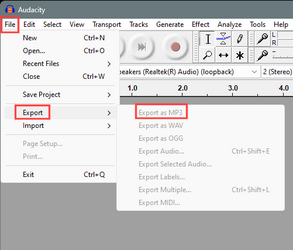
And to export as .mp3 just choose it...
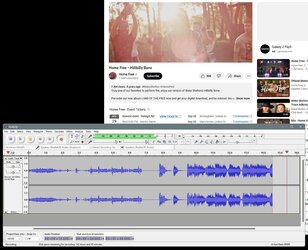
I've been using Audacity for years to record the audio from youtubes and exporting as .mp3


Image1.png
 

My Computers My Computers

  • At a glance

    Win 11 Home ♦♦♦26200.9168 ♦♦♦♦♦♦♦25H2AMD Ryzen 7 3700XG.Skill (F4-3200C14D-16GTZKW)EVGA RTX 2070 (08G-P4-2171-KR)
    OS
    Win 11 Home ♦♦♦26200.9168 ♦♦♦♦♦♦♦25H2
    Computer type
    PC/Desktop
    Manufacturer/Model
    Built by Ghot® [May 2020]
    CPU
    AMD Ryzen 7 3700X
    Motherboard
    Asus Pro WS X570-ACE (BIOS 5302)
    Memory
    G.Skill (F4-3200C14D-16GTZKW)
    Graphics Card(s)
    EVGA RTX 2070 (08G-P4-2171-KR)
    Sound Card
    Realtek ALC1220P / ALC S1220A
    Monitor(s) Displays
    Dell U3011 30"
    Screen Resolution
    2560 x 1600
    Hard Drives
    2x Samsung 860 EVO 500GB,
    WD 4TB Black FZBX - SATA III,
    WD 8TB Black FZBX - SATA III,
    DRW-24B1ST CD/DVD Burner
    PSU
    PC Power & Cooling 750W Quad EPS12V
    Case
    Cooler Master ATCS 840 Tower
    Cooling
    CM Hyper 212 EVO (push/pull)
    Keyboard
    Ducky DK9008 Shine II Blue LED
    Mouse
    Logitech Optical M-100
    Internet Speed
    300/300
    Browser
    Firefox (latest)
    Antivirus
    Bitdefender Total Security
    Other Info
    Speakers: Klipsch Pro Media 2.1
  • At a glance

    Windows XP Pro 32bit w/SP3AMD Athlon 64 X2 5000+ (OC'd @ 3.2Ghz)TWIN2X2048-6400C4DHX (2 x 1GB, DDR2 800)EVGA 256-P2-N758-TR GeForce 8600GT SSC
    Operating System
    Windows XP Pro 32bit w/SP3
    Computer type
    PC/Desktop
    Manufacturer/Model
    Built by Ghot® (not in use)
    CPU
    AMD Athlon 64 X2 5000+ (OC'd @ 3.2Ghz)
    Motherboard
    ASUS M2N32-SLI Deluxe Wireless Edition
    Memory
    TWIN2X2048-6400C4DHX (2 x 1GB, DDR2 800)
    Graphics card(s)
    EVGA 256-P2-N758-TR GeForce 8600GT SSC
    Sound Card
    Onboard
    Monitor(s) Displays
    ViewSonic G90FB Black 19" Professional (CRT)
    Screen Resolution
    up to 2048 x 1536
    Hard Drives
    WD 36GB 10,000rpm Raptor SATA
    Seagate 80GB 7200rpm SATA
    Lite-On LTR-52246S CD/RW
    Lite-On LH-18A1P CD/DVD Burner
    PSU
    PC Power & Cooling Silencer 750 Quad EPS12V
    Case
    Generic Beige case, 80mm fans
    Cooling
    ZALMAN 9500A 92mm CPU Cooler
    Keyboard
    Logitech Classic Keybooard 200
    Mouse
    Logitech Optical M-BT96a
    Internet Speed
    300/300
    Browser
    Firefox 3.x ??
    Antivirus
    Symantec (Norton)
    Other Info
    Still assembled, still runs. Haven't turned it on for 15 years?
one is to enabling the stereo mix
Whether or not you can have Stereo mix available is dictated by your audio driver.
If your audio driver does not provide Stereo mix then you cannot set up Stereo mix by any other means.
You will have to use another method to achieve what you want. This will probably involve use of other apps instead of the ones you had intended.


Denis
 
Last edited:

My Computer My Computer

At a glance

Windows 11 Home x64 Version 25H2 Build 26200....
OS
Windows 11 Home x64 Version 25H2 Build 26200.9168
I use Audacity with 'Host' as WASAPI, recording device set to 'Loopback'. Screenshot 2023-07-28 132227.png
 

My Computer My Computer

At a glance

W11 Pro x64 ongoing Canary 29500 latest buildsIntel i58GbIntel HD Graphics
OS
W11 Pro x64 ongoing Canary 29500 latest builds
Computer type
Laptop
Manufacturer/Model
Dell 7760 Mobile Precision 17"
CPU
Intel i5
Motherboard
Unknown
Memory
8Gb
Graphics Card(s)
Intel HD Graphics
Sound Card
Realtek
Monitor(s) Displays
Internal
Hard Drives
2 x 256Gb SSD
PSU
Dell 240 watt
Mouse
Dell Premier Bluetooth
Internet Speed
50Mbps
Browser
Edge
Antivirus
Default Microsoft Security
Hi, Ghot, which is the version you have. I have tried up to old version 2.3.3. Menus were not present to select wasapi etc.
But going to the drop down menu and select default speakers in recording and wasapi in host also not working.
There is something I miss. I will try to post those screen shots. But , it does not pop up any error. But recording tab just do not do anything.
 

My Computer My Computer

At a glance

windows 11pro version 23H2i5 processor8 gb
OS
windows 11pro version 23H2
Computer type
PC/Desktop
Manufacturer/Model
Dell Inspiron 3910
CPU
i5 processor
Memory
8 gb
Hi, Ghot, which is the version you have. I have tried up to old version 2.3.3. Menus were not present to select wasapi etc.
But going to the drop down menu and select default speakers in recording and wasapi in host also not working.
There is something I miss. I will try to post those screen shots. But , it does not pop up any error. But recording tab just do not do anything.

Version 2.3.3

Maybe there's hardware differences... do you have separate speakers? Or maybe speakers in your monitor?
I have separate speakers.
I just press Record in Audacity, then start the video... then afterward, I highlight and delete the stuff I don't want.

Image1.jpg
 
Last edited:

My Computers My Computers

  • At a glance

    Win 11 Home ♦♦♦26200.9168 ♦♦♦♦♦♦♦25H2AMD Ryzen 7 3700XG.Skill (F4-3200C14D-16GTZKW)EVGA RTX 2070 (08G-P4-2171-KR)
    OS
    Win 11 Home ♦♦♦26200.9168 ♦♦♦♦♦♦♦25H2
    Computer type
    PC/Desktop
    Manufacturer/Model
    Built by Ghot® [May 2020]
    CPU
    AMD Ryzen 7 3700X
    Motherboard
    Asus Pro WS X570-ACE (BIOS 5302)
    Memory
    G.Skill (F4-3200C14D-16GTZKW)
    Graphics Card(s)
    EVGA RTX 2070 (08G-P4-2171-KR)
    Sound Card
    Realtek ALC1220P / ALC S1220A
    Monitor(s) Displays
    Dell U3011 30"
    Screen Resolution
    2560 x 1600
    Hard Drives
    2x Samsung 860 EVO 500GB,
    WD 4TB Black FZBX - SATA III,
    WD 8TB Black FZBX - SATA III,
    DRW-24B1ST CD/DVD Burner
    PSU
    PC Power & Cooling 750W Quad EPS12V
    Case
    Cooler Master ATCS 840 Tower
    Cooling
    CM Hyper 212 EVO (push/pull)
    Keyboard
    Ducky DK9008 Shine II Blue LED
    Mouse
    Logitech Optical M-100
    Internet Speed
    300/300
    Browser
    Firefox (latest)
    Antivirus
    Bitdefender Total Security
    Other Info
    Speakers: Klipsch Pro Media 2.1
  • At a glance

    Windows XP Pro 32bit w/SP3AMD Athlon 64 X2 5000+ (OC'd @ 3.2Ghz)TWIN2X2048-6400C4DHX (2 x 1GB, DDR2 800)EVGA 256-P2-N758-TR GeForce 8600GT SSC
    Operating System
    Windows XP Pro 32bit w/SP3
    Computer type
    PC/Desktop
    Manufacturer/Model
    Built by Ghot® (not in use)
    CPU
    AMD Athlon 64 X2 5000+ (OC'd @ 3.2Ghz)
    Motherboard
    ASUS M2N32-SLI Deluxe Wireless Edition
    Memory
    TWIN2X2048-6400C4DHX (2 x 1GB, DDR2 800)
    Graphics card(s)
    EVGA 256-P2-N758-TR GeForce 8600GT SSC
    Sound Card
    Onboard
    Monitor(s) Displays
    ViewSonic G90FB Black 19" Professional (CRT)
    Screen Resolution
    up to 2048 x 1536
    Hard Drives
    WD 36GB 10,000rpm Raptor SATA
    Seagate 80GB 7200rpm SATA
    Lite-On LTR-52246S CD/RW
    Lite-On LH-18A1P CD/DVD Burner
    PSU
    PC Power & Cooling Silencer 750 Quad EPS12V
    Case
    Generic Beige case, 80mm fans
    Cooling
    ZALMAN 9500A 92mm CPU Cooler
    Keyboard
    Logitech Classic Keybooard 200
    Mouse
    Logitech Optical M-BT96a
    Internet Speed
    300/300
    Browser
    Firefox 3.x ??
    Antivirus
    Symantec (Norton)
    Other Info
    Still assembled, still runs. Haven't turned it on for 15 years?
You use your mic for recording.
I also meant mic for my performance in the sense, I could talk through the mic.
can i do in audacity.
I have attached separate speakers to the back of my pc, with one usb and other 3.5 mm jack.
I have a provision in the front panel also for a usb and 3.5 m m jack.
I want to hear while I perform and also for record purpose. can audacity help in that.
 

My Computer My Computer

At a glance

windows 11pro version 23H2i5 processor8 gb
OS
windows 11pro version 23H2
Computer type
PC/Desktop
Manufacturer/Model
Dell Inspiron 3910
CPU
i5 processor
Memory
8 gb
Hi, moreover, I have a wireless mic having battery. I have enabled bluetooth in windows 11.
Can i talk with mic by connecting and using the speaker to hear what i speak?
Or should I have to have a kind of some other connecting device to connect it.
I am little confused in this matter.
how do i connect the wireless mike with bluetooth.
When I click add a device , the mike is not captured.
 

My Computer My Computer

At a glance

windows 11pro version 23H2i5 processor8 gb
OS
windows 11pro version 23H2
Computer type
PC/Desktop
Manufacturer/Model
Dell Inspiron 3910
CPU
i5 processor
Memory
8 gb

Latest Support Threads

Back
Top Bottom