Solved System crash while playing GTA V


It’s Master X version 1
 

My Computer

System One

  • OS
    Windows 11 Pro
    Computer type
    PC/Desktop
    Manufacturer/Model
    Custom Build
    CPU
    Intel i9 14900K
    Motherboard
    Gigabyte Z790 Master X (Wifi-7) Revision 1.0
    Memory
    Kingston Fury Beast 64GB (2x32GB) KF564C32BBEK2-64
    Graphics Card(s)
    Gigabyte Gaming OC RTX 5070 Ti
    Sound Card
    Onboard audio
    Monitor(s) Displays
    Asus XG27ACDNG
    Screen Resolution
    1440p
    Hard Drives
    Samsung - 990 PRO 4TB

    WD - BLACK SN850X 4TB

    Seagate FireCuda ST8000DX001 8TB x2
    PSU
    Lian Li Edge Series-1300W Full Modular Power Supply-80 Plus Platinum
    Case
    Lian-Li 011D Evo RGB
    Cooling
    CORSAIR iCUE Link H170i RGB plus 7 additional Corsair QX 120s
    Keyboard
    Corsair K70 RGB Pro
    Mouse
    Corsair Nightsword RGB
    Internet Speed
    1-2GB
    Browser
    Chrome/Edge
    Antivirus
    Windows Defender
Motherboard Z790 AORUS MASTER X 1.0 supported:


Intel Core I9-14900K 3.20GHz 36MB Intel® UHD Graphics 770 Raptor Lake Intel 7 B0 125W 100 F4


6400 CORSAIR 32GB 2Rx8 CMT64GX5M2B6400C32 ver 5.43.01 DS Hynix A 32-40-40-84 1.4v v v v 4800 v


Your search returned 24 results
60-days risk free returns
 
Last edited:

My Computer

System One

  • OS
    Windows 10
    Computer type
    Laptop
    Manufacturer/Model
    HP
    CPU
    Intel(R) Core(TM) i7-4800MQ CPU @ 2.70GHz
    Motherboard
    Product : 190A Version : KBC Version 94.56
    Memory
    16 GB Total: Manufacturer : Samsung MemoryType : DDR3 FormFactor : SODIMM Capacity : 8GB Speed : 1600
    Graphics Card(s)
    NVIDIA Quadro K3100M; Intel(R) HD Graphics 4600
    Sound Card
    IDT High Definition Audio CODEC; PNP Device ID HDAUDIO\FUNC_01&VEN_111D&DEV_76E0
    Hard Drives
    Model Hitachi HTS727575A9E364
    Antivirus
    Microsoft Defender
    Other Info
    Mobile Workstation
Motherboard Z790 AORUS MASTER X 1.0 supported:


Intel Core I9-14900K 3.20GHz 36MB Intel® UHD Graphics 770 Raptor Lake Intel 7 B0 125W 100 F4


6400 CORSAIR 32GB 2Rx8 CMT64GX5M2B6400C32 ver 5.43.01 DS Hynix A 32-40-40-84 1.4v v v v 4800 v


Your search returned 24 results
60-days risk free returns
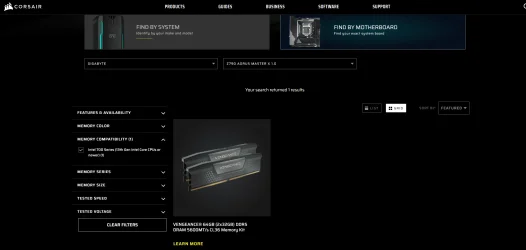
Yes, it is supported according to Gigabyte. However, when you check it in the Corsair compatibility checker for 13/14 gen CPUs with that board version, it is not supported, and Corsair only backs 1 model for that configuration.
Corsair RAM compatiblity Master X v1 13-14Gen.webp
 

My Computer

System One

  • OS
    Windows 11 Pro
    Computer type
    PC/Desktop
    Manufacturer/Model
    Custom Build
    CPU
    Intel i9 14900K
    Motherboard
    Gigabyte Z790 Master X (Wifi-7) Revision 1.0
    Memory
    Kingston Fury Beast 64GB (2x32GB) KF564C32BBEK2-64
    Graphics Card(s)
    Gigabyte Gaming OC RTX 5070 Ti
    Sound Card
    Onboard audio
    Monitor(s) Displays
    Asus XG27ACDNG
    Screen Resolution
    1440p
    Hard Drives
    Samsung - 990 PRO 4TB

    WD - BLACK SN850X 4TB

    Seagate FireCuda ST8000DX001 8TB x2
    PSU
    Lian Li Edge Series-1300W Full Modular Power Supply-80 Plus Platinum
    Case
    Lian-Li 011D Evo RGB
    Cooling
    CORSAIR iCUE Link H170i RGB plus 7 additional Corsair QX 120s
    Keyboard
    Corsair K70 RGB Pro
    Mouse
    Corsair Nightsword RGB
    Internet Speed
    1-2GB
    Browser
    Chrome/Edge
    Antivirus
    Windows Defender
Nearly anything can happen.


Please reseat the current RAM.


Check the MB manual to see whether two RAM modules must use specified DIMM.

If not also try other DIMM.
 

My Computer

System One

  • OS
    Windows 10
    Computer type
    Laptop
    Manufacturer/Model
    HP
    CPU
    Intel(R) Core(TM) i7-4800MQ CPU @ 2.70GHz
    Motherboard
    Product : 190A Version : KBC Version 94.56
    Memory
    16 GB Total: Manufacturer : Samsung MemoryType : DDR3 FormFactor : SODIMM Capacity : 8GB Speed : 1600
    Graphics Card(s)
    NVIDIA Quadro K3100M; Intel(R) HD Graphics 4600
    Sound Card
    IDT High Definition Audio CODEC; PNP Device ID HDAUDIO\FUNC_01&VEN_111D&DEV_76E0
    Hard Drives
    Model Hitachi HTS727575A9E364
    Antivirus
    Microsoft Defender
    Other Info
    Mobile Workstation
I should have the new RAM by Wednesday. I’ve reseated the current RAM and the DIMMs are in the right slots.
 

My Computer

System One

  • OS
    Windows 11 Pro
    Computer type
    PC/Desktop
    Manufacturer/Model
    Custom Build
    CPU
    Intel i9 14900K
    Motherboard
    Gigabyte Z790 Master X (Wifi-7) Revision 1.0
    Memory
    Kingston Fury Beast 64GB (2x32GB) KF564C32BBEK2-64
    Graphics Card(s)
    Gigabyte Gaming OC RTX 5070 Ti
    Sound Card
    Onboard audio
    Monitor(s) Displays
    Asus XG27ACDNG
    Screen Resolution
    1440p
    Hard Drives
    Samsung - 990 PRO 4TB

    WD - BLACK SN850X 4TB

    Seagate FireCuda ST8000DX001 8TB x2
    PSU
    Lian Li Edge Series-1300W Full Modular Power Supply-80 Plus Platinum
    Case
    Lian-Li 011D Evo RGB
    Cooling
    CORSAIR iCUE Link H170i RGB plus 7 additional Corsair QX 120s
    Keyboard
    Corsair K70 RGB Pro
    Mouse
    Corsair Nightsword RGB
    Internet Speed
    1-2GB
    Browser
    Chrome/Edge
    Antivirus
    Windows Defender
For any BSOD before or after the RAM swap please post a V2 share link into the newest post.
 
Last edited:

My Computer

System One

  • OS
    Windows 10
    Computer type
    Laptop
    Manufacturer/Model
    HP
    CPU
    Intel(R) Core(TM) i7-4800MQ CPU @ 2.70GHz
    Motherboard
    Product : 190A Version : KBC Version 94.56
    Memory
    16 GB Total: Manufacturer : Samsung MemoryType : DDR3 FormFactor : SODIMM Capacity : 8GB Speed : 1600
    Graphics Card(s)
    NVIDIA Quadro K3100M; Intel(R) HD Graphics 4600
    Sound Card
    IDT High Definition Audio CODEC; PNP Device ID HDAUDIO\FUNC_01&VEN_111D&DEV_76E0
    Hard Drives
    Model Hitachi HTS727575A9E364
    Antivirus
    Microsoft Defender
    Other Info
    Mobile Workstation
I swapped the RAM out on 10/1. I had several crashes with the old RAM
New V2 Log
 

My Computer

System One

  • OS
    Windows 11 Pro
    Computer type
    PC/Desktop
    Manufacturer/Model
    Custom Build
    CPU
    Intel i9 14900K
    Motherboard
    Gigabyte Z790 Master X (Wifi-7) Revision 1.0
    Memory
    Kingston Fury Beast 64GB (2x32GB) KF564C32BBEK2-64
    Graphics Card(s)
    Gigabyte Gaming OC RTX 5070 Ti
    Sound Card
    Onboard audio
    Monitor(s) Displays
    Asus XG27ACDNG
    Screen Resolution
    1440p
    Hard Drives
    Samsung - 990 PRO 4TB

    WD - BLACK SN850X 4TB

    Seagate FireCuda ST8000DX001 8TB x2
    PSU
    Lian Li Edge Series-1300W Full Modular Power Supply-80 Plus Platinum
    Case
    Lian-Li 011D Evo RGB
    Cooling
    CORSAIR iCUE Link H170i RGB plus 7 additional Corsair QX 120s
    Keyboard
    Corsair K70 RGB Pro
    Mouse
    Corsair Nightsword RGB
    Internet Speed
    1-2GB
    Browser
    Chrome/Edge
    Antivirus
    Windows Defender

My Computer

System One

  • OS
    Windows 10
    Computer type
    Laptop
    Manufacturer/Model
    HP
    CPU
    Intel(R) Core(TM) i7-4800MQ CPU @ 2.70GHz
    Motherboard
    Product : 190A Version : KBC Version 94.56
    Memory
    16 GB Total: Manufacturer : Samsung MemoryType : DDR3 FormFactor : SODIMM Capacity : 8GB Speed : 1600
    Graphics Card(s)
    NVIDIA Quadro K3100M; Intel(R) HD Graphics 4600
    Sound Card
    IDT High Definition Audio CODEC; PNP Device ID HDAUDIO\FUNC_01&VEN_111D&DEV_76E0
    Hard Drives
    Model Hitachi HTS727575A9E364
    Antivirus
    Microsoft Defender
    Other Info
    Mobile Workstation
There were unexpected shutdowns on 10/01 but none on 10/02 as of T06:40.
Yes, I did a series of BIOS flashes without a monitor. So I performed a few abrupt shutdowns on 10/1. So far the system seems stable but I haven’t tried any gaming or enabling XMP.
 

My Computer

System One

  • OS
    Windows 11 Pro
    Computer type
    PC/Desktop
    Manufacturer/Model
    Custom Build
    CPU
    Intel i9 14900K
    Motherboard
    Gigabyte Z790 Master X (Wifi-7) Revision 1.0
    Memory
    Kingston Fury Beast 64GB (2x32GB) KF564C32BBEK2-64
    Graphics Card(s)
    Gigabyte Gaming OC RTX 5070 Ti
    Sound Card
    Onboard audio
    Monitor(s) Displays
    Asus XG27ACDNG
    Screen Resolution
    1440p
    Hard Drives
    Samsung - 990 PRO 4TB

    WD - BLACK SN850X 4TB

    Seagate FireCuda ST8000DX001 8TB x2
    PSU
    Lian Li Edge Series-1300W Full Modular Power Supply-80 Plus Platinum
    Case
    Lian-Li 011D Evo RGB
    Cooling
    CORSAIR iCUE Link H170i RGB plus 7 additional Corsair QX 120s
    Keyboard
    Corsair K70 RGB Pro
    Mouse
    Corsair Nightsword RGB
    Internet Speed
    1-2GB
    Browser
    Chrome/Edge
    Antivirus
    Windows Defender
The system seems stable after a RAM, PSU and mobo replacement.
 

My Computer

System One

  • OS
    Windows 11 Pro
    Computer type
    PC/Desktop
    Manufacturer/Model
    Custom Build
    CPU
    Intel i9 14900K
    Motherboard
    Gigabyte Z790 Master X (Wifi-7) Revision 1.0
    Memory
    Kingston Fury Beast 64GB (2x32GB) KF564C32BBEK2-64
    Graphics Card(s)
    Gigabyte Gaming OC RTX 5070 Ti
    Sound Card
    Onboard audio
    Monitor(s) Displays
    Asus XG27ACDNG
    Screen Resolution
    1440p
    Hard Drives
    Samsung - 990 PRO 4TB

    WD - BLACK SN850X 4TB

    Seagate FireCuda ST8000DX001 8TB x2
    PSU
    Lian Li Edge Series-1300W Full Modular Power Supply-80 Plus Platinum
    Case
    Lian-Li 011D Evo RGB
    Cooling
    CORSAIR iCUE Link H170i RGB plus 7 additional Corsair QX 120s
    Keyboard
    Corsair K70 RGB Pro
    Mouse
    Corsair Nightsword RGB
    Internet Speed
    1-2GB
    Browser
    Chrome/Edge
    Antivirus
    Windows Defender
1) Please open a new thread to troubleshoot MSinfo32:

It was not able to be opened as the Msinfo32 link nor from the V2 collected file.

Ask if any forum member can view the NFO file.


Code:
System information is unable to open this NFO file.

The file might be corrupt or incompatible with this version of system information.


2) Post a new V2 share link into the newest post.
 

My Computer

System One

  • OS
    Windows 10
    Computer type
    Laptop
    Manufacturer/Model
    HP
    CPU
    Intel(R) Core(TM) i7-4800MQ CPU @ 2.70GHz
    Motherboard
    Product : 190A Version : KBC Version 94.56
    Memory
    16 GB Total: Manufacturer : Samsung MemoryType : DDR3 FormFactor : SODIMM Capacity : 8GB Speed : 1600
    Graphics Card(s)
    NVIDIA Quadro K3100M; Intel(R) HD Graphics 4600
    Sound Card
    IDT High Definition Audio CODEC; PNP Device ID HDAUDIO\FUNC_01&VEN_111D&DEV_76E0
    Hard Drives
    Model Hitachi HTS727575A9E364
    Antivirus
    Microsoft Defender
    Other Info
    Mobile Workstation
Back
Top Bottom