Solved System Protection Continues Creating Backups While Disabled


FelixTheCat

Member
Member
Local time
8:20 PM
Posts
29
Location
Manchester
OS
Windows 11 Pro 25H2
Problem
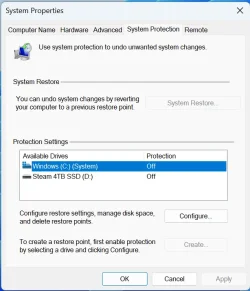
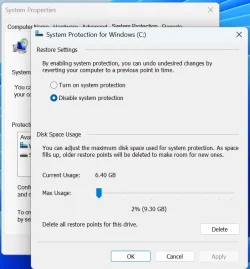
I am experiencing an issue where Windows System Protection continues to create backup files despite being explicitly disabled.

Expected Behavior
When System Protection is disabled, I expect it to cease all backup activities and not create or maintain any restore points or backup files.

Actual Behavior
Despite System Protection being disabled, it continues to generate backups. Currently, there are approximately 6GB of backups, spread across three 2GB files.

What I've Tried
* I have disabled System Protection through the system settings.
* I have run the `DISM` and `SFC` commands, and both reported no integrity violations.

Extra Details
I do not rely on Windows System Protection as I use Macrium Reflect for my system image backups. I am seeking a solution that does not require a repair reinstall of Windows.
 
Windows Build/Version
Windows 11 Pro 25H2 26200.8246

My Computers My Computers

  • At a glance

    Windows 11 Pro 25H2AMD Ryzen 7 5800X 3.80GHz Stock; OC 4.50GHz64GB DDR4 3600MT/sMSI GeForce RTX 4060 Ti 16GB
    OS
    Windows 11 Pro 25H2
    Computer type
    PC/Desktop
    Manufacturer/Model
    ASUS ROG Strix X570-F Gaming
    CPU
    AMD Ryzen 7 5800X 3.80GHz Stock; OC 4.50GHz
    Motherboard
    ROG Strix X570-F Gaming
    Memory
    64GB DDR4 3600MT/s
    Graphics Card(s)
    MSI GeForce RTX 4060 Ti 16GB
    Sound Card
    Onboard Realtek Audio
    Monitor(s) Displays
    iiyama ProLite XU2792UHSU 4K 27"
    Screen Resolution
    3840 x 2160
    Hard Drives
    Samsung 980 PRO 500GB - OS
    Samsung 990 PRO 4TB - Data & Games
    PSU
    Corsair 850w RMx Series
    Case
    Corsair 4000D Black
    Cooling
    Corsair ICUE Link H150i RGB
    Internet Speed
    1Gbps
    Browser
    Google Chrome
    Antivirus
    ESET Smart Security
    Other Info
    TP-Link TX201 2.5Gbps PCIe Network Card
  • At a glance

    Windows 11 Pro 25H2AMD Ryzen 7 8840HS 3.3 GHz16GB DDR5 5600 MT/sAMD Radeon 780M 512MB
    Operating System
    Windows 11 Pro 25H2
    Computer type
    Laptop
    Manufacturer/Model
    Acer Aspire 15 - A15-61M
    CPU
    AMD Ryzen 7 8840HS 3.3 GHz
    Motherboard
    HWK
    Memory
    16GB DDR5 5600 MT/s
    Graphics card(s)
    AMD Radeon 780M 512MB
    Sound Card
    Onboard Senary Audio
    Screen Resolution
    1920 x 1080
    Hard Drives
    WD PC SN5000S 1TB SSD
    Internet Speed
    1Gbps
    Browser
    Google Chrome
    Antivirus
    ESET Smart Security
Screenshot 2026-04-24 083416.webpScreenshot 2026-04-24 083425.webp
 

My Computers My Computers

  • At a glance

    Windows 11 Pro 25H2AMD Ryzen 7 5800X 3.80GHz Stock; OC 4.50GHz64GB DDR4 3600MT/sMSI GeForce RTX 4060 Ti 16GB
    OS
    Windows 11 Pro 25H2
    Computer type
    PC/Desktop
    Manufacturer/Model
    ASUS ROG Strix X570-F Gaming
    CPU
    AMD Ryzen 7 5800X 3.80GHz Stock; OC 4.50GHz
    Motherboard
    ROG Strix X570-F Gaming
    Memory
    64GB DDR4 3600MT/s
    Graphics Card(s)
    MSI GeForce RTX 4060 Ti 16GB
    Sound Card
    Onboard Realtek Audio
    Monitor(s) Displays
    iiyama ProLite XU2792UHSU 4K 27"
    Screen Resolution
    3840 x 2160
    Hard Drives
    Samsung 980 PRO 500GB - OS
    Samsung 990 PRO 4TB - Data & Games
    PSU
    Corsair 850w RMx Series
    Case
    Corsair 4000D Black
    Cooling
    Corsair ICUE Link H150i RGB
    Internet Speed
    1Gbps
    Browser
    Google Chrome
    Antivirus
    ESET Smart Security
    Other Info
    TP-Link TX201 2.5Gbps PCIe Network Card
  • At a glance

    Windows 11 Pro 25H2AMD Ryzen 7 8840HS 3.3 GHz16GB DDR5 5600 MT/sAMD Radeon 780M 512MB
    Operating System
    Windows 11 Pro 25H2
    Computer type
    Laptop
    Manufacturer/Model
    Acer Aspire 15 - A15-61M
    CPU
    AMD Ryzen 7 8840HS 3.3 GHz
    Motherboard
    HWK
    Memory
    16GB DDR5 5600 MT/s
    Graphics card(s)
    AMD Radeon 780M 512MB
    Sound Card
    Onboard Senary Audio
    Screen Resolution
    1920 x 1080
    Hard Drives
    WD PC SN5000S 1TB SSD
    Internet Speed
    1Gbps
    Browser
    Google Chrome
    Antivirus
    ESET Smart Security
Despite System Protection being disabled, it continues to generate backups. Currently, there are approximately 6GB of backups, spread across three 2GB files.

What I've Tried
* I have disabled System Protection through the system settings.
* I have run the `DISM` and `SFC` commands, and both reported no integrity violations.
Try turning system protection back on, then turn it off again. System protection should delete all existing restore points when you turn it off. Then see if it stays that way.
 

My Computers My Computers

  • At a glance

    Windows 11 HomeAMD Athlon Silver 3050U8GBRadeon Graphics
    OS
    Windows 11 Home
    Computer type
    Laptop
    Manufacturer/Model
    Acer Aspire 3 A315-23-R9VY
    CPU
    AMD Athlon Silver 3050U
    Memory
    8GB
    Graphics Card(s)
    Radeon Graphics
    Monitor(s) Displays
    laptop screen
    Screen Resolution
    1366x768 native resolution, up to 2560x1440 with Radeon Virtual Super Resolution
    Hard Drives
    1TB Samsung EVO 870 SSD (from April 2026: 250GB EVO 850)
    Internet Speed
    150 Mbps
    Browser
    Edge, Firefox
    Antivirus
    Defender
    Other Info
    UPDATE - 11 April 2026: due to lid hinges starting to break up this laptop has been retired from active duty. The OS with all software and files has been migrated to my System Seven in 'Other systems' to carry on as my general purpose 'main machine'.

    I've now clean installed 25H2 and used Garlin's scripts to update Secure Boot to CA 2023 and revoke the PCA 2011 certificates. It's new role is to test secure boot issues.

    Info for 2021-2026:
    fully 'Windows 11 ready' laptop. Windows 10 C: partition migrated from my old unsupported 'main machine' then upgraded to 11. A test migration ran Insider builds for 2 months. When 11 was released on 5th October 2021 it was re-imaged back to 10 and was offered the upgrade in Windows Update on 20th October. Windows Update offered the 22H2 Feature Update on 20th September 2022. It got the 23H2 Feature Update on 4th November 2023 through Windows Update, 24H2 on 3rd October 2024 through Windows Update by setting the Target Release Version for 24H2, and 25H2 on 30th September 2025 through Windows Update by setting the Target Release Version for 25H2.
  • At a glance

    Windows 11 ProIntel® Core™ i5-520M8GB(integrated graphics) Intel HD Graphics
    Operating System
    Windows 11 Pro
    Computer type
    Laptop
    Manufacturer/Model
    Dell Latitude E4310
    CPU
    Intel® Core™ i5-520M
    Motherboard
    0T6M8G
    Memory
    8GB
    Graphics card(s)
    (integrated graphics) Intel HD Graphics
    Screen Resolution
    1366x768
    Hard Drives
    500GB Crucial MX500 SSD
    Browser
    Firefox, Edge
    Antivirus
    Defender
    Other Info
    unsupported machine: Legacy bios, MBR, TPM 1.2, upgraded from W10 to W11 using W10/W11 hybrid install media workaround.

    In-place upgrade to 22H2 using ISO and a workaround.
    Feature Update to 23H2 by manually installing the Enablement Package.
    In-place upgrade to 24H2 using hybrid 23H2/24H2 install media.
    Upgraded to 25H2 by Enablement Package.

    Also running Insider Experimental 263xx and 29xxx builds and Windows 10 as native boot .vhdx.
  • My SYSTEM THREE is a Dell Latitude 5410, i7-10610U, 32GB RAM, 512GB NVMe ssd, supported device running Windows 11 Pro.

    My SYSTEM FOUR was a 2-in-1 convertible Lenovo Yoga 11e (1st gen) type 20DA, Celeron N2930, 8GB RAM, 256GB ssd. Unsupported device. This has now been sold. It has been replaced by my System Eight.

    My SYSTEM FIVE is a Dell Latitude 3190 2-in-1, Pentium Silver N5030, 8GB RAM, 1TB NVMe ssd, supported device running Windows 11 Pro, plus Insider Beta, Experimental 263xx and 29xxx builds (and a few others) as a native boot .vhdx.

    My SYSTEM SIX is a Dell Latitude 5550, Core Ultra 7 165H, 64GB RAM, 1TB NVMe SSD, supported device, Windows 11 Pro, Hyper-V host machine. Updated to 25H2 on 30th September 2025.

    My SYSTEM SEVEN is a Lenovo Thinkpad T580, 1920x1080 touchscreen, Intel Core i7-8650U, 16GB RAM, 512GB NVMe SSD + 2nd 512GB NVMe SSD, a supported device for Windows 11. This is my current general purpose 'main machine'. The installed Windows 11 Home from my System One has been migrated to this machine. As its new home has an existing digital licence for Pro I've been able to upgrade the migrated OS from Home to Pro.

    My SYSTEM EIGHT is a 2-in-1 convertible Lenovo Yoga 11e (5th gen) type 20LN, Celeron N4120, 8GB RAM, 512GB NVMe ssd, a supported device for Windows 11. Currently running Windows 11 Pro, plus Insider Beta, Experimental 263xx and 29xxx builds as native boot vhdx.
Thank you Bree, I tried that it removed the 6.4GB then I disabled it again but sadly it continued to make new restore points.
 

My Computers My Computers

  • At a glance

    Windows 11 Pro 25H2AMD Ryzen 7 5800X 3.80GHz Stock; OC 4.50GHz64GB DDR4 3600MT/sMSI GeForce RTX 4060 Ti 16GB
    OS
    Windows 11 Pro 25H2
    Computer type
    PC/Desktop
    Manufacturer/Model
    ASUS ROG Strix X570-F Gaming
    CPU
    AMD Ryzen 7 5800X 3.80GHz Stock; OC 4.50GHz
    Motherboard
    ROG Strix X570-F Gaming
    Memory
    64GB DDR4 3600MT/s
    Graphics Card(s)
    MSI GeForce RTX 4060 Ti 16GB
    Sound Card
    Onboard Realtek Audio
    Monitor(s) Displays
    iiyama ProLite XU2792UHSU 4K 27"
    Screen Resolution
    3840 x 2160
    Hard Drives
    Samsung 980 PRO 500GB - OS
    Samsung 990 PRO 4TB - Data & Games
    PSU
    Corsair 850w RMx Series
    Case
    Corsair 4000D Black
    Cooling
    Corsair ICUE Link H150i RGB
    Internet Speed
    1Gbps
    Browser
    Google Chrome
    Antivirus
    ESET Smart Security
    Other Info
    TP-Link TX201 2.5Gbps PCIe Network Card
  • At a glance

    Windows 11 Pro 25H2AMD Ryzen 7 8840HS 3.3 GHz16GB DDR5 5600 MT/sAMD Radeon 780M 512MB
    Operating System
    Windows 11 Pro 25H2
    Computer type
    Laptop
    Manufacturer/Model
    Acer Aspire 15 - A15-61M
    CPU
    AMD Ryzen 7 8840HS 3.3 GHz
    Motherboard
    HWK
    Memory
    16GB DDR5 5600 MT/s
    Graphics card(s)
    AMD Radeon 780M 512MB
    Sound Card
    Onboard Senary Audio
    Screen Resolution
    1920 x 1080
    Hard Drives
    WD PC SN5000S 1TB SSD
    Internet Speed
    1Gbps
    Browser
    Google Chrome
    Antivirus
    ESET Smart Security
Turn the max disk usage to 0 as a workaround?
 

My Computers My Computers

  • At a glance

    Windows 11 ProIntel Core i9 14900K 5800/4500 P/E96GB (2x48) G.skill Ripjaws 6800Asus ROG Strix 4070 Ti OC
    OS
    Windows 11 Pro
    Computer type
    PC/Desktop
    Manufacturer/Model
    DIY Photoshop/Audio/Game/tinker
    CPU
    Intel Core i9 14900K 5800/4500 P/E
    Motherboard
    Asus ROG Maximus Z790 Dark Hero
    Memory
    96GB (2x48) G.skill Ripjaws 6800
    Graphics Card(s)
    Asus ROG Strix 4070 Ti OC
    Sound Card
    B&W 606 S3 speakers; Audiolabs 7000a integrated amp; RSL 10S Mk2 sub
    Monitor(s) Displays
    Eizo CG2730 ColorEdge, ViewSonic VP2768
    Screen Resolution
    2560 x 1440 x 2
    Hard Drives
    nvme: WDC SN850X 4TB, SN850 1TB, SK-Hynix 2 TB P41
    Spinners: Sabrent USB-C DS-SC5B 5-bay docking station, 6TB WDC Black, 6TB Ironwolf Pro 2x 2TB WDC Black
    PSU
    850W Seasonic Vertex PX-850
    Case
    FD North XL Mesh, Black Walnut
    Cooling
    EK Nucleus black 360 AIO w/Phanteks T30 fans; 2 Noctua NF-A14 Chromax ; T30 for memory
    Keyboard
    Keychron Q3 Max TKL w/GMK Redsuns Red Samuri keycaps
    Mouse
    Logitech G305 wireless gaming
    Internet Speed
    575 Mb/s down | 25 Mb/s up
    Browser
    Firefox
    Antivirus
    Defender, Macrium Reflect X
    Other Info
    Phangkey Amaterasu V2 Desk Mat
  • At a glance

    Apple M1
    Computer type
    Laptop
    Manufacturer/Model
    💻 Apple 13" Macbook Pro 2020 (m1)
    CPU
    Apple M1
    Screen Resolution
    2560x1600
    Browser
    Firefox
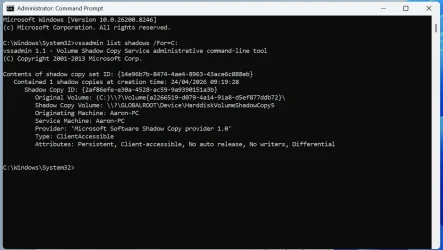
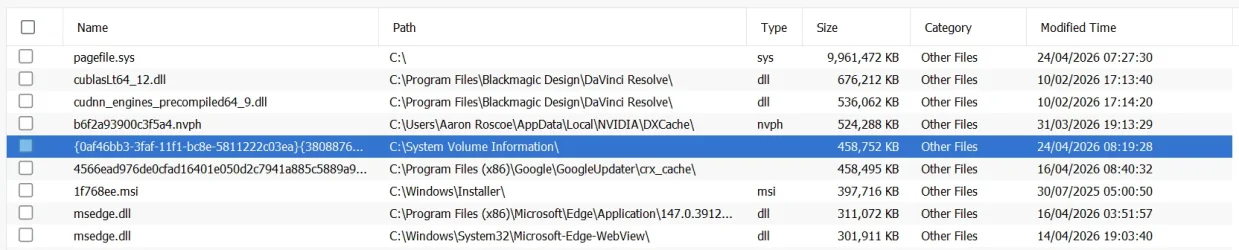
Could you post 1 or more screenshots showing how/where you see these restore points, and the date they were created?

In particular, at an admin command prompt type:
vssadmin list shadows /For=C:

Thanks.
I do not rely on Windows System Protection as I use Macrium Reflect for my system image backups.
As I've said elsewhere, these two are neatly complementary and not equivalents. Each tool to its appropriate use.
 

My Computer My Computer

At a glance

Windows 11 Proi7-8650U16GBIntel UHD 620
OS
Windows 11 Pro
Computer type
Laptop
Manufacturer/Model
Lenovo t480s
CPU
i7-8650U
Memory
16GB
Graphics Card(s)
Intel UHD 620
Screen Resolution
1920x1080
Hard Drives
C SN810 SDCPNRY-512G-1006
Browser
Edge, Firefox
Antivirus
Defender
Oh, macrium reflect uses volume shadow copies. They should be deleted after a backup though. But maybe there is something wrong there.in the macrium app you can view the VSS log to see if there might be an issue.
 

My Computers My Computers

  • At a glance

    Windows 11 ProIntel Core i9 14900K 5800/4500 P/E96GB (2x48) G.skill Ripjaws 6800Asus ROG Strix 4070 Ti OC
    OS
    Windows 11 Pro
    Computer type
    PC/Desktop
    Manufacturer/Model
    DIY Photoshop/Audio/Game/tinker
    CPU
    Intel Core i9 14900K 5800/4500 P/E
    Motherboard
    Asus ROG Maximus Z790 Dark Hero
    Memory
    96GB (2x48) G.skill Ripjaws 6800
    Graphics Card(s)
    Asus ROG Strix 4070 Ti OC
    Sound Card
    B&W 606 S3 speakers; Audiolabs 7000a integrated amp; RSL 10S Mk2 sub
    Monitor(s) Displays
    Eizo CG2730 ColorEdge, ViewSonic VP2768
    Screen Resolution
    2560 x 1440 x 2
    Hard Drives
    nvme: WDC SN850X 4TB, SN850 1TB, SK-Hynix 2 TB P41
    Spinners: Sabrent USB-C DS-SC5B 5-bay docking station, 6TB WDC Black, 6TB Ironwolf Pro 2x 2TB WDC Black
    PSU
    850W Seasonic Vertex PX-850
    Case
    FD North XL Mesh, Black Walnut
    Cooling
    EK Nucleus black 360 AIO w/Phanteks T30 fans; 2 Noctua NF-A14 Chromax ; T30 for memory
    Keyboard
    Keychron Q3 Max TKL w/GMK Redsuns Red Samuri keycaps
    Mouse
    Logitech G305 wireless gaming
    Internet Speed
    575 Mb/s down | 25 Mb/s up
    Browser
    Firefox
    Antivirus
    Defender, Macrium Reflect X
    Other Info
    Phangkey Amaterasu V2 Desk Mat
  • At a glance

    Apple M1
    Computer type
    Laptop
    Manufacturer/Model
    💻 Apple 13" Macbook Pro 2020 (m1)
    CPU
    Apple M1
    Screen Resolution
    2560x1600
    Browser
    Firefox
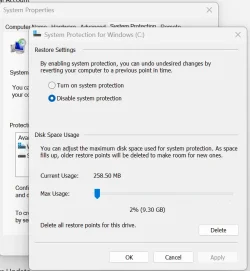
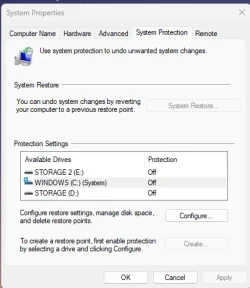
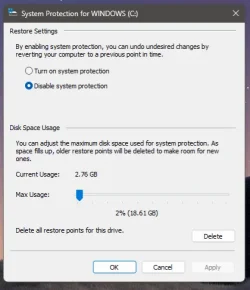
Few more images as requested, I tried setting to 0% on Max Disk Usage but it's already set as that. A new system retore has been made again.
 

Attachments

  • Screenshot 2026-04-24 104431.webp
    Screenshot 2026-04-24 104431.webp
    74.7 KB · Views: 4
  • Screenshot 2026-04-24 104418.webp
    Screenshot 2026-04-24 104418.webp
    79.9 KB · Views: 4
  • Screenshot 2026-04-24 104452.webp
    Screenshot 2026-04-24 104452.webp
    43.4 KB · Views: 3

My Computers My Computers

  • At a glance

    Windows 11 Pro 25H2AMD Ryzen 7 5800X 3.80GHz Stock; OC 4.50GHz64GB DDR4 3600MT/sMSI GeForce RTX 4060 Ti 16GB
    OS
    Windows 11 Pro 25H2
    Computer type
    PC/Desktop
    Manufacturer/Model
    ASUS ROG Strix X570-F Gaming
    CPU
    AMD Ryzen 7 5800X 3.80GHz Stock; OC 4.50GHz
    Motherboard
    ROG Strix X570-F Gaming
    Memory
    64GB DDR4 3600MT/s
    Graphics Card(s)
    MSI GeForce RTX 4060 Ti 16GB
    Sound Card
    Onboard Realtek Audio
    Monitor(s) Displays
    iiyama ProLite XU2792UHSU 4K 27"
    Screen Resolution
    3840 x 2160
    Hard Drives
    Samsung 980 PRO 500GB - OS
    Samsung 990 PRO 4TB - Data & Games
    PSU
    Corsair 850w RMx Series
    Case
    Corsair 4000D Black
    Cooling
    Corsair ICUE Link H150i RGB
    Internet Speed
    1Gbps
    Browser
    Google Chrome
    Antivirus
    ESET Smart Security
    Other Info
    TP-Link TX201 2.5Gbps PCIe Network Card
  • At a glance

    Windows 11 Pro 25H2AMD Ryzen 7 8840HS 3.3 GHz16GB DDR5 5600 MT/sAMD Radeon 780M 512MB
    Operating System
    Windows 11 Pro 25H2
    Computer type
    Laptop
    Manufacturer/Model
    Acer Aspire 15 - A15-61M
    CPU
    AMD Ryzen 7 8840HS 3.3 GHz
    Motherboard
    HWK
    Memory
    16GB DDR5 5600 MT/s
    Graphics card(s)
    AMD Radeon 780M 512MB
    Sound Card
    Onboard Senary Audio
    Screen Resolution
    1920 x 1080
    Hard Drives
    WD PC SN5000S 1TB SSD
    Internet Speed
    1Gbps
    Browser
    Google Chrome
    Antivirus
    ESET Smart Security
Thank you for your reply.

I assume you have restarted since disabling SR.

I'm wondering if something other than Windows normal SR generation is creating one.
For example, some 3rd party tools can trigger the creation of one.
It's also possible to set up a scheduled task to create SR points.

What I don't know is whether that should be possible or not irrespective of Windows settings being disabled as you show.
 

My Computer My Computer

At a glance

Windows 11 Proi7-8650U16GBIntel UHD 620
OS
Windows 11 Pro
Computer type
Laptop
Manufacturer/Model
Lenovo t480s
CPU
i7-8650U
Memory
16GB
Graphics Card(s)
Intel UHD 620
Screen Resolution
1920x1080
Hard Drives
C SN810 SDCPNRY-512G-1006
Browser
Edge, Firefox
Antivirus
Defender
"However, on an MSI or Windows Update installation, if the size of the operating system disk is greater than 128 gigabytes (GB), a restore point is automatically created without the user enabling System Restore (as if System Restore were already enabled). Similarly, if the disk size is less than 128 GB, no restore point is created until System Restore is manually enabled.
You can verify this yourself by checking for a restore point after a .msi or Windows Update installation on a computer that has a disk size of greater than 128 GB." (c) System restore points are disabled after upgrade - Windows Client
 

My Computer My Computer

At a glance

Windows 11 Insider Experimental (26H2)Intel Core i5-1140032Gb (DDR4 SDRAM)Intel(R) UHD Graphics 730
OS
Windows 11 Insider Experimental (26H2)
Computer type
PC/Desktop
Manufacturer/Model
Gigabyte Technology Co., Ltd.
CPU
Intel Core i5-11400
Motherboard
Z590 AORUS PRO AX
Memory
32Gb (DDR4 SDRAM)
Graphics Card(s)
Intel(R) UHD Graphics 730
Sound Card
Realtek USB Audio
Monitor(s) Displays
LG 27US500-W 4K UHD UltraFine™
Screen Resolution
3840x2160
Hard Drives
Samsung SSD 980 PRO 1TB
WDC WD7501AALS
PSU
Montech CENTURY, 650W, 80+ Gold
Case
Cougar Airface ECO RGB
Cooling
ID-COOLING SE-224-XTS BLACK
Keyboard
Microsoft SideWinder X6 Keyboard
Mouse
Microsoft SideWinder Mouse
Internet Speed
Internet speed of 1 Gbit/s
Browser
Vivaldi browser
Antivirus
Windows Defender
I've not installed any programs recently, there is definitely something odd about it. Another backup was made around lunchtime when I was away from the PC knocking it to just 1.1GB. I don't believe I have set up any scheduled tasks although I won't actually know where to look unless its in the event viewer from top of my mind?.
 

My Computers My Computers

  • At a glance

    Windows 11 Pro 25H2AMD Ryzen 7 5800X 3.80GHz Stock; OC 4.50GHz64GB DDR4 3600MT/sMSI GeForce RTX 4060 Ti 16GB
    OS
    Windows 11 Pro 25H2
    Computer type
    PC/Desktop
    Manufacturer/Model
    ASUS ROG Strix X570-F Gaming
    CPU
    AMD Ryzen 7 5800X 3.80GHz Stock; OC 4.50GHz
    Motherboard
    ROG Strix X570-F Gaming
    Memory
    64GB DDR4 3600MT/s
    Graphics Card(s)
    MSI GeForce RTX 4060 Ti 16GB
    Sound Card
    Onboard Realtek Audio
    Monitor(s) Displays
    iiyama ProLite XU2792UHSU 4K 27"
    Screen Resolution
    3840 x 2160
    Hard Drives
    Samsung 980 PRO 500GB - OS
    Samsung 990 PRO 4TB - Data & Games
    PSU
    Corsair 850w RMx Series
    Case
    Corsair 4000D Black
    Cooling
    Corsair ICUE Link H150i RGB
    Internet Speed
    1Gbps
    Browser
    Google Chrome
    Antivirus
    ESET Smart Security
    Other Info
    TP-Link TX201 2.5Gbps PCIe Network Card
  • At a glance

    Windows 11 Pro 25H2AMD Ryzen 7 8840HS 3.3 GHz16GB DDR5 5600 MT/sAMD Radeon 780M 512MB
    Operating System
    Windows 11 Pro 25H2
    Computer type
    Laptop
    Manufacturer/Model
    Acer Aspire 15 - A15-61M
    CPU
    AMD Ryzen 7 8840HS 3.3 GHz
    Motherboard
    HWK
    Memory
    16GB DDR5 5600 MT/s
    Graphics card(s)
    AMD Radeon 780M 512MB
    Sound Card
    Onboard Senary Audio
    Screen Resolution
    1920 x 1080
    Hard Drives
    WD PC SN5000S 1TB SSD
    Internet Speed
    1Gbps
    Browser
    Google Chrome
    Antivirus
    ESET Smart Security
I have been having this issue also.... for months
Still have not figured it out.
1777046094869.webpUntitled.webp
 

My Computer My Computer

At a glance

Windows 11 ProRyzen 9 5950X128GB G Skill Trident Z RGB F4-3600C18-32GTZRXFX Speedster MERC310 Radeon RX 7900XT
OS
Windows 11 Pro
Computer type
PC/Desktop
CPU
Ryzen 9 5950X
Motherboard
Asus TUF GAMING X570-PLUS
Memory
128GB G Skill Trident Z RGB F4-3600C18-32GTZR
Graphics Card(s)
XFX Speedster MERC310 Radeon RX 7900XT
Sound Card
HDMI
Monitor(s) Displays
SAMSUNG C27F390 X2, Samsung 55" 4k
Screen Resolution
1920x1080
Hard Drives
SAMSUNG 990PRO W/heatsink (PCI-E 4.0 x4) 1TB and a 2TB
8 Seagate ST6000NM0034 6TB in Raid 6
PSU
Corsair RM1000x
Case
Phanteks Enthoo Prime
Cooling
15 Enermax Squa Rgb fans Enermax Auquafusion 360 AIO
Keyboard
Microsoft wireless keyboard 5050
Mouse
Microsoft wireless mouse 5000
Internet Speed
Gigabit
Browser
Edge
Antivirus
Norton 360
Other Info
4 LG WH16NS60 Blu-Ray burners flashed for 4k ripping.
Hauppauge dual tuner tv card
Silverstone internal flash card reader
Dell Perc H700 Raid controller
Thank you for your reply.

I assume you have restarted since disabling SR.

I'm wondering if something other than Windows normal SR generation is creating one.
For example, some 3rd party tools can trigger the creation of one.
It's also possible to set up a scheduled task to create SR points.

What I don't know is whether that should be possible or not irrespective of Windows settings being disabled as you show.

Macrium reflect uses VSS shadow copies to make point-in-time backups regardless of the system protection setting, as I mentioned a few posts above yours.

OP: What version of macrium reflect? Post the VSS log from it (in the "other tasks" menu). There is also a "Fix VSS problems" in the same menu

After posting the log, try reinstalling reflect.
 
Last edited:

My Computers My Computers

  • At a glance

    Windows 11 ProIntel Core i9 14900K 5800/4500 P/E96GB (2x48) G.skill Ripjaws 6800Asus ROG Strix 4070 Ti OC
    OS
    Windows 11 Pro
    Computer type
    PC/Desktop
    Manufacturer/Model
    DIY Photoshop/Audio/Game/tinker
    CPU
    Intel Core i9 14900K 5800/4500 P/E
    Motherboard
    Asus ROG Maximus Z790 Dark Hero
    Memory
    96GB (2x48) G.skill Ripjaws 6800
    Graphics Card(s)
    Asus ROG Strix 4070 Ti OC
    Sound Card
    B&W 606 S3 speakers; Audiolabs 7000a integrated amp; RSL 10S Mk2 sub
    Monitor(s) Displays
    Eizo CG2730 ColorEdge, ViewSonic VP2768
    Screen Resolution
    2560 x 1440 x 2
    Hard Drives
    nvme: WDC SN850X 4TB, SN850 1TB, SK-Hynix 2 TB P41
    Spinners: Sabrent USB-C DS-SC5B 5-bay docking station, 6TB WDC Black, 6TB Ironwolf Pro 2x 2TB WDC Black
    PSU
    850W Seasonic Vertex PX-850
    Case
    FD North XL Mesh, Black Walnut
    Cooling
    EK Nucleus black 360 AIO w/Phanteks T30 fans; 2 Noctua NF-A14 Chromax ; T30 for memory
    Keyboard
    Keychron Q3 Max TKL w/GMK Redsuns Red Samuri keycaps
    Mouse
    Logitech G305 wireless gaming
    Internet Speed
    575 Mb/s down | 25 Mb/s up
    Browser
    Firefox
    Antivirus
    Defender, Macrium Reflect X
    Other Info
    Phangkey Amaterasu V2 Desk Mat
  • At a glance

    Apple M1
    Computer type
    Laptop
    Manufacturer/Model
    💻 Apple 13" Macbook Pro 2020 (m1)
    CPU
    Apple M1
    Screen Resolution
    2560x1600
    Browser
    Firefox
Noted. In which case, what was actually responsible for this one? (post #11)

I've not installed any programs recently, there is definitely something odd about it. Another backup was made around lunchtime when I was away from the PC knocking it to just 1.1GB.
 

My Computer My Computer

At a glance

Windows 11 Proi7-8650U16GBIntel UHD 620
OS
Windows 11 Pro
Computer type
Laptop
Manufacturer/Model
Lenovo t480s
CPU
i7-8650U
Memory
16GB
Graphics Card(s)
Intel UHD 620
Screen Resolution
1920x1080
Hard Drives
C SN810 SDCPNRY-512G-1006
Browser
Edge, Firefox
Antivirus
Defender
I suggest using the .reg file in option 2.


My Computers My Computers

  • At a glance

    All Branches but StableAMD Ryzen 7 7735HS 3200-4500 Mhz 8 cores x 232 GB DDR5Radeon Graphic / NVIDIA GeForce RTX 4060 8 GB...
    OS
    All Branches but Stable
    Computer type
    Laptop
    Manufacturer/Model
    Acer Nitro ANV15-51
    CPU
    AMD Ryzen 7 7735HS 3200-4500 Mhz 8 cores x 2
    Motherboard
    Sportage_RBH
    Memory
    32 GB DDR5
    Graphics Card(s)
    Radeon Graphic / NVIDIA GeForce RTX 4060 8 GB GDDR6
    Sound Card
    AMD/Realtek(R) Audio
    Monitor(s) Displays
    Integrated Monitor (15.3"vis)
    Screen Resolution
    FHD 1920X1080 16:9 144Hz
    Hard Drives
    KINGSTON OM8SEP4512Q-AA 1TB
    Western Digital 256GB
    PSU
    19V DC 6.32 A 120 W
    Cooling
    Dual Fans
    Mouse
    MS Bluetooth
    Internet Speed
    Fiber 1GB Cox -us & 1GB Orange-fr
    Browser
    Edge Canary- Firefox Nightly-Chrome Dev-Chrome Dev
    Antivirus
    Windows Defender
  • At a glance

    Windows 11 BetaAMD A9-94208 GB of DDR4AMD Radeon R5
    Operating System
    Windows 11 Beta
    Computer type
    Laptop
    Manufacturer/Model
    Asus X751BP
    CPU
    AMD A9-9420
    Memory
    8 GB of DDR4
    Graphics card(s)
    AMD Radeon R5
    Screen Resolution
    1600x900
    Hard Drives
    Seagate 1 TB
Noted. In which case, what was actually responsible for this one? (post #11)

Scheduled? Backups are about the only thing I know of that create shadow copies. Anything that needs a point in time snapshot of the disk disk partition(s).
 

My Computers My Computers

  • At a glance

    Windows 11 ProIntel Core i9 14900K 5800/4500 P/E96GB (2x48) G.skill Ripjaws 6800Asus ROG Strix 4070 Ti OC
    OS
    Windows 11 Pro
    Computer type
    PC/Desktop
    Manufacturer/Model
    DIY Photoshop/Audio/Game/tinker
    CPU
    Intel Core i9 14900K 5800/4500 P/E
    Motherboard
    Asus ROG Maximus Z790 Dark Hero
    Memory
    96GB (2x48) G.skill Ripjaws 6800
    Graphics Card(s)
    Asus ROG Strix 4070 Ti OC
    Sound Card
    B&W 606 S3 speakers; Audiolabs 7000a integrated amp; RSL 10S Mk2 sub
    Monitor(s) Displays
    Eizo CG2730 ColorEdge, ViewSonic VP2768
    Screen Resolution
    2560 x 1440 x 2
    Hard Drives
    nvme: WDC SN850X 4TB, SN850 1TB, SK-Hynix 2 TB P41
    Spinners: Sabrent USB-C DS-SC5B 5-bay docking station, 6TB WDC Black, 6TB Ironwolf Pro 2x 2TB WDC Black
    PSU
    850W Seasonic Vertex PX-850
    Case
    FD North XL Mesh, Black Walnut
    Cooling
    EK Nucleus black 360 AIO w/Phanteks T30 fans; 2 Noctua NF-A14 Chromax ; T30 for memory
    Keyboard
    Keychron Q3 Max TKL w/GMK Redsuns Red Samuri keycaps
    Mouse
    Logitech G305 wireless gaming
    Internet Speed
    575 Mb/s down | 25 Mb/s up
    Browser
    Firefox
    Antivirus
    Defender, Macrium Reflect X
    Other Info
    Phangkey Amaterasu V2 Desk Mat
  • At a glance

    Apple M1
    Computer type
    Laptop
    Manufacturer/Model
    💻 Apple 13" Macbook Pro 2020 (m1)

    CPU
    Apple M1
    Screen Resolution
    2560x1600
    Browser
    Firefox
I've not installed any programs recently, there is definitely something odd about it. Another backup was made around lunchtime when I was away from the PC knocking it to just 1.1GB. I don't believe I have set up any scheduled tasks although I won't actually know where to look unless its in the event viewer from top of my mind?.
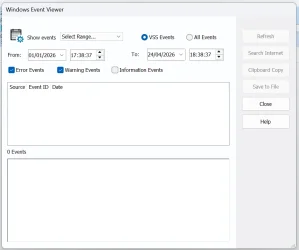
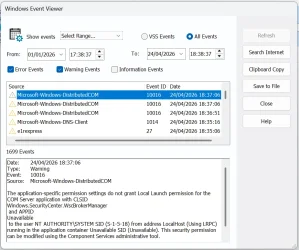
I would recommend that you check the built-in Windows event viewer and check these events; 8231 (Snapshot creation initiated), 8222 (shadow copy created), also please check if any other event was registered before/after this event.
 

My Computer My Computer

At a glance

Windows 11 Insider Experimental (26H2)Intel Core i5-1140032Gb (DDR4 SDRAM)Intel(R) UHD Graphics 730
OS
Windows 11 Insider Experimental (26H2)
Computer type
PC/Desktop
Manufacturer/Model
Gigabyte Technology Co., Ltd.
CPU
Intel Core i5-11400
Motherboard
Z590 AORUS PRO AX
Memory
32Gb (DDR4 SDRAM)
Graphics Card(s)
Intel(R) UHD Graphics 730
Sound Card
Realtek USB Audio
Monitor(s) Displays
LG 27US500-W 4K UHD UltraFine™
Screen Resolution
3840x2160
Hard Drives
Samsung SSD 980 PRO 1TB
WDC WD7501AALS
PSU
Montech CENTURY, 650W, 80+ Gold
Case
Cougar Airface ECO RGB
Cooling
ID-COOLING SE-224-XTS BLACK
Keyboard
Microsoft SideWinder X6 Keyboard
Mouse
Microsoft SideWinder Mouse
Internet Speed
Internet speed of 1 Gbit/s
Browser
Vivaldi browser
Antivirus
Windows Defender
I removed Macrium temp for now, but System Protection still went on to made a another back up around 230mb this time. I have used the suggested reg file with a reboot so far no backups are been made. In my event viewer when looking up both 8231 & 8222 nothing came back to suggest anything is triggering it.
 

My Computers My Computers

  • At a glance

    Windows 11 Pro 25H2AMD Ryzen 7 5800X 3.80GHz Stock; OC 4.50GHz64GB DDR4 3600MT/sMSI GeForce RTX 4060 Ti 16GB
    OS
    Windows 11 Pro 25H2
    Computer type
    PC/Desktop
    Manufacturer/Model
    ASUS ROG Strix X570-F Gaming
    CPU
    AMD Ryzen 7 5800X 3.80GHz Stock; OC 4.50GHz
    Motherboard
    ROG Strix X570-F Gaming
    Memory
    64GB DDR4 3600MT/s
    Graphics Card(s)
    MSI GeForce RTX 4060 Ti 16GB
    Sound Card
    Onboard Realtek Audio
    Monitor(s) Displays
    iiyama ProLite XU2792UHSU 4K 27"
    Screen Resolution
    3840 x 2160
    Hard Drives
    Samsung 980 PRO 500GB - OS
    Samsung 990 PRO 4TB - Data & Games
    PSU
    Corsair 850w RMx Series
    Case
    Corsair 4000D Black
    Cooling
    Corsair ICUE Link H150i RGB
    Internet Speed
    1Gbps
    Browser
    Google Chrome
    Antivirus
    ESET Smart Security
    Other Info
    TP-Link TX201 2.5Gbps PCIe Network Card
  • At a glance

    Windows 11 Pro 25H2AMD Ryzen 7 8840HS 3.3 GHz16GB DDR5 5600 MT/sAMD Radeon 780M 512MB
    Operating System
    Windows 11 Pro 25H2
    Computer type
    Laptop
    Manufacturer/Model
    Acer Aspire 15 - A15-61M
    CPU
    AMD Ryzen 7 8840HS 3.3 GHz
    Motherboard
    HWK
    Memory
    16GB DDR5 5600 MT/s
    Graphics card(s)
    AMD Radeon 780M 512MB
    Sound Card
    Onboard Senary Audio
    Screen Resolution
    1920 x 1080
    Hard Drives
    WD PC SN5000S 1TB SSD
    Internet Speed
    1Gbps
    Browser
    Google Chrome
    Antivirus
    ESET Smart Security
I would recommend that you check the built-in Windows event viewer and check these events; 8231 (Snapshot creation initiated), 8222 (shadow copy created), also please check if any other event was registered before/after this event.

Those events can tell you the source. Check both the system event log and the application event log for this ID (e.g. macrium events show up in the application log)Screenshot 2026-04-24 140453.webp
 

My Computers My Computers

  • At a glance

    Windows 11 ProIntel Core i9 14900K 5800/4500 P/E96GB (2x48) G.skill Ripjaws 6800Asus ROG Strix 4070 Ti OC
    OS
    Windows 11 Pro
    Computer type
    PC/Desktop
    Manufacturer/Model
    DIY Photoshop/Audio/Game/tinker
    CPU
    Intel Core i9 14900K 5800/4500 P/E
    Motherboard
    Asus ROG Maximus Z790 Dark Hero
    Memory
    96GB (2x48) G.skill Ripjaws 6800
    Graphics Card(s)
    Asus ROG Strix 4070 Ti OC
    Sound Card
    B&W 606 S3 speakers; Audiolabs 7000a integrated amp; RSL 10S Mk2 sub
    Monitor(s) Displays
    Eizo CG2730 ColorEdge, ViewSonic VP2768
    Screen Resolution
    2560 x 1440 x 2
    Hard Drives
    nvme: WDC SN850X 4TB, SN850 1TB, SK-Hynix 2 TB P41
    Spinners: Sabrent USB-C DS-SC5B 5-bay docking station, 6TB WDC Black, 6TB Ironwolf Pro 2x 2TB WDC Black
    PSU
    850W Seasonic Vertex PX-850
    Case
    FD North XL Mesh, Black Walnut
    Cooling
    EK Nucleus black 360 AIO w/Phanteks T30 fans; 2 Noctua NF-A14 Chromax ; T30 for memory
    Keyboard
    Keychron Q3 Max TKL w/GMK Redsuns Red Samuri keycaps
    Mouse
    Logitech G305 wireless gaming
    Internet Speed
    575 Mb/s down | 25 Mb/s up
    Browser
    Firefox
    Antivirus
    Defender, Macrium Reflect X
    Other Info
    Phangkey Amaterasu V2 Desk Mat
  • At a glance

    Apple M1
    Computer type
    Laptop
    Manufacturer/Model
    💻 Apple 13" Macbook Pro 2020 (m1)
    CPU
    Apple M1
    Screen Resolution
    2560x1600
    Browser
    Firefox
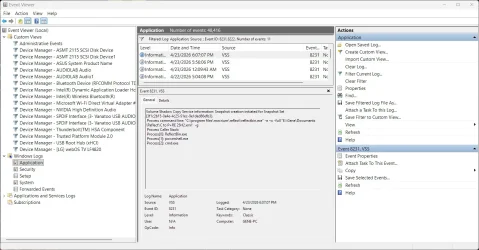
Thank you all, I'm a little rusty in the Event Viewer having not needed to go in it for a long while. some images of when I removed Macrium info and after a reboot cause it needed one after uninstall leaves me with 8224. The Reg File has disable System Protection Back Ups.
 

Attachments

  • Screenshot 2026-04-24 183912.webp
    Screenshot 2026-04-24 183912.webp
    23.1 KB · Views: 3
  • Screenshot 2026-04-24 183930.webp
    Screenshot 2026-04-24 183930.webp
    75.8 KB · Views: 3
  • Screenshot 2026-04-24 191328.webp
    Screenshot 2026-04-24 191328.webp
    19.1 KB · Views: 3

My Computers My Computers

  • At a glance

    Windows 11 Pro 25H2AMD Ryzen 7 5800X 3.80GHz Stock; OC 4.50GHz64GB DDR4 3600MT/sMSI GeForce RTX 4060 Ti 16GB
    OS
    Windows 11 Pro 25H2
    Computer type
    PC/Desktop
    Manufacturer/Model
    ASUS ROG Strix X570-F Gaming
    CPU
    AMD Ryzen 7 5800X 3.80GHz Stock; OC 4.50GHz
    Motherboard
    ROG Strix X570-F Gaming
    Memory
    64GB DDR4 3600MT/s
    Graphics Card(s)
    MSI GeForce RTX 4060 Ti 16GB
    Sound Card
    Onboard Realtek Audio
    Monitor(s) Displays
    iiyama ProLite XU2792UHSU 4K 27"
    Screen Resolution
    3840 x 2160
    Hard Drives
    Samsung 980 PRO 500GB - OS
    Samsung 990 PRO 4TB - Data & Games
    PSU
    Corsair 850w RMx Series
    Case
    Corsair 4000D Black
    Cooling
    Corsair ICUE Link H150i RGB
    Internet Speed
    1Gbps
    Browser
    Google Chrome
    Antivirus
    ESET Smart Security
    Other Info
    TP-Link TX201 2.5Gbps PCIe Network Card
  • At a glance

    Windows 11 Pro 25H2AMD Ryzen 7 8840HS 3.3 GHz16GB DDR5 5600 MT/sAMD Radeon 780M 512MB
    Operating System
    Windows 11 Pro 25H2
    Computer type
    Laptop
    Manufacturer/Model
    Acer Aspire 15 - A15-61M
    CPU
    AMD Ryzen 7 8840HS 3.3 GHz
    Motherboard
    HWK
    Memory
    16GB DDR5 5600 MT/s
    Graphics card(s)
    AMD Radeon 780M 512MB
    Sound Card
    Onboard Senary Audio
    Screen Resolution
    1920 x 1080
    Hard Drives
    WD PC SN5000S 1TB SSD
    Internet Speed
    1Gbps
    Browser
    Google Chrome
    Antivirus
    ESET Smart Security

Latest Support Threads

Back
Top Bottom