Solved Task manager question?


Alexey2912

Well-known member
Member
VIP
Local time
11:54 AM
Posts
2,185
Location
Aiea, Honolulu HI
OS
Windows 11 Pro 25H2 (26200.9550).
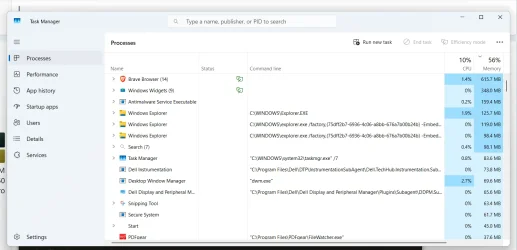
What does in Task Manager show that the laptop requires a reboot?

Thanks.

TM.webpTM1.webp
 
Windows Build/Version
Windows 11 Pro 25H2 (26200.9550).

My Computers My Computers

  • At a glance

    Windows 11 Pro 25H2 (26200.9550).core i7 11th gen16 GB DDR4 @3200 MHz
    OS
    Windows 11 Pro 25H2 (26200.9550).
    Computer type
    Laptop
    Manufacturer/Model
    Dell Inspiron i5 5510
    CPU
    core i7 11th gen
    Memory
    16 GB DDR4 @3200 MHz
    Hard Drives
    1 TB SSD M.2 NVMe
    Keyboard
    Dell Premier Multi-Device Wireless Keyboard and Mouse – KM7321W
    Browser
    Brave.
    Other Info
    Edifier speakers. (Thanks to @Edwin).
  • At a glance

    W11 25H2 (26200.7840)11th Gen Intel® Core i7-11700 processor32 GB, 2 x 16 GB, DDR4, 2933 MHz, dual channelNVIDIA GeForce RTX 3060 12GB GDDR6
    Operating System
    W11 25H2 (26200.7840)
    Computer type
    PC/Desktop
    Manufacturer/Model
    XPS Special Edition
    CPU
    11th Gen Intel® Core i7-11700 processor
    Memory
    32 GB, 2 x 16 GB, DDR4, 2933 MHz, dual channel
    Graphics card(s)
    NVIDIA GeForce RTX 3060 12GB GDDR6
    Hard Drives
    2TB M.2 PCIe NVMe SSD
@Alexey2912

Say what?!? :-)

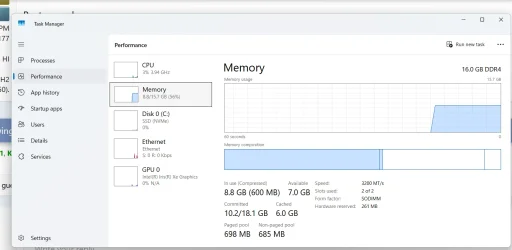
If you're asking if anything in Task Manager indicates that you might want to reboot...
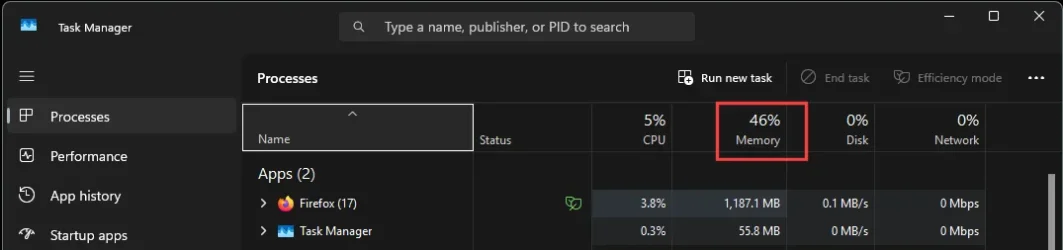
The only thing I ever use as a reboot indicator would be when the memory usage % gets too high.

Image1.webp


After a reboot the memory usage drops a bit.
 

My Computers My Computers

  • At a glance

    Win 11 Home ♦♦♦26300.9550 ♦♦♦♦♦♦♦26H2AMD Ryzen 7 3700XG.Skill (F4-3200C14D-16GTZKW)EVGA RTX 2070 (08G-P4-2171-KR)
    OS
    Win 11 Home ♦♦♦26300.9550 ♦♦♦♦♦♦♦26H2
    Computer type
    PC/Desktop
    Manufacturer/Model
    Built by Ghot® [May 2020]
    CPU
    AMD Ryzen 7 3700X
    Motherboard
    Asus Pro WS X570-ACE (BIOS 5302)
    Memory
    G.Skill (F4-3200C14D-16GTZKW)
    Graphics Card(s)
    EVGA RTX 2070 (08G-P4-2171-KR)
    Sound Card
    Realtek ALC1220P / ALC S1220A
    Monitor(s) Displays
    Dell U3011 30"
    Screen Resolution
    2560 x 1600
    Hard Drives
    2x Samsung 860 EVO 500GB,
    WD 4TB Black FZBX - SATA III,
    WD 8TB Black FZBX - SATA III,
    DRW-24B1ST CD/DVD Burner
    PSU
    PC Power & Cooling 750W Quad EPS12V
    Case
    Cooler Master ATCS 840 Tower
    Cooling
    CM Hyper 212 EVO (push/pull)
    Keyboard
    Ducky DK9008 Shine II Blue LED
    Mouse
    Logitech Optical M-100
    Internet Speed
    300/300
    Browser
    Firefox (latest)
    Antivirus
    Bitdefender Total Security
    Other Info
    Speakers: Klipsch Pro Media 2.1
  • At a glance

    Windows XP Pro 32bit w/SP3AMD Athlon 64 X2 5000+ (OC'd @ 3.2Ghz)TWIN2X2048-6400C4DHX (2 x 1GB, DDR2 800)EVGA 256-P2-N758-TR GeForce 8600GT SSC
    Operating System
    Windows XP Pro 32bit w/SP3
    Computer type
    PC/Desktop
    Manufacturer/Model
    Built by Ghot® (not in use)
    CPU
    AMD Athlon 64 X2 5000+ (OC'd @ 3.2Ghz)
    Motherboard
    ASUS M2N32-SLI Deluxe Wireless Edition
    Memory
    TWIN2X2048-6400C4DHX (2 x 1GB, DDR2 800)
    Graphics card(s)
    EVGA 256-P2-N758-TR GeForce 8600GT SSC
    Sound Card
    Onboard
    Monitor(s) Displays
    ViewSonic G90FB Black 19" Professional (CRT)
    Screen Resolution
    up to 2048 x 1536
    Hard Drives
    WD 36GB 10,000rpm Raptor SATA
    Seagate 80GB 7200rpm SATA
    Lite-On LTR-52246S CD/RW
    Lite-On LH-18A1P CD/DVD Burner
    PSU
    PC Power & Cooling Silencer 750 Quad EPS12V
    Case
    Generic Beige case, 80mm fans
    Cooling
    ZALMAN 9500A 92mm CPU Cooler
    Keyboard
    Logitech Classic Keybooard 200
    Mouse
    Logitech Optical M-BT96a
    Internet Speed
    300/300
    Browser
    Firefox 3.x ??
    Antivirus
    Symantec (Norton)
    Other Info
    Still assembled, still runs. Haven't turned it on for 15 years?

My Computers My Computers

  • At a glance

    Windows 11 Pro 25H2 (26200.9550).core i7 11th gen16 GB DDR4 @3200 MHz
    OS
    Windows 11 Pro 25H2 (26200.9550).
    Computer type
    Laptop
    Manufacturer/Model
    Dell Inspiron i5 5510
    CPU
    core i7 11th gen
    Memory
    16 GB DDR4 @3200 MHz
    Hard Drives
    1 TB SSD M.2 NVMe
    Keyboard
    Dell Premier Multi-Device Wireless Keyboard and Mouse – KM7321W
    Browser
    Brave.
    Other Info
    Edifier speakers. (Thanks to @Edwin).
  • At a glance

    W11 25H2 (26200.7840)11th Gen Intel® Core i7-11700 processor32 GB, 2 x 16 GB, DDR4, 2933 MHz, dual channelNVIDIA GeForce RTX 3060 12GB GDDR6
    Operating System
    W11 25H2 (26200.7840)
    Computer type
    PC/Desktop
    Manufacturer/Model
    XPS Special Edition
    CPU
    11th Gen Intel® Core i7-11700 processor
    Memory
    32 GB, 2 x 16 GB, DDR4, 2933 MHz, dual channel
    Graphics card(s)
    NVIDIA GeForce RTX 3060 12GB GDDR6
    Hard Drives
    2TB M.2 PCIe NVMe SSD
@Ghot , what is the indicator in TM to reboot?


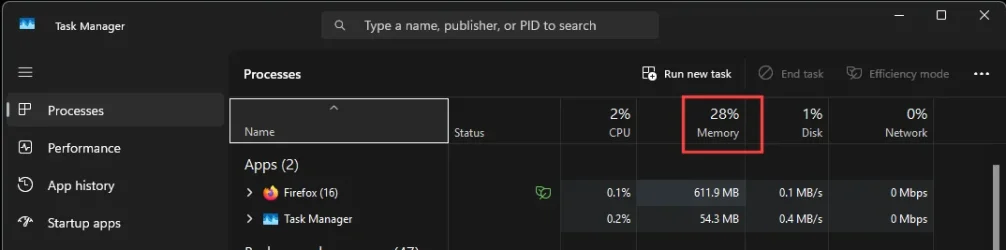
See the difference? Same apps running and same tabs open.
Memory usage dropped from 46% to 28%.

It will slowly climb again. You don't really need to worry about it unless it starts getting above 80%.

Image1.webp


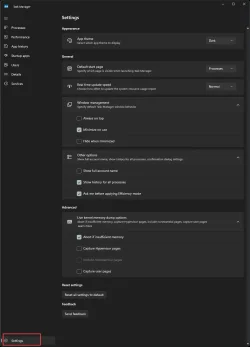
NOTE: In the lower left corner of Task Manager, click on Settings and you can choose "Dark Mode" if desired.


Image1.webp
 

My Computers My Computers

  • At a glance

    Win 11 Home ♦♦♦26300.9550 ♦♦♦♦♦♦♦26H2AMD Ryzen 7 3700XG.Skill (F4-3200C14D-16GTZKW)EVGA RTX 2070 (08G-P4-2171-KR)
    OS
    Win 11 Home ♦♦♦26300.9550 ♦♦♦♦♦♦♦26H2
    Computer type
    PC/Desktop
    Manufacturer/Model
    Built by Ghot® [May 2020]
    CPU
    AMD Ryzen 7 3700X
    Motherboard
    Asus Pro WS X570-ACE (BIOS 5302)
    Memory
    G.Skill (F4-3200C14D-16GTZKW)
    Graphics Card(s)
    EVGA RTX 2070 (08G-P4-2171-KR)
    Sound Card
    Realtek ALC1220P / ALC S1220A
    Monitor(s) Displays
    Dell U3011 30"
    Screen Resolution
    2560 x 1600
    Hard Drives
    2x Samsung 860 EVO 500GB,
    WD 4TB Black FZBX - SATA III,
    WD 8TB Black FZBX - SATA III,
    DRW-24B1ST CD/DVD Burner
    PSU
    PC Power & Cooling 750W Quad EPS12V
    Case
    Cooler Master ATCS 840 Tower
    Cooling
    CM Hyper 212 EVO (push/pull)
    Keyboard
    Ducky DK9008 Shine II Blue LED
    Mouse
    Logitech Optical M-100
    Internet Speed
    300/300
    Browser
    Firefox (latest)
    Antivirus
    Bitdefender Total Security
    Other Info
    Speakers: Klipsch Pro Media 2.1
  • At a glance

    Windows XP Pro 32bit w/SP3AMD Athlon 64 X2 5000+ (OC'd @ 3.2Ghz)TWIN2X2048-6400C4DHX (2 x 1GB, DDR2 800)EVGA 256-P2-N758-TR GeForce 8600GT SSC
    Operating System
    Windows XP Pro 32bit w/SP3
    Computer type
    PC/Desktop
    Manufacturer/Model
    Built by Ghot® (not in use)
    CPU
    AMD Athlon 64 X2 5000+ (OC'd @ 3.2Ghz)
    Motherboard
    ASUS M2N32-SLI Deluxe Wireless Edition
    Memory
    TWIN2X2048-6400C4DHX (2 x 1GB, DDR2 800)
    Graphics card(s)
    EVGA 256-P2-N758-TR GeForce 8600GT SSC
    Sound Card
    Onboard
    Monitor(s) Displays
    ViewSonic G90FB Black 19" Professional (CRT)
    Screen Resolution
    up to 2048 x 1536
    Hard Drives
    WD 36GB 10,000rpm Raptor SATA
    Seagate 80GB 7200rpm SATA
    Lite-On LTR-52246S CD/RW
    Lite-On LH-18A1P CD/DVD Burner
    PSU
    PC Power & Cooling Silencer 750 Quad EPS12V
    Case
    Generic Beige case, 80mm fans
    Cooling
    ZALMAN 9500A 92mm CPU Cooler
    Keyboard
    Logitech Classic Keybooard 200
    Mouse
    Logitech Optical M-BT96a
    Internet Speed
    300/300
    Browser
    Firefox 3.x ??
    Antivirus
    Symantec (Norton)
    Other Info
    Still assembled, still runs. Haven't turned it on for 15 years?
See the difference? Same apps running and same tabs open.
Memory usage dropped from 46% to 28%.

It will slowly climb again. You don't really need to worry about it unless it starts getting above 80%.

View attachment 184452


NOTE: In the lower left corner of Task Manager, click on Settings and you can choose "Dark Mode" if desired.


View attachment 184453
@Ghot how can you make memory @28% vs mine at 56%........must have tweaked big time or using Windows 11 Home? Thanks.
 

My Computers My Computers

  • At a glance

    Windows 11 Pro 25H2 (26200.9550).core i7 11th gen16 GB DDR4 @3200 MHz
    OS
    Windows 11 Pro 25H2 (26200.9550).
    Computer type
    Laptop
    Manufacturer/Model
    Dell Inspiron i5 5510
    CPU
    core i7 11th gen
    Memory
    16 GB DDR4 @3200 MHz
    Hard Drives
    1 TB SSD M.2 NVMe
    Keyboard
    Dell Premier Multi-Device Wireless Keyboard and Mouse – KM7321W
    Browser
    Brave.
    Other Info
    Edifier speakers. (Thanks to @Edwin).
  • At a glance

    W11 25H2 (26200.7840)11th Gen Intel® Core i7-11700 processor32 GB, 2 x 16 GB, DDR4, 2933 MHz, dual channelNVIDIA GeForce RTX 3060 12GB GDDR6
    Operating System
    W11 25H2 (26200.7840)
    Computer type
    PC/Desktop
    Manufacturer/Model
    XPS Special Edition
    CPU
    11th Gen Intel® Core i7-11700 processor
    Memory
    32 GB, 2 x 16 GB, DDR4, 2933 MHz, dual channel
    Graphics card(s)
    NVIDIA GeForce RTX 3060 12GB GDDR6
    Hard Drives
    2TB M.2 PCIe NVMe SSD
@Ghot how can you make memory @28% vs mine at 56%........must have tweaked big time or using Windows 11 Home? Thanks.


I just rebooted the computer.
Reboot yours, and you'll also see a drop in memory usage.

It will always, slowly (over many days), climb back up. That's normal.
It's mostly the browser(s) and the open tabs, that cause the increase. As I said though... that's normal.


If you're asking how to speed up your computer...

The only thing that will speed up the computers you have, is getting a faster computer.
On self built computers, you can play around with overclocking, but I wouldn't advise it on a pre-built computer.
They don't have a lot of leeway for things like overclocking.


Some things you CAN do...

1. In Task Manager check the "Startup Apps" section, and see what can be disabled at Startup.
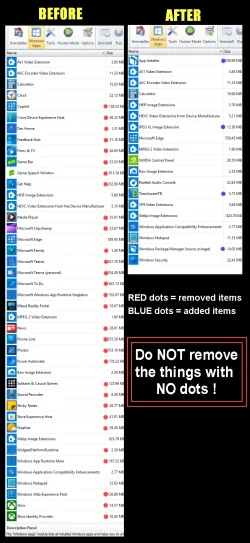
2. A lot of the stuff that comes with Windows, can be removed with REVO Uninstaller (free)

Like so... obviously a personal choice.

00000 REVO Junk Removal.webp


3. There may be a few "Services" you can safely disable.
For example, I don't have a printer, and I don't use Bluetooth, so I can disable those.

4. You can run Disk Cleanup every now and then.
 
Last edited:

My Computers My Computers

  • At a glance

    Win 11 Home ♦♦♦26300.9550 ♦♦♦♦♦♦♦26H2AMD Ryzen 7 3700XG.Skill (F4-3200C14D-16GTZKW)EVGA RTX 2070 (08G-P4-2171-KR)
    OS
    Win 11 Home ♦♦♦26300.9550 ♦♦♦♦♦♦♦26H2
    Computer type
    PC/Desktop
    Manufacturer/Model
    Built by Ghot® [May 2020]
    CPU
    AMD Ryzen 7 3700X
    Motherboard
    Asus Pro WS X570-ACE (BIOS 5302)
    Memory
    G.Skill (F4-3200C14D-16GTZKW)
    Graphics Card(s)
    EVGA RTX 2070 (08G-P4-2171-KR)
    Sound Card
    Realtek ALC1220P / ALC S1220A
    Monitor(s) Displays
    Dell U3011 30"
    Screen Resolution
    2560 x 1600
    Hard Drives
    2x Samsung 860 EVO 500GB,
    WD 4TB Black FZBX - SATA III,
    WD 8TB Black FZBX - SATA III,
    DRW-24B1ST CD/DVD Burner
    PSU
    PC Power & Cooling 750W Quad EPS12V
    Case
    Cooler Master ATCS 840 Tower
    Cooling
    CM Hyper 212 EVO (push/pull)
    Keyboard
    Ducky DK9008 Shine II Blue LED
    Mouse
    Logitech Optical M-100
    Internet Speed
    300/300
    Browser
    Firefox (latest)
    Antivirus
    Bitdefender Total Security
    Other Info
    Speakers: Klipsch Pro Media 2.1
  • At a glance

    Windows XP Pro 32bit w/SP3AMD Athlon 64 X2 5000+ (OC'd @ 3.2Ghz)TWIN2X2048-6400C4DHX (2 x 1GB, DDR2 800)EVGA 256-P2-N758-TR GeForce 8600GT SSC
    Operating System
    Windows XP Pro 32bit w/SP3
    Computer type
    PC/Desktop
    Manufacturer/Model
    Built by Ghot® (not in use)
    CPU
    AMD Athlon 64 X2 5000+ (OC'd @ 3.2Ghz)
    Motherboard
    ASUS M2N32-SLI Deluxe Wireless Edition
    Memory
    TWIN2X2048-6400C4DHX (2 x 1GB, DDR2 800)
    Graphics card(s)
    EVGA 256-P2-N758-TR GeForce 8600GT SSC
    Sound Card
    Onboard
    Monitor(s) Displays
    ViewSonic G90FB Black 19" Professional (CRT)
    Screen Resolution
    up to 2048 x 1536
    Hard Drives
    WD 36GB 10,000rpm Raptor SATA
    Seagate 80GB 7200rpm SATA
    Lite-On LTR-52246S CD/RW
    Lite-On LH-18A1P CD/DVD Burner
    PSU
    PC Power & Cooling Silencer 750 Quad EPS12V
    Case
    Generic Beige case, 80mm fans
    Cooling
    ZALMAN 9500A 92mm CPU Cooler
    Keyboard
    Logitech Classic Keybooard 200
    Mouse
    Logitech Optical M-BT96a
    Internet Speed
    300/300
    Browser
    Firefox 3.x ??
    Antivirus
    Symantec (Norton)
    Other Info
    Still assembled, still runs. Haven't turned it on for 15 years?
I just rebooted the computer.
Reboot yours, and you'll also see a drop in memory usage.

It will always, slowly (over many days), climb back up. That's normal.
It's mostly the browser(s) and the open tabs, that cause the increase. As I said though... that's normal.


If you're asking how to speed up your computer...

The only thing that will speed up the computers you have, is getting a faster computer.
On self built computers, you can play around with overclocking, but I wouldn't advise it on a pre-built computer.
They don't have a lot of leeway for things like overclocking.


Some things you CAN do...

1. In Task Manager check the "Startup Apps" section, and see what can be disabled at Startup.
2. A lot of the stuff that comes with Windows, can be removed with REVO Uninstaller (free)

Like so... obviously a personal choice.

View attachment 184454

Thanks for sharing your expert thoughts. Regards!
 

My Computers My Computers

  • At a glance

    Windows 11 Pro 25H2 (26200.9550).core i7 11th gen16 GB DDR4 @3200 MHz
    OS
    Windows 11 Pro 25H2 (26200.9550).
    Computer type
    Laptop
    Manufacturer/Model
    Dell Inspiron i5 5510
    CPU
    core i7 11th gen
    Memory
    16 GB DDR4 @3200 MHz
    Hard Drives
    1 TB SSD M.2 NVMe
    Keyboard
    Dell Premier Multi-Device Wireless Keyboard and Mouse – KM7321W
    Browser
    Brave.
    Other Info
    Edifier speakers. (Thanks to @Edwin).
  • At a glance

    W11 25H2 (26200.7840)11th Gen Intel® Core i7-11700 processor32 GB, 2 x 16 GB, DDR4, 2933 MHz, dual channelNVIDIA GeForce RTX 3060 12GB GDDR6
    Operating System
    W11 25H2 (26200.7840)
    Computer type
    PC/Desktop
    Manufacturer/Model
    XPS Special Edition
    CPU
    11th Gen Intel® Core i7-11700 processor
    Memory
    32 GB, 2 x 16 GB, DDR4, 2933 MHz, dual channel
    Graphics card(s)
    NVIDIA GeForce RTX 3060 12GB GDDR6
    Hard Drives
    2TB M.2 PCIe NVMe SSD
Thanks for sharing your expert thoughts. Regards!


Nothing expert about it. Just years of tinkering. :-)
Most of the regulars on here, are serious tinkerers, and have their own tips and tricks.

If you're going to tinker... use 3rd party backup software. Something like THESE maybe.


Do these programs you see online, that claim to speed up your computer with one click, work? NO they don't!


Most of the time they seriously mess up your computer. ^^

Exploding computer.webp

Just kidding.
It's pretty hard to accidentally blow up a computer. :-)
 
Last edited:

My Computers My Computers

  • At a glance

    Win 11 Home ♦♦♦26300.9550 ♦♦♦♦♦♦♦26H2AMD Ryzen 7 3700XG.Skill (F4-3200C14D-16GTZKW)EVGA RTX 2070 (08G-P4-2171-KR)
    OS
    Win 11 Home ♦♦♦26300.9550 ♦♦♦♦♦♦♦26H2
    Computer type
    PC/Desktop
    Manufacturer/Model
    Built by Ghot® [May 2020]
    CPU
    AMD Ryzen 7 3700X
    Motherboard
    Asus Pro WS X570-ACE (BIOS 5302)
    Memory
    G.Skill (F4-3200C14D-16GTZKW)
    Graphics Card(s)
    EVGA RTX 2070 (08G-P4-2171-KR)
    Sound Card
    Realtek ALC1220P / ALC S1220A
    Monitor(s) Displays
    Dell U3011 30"
    Screen Resolution
    2560 x 1600
    Hard Drives
    2x Samsung 860 EVO 500GB,
    WD 4TB Black FZBX - SATA III,
    WD 8TB Black FZBX - SATA III,
    DRW-24B1ST CD/DVD Burner
    PSU
    PC Power & Cooling 750W Quad EPS12V
    Case
    Cooler Master ATCS 840 Tower
    Cooling
    CM Hyper 212 EVO (push/pull)
    Keyboard
    Ducky DK9008 Shine II Blue LED
    Mouse
    Logitech Optical M-100
    Internet Speed
    300/300
    Browser
    Firefox (latest)
    Antivirus
    Bitdefender Total Security
    Other Info
    Speakers: Klipsch Pro Media 2.1
  • At a glance

    Windows XP Pro 32bit w/SP3AMD Athlon 64 X2 5000+ (OC'd @ 3.2Ghz)TWIN2X2048-6400C4DHX (2 x 1GB, DDR2 800)EVGA 256-P2-N758-TR GeForce 8600GT SSC
    Operating System
    Windows XP Pro 32bit w/SP3
    Computer type
    PC/Desktop
    Manufacturer/Model
    Built by Ghot® (not in use)
    CPU
    AMD Athlon 64 X2 5000+ (OC'd @ 3.2Ghz)
    Motherboard
    ASUS M2N32-SLI Deluxe Wireless Edition
    Memory
    TWIN2X2048-6400C4DHX (2 x 1GB, DDR2 800)
    Graphics card(s)
    EVGA 256-P2-N758-TR GeForce 8600GT SSC
    Sound Card
    Onboard
    Monitor(s) Displays
    ViewSonic G90FB Black 19" Professional (CRT)
    Screen Resolution
    up to 2048 x 1536
    Hard Drives
    WD 36GB 10,000rpm Raptor SATA
    Seagate 80GB 7200rpm SATA
    Lite-On LTR-52246S CD/RW
    Lite-On LH-18A1P CD/DVD Burner
    PSU
    PC Power & Cooling Silencer 750 Quad EPS12V
    Case
    Generic Beige case, 80mm fans
    Cooling
    ZALMAN 9500A 92mm CPU Cooler
    Keyboard
    Logitech Classic Keybooard 200
    Mouse
    Logitech Optical M-BT96a
    Internet Speed
    300/300
    Browser
    Firefox 3.x ??
    Antivirus
    Symantec (Norton)
    Other Info
    Still assembled, still runs. Haven't turned it on for 15 years?
indicates that you might want to reboot...
you say what.... :think: ...... reboot....... is that something you eat.😁
Sorry i couldn't resist. 😇😀(y)
 

My Computers My Computers

  • At a glance

    Linux: Debian, Kali-linux, Alma, Win:7,10IoT,...i3, i5 and i7 From 2gen to 9th gen... Server ...
    OS
    Linux: Debian, Kali-linux, Alma, Win:7,10IoT,2012R
    Manufacturer/Model
    HP Elitebook 840, AsusX53, Aspire E1-572. AsusUX32A, HP Pro3130mt+3010mt, HP Proliant ML150, 3xCustom-PC, i3, i5, i7
    CPU
    i3, i5 and i7 From 2gen to 9th gen... Server dual Xenon
    Hard Drives
    Sata, M.2, SAS
  • At a glance

    Retro: 2003server.XPpro, Win2000, Win98SE, Wi...Oldest intel 8088 up to P4 dual core
    Operating System
    Retro: 2003server.XPpro, Win2000, Win98SE, Win95, Win3.11, MS-DOS, IBM-DOS
    Manufacturer/Model
    Commodore, AST, Fujitsu, Compaq, etc etc. etc Around 15 desktops and 20 laptops in the collection
    CPU
    Oldest intel 8088 up to P4 dual core
    Hard Drives
    MFM, IDE, SCSI

Latest Support Threads

Latest Tutorials

Back
Top Bottom