Hi
I have a Main PC and then a NUC, both were fine after sorting out shares on Windows 24h2 build 4946. Both could see each other within discovery, map and share drives and files.
Both have now updated through WU to build 24h2 6584....

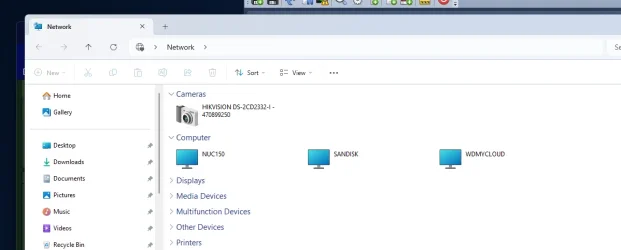
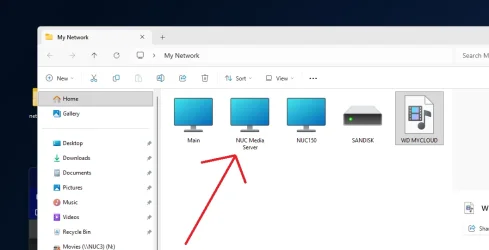
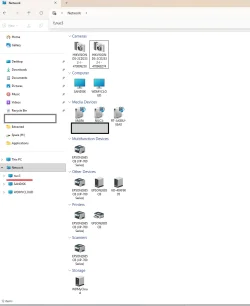
On the Main PC the NUC will no longer show within the "Network" screen BUT I can fully access the mapped drives and content. I can also type in its designation and access it....
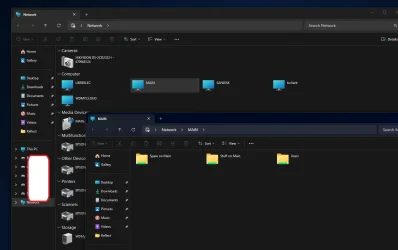
For some reason the "Main" computer now shows in its own open Network Window, not the NUC though....
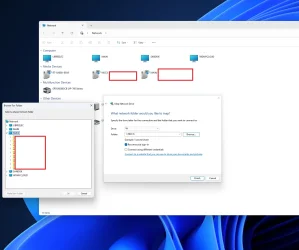
the above shows that I can still map the NUC from the MAIN, but I can no longer see it, but I can see MAIN.
When I RDC into the NUC, it works as expected......
Networks are noted as Private, discovery on, shares etc all set as they should be.
All the following are set to auto as services...
I just can no longer see the NUC as I could earlier on today before both machines went and updated, from the MAIN PC. But now it shows itself.
Any ideas..?
Loathed to go too deep into this, in case I lose the access I have at the moment.
But it would be good and useful to see the NUC again within the Network Window show.
At times, more often these days, I dread Windows Updates.
Thanks.
EDIT: After a couple more reboots the Main PC doesn't seem to see itself within the Network Window but it also still does not see the awake and accessible NUC.
I have a Main PC and then a NUC, both were fine after sorting out shares on Windows 24h2 build 4946. Both could see each other within discovery, map and share drives and files.
Both have now updated through WU to build 24h2 6584....
On the Main PC the NUC will no longer show within the "Network" screen BUT I can fully access the mapped drives and content. I can also type in its designation and access it....
For some reason the "Main" computer now shows in its own open Network Window, not the NUC though....
the above shows that I can still map the NUC from the MAIN, but I can no longer see it, but I can see MAIN.
When I RDC into the NUC, it works as expected......
Networks are noted as Private, discovery on, shares etc all set as they should be.
All the following are set to auto as services...
- Function Discovery Resource Publication
- Function Discovery Provider Host
- SSDP Discovery
- UPnP Device Host
I just can no longer see the NUC as I could earlier on today before both machines went and updated, from the MAIN PC. But now it shows itself.
Any ideas..?
Loathed to go too deep into this, in case I lose the access I have at the moment.
But it would be good and useful to see the NUC again within the Network Window show.
At times, more often these days, I dread Windows Updates.
Thanks.
EDIT: After a couple more reboots the Main PC doesn't seem to see itself within the Network Window but it also still does not see the awake and accessible NUC.
Last edited:
My Computers
-
At a glance
Windows 11 Pro build 25H2Intel 265k32GB DDR5 Corsair Dominator 7200MhzFE Edition 4080- OS
- Windows 11 Pro build 25H2
- Computer type
- PC/Desktop
- Manufacturer/Model
- Home brew
- CPU
- Intel 265k
- Motherboard
- Gigabyte Z890 Aorus Elite
- Memory
- 32GB DDR5 Corsair Dominator 7200Mhz
- Graphics Card(s)
- FE Edition 4080
- Sound Card
- onboard
- Monitor(s) Displays
- Acer 32" 4k IPS monitor
- Screen Resolution
- 4k
- Hard Drives
- Various NVME and two SSD's
- PSU
- Antec ATX 3.1 1200w
- Case
- Meshify 2 XL
- Cooling
- Corsair Nautilus 360 AIO
- Keyboard
- Mechanical blue switch
- Mouse
- G502 Lightspeed Wireless
- Internet Speed
- FTTP 500Mb
- Browser
- Edge
- Antivirus
- Microsoft
-
At a glance
Windows 11 Pro 24h2Alder Lake 3.4Ghz 4 Core16GB DDR4 3200GhzInternal GPU to the CPU- Operating System
- Windows 11 Pro 24h2
- Computer type
- PC/Desktop
- Manufacturer/Model
- NUC N100 type model and System 3 but an N150 CPU
- CPU
- Alder Lake 3.4Ghz 4 Core
- Motherboard
- built in SOC
- Memory
- 16GB DDR4 3200Ghz
- Graphics card(s)
- Internal GPU to the CPU
- Sound Card
- nah
- Monitor(s) Displays
- Samsung Syncmaster 913n VGA but used headless mainly.
- Screen Resolution
- 1280x1024
- Hard Drives
- NVME 512GB and a SATA SSD at 1TB
- PSU
- I reckon so, external type
- Case
- yup it has one of those
- Cooling
- probably
- Keyboard
- only attached for rare local access
- Mouse
- not really needed but attached. Old Logitech, with a ball...!
- Internet Speed
- FTTC 500GB.
- Browser
- Edge