Two machines updated to build 6584....Network discovery issues on one


Vimes

Well-known member
Member
Local time
8:37 PM
Posts
67
Location
Earth, for now
OS
Windows 11 Pro build 25H2
Hi

I have a Main PC and then a NUC, both were fine after sorting out shares on Windows 24h2 build 4946. Both could see each other within discovery, map and share drives and files.

Both have now updated through WU to build 24h2 6584....

winver.webp

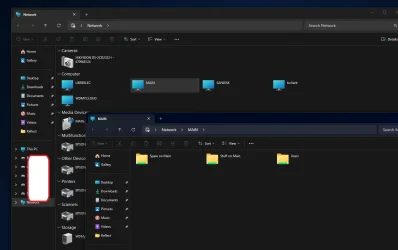
On the Main PC the NUC will no longer show within the "Network" screen BUT I can fully access the mapped drives and content. I can also type in its designation and access it....

For some reason the "Main" computer now shows in its own open Network Window, not the NUC though....
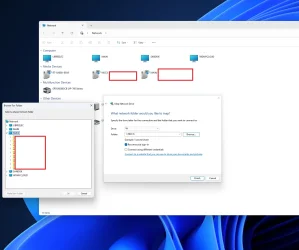
Shares from Main.webp

the above shows that I can still map the NUC from the MAIN, but I can no longer see it, but I can see MAIN.


When I RDC into the NUC, it works as expected......

Shares from NUC.webp

Networks are noted as Private, discovery on, shares etc all set as they should be.

All the following are set to auto as services...

  • Function Discovery Resource Publication
  • Function Discovery Provider Host
  • SSDP Discovery
  • UPnP Device Host
and running.
I just can no longer see the NUC as I could earlier on today before both machines went and updated, from the MAIN PC. But now it shows itself.

Any ideas..?

Loathed to go too deep into this, in case I lose the access I have at the moment.

But it would be good and useful to see the NUC again within the Network Window show.

At times, more often these days, I dread Windows Updates.

Thanks.

EDIT: After a couple more reboots the Main PC doesn't seem to see itself within the Network Window but it also still does not see the awake and accessible NUC.
 
Last edited:

My Computers

System One System Two

  • OS
    Windows 11 Pro build 25H2
    Computer type
    PC/Desktop
    Manufacturer/Model
    Home brew
    CPU
    Intel 265k
    Motherboard
    Gigabyte Z890 Aorus Elite
    Memory
    32GB DDR5 Corsair Dominator 7200Mhz
    Graphics Card(s)
    FE Edition 4080
    Sound Card
    onboard
    Monitor(s) Displays
    Acer 32" 4k IPS monitor
    Screen Resolution
    4k
    Hard Drives
    Various NVME and two SSD's
    PSU
    Antec ATX 3.1 1200w
    Case
    Meshify 2 XL
    Cooling
    Corsair Nautilus 360 AIO
    Keyboard
    Mechanical blue switch
    Mouse
    G502 Lightspeed Wireless
    Internet Speed
    FTTP 500Mb
    Browser
    Edge
    Antivirus
    Microsoft
  • Operating System
    Windows 11 Pro 24h2
    Computer type
    PC/Desktop
    Manufacturer/Model
    NUC N100 type model and System 3 but an N150 CPU
    CPU
    Alder Lake 3.4Ghz 4 Core
    Motherboard
    built in SOC
    Memory
    16GB DDR4 3200Ghz
    Graphics card(s)
    Internal GPU to the CPU
    Sound Card
    nah
    Monitor(s) Displays
    Samsung Syncmaster 913n VGA but used headless mainly.
    Screen Resolution
    1280x1024
    Hard Drives
    NVME 512GB and a SATA SSD at 1TB
    PSU
    I reckon so, external type
    Case
    yup it has one of those
    Cooling
    probably
    Keyboard
    only attached for rare local access
    Mouse
    not really needed but attached. Old Logitech, with a ball...!
    Internet Speed
    FTTC 500GB.
    Browser
    Edge
Resolved by removing KB506426 on both machines, this reverted each 24h2 build to 4946.

Having a search is seems some issues can be associated with that update.


Network discovery and functionality working as expected.
 

My Computers

System One System Two

  • OS
    Windows 11 Pro build 25H2
    Computer type
    PC/Desktop
    Manufacturer/Model
    Home brew
    CPU
    Intel 265k
    Motherboard
    Gigabyte Z890 Aorus Elite
    Memory
    32GB DDR5 Corsair Dominator 7200Mhz
    Graphics Card(s)
    FE Edition 4080
    Sound Card
    onboard
    Monitor(s) Displays
    Acer 32" 4k IPS monitor
    Screen Resolution
    4k
    Hard Drives
    Various NVME and two SSD's
    PSU
    Antec ATX 3.1 1200w
    Case
    Meshify 2 XL
    Cooling
    Corsair Nautilus 360 AIO
    Keyboard
    Mechanical blue switch
    Mouse
    G502 Lightspeed Wireless
    Internet Speed
    FTTP 500Mb
    Browser
    Edge
    Antivirus
    Microsoft
  • Operating System
    Windows 11 Pro 24h2
    Computer type
    PC/Desktop
    Manufacturer/Model
    NUC N100 type model and System 3 but an N150 CPU
    CPU
    Alder Lake 3.4Ghz 4 Core
    Motherboard
    built in SOC
    Memory
    16GB DDR4 3200Ghz
    Graphics card(s)
    Internal GPU to the CPU
    Sound Card
    nah
    Monitor(s) Displays
    Samsung Syncmaster 913n VGA but used headless mainly.
    Screen Resolution
    1280x1024
    Hard Drives
    NVME 512GB and a SATA SSD at 1TB
    PSU
    I reckon so, external type
    Case
    yup it has one of those
    Cooling
    probably
    Keyboard
    only attached for rare local access
    Mouse
    not really needed but attached. Old Logitech, with a ball...!
    Internet Speed
    FTTC 500GB.
    Browser
    Edge
In my case my network issues were caused by my cloning the machines without sysprep'ing causing an SID clash
 

My Computers

System One System Two

  • OS
    Windows 11 Enterprise 25H2 26200 7462
    Computer type
    PC/Desktop
    Manufacturer/Model
    Custom Build
    CPU
    Intel XEON E5-2699 v3
    Motherboard
    ASUS X99-A
    Memory
    64GB Teamgroup UD4-3600
    Graphics Card(s)
    NVIDIA GeForce GTX 1080 Ti
    Sound Card
    Integrated
    Monitor(s) Displays
    ACER X34 Predator
    Screen Resolution
    3440 x 1440
    Hard Drives
    Crucial CT1000P 3P SSD8 1TB
    Crucial CT1000 BX500 SSD 1TB
    PSU
    GameMax Pro
    Case
    Fractal Design
    Cooling
    Corsair H110iGT + 6 140mm Fans
    Keyboard
    Corsair K4
    Mouse
    G-Skill G502
    Internet Speed
    300MBs
    Browser
    Chrome
    Antivirus
    OEM
    Other Info
    ASUS RT-AC87U Router
  • Operating System
    25H2 26200.5074
    Computer type
    Laptop
    Manufacturer/Model
    ASUS X555LA
    Memory
    8GB
    Browser
    Chrome
    Antivirus
    OEM
Thanks.

I had read a number of posts where that had been an issue.
Each of mine is a unique install.
A second NUC will arrive today, that will be formatted and a fresh insrall of 24h2 will be applied.

It seems that, in some circumstances, other issues can apply.
searching with that build number of Windows, or KB update would show that.

At least it was easy enough to roll back, this time.
 

My Computers

System One System Two

  • OS
    Windows 11 Pro build 25H2
    Computer type
    PC/Desktop
    Manufacturer/Model
    Home brew
    CPU
    Intel 265k
    Motherboard
    Gigabyte Z890 Aorus Elite
    Memory
    32GB DDR5 Corsair Dominator 7200Mhz
    Graphics Card(s)
    FE Edition 4080
    Sound Card
    onboard
    Monitor(s) Displays
    Acer 32" 4k IPS monitor
    Screen Resolution
    4k
    Hard Drives
    Various NVME and two SSD's
    PSU
    Antec ATX 3.1 1200w
    Case
    Meshify 2 XL
    Cooling
    Corsair Nautilus 360 AIO
    Keyboard
    Mechanical blue switch
    Mouse
    G502 Lightspeed Wireless
    Internet Speed
    FTTP 500Mb
    Browser
    Edge
    Antivirus
    Microsoft
  • Operating System
    Windows 11 Pro 24h2
    Computer type
    PC/Desktop
    Manufacturer/Model
    NUC N100 type model and System 3 but an N150 CPU
    CPU
    Alder Lake 3.4Ghz 4 Core
    Motherboard
    built in SOC
    Memory
    16GB DDR4 3200Ghz
    Graphics card(s)
    Internal GPU to the CPU
    Sound Card
    nah
    Monitor(s) Displays
    Samsung Syncmaster 913n VGA but used headless mainly.
    Screen Resolution
    1280x1024
    Hard Drives
    NVME 512GB and a SATA SSD at 1TB
    PSU
    I reckon so, external type
    Case
    yup it has one of those
    Cooling
    probably
    Keyboard
    only attached for rare local access
    Mouse
    not really needed but attached. Old Logitech, with a ball...!
    Internet Speed
    FTTC 500GB.
    Browser
    Edge
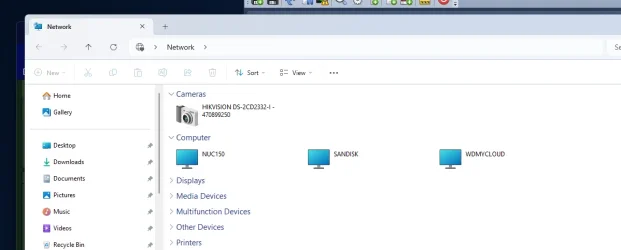
It has somewhat changed now that all three machines have updated....

Another user within the Windows 10 forum, similar issue with their Sept update, upgrading from 10 to 11, and previous, where Network discovery does not see a PC. This is for me on Windows 11 with this 6584 update......

Network discovery.webp


the above being via Network Discovery. It does not see itself "Main", as expected.


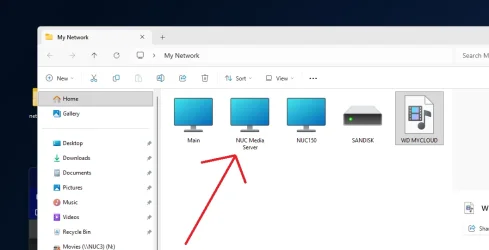
The one below is by creating my own folder and shortcuts, as suggested to create in that other forum............

my own network.webp


the "missing" NUC Media Server can then be seen. It and its drives can be accessed there if needed. They can also be mapped without issues.

Network Discovery is on and all settings remain the same. Access is fine, machine pingable as it can have its content accessed and shared with no issues.
RDP into it and opening its own Network Discovery and it sees the other two fine.

It is what it is. for now. At least it works, just the one machine cannot be seen in ND, but still fully accessed, by the other two, as well as media devices that share the content from that server.
 
Last edited:

My Computers

System One System Two

  • OS
    Windows 11 Pro build 25H2
    Computer type
    PC/Desktop
    Manufacturer/Model
    Home brew
    CPU
    Intel 265k
    Motherboard
    Gigabyte Z890 Aorus Elite
    Memory
    32GB DDR5 Corsair Dominator 7200Mhz
    Graphics Card(s)
    FE Edition 4080
    Sound Card
    onboard
    Monitor(s) Displays
    Acer 32" 4k IPS monitor
    Screen Resolution
    4k
    Hard Drives
    Various NVME and two SSD's
    PSU
    Antec ATX 3.1 1200w
    Case
    Meshify 2 XL
    Cooling
    Corsair Nautilus 360 AIO
    Keyboard
    Mechanical blue switch
    Mouse
    G502 Lightspeed Wireless
    Internet Speed
    FTTP 500Mb
    Browser
    Edge
    Antivirus
    Microsoft
  • Operating System
    Windows 11 Pro 24h2
    Computer type
    PC/Desktop
    Manufacturer/Model
    NUC N100 type model and System 3 but an N150 CPU
    CPU
    Alder Lake 3.4Ghz 4 Core
    Motherboard
    built in SOC
    Memory
    16GB DDR4 3200Ghz
    Graphics card(s)
    Internal GPU to the CPU
    Sound Card
    nah
    Monitor(s) Displays
    Samsung Syncmaster 913n VGA but used headless mainly.
    Screen Resolution
    1280x1024
    Hard Drives
    NVME 512GB and a SATA SSD at 1TB
    PSU
    I reckon so, external type
    Case
    yup it has one of those
    Cooling
    probably
    Keyboard
    only attached for rare local access
    Mouse
    not really needed but attached. Old Logitech, with a ball...!
    Internet Speed
    FTTC 500GB.
    Browser
    Edge
Amazing how the basic common sense "Don't fix it if it isn't broken" has never occurred to anyone at Microsoft.
 

My Computer

System One

  • OS
    Windows 11 22H2 Pro (X-lite Micro 11 version)
    Computer type
    Laptop
    Manufacturer/Model
    Dell/ Precision 7680
    CPU
    i7 13850HX (20 cores, 28 threads)
    Motherboard
    Dell
    Memory
    32GB DDR5
    Graphics Card(s)
    Intel UHD/ RTX 1000 ADA
    Sound Card
    Realtek
    Monitor(s) Displays
    4K UHD Touchscreen
    Screen Resolution
    3840 x 2400
    Hard Drives
    Samsung 512GB system drive
    WD Blue 1TB game drive
    PSU
    240W AC adapter, 1800W when docked
    Internet Speed
    1 gigabit symmetrical
    Browser
    Firefox, Librewolf
    Antivirus
    None. Manully configured so nobody except me can change any critical system files. (Don't ask how, it's probably against some rule somewhere)
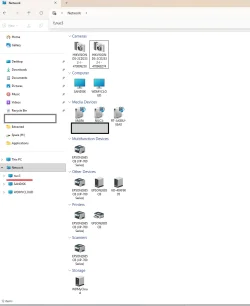
If I open "Network" to show the computers etc that can be seen over it I do not see the NUC 3. BUT, if I type in \\NUC3 on the top address bar it will show the NUC 3 in the left column and, if I did it, show all of its shares. It just does not show up as a computer.....

NUC 3.webp

as noted, it is fully accessible, drives can be mapped and content can be accessed. RDP to and from it is fine.
Network Discovery is turned on and checked for each machine. It remains to be that that one particular Windows 11 NUC cannot be seen by either of the other two under Network, but can be accessed.

BUT, whilst it does not show as a computer, I can share, and be seen above, its media, as media sharing is enabled.
 

My Computers

System One System Two

  • OS
    Windows 11 Pro build 25H2
    Computer type
    PC/Desktop
    Manufacturer/Model
    Home brew
    CPU
    Intel 265k
    Motherboard
    Gigabyte Z890 Aorus Elite
    Memory
    32GB DDR5 Corsair Dominator 7200Mhz
    Graphics Card(s)
    FE Edition 4080
    Sound Card
    onboard
    Monitor(s) Displays
    Acer 32" 4k IPS monitor
    Screen Resolution
    4k
    Hard Drives
    Various NVME and two SSD's
    PSU
    Antec ATX 3.1 1200w
    Case
    Meshify 2 XL
    Cooling
    Corsair Nautilus 360 AIO
    Keyboard
    Mechanical blue switch
    Mouse
    G502 Lightspeed Wireless
    Internet Speed
    FTTP 500Mb
    Browser
    Edge
    Antivirus
    Microsoft
  • Operating System
    Windows 11 Pro 24h2
    Computer type
    PC/Desktop
    Manufacturer/Model
    NUC N100 type model and System 3 but an N150 CPU
    CPU
    Alder Lake 3.4Ghz 4 Core
    Motherboard
    built in SOC
    Memory
    16GB DDR4 3200Ghz
    Graphics card(s)
    Internal GPU to the CPU
    Sound Card
    nah
    Monitor(s) Displays
    Samsung Syncmaster 913n VGA but used headless mainly.
    Screen Resolution
    1280x1024
    Hard Drives
    NVME 512GB and a SATA SSD at 1TB
    PSU
    I reckon so, external type
    Case
    yup it has one of those
    Cooling
    probably
    Keyboard
    only attached for rare local access
    Mouse
    not really needed but attached. Old Logitech, with a ball...!
    Internet Speed
    FTTC 500GB.
    Browser
    Edge
I gave up on "Network Discovery" long ago. M.$ want's you to use their cloud instead of your LAN.

I now make shortcuts to the other computers on the LAN then pin the opened LAN destination to Quick Access.

Oddly, once the destination has been opened via the shortcut, it shows normally in the folder tree until you restart windows explorer.

Code:
Target = //PC-Name
 

My Computers

System One System Two

  • OS
    Windroid 11 Pro / Win 10 Pro
    Computer type
    PC/Desktop
    Manufacturer/Model
    MSI
    CPU
    Intel Core i9-14900K Raptor Lake Refreshed 6.0 GHZ
    Motherboard
    MSI MAG Z790 Tomahawk WiFi
    Memory
    32GB (2x16) GSKILL Trident Z5 RGB Series (Intel XMP 3.0) DDR5 RAM 6700MT/s
    Graphics Card(s)
    MSI Gaming GeForce RTX 4070 12GB
    Sound Card
    Onboard Realtek® ALC4080 Codec
    Monitor(s) Displays
    Monitor #1 Samsung Odyssey G50A WQHD G-Sync HDR10 Monitor #2 HP LA1911
    Screen Resolution
    2560x1440 and 1280x1024
    Hard Drives
    Samsung 980 PRO SSD 1TB PCIe 4.0 NVMe Gen 4 Gaming M.2 (145GB Win11/100GB Win10/685GB More Games)
    Crucial CT2000MX500SSD1 2TB (Games)
    Western Digital Blue WD60EZAZ 6TB (Data/Backup)
    Western Digital Blue WD60EZAZ 6TB (Media)
    Western Digital Blue WD80EAAZ 8TB (Storage)
    PSU
    Rosewill Hive-750S
    Case
    Cooler Master Elite 430 Mid Tower
    Cooling
    Cooler Master ML240L V2 Liquid CPU cooler + 3x120mm in + Isolated PSU Standard upward flow
    Keyboard
    Microsoft Natural Elite White PS/2 (with usb adapter)
    Mouse
    Microsoft D67-00001 Trackball Optical Mouse (rebuilt with ceramic bearings)
    Internet Speed
    450Mb/s hard wired
    Browser
    FF, Mullvad, Tor
    Antivirus
    Win Def
    Other Info
    Razer Tartarus V2 Gaming Keypad
    Logitech Z-906 5.1 THX 500w (Original 8" Sub with Polk Audio satellites)
  • Operating System
    Windows 11 Pro
    Computer type
    PC/Desktop
    Manufacturer/Model
    MSI
    CPU
    Intel Core i9-14900K Raptor Lake Refreshed 6.0 GHz FCLGA1700 (Gen 14)
    Motherboard
    MSI MAG Z790 Tomahawk WiFi
    Memory
    32GB (2x16) GSKILL Trident Z5 RGB Series (Intel XMP 3.0) DDR5 RAM 6700MT/s
    Graphics card(s)
    MSI Gaming GeForce RTX 3060Ti 8GB
    Sound Card
    Onboard Realtek® ALC4080 Codec
    Monitor(s) Displays
    Monitor #1 Samsung Odyssey G50A WQHD G-Sync HDR10 Monitor #2 Samsung TU7000 55" TV
    Screen Resolution
    2560x1440 and 3840x2160
    Hard Drives
    Samsung 980 PRO SSD 1TB PCIe 4.0 NVMe Gen 4 Gaming M.2 (System)
    Samsung 980 PRO SSD 2TB PCIe 4.0 NVMe Gen 4 Gaming M.2 (Games)
    Crucial CT1000MX500SSD1 1TB (More Games)
    WD Green WD20EZRX 2TB (Data/Backup)
    WD Blue WD60EZAZ 6TB (Media)
    PSU
    Rosewill Hive-750S
    Case
    Cooler Master N400 NSE-400-KKN2 Mid-Tower
    Cooling
    Cooler Master ML240L V2 Liquid CPU cooler + 3x120mm in + 2x120mm + Isolated PSU Reverse flow front exhaust
    Keyboard
    Logitech MK345 Wireless
    Mouse
    MSI G20 Elite and Logitech MK345 Wireless
    Internet Speed
    450Mb/s hard wired
    Browser
    FF
    Antivirus
    Win Def
    Other Info
    Razer Tartarus Gaming Keypad
    MSI GC30 Gaming Controller (Xbox style)
Indeed, it seems so. Yes, I have noted it shows up within the Explorer tree, albeit not in the typical icon way within the discovery window. It is what it is.....it seems :)
 

My Computers

System One System Two

  • OS
    Windows 11 Pro build 25H2
    Computer type
    PC/Desktop
    Manufacturer/Model
    Home brew
    CPU
    Intel 265k
    Motherboard
    Gigabyte Z890 Aorus Elite
    Memory
    32GB DDR5 Corsair Dominator 7200Mhz
    Graphics Card(s)
    FE Edition 4080
    Sound Card
    onboard
    Monitor(s) Displays
    Acer 32" 4k IPS monitor
    Screen Resolution
    4k
    Hard Drives
    Various NVME and two SSD's
    PSU
    Antec ATX 3.1 1200w
    Case
    Meshify 2 XL
    Cooling
    Corsair Nautilus 360 AIO
    Keyboard
    Mechanical blue switch
    Mouse
    G502 Lightspeed Wireless
    Internet Speed
    FTTP 500Mb
    Browser
    Edge
    Antivirus
    Microsoft
  • Operating System
    Windows 11 Pro 24h2
    Computer type
    PC/Desktop
    Manufacturer/Model
    NUC N100 type model and System 3 but an N150 CPU
    CPU
    Alder Lake 3.4Ghz 4 Core
    Motherboard
    built in SOC
    Memory
    16GB DDR4 3200Ghz
    Graphics card(s)
    Internal GPU to the CPU
    Sound Card
    nah
    Monitor(s) Displays
    Samsung Syncmaster 913n VGA but used headless mainly.
    Screen Resolution
    1280x1024
    Hard Drives
    NVME 512GB and a SATA SSD at 1TB
    PSU
    I reckon so, external type
    Case
    yup it has one of those
    Cooling
    probably
    Keyboard
    only attached for rare local access
    Mouse
    not really needed but attached. Old Logitech, with a ball...!
    Internet Speed
    FTTC 500GB.
    Browser
    Edge
Back
Top Bottom