Solved unplug phone from computer


@TheMystic Well, your last paragraph (in post #58) in particular makes me feel that I should be looking at workarounds on the 'selective pairing' issue. Any suggestions?
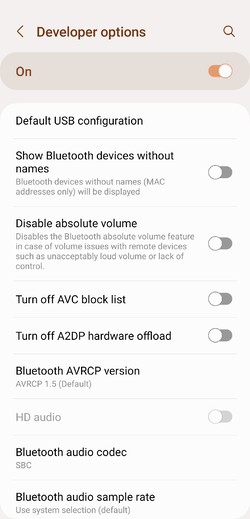
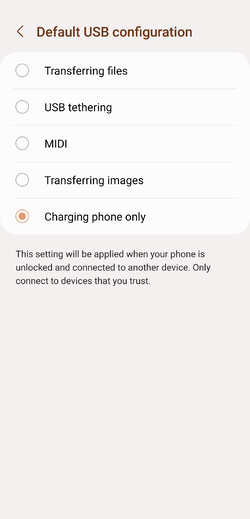
Selective pairing in itself is an unexpected behaviour. If Developer Options is disabled on your device (it is disabled by default), you can enable it by tapping on the Build Number (under About Device) 7 times. Once enabled, go into Developer Options and look for Default USB configuration (you'll have to scroll down a bit or use the Search function):

Screenshot_20230105_111023_Settings.png

And choose 'Charging only' here:

Screenshot_20230105_111029_Settings.png
 

My Computer My Computer

At a glance

Windows 11Intel Core i7 3630QM16 GBIntel HD Graphics 4000 & Nvidia GeForce GT 635M
OS
Windows 11
Computer type
Laptop
Manufacturer/Model
HP Envy dv7
CPU
Intel Core i7 3630QM
Motherboard
HP
Memory
16 GB
Graphics Card(s)
Intel HD Graphics 4000 & Nvidia GeForce GT 635M
Sound Card
IDT High Definition
Screen Resolution
1080p
Hard Drives
1 TB Crucial MX500 on bay 1.
1 TB Seagate HDD on bay 2.
Antivirus
Windows Defender
:-) What I wanted to find workarounds for was to achieve pairing/unpairing to/from selected PCs without using dangerous developer tools.

If that cannot be achieved using benign tools available to casual users, then I should perhaps use stronger passwords for my phone, watch my phone more carefully, etc.
 

My Computer My Computer

At a glance

Windows 10 Pro
OS
Windows 10 Pro
:-) What I wanted to find workarounds for was to achieve pairing/unpairing to/from selected PCs without using dangerous developer tools.
If that cannot be achieved using benign tools available to casual users, then I should perhaps use stronger passwords for my phone, watch my phone more carefully, etc.
Since selective pairing isn't something I'm aware of, I'm unable to provide a solution to this at this point.

There is no harm in enabling Developer Options on your phone, and setting the default USB configuration there. Once set, you can turn the Developer Options OFF.

And let me know if that helped.
 

My Computer My Computer

At a glance

Windows 11Intel Core i7 3630QM16 GBIntel HD Graphics 4000 & Nvidia GeForce GT 635M
OS
Windows 11
Computer type
Laptop
Manufacturer/Model
HP Envy dv7
CPU
Intel Core i7 3630QM
Motherboard
HP
Memory
16 GB
Graphics Card(s)
Intel HD Graphics 4000 & Nvidia GeForce GT 635M
Sound Card
IDT High Definition
Screen Resolution
1080p
Hard Drives
1 TB Crucial MX500 on bay 1.
1 TB Seagate HDD on bay 2.
Antivirus
Windows Defender
There is no harm in enabling Developer Options on your phone, and setting the default USB configuration there. Once set, you can turn the Developer Options OFF.
Too many accidents happen if city street drivers hop into all-terrain vehicles, that's not particularly prudent for practical human factor reasons.

Anyway, perhaps someone can achieve the following without going into developer mode:

a) default behavior after connecting = 'transfer file' with computer A
b) default behavior after connecting = 'charge' with computer B, C, D, ... Z

and being able to toggle the default behavior from 'transfer file' to 'charge' or from 'charge' to 'transfer file' at any time for selected computers.

Edit: I know for a fact that the above can be achieved with a server-client model, long time ago I ran MS server on my home LAN, it's pretty simple. I am surprised that Android does not implement such a simple model, it greatly enhances security.
 

My Computer My Computer

At a glance

Windows 10 Pro
OS
Windows 10 Pro
Too many accidents happen if city street drivers hop into all-terrain vehicles, that's not particularly prudent for practical human factor reasons.
It isn't all that risky or complicated. This is a fairly simple process without any risk involved as long as you don't change other settings there that you don't understand.

Anyway, perhaps someone can achieve the following without going into developer mode:

a) default behavior after connecting = 'transfer file' with computer A
b) default behavior after connecting = 'charge' with computer B, C, D, ... Z

and being able to toggle the default behavior from 'transfer file' to 'charge' or from 'charge' to 'transfer file' at any time for selected computers.
Not possible as far as I know.

Edit: I know for a fact that the above can be achieved with a server-client model, long time ago I ran MS server on my home LAN, it's pretty simple. I am surprised that Android does not implement such a simple model, it greatly enhances security.
It would indeed be nice to have such a feature. But leaving the default setting to Charging only for all devices, and manually changing it per instance from notification area isn't a hassle either.
 

My Computer My Computer

At a glance

Windows 11Intel Core i7 3630QM16 GBIntel HD Graphics 4000 & Nvidia GeForce GT 635M
OS
Windows 11
Computer type
Laptop
Manufacturer/Model
HP Envy dv7
CPU
Intel Core i7 3630QM
Motherboard
HP
Memory
16 GB
Graphics Card(s)
Intel HD Graphics 4000 & Nvidia GeForce GT 635M
Sound Card
IDT High Definition
Screen Resolution
1080p
Hard Drives
1 TB Crucial MX500 on bay 1.
1 TB Seagate HDD on bay 2.
Antivirus
Windows Defender
But leaving the default setting to Charging only for all devices, and manually changing it per instance from notification area isn't a hassle either.

The toggle from 'charge' to 'transfer file' is one way only.

After transferring files, you can toggle it from 'transfer file' back to 'charge' but the next time you plug the phone in, it's back to 'transfer file' again, see also @Edwin post #43 that I quote below.

Mine defaults to File Transfer on all my PC's even if I change it!
Can't remember how I got it to function that way..., perhaps it's because my device is paired to all my PC's 🤷‍♂️

The 'one way issue' is the reason why I pair my phone to only one desktop computer in my stable.

I can't explain the issue any further though.
 

My Computer My Computer

At a glance

Windows 10 Pro
OS
Windows 10 Pro
The toggle from 'charge' to 'transfer file' is one way only.

After transferring files, you can toggle it from 'transfer file' back to 'charge' but the next time you plug the phone in, it's back to 'transfer file' again, see also @Edwin post #43 that I quote below.
That's because the default setting has changed somehow. The only way to change it back is via Developer Options. Unless you try it and see if that helps, not much can be done. If that too doesn't help, I would consider that a bug in the ROM.

The 'one way issue' is the reason why I pair my phone to only one desktop computer in my stable.
As long as you don't plug in your phone on another computer, this should be fine assuming your computer isn't infected.
 

My Computer My Computer

At a glance

Windows 11Intel Core i7 3630QM16 GBIntel HD Graphics 4000 & Nvidia GeForce GT 635M
OS
Windows 11
Computer type
Laptop
Manufacturer/Model
HP Envy dv7
CPU
Intel Core i7 3630QM
Motherboard
HP
Memory
16 GB
Graphics Card(s)
Intel HD Graphics 4000 & Nvidia GeForce GT 635M
Sound Card
IDT High Definition
Screen Resolution
1080p
Hard Drives
1 TB Crucial MX500 on bay 1.
1 TB Seagate HDD on bay 2.
Antivirus
Windows Defender
Years ago on my Samsung S7 I couldn't set the option to enable transfer mode. Online it suggested I use Developer Mode. That worked. However, later I found that Developer Mode really wasn't necessary at all. I found out accidentally that all I really had to do was reboot the phone to get that option working again.

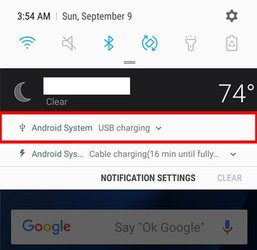
BTW, normally when you connect your phone to your computer using USB there should be a notification on the phone. You just have to swipe down on the screen to access it. The problem I originally had was no notification was showing up.

1. If the notification shows the phone was in USB charging mode, then tap on it to open it

USB1.jpg

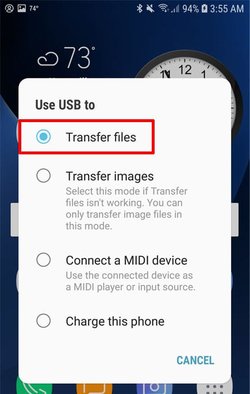
2. You can then change the mode to Transfer files

USB2.jpg

I also found that with my Samsung S7 transfer mode would automatically be enabled after the first time I set it. A friend had a Motorola E6. With his phone he had to set transfer mode manually every time he connected it to his laptop.

Some people might worry about security. They might think that anyone can access the data on your phone just by connecting it to their computer. Fortunately, there is a safeguard. You will find that the data on the phone will not be accessible unless the phone's screen is unlocked.

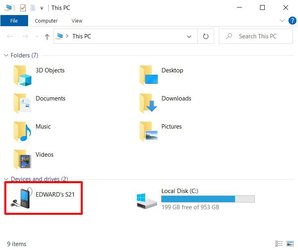
1. Phone shows up in File Explorer after you connect it to computer with USB cable.

Phone1.jpg

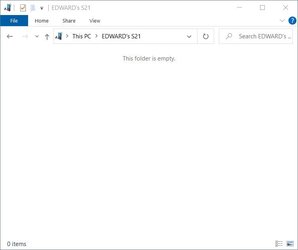
2. However, if the screen on the phone is locked nothing is accessible.

Phone2.jpg

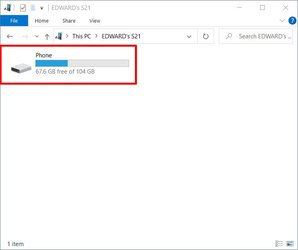
3. If the screen on the phone is unlocked then you can access its data.

1672913399534.jpeg
 
Last edited:

My Computers My Computers

  • At a glance

    Windows 11 Pro 25H2 (26200.6901)AMD Ryzen 7 6800H with Radeon 680M GPU (486MB...Crucial DDR5-4800 (2400MHz) 32GB (2 x 16GB)NVIDIA RTX 3060 Laptop (6GB RAM)
    OS
    Windows 11 Pro 25H2 (26200.6901)
    Computer type
    Laptop
    Manufacturer/Model
    ASUS TUF Gaming A15 (2022)
    CPU
    AMD Ryzen 7 6800H with Radeon 680M GPU (486MB RAM)
    Memory
    Crucial DDR5-4800 (2400MHz) 32GB (2 x 16GB)
    Graphics Card(s)
    NVIDIA RTX 3060 Laptop (6GB RAM)
    Sound Card
    n/a
    Monitor(s) Displays
    15.6-inch
    Screen Resolution
    1920x1080 300Hz
    Hard Drives
    2 x Samsung 990 Evo Plus (2TB M.2 NVME SSD)
    PSU
    n/a
    Mouse
    Wireless Mouse M510
    Internet Speed
    2100Mbps/300Mbps
    Browser
    Firefox
    Antivirus
    Malwarebytes
  • At a glance

    Windows 11 Pro 25H2 (26200.8246)AMD Ryzen 7 5700X3DG.SKILL Flare X 32GB (2x16GB) DDR4ASUS ROG-STRIX-RTX3060TI-08G-V2-GAMING (RTX 3...
    Operating System
    Windows 11 Pro 25H2 (26200.8246)
    Computer type
    PC/Desktop
    Manufacturer/Model
    Custom build
    CPU
    AMD Ryzen 7 5700X3D
    Motherboard
    ASUS ROG Strix B550-F Gaming WiFi II
    Memory
    G.SKILL Flare X 32GB (2x16GB) DDR4
    Graphics card(s)
    ASUS ROG-STRIX-RTX3060TI-08G-V2-GAMING (RTX 3060-Ti, 8GB RAM)
    Monitor(s) Displays
    Samsung G50D IPS 27"
    Screen Resolution
    1440p/180Hz
    Hard Drives
    SAMSUNG 990 EVO Plus (2TB] M.2 NVME SSD
    SAMSUNG 990 EVO Plus (4TB) M.2 NVME SSD
    PSU
    Corsair RM750x (750 watts)
    Case
    Cooler Master MasterCase 5
    Cooling
    Scythe Mugen 6
    Keyboard
    Logitech K520 (MK540 keyboard/mouse combo)
    Mouse
    Logitech M310 (MK540 keyboard/mouse combo)
    Internet Speed
    2100 Mbps down / 300 Mbps up
    Browser
    Firefox, Edge, Chrome
    Antivirus
    Malwarebytes (Premium)
    Other Info
    ASUS Blu-ray Burner BW-16D1HT (SATA) || Western Digital Easystore 20TB USB 3.0 external hard drive used with Acronis True Image 2025 backup software || HP OfficeJet Pro 6975 Printer/Scanner
If it was indeed that safe, then Microsoft should have removed that option on the taskbar for external drives that have write caching disabled.

Even today, I often see the annoying inability of Windows to tell me why I can't remove the USB safely and which program is using it:

View attachment 49176

View attachment 49177
I see that annoying message once in a while. Usually stopping all programs that are running will solve the problem. Sometime its Firefox has to be stopped. In the rare case when even that did not work I just pull the USB device. Nowadays I have never had a problem doing that. Years ago when I was running Windows XP or Windows 7 that was a dangerous thing to do because you risked data loss. I had that result a few times.

To avoid being faced with that problem I found it was better to never edit anything on a flash drive. It was better to first copy the file to the PC, edit it there, and then copy it back to the flash drive.
 

My Computers My Computers

  • At a glance

    Windows 11 Pro 25H2 (26200.6901)AMD Ryzen 7 6800H with Radeon 680M GPU (486MB...Crucial DDR5-4800 (2400MHz) 32GB (2 x 16GB)NVIDIA RTX 3060 Laptop (6GB RAM)
    OS
    Windows 11 Pro 25H2 (26200.6901)
    Computer type
    Laptop
    Manufacturer/Model
    ASUS TUF Gaming A15 (2022)
    CPU
    AMD Ryzen 7 6800H with Radeon 680M GPU (486MB RAM)
    Memory
    Crucial DDR5-4800 (2400MHz) 32GB (2 x 16GB)
    Graphics Card(s)
    NVIDIA RTX 3060 Laptop (6GB RAM)
    Sound Card
    n/a
    Monitor(s) Displays
    15.6-inch
    Screen Resolution
    1920x1080 300Hz
    Hard Drives
    2 x Samsung 990 Evo Plus (2TB M.2 NVME SSD)
    PSU
    n/a
    Mouse
    Wireless Mouse M510
    Internet Speed
    2100Mbps/300Mbps
    Browser
    Firefox
    Antivirus
    Malwarebytes
  • At a glance

    Windows 11 Pro 25H2 (26200.8246)AMD Ryzen 7 5700X3DG.SKILL Flare X 32GB (2x16GB) DDR4ASUS ROG-STRIX-RTX3060TI-08G-V2-GAMING (RTX 3...
    Operating System
    Windows 11 Pro 25H2 (26200.8246)
    Computer type
    PC/Desktop
    Manufacturer/Model
    Custom build
    CPU
    AMD Ryzen 7 5700X3D
    Motherboard
    ASUS ROG Strix B550-F Gaming WiFi II
    Memory
    G.SKILL Flare X 32GB (2x16GB) DDR4
    Graphics card(s)
    ASUS ROG-STRIX-RTX3060TI-08G-V2-GAMING (RTX 3060-Ti, 8GB RAM)
    Monitor(s) Displays
    Samsung G50D IPS 27"
    Screen Resolution
    1440p/180Hz
    Hard Drives
    SAMSUNG 990 EVO Plus (2TB] M.2 NVME SSD
    SAMSUNG 990 EVO Plus (4TB) M.2 NVME SSD
    PSU
    Corsair RM750x (750 watts)
    Case
    Cooler Master MasterCase 5
    Cooling
    Scythe Mugen 6
    Keyboard
    Logitech K520 (MK540 keyboard/mouse combo)
    Mouse
    Logitech M310 (MK540 keyboard/mouse combo)
    Internet Speed
    2100 Mbps down / 300 Mbps up
    Browser
    Firefox, Edge, Chrome
    Antivirus
    Malwarebytes (Premium)
    Other Info
    ASUS Blu-ray Burner BW-16D1HT (SATA) || Western Digital Easystore 20TB USB 3.0 external hard drive used with Acronis True Image 2025 backup software || HP OfficeJet Pro 6975 Printer/Scanner

My Computers My Computers

  • At a glance

    Windows 11 Pro
    OS
    Windows 11 Pro
    Computer type
    PC/Desktop
    Manufacturer/Model
    ASUS ROG Strix
  • At a glance

    Windows 11 Pro
    Operating System
    Windows 11 Pro
    Computer type
    Laptop
    Manufacturer/Model
    ASUS VivoBook
  • ASUS VivoBook 'Lite' ~ Windows 11 Home
Even today, I often see the annoying inability of Windows to tell me why I can't remove the USB safely and which program is using it:
Most of the time it's probably Defender scanning it!
 

My Computers My Computers

  • At a glance

    Windows 11 Pro
    OS
    Windows 11 Pro
    Computer type
    PC/Desktop
    Manufacturer/Model
    ASUS ROG Strix
  • At a glance

    Windows 11 Pro
    Operating System
    Windows 11 Pro
    Computer type
    Laptop
    Manufacturer/Model
    ASUS VivoBook
  • ASUS VivoBook 'Lite' ~ Windows 11 Home
I also found that with my Samsung S7 transfer mode would automatically be enabled after the first time I set it.

Your unlocked Samsung phone may be in transfer mode too if connected to another computer. Try it (perhaps with a computer in a public library) I am curious.


A friend had a Motorola E6. With his phone he had to set transfer mode manually every time he connected it to his laptop.

I would consider your friend's Motorola phone to be more secure. It was released in August 2019 with Android 9.0 (Pie) I wonder if the feature was considered inconvenient and hence abandoned.
 

My Computer My Computer

At a glance

Windows 10 Pro
OS
Windows 10 Pro
Pretty sure that's how I set mine.
If you indeed set yours via developer options then your unlocked phone would 'transfer files' with just about any USB connected computer.

I really wonder why Android does not do the following simple (and more secure/selective) algorithm on a main setting screen:

a) all USB connected computers are disallowed (can only charge)
b) tap allow > computer x and only computer x is allowed (can transfer files)
c) tap disallow > computer x is disallowed again

Are we really sure we haven't overlooked something?
 

My Computer My Computer

At a glance

Windows 10 Pro
OS
Windows 10 Pro
Are we really sure we haven't overlooked something?
Beats me!
I don't go around plugging my phone into all sorts of computers.
Just my own.
 

My Computers My Computers

  • At a glance

    Windows 11 Pro
    OS
    Windows 11 Pro
    Computer type
    PC/Desktop
    Manufacturer/Model
    ASUS ROG Strix
  • At a glance

    Windows 11 Pro
    Operating System
    Windows 11 Pro
    Computer type
    Laptop
    Manufacturer/Model
    ASUS VivoBook
  • ASUS VivoBook 'Lite' ~ Windows 11 Home
With his phone he had to set transfer mode manually every time he connected it to his laptop.
That is the default configuration on all phones, and all ROMs, until the user overrides it manually.

To avoid being faced with that problem I found it was better to never edit anything on a flash drive. It was better to first copy the file to the PC, edit it there, and then copy it back to the flash drive.
I don't know why Windows allows any program to access the USB drives without the user requesting it. Most of the time, the user only uses the File Explorer for file operations, and if there are no currently active operations, Windows must automatically keep it ready to be removed.

Pretty sure that's how I set mine.
That confirms what I have been saying repeatedly.

Most of the time it's probably Defender scanning it!
Why can't Windows simply say that or just say which program is using it?
 

My Computer My Computer

At a glance

Windows 11Intel Core i7 3630QM16 GBIntel HD Graphics 4000 & Nvidia GeForce GT 635M
OS
Windows 11
Computer type
Laptop
Manufacturer/Model
HP Envy dv7
CPU
Intel Core i7 3630QM
Motherboard
HP
Memory
16 GB
Graphics Card(s)
Intel HD Graphics 4000 & Nvidia GeForce GT 635M
Sound Card
IDT High Definition
Screen Resolution
1080p
Hard Drives
1 TB Crucial MX500 on bay 1.
1 TB Seagate HDD on bay 2.
Antivirus
Windows Defender
Beats me!
I don't go around plugging my phone into all sorts of computers.
Just my own.
LOL, just imagine your are in a customer meeting, you leave your unlocked phone on the table to go to the copier and your customer plugs your unlocked phone in his laptop :eek1:
 

My Computer My Computer

At a glance

Windows 10 Pro
OS
Windows 10 Pro
LOL, just imagine your are in a customer meeting, you leave your unlocked phone on the table to go to the copier and your customer plugs your unlocked phone in his laptop :eek1:
Oh, the interesting music that person would find! :ROFLMAO:
 

My Computers My Computers

  • At a glance

    Windows 11 Pro 25H2 RP channelRyzen 9 5900XCorsair Vengeance RGB PRO 64GB (2x32GB) DDR4 ...ASUS GeForce RTX 4070 Super OC 12GB DDR6 / ZO...
    OS
    Windows 11 Pro 25H2 RP channel
    Computer type
    PC/Desktop
    Manufacturer/Model
    Home built
    CPU
    Ryzen 9 5900X
    Motherboard
    MSI MPG X570S Edge Max WiFi
    Memory
    Corsair Vengeance RGB PRO 64GB (2x32GB) DDR4 3600 (PC4-28800) C18
    Graphics Card(s)
    ASUS GeForce RTX 4070 Super OC 12GB DDR6 / ZOTAC RTX 3060 Twin Edge OC 12GB GDDR6
    Sound Card
    Proprietary on MB / FiiO K5Pro DAC
    Monitor(s) Displays
    ViewSonic XG2530 25"/Benq XL2411P 24"/ ASUS VA24DQSB) 23.8"
    Screen Resolution
    1920x1080 240Hz/144Hz/60Hz (based on monitor setup above)
    Hard Drives
    SK hynix Gold P31 1TB PCIe NVMe Gen3 M.2 2280 Internal SSD
    ADATA XPG SX8200 Pro 1TB
    Samsung SSD 860 EVO 1TB 2.5 Inch SATA III Internal SSD
    PSU
    Corsair RM1000e
    Case
    Phanteks Enthoo Pro Full Tower Chassis with Window
    Cooling
    Corsair iCUE H60i RGB PRO XT Liquid CPU Cooler
    Keyboard
    Corsair K70
    Mouse
    Logitech MX Master 3
    Internet Speed
    ~950Mb/s download / ~700Mb/s upload
    Browser
    Edge (Chromium)
    Antivirus
    Norton 360
  • At a glance

    Windows 11 ProRyzen 7 3700X32MB DDR4I forget, but it's old. I can't see the need ...
    Operating System
    Windows 11 Pro
    Computer type
    PC/Desktop
    Manufacturer/Model
    Home Built
    CPU
    Ryzen 7 3700X
    Motherboard
    MSI B550 Gaming GEN3 Gaming Motherboard
    Memory
    32MB DDR4
    Graphics card(s)
    I forget, but it's old. I can't see the need to upgrade it.
    Sound Card
    Propietary
    Monitor(s) Displays
    ACER LED 24"
    Screen Resolution
    1920X1080
    Hard Drives
    1TB Samsung SSD 3.5"
    Case
    Corsair
    Cooling
    Stock
    Keyboard
    Logitech
    Mouse
    Logitech
    Internet Speed
    ~750Mb/s download / ~750Mb/s upload
    Browser
    Edge
    Antivirus
    Defender and Malware Bytes
  • ASUS Vivobook 16X, 16" WUXGA(1920x1200) Business Laptop Computer, AMD Ryzen 7, 16GB DDR4 RAM, 1TB SSD, Windows 11 Pro, Wi-Fi 6, USB-C, Full-Sized Keyboard, Webcam, HDMI
Oh, the interesting music that person would find! :ROFLMAO:
LOL, the way the discussion is going, though, Android would not even meet a pretty low level of commercial security, something is wrong.
 

My Computer My Computer

At a glance

Windows 10 Pro
OS
Windows 10 Pro

My Computers My Computers

  • At a glance

    Windows 11 Pro
    OS
    Windows 11 Pro
    Computer type
    PC/Desktop
    Manufacturer/Model
    ASUS ROG Strix
  • At a glance

    Windows 11 Pro
    Operating System
    Windows 11 Pro
    Computer type
    Laptop
    Manufacturer/Model
    ASUS VivoBook
  • ASUS VivoBook 'Lite' ~ Windows 11 Home
Your unlocked Samsung phone may be in transfer mode too if connected to another computer. Try it (perhaps with a computer in a public library) I am curious.
I can't test that with the Samsung S7 because someone stole it.

I did some tests with my Samsung S21 5G phone with Android 13. I tested it with a desktop PC which has a dual-boot of Windows 7 and 10 and my laptop PC with Windows 11.

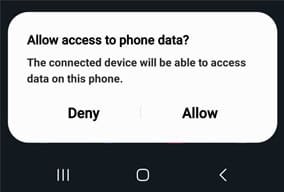
Under all three operating systems the first time I connected my phone it changed to transfer mode automatically. All three computers could see the phone but could not see its files. If I unlocked the phone I had a popup notification.

1672948535665.jpeg

If I selected Allow all computers could see the phones files and if didn't they couldn't. I could still see the files if I then locked the phone.

Note I only had to do this the first time I connected the phone. Even if I rebooted the phone or computer I was still allowed to see the files. In the past this popup returned at times forcing me to give permission again but I don't know what triggered that.

BTW, I plugged my phone into an old computer with Windows XP. I got the Deny/Allow popup on my phone and the computer could see the phone and its identity. Unfortunately, Windows XP lacked the proper ADB driver to allow it to see the files. I tried a driver I found online but couldn't get it to work.

To summarize, at least Android 13 has the security in place to prevent access to its files unless permission is given to do so.
 

My Computers My Computers

  • At a glance

    Windows 11 Pro 25H2 (26200.6901)AMD Ryzen 7 6800H with Radeon 680M GPU (486MB...Crucial DDR5-4800 (2400MHz) 32GB (2 x 16GB)NVIDIA RTX 3060 Laptop (6GB RAM)
    OS
    Windows 11 Pro 25H2 (26200.6901)
    Computer type
    Laptop
    Manufacturer/Model
    ASUS TUF Gaming A15 (2022)
    CPU
    AMD Ryzen 7 6800H with Radeon 680M GPU (486MB RAM)
    Memory
    Crucial DDR5-4800 (2400MHz) 32GB (2 x 16GB)
    Graphics Card(s)
    NVIDIA RTX 3060 Laptop (6GB RAM)
    Sound Card
    n/a
    Monitor(s) Displays
    15.6-inch
    Screen Resolution
    1920x1080 300Hz
    Hard Drives
    2 x Samsung 990 Evo Plus (2TB M.2 NVME SSD)
    PSU
    n/a
    Mouse
    Wireless Mouse M510
    Internet Speed
    2100Mbps/300Mbps
    Browser
    Firefox
    Antivirus
    Malwarebytes
  • At a glance

    Windows 11 Pro 25H2 (26200.8246)AMD Ryzen 7 5700X3DG.SKILL Flare X 32GB (2x16GB) DDR4ASUS ROG-STRIX-RTX3060TI-08G-V2-GAMING (RTX 3...
    Operating System
    Windows 11 Pro 25H2 (26200.8246)
    Computer type
    PC/Desktop
    Manufacturer/Model
    Custom build
    CPU
    AMD Ryzen 7 5700X3D
    Motherboard
    ASUS ROG Strix B550-F Gaming WiFi II
    Memory
    G.SKILL Flare X 32GB (2x16GB) DDR4
    Graphics card(s)
    ASUS ROG-STRIX-RTX3060TI-08G-V2-GAMING (RTX 3060-Ti, 8GB RAM)
    Monitor(s) Displays
    Samsung G50D IPS 27"
    Screen Resolution
    1440p/180Hz
    Hard Drives
    SAMSUNG 990 EVO Plus (2TB] M.2 NVME SSD
    SAMSUNG 990 EVO Plus (4TB) M.2 NVME SSD
    PSU
    Corsair RM750x (750 watts)
    Case
    Cooler Master MasterCase 5
    Cooling
    Scythe Mugen 6
    Keyboard
    Logitech K520 (MK540 keyboard/mouse combo)
    Mouse
    Logitech M310 (MK540 keyboard/mouse combo)
    Internet Speed
    2100 Mbps down / 300 Mbps up
    Browser
    Firefox, Edge, Chrome
    Antivirus
    Malwarebytes (Premium)
    Other Info
    ASUS Blu-ray Burner BW-16D1HT (SATA) || Western Digital Easystore 20TB USB 3.0 external hard drive used with Acronis True Image 2025 backup software || HP OfficeJet Pro 6975 Printer/Scanner

Latest Support Threads

Back
Top Bottom