Solved Using Customizer God to change system icons


The network icons do not work anymore, you must use nettraffic
also imageres icons keep duplicating
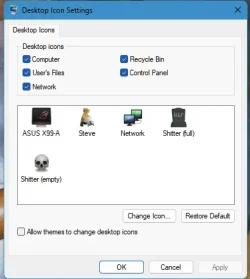
What Network Icon? You have a settings in:-

1766939855824.webp
 

My Computers

System One System Two

  • OS
    Windows 11 Enterprise 25H2 26200 7462
    Computer type
    PC/Desktop
    Manufacturer/Model
    Custom Build
    CPU
    Intel XEON E5-2699 v3
    Motherboard
    ASUS X99-A
    Memory
    64GB Teamgroup UD4-3600
    Graphics Card(s)
    NVIDIA GeForce GTX 1080 Ti
    Sound Card
    Integrated
    Monitor(s) Displays
    ACER X34 Predator
    Screen Resolution
    3440 x 1440
    Hard Drives
    Crucial CT1000P 3P SSD8 1TB
    Crucial CT1000 BX500 SSD 1TB
    PSU
    GameMax Pro
    Case
    Fractal Design
    Cooling
    Corsair H110iGT + 6 140mm Fans
    Keyboard
    Corsair K4
    Mouse
    G-Skill G502
    Internet Speed
    300MBs
    Browser
    Chrome
    Antivirus
    OEM
    Other Info
    ASUS RT-AC87U Router
  • Operating System
    25H2 26200.5074
    Computer type
    Laptop
    Manufacturer/Model
    ASUS X555LA
    Memory
    8GB
    Browser
    Chrome
    Antivirus
    OEM
The network icons do not work anymore, you must use nettraffic
also imageres icons keep duplicating
Mapped Drive Icon:-

HKEY_LOCAL_MACHINE\SOFTWARE\MICROSOFT\WINDOWS\CURRENTVERSION\EXPLORER\DRIVEICONS\"%NetDrive%"\DefaultIcon
@="C:\\User_Icons\\Shell32 010.ico,0"

HKEY_LOCAL_MACHINE\SOFTWARE\MICROSOFT\WINDOWS\CURRENTVERSION\EXPLORER\DRIVEICONS\"%NetDrive%"\
@="C:\\User_Icons\\Shell32 011.ico,0"
 

My Computers

System One System Two

  • OS
    Windows 11 Enterprise 25H2 26200 7462
    Computer type
    PC/Desktop
    Manufacturer/Model
    Custom Build
    CPU
    Intel XEON E5-2699 v3
    Motherboard
    ASUS X99-A
    Memory
    64GB Teamgroup UD4-3600
    Graphics Card(s)
    NVIDIA GeForce GTX 1080 Ti
    Sound Card
    Integrated
    Monitor(s) Displays
    ACER X34 Predator
    Screen Resolution
    3440 x 1440
    Hard Drives
    Crucial CT1000P 3P SSD8 1TB
    Crucial CT1000 BX500 SSD 1TB
    PSU
    GameMax Pro
    Case
    Fractal Design
    Cooling
    Corsair H110iGT + 6 140mm Fans
    Keyboard
    Corsair K4
    Mouse
    G-Skill G502
    Internet Speed
    300MBs
    Browser
    Chrome
    Antivirus
    OEM
    Other Info
    ASUS RT-AC87U Router
  • Operating System
    25H2 26200.5074
    Computer type
    Laptop
    Manufacturer/Model
    ASUS X555LA
    Memory
    8GB
    Browser
    Chrome
    Antivirus
    OEM
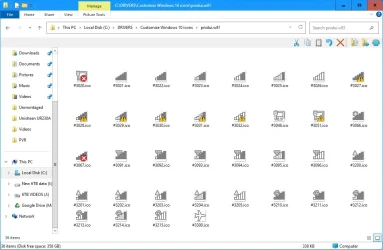
Here are the network icons from Windows 8.1 which I prefer using to the default Windows 11 icons:

Pnidui 8.1 icons.webp

These are in C:\Program Files\Explorer Patcher\pnidui.dll in 24H2 and 25H2 since the original file C:\Windows\System32\pnidui.dll has been removed in these versions. To see them you must use Explorer Patcher to ungroup the power/network/sound icons and set the taskbar style to Windows 10 (ExplorerPatcher). Enything esle simply doesn't work and you see the default Windows 11 network icons.
 
Last edited:

My Computers

System One System Two

  • OS
    Windows 11 Pro 23H2 (5699), 25H2 (8457)
    Computer type
    Laptop
    Manufacturer/Model
    Acer Extensa 5630EZ
    CPU
    Mobile DualCore Intel Core 2 Duo T7250, 2000 MHz
    Motherboard
    Acer Extensa 5630
    Memory
    4GB
    Graphics Card(s)
    Mobile Intel(R) GMA 4500M (Mobile 4 series)
    Sound Card
    Realtek ALC268 @ Intel 82801IB ICH9 - High Definition Audio Controller
    Monitor(s) Displays
    1
    Screen Resolution
    1280x800
    Hard Drives
    Samsung SSD 850 EVO 250GB SATA Device (250 GB, SATA-III)
    Internet Speed
    VDSL 50 Mbps
    Browser
    MICROSOFT EDGE
    Antivirus
    WINDOWS DEFENDER
    Other Info
    Legacy MBR installation, no TPM, no Secure Boot, no WDDM 2.0 graphics drivers, no SSE4.2, cannot get more unsupported ;) This is only my test laptop. I had installed Windows 11 here before upgrading my main PC. For my main PC I use everyday see my 2nd system specs.
  • Operating System
    Windows 11 Pro v25H2 (build 26200.8457)
    Computer type
    PC/Desktop
    Manufacturer/Model
    Custom-built PC
    CPU
    Intel Core-i7 3770 3.40GHz s1155 (3rd generation)
    Motherboard
    Asus P8H61 s1155 ATX
    Memory
    2x Kingston Hyper-X Blu 8GB DDR3-1600
    Graphics card(s)
    GIGABYTE GeForce RTX 3050 WINDFORCE OC V2 6GB (GV-N3050WF2OCV2-6GD)
    Sound Card
    Realtek HD audio (ALC887)
    Monitor(s) Displays
    Sony Bravia KDL-19L4000 19" LCD TV via VGA
    Screen Resolution
    1440x900 32-bit 60Hz
    Hard Drives
    WD Blue SA510 2.5 1000GB SSD as system disk, Western Digital Caviar Purple 4TB SATA III (WD40PURZ) as second
    PSU
    Thermaltake Litepower RGB 550W Full Wired
    Case
    SUPERCASE MIDI-TOWER
    Cooling
    Deepcool Gamma Archer CPU cooler, 1x 8cm fan at the back
    Keyboard
    Mitsumi 101-key PS/2
    Mouse
    Sunnyline OptiEye PS/2
    Internet Speed
    100Mbps
    Browser
    Microsoft Edge, Mozilla Firefox
    Antivirus
    Microsoft Windows Defender
    Other Info
    Legacy BIOS (MBR) installation, no TPM, no Secure Boot, WDDM 3.0 graphics drivers, WEI score 7.4
The file C:\Windows\System32\pnidui.dll has been removed in Windows 11 24H2 and 25H2. So the network icons are now found in C:\Program Files\ExplorerPatcher\pnidui.dll, provided you have Explorer Patcher installed. To see the modified icons you must switch taskbar style to Windows 10 (ExplorerPacter) or you only see the default flat icons. Also as explained in previous posts, you cannot modify the file C:\Windows\SystemResources\imageres.dll.mun (or any other file in that folder) directly. You must copy it to another folder, change the icons and then take ownership and full access rights to replace it. See my older posts.
I also found out that i cant change the icons to windows 10 really, my exporer restrated in LOOP over so i used crtl alt delete sign out, and my pc glitched so i restarted, all fixed, also i tried installing pnidui.dll on inteernet, didnt work so here is my icon
1766956915965.webp
I used nettraffic and allowed acsess to the folders so i customize icons. I also use iconviewer cuz i think my parents installed it, preety useful
 

My Computers

System One System Two

  • OS
    Windows 1125h2
    Computer type
    Laptop
    Manufacturer/Model
    HP
    CPU
    Intel(R) Pentium(R) Silver N5030 CPU @ 1.10GHz
    Motherboard
    HP 864D PCI express
    Memory
    4GB
    Graphics Card(s)
    Intel (UHD) Graphics 605
    Screen Resolution
    1920x1080
    Hard Drives
    2, A:, C:, D: (Note that A is not a hard disk)
    Cooling
    Hot
    Keyboard
    UK Keyboard layout
    Mouse
    No Mouse, compatble laptop
    Internet Speed
    500Kbps
    Browser
    Chrome
    Antivirus
    Windows Defender, Microsoft Defender
    Other Info
    Main PC
    I have 5 computers
  • Operating System
    Windows 11 24h2
    Computer type
    Laptop
    Manufacturer/Model
    DELL
    CPU
    Intel i5 processer
    Screen Resolution
    Random Screen resolution
    Hard Drives
    1 C:, cuz others are banned
    Cooling
    Fine
    Keyboard
    UK Keyboard layout
    Mouse
    Laptop mouse
    Internet Speed
    0.5Kbps
    Browser
    Edge
    Antivirus
    Windows Defender
    Other Info
    School Teacher PC
The file C:\Windows\System32\pnidui.dll has been removed in Windows 11 24H2 and 25H2.
I still have it on 26H1! CG has been backing it up for the past 6 or 7 years!

0008338.webp
 

My Computers

System One System Two

  • OS
    Windows 11 Pro
    Computer type
    PC/Desktop
    Manufacturer/Model
    ASUS ROG Strix
  • Operating System
    Windows 11 Pro
    Computer type
    Laptop
    Manufacturer/Model
    ASUS VivoBook
I still have it on 26H1! CG has been backing it up for the past 6 or 7 years!

View attachment 158266
Yes, it's there if you upgrade from earlier Windows 11 version to 24H2 or 25H2 but not used by Windows. You can even manually copy it from earlier Windows 11 versions in C:\Windows\System32 folder. It won't make any difference as new versions ignore it. That's why Explorer Patcher provides a copy in its own application folder. Been there done that.

PS: Every time you upgrade Explorer Patcher to a new version you have to modify the icons again because the file is replaced.
 

My Computers

System One System Two

  • OS
    Windows 11 Pro 23H2 (5699), 25H2 (8457)
    Computer type
    Laptop
    Manufacturer/Model
    Acer Extensa 5630EZ
    CPU
    Mobile DualCore Intel Core 2 Duo T7250, 2000 MHz
    Motherboard
    Acer Extensa 5630
    Memory
    4GB
    Graphics Card(s)
    Mobile Intel(R) GMA 4500M (Mobile 4 series)
    Sound Card
    Realtek ALC268 @ Intel 82801IB ICH9 - High Definition Audio Controller
    Monitor(s) Displays
    1
    Screen Resolution
    1280x800
    Hard Drives
    Samsung SSD 850 EVO 250GB SATA Device (250 GB, SATA-III)
    Internet Speed
    VDSL 50 Mbps
    Browser
    MICROSOFT EDGE
    Antivirus
    WINDOWS DEFENDER
    Other Info
    Legacy MBR installation, no TPM, no Secure Boot, no WDDM 2.0 graphics drivers, no SSE4.2, cannot get more unsupported ;) This is only my test laptop. I had installed Windows 11 here before upgrading my main PC. For my main PC I use everyday see my 2nd system specs.
  • Operating System
    Windows 11 Pro v25H2 (build 26200.8457)
    Computer type
    PC/Desktop
    Manufacturer/Model
    Custom-built PC
    CPU
    Intel Core-i7 3770 3.40GHz s1155 (3rd generation)
    Motherboard
    Asus P8H61 s1155 ATX
    Memory
    2x Kingston Hyper-X Blu 8GB DDR3-1600
    Graphics card(s)
    GIGABYTE GeForce RTX 3050 WINDFORCE OC V2 6GB (GV-N3050WF2OCV2-6GD)
    Sound Card
    Realtek HD audio (ALC887)
    Monitor(s) Displays
    Sony Bravia KDL-19L4000 19" LCD TV via VGA
    Screen Resolution
    1440x900 32-bit 60Hz
    Hard Drives
    WD Blue SA510 2.5 1000GB SSD as system disk, Western Digital Caviar Purple 4TB SATA III (WD40PURZ) as second
    PSU
    Thermaltake Litepower RGB 550W Full Wired
    Case
    SUPERCASE MIDI-TOWER
    Cooling
    Deepcool Gamma Archer CPU cooler, 1x 8cm fan at the back
    Keyboard
    Mitsumi 101-key PS/2
    Mouse
    Sunnyline OptiEye PS/2
    Internet Speed
    100Mbps
    Browser
    Microsoft Edge, Mozilla Firefox
    Antivirus
    Microsoft Windows Defender
    Other Info
    Legacy BIOS (MBR) installation, no TPM, no Secure Boot, WDDM 3.0 graphics drivers, WEI score 7.4
To change the displayed drive icon, you can use the autorun.inf file, which is stored in the root of the drive itself. This is convenient, for example, for USB drives, which will always display a specific icon, regardless of their assigned drive letter.
 

My Computer

System One

  • OS
    Microsoft Windows 11 Home
    Computer type
    PC/Desktop
    Manufacturer/Model
    MSI MS-7D98
    CPU
    Intel Core i5-13490F
    Motherboard
    MSI B760 GAMING PLUS WIFI
    Memory
    2 x 16 Patriot Memory (PDP Systems) PSD516G560081 6400MT (32-37-37-74); 1.35V)
    Graphics Card(s)
    GIGABYTE GeForce RTX 4070 WINDFORCE OC 12G (GV-N4070WF3OC-12GD)
    Sound Card
    Bluetooth Аудио
    Monitor(s) Displays
    INNOCN 15K1F
    Screen Resolution
    1920 x 1080
    Hard Drives
    WD_BLACK SN770 250GB
    KINGSTON SNV2S1000G (ELFK0S.6)
    PSU
    Thermaltake Toughpower GF3 1000W
    Case
    CG560 - DeepCool
    Cooling
    ID-COOLING SE-224-XTS / 2 x 140Mm Fan - rear and top; 3 x 120Mm - front
    Keyboard
    Corsair K70 RGB TKL
    Mouse
    Corsair KATAR PRO XT
    Internet Speed
    100 Mbps
    Browser
    Firefox
    Antivirus
    Microsoft Defender Antivirus
    Other Info
    https://www.userbenchmark.com/UserRun/66553205
I still have it on 26H1! CG has been backing it up for the past 6 or 7 years!

View attachment 158266
i have it on 25h2 i have all the versions and second off omg not 6 7 and customizergod has not you just downloaded it from internet so STOP SAYING MISINFORMATION
To change the displayed drive icon, you can use the autorun.inf file, which is stored in the root of the drive itself. This is convenient, for example, for USB drives, which will always display a specific icon, regardless of their assigned drive letter.
you are very helpful but i did it and it turned from windows 10 icons but it changed back to theese
1766995524892.webp
Screenshot 2025-12-29 080536.webp
I tried reverting ALL of them to windows 10 but some just keep duplicating like when i change info and question icons get to be the same
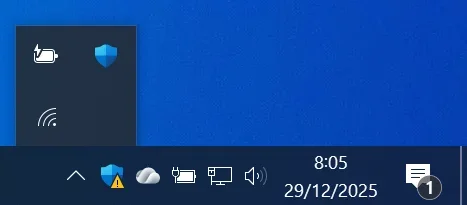
Also i hid the network icon here
1766995645175.webpand used netanimate to get the new icon
1766995685541.webpWhen you edit the files it says denied. You need to add yourself in security and allow yourself to customize icons, ifyou dont know what i mean i might put up tutorial


What Network Icon? You have a settings in:-

View attachment 158249
No thats the desktop icon settings, we are using CustomizerGod to change the icons, Read the title
Windows 10 icons
Windows 7 icons
Windows vista icons
Please check all to see if they are right

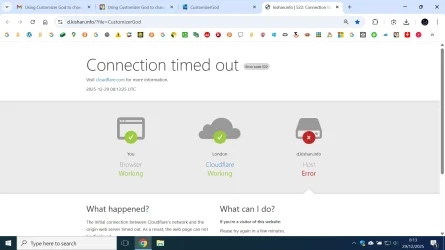
IMPORTANT NOTICE: Customizergod does not download from the website. It took me to this
1766996037270.webp
You need to download from majorgeeks instead
Error details

What can I do?​

If you're a visitor of this website:​

Please try again in a few minutes.

If you're the owner of this website:​

Contact your hosting provider letting them know your web server is not completing requests. An Error 522 means that the request was able to connect to your web server, but that the request didn't finish. The most likely cause is that something on your server is hogging resources. Additional troubleshooting information here.

What happened?​

The initial connection between Cloudflare's network and the origin web server timed out. As a result, the web page can not be displayed.

So thats what happened, customizergod is probaly last time it updated. PLEASE DOOR2WINDOWS PLEASE MAKE IT COMPATIBLE FOR WINDOWS 11
1766996991988.webp
Here are the network icons from Windows 8.1 which I prefer using to the default Windows 11 icons:

View attachment 158257

These are in C:\Program Files\Explorer Patcher\pnidui.dll in 24H2 and 25H2 since the original file C:\Windows\System32\pnidui.dll has been removed in these versions. To see them you must use Explorer Patcher to ungroup the power/network/sound icons and set the taskbar style to Windows 10 (ExplorerPatcher). Enything esle simply doesn't work and you see the default Windows 11 network icons.
how do i change the icons, i am using icon viewer and want old network icons
my old pc it worked but using retrobar te tray icons broke so dont use retrobar
now i have to use netanimate
1766997228019.webp1766997254922.webp
 
Last edited:

My Computers

System One System Two

  • OS
    Windows 1125h2
    Computer type
    Laptop
    Manufacturer/Model
    HP
    CPU
    Intel(R) Pentium(R) Silver N5030 CPU @ 1.10GHz
    Motherboard
    HP 864D PCI express
    Memory
    4GB
    Graphics Card(s)
    Intel (UHD) Graphics 605
    Screen Resolution
    1920x1080
    Hard Drives
    2, A:, C:, D: (Note that A is not a hard disk)
    Cooling
    Hot
    Keyboard
    UK Keyboard layout
    Mouse
    No Mouse, compatble laptop
    Internet Speed
    500Kbps
    Browser
    Chrome
    Antivirus
    Windows Defender, Microsoft Defender
    Other Info
    Main PC
    I have 5 computers
  • Operating System
    Windows 11 24h2
    Computer type
    Laptop
    Manufacturer/Model
    DELL
    CPU
    Intel i5 processer
    Screen Resolution
    Random Screen resolution
    Hard Drives
    1 C:, cuz others are banned
    Cooling
    Fine
    Keyboard
    UK Keyboard layout
    Mouse
    Laptop mouse
    Internet Speed
    0.5Kbps
    Browser
    Edge
    Antivirus
    Windows Defender
    Other Info
    School Teacher PC
Last edited:

My Computer

System One

  • OS
    Microsoft Windows 11 Home
    Computer type
    PC/Desktop
    Manufacturer/Model
    MSI MS-7D98
    CPU
    Intel Core i5-13490F
    Motherboard
    MSI B760 GAMING PLUS WIFI
    Memory
    2 x 16 Patriot Memory (PDP Systems) PSD516G560081 6400MT (32-37-37-74); 1.35V)
    Graphics Card(s)
    GIGABYTE GeForce RTX 4070 WINDFORCE OC 12G (GV-N4070WF3OC-12GD)
    Sound Card
    Bluetooth Аудио
    Monitor(s) Displays
    INNOCN 15K1F
    Screen Resolution
    1920 x 1080
    Hard Drives
    WD_BLACK SN770 250GB
    KINGSTON SNV2S1000G (ELFK0S.6)
    PSU
    Thermaltake Toughpower GF3 1000W
    Case
    CG560 - DeepCool
    Cooling
    ID-COOLING SE-224-XTS / 2 x 140Mm Fan - rear and top; 3 x 120Mm - front
    Keyboard
    Corsair K70 RGB TKL
    Mouse
    Corsair KATAR PRO XT
    Internet Speed
    100 Mbps
    Browser
    Firefox
    Antivirus
    Microsoft Defender Antivirus
    Other Info
    https://www.userbenchmark.com/UserRun/66553205
i have it on 25h2 i have all the versions and second off omg not 6 7 and customizergod has not you just downloaded it from internet so STOP SAYING MISINFORMATION
Whatever! 🤷‍♂️
 

My Computers

System One System Two

  • OS
    Windows 11 Pro
    Computer type
    PC/Desktop
    Manufacturer/Model
    ASUS ROG Strix
  • Operating System
    Windows 11 Pro
    Computer type
    Laptop
    Manufacturer/Model
    ASUS VivoBook
i have it on 25h2 i have all the versions and second off omg not 6 7 and customizergod has not you just downloaded it from internet so STOP SAYING MISINFORMATION

you are very helpful but i did it and it turned from windows 10 icons but it changed back to theese
View attachment 158291
View attachment 158294
I tried reverting ALL of them to windows 10 but some just keep duplicating like when i change info and question icons get to be the same
Also i hid the network icon here
View attachment 158296and used netanimate to get the new icon
View attachment 158297When you edit the files it says denied. You need to add yourself in security and allow yourself to customize icons, ifyou dont know what i mean i might put up tutorial


No thats the desktop icon settings, we are using CustomizerGod to change the icons, Read the title
Windows 10 icons
Windows 7 icons
Windows vista icons
Please check all to see if they are right

IMPORTANT NOTICE: Customizergod does not download from the website. It took me to this
View attachment 158298
You need to download from majorgeeks instead
Error details

What can I do?​

If you're a visitor of this website:​

Please try again in a few minutes.

If you're the owner of this website:​

Contact your hosting provider letting them know your web server is not completing requests. An Error 522 means that the request was able to connect to your web server, but that the request didn't finish. The most likely cause is that something on your server is hogging resources. Additional troubleshooting information here.

What happened?​

The initial connection between Cloudflare's network and the origin web server timed out. As a result, the web page can not be displayed.

So thats what happened, customizergod is probaly last time it updated. PLEASE DOOR2WINDOWS PLEASE MAKE IT COMPATIBLE FOR WINDOWS 11
View attachment 158299

how do i change the icons, i am using icon viewer and want old network icons
my old pc it worked but using retrobar te tray icons broke so dont use retrobar
now i have to use netanimate
View attachment 158300View attachment 158301

If you want to take the icons from the respective file C:\Windows\System32\pnidui.dll of Windows 7 or 8.1, then open it in Customizer God and select all icons. Then click on the down arrow icon to reveal more options (in the old version I am using, don't know about newer versions) and click Export Selected Resources. This will extract all icons in a folder with specific file names reflecting their position in the file. Don't rename them to facilitate automatic replacement! To replace the network icons, make sure you have Explorer Patcher installed. Then as I already said, you have to open the file in the Explorer Patcher folder, that is C:\Program Files\ExplorerPatcher\pnidui.dll. Then select all icons and click Replace. Browse to the folder with the icons. This will match the respective icon number based on filenames and save you the trouble to replace them one by one.

Regarding C:\Windows\System32\Shell32.dll, this files contains the default Windows 11 system icons and CANNOT be modified. If you do modify it, Windows will not boot because of signature mismach! DON'T touch that file, never! If you want to modify the system icons, open the file C:\Windows\SystemResources\imageres.dll.mun instead. Don't open it directly, it will fail due to access rights. Copy it to another folder, modify the icons and then take ownership and full access rights to replace the original file.

Also every time there is an upgrade to Windows system files or Explorer Patcher the respective icons will be restored to default because the files are being replaced and you have to customize them again.


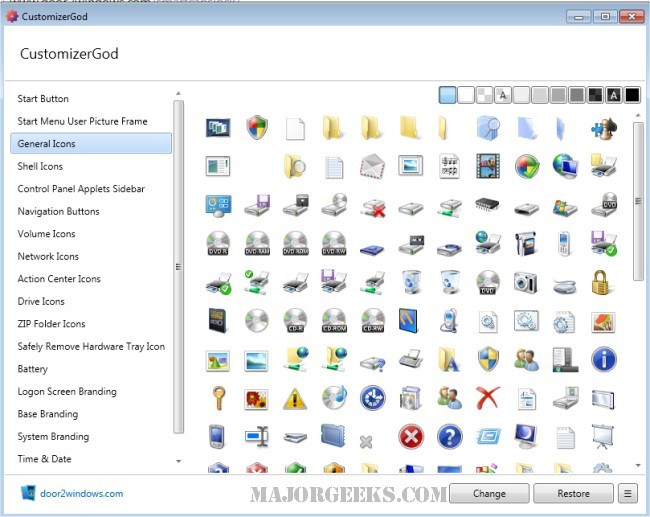
You can download Customizer God from these sites:
 
Last edited:

My Computers

System One System Two

  • OS
    Windows 11 Pro 23H2 (5699), 25H2 (8457)
    Computer type
    Laptop
    Manufacturer/Model
    Acer Extensa 5630EZ
    CPU
    Mobile DualCore Intel Core 2 Duo T7250, 2000 MHz
    Motherboard
    Acer Extensa 5630
    Memory
    4GB
    Graphics Card(s)
    Mobile Intel(R) GMA 4500M (Mobile 4 series)
    Sound Card
    Realtek ALC268 @ Intel 82801IB ICH9 - High Definition Audio Controller
    Monitor(s) Displays
    1
    Screen Resolution
    1280x800
    Hard Drives
    Samsung SSD 850 EVO 250GB SATA Device (250 GB, SATA-III)
    Internet Speed
    VDSL 50 Mbps
    Browser
    MICROSOFT EDGE
    Antivirus
    WINDOWS DEFENDER
    Other Info
    Legacy MBR installation, no TPM, no Secure Boot, no WDDM 2.0 graphics drivers, no SSE4.2, cannot get more unsupported ;) This is only my test laptop. I had installed Windows 11 here before upgrading my main PC. For my main PC I use everyday see my 2nd system specs.
  • Operating System
    Windows 11 Pro v25H2 (build 26200.8457)
    Computer type
    PC/Desktop
    Manufacturer/Model
    Custom-built PC
    CPU
    Intel Core-i7 3770 3.40GHz s1155 (3rd generation)
    Motherboard
    Asus P8H61 s1155 ATX
    Memory
    2x Kingston Hyper-X Blu 8GB DDR3-1600
    Graphics card(s)
    GIGABYTE GeForce RTX 3050 WINDFORCE OC V2 6GB (GV-N3050WF2OCV2-6GD)
    Sound Card
    Realtek HD audio (ALC887)
    Monitor(s) Displays
    Sony Bravia KDL-19L4000 19" LCD TV via VGA
    Screen Resolution
    1440x900 32-bit 60Hz
    Hard Drives
    WD Blue SA510 2.5 1000GB SSD as system disk, Western Digital Caviar Purple 4TB SATA III (WD40PURZ) as second
    PSU
    Thermaltake Litepower RGB 550W Full Wired
    Case
    SUPERCASE MIDI-TOWER
    Cooling
    Deepcool Gamma Archer CPU cooler, 1x 8cm fan at the back
    Keyboard
    Mitsumi 101-key PS/2
    Mouse
    Sunnyline OptiEye PS/2
    Internet Speed
    100Mbps
    Browser
    Microsoft Edge, Mozilla Firefox
    Antivirus
    Microsoft Windows Defender
    Other Info
    Legacy BIOS (MBR) installation, no TPM, no Secure Boot, WDDM 3.0 graphics drivers, WEI score 7.4
If you want to take the icons from the respective file C:\Windows\System32\pnidui.dll of Windows 7 or 8.1, then open it in Customizer God and select all icons. Then click on the down arrow icon to reveal more options (in the old version I am using, don't know about newer versions) and click Export Selected Resources. This will extract all icons in a folder with specific file names reflecting their position in the file. Don't rename them to facilitate automatic replacement! To replace the network icons, make sure you have Explorer Patcher installed. Then as I already said, you have to open the file in the Explorer Patcher folder, that is C:\Program Files\ExplorerPatcher\pnidui.dll. Then select all icons and click Replace. Browse to the folder with the icons. This will match the respective icon number based on filenames and save you the trouble to replace them one by one.

Regarding C:\Windows\System32\Shell32.dll, this files contains the default Windows 11 system icons and CANNOT be modified. If you do modify it, Windows will not boot because of signature mismach! DON'T touch that file, never! If you want to modify the system icons, open the file C:\Windows\SystemResources\imageres.dll.mun instead. Don't open it directly, it will fail due to access rights. Copy it to another folder, modify the icons and then take ownership and full access rights to replace the original file.

Also every time there is an upgrade to Windows system files or Explorer Patcher the respective icons will be restored to default because the files are being replaced and you have to customize them again.


You can download Customizer God from these sites:
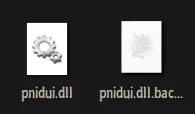
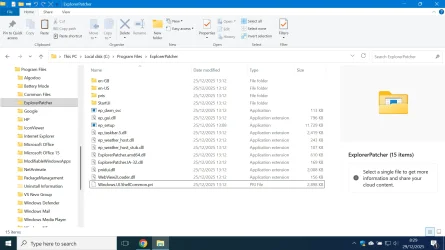
I dont know if you can see this but here is the explorerpatcher pnidui
Screenshot 2025-12-29 130350.webp
Here is another pnidui dll i put in system32 and modified it
Screenshot 2025-12-29 130504.webp
I do not care about the windows 7 or 8.1 icons to be honest
I am reffering to this topic on the windows 10 forums right here
It worked on my other PC which does not work due to a driver issue

So do jsut take out the pnidui from explorerpatcher and use customizerod to change it and put the modified back to where it was

Here are sets you can use
Screenshot 2025-12-28 153005.webp
Im trying to do this on windows 10 PCs but people always foil my plans. BRO WHY I WANT TO TRY AT SCHOOL BUT I NEED UAC BRO WHAT THE HECK

Replace globe with an X icon, wifi or Ethernet, your choice
Replace the 0, 1, 2, 3, 4, bar icons with the warning icon, wifi or Ethernet, your choice
Replace flight mode icon with Asterisk icon (IF YOU CHOOSE EHTHERNET CHOOSE RED X)
If you use both but use wifi more set ethernet icon to Warning (Wifi or ethernet, your choice)
 
Last edited:

My Computers

System One System Two

  • OS
    Windows 1125h2
    Computer type
    Laptop
    Manufacturer/Model
    HP
    CPU
    Intel(R) Pentium(R) Silver N5030 CPU @ 1.10GHz
    Motherboard
    HP 864D PCI express
    Memory
    4GB
    Graphics Card(s)
    Intel (UHD) Graphics 605
    Screen Resolution
    1920x1080
    Hard Drives
    2, A:, C:, D: (Note that A is not a hard disk)
    Cooling
    Hot
    Keyboard
    UK Keyboard layout
    Mouse
    No Mouse, compatble laptop
    Internet Speed
    500Kbps
    Browser
    Chrome
    Antivirus
    Windows Defender, Microsoft Defender
    Other Info
    Main PC
    I have 5 computers
  • Operating System
    Windows 11 24h2
    Computer type
    Laptop
    Manufacturer/Model
    DELL
    CPU
    Intel i5 processer
    Screen Resolution
    Random Screen resolution
    Hard Drives
    1 C:, cuz others are banned
    Cooling
    Fine
    Keyboard
    UK Keyboard layout
    Mouse
    Laptop mouse
    Internet Speed
    0.5Kbps
    Browser
    Edge
    Antivirus
    Windows Defender
    Other Info
    School Teacher PC
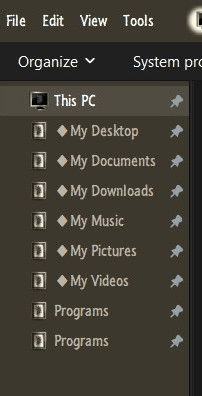
I only use CG to rid the Navigation Pane of those stupid push pins.

giff.gif
 

My Computers

System One System Two

  • OS
    Windows 11 Pro
    Computer type
    PC/Desktop
    Manufacturer/Model
    ASUS ROG Strix
  • Operating System
    Windows 11 Pro
    Computer type
    Laptop
    Manufacturer/Model
    ASUS VivoBook
Im trying to do this on windows 10 PCs but people always foil my plans. BRO WHY I WANT TO TRY AT SCHOOL BUT I NEED UAC BRO WHAT THE HECK
Yeah… it’s called a domain, and they’re called Group Policies
 

My Computer

System One

  • OS
    Windows 11 Pro
Like bro
Yeah… it’s called a domain, and they’re called Group Policies
Bitlocker and my mums IT foiled my plans
I only use CG to rid the Navigation Pane of those stupid push pins.

View attachment 158315
Ok, i stopped using it cuz my pc corrupted so i had to restart the pc to fix it and had to use DISM to fix the corruption
My whole entire PC including the taskbar and restart screen glitched so i used dism

I use customizergod to make windows 11 look like windows 10
My progress so far
Screenshot 2025-12-29 173617.webp
The UAC shields reverted to windows 11 and the folders too, and the drives reverted back
 

My Computers

System One System Two

  • OS
    Windows 1125h2
    Computer type
    Laptop
    Manufacturer/Model
    HP
    CPU
    Intel(R) Pentium(R) Silver N5030 CPU @ 1.10GHz
    Motherboard
    HP 864D PCI express
    Memory
    4GB
    Graphics Card(s)
    Intel (UHD) Graphics 605
    Screen Resolution
    1920x1080
    Hard Drives
    2, A:, C:, D: (Note that A is not a hard disk)
    Cooling
    Hot
    Keyboard
    UK Keyboard layout
    Mouse
    No Mouse, compatble laptop
    Internet Speed
    500Kbps
    Browser
    Chrome
    Antivirus
    Windows Defender, Microsoft Defender
    Other Info
    Main PC
    I have 5 computers
  • Operating System
    Windows 11 24h2
    Computer type
    Laptop
    Manufacturer/Model
    DELL
    CPU
    Intel i5 processer
    Screen Resolution
    Random Screen resolution
    Hard Drives
    1 C:, cuz others are banned
    Cooling
    Fine
    Keyboard
    UK Keyboard layout
    Mouse
    Laptop mouse
    Internet Speed
    0.5Kbps
    Browser
    Edge
    Antivirus
    Windows Defender
    Other Info
    School Teacher PC
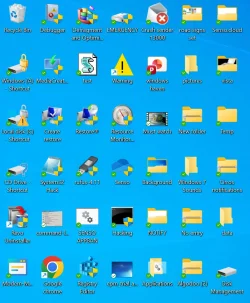
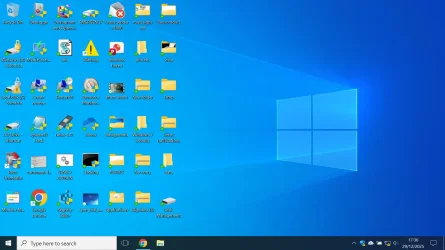
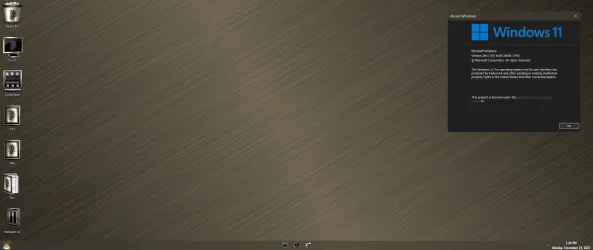
As mentioned, I use CG for that one single, 'no permissions' task..., everything else is governed by Icon Packager..., no corruption...

11756.webp
 

My Computers

System One System Two

  • OS
    Windows 11 Pro
    Computer type
    PC/Desktop
    Manufacturer/Model
    ASUS ROG Strix
  • Operating System
    Windows 11 Pro
    Computer type
    Laptop
    Manufacturer/Model
    ASUS VivoBook
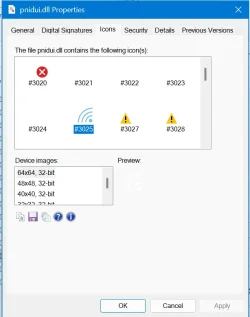
I dont know if you can see this but here is the explorerpatcher pnidui
View attachment 158308
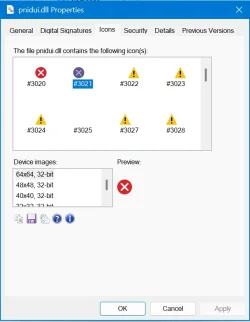
Here is another pnidui dll i put in system32 and modified it
View attachment 158309
I do not care about the windows 7 or 8.1 icons to be honest
I am reffering to this topic on the windows 10 forums right here
It worked on my other PC which does not work due to a driver issue

So do jsut take out the pnidui from explorerpatcher and use customizerod to change it and put the modified back to where it was

Here are sets you can use
View attachment 158310
Im trying to do this on windows 10 PCs but people always foil my plans. BRO WHY I WANT TO TRY AT SCHOOL BUT I NEED UAC BRO WHAT THE HECK

Replace globe with an X icon, wifi or Ethernet, your choice
Replace the 0, 1, 2, 3, 4, bar icons with the warning icon, wifi or Ethernet, your choice
Replace flight mode icon with Asterisk icon (IF YOU CHOOSE EHTHERNET CHOOSE RED X)
If you use both but use wifi more set ethernet icon to Warning (Wifi or ethernet, your choice)
All the icons in the first screenshot are the default Windows 11 plain white icons and they don't show well on white background. In Customizer God there is a light blue background that makes them all visible. Just open the file I told you and click on the desired icon to modify. Then click on replace and select your custom icon. Do that for the rest icons, changes are save automatically. To take effect and see them you must restart the computer or just restart File Explorer. Easy to restart File Explorer from Explorer Patcher.
 

My Computers

System One System Two

  • OS
    Windows 11 Pro 23H2 (5699), 25H2 (8457)
    Computer type
    Laptop
    Manufacturer/Model
    Acer Extensa 5630EZ
    CPU
    Mobile DualCore Intel Core 2 Duo T7250, 2000 MHz
    Motherboard
    Acer Extensa 5630
    Memory
    4GB
    Graphics Card(s)
    Mobile Intel(R) GMA 4500M (Mobile 4 series)
    Sound Card
    Realtek ALC268 @ Intel 82801IB ICH9 - High Definition Audio Controller
    Monitor(s) Displays
    1
    Screen Resolution
    1280x800
    Hard Drives
    Samsung SSD 850 EVO 250GB SATA Device (250 GB, SATA-III)
    Internet Speed
    VDSL 50 Mbps
    Browser
    MICROSOFT EDGE
    Antivirus
    WINDOWS DEFENDER
    Other Info
    Legacy MBR installation, no TPM, no Secure Boot, no WDDM 2.0 graphics drivers, no SSE4.2, cannot get more unsupported ;) This is only my test laptop. I had installed Windows 11 here before upgrading my main PC. For my main PC I use everyday see my 2nd system specs.
  • Operating System
    Windows 11 Pro v25H2 (build 26200.8457)
    Computer type
    PC/Desktop
    Manufacturer/Model
    Custom-built PC
    CPU
    Intel Core-i7 3770 3.40GHz s1155 (3rd generation)
    Motherboard
    Asus P8H61 s1155 ATX
    Memory
    2x Kingston Hyper-X Blu 8GB DDR3-1600
    Graphics card(s)
    GIGABYTE GeForce RTX 3050 WINDFORCE OC V2 6GB (GV-N3050WF2OCV2-6GD)
    Sound Card
    Realtek HD audio (ALC887)
    Monitor(s) Displays
    Sony Bravia KDL-19L4000 19" LCD TV via VGA
    Screen Resolution
    1440x900 32-bit 60Hz
    Hard Drives
    WD Blue SA510 2.5 1000GB SSD as system disk, Western Digital Caviar Purple 4TB SATA III (WD40PURZ) as second
    PSU
    Thermaltake Litepower RGB 550W Full Wired
    Case
    SUPERCASE MIDI-TOWER
    Cooling
    Deepcool Gamma Archer CPU cooler, 1x 8cm fan at the back
    Keyboard
    Mitsumi 101-key PS/2
    Mouse
    Sunnyline OptiEye PS/2
    Internet Speed
    100Mbps
    Browser
    Microsoft Edge, Mozilla Firefox
    Antivirus
    Microsoft Windows Defender
    Other Info
    Legacy BIOS (MBR) installation, no TPM, no Secure Boot, WDDM 3.0 graphics drivers, WEI score 7.4
All the icons in the first screenshot are the default Windows 11 plain white icons and they don't show well on white background. In Customizer God there is a light blue background that makes them all visible. Just open the file I told you and click on the desired icon to modify. Then click on replace and select your custom icon. Do that for the rest icons, changes are save automatically. To take effect and see them you must restart the computer or just restart File Explorer. Easy to restart File Explorer from Explorer Patcher.
yeah thefirst pic is explorerpatchers
i can only modify the second picture

is it safe to delete the explorerpatcher pnidui and then put a modified version in
 

My Computers

System One System Two

  • OS
    Windows 1125h2
    Computer type
    Laptop
    Manufacturer/Model
    HP
    CPU
    Intel(R) Pentium(R) Silver N5030 CPU @ 1.10GHz
    Motherboard
    HP 864D PCI express
    Memory
    4GB
    Graphics Card(s)
    Intel (UHD) Graphics 605
    Screen Resolution
    1920x1080
    Hard Drives
    2, A:, C:, D: (Note that A is not a hard disk)
    Cooling
    Hot
    Keyboard
    UK Keyboard layout
    Mouse
    No Mouse, compatble laptop
    Internet Speed
    500Kbps
    Browser
    Chrome
    Antivirus
    Windows Defender, Microsoft Defender
    Other Info
    Main PC
    I have 5 computers
  • Operating System
    Windows 11 24h2
    Computer type
    Laptop
    Manufacturer/Model
    DELL
    CPU
    Intel i5 processer
    Screen Resolution
    Random Screen resolution
    Hard Drives
    1 C:, cuz others are banned
    Cooling
    Fine
    Keyboard
    UK Keyboard layout
    Mouse
    Laptop mouse
    Internet Speed
    0.5Kbps
    Browser
    Edge
    Antivirus
    Windows Defender
    Other Info
    School Teacher PC
As mentioned, I use CG for that one single, 'no permissions' task..., everything else is governed by Icon Packager..., no corruption...

View attachment 158330
Cool desktop but the winver dialog is edited your definetly in 25h2 cuz 26h2 doesnot exist yet
 

My Computers

System One System Two

  • OS
    Windows 1125h2
    Computer type
    Laptop
    Manufacturer/Model
    HP
    CPU
    Intel(R) Pentium(R) Silver N5030 CPU @ 1.10GHz
    Motherboard
    HP 864D PCI express
    Memory
    4GB
    Graphics Card(s)
    Intel (UHD) Graphics 605
    Screen Resolution
    1920x1080
    Hard Drives
    2, A:, C:, D: (Note that A is not a hard disk)
    Cooling
    Hot
    Keyboard
    UK Keyboard layout
    Mouse
    No Mouse, compatble laptop
    Internet Speed
    500Kbps
    Browser
    Chrome
    Antivirus
    Windows Defender, Microsoft Defender
    Other Info
    Main PC
    I have 5 computers
  • Operating System
    Windows 11 24h2
    Computer type
    Laptop
    Manufacturer/Model
    DELL
    CPU
    Intel i5 processer
    Screen Resolution
    Random Screen resolution
    Hard Drives
    1 C:, cuz others are banned
    Cooling
    Fine
    Keyboard
    UK Keyboard layout
    Mouse
    Laptop mouse
    Internet Speed
    0.5Kbps
    Browser
    Edge
    Antivirus
    Windows Defender
    Other Info
    School Teacher PC

My Computers

System One System Two

  • OS
    Windows 11 Pro
    Computer type
    PC/Desktop
    Manufacturer/Model
    ASUS ROG Strix
  • Operating System
    Windows 11 Pro
    Computer type
    Laptop
    Manufacturer/Model
    ASUS VivoBook
Back
Top Bottom