Solved Using Customizer God to change system icons


You probably have to replace the icons in Windows Defender executable or some .dll file in the folder

C:\Program Files\Windows Defender

I don't know which one, haven't done it.
since you hate the flat icons you can change your epp.maniffest.dll to the microsoft security essentials icon
and im not sure about onedrive but i hate this icon
1767354697116.webpits so trash bro, this happened to my school pcs too with blue onedrive

you can hide the action centre icon
 

My Computers

System One System Two

  • OS
    Windows 1125h2
    Computer type
    Laptop
    Manufacturer/Model
    HP
    CPU
    Intel(R) Pentium(R) Silver N5030 CPU @ 1.10GHz
    Motherboard
    HP 864D PCI express
    Memory
    4GB
    Graphics Card(s)
    Intel (UHD) Graphics 605
    Screen Resolution
    1920x1080
    Hard Drives
    2, A:, C:, D: (Note that A is not a hard disk)
    Cooling
    Hot
    Keyboard
    UK Keyboard layout
    Mouse
    No Mouse, compatble laptop
    Internet Speed
    500Kbps
    Browser
    Chrome
    Antivirus
    Windows Defender, Microsoft Defender
    Other Info
    Main PC
    I have 5 computers
  • Operating System
    Windows 11 24h2
    Computer type
    Laptop
    Manufacturer/Model
    DELL
    CPU
    Intel i5 processer
    Screen Resolution
    Random Screen resolution
    Hard Drives
    1 C:, cuz others are banned
    Cooling
    Fine
    Keyboard
    UK Keyboard layout
    Mouse
    Laptop mouse
    Internet Speed
    0.5Kbps
    Browser
    Edge
    Antivirus
    Windows Defender
    Other Info
    School Teacher PC

So insignificant, why spend so much time on it!?
we are finding how to change the ugly windows 11 flat icons to whidows 7 ones
 

My Computers

System One System Two

  • OS
    Windows 1125h2
    Computer type
    Laptop
    Manufacturer/Model
    HP
    CPU
    Intel(R) Pentium(R) Silver N5030 CPU @ 1.10GHz
    Motherboard
    HP 864D PCI express
    Memory
    4GB
    Graphics Card(s)
    Intel (UHD) Graphics 605
    Screen Resolution
    1920x1080
    Hard Drives
    2, A:, C:, D: (Note that A is not a hard disk)
    Cooling
    Hot
    Keyboard
    UK Keyboard layout
    Mouse
    No Mouse, compatble laptop
    Internet Speed
    500Kbps
    Browser
    Chrome
    Antivirus
    Windows Defender, Microsoft Defender
    Other Info
    Main PC
    I have 5 computers
  • Operating System
    Windows 11 24h2
    Computer type
    Laptop
    Manufacturer/Model
    DELL
    CPU
    Intel i5 processer
    Screen Resolution
    Random Screen resolution
    Hard Drives
    1 C:, cuz others are banned
    Cooling
    Fine
    Keyboard
    UK Keyboard layout
    Mouse
    Laptop mouse
    Internet Speed
    0.5Kbps
    Browser
    Edge
    Antivirus
    Windows Defender
    Other Info
    School Teacher PC
Hide 'em in the SysTray so you don't have to look at them.

11807.webp
 

My Computers

System One System Two

  • OS
    Windows 11 Pro
    Computer type
    PC/Desktop
    Manufacturer/Model
    ASUS ROG Strix
  • Operating System
    Windows 11 Pro
    Computer type
    Laptop
    Manufacturer/Model
    ASUS VivoBook

My Computers

System One System Two

  • OS
    Windows 1125h2
    Computer type
    Laptop
    Manufacturer/Model
    HP
    CPU
    Intel(R) Pentium(R) Silver N5030 CPU @ 1.10GHz
    Motherboard
    HP 864D PCI express
    Memory
    4GB
    Graphics Card(s)
    Intel (UHD) Graphics 605
    Screen Resolution
    1920x1080
    Hard Drives
    2, A:, C:, D: (Note that A is not a hard disk)
    Cooling
    Hot
    Keyboard
    UK Keyboard layout
    Mouse
    No Mouse, compatble laptop
    Internet Speed
    500Kbps
    Browser
    Chrome
    Antivirus
    Windows Defender, Microsoft Defender
    Other Info
    Main PC
    I have 5 computers
  • Operating System
    Windows 11 24h2
    Computer type
    Laptop
    Manufacturer/Model
    DELL
    CPU
    Intel i5 processer
    Screen Resolution
    Random Screen resolution
    Hard Drives
    1 C:, cuz others are banned
    Cooling
    Fine
    Keyboard
    UK Keyboard layout
    Mouse
    Laptop mouse
    Internet Speed
    0.5Kbps
    Browser
    Edge
    Antivirus
    Windows Defender
    Other Info
    School Teacher PC
since you hate the flat icons you can change your epp.maniffest.dll to the microsoft security essentials icon
and im not sure about onedrive but i hate this icon
View attachment 158627its so trash bro, this happened to my school pcs too with blue onedrive

you can hide the action centre icon
Don't use the OneDrive app from Microsoft Store (flat icon). Download the desktop version (nice blue icon). Same for Skype, although now it has been replaced by Microsoft Teams. In general, if there are both desktop and UWP (Universal Windows Platform aka Metro interface, Microsoft Store) versions, I always prefer the desktop version of any application to get the nicer interface and usually all features while the UWP version might lack some features.
 

My Computers

System One System Two

  • OS
    Windows 11 Pro 23H2 (5699), 25H2 (8457)
    Computer type
    Laptop
    Manufacturer/Model
    Acer Extensa 5630EZ
    CPU
    Mobile DualCore Intel Core 2 Duo T7250, 2000 MHz
    Motherboard
    Acer Extensa 5630
    Memory
    4GB
    Graphics Card(s)
    Mobile Intel(R) GMA 4500M (Mobile 4 series)
    Sound Card
    Realtek ALC268 @ Intel 82801IB ICH9 - High Definition Audio Controller
    Monitor(s) Displays
    1
    Screen Resolution
    1280x800
    Hard Drives
    Samsung SSD 850 EVO 250GB SATA Device (250 GB, SATA-III)
    Internet Speed
    VDSL 50 Mbps
    Browser
    MICROSOFT EDGE
    Antivirus
    WINDOWS DEFENDER
    Other Info
    Legacy MBR installation, no TPM, no Secure Boot, no WDDM 2.0 graphics drivers, no SSE4.2, cannot get more unsupported ;) This is only my test laptop. I had installed Windows 11 here before upgrading my main PC. For my main PC I use everyday see my 2nd system specs.
  • Operating System
    Windows 11 Pro v25H2 (build 26200.8457)
    Computer type
    PC/Desktop
    Manufacturer/Model
    Custom-built PC
    CPU
    Intel Core-i7 3770 3.40GHz s1155 (3rd generation)
    Motherboard
    Asus P8H61 s1155 ATX
    Memory
    2x Kingston Hyper-X Blu 8GB DDR3-1600
    Graphics card(s)
    GIGABYTE GeForce RTX 3050 WINDFORCE OC V2 6GB (GV-N3050WF2OCV2-6GD)
    Sound Card
    Realtek HD audio (ALC887)
    Monitor(s) Displays
    Sony Bravia KDL-19L4000 19" LCD TV via VGA
    Screen Resolution
    1440x900 32-bit 60Hz
    Hard Drives
    WD Blue SA510 2.5 1000GB SSD as system disk, Western Digital Caviar Purple 4TB SATA III (WD40PURZ) as second
    PSU
    Thermaltake Litepower RGB 550W Full Wired
    Case
    SUPERCASE MIDI-TOWER
    Cooling
    Deepcool Gamma Archer CPU cooler, 1x 8cm fan at the back
    Keyboard
    Mitsumi 101-key PS/2
    Mouse
    Sunnyline OptiEye PS/2
    Internet Speed
    100Mbps
    Browser
    Microsoft Edge, Mozilla Firefox
    Antivirus
    Microsoft Windows Defender
    Other Info
    Legacy BIOS (MBR) installation, no TPM, no Secure Boot, WDDM 3.0 graphics drivers, WEI score 7.4
Don't use the OneDrive app from Microsoft Store (flat icon). Download the desktop version (nice blue icon). Same for Skype, although now it has been replaced by Microsoft Teams. In general, if there are both desktop and UWP (Universal Windows Platform aka Metro interface, Microsoft Store) versions, I always prefer the desktop version of any app or game.
i have to keep onedrive for safe reasons
to change icon for network in 24h2
requires no uac
 

My Computers

System One System Two

  • OS
    Windows 1125h2
    Computer type
    Laptop
    Manufacturer/Model
    HP
    CPU
    Intel(R) Pentium(R) Silver N5030 CPU @ 1.10GHz
    Motherboard
    HP 864D PCI express
    Memory
    4GB
    Graphics Card(s)
    Intel (UHD) Graphics 605
    Screen Resolution
    1920x1080
    Hard Drives
    2, A:, C:, D: (Note that A is not a hard disk)
    Cooling
    Hot
    Keyboard
    UK Keyboard layout
    Mouse
    No Mouse, compatble laptop
    Internet Speed
    500Kbps
    Browser
    Chrome
    Antivirus
    Windows Defender, Microsoft Defender
    Other Info
    Main PC
    I have 5 computers
  • Operating System
    Windows 11 24h2
    Computer type
    Laptop
    Manufacturer/Model
    DELL
    CPU
    Intel i5 processer
    Screen Resolution
    Random Screen resolution
    Hard Drives
    1 C:, cuz others are banned
    Cooling
    Fine
    Keyboard
    UK Keyboard layout
    Mouse
    Laptop mouse
    Internet Speed
    0.5Kbps
    Browser
    Edge
    Antivirus
    Windows Defender
    Other Info
    School Teacher PC
i have to keep onedrive for safe reasons
to change icon for network in 24h2
requires no uac
I just modify the C:\Program Files\Explorer Patcher\pnidui.dll file for the network icons and the
C:\Windows\SystemResources\SndVolSSO.dll.mun file for the sound icons with Customizer God.

This is how they look like in my system:

Network and sound icons.webp

I just remind everyone that I must select "Windows 10 (ExplorerPatcher)" style for the taskbar, or these custom icons are ignored and I see the ugly flat defaults.
 

My Computers

System One System Two

  • OS
    Windows 11 Pro 23H2 (5699), 25H2 (8457)
    Computer type
    Laptop
    Manufacturer/Model
    Acer Extensa 5630EZ
    CPU
    Mobile DualCore Intel Core 2 Duo T7250, 2000 MHz
    Motherboard
    Acer Extensa 5630
    Memory
    4GB
    Graphics Card(s)
    Mobile Intel(R) GMA 4500M (Mobile 4 series)
    Sound Card
    Realtek ALC268 @ Intel 82801IB ICH9 - High Definition Audio Controller
    Monitor(s) Displays
    1
    Screen Resolution
    1280x800
    Hard Drives
    Samsung SSD 850 EVO 250GB SATA Device (250 GB, SATA-III)
    Internet Speed
    VDSL 50 Mbps
    Browser
    MICROSOFT EDGE
    Antivirus
    WINDOWS DEFENDER
    Other Info
    Legacy MBR installation, no TPM, no Secure Boot, no WDDM 2.0 graphics drivers, no SSE4.2, cannot get more unsupported ;) This is only my test laptop. I had installed Windows 11 here before upgrading my main PC. For my main PC I use everyday see my 2nd system specs.
  • Operating System
    Windows 11 Pro v25H2 (build 26200.8457)
    Computer type
    PC/Desktop
    Manufacturer/Model
    Custom-built PC
    CPU
    Intel Core-i7 3770 3.40GHz s1155 (3rd generation)
    Motherboard
    Asus P8H61 s1155 ATX
    Memory
    2x Kingston Hyper-X Blu 8GB DDR3-1600
    Graphics card(s)
    GIGABYTE GeForce RTX 3050 WINDFORCE OC V2 6GB (GV-N3050WF2OCV2-6GD)
    Sound Card
    Realtek HD audio (ALC887)
    Monitor(s) Displays
    Sony Bravia KDL-19L4000 19" LCD TV via VGA
    Screen Resolution
    1440x900 32-bit 60Hz
    Hard Drives
    WD Blue SA510 2.5 1000GB SSD as system disk, Western Digital Caviar Purple 4TB SATA III (WD40PURZ) as second
    PSU
    Thermaltake Litepower RGB 550W Full Wired
    Case
    SUPERCASE MIDI-TOWER
    Cooling
    Deepcool Gamma Archer CPU cooler, 1x 8cm fan at the back
    Keyboard
    Mitsumi 101-key PS/2
    Mouse
    Sunnyline OptiEye PS/2
    Internet Speed
    100Mbps
    Browser
    Microsoft Edge, Mozilla Firefox
    Antivirus
    Microsoft Windows Defender
    Other Info
    Legacy BIOS (MBR) installation, no TPM, no Secure Boot, WDDM 3.0 graphics drivers, WEI score 7.4
I just modify the C:\Program Files\Explorer Patcher\pnidui.dll file for the network icons and the
C:\Windows\SystemResources\SndVolSSO.dll.mun file for the sound icons with Customizer God.

This is how they look like in my system:

View attachment 158636

I just remind everyone that I must select "Windows 10 (ExplorerPatcher)" style for the taskbar, or these custom icons are ignored and I see the ugly flat defaults.
wait, do i delete my modified pnidui from system32 and move explorerpatcher pnidui to the system32 and use customizergod
 

My Computers

System One System Two

  • OS
    Windows 1125h2
    Computer type
    Laptop
    Manufacturer/Model
    HP
    CPU
    Intel(R) Pentium(R) Silver N5030 CPU @ 1.10GHz
    Motherboard
    HP 864D PCI express
    Memory
    4GB
    Graphics Card(s)
    Intel (UHD) Graphics 605
    Screen Resolution
    1920x1080
    Hard Drives
    2, A:, C:, D: (Note that A is not a hard disk)
    Cooling
    Hot
    Keyboard
    UK Keyboard layout
    Mouse
    No Mouse, compatble laptop
    Internet Speed
    500Kbps
    Browser
    Chrome
    Antivirus
    Windows Defender, Microsoft Defender
    Other Info
    Main PC
    I have 5 computers
  • Operating System
    Windows 11 24h2
    Computer type
    Laptop
    Manufacturer/Model
    DELL
    CPU
    Intel i5 processer
    Screen Resolution
    Random Screen resolution
    Hard Drives
    1 C:, cuz others are banned
    Cooling
    Fine
    Keyboard
    UK Keyboard layout
    Mouse
    Laptop mouse
    Internet Speed
    0.5Kbps
    Browser
    Edge
    Antivirus
    Windows Defender
    Other Info
    School Teacher PC
wait, do i delete my modified pnidui from system32 and move explorerpatcher pnidui to the system32 and use customizergod
No need, just open C:\Program Files\Explorer Patcher\pnidui.dll directly in CustomizerGod and replace the icons. Restart File Explorer to see the new icons.
 

My Computers

System One System Two

  • OS
    Windows 11 Pro 23H2 (5699), 25H2 (8457)
    Computer type
    Laptop
    Manufacturer/Model
    Acer Extensa 5630EZ
    CPU
    Mobile DualCore Intel Core 2 Duo T7250, 2000 MHz
    Motherboard
    Acer Extensa 5630
    Memory
    4GB
    Graphics Card(s)
    Mobile Intel(R) GMA 4500M (Mobile 4 series)
    Sound Card
    Realtek ALC268 @ Intel 82801IB ICH9 - High Definition Audio Controller
    Monitor(s) Displays
    1
    Screen Resolution
    1280x800
    Hard Drives
    Samsung SSD 850 EVO 250GB SATA Device (250 GB, SATA-III)
    Internet Speed
    VDSL 50 Mbps
    Browser
    MICROSOFT EDGE
    Antivirus
    WINDOWS DEFENDER
    Other Info
    Legacy MBR installation, no TPM, no Secure Boot, no WDDM 2.0 graphics drivers, no SSE4.2, cannot get more unsupported ;) This is only my test laptop. I had installed Windows 11 here before upgrading my main PC. For my main PC I use everyday see my 2nd system specs.
  • Operating System
    Windows 11 Pro v25H2 (build 26200.8457)
    Computer type
    PC/Desktop
    Manufacturer/Model
    Custom-built PC
    CPU
    Intel Core-i7 3770 3.40GHz s1155 (3rd generation)
    Motherboard
    Asus P8H61 s1155 ATX
    Memory
    2x Kingston Hyper-X Blu 8GB DDR3-1600
    Graphics card(s)
    GIGABYTE GeForce RTX 3050 WINDFORCE OC V2 6GB (GV-N3050WF2OCV2-6GD)
    Sound Card
    Realtek HD audio (ALC887)
    Monitor(s) Displays
    Sony Bravia KDL-19L4000 19" LCD TV via VGA
    Screen Resolution
    1440x900 32-bit 60Hz
    Hard Drives
    WD Blue SA510 2.5 1000GB SSD as system disk, Western Digital Caviar Purple 4TB SATA III (WD40PURZ) as second
    PSU
    Thermaltake Litepower RGB 550W Full Wired
    Case
    SUPERCASE MIDI-TOWER
    Cooling
    Deepcool Gamma Archer CPU cooler, 1x 8cm fan at the back
    Keyboard
    Mitsumi 101-key PS/2
    Mouse
    Sunnyline OptiEye PS/2
    Internet Speed
    100Mbps
    Browser
    Microsoft Edge, Mozilla Firefox
    Antivirus
    Microsoft Windows Defender
    Other Info
    Legacy BIOS (MBR) installation, no TPM, no Secure Boot, WDDM 3.0 graphics drivers, WEI score 7.4
No need, just open C:\Program Files\Explorer Patcher\pnidui.dll directly in CustomizerGod and replace the icons. Restart File Explorer to see the new icons.
Thank you did not know that

yesssssssssssssssssss i did it
 

My Computers

System One System Two

  • OS
    Windows 1125h2
    Computer type
    Laptop
    Manufacturer/Model
    HP
    CPU
    Intel(R) Pentium(R) Silver N5030 CPU @ 1.10GHz
    Motherboard
    HP 864D PCI express
    Memory
    4GB
    Graphics Card(s)
    Intel (UHD) Graphics 605
    Screen Resolution
    1920x1080
    Hard Drives
    2, A:, C:, D: (Note that A is not a hard disk)
    Cooling
    Hot
    Keyboard
    UK Keyboard layout
    Mouse
    No Mouse, compatble laptop
    Internet Speed
    500Kbps
    Browser
    Chrome
    Antivirus
    Windows Defender, Microsoft Defender
    Other Info
    Main PC
    I have 5 computers
  • Operating System
    Windows 11 24h2
    Computer type
    Laptop
    Manufacturer/Model
    DELL
    CPU
    Intel i5 processer
    Screen Resolution
    Random Screen resolution
    Hard Drives
    1 C:, cuz others are banned
    Cooling
    Fine
    Keyboard
    UK Keyboard layout
    Mouse
    Laptop mouse
    Internet Speed
    0.5Kbps
    Browser
    Edge
    Antivirus
    Windows Defender
    Other Info
    School Teacher PC
No need, just open C:\Program Files\Explorer Patcher\pnidui.dll directly in CustomizerGod and replace the icons. Restart File Explorer to see the new icons.
expect one problem
1767365401608.webp
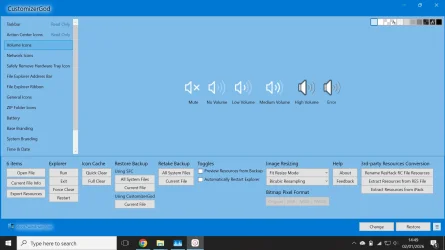
the icons keep duplicatin eg if i change high volume to something and error to another both turn the same
 

My Computers

System One System Two

  • OS
    Windows 1125h2
    Computer type
    Laptop
    Manufacturer/Model
    HP
    CPU
    Intel(R) Pentium(R) Silver N5030 CPU @ 1.10GHz
    Motherboard
    HP 864D PCI express
    Memory
    4GB
    Graphics Card(s)
    Intel (UHD) Graphics 605
    Screen Resolution
    1920x1080
    Hard Drives
    2, A:, C:, D: (Note that A is not a hard disk)
    Cooling
    Hot
    Keyboard
    UK Keyboard layout
    Mouse
    No Mouse, compatble laptop
    Internet Speed
    500Kbps
    Browser
    Chrome
    Antivirus
    Windows Defender, Microsoft Defender
    Other Info
    Main PC
    I have 5 computers
  • Operating System
    Windows 11 24h2
    Computer type
    Laptop
    Manufacturer/Model
    DELL
    CPU
    Intel i5 processer
    Screen Resolution
    Random Screen resolution
    Hard Drives
    1 C:, cuz others are banned
    Cooling
    Fine
    Keyboard
    UK Keyboard layout
    Mouse
    Laptop mouse
    Internet Speed
    0.5Kbps
    Browser
    Edge
    Antivirus
    Windows Defender
    Other Info
    School Teacher PC
You cannot modify the files in SystemResources folder directly. You must copy them to another folder, modify them, take ownership of both the original folder and the original file, get full access rights and close (end task) File Explorer so they are not used and you can replace them. If you do it a couple of times it is easier than it sounds.
 

My Computers

System One System Two

  • OS
    Windows 11 Pro 23H2 (5699), 25H2 (8457)
    Computer type
    Laptop
    Manufacturer/Model
    Acer Extensa 5630EZ
    CPU
    Mobile DualCore Intel Core 2 Duo T7250, 2000 MHz
    Motherboard
    Acer Extensa 5630
    Memory
    4GB
    Graphics Card(s)
    Mobile Intel(R) GMA 4500M (Mobile 4 series)
    Sound Card
    Realtek ALC268 @ Intel 82801IB ICH9 - High Definition Audio Controller
    Monitor(s) Displays
    1
    Screen Resolution
    1280x800
    Hard Drives
    Samsung SSD 850 EVO 250GB SATA Device (250 GB, SATA-III)
    Internet Speed
    VDSL 50 Mbps
    Browser
    MICROSOFT EDGE
    Antivirus
    WINDOWS DEFENDER
    Other Info
    Legacy MBR installation, no TPM, no Secure Boot, no WDDM 2.0 graphics drivers, no SSE4.2, cannot get more unsupported ;) This is only my test laptop. I had installed Windows 11 here before upgrading my main PC. For my main PC I use everyday see my 2nd system specs.
  • Operating System
    Windows 11 Pro v25H2 (build 26200.8457)
    Computer type
    PC/Desktop
    Manufacturer/Model
    Custom-built PC
    CPU
    Intel Core-i7 3770 3.40GHz s1155 (3rd generation)
    Motherboard
    Asus P8H61 s1155 ATX
    Memory
    2x Kingston Hyper-X Blu 8GB DDR3-1600
    Graphics card(s)
    GIGABYTE GeForce RTX 3050 WINDFORCE OC V2 6GB (GV-N3050WF2OCV2-6GD)
    Sound Card
    Realtek HD audio (ALC887)
    Monitor(s) Displays
    Sony Bravia KDL-19L4000 19" LCD TV via VGA
    Screen Resolution
    1440x900 32-bit 60Hz
    Hard Drives
    WD Blue SA510 2.5 1000GB SSD as system disk, Western Digital Caviar Purple 4TB SATA III (WD40PURZ) as second
    PSU
    Thermaltake Litepower RGB 550W Full Wired
    Case
    SUPERCASE MIDI-TOWER
    Cooling
    Deepcool Gamma Archer CPU cooler, 1x 8cm fan at the back
    Keyboard
    Mitsumi 101-key PS/2
    Mouse
    Sunnyline OptiEye PS/2
    Internet Speed
    100Mbps
    Browser
    Microsoft Edge, Mozilla Firefox
    Antivirus
    Microsoft Windows Defender
    Other Info
    Legacy BIOS (MBR) installation, no TPM, no Secure Boot, WDDM 3.0 graphics drivers, WEI score 7.4
You cannot modify the files in SystemResources folder directly. You must copy them to another folder, modify them, take ownership of both the original folder and the original file, get full access rights and close (end task) File Explorer so they are not used and you can replace them. If you do it a couple of times it is easier than it sounds.
i am not using systemresources
1767368607439.webpim trying to change the windows 10 volume to windows 7
i sucsessfully did the network on explorerpatcher and replaced the netanimate one with fake action centre
 

My Computers

System One System Two

  • OS
    Windows 1125h2
    Computer type
    Laptop
    Manufacturer/Model
    HP
    CPU
    Intel(R) Pentium(R) Silver N5030 CPU @ 1.10GHz
    Motherboard
    HP 864D PCI express
    Memory
    4GB
    Graphics Card(s)
    Intel (UHD) Graphics 605
    Screen Resolution
    1920x1080
    Hard Drives
    2, A:, C:, D: (Note that A is not a hard disk)
    Cooling
    Hot
    Keyboard
    UK Keyboard layout
    Mouse
    No Mouse, compatble laptop
    Internet Speed
    500Kbps
    Browser
    Chrome
    Antivirus
    Windows Defender, Microsoft Defender
    Other Info
    Main PC
    I have 5 computers
  • Operating System
    Windows 11 24h2
    Computer type
    Laptop
    Manufacturer/Model
    DELL
    CPU
    Intel i5 processer
    Screen Resolution
    Random Screen resolution
    Hard Drives
    1 C:, cuz others are banned
    Cooling
    Fine
    Keyboard
    UK Keyboard layout
    Mouse
    Laptop mouse
    Internet Speed
    0.5Kbps
    Browser
    Edge
    Antivirus
    Windows Defender
    Other Info
    School Teacher PC
Since Windows 10 version 1903 some specific system files were moved from System32 folder to SystemResources folder. These include the battery icon, the sound icon, the USB safe ejection icon and most folder/file icons. While you could modify all files in System32 folder directly with Customizer God, the respective files in SystemResources folder produce errors you must copy them to another folder to modify them. In Windows 10 1903 or higher and all Windows 11 versions, the sound icons are in SndVolSSO.dl.mun file. I copy them to a folder such as C:\Temp, modify them and then get full access rights to replace them, see my previous posts.
 

My Computers

System One System Two

  • OS
    Windows 11 Pro 23H2 (5699), 25H2 (8457)
    Computer type
    Laptop
    Manufacturer/Model
    Acer Extensa 5630EZ
    CPU
    Mobile DualCore Intel Core 2 Duo T7250, 2000 MHz
    Motherboard
    Acer Extensa 5630
    Memory
    4GB
    Graphics Card(s)
    Mobile Intel(R) GMA 4500M (Mobile 4 series)
    Sound Card
    Realtek ALC268 @ Intel 82801IB ICH9 - High Definition Audio Controller
    Monitor(s) Displays
    1
    Screen Resolution
    1280x800
    Hard Drives
    Samsung SSD 850 EVO 250GB SATA Device (250 GB, SATA-III)
    Internet Speed
    VDSL 50 Mbps
    Browser
    MICROSOFT EDGE
    Antivirus
    WINDOWS DEFENDER
    Other Info
    Legacy MBR installation, no TPM, no Secure Boot, no WDDM 2.0 graphics drivers, no SSE4.2, cannot get more unsupported ;) This is only my test laptop. I had installed Windows 11 here before upgrading my main PC. For my main PC I use everyday see my 2nd system specs.
  • Operating System
    Windows 11 Pro v25H2 (build 26200.8457)
    Computer type
    PC/Desktop
    Manufacturer/Model
    Custom-built PC
    CPU
    Intel Core-i7 3770 3.40GHz s1155 (3rd generation)
    Motherboard
    Asus P8H61 s1155 ATX
    Memory
    2x Kingston Hyper-X Blu 8GB DDR3-1600
    Graphics card(s)
    GIGABYTE GeForce RTX 3050 WINDFORCE OC V2 6GB (GV-N3050WF2OCV2-6GD)
    Sound Card
    Realtek HD audio (ALC887)
    Monitor(s) Displays
    Sony Bravia KDL-19L4000 19" LCD TV via VGA
    Screen Resolution
    1440x900 32-bit 60Hz
    Hard Drives
    WD Blue SA510 2.5 1000GB SSD as system disk, Western Digital Caviar Purple 4TB SATA III (WD40PURZ) as second
    PSU
    Thermaltake Litepower RGB 550W Full Wired
    Case
    SUPERCASE MIDI-TOWER
    Cooling
    Deepcool Gamma Archer CPU cooler, 1x 8cm fan at the back
    Keyboard
    Mitsumi 101-key PS/2
    Mouse
    Sunnyline OptiEye PS/2
    Internet Speed
    100Mbps
    Browser
    Microsoft Edge, Mozilla Firefox
    Antivirus
    Microsoft Windows Defender
    Other Info
    Legacy BIOS (MBR) installation, no TPM, no Secure Boot, WDDM 3.0 graphics drivers, WEI score 7.4
Since Windows 10 version 1903 some specific system files were moved from System32 folder to SystemResources folder. These include the battery icon, the sound icon, the USB safe ejection icon and most folder/file icons. While you could modify all files in System32 folder directly with Customizer God, the respective files in SystemResources folder produce errors you must copy them to another folder to modify them. In Windows 10 1903 or higher and all Windows 11 versions, the sound icons are in SndVolSSO.dl.mun file. I copy them to a folder such as C:\Temp, modify them and then get full access rights to replace them, see my previous posts.
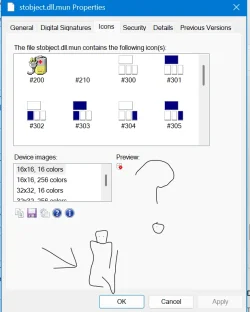
surprisingly stobject.dll looks like this
ease of acsess things
Screenshot 2026-01-02 175958.webp
 

My Computers

System One System Two

  • OS
    Windows 1125h2
    Computer type
    Laptop
    Manufacturer/Model
    HP
    CPU
    Intel(R) Pentium(R) Silver N5030 CPU @ 1.10GHz
    Motherboard
    HP 864D PCI express
    Memory
    4GB
    Graphics Card(s)
    Intel (UHD) Graphics 605
    Screen Resolution
    1920x1080
    Hard Drives
    2, A:, C:, D: (Note that A is not a hard disk)
    Cooling
    Hot
    Keyboard
    UK Keyboard layout
    Mouse
    No Mouse, compatble laptop
    Internet Speed
    500Kbps
    Browser
    Chrome
    Antivirus
    Windows Defender, Microsoft Defender
    Other Info
    Main PC
    I have 5 computers
  • Operating System
    Windows 11 24h2
    Computer type
    Laptop
    Manufacturer/Model
    DELL
    CPU
    Intel i5 processer
    Screen Resolution
    Random Screen resolution
    Hard Drives
    1 C:, cuz others are banned
    Cooling
    Fine
    Keyboard
    UK Keyboard layout
    Mouse
    Laptop mouse
    Internet Speed
    0.5Kbps
    Browser
    Edge
    Antivirus
    Windows Defender
    Other Info
    School Teacher PC
it didnt work, mun files wont work
 

My Computers

System One System Two

  • OS
    Windows 1125h2
    Computer type
    Laptop
    Manufacturer/Model
    HP
    CPU
    Intel(R) Pentium(R) Silver N5030 CPU @ 1.10GHz
    Motherboard
    HP 864D PCI express
    Memory
    4GB
    Graphics Card(s)
    Intel (UHD) Graphics 605
    Screen Resolution
    1920x1080
    Hard Drives
    2, A:, C:, D: (Note that A is not a hard disk)
    Cooling
    Hot
    Keyboard
    UK Keyboard layout
    Mouse
    No Mouse, compatble laptop
    Internet Speed
    500Kbps
    Browser
    Chrome
    Antivirus
    Windows Defender, Microsoft Defender
    Other Info
    Main PC
    I have 5 computers
  • Operating System
    Windows 11 24h2
    Computer type
    Laptop
    Manufacturer/Model
    DELL
    CPU
    Intel i5 processer
    Screen Resolution
    Random Screen resolution
    Hard Drives
    1 C:, cuz others are banned
    Cooling
    Fine
    Keyboard
    UK Keyboard layout
    Mouse
    Laptop mouse
    Internet Speed
    0.5Kbps
    Browser
    Edge
    Antivirus
    Windows Defender
    Other Info
    School Teacher PC
1767377182557.webp
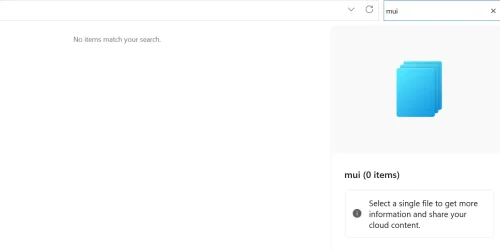
mui files dont exist
how do i fix my problem, icons duplicating
is it also safe to change the windws defender icon
 

My Computers

System One System Two

  • OS
    Windows 1125h2
    Computer type
    Laptop
    Manufacturer/Model
    HP
    CPU
    Intel(R) Pentium(R) Silver N5030 CPU @ 1.10GHz
    Motherboard
    HP 864D PCI express
    Memory
    4GB
    Graphics Card(s)
    Intel (UHD) Graphics 605
    Screen Resolution
    1920x1080
    Hard Drives
    2, A:, C:, D: (Note that A is not a hard disk)
    Cooling
    Hot
    Keyboard
    UK Keyboard layout
    Mouse
    No Mouse, compatble laptop
    Internet Speed
    500Kbps
    Browser
    Chrome
    Antivirus
    Windows Defender, Microsoft Defender
    Other Info
    Main PC
    I have 5 computers
  • Operating System
    Windows 11 24h2
    Computer type
    Laptop
    Manufacturer/Model
    DELL
    CPU
    Intel i5 processer
    Screen Resolution
    Random Screen resolution
    Hard Drives
    1 C:, cuz others are banned
    Cooling
    Fine
    Keyboard
    UK Keyboard layout
    Mouse
    Laptop mouse
    Internet Speed
    0.5Kbps
    Browser
    Edge
    Antivirus
    Windows Defender
    Other Info
    School Teacher PC

My Computers

System One System Two

  • OS
    Windows 11 Pro 23H2 (5699), 25H2 (8457)
    Computer type
    Laptop
    Manufacturer/Model
    Acer Extensa 5630EZ
    CPU
    Mobile DualCore Intel Core 2 Duo T7250, 2000 MHz
    Motherboard
    Acer Extensa 5630
    Memory
    4GB
    Graphics Card(s)
    Mobile Intel(R) GMA 4500M (Mobile 4 series)
    Sound Card
    Realtek ALC268 @ Intel 82801IB ICH9 - High Definition Audio Controller
    Monitor(s) Displays
    1
    Screen Resolution
    1280x800
    Hard Drives
    Samsung SSD 850 EVO 250GB SATA Device (250 GB, SATA-III)
    Internet Speed
    VDSL 50 Mbps
    Browser
    MICROSOFT EDGE
    Antivirus
    WINDOWS DEFENDER
    Other Info
    Legacy MBR installation, no TPM, no Secure Boot, no WDDM 2.0 graphics drivers, no SSE4.2, cannot get more unsupported ;) This is only my test laptop. I had installed Windows 11 here before upgrading my main PC. For my main PC I use everyday see my 2nd system specs.
  • Operating System
    Windows 11 Pro v25H2 (build 26200.8457)
    Computer type
    PC/Desktop
    Manufacturer/Model
    Custom-built PC
    CPU
    Intel Core-i7 3770 3.40GHz s1155 (3rd generation)
    Motherboard
    Asus P8H61 s1155 ATX
    Memory
    2x Kingston Hyper-X Blu 8GB DDR3-1600
    Graphics card(s)
    GIGABYTE GeForce RTX 3050 WINDFORCE OC V2 6GB (GV-N3050WF2OCV2-6GD)
    Sound Card
    Realtek HD audio (ALC887)
    Monitor(s) Displays
    Sony Bravia KDL-19L4000 19" LCD TV via VGA
    Screen Resolution
    1440x900 32-bit 60Hz
    Hard Drives
    WD Blue SA510 2.5 1000GB SSD as system disk, Western Digital Caviar Purple 4TB SATA III (WD40PURZ) as second
    PSU
    Thermaltake Litepower RGB 550W Full Wired
    Case
    SUPERCASE MIDI-TOWER
    Cooling
    Deepcool Gamma Archer CPU cooler, 1x 8cm fan at the back
    Keyboard
    Mitsumi 101-key PS/2
    Mouse
    Sunnyline OptiEye PS/2
    Internet Speed
    100Mbps
    Browser
    Microsoft Edge, Mozilla Firefox
    Antivirus
    Microsoft Windows Defender
    Other Info
    Legacy BIOS (MBR) installation, no TPM, no Secure Boot, WDDM 3.0 graphics drivers, WEI score 7.4
Icon #210 is the one you see when you connect a USB flash drive or USB disk. That's the one you click on for safe removal.
i do not have safe remove icon yet, i will do it tommoworw, and i used resourse hacker and didnt work didnt show icons
and i am trying to change volume
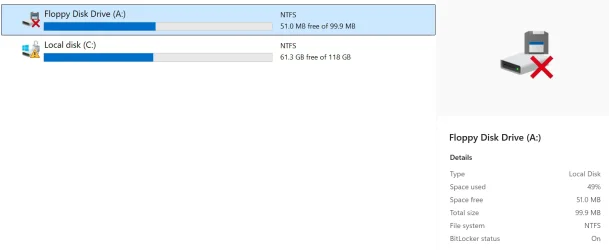
i have a floppy drive which i can store icons here
1767387324435.webp
1767387352300.webp
 

My Computers

System One System Two

  • OS
    Windows 1125h2
    Computer type
    Laptop
    Manufacturer/Model
    HP
    CPU
    Intel(R) Pentium(R) Silver N5030 CPU @ 1.10GHz
    Motherboard
    HP 864D PCI express
    Memory
    4GB
    Graphics Card(s)
    Intel (UHD) Graphics 605
    Screen Resolution
    1920x1080
    Hard Drives
    2, A:, C:, D: (Note that A is not a hard disk)
    Cooling
    Hot
    Keyboard
    UK Keyboard layout
    Mouse
    No Mouse, compatble laptop
    Internet Speed
    500Kbps
    Browser
    Chrome
    Antivirus
    Windows Defender, Microsoft Defender
    Other Info
    Main PC
    I have 5 computers
  • Operating System
    Windows 11 24h2
    Computer type
    Laptop
    Manufacturer/Model
    DELL
    CPU
    Intel i5 processer
    Screen Resolution
    Random Screen resolution
    Hard Drives
    1 C:, cuz others are banned
    Cooling
    Fine
    Keyboard
    UK Keyboard layout
    Mouse
    Laptop mouse
    Internet Speed
    0.5Kbps
    Browser
    Edge
    Antivirus
    Windows Defender
    Other Info
    School Teacher PC
View attachment 158670
mui files dont exist
how do i fix my problem, icons duplicating
is it also safe to change the windws defender icon
If you open File Explorer to C:\Windows\SystemResources folder you will see many files. For the battery icon is batmeter.dll.mun For all system icons is imageres.dll.mun For sound is SndVolSSO.dll.mun and for USB safe ejection icon is stobject.dll.mun

Since Customizer God expects standard .dll icons, it doesn't show them by default. You have to either change file type to *.* to see them or manually type the first letters of their filename. I don't know about new versions, but in my old version you press CTRL+O to open a file.
 

My Computers

System One System Two

  • OS
    Windows 11 Pro 23H2 (5699), 25H2 (8457)
    Computer type
    Laptop
    Manufacturer/Model
    Acer Extensa 5630EZ
    CPU
    Mobile DualCore Intel Core 2 Duo T7250, 2000 MHz
    Motherboard
    Acer Extensa 5630
    Memory
    4GB
    Graphics Card(s)
    Mobile Intel(R) GMA 4500M (Mobile 4 series)
    Sound Card
    Realtek ALC268 @ Intel 82801IB ICH9 - High Definition Audio Controller
    Monitor(s) Displays
    1
    Screen Resolution
    1280x800
    Hard Drives
    Samsung SSD 850 EVO 250GB SATA Device (250 GB, SATA-III)
    Internet Speed
    VDSL 50 Mbps
    Browser
    MICROSOFT EDGE
    Antivirus
    WINDOWS DEFENDER
    Other Info
    Legacy MBR installation, no TPM, no Secure Boot, no WDDM 2.0 graphics drivers, no SSE4.2, cannot get more unsupported ;) This is only my test laptop. I had installed Windows 11 here before upgrading my main PC. For my main PC I use everyday see my 2nd system specs.
  • Operating System
    Windows 11 Pro v25H2 (build 26200.8457)
    Computer type
    PC/Desktop
    Manufacturer/Model
    Custom-built PC
    CPU
    Intel Core-i7 3770 3.40GHz s1155 (3rd generation)
    Motherboard
    Asus P8H61 s1155 ATX
    Memory
    2x Kingston Hyper-X Blu 8GB DDR3-1600
    Graphics card(s)
    GIGABYTE GeForce RTX 3050 WINDFORCE OC V2 6GB (GV-N3050WF2OCV2-6GD)
    Sound Card
    Realtek HD audio (ALC887)
    Monitor(s) Displays
    Sony Bravia KDL-19L4000 19" LCD TV via VGA
    Screen Resolution
    1440x900 32-bit 60Hz
    Hard Drives
    WD Blue SA510 2.5 1000GB SSD as system disk, Western Digital Caviar Purple 4TB SATA III (WD40PURZ) as second
    PSU
    Thermaltake Litepower RGB 550W Full Wired
    Case
    SUPERCASE MIDI-TOWER
    Cooling
    Deepcool Gamma Archer CPU cooler, 1x 8cm fan at the back
    Keyboard
    Mitsumi 101-key PS/2
    Mouse
    Sunnyline OptiEye PS/2
    Internet Speed
    100Mbps
    Browser
    Microsoft Edge, Mozilla Firefox
    Antivirus
    Microsoft Windows Defender
    Other Info
    Legacy BIOS (MBR) installation, no TPM, no Secure Boot, WDDM 3.0 graphics drivers, WEI score 7.4
Back
Top Bottom