
Why does my 7900xtx use less power in some games?


Crap... my games are all Steam and Gamepass. I guess that could be it.


I don't KNOW that is the problem. It's just a guess.
The driver is also common to all the games, but it has no trouble with Furmark.

But if all the games have issues, it has to be something common to them all.


The only other thing I can think of that's common to all the games would be the Visual C++ Redistributables...
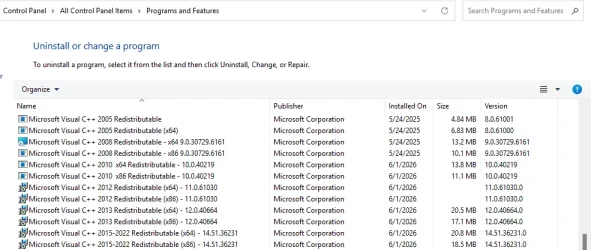
Image1.webp


If you don't have all of these you can get an all-in-one package, here...



The file at the top will install all of them...
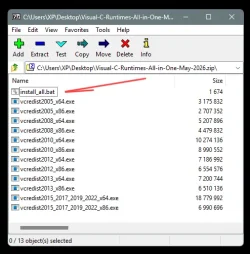
Image1.webp

Everyone should have these installed. Lots of old programs and old games need them.


Whatever you are using to monitor your FPS (post #1), may also be the culprit.
It's also common to all the games.
 

My Computers

System One System Two

  • OS
    Win 11 Home ♦♦♦26200.8457 ♦♦♦♦♦♦♦25H2
    Computer type
    PC/Desktop
    Manufacturer/Model
    Built by Ghot® [May 2020]
    CPU
    AMD Ryzen 7 3700X
    Motherboard
    Asus Pro WS X570-ACE (BIOS 5302)
    Memory
    G.Skill (F4-3200C14D-16GTZKW)
    Graphics Card(s)
    EVGA RTX 2070 (08G-P4-2171-KR)
    Sound Card
    Realtek ALC1220P / ALC S1220A
    Monitor(s) Displays
    Dell U3011 30"
    Screen Resolution
    2560 x 1600
    Hard Drives
    2x Samsung 860 EVO 500GB,
    WD 4TB Black FZBX - SATA III,
    WD 8TB Black FZBX - SATA III,
    DRW-24B1ST CD/DVD Burner
    PSU
    PC Power & Cooling 750W Quad EPS12V
    Case
    Cooler Master ATCS 840 Tower
    Cooling
    CM Hyper 212 EVO (push/pull)
    Keyboard
    Ducky DK9008 Shine II Blue LED
    Mouse
    Logitech Optical M-100
    Internet Speed
    300/300
    Browser
    Firefox (latest)
    Antivirus
    Bitdefender Total Security
    Other Info
    Speakers: Klipsch Pro Media 2.1
  • Operating System
    Windows XP Pro 32bit w/SP3
    Computer type
    PC/Desktop
    Manufacturer/Model
    Built by Ghot® (not in use)
    CPU
    AMD Athlon 64 X2 5000+ (OC'd @ 3.2Ghz)
    Motherboard
    ASUS M2N32-SLI Deluxe Wireless Edition
    Memory
    TWIN2X2048-6400C4DHX (2 x 1GB, DDR2 800)
    Graphics card(s)
    EVGA 256-P2-N758-TR GeForce 8600GT SSC
    Sound Card
    Onboard
    Monitor(s) Displays
    ViewSonic G90FB Black 19" Professional (CRT)
    Screen Resolution
    up to 2048 x 1536
    Hard Drives
    WD 36GB 10,000rpm Raptor SATA
    Seagate 80GB 7200rpm SATA
    Lite-On LTR-52246S CD/RW
    Lite-On LH-18A1P CD/DVD Burner
    PSU
    PC Power & Cooling Silencer 750 Quad EPS12V
    Case
    Generic Beige case, 80mm fans
    Cooling
    ZALMAN 9500A 92mm CPU Cooler
    Keyboard
    Logitech Classic Keybooard 200
    Mouse
    Logitech Optical M-BT96a
    Internet Speed
    300/300
    Browser
    Firefox 3.x ??
    Antivirus
    Symantec (Norton)
    Other Info
    Still assembled, still runs. Haven't turned it on for 15 years?
I use MSI afterburner which now that I think about it I've had issues with it crashing games in the past when it was out of date. I will disable it and use the AMD Adrenaline display.
 

My Computer

System One

  • OS
    Windows 11
    Computer type
    PC/Desktop
    Manufacturer/Model
    Aorus
    CPU
    AMD 5950X
    Motherboard
    Aorus X570S Master
    Memory
    64gigs DDR4 4000mhz Neo TridentZ
    Graphics Card(s)
    Radeon 7900XTX
    Monitor(s) Displays
    Dual 42" Insignia 1080p 55" TCL 6 series
    Screen Resolution
    3200x1800 / 3840x2160
    Hard Drives
    1 500gb NvMe Operating System Drive
    3x 2TB NvMe
    1 2tb SSD
    1 500gb SSD
    PSU
    Lian Li Edge Serie - 1000W
    Cooling
    ARCTIC Liquid Freezer II 360
    Browser
    Chrome
I would check the fan settings. If the fans are idle and the card overheats it makes sense why it slows down. When the fans finally start working and cool the card then it gets faster again. I would make the fans work all the time at low speed, never stop entirely. Since all games are Steam, maybe it is something with the Steam settings which affects all games. I am not familiar with Steam to tell you what it is and how to fix it. Check all Steam settings. Post screenshots of the settings to examine and help you further.
 
Last edited:

My Computers

System One System Two

  • OS
    Windows 11 Pro 23H2 (5699), 25H2 (8457)
    Computer type
    Laptop
    Manufacturer/Model
    Acer Extensa 5630EZ
    CPU
    Mobile DualCore Intel Core 2 Duo T7250, 2000 MHz
    Motherboard
    Acer Extensa 5630
    Memory
    4GB
    Graphics Card(s)
    Mobile Intel(R) GMA 4500M (Mobile 4 series)
    Sound Card
    Realtek ALC268 @ Intel 82801IB ICH9 - High Definition Audio Controller
    Monitor(s) Displays
    1
    Screen Resolution
    1280x800
    Hard Drives
    Samsung SSD 850 EVO 250GB SATA Device (250 GB, SATA-III)
    Internet Speed
    VDSL 50 Mbps
    Browser
    MICROSOFT EDGE
    Antivirus
    WINDOWS DEFENDER
    Other Info
    Legacy MBR installation, no TPM, no Secure Boot, no WDDM 2.0 graphics drivers, no SSE4.2, cannot get more unsupported ;) This is only my test laptop. I had installed Windows 11 here before upgrading my main PC. For my main PC I use everyday see my 2nd system specs.
  • Operating System
    Windows 11 Pro v25H2 (build 26200.8457)
    Computer type
    PC/Desktop
    Manufacturer/Model
    Custom-built PC
    CPU
    Intel Core-i7 3770 3.40GHz s1155 (3rd generation)
    Motherboard
    Asus P8H61 s1155 ATX
    Memory
    2x Kingston Hyper-X Blu 8GB DDR3-1600
    Graphics card(s)
    GIGABYTE GeForce RTX 3050 WINDFORCE OC V2 6GB (GV-N3050WF2OCV2-6GD)
    Sound Card
    Realtek HD audio (ALC887)
    Monitor(s) Displays
    Sony Bravia KDL-19L4000 19" LCD TV via VGA
    Screen Resolution
    1440x900 32-bit 60Hz
    Hard Drives
    WD Blue SA510 2.5 1000GB SSD as system disk, Western Digital Caviar Purple 4TB SATA III (WD40PURZ) as second
    PSU
    Thermaltake Litepower RGB 550W Full Wired
    Case
    SUPERCASE MIDI-TOWER
    Cooling
    Deepcool Gamma Archer CPU cooler, 1x 8cm fan at the back
    Keyboard
    Mitsumi 101-key PS/2
    Mouse
    Sunnyline OptiEye PS/2
    Internet Speed
    100Mbps
    Browser
    Microsoft Edge, Mozilla Firefox
    Antivirus
    Microsoft Windows Defender
    Other Info
    Legacy BIOS (MBR) installation, no TPM, no Secure Boot, WDDM 3.0 graphics drivers, WEI score 7.4
I would check the fan settings. If the fans are idle and the card overheats it makes sense why it slows down. When the fans finally start working and cool the card then it gets faster again. I would make the fans work all the time at low speed, never stop entirely. Since all games are Steam, maybe it is something with the Steam global graphics settings which affects all games. I am not familiar with Steam to tell you what it is and how to fix it. Check all Steam graphics settings. Post screenshots of the settings to examine and help you further.
It's not a thermal issue. I keep track of the fan speed religiously. The GPU hits about 77-80c while gaming while the Hotspot hits 95-99c. The Hotspot does tend to hit 103 sometimes so I dial down the power 5% which takes it back down to 95c. I installed a thick 140mm 6k rpm fan to suck in air from the bottom and blow it up into the card directly. Intake temp is 22c idle and 32c under load.
 

My Computer

System One

  • OS
    Windows 11
    Computer type
    PC/Desktop
    Manufacturer/Model
    Aorus
    CPU
    AMD 5950X
    Motherboard
    Aorus X570S Master
    Memory
    64gigs DDR4 4000mhz Neo TridentZ
    Graphics Card(s)
    Radeon 7900XTX
    Monitor(s) Displays
    Dual 42" Insignia 1080p 55" TCL 6 series
    Screen Resolution
    3200x1800 / 3840x2160
    Hard Drives
    1 500gb NvMe Operating System Drive
    3x 2TB NvMe
    1 2tb SSD
    1 500gb SSD
    PSU
    Lian Li Edge Serie - 1000W
    Cooling
    ARCTIC Liquid Freezer II 360
    Browser
    Chrome
It's not a thermal issue. I keep track of the fan speed religiously. The GPU hits about 77-80c while gaming while the Hotspot hits 95-99c. The Hotspot does tend to hit 103 sometimes so I dial down the power 5% which takes it back down to 95c. I installed a thick 140mm 6k rpm fan to suck in air from the bottom and blow it up into the card directly. Intake temp is 22c idle and 32c under load.
Check your fan profile. Make sure it remains fast up to at least 80C so the card never slows down unless it exceeds 80C. Also make sure you set the graphics to best performance over quality and compare results. I would personally prefer a less smooth graphics but reasonably fast over perfect graphics that stutter.
 

My Computers

System One System Two

  • OS
    Windows 11 Pro 23H2 (5699), 25H2 (8457)
    Computer type
    Laptop
    Manufacturer/Model
    Acer Extensa 5630EZ
    CPU
    Mobile DualCore Intel Core 2 Duo T7250, 2000 MHz
    Motherboard
    Acer Extensa 5630
    Memory
    4GB
    Graphics Card(s)
    Mobile Intel(R) GMA 4500M (Mobile 4 series)
    Sound Card
    Realtek ALC268 @ Intel 82801IB ICH9 - High Definition Audio Controller
    Monitor(s) Displays
    1
    Screen Resolution
    1280x800
    Hard Drives
    Samsung SSD 850 EVO 250GB SATA Device (250 GB, SATA-III)
    Internet Speed
    VDSL 50 Mbps
    Browser
    MICROSOFT EDGE
    Antivirus
    WINDOWS DEFENDER
    Other Info
    Legacy MBR installation, no TPM, no Secure Boot, no WDDM 2.0 graphics drivers, no SSE4.2, cannot get more unsupported ;) This is only my test laptop. I had installed Windows 11 here before upgrading my main PC. For my main PC I use everyday see my 2nd system specs.
  • Operating System
    Windows 11 Pro v25H2 (build 26200.8457)
    Computer type
    PC/Desktop
    Manufacturer/Model
    Custom-built PC
    CPU
    Intel Core-i7 3770 3.40GHz s1155 (3rd generation)
    Motherboard
    Asus P8H61 s1155 ATX
    Memory
    2x Kingston Hyper-X Blu 8GB DDR3-1600
    Graphics card(s)
    GIGABYTE GeForce RTX 3050 WINDFORCE OC V2 6GB (GV-N3050WF2OCV2-6GD)
    Sound Card
    Realtek HD audio (ALC887)
    Monitor(s) Displays
    Sony Bravia KDL-19L4000 19" LCD TV via VGA
    Screen Resolution
    1440x900 32-bit 60Hz
    Hard Drives
    WD Blue SA510 2.5 1000GB SSD as system disk, Western Digital Caviar Purple 4TB SATA III (WD40PURZ) as second
    PSU
    Thermaltake Litepower RGB 550W Full Wired
    Case
    SUPERCASE MIDI-TOWER
    Cooling
    Deepcool Gamma Archer CPU cooler, 1x 8cm fan at the back
    Keyboard
    Mitsumi 101-key PS/2
    Mouse
    Sunnyline OptiEye PS/2
    Internet Speed
    100Mbps
    Browser
    Microsoft Edge, Mozilla Firefox
    Antivirus
    Microsoft Windows Defender
    Other Info
    Legacy BIOS (MBR) installation, no TPM, no Secure Boot, WDDM 3.0 graphics drivers, WEI score 7.4
It's not a thermal issue. I keep track of the fan speed religiously. The GPU hits about 77-80c while gaming while the Hotspot hits 95-99c. The Hotspot does tend to hit 103 sometimes so I dial down the power 5% which takes it back down to 95c. I installed a thick 140mm 6k rpm fan to suck in air from the bottom and blow it up into the card directly. Intake temp is 22c idle and 32c under load.
The easiest way to verify whether this is a thermal (clocks dropping) issue with the GPU or not, is to check what your GPU clocks are while gaming.
 

My Computer

System One

  • OS
    Windows 11 25H2
    Computer type
    PC/Desktop
    Manufacturer/Model
    EVGA home brew
    CPU
    Broadwell-e 6850K 4.5ghz @1.36v
    Motherboard
    EVGA X99 FTW K
    Memory
    32GB Corsair LPM 3600 C16
    Graphics Card(s)
    EVGA RTX 3080Ti FTW
    Sound Card
    Asus Centurion true 7.1 headset. (5 speakers in each earpeice)
    Monitor(s) Displays
    LG C4 55"
    Screen Resolution
    4K 144hz
    Hard Drives
    Various models of SSDs ~10TB No HDDs installed.
    PSU
    be quiet! BN516 Straight Power 12-1000w 80 Plus Platinum
    Case
    Corsair 780T modified to dual 200mm intake fans
    Cooling
    Corsair H110i
    Keyboard
    Corsair K95 Platinum
    Mouse
    Corsair M65 RGB Elite
    Internet Speed
    50Mbs
I did away with MSI afterburner. The GPU doesn't take cat naps but it stutters or seizures randomly. FPS is a bit better and more stable. I set my FPS limit to match my refresh rate in a few games which also made a noticeable difference.
 

My Computer

System One

  • OS
    Windows 11
    Computer type
    PC/Desktop
    Manufacturer/Model
    Aorus
    CPU
    AMD 5950X
    Motherboard
    Aorus X570S Master
    Memory
    64gigs DDR4 4000mhz Neo TridentZ
    Graphics Card(s)
    Radeon 7900XTX
    Monitor(s) Displays
    Dual 42" Insignia 1080p 55" TCL 6 series
    Screen Resolution
    3200x1800 / 3840x2160
    Hard Drives
    1 500gb NvMe Operating System Drive
    3x 2TB NvMe
    1 2tb SSD
    1 500gb SSD
    PSU
    Lian Li Edge Serie - 1000W
    Cooling
    ARCTIC Liquid Freezer II 360
    Browser
    Chrome
Like I said, try to give less data to the GPU. Not only you increase performance and frame rate, but also prevent the temperature rising too high. When the temperature rises it might slow down to avoid overheating. Also make sure you set the fan profile so it stays cool and prevents overheating.
 

My Computers

System One System Two

  • OS
    Windows 11 Pro 23H2 (5699), 25H2 (8457)
    Computer type
    Laptop
    Manufacturer/Model
    Acer Extensa 5630EZ
    CPU
    Mobile DualCore Intel Core 2 Duo T7250, 2000 MHz
    Motherboard
    Acer Extensa 5630
    Memory
    4GB
    Graphics Card(s)
    Mobile Intel(R) GMA 4500M (Mobile 4 series)
    Sound Card
    Realtek ALC268 @ Intel 82801IB ICH9 - High Definition Audio Controller
    Monitor(s) Displays
    1
    Screen Resolution
    1280x800
    Hard Drives
    Samsung SSD 850 EVO 250GB SATA Device (250 GB, SATA-III)
    Internet Speed
    VDSL 50 Mbps
    Browser
    MICROSOFT EDGE
    Antivirus
    WINDOWS DEFENDER
    Other Info
    Legacy MBR installation, no TPM, no Secure Boot, no WDDM 2.0 graphics drivers, no SSE4.2, cannot get more unsupported ;) This is only my test laptop. I had installed Windows 11 here before upgrading my main PC. For my main PC I use everyday see my 2nd system specs.
  • Operating System
    Windows 11 Pro v25H2 (build 26200.8457)
    Computer type
    PC/Desktop
    Manufacturer/Model
    Custom-built PC
    CPU
    Intel Core-i7 3770 3.40GHz s1155 (3rd generation)
    Motherboard
    Asus P8H61 s1155 ATX
    Memory
    2x Kingston Hyper-X Blu 8GB DDR3-1600
    Graphics card(s)
    GIGABYTE GeForce RTX 3050 WINDFORCE OC V2 6GB (GV-N3050WF2OCV2-6GD)
    Sound Card
    Realtek HD audio (ALC887)
    Monitor(s) Displays
    Sony Bravia KDL-19L4000 19" LCD TV via VGA
    Screen Resolution
    1440x900 32-bit 60Hz
    Hard Drives
    WD Blue SA510 2.5 1000GB SSD as system disk, Western Digital Caviar Purple 4TB SATA III (WD40PURZ) as second
    PSU
    Thermaltake Litepower RGB 550W Full Wired
    Case
    SUPERCASE MIDI-TOWER
    Cooling
    Deepcool Gamma Archer CPU cooler, 1x 8cm fan at the back
    Keyboard
    Mitsumi 101-key PS/2
    Mouse
    Sunnyline OptiEye PS/2
    Internet Speed
    100Mbps
    Browser
    Microsoft Edge, Mozilla Firefox
    Antivirus
    Microsoft Windows Defender
    Other Info
    Legacy BIOS (MBR) installation, no TPM, no Secure Boot, WDDM 3.0 graphics drivers, WEI score 7.4

Latest Support Threads

Back
Top Bottom




