- Local time
- 2:27 PM
- Posts
- 54
- OS
- Win10 Home
Ran Winsat pointing it to my "C" drive, a 512GB NVMe PCI3 SSD. The results were not stellar:
> Disk Random 16.0 Read 472.47 MB/s 8.2
> Disk Sequential 64.0 Read 2561.93 MB/s 9.1
> Disk Sequential 64.0 Write 795.96 MB/s 8.3
> Average Read Time with Sequential Writes 0.234 ms 8.5
> Latency: 95th Percentile 1.521 ms 7.9
> Latency: Maximum 4.416 ms 8.6
> Average Read Time with Random Writes 0.201 ms 8.9
> Total Run Time 00:00:05.28
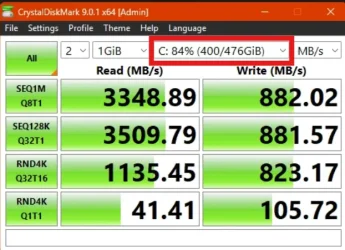
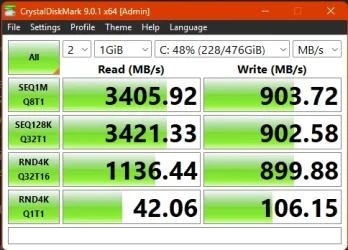
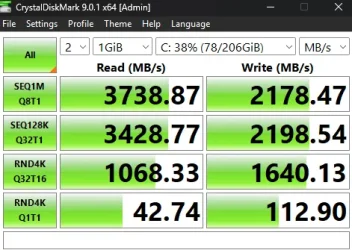
Why would the write speed be so slow? I also ran Crystal Disk and I -assume- it used the "C" drive as I could not find any setting that would change it.
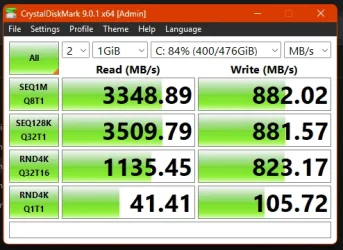
It's the original SSD that came with my Lenovo T7 Desktop. I've always felt writing was slow but I was blaming it on Windows. Perhaps Lenovo just stuck in a lousy SSD? I could certainly swap it out for a new one.
> Disk Random 16.0 Read 472.47 MB/s 8.2
> Disk Sequential 64.0 Read 2561.93 MB/s 9.1
> Disk Sequential 64.0 Write 795.96 MB/s 8.3
> Average Read Time with Sequential Writes 0.234 ms 8.5
> Latency: 95th Percentile 1.521 ms 7.9
> Latency: Maximum 4.416 ms 8.6
> Average Read Time with Random Writes 0.201 ms 8.9
> Total Run Time 00:00:05.28
Why would the write speed be so slow? I also ran Crystal Disk and I -assume- it used the "C" drive as I could not find any setting that would change it.
It's the original SSD that came with my Lenovo T7 Desktop. I've always felt writing was slow but I was blaming it on Windows. Perhaps Lenovo just stuck in a lousy SSD? I could certainly swap it out for a new one.
- Windows Build/Version
- Win11 v24H2 (Build 26100.4946)
Last edited:
My Computer
At a glance
Win10 HomeCore i9-10900K16GBRTX 2080
- OS
- Win10 Home
- Computer type
- PC/Desktop
- Manufacturer/Model
- Lenovo
- CPU
- Core i9-10900K
- Motherboard
- Lenovo 3715
- Memory
- 16GB
- Graphics Card(s)
- RTX 2080
- Sound Card
- motherboard
- Monitor(s) Displays
- Viewsonic VG2755-2K
- Screen Resolution
- 2560x1440