Why so slow?


rumplestiltskin

Well-known member
Member
Local time
4:35 PM
Posts
54
OS
Win10 Home
Ran Winsat pointing it to my "C" drive, a 512GB NVMe PCI3 SSD. The results were not stellar:

> Disk Random 16.0 Read 472.47 MB/s 8.2
> Disk Sequential 64.0 Read 2561.93 MB/s 9.1
> Disk Sequential 64.0 Write 795.96 MB/s 8.3
> Average Read Time with Sequential Writes 0.234 ms 8.5
> Latency: 95th Percentile 1.521 ms 7.9
> Latency: Maximum 4.416 ms 8.6
> Average Read Time with Random Writes 0.201 ms 8.9
> Total Run Time 00:00:05.28

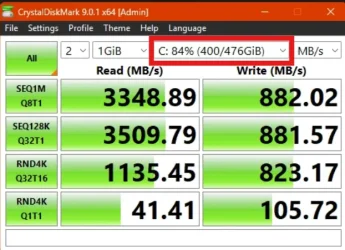
Why would the write speed be so slow? I also ran Crystal Disk and I -assume- it used the "C" drive as I could not find any setting that would change it.
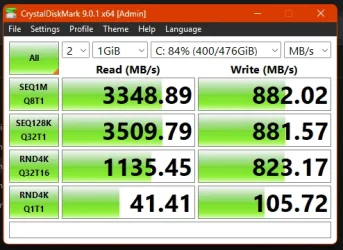
Screenshot 2025-08-19 104132.webp

It's the original SSD that came with my Lenovo T7 Desktop. I've always felt writing was slow but I was blaming it on Windows. Perhaps Lenovo just stuck in a lousy SSD? I could certainly swap it out for a new one.
 
Windows Build/Version
Win11 v24H2 (Build 26100.4946)
Last edited:

My Computer

System One

  • OS
    Win10 Home
    Computer type
    PC/Desktop
    Manufacturer/Model
    Lenovo
    CPU
    Core i9-10900K
    Motherboard
    Lenovo 3715
    Memory
    16GB
    Graphics Card(s)
    RTX 2080
    Sound Card
    motherboard
    Monitor(s) Displays
    Viewsonic VG2755-2K
    Screen Resolution
    2560x1440
The "C" drive is a Samsung MZVLB512HBJQ-000L7 which Samsung claims has a 2900MB/s sequential write speed. So something seems amiss.
 

My Computer

System One

  • OS
    Win10 Home
    Computer type
    PC/Desktop
    Manufacturer/Model
    Lenovo
    CPU
    Core i9-10900K
    Motherboard
    Lenovo 3715
    Memory
    16GB
    Graphics Card(s)
    RTX 2080
    Sound Card
    motherboard
    Monitor(s) Displays
    Viewsonic VG2755-2K
    Screen Resolution
    2560x1440
It is pointing at your C drive. Use the drop-down arrow to test other drives.

1755634387506.webp
 

My Computers

System One System Two

  • OS
    Win 11 Pro 25H2 26200.8524
    Computer type
    PC/Desktop
    Manufacturer/Model
    Self Built
    CPU
    Intel® Core™ i7-14700K
    Motherboard
    ASUS TUF Z690-PLUS WIFI BIOS 4505 11/29/25
    Memory
    G.SKILL Ripjaws S5 Series 64GB (2 x 32GB) DDR5
    Graphics Card(s)
    ASUS GeForce RTX 4070 Super 12GB
    Sound Card
    Sound Blaster AE-5 Plus
    Monitor(s) Displays
    ASUS TUF Gaming 27" 2K HDR Gaming
    Screen Resolution
    2560 x 1440
    Hard Drives
    Samsung 990 Pro 1TB NVMe (Win 11 25H2)
    SK hynix P41 500GB NVMe 25H2 DEV/Games
    SK hynix P41 2TB NVMe (x3)
    Crucial P3 Plus 4TB
    PSU
    Corsair RM850x Shift
    Case
    Antec Dark Phantom DP502 FLUX
    Cooling
    Corsair Nautilus 360 RS AIO
    Keyboard
    Logitech MK 320
    Mouse
    Razer Basilisk V3
    Internet Speed
    350Mbs
    Browser
    Firefox
    Antivirus
    Winows Security
    Other Info
    MR 8.1 Home

    System 3 Specs
    Win 11 Pro 25H2 26200.8524
    ASUS PRIME Z370-P II BIOS 3004 7/12/21
    Intel Core i7-8700 CPU @ 3.20GHz
    32GB DDR4 RAM (4x8)
    iGPU Intel UHD Graphics 630
  • Operating System
    Win 11 Pro 25H2 26200.8524
    Computer type
    PC/Desktop
    Manufacturer/Model
    Self Built
    CPU
    Intel Core i7-11700F
    Motherboard
    Asus TUF Gaming Z590 Plus WiFi (BIOS 2803)
    Memory
    64 GB DDR4
    Graphics card(s)
    MSI GeForce RTX 3060 Ventus 2X 12GB
    Sound Card
    SoundBlaster Audigy Fx V2
    Monitor(s) Displays
    Samsung F27T350
    Screen Resolution
    1920x1080
    Hard Drives
    Samsung 980 Pro 1TB
    Samsung 970 EVO Plus 2TB
    Samsung 870 EVO 500GB SSD
    PSU
    Corsair HX750
    Case
    Cougar MX330-G Window
    Cooling
    Thermalright Frozen Edge 240 Black AIO
    Internet Speed
    350Mbps
    Browser
    Firefox
    Antivirus
    Windows Security

My Computers

System One System Two

  • OS
    Windows 11 26200.8116
    Computer type
    PC/Desktop
    Manufacturer/Model
    homebuilt
    CPU
    Amd Threadripper 7970X
    Motherboard
    Gigabyte TRX50 Aero D Rev. 1.0
    Memory
    128GB (4 X 32) G.Skill DDR5 6400 (RDIMM)
    Graphics Card(s)
    Gigabyte RTX 4090 OC
    Sound Card
    none (USB to speakers), Realtek
    Monitor(s) Displays
    Innocn 32" OLED
    Screen Resolution
    3840 X 2160 @ 60Hz
    Hard Drives
    Crucial T700 2TB M.2 NVME SSD
    WD 4TB Blue SATA SSD
    Seagate 18TB IronWolf Pro
    PSU
    BeQuiet! Straight Power 12 1500W
    Case
    Lian Li 011 Dynamic Evo XL
    Cooling
    SilverStone Technology XE360-TR5, with 3 Phanteks T30 fans
    Keyboard
    Cherry KC 500 MX LP (mechanical)
    Mouse
    Logitech M500s (wired)
    Internet Speed
    2000/250 Mbps (down/up)
    Other Info
    xFinity gateway
  • Operating System
    windows 11 26200.8116
    Computer type
    PC/Desktop
    Manufacturer/Model
    homebuilt
    CPU
    Intel I9-13900K
    Motherboard
    Asus RoG Strix Z690-E
    Memory
    64GB G.Skill DDR5-6000
    Graphics card(s)
    Gigabyte RTX 3090 ti
    Sound Card
    built in Realtek
    Monitor(s) Displays
    Philips 27E1N8900 27" OLED
    Screen Resolution
    3840 X 2160 @60Hz
    Hard Drives
    WDC SN850 1TB
    8TB Seagate Ironwolf
    4TB Seagate Ironwolf
    PSU
    eVGA SuperNOVA 1300 GT
    Case
    Lian Li 011 Dynamic Evo
    Cooling
    Corsair iCUE H150i ELITE CAPELLIX Liquid CPU Cooler
    Keyboard
    Cherry Streaming (wired)
    Mouse
    Logitech M500s (wired)
It is pointing at your C drive. Use the drop-down arrow to test other drives.

(snip)
That seems to be answering a question that wasn't asked.
 

My Computers

System One System Two

  • OS
    Windows 11 26200.8116
    Computer type
    PC/Desktop
    Manufacturer/Model
    homebuilt
    CPU
    Amd Threadripper 7970X
    Motherboard
    Gigabyte TRX50 Aero D Rev. 1.0
    Memory
    128GB (4 X 32) G.Skill DDR5 6400 (RDIMM)
    Graphics Card(s)
    Gigabyte RTX 4090 OC
    Sound Card
    none (USB to speakers), Realtek
    Monitor(s) Displays
    Innocn 32" OLED
    Screen Resolution
    3840 X 2160 @ 60Hz
    Hard Drives
    Crucial T700 2TB M.2 NVME SSD
    WD 4TB Blue SATA SSD
    Seagate 18TB IronWolf Pro
    PSU
    BeQuiet! Straight Power 12 1500W
    Case
    Lian Li 011 Dynamic Evo XL
    Cooling
    SilverStone Technology XE360-TR5, with 3 Phanteks T30 fans
    Keyboard
    Cherry KC 500 MX LP (mechanical)
    Mouse
    Logitech M500s (wired)
    Internet Speed
    2000/250 Mbps (down/up)
    Other Info
    xFinity gateway
  • Operating System
    windows 11 26200.8116
    Computer type
    PC/Desktop
    Manufacturer/Model
    homebuilt
    CPU
    Intel I9-13900K
    Motherboard
    Asus RoG Strix Z690-E
    Memory
    64GB G.Skill DDR5-6000
    Graphics card(s)
    Gigabyte RTX 3090 ti
    Sound Card
    built in Realtek
    Monitor(s) Displays
    Philips 27E1N8900 27" OLED
    Screen Resolution
    3840 X 2160 @60Hz
    Hard Drives
    WDC SN850 1TB
    8TB Seagate Ironwolf
    4TB Seagate Ironwolf
    PSU
    eVGA SuperNOVA 1300 GT
    Case
    Lian Li 011 Dynamic Evo
    Cooling
    Corsair iCUE H150i ELITE CAPELLIX Liquid CPU Cooler
    Keyboard
    Cherry Streaming (wired)
    Mouse
    Logitech M500s (wired)
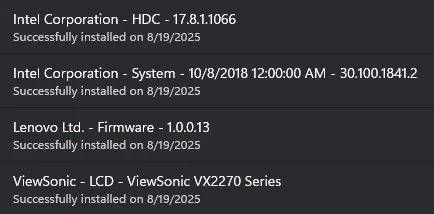
Checked for updates; showed nothing but a Defender update. Then looked in the "optional" area and found four items. Did those updates and restarted. Ran winsat again and it showed a write speed of about 2800MB/s so maybe a missing firmware update or driver?
Screenshot 2025-08-19 131259.webp
That second Intel driver (30.100.1841.2) is for Windows 10 according to the MS Update Catalog. The first one (17.8.1.1066) does look like it's a SCSI driver so maybe that's the guy my system was missing. My Lenovo had been running Win10 since I bought it four(?) years ago and I did a nuke and pave into Win11 a couple of months ago.

Also: @bobkn - Following your advice, I did check for TRIM status:
NTFS DisableDeleteNotify = 0 (Allows TRIM operations to be sent to the storage device)
ReFS DisableDeleteNotify = 0 (Allows TRIM operations to be sent to the storage device)
...so that looks okay. Thank you!
 

My Computer

System One

  • OS
    Win10 Home
    Computer type
    PC/Desktop
    Manufacturer/Model
    Lenovo
    CPU
    Core i9-10900K
    Motherboard
    Lenovo 3715
    Memory
    16GB
    Graphics Card(s)
    RTX 2080
    Sound Card
    motherboard
    Monitor(s) Displays
    Viewsonic VG2755-2K
    Screen Resolution
    2560x1440
Winsat. Jeepers, I forgot that was still present.
 

My Computers

System One System Two

  • OS
    Windows 11 26200.8116
    Computer type
    PC/Desktop
    Manufacturer/Model
    homebuilt
    CPU
    Amd Threadripper 7970X
    Motherboard
    Gigabyte TRX50 Aero D Rev. 1.0
    Memory
    128GB (4 X 32) G.Skill DDR5 6400 (RDIMM)
    Graphics Card(s)
    Gigabyte RTX 4090 OC
    Sound Card
    none (USB to speakers), Realtek
    Monitor(s) Displays
    Innocn 32" OLED
    Screen Resolution
    3840 X 2160 @ 60Hz
    Hard Drives
    Crucial T700 2TB M.2 NVME SSD
    WD 4TB Blue SATA SSD
    Seagate 18TB IronWolf Pro
    PSU
    BeQuiet! Straight Power 12 1500W
    Case
    Lian Li 011 Dynamic Evo XL
    Cooling
    SilverStone Technology XE360-TR5, with 3 Phanteks T30 fans
    Keyboard
    Cherry KC 500 MX LP (mechanical)
    Mouse
    Logitech M500s (wired)
    Internet Speed
    2000/250 Mbps (down/up)
    Other Info
    xFinity gateway
  • Operating System
    windows 11 26200.8116
    Computer type
    PC/Desktop
    Manufacturer/Model
    homebuilt
    CPU
    Intel I9-13900K
    Motherboard
    Asus RoG Strix Z690-E
    Memory
    64GB G.Skill DDR5-6000
    Graphics card(s)
    Gigabyte RTX 3090 ti
    Sound Card
    built in Realtek
    Monitor(s) Displays
    Philips 27E1N8900 27" OLED
    Screen Resolution
    3840 X 2160 @60Hz
    Hard Drives
    WDC SN850 1TB
    8TB Seagate Ironwolf
    4TB Seagate Ironwolf
    PSU
    eVGA SuperNOVA 1300 GT
    Case
    Lian Li 011 Dynamic Evo
    Cooling
    Corsair iCUE H150i ELITE CAPELLIX Liquid CPU Cooler
    Keyboard
    Cherry Streaming (wired)
    Mouse
    Logitech M500s (wired)
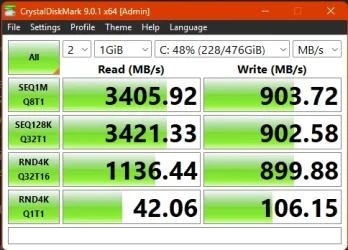
Ran CrystalDiskMark again (post-updates). Still shows sucky performance:
Screenshot 2025-08-19 134028.webp
...and winsat now shows a sequential write speed of 1063MB/s (was 2900 just after a restart). I'll restart and check it again.
 

My Computer

System One

  • OS
    Win10 Home
    Computer type
    PC/Desktop
    Manufacturer/Model
    Lenovo
    CPU
    Core i9-10900K
    Motherboard
    Lenovo 3715
    Memory
    16GB
    Graphics Card(s)
    RTX 2080
    Sound Card
    motherboard
    Monitor(s) Displays
    Viewsonic VG2755-2K
    Screen Resolution
    2560x1440

My Computers

System One System Two

  • OS
    Win 11 Pro 25H2 26200.8524
    Computer type
    PC/Desktop
    Manufacturer/Model
    Self Built
    CPU
    Intel® Core™ i7-14700K
    Motherboard
    ASUS TUF Z690-PLUS WIFI BIOS 4505 11/29/25
    Memory
    G.SKILL Ripjaws S5 Series 64GB (2 x 32GB) DDR5
    Graphics Card(s)
    ASUS GeForce RTX 4070 Super 12GB
    Sound Card
    Sound Blaster AE-5 Plus
    Monitor(s) Displays
    ASUS TUF Gaming 27" 2K HDR Gaming
    Screen Resolution
    2560 x 1440
    Hard Drives
    Samsung 990 Pro 1TB NVMe (Win 11 25H2)
    SK hynix P41 500GB NVMe 25H2 DEV/Games
    SK hynix P41 2TB NVMe (x3)
    Crucial P3 Plus 4TB
    PSU
    Corsair RM850x Shift
    Case
    Antec Dark Phantom DP502 FLUX
    Cooling
    Corsair Nautilus 360 RS AIO
    Keyboard
    Logitech MK 320
    Mouse
    Razer Basilisk V3
    Internet Speed
    350Mbs
    Browser
    Firefox
    Antivirus
    Winows Security
    Other Info
    MR 8.1 Home

    System 3 Specs
    Win 11 Pro 25H2 26200.8524
    ASUS PRIME Z370-P II BIOS 3004 7/12/21
    Intel Core i7-8700 CPU @ 3.20GHz
    32GB DDR4 RAM (4x8)
    iGPU Intel UHD Graphics 630
  • Operating System
    Win 11 Pro 25H2 26200.8524
    Computer type
    PC/Desktop
    Manufacturer/Model
    Self Built
    CPU
    Intel Core i7-11700F
    Motherboard
    Asus TUF Gaming Z590 Plus WiFi (BIOS 2803)
    Memory
    64 GB DDR4
    Graphics card(s)
    MSI GeForce RTX 3060 Ventus 2X 12GB
    Sound Card
    SoundBlaster Audigy Fx V2
    Monitor(s) Displays
    Samsung F27T350
    Screen Resolution
    1920x1080
    Hard Drives
    Samsung 980 Pro 1TB
    Samsung 970 EVO Plus 2TB
    Samsung 870 EVO 500GB SSD
    PSU
    Corsair HX750
    Case
    Cougar MX330-G Window
    Cooling
    Thermalright Frozen Edge 240 Black AIO
    Internet Speed
    350Mbps
    Browser
    Firefox
    Antivirus
    Windows Security
Ran CrystalDiskMark again (post-updates). Still shows sucky performance:
View attachment 142843
...and winsat now shows a sequential write speed of 1063MB/s (was 2900 just after a restart). I'll restart and check it again.
Seems about right to me.
Even on CrystalMark site, the same pattern is shown.
Probably because it is using 4kb with only 1 queue in the last one.

disk.webp
 

My Computers

System One System Two

  • OS
    All Branches but Release
    Computer type
    Laptop
    Manufacturer/Model
    Acer Nitro ANV15-51
    CPU
    AMD Ryzen 7 7735HS 3200-4500 Mhz 8 cores x 2
    Motherboard
    Sportage_RBH
    Memory
    32 GB DDR5
    Graphics Card(s)
    Radeon Graphic / NVIDIA GeForce RTX 4060 8 GB GDDR6
    Sound Card
    AMD/Realtek(R) Audio
    Monitor(s) Displays
    Integrated Monitor (15.3"vis)
    Screen Resolution
    FHD 1920X1080 16:9 144Hz
    Hard Drives
    KINGSTON OM8SEP4512Q-AA 1TB
    Western Digital 256GB
    PSU
    19V DC 6.32 A 120 W
    Cooling
    Dual Fans
    Mouse
    MS Bluetooth
    Internet Speed
    Fiber 1GB Cox -us & 1GB Orange-fr
    Browser
    Edge Canary- Firefox Nightly-Chrome Dev-Chrome Dev
    Antivirus
    Windows Defender
  • Operating System
    Windows 11 Beta
    Computer type
    Laptop
    Manufacturer/Model
    Asus X751BP
    CPU
    AMD A9-9420
    Memory
    8 GB of DDR4
    Graphics card(s)
    AMD Radeon R5
    Screen Resolution
    1600x900
    Hard Drives
    Seagate 1 TB
Nothing much is amiss, your testing shows that it is broadly in line with the manufacturers specs.
They always pick the highest numbers possible.

The low write speed is probably due to it being at 84% capacity plus Housekeeping functions and maybe Thermal limits, Power saving measures, OEM Laptop firmware.
 

My Computer

System One

  • OS
    Windows 11
Nothing much is amiss, your testing shows that it is broadly in line with the manufacturers specs.
They always pick the highest numbers possible.

The low write speed is probably due to it being at 84% capacity plus Housekeeping functions and maybe Thermal limits, Power saving measures, OEM Laptop firmware.
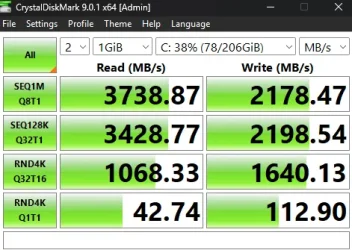
Did a cleanup through Settings > Storage which dropped the used space to 38%. All power settings are at 100%. Energy Saver is off except for screen sleep in 10 minutes. This is a T7 Desktop; I know there's a T7 laptop but that's not my machine. The CPU is water-cooled and never runs hot. I have everything set to ramp up fans when required instead of dropping power. BTW: I haven't done any tweaks to the CPU.

I'm going to try one more restart and run winstat a few times over the course of a couple of hours. I'll note that, upon a restart, running CrystalDiskMark immediately shows lousy write #'s. Winstat upon a restart looks fine (about 2900 MB/s write) but, as soon as I run CrystalDiskMark (and get the lousy numbers), then return to run winstat again, now I get lousy numbers. In short: CrystalDiskMark always shows lousy write numbers. Ugh.
 

My Computer

System One

  • OS
    Win10 Home
    Computer type
    PC/Desktop
    Manufacturer/Model
    Lenovo
    CPU
    Core i9-10900K
    Motherboard
    Lenovo 3715
    Memory
    16GB
    Graphics Card(s)
    RTX 2080
    Sound Card
    motherboard
    Monitor(s) Displays
    Viewsonic VG2755-2K
    Screen Resolution
    2560x1440

Latest Support Threads

Back
Top Bottom