Windows 11 File Explorer Ribbon


DavidJohnson933

New member
Local time
6:32 PM
Posts
2
OS
windows 11
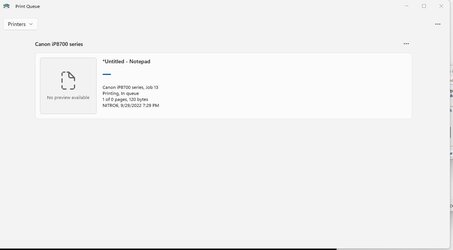
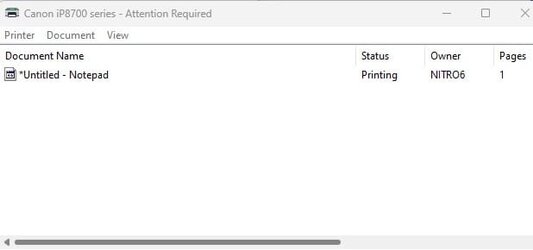
I had a registry edit that made the windows 11 file explorer ribbon look like the windows 10 file explorer ribbon. But since 22H2 update the ribbon went back to windows 11 and the edit does not work any more. I tried removing it and and adding it. It also changed the print queue box in the lower right hand corner by the time when printing I would open it up and see my print jobs by line. Now it opens up with huge icon boxes... I dont like that either.. LOL

I need the old file explorer back, can anyone help?

This is another thread I found on the same issue.
File Explorer Ribbon
 
Windows Build/Version
22621.521

Attachments

  • new print queue.jpg
    new print queue.jpg
    15.7 KB · Views: 12
  • old print queue.jpg
    old print queue.jpg
    9.5 KB · Views: 11

My Computer My Computer

At a glance

windows 11
OS
windows 11
Hello @DavidJohnson933 and welcome to ElevenForum.

You are correct, the 22H2 upgrade broke the File Explorer ribbon bar tweak.
I too am disappointed, but the new non-ribbon bar method isn't too bad. It's just different.

If a method is found to bring back the classic ribbon bar, rest assured that it will be posted in the tutorials section.


There is a tweak tool called: Explorer Patcher, that many use.
I am not one of them, so I can't really comment on it.


My Computers My Computers

  • At a glance

    Win 11 Home ♦♦♦26200.8875 ♦♦♦♦♦♦♦25H2AMD Ryzen 7 3700XG.Skill (F4-3200C14D-16GTZKW)EVGA RTX 2070 (08G-P4-2171-KR)
    OS
    Win 11 Home ♦♦♦26200.8875 ♦♦♦♦♦♦♦25H2
    Computer type
    PC/Desktop
    Manufacturer/Model
    Built by Ghot® [May 2020]
    CPU
    AMD Ryzen 7 3700X
    Motherboard
    Asus Pro WS X570-ACE (BIOS 5302)
    Memory
    G.Skill (F4-3200C14D-16GTZKW)
    Graphics Card(s)
    EVGA RTX 2070 (08G-P4-2171-KR)
    Sound Card
    Realtek ALC1220P / ALC S1220A
    Monitor(s) Displays
    Dell U3011 30"
    Screen Resolution
    2560 x 1600
    Hard Drives
    2x Samsung 860 EVO 500GB,
    WD 4TB Black FZBX - SATA III,
    WD 8TB Black FZBX - SATA III,
    DRW-24B1ST CD/DVD Burner
    PSU
    PC Power & Cooling 750W Quad EPS12V
    Case
    Cooler Master ATCS 840 Tower
    Cooling
    CM Hyper 212 EVO (push/pull)
    Keyboard
    Ducky DK9008 Shine II Blue LED
    Mouse
    Logitech Optical M-100
    Internet Speed
    300/300
    Browser
    Firefox (latest)
    Antivirus
    Bitdefender Total Security
    Other Info
    Speakers: Klipsch Pro Media 2.1
  • At a glance

    Windows XP Pro 32bit w/SP3AMD Athlon 64 X2 5000+ (OC'd @ 3.2Ghz)TWIN2X2048-6400C4DHX (2 x 1GB, DDR2 800)EVGA 256-P2-N758-TR GeForce 8600GT SSC
    Operating System
    Windows XP Pro 32bit w/SP3
    Computer type
    PC/Desktop
    Manufacturer/Model
    Built by Ghot® (not in use)
    CPU
    AMD Athlon 64 X2 5000+ (OC'd @ 3.2Ghz)
    Motherboard
    ASUS M2N32-SLI Deluxe Wireless Edition
    Memory
    TWIN2X2048-6400C4DHX (2 x 1GB, DDR2 800)
    Graphics card(s)
    EVGA 256-P2-N758-TR GeForce 8600GT SSC
    Sound Card
    Onboard
    Monitor(s) Displays
    ViewSonic G90FB Black 19" Professional (CRT)
    Screen Resolution
    up to 2048 x 1536
    Hard Drives
    WD 36GB 10,000rpm Raptor SATA
    Seagate 80GB 7200rpm SATA
    Lite-On LTR-52246S CD/RW
    Lite-On LH-18A1P CD/DVD Burner
    PSU
    PC Power & Cooling Silencer 750 Quad EPS12V
    Case
    Generic Beige case, 80mm fans
    Cooling
    ZALMAN 9500A 92mm CPU Cooler
    Keyboard
    Logitech Classic Keybooard 200
    Mouse
    Logitech Optical M-BT96a
    Internet Speed
    300/300
    Browser
    Firefox 3.x ??
    Antivirus
    Symantec (Norton)
    Other Info
    Still assembled, still runs. Haven't turned it on for 15 years?
Hello @DavidJohnson933 and welcome to ElevenForum.

You are correct, the 22H2 upgrade broke the File Explorer ribbon bar tweak.
I too am disappointed, but the new non-ribbon bar method isn't too bad. It's just different.

If a method is found to bring back the classic ribbon bar, rest assured that it will be posted in the tutorials section.


There is a tweak tool called: Explorer Patcher, that many use.
I am not one of them, so I can't really comment on it.

The only problem with the new one is you have to click more times than normal.. LOL but yeah wish I can get the old one back...
 

My Computer My Computer

At a glance

windows 11
OS
windows 11
The only problem with the new one is you have to click more times than normal.. LOL but yeah wish I can get the old one back...


Yep, Microsoft has been overly generous with the "extra clicks".
They've spread them around like sprinkles on a cupcake. :D
 

My Computers My Computers

  • At a glance

    Win 11 Home ♦♦♦26200.8875 ♦♦♦♦♦♦♦25H2AMD Ryzen 7 3700XG.Skill (F4-3200C14D-16GTZKW)EVGA RTX 2070 (08G-P4-2171-KR)
    OS
    Win 11 Home ♦♦♦26200.8875 ♦♦♦♦♦♦♦25H2
    Computer type
    PC/Desktop
    Manufacturer/Model
    Built by Ghot® [May 2020]
    CPU
    AMD Ryzen 7 3700X
    Motherboard
    Asus Pro WS X570-ACE (BIOS 5302)
    Memory
    G.Skill (F4-3200C14D-16GTZKW)
    Graphics Card(s)
    EVGA RTX 2070 (08G-P4-2171-KR)
    Sound Card
    Realtek ALC1220P / ALC S1220A
    Monitor(s) Displays
    Dell U3011 30"
    Screen Resolution
    2560 x 1600
    Hard Drives
    2x Samsung 860 EVO 500GB,
    WD 4TB Black FZBX - SATA III,
    WD 8TB Black FZBX - SATA III,
    DRW-24B1ST CD/DVD Burner
    PSU
    PC Power & Cooling 750W Quad EPS12V
    Case
    Cooler Master ATCS 840 Tower
    Cooling
    CM Hyper 212 EVO (push/pull)
    Keyboard
    Ducky DK9008 Shine II Blue LED
    Mouse
    Logitech Optical M-100
    Internet Speed
    300/300
    Browser
    Firefox (latest)
    Antivirus
    Bitdefender Total Security
    Other Info
    Speakers: Klipsch Pro Media 2.1
  • At a glance

    Windows XP Pro 32bit w/SP3AMD Athlon 64 X2 5000+ (OC'd @ 3.2Ghz)TWIN2X2048-6400C4DHX (2 x 1GB, DDR2 800)EVGA 256-P2-N758-TR GeForce 8600GT SSC
    Operating System
    Windows XP Pro 32bit w/SP3
    Computer type
    PC/Desktop
    Manufacturer/Model
    Built by Ghot® (not in use)
    CPU
    AMD Athlon 64 X2 5000+ (OC'd @ 3.2Ghz)
    Motherboard
    ASUS M2N32-SLI Deluxe Wireless Edition
    Memory
    TWIN2X2048-6400C4DHX (2 x 1GB, DDR2 800)
    Graphics card(s)
    EVGA 256-P2-N758-TR GeForce 8600GT SSC
    Sound Card
    Onboard
    Monitor(s) Displays
    ViewSonic G90FB Black 19" Professional (CRT)
    Screen Resolution
    up to 2048 x 1536
    Hard Drives
    WD 36GB 10,000rpm Raptor SATA
    Seagate 80GB 7200rpm SATA
    Lite-On LTR-52246S CD/RW
    Lite-On LH-18A1P CD/DVD Burner
    PSU
    PC Power & Cooling Silencer 750 Quad EPS12V
    Case
    Generic Beige case, 80mm fans
    Cooling
    ZALMAN 9500A 92mm CPU Cooler
    Keyboard
    Logitech Classic Keybooard 200
    Mouse
    Logitech Optical M-BT96a
    Internet Speed
    300/300
    Browser
    Firefox 3.x ??
    Antivirus
    Symantec (Norton)
    Other Info
    Still assembled, still runs. Haven't turned it on for 15 years?
For goodness sake, please reinstate the File Explorer ribbon. File Explorer is used for just that, exploring files and the move and copy functions are an important part of the whole explorer process. Unbelievable that it has been broken again with the last 22H2 update. Yes, you can access these functions but they are a few more click away and very non-intuitive. Definetly a backward step Microsoft! Don't fix what wasn't broken in the first place.
 

My Computer My Computer

At a glance

Windows 11 ProDevice name HPLaptop Processor Intel(R) Core(...8.00 GB (7.84 GB usable)
OS
Windows 11 Pro
Computer type
Laptop
Manufacturer/Model
HP ProBook 450 G7
CPU
Device name HPLaptop Processor Intel(R) Core(TM) i5-102
Memory
8.00 GB (7.84 GB usable)
or goodness sake, please reinstate the File Explorer ribbon.
You're preaching to other pastors here. The congregation (MS) isn't listening.
 

My Computers My Computers

  • At a glance

    Windows 11 Pro 25H2 26200.8875i9-10900 10 core 20 threads32 gbnone-Intel UHD Graphics 630
    OS
    Windows 11 Pro 25H2 26200.8875
    Computer type
    PC/Desktop
    Manufacturer/Model
    Dell Optiplex 7080
    CPU
    i9-10900 10 core 20 threads
    Motherboard
    DELL 0J37VM
    Memory
    32 gb
    Graphics Card(s)
    none-Intel UHD Graphics 630
    Sound Card
    Integrated Realtek
    Monitor(s) Displays
    Benq 27
    Screen Resolution
    2560x1440
    Hard Drives
    2x1tb Solidigm m.2 nvme /External drives 512gb Samsung m.2 sata+2tb Kingston m2.nvme
    PSU
    500w
    Case
    MT
    Cooling
    Dell Premium
    Keyboard
    Logitech wired
    Mouse
    Logitech wireless
    Internet Speed
    so slow I'm too embarrassed to tell
    Browser
    #1 Edge #2 Firefox
    Antivirus
    Defender+MWB Premium
  • At a glance

    Windows 11 Pro 24H2 26200.8875AMD Ryzen 7 6800U32 gbintegrated
    Operating System
    Windows 11 Pro 24H2 26200.8875
    Computer type
    PC/Desktop
    Manufacturer/Model
    Beelink Mini PC SER5
    CPU
    AMD Ryzen 7 6800U
    Memory
    32 gb
    Graphics card(s)
    integrated
    Sound Card
    integrated
    Monitor(s) Displays
    Benq 27
    Screen Resolution
    2560x1440
    Hard Drives
    1TB Crucial nvme
    Keyboard
    Logitech wired
    Mouse
    Logitech wireless
    Internet Speed
    still too embarrassed to tell
    Browser
    Firefox
    Antivirus
    Defender
    Other Info
    System 3 is non compliant Dell 9020 i7-4770/24gb ram Win11 PRO 26200.8875
Hello @DavidJohnson933 and welcome to ElevenForum.

You are correct, the 22H2 upgrade broke the File Explorer ribbon bar tweak.
I too am disappointed, but the new non-ribbon bar method isn't too bad. It's just different.

If a method is found to bring back the classic ribbon bar, rest assured that it will be posted in the tutorials section.


There is a tweak tool called: Explorer Patcher, that many use.
I am not one of them, so I can't really comment on it.

Explorer Patcher is not yet not working on 22H2. I hope the developers can relieve our pain 😬
 

My Computer My Computer

At a glance

Windows 11 64-bitIntel Core Ultra 7 265KCorsair DDR5-5200 32GB x 2ASUS RTX 5060 Ti 16GB
OS
Windows 11 64-bit
Computer type
PC/Desktop
Manufacturer/Model
Me
CPU
Intel Core Ultra 7 265K
Motherboard
ASUS ROG STRIX Z890-F
Memory
Corsair DDR5-5200 32GB x 2
Graphics Card(s)
ASUS RTX 5060 Ti 16GB
Sound Card
on board
Monitor(s) Displays
ASUS PB27UQ
Screen Resolution
3840 x 2160
Hard Drives
Samsung SSD 9100 PRO 1TB, Samsung SSD 960 EVO 500GB, Seagate 1TB HDD for backup
PSU
Corsair RM850e - 850W Gold ATX 3.1 Modular PSU
Case
Coolermaster Masterbox HAF 500 Mid Tower (should have gone with Fractal Design!)
Cooling
Noctua NH-D15 Chromax Black
Keyboard
Logitech G915 X
Mouse
Logitech M560 Bluetooth
Internet Speed
750Mb/s
Browser
Firefox 64-bit
Antivirus
ESET
Ahh that answered my question. Explorer Patcher is not working with on 22H2.

Good Grief that last update on Explorer Patcher has been 11/2022
 

My Computer My Computer

At a glance

Windows 11 Ptoi7 875016GB
OS
Windows 11 Pto
Computer type
Laptop
Manufacturer/Model
Dell Dimension G3 3779
CPU
i7 8750
Memory
16GB
For goodness sake, please reinstate the File Explorer ribbon. File Explorer is used for just that, exploring files and the move and copy functions are an important part of the whole explorer process. Unbelievable that it has been broken again with the last 22H2 update. Yes, you can access these functions but they are a few more click away and very non-intuitive. Definetly a backward step Microsoft! Don't fix what wasn't broken in the first place.
I found this on another thread and this works for me when I use File Explorer to sort files and folders:
The old explorer is still there, if you open a run box and type control, hit enter to open control panel then press Alt+Up Arrow then Windows 10 explorer is back. Unfortunately, I don't know of a way of keeping it like this, for now I am just opening a couple of windows like this and trying to remember not to shut them down. Doesn't really feel like progress to be honest, typical MS, why not give people a choice instead of forcing this garbage that no one asked for....

This was a suggestion of SteveSXD on the thread 'Restoring Windows 10 Ribbon'. Apologies but I don't know how to link Steve's suggestion on this thread. Just tried the 'fix' again and it works for me. Just to add, this was easy for me as I continue to use Control Panel as my go to (old habit!)
 

My Computer My Computer

At a glance

Windows 11 ProDevice name HPLaptop Processor Intel(R) Core(...8.00 GB (7.84 GB usable)
OS
Windows 11 Pro
Computer type
Laptop
Manufacturer/Model
HP ProBook 450 G7
CPU
Device name HPLaptop Processor Intel(R) Core(TM) i5-102
Memory
8.00 GB (7.84 GB usable)
yeah such a rubbish show. I am not liking W11 File Explorer.
 

My Computer My Computer

At a glance

Windows 11 Ptoi7 875016GB
OS
Windows 11 Pto
Computer type
Laptop
Manufacturer/Model
Dell Dimension G3 3779
CPU
i7 8750
Memory
16GB

My Computers My Computers

  • At a glance

    Windows 11 ProIntel Core i9-10900XCorsair 64 GB (4 x 16 GB) CMW64GX4M4C3000C15 ...GIGABYTE GeForce GTX 1660 Super Mini ITX 6 GB OC
    OS
    Windows 11 Pro
    Computer type
    PC/Desktop
    Manufacturer/Model
    Stigg's Build
    CPU
    Intel Core i9-10900X
    Motherboard
    GIGABYTE X299X DESIGNARE 10G
    Memory
    Corsair 64 GB (4 x 16 GB) CMW64GX4M4C3000C15 Vengeance RGB Pro 3000Mhz DDR4
    Graphics Card(s)
    GIGABYTE GeForce GTX 1660 Super Mini ITX 6 GB OC
    Sound Card
    Realtek ALC1220
    Monitor(s) Displays
    Samsung 27" FHD LED FreeSync Gaming Monitor (LS27F350FHEXXY)
    Screen Resolution
    1920 x 1080
    Hard Drives
    Samsung 970 Pro Series 1TB M.2 2280 NVMe SSD
    Western Digital Red Pro WD8003FFBX-68B9AN0 8 TB, 7200 RPM, SATA-III
    Western Digital Red Pro WD8003FFBX-68B9AN0 8 TB, 7200 RPM, SATA-III
    PSU
    Corsair HX1200 1200W 80 Plus Platinum
    Case
    Fractal Design Define 7 Black Solid Case
    Cooling
    Noctua NH-D15 Chromax Black
    Keyboard
    Razer Ornata V2
    Mouse
    Razer DeathAdder Essential
    Internet Speed
    FTTN 100Mbps / 40Mbps
    Browser
    Mozilla Firefox
    Antivirus
    N/A
    Other Info
    Logitech BRIO 4k Ultra HD USB-C Webcam
  • At a glance

    Windows 10 ProCore i7-8750HSK Hynix 32 GB (2 x 16 GB) HMA82GS6CJR8N-VK 1...NVIDIA GeForce GTX 1070
    Operating System
    Windows 10 Pro
    Computer type
    Laptop
    Manufacturer/Model
    ASUS ROG Zephyrus M GM501GS
    CPU
    Core i7-8750H
    Motherboard
    Zephyrus M GM501GS
    Memory
    SK Hynix 32 GB (2 x 16 GB) HMA82GS6CJR8N-VK 16 GB DDR4-2666 DDR4 SDRAM
    Graphics card(s)
    NVIDIA GeForce GTX 1070
    Sound Card
    Realtek ALC294
    Monitor(s) Displays
    AU Optronics B156HAN07.1 [15.6" LCD]
    Screen Resolution
    1920 x 1080
    Hard Drives
    Samsung MZVKW512HMJP-00000 512 GB, PCI-E 3.0 x4
    Samsung SSD 860 QVO 4TB 4 TB, SATA-III
    PSU
    N/A
    Case
    N/A
    Cooling
    N/A
    Keyboard
    PC/AT Enhanced PS2 Keyboard (101/102-Key)
    Mouse
    Razer DeathAdder Essential
    Internet Speed
    FTTN 100Mbps / 40Mbps
    Browser
    Mozilla Firefox
    Antivirus
    N/A
    Other Info
    USB2.0 HD UVC Webcam
Back
Top Bottom