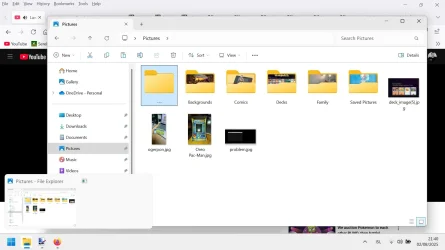
Solved Windows Explorer showing a double thumbnail


nocruoro

Well-known member
Member
Local time
2:41 AM
Posts
163
OS
Windows 11 Home
Windows 11 just did today all of a sudden but i only have one folder active. How do i disable this double thumbnail problem with the blank thumbnail if it shows up again ?

It isn't causing problems but it is odd. Normally only network browsers do this.
 

Attachments

  • windows.webp
    windows.webp
    75.5 KB · Views: 1

My Computer My Computer

At a glance

Windows 11 Home
OS
Windows 11 Home
Computer type
Laptop
Manufacturer/Model
Lenovo Yoga 7 Slim 14I110
Reset thumbnail cache
 

My Computer My Computer

At a glance

Windows 11 Pro Insider 64 bit 25H2 26200.5742Intel Core i7 9700K 3.6016 GBnVidia GEForce RTX 2060 Super
OS
Windows 11 Pro Insider 64 bit 25H2 26200.5742
Computer type
PC/Desktop
Manufacturer/Model
Gigabyte Z390 UD
CPU
Intel Core i7 9700K 3.60
Motherboard
Gigabyte Z390 UD
Memory
16 GB
Graphics Card(s)
nVidia GEForce RTX 2060 Super
Sound Card
onboard
Monitor(s) Displays
Two 27" Dell 4K monitors
Screen Resolution
3840 x 2160
Hard Drives
M.2 NVME SSD, 500 GB; Two 2TB Mechanical HDD's
PSU
850w PSU
Case
Cyberpower PC
Cooling
Water cooled
Keyboard
Backlit Cyberpower gaming keyboard
Mouse
Backlit Cyberpower gaming mouse
Internet Speed
1 GB mbps
Browser
Brave
Antivirus
Windows Security
Disk Cleanup is done now. Hopefully it should clear up this mess for a while. ;-)
 

My Computer My Computer

At a glance

Windows 11 Home
OS
Windows 11 Home
Computer type
Laptop
Manufacturer/Model
Lenovo Yoga 7 Slim 14I110

Latest Support Threads

Back
Top Bottom