Windows Security Health Crash after Windows 11 22H2 Upgrade


My advice is DOING NOTHING. It's clearly a bug in the service and Microsoft will fix it one day (I'm sure automatic reports are growing...).
Maybe trying to disable some Security options could help, but I doubt it given the error codes (probably heap corruption or bad pointer hence a programming bug).
 

My Computer My Computer

At a glance

Windows 11 HomeIntel i9-13980HX32GB DDR5 5600MHzNVidia GTX 4090 Laptop 256bit 16GB 175W
OS
Windows 11 Home
Computer type
Laptop
Manufacturer/Model
ASUS ROG SCAR 18
CPU
Intel i9-13980HX
Memory
32GB DDR5 5600MHz
Graphics Card(s)
NVidia GTX 4090 Laptop 256bit 16GB 175W
Sound Card
Realtek ALC285 + Dolby Atmos
Monitor(s) Displays
G-Sync NE180QDM-NZ2 18" 16:10, FreeSync Premium XiaoMi Mi 34" 21:9
Screen Resolution
2560x1600@240Hz (internal), 3440x1440@144Hz (external)
Hard Drives
NVMe Lexar NM790 1TB 6GB/s, NVMe Lexar NM790 4TB 6GB/s
PSU
330W (laptop PSU)
Mouse
ROG Strix Carry Wireless-BT mouse
Other Info
4K UHD USB Archgon Star Blu-Ray 4K UHD,
8BitDo Arcade Stick,
Vader 4 Pro controller
Looking around other forum/threads the problem seems Microsoft pushes WRONG "Security Health UI" for the DEV ring build! Instead of 22621 for Windows 11 22H2 22621.x...
You can check it by opening an Admin PowerShell and listing your currently installed version with:

Code:
Get-AppxPackage Microsoft.SecHealthUI -AllUsers

It should be "Microsoft.SecHealthUI_1000.22621.1.0_x64__8wekyb3d8bbwe" and not something like "Microsoft.SecHealthUI_1000.25305.1000.0_x64__8wekyb3d8bbwe" with directory " C:\Windows\System32\SecurityHealth\1.0.2302.21002-0"!
 

My Computer My Computer

At a glance

Windows 11 HomeIntel i9-13980HX32GB DDR5 5600MHzNVidia GTX 4090 Laptop 256bit 16GB 175W
OS
Windows 11 Home
Computer type
Laptop
Manufacturer/Model
ASUS ROG SCAR 18
CPU
Intel i9-13980HX
Memory
32GB DDR5 5600MHz
Graphics Card(s)
NVidia GTX 4090 Laptop 256bit 16GB 175W
Sound Card
Realtek ALC285 + Dolby Atmos
Monitor(s) Displays
G-Sync NE180QDM-NZ2 18" 16:10, FreeSync Premium XiaoMi Mi 34" 21:9
Screen Resolution
2560x1600@240Hz (internal), 3440x1440@144Hz (external)
Hard Drives
NVMe Lexar NM790 1TB 6GB/s, NVMe Lexar NM790 4TB 6GB/s
PSU
330W (laptop PSU)
Mouse
ROG Strix Carry Wireless-BT mouse
Other Info
4K UHD USB Archgon Star Blu-Ray 4K UHD,
8BitDo Arcade Stick,
Vader 4 Pro controller
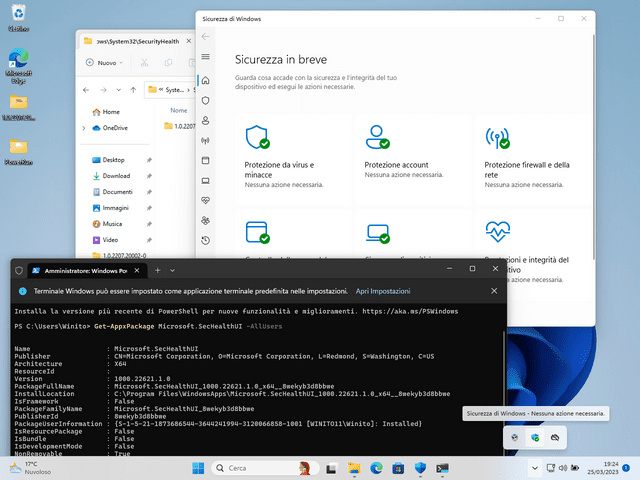
Looking around other forum/threads the problem seems Microsoft pushes WRONG "Security Health UI" for the DEV ring build! Instead of 22621 for Windows 11 22H2 22621.x...
You can check it by opening an Admin PowerShell and listing your currently installed version with:

Code:
Get-AppxPackage Microsoft.SecHealthUI -AllUsers

It should be "Microsoft.SecHealthUI_1000.22621.1.0_x64__8wekyb3d8bbwe" and not something like "Microsoft.SecHealthUI_1000.25305.1000.0_x64__8wekyb3d8bbwe" with directory " C:\Windows\System32\SecurityHealth\1.0.2302.21002-0"!
Yes it's exactly the same problem reported last summer when the wrong one was sent out
 

My Computer My Computer

At a glance

Windows 11 Pro 25H2 (RP channel)AMD Ryzen 7 9800X3D 8-core64GB Corsair Titanium 6000/CL30MSI Suprim 5080 SOC
OS
Windows 11 Pro 25H2 (RP channel)
Computer type
PC/Desktop
Manufacturer/Model
MSI
CPU
AMD Ryzen 7 9800X3D 8-core
Motherboard
MEG X870E Godlike
Memory
64GB Corsair Titanium 6000/CL30
Graphics Card(s)
MSI Suprim 5080 SOC
Sound Card
Soundblaster AE-9
Monitor(s) Displays
ASUS TUF Gaming VG289Q
Screen Resolution
3840x2160
Hard Drives
Samsung 9100 Pro 4TB (gen 5 x4, system drive/games)
Samsung 990 Pro 2TB
Samsung 980 Pro 2TB
Samsung 870 Evo 4TB
Samsung 870 Evo 2TB
Samsung T9 4TB
PSU
Seasonic PX-2200
Case
Bequiet! Dark Base Pro 901
Cooling
Noctua NH-D15S Chromax black
Keyboard
Logitech G915 X (wired)
Mouse
Logitech G903 with PowerPlay charger
Internet Speed
900Mb/sec
Browser
Microsoft Edge
Antivirus
Windows Defender
This means they are STILL pushing the wrong one, even on a fresh Win 11 installation 🤦🏻‍♂️
I was able to restore 22621 on the test environment in VBox, and after checking for updates it didn't reinstall buggy 25305. I wonder if on next major security update it will be overwritten again with the DEV ring edition...
I'm cautious before I try the same restore method on my everyday OS.
 

My Computer My Computer

At a glance

Windows 11 HomeIntel i9-13980HX32GB DDR5 5600MHzNVidia GTX 4090 Laptop 256bit 16GB 175W
OS
Windows 11 Home
Computer type
Laptop
Manufacturer/Model
ASUS ROG SCAR 18
CPU
Intel i9-13980HX
Memory
32GB DDR5 5600MHz
Graphics Card(s)
NVidia GTX 4090 Laptop 256bit 16GB 175W
Sound Card
Realtek ALC285 + Dolby Atmos
Monitor(s) Displays
G-Sync NE180QDM-NZ2 18" 16:10, FreeSync Premium XiaoMi Mi 34" 21:9
Screen Resolution
2560x1600@240Hz (internal), 3440x1440@144Hz (external)
Hard Drives
NVMe Lexar NM790 1TB 6GB/s, NVMe Lexar NM790 4TB 6GB/s
PSU
330W (laptop PSU)
Mouse
ROG Strix Carry Wireless-BT mouse
Other Info
4K UHD USB Archgon Star Blu-Ray 4K UHD,
8BitDo Arcade Stick,
Vader 4 Pro controller
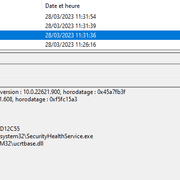
This means they are STILL pushing the wrong one, even on a fresh Win 11 installation 🤦🏻‍♂️
I was able to restore 22621 on the test environment in VBox, and after checking for updates it didn't reinstall buggy 25305. I wonder if on next major security update it will be overwritten again with the DEV ring edition...
I'm cautious before I try the same restore method on my everyday OS.
The update is still showing as hidden when I run 'wushowhide', if I unhide it it will get installed again
 

My Computer My Computer

At a glance

Windows 11 Pro 25H2 (RP channel)AMD Ryzen 7 9800X3D 8-core64GB Corsair Titanium 6000/CL30MSI Suprim 5080 SOC
OS
Windows 11 Pro 25H2 (RP channel)
Computer type
PC/Desktop
Manufacturer/Model
MSI
CPU
AMD Ryzen 7 9800X3D 8-core
Motherboard
MEG X870E Godlike
Memory
64GB Corsair Titanium 6000/CL30
Graphics Card(s)
MSI Suprim 5080 SOC
Sound Card
Soundblaster AE-9
Monitor(s) Displays
ASUS TUF Gaming VG289Q
Screen Resolution
3840x2160
Hard Drives
Samsung 9100 Pro 4TB (gen 5 x4, system drive/games)
Samsung 990 Pro 2TB
Samsung 980 Pro 2TB
Samsung 870 Evo 4TB
Samsung 870 Evo 2TB
Samsung T9 4TB
PSU
Seasonic PX-2200
Case
Bequiet! Dark Base Pro 901
Cooling
Noctua NH-D15S Chromax black
Keyboard
Logitech G915 X (wired)
Mouse
Logitech G903 with PowerPlay charger
Internet Speed
900Mb/sec
Browser
Microsoft Edge
Antivirus
Windows Defender
This means they are STILL pushing the wrong one, even on a fresh Win 11 installation 🤦🏻‍♂️
I was able to restore 22621 on the test environment in VBox, and after checking for updates it didn't reinstall buggy 25305. I wonder if on next major security update it will be overwritten again with the DEV ring edition...
I'm cautious before I try the same restore method on my everyday OS.
You say the update DIDN'T re-install after restoring your image? Can you run 'wushowhide' and see if it's showing as an downloadable update?


My Computer My Computer

At a glance

Windows 11 Pro 25H2 (RP channel)AMD Ryzen 7 9800X3D 8-core64GB Corsair Titanium 6000/CL30MSI Suprim 5080 SOC
OS
Windows 11 Pro 25H2 (RP channel)
Computer type
PC/Desktop
Manufacturer/Model
MSI
CPU
AMD Ryzen 7 9800X3D 8-core
Motherboard
MEG X870E Godlike
Memory
64GB Corsair Titanium 6000/CL30
Graphics Card(s)
MSI Suprim 5080 SOC
Sound Card
Soundblaster AE-9
Monitor(s) Displays
ASUS TUF Gaming VG289Q
Screen Resolution
3840x2160
Hard Drives
Samsung 9100 Pro 4TB (gen 5 x4, system drive/games)
Samsung 990 Pro 2TB
Samsung 980 Pro 2TB
Samsung 870 Evo 4TB
Samsung 870 Evo 2TB
Samsung T9 4TB
PSU
Seasonic PX-2200
Case
Bequiet! Dark Base Pro 901
Cooling
Noctua NH-D15S Chromax black
Keyboard
Logitech G915 X (wired)
Mouse
Logitech G903 with PowerPlay charger
Internet Speed
900Mb/sec
Browser
Microsoft Edge
Antivirus
Windows Defender
After installing Win11 22H2 it automatically upgraded to the infamous DEV ring version, but following that guide I reinstalled the correct version for Win11 22H2 build 22621.x.
The method from that link does work: at the moment it didn't try to over-install 25305 again after I searched for updates, no. Of course Defender engine updates are regularly installed and up-to-date after I reverted to 22621. I simplified the procedure using PowerRun (Sordum) instead of taking ownership etc. and it worked fine indeed (in the VBox environment) and now there's the 22621 Security Health UI installed and is working perfectly fine with no crashes or issues:


The question now is: on next major KB Security Update Windows will try again to re-install 25xxx (DEV)?
 

My Computer My Computer

At a glance

Windows 11 HomeIntel i9-13980HX32GB DDR5 5600MHzNVidia GTX 4090 Laptop 256bit 16GB 175W
OS
Windows 11 Home
Computer type
Laptop
Manufacturer/Model
ASUS ROG SCAR 18
CPU
Intel i9-13980HX
Memory
32GB DDR5 5600MHz
Graphics Card(s)
NVidia GTX 4090 Laptop 256bit 16GB 175W
Sound Card
Realtek ALC285 + Dolby Atmos
Monitor(s) Displays
G-Sync NE180QDM-NZ2 18" 16:10, FreeSync Premium XiaoMi Mi 34" 21:9
Screen Resolution
2560x1600@240Hz (internal), 3440x1440@144Hz (external)
Hard Drives
NVMe Lexar NM790 1TB 6GB/s, NVMe Lexar NM790 4TB 6GB/s
PSU
330W (laptop PSU)
Mouse
ROG Strix Carry Wireless-BT mouse
Other Info
4K UHD USB Archgon Star Blu-Ray 4K UHD,
8BitDo Arcade Stick,
Vader 4 Pro controller
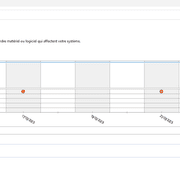
After installing Win11 22H2 it automatically upgraded to the infamous DEV ring version, but following that guide I reinstalled the correct version for Win11 22H2 build 22621.x.
The method from that link does work: at the moment it didn't try to over-install 25305 again after I searched for updates, no. Of course Defender engine updates are regularly installed and up-to-date after I reverted to 22621. I simplified the procedure using PowerRun (Sordum) instead of taking ownership etc. and it worked fine indeed (in the VBox environment) and now there's the 22621 Security Health UI installed and is working perfectly fine with no crashes or issues:


The question now is: on next major KB Security Update Windows will try again to re-install 25xxx (DEV)?
I got this update yesterday:

Update for Microsoft Defender Antivirus antimalware platform - KB4052623 (Version 4.18.2302.7)

This is fine, I've had these platform updates before. It doesn't cause Security UI crashes, and no new features/toggles are in the Security app.

The one that causes problems is this one. They both have the same name but are different things, it's this one that's the problem. MS are STILL sending this out to non-Dev builds!

1679976557972.png
 

My Computer My Computer

At a glance

Windows 11 Pro 25H2 (RP channel)AMD Ryzen 7 9800X3D 8-core64GB Corsair Titanium 6000/CL30MSI Suprim 5080 SOC
OS
Windows 11 Pro 25H2 (RP channel)
Computer type
PC/Desktop
Manufacturer/Model
MSI
CPU
AMD Ryzen 7 9800X3D 8-core
Motherboard
MEG X870E Godlike
Memory
64GB Corsair Titanium 6000/CL30
Graphics Card(s)
MSI Suprim 5080 SOC
Sound Card
Soundblaster AE-9
Monitor(s) Displays
ASUS TUF Gaming VG289Q
Screen Resolution
3840x2160
Hard Drives
Samsung 9100 Pro 4TB (gen 5 x4, system drive/games)
Samsung 990 Pro 2TB
Samsung 980 Pro 2TB
Samsung 870 Evo 4TB
Samsung 870 Evo 2TB
Samsung T9 4TB
PSU
Seasonic PX-2200
Case
Bequiet! Dark Base Pro 901
Cooling
Noctua NH-D15S Chromax black
Keyboard
Logitech G915 X (wired)
Mouse
Logitech G903 with PowerPlay charger
Internet Speed
900Mb/sec
Browser
Microsoft Edge
Antivirus
Windows Defender
It's a mess... better waiting for a MS official fix, one day... sigh
I tried the method above on a real machine with full HW requirements like TPM etc. (not present under VBox testing machine) and didn't work so well: still randomly crashed even with SecHealthUI 22621 installed! Moreover this removed the TPM thing altogether from the UI... Then I manually restored old 25305 but now there's a strange situation missing some features: "App & Browser control" disappeared (!?) and under "Device Security" it now says "Standard hardware security not supported".
The funny thing is: now Defender won't crash anymore LOL

1679991822541.png
 
Last edited:

My Computer My Computer

At a glance

Windows 11 HomeIntel i9-13980HX32GB DDR5 5600MHzNVidia GTX 4090 Laptop 256bit 16GB 175W
OS
Windows 11 Home
Computer type
Laptop
Manufacturer/Model
ASUS ROG SCAR 18
CPU
Intel i9-13980HX
Memory
32GB DDR5 5600MHz
Graphics Card(s)
NVidia GTX 4090 Laptop 256bit 16GB 175W
Sound Card
Realtek ALC285 + Dolby Atmos
Monitor(s) Displays
G-Sync NE180QDM-NZ2 18" 16:10, FreeSync Premium XiaoMi Mi 34" 21:9
Screen Resolution
2560x1600@240Hz (internal), 3440x1440@144Hz (external)
Hard Drives
NVMe Lexar NM790 1TB 6GB/s, NVMe Lexar NM790 4TB 6GB/s
PSU
330W (laptop PSU)
Mouse
ROG Strix Carry Wireless-BT mouse
Other Info
4K UHD USB Archgon Star Blu-Ray 4K UHD,
8BitDo Arcade Stick,
Vader 4 Pro controller
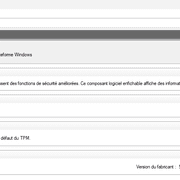
It's a mess... better waiting for a MS official fix, one day... sigh
I tried the method above on a real machine with full HW requirements like TPM etc. (not present under VBox testing machine) and didn't work so well: still randomly crashed even with SecHealthUI 22621 installed! Moreover this removed the TPM thing altogether from the UI... Then I manually restored old 25305 but now there's a strange situation missing some features: "App & Browser control" disappeared (!?) and under "Device Security" it now says "Standard hardware security not supported".
The funny thing is: now Defender won't crash anymore LOL

View attachment 56525
I found the app won't crash if the TPM is disabled, even with the 25303 version. Obviously with a VM and no TPM it will be fine also.
 

My Computer My Computer

At a glance

Windows 11 Pro 25H2 (RP channel)AMD Ryzen 7 9800X3D 8-core64GB Corsair Titanium 6000/CL30MSI Suprim 5080 SOC
OS
Windows 11 Pro 25H2 (RP channel)
Computer type
PC/Desktop
Manufacturer/Model
MSI
CPU
AMD Ryzen 7 9800X3D 8-core
Motherboard
MEG X870E Godlike
Memory
64GB Corsair Titanium 6000/CL30
Graphics Card(s)
MSI Suprim 5080 SOC
Sound Card
Soundblaster AE-9
Monitor(s) Displays
ASUS TUF Gaming VG289Q
Screen Resolution
3840x2160
Hard Drives
Samsung 9100 Pro 4TB (gen 5 x4, system drive/games)
Samsung 990 Pro 2TB
Samsung 980 Pro 2TB
Samsung 870 Evo 4TB
Samsung 870 Evo 2TB
Samsung T9 4TB
PSU
Seasonic PX-2200
Case
Bequiet! Dark Base Pro 901
Cooling
Noctua NH-D15S Chromax black
Keyboard
Logitech G915 X (wired)
Mouse
Logitech G903 with PowerPlay charger
Internet Speed
900Mb/sec
Browser
Microsoft Edge
Antivirus
Windows Defender
Yep, the TPM feature in Security Health seems the origin of random crashes at this point, confirmed by this last experiment where it didn't crash once it got disabled during the fix attempt.
 
Last edited:

My Computer My Computer

At a glance

Windows 11 HomeIntel i9-13980HX32GB DDR5 5600MHzNVidia GTX 4090 Laptop 256bit 16GB 175W
OS
Windows 11 Home
Computer type
Laptop
Manufacturer/Model
ASUS ROG SCAR 18
CPU
Intel i9-13980HX
Memory
32GB DDR5 5600MHz
Graphics Card(s)
NVidia GTX 4090 Laptop 256bit 16GB 175W
Sound Card
Realtek ALC285 + Dolby Atmos
Monitor(s) Displays
G-Sync NE180QDM-NZ2 18" 16:10, FreeSync Premium XiaoMi Mi 34" 21:9
Screen Resolution
2560x1600@240Hz (internal), 3440x1440@144Hz (external)
Hard Drives
NVMe Lexar NM790 1TB 6GB/s, NVMe Lexar NM790 4TB 6GB/s
PSU
330W (laptop PSU)
Mouse
ROG Strix Carry Wireless-BT mouse
Other Info
4K UHD USB Archgon Star Blu-Ray 4K UHD,
8BitDo Arcade Stick,
Vader 4 Pro controller
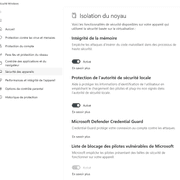
Yep, the TPM feature in Security Health seems the origin of random crashes at this point, confirmed by this last experiment where it didn't crash once it got disabled during the fix attempt.
It is exactly the same problem that users reported in the summer
 

My Computer My Computer

At a glance

Windows 11 Pro 25H2 (RP channel)AMD Ryzen 7 9800X3D 8-core64GB Corsair Titanium 6000/CL30MSI Suprim 5080 SOC
OS
Windows 11 Pro 25H2 (RP channel)
Computer type
PC/Desktop
Manufacturer/Model
MSI
CPU
AMD Ryzen 7 9800X3D 8-core
Motherboard
MEG X870E Godlike
Memory
64GB Corsair Titanium 6000/CL30
Graphics Card(s)
MSI Suprim 5080 SOC
Sound Card
Soundblaster AE-9
Monitor(s) Displays
ASUS TUF Gaming VG289Q
Screen Resolution
3840x2160
Hard Drives
Samsung 9100 Pro 4TB (gen 5 x4, system drive/games)
Samsung 990 Pro 2TB
Samsung 980 Pro 2TB
Samsung 870 Evo 4TB
Samsung 870 Evo 2TB
Samsung T9 4TB
PSU
Seasonic PX-2200
Case
Bequiet! Dark Base Pro 901
Cooling
Noctua NH-D15S Chromax black
Keyboard
Logitech G915 X (wired)
Mouse
Logitech G903 with PowerPlay charger
Internet Speed
900Mb/sec
Browser
Microsoft Edge
Antivirus
Windows Defender
Hello, same problem for a long time and Microsoft still hasn't solved it.
When I navigate to Windows Defender and open the "device security" or "kernel isolation" sections (I only open the section, I don't click on anything else), Windows Defender freezes, its service restarts and an error appears in the event viewer.
The problem happens every time :

Name of the failed application SecurityHealthService.exe, version: 10.0.22621.900, timestamp: 0x45a7fb3f
Name of the failed module: ucrtbase.dll, version: 10.0.22621.608, timestamp: 0xf5fc15a3
Exception code: 0xc0000409
Error offset: 0x000000000007f61e
ID of the failed process: 0x0x2358
Start time of the failed application: 0x0x1D95BCE7F807566
Path of the failed application: C:\WINDOWS\system32\SecurityHealthService.exe
Path to the failed module: C:\WINDOWS\SYSTEM32\ucrtbase.dll
Report ID: 427a82bf-68be-4e77-830e-5bd16fad0879
Full name of the failed package:
ID of the application related to the failed package.


I hope this problem will be solved in a future patch. I have already reinstalled Windows 11 Pro 22H2 (build 22621.1485) twice and the bug starts again.
By browsing the forums, I see that this problem occurs with many users, I can't wait for a patch !
 
Last edited:

My Computer My Computer

At a glance

Windows 11
OS
Windows 11
Hello, same problem for a long time and Microsoft still hasn't solved it.
When I navigate to Windows Defender and open the "device security" or "kernel isolation" sections (I only open the section, I don't click on anything else), Windows Defender freezes, its service restarts and an error appears in the event viewer.
The problem happens every time :

Name of the failed application SecurityHealthService.exe, version: 10.0.22621.900, timestamp: 0x45a7fb3f
Name of the failed module: ucrtbase.dll, version: 10.0.22621.608, timestamp: 0xf5fc15a3
Exception code: 0xc0000409
Error offset: 0x000000000007f61e
ID of the failed process: 0x0x2358
Start time of the failed application: 0x0x1D95BCE7F807566
Path of the failed application: C:\WINDOWS\system32\SecurityHealthService.exe
Path to the failed module: C:\WINDOWS\SYSTEM32\ucrtbase.dll
Report ID: 427a82bf-68be-4e77-830e-5bd16fad0879
Full name of the failed package:
ID of the application related to the failed package.


I hope this problem will be solved in a future patch. I have already reinstalled Windows 11 Pro 22H2 (build 22621.1485) twice and the bug starts again.
By browsing the forums, I see that this problem occurs with many users, I can't wait for a patch !
It's been a problem for months, I don't think MS are in a hurry to fix it. The updates to SecurityHealth are causing crashes with the TPM enabled.
 

My Computer My Computer

At a glance

Windows 11 Pro 25H2 (RP channel)AMD Ryzen 7 9800X3D 8-core64GB Corsair Titanium 6000/CL30MSI Suprim 5080 SOC
OS
Windows 11 Pro 25H2 (RP channel)
Computer type
PC/Desktop
Manufacturer/Model
MSI
CPU
AMD Ryzen 7 9800X3D 8-core
Motherboard
MEG X870E Godlike
Memory
64GB Corsair Titanium 6000/CL30
Graphics Card(s)
MSI Suprim 5080 SOC
Sound Card
Soundblaster AE-9
Monitor(s) Displays
ASUS TUF Gaming VG289Q
Screen Resolution
3840x2160
Hard Drives
Samsung 9100 Pro 4TB (gen 5 x4, system drive/games)
Samsung 990 Pro 2TB
Samsung 980 Pro 2TB
Samsung 870 Evo 4TB
Samsung 870 Evo 2TB
Samsung T9 4TB
PSU
Seasonic PX-2200
Case
Bequiet! Dark Base Pro 901
Cooling
Noctua NH-D15S Chromax black
Keyboard
Logitech G915 X (wired)
Mouse
Logitech G903 with PowerPlay charger
Internet Speed
900Mb/sec
Browser
Microsoft Edge
Antivirus
Windows Defender
It's been a problem for months, I don't think MS are in a hurry to fix it. The updates to SecurityHealth are causing crashes with the TPM enabled.
thank you, yes this problem has been around for a long time.
It's still annoying to have these crashes with Windows Defender/Security Health and TPM. This is not a normal operation of the OS.
I hope MS will make an effort to release a patch soon (y)
 

My Computer My Computer

At a glance

Windows 11
OS
Windows 11
So i noticed this bug as well and just wanted to know if my system is still protected? Or should i just go back to win10? Sometimes defender is completely blank, sometimes has red X marks on the firewall tab, sometimes yellow squares saying things are not enabled. Event viewer says the same thing posted on this thread. So are these just visual errors or are they real and defender stops working every now and then?

I even did a fresh install, but the issues remain.
 

My Computer My Computer

At a glance

Windows 11Ryzen 7 5700X32GB 3600MHZ CL16RTX3070TI
OS
Windows 11
Computer type
PC/Desktop
CPU
Ryzen 7 5700X
Motherboard
ASUS Crosshair VII Hero
Memory
32GB 3600MHZ CL16
Graphics Card(s)
RTX3070TI
Monitor(s) Displays
LG27GP850-B
Screen Resolution
2560x1440
PSU
Corsair RM750x
Case
Fractal Design Meshify 2
Cooling
Noctua NH-D15s
Keyboard
ASUS Strix Flare
Mouse
Glorious Model D- Wireless
Browser
MS Edge
When it crashes on opening UI or checking files from RMB (right menu button) with a blank panel... it usually restarts itself in 1 minute and Defender will work again. Red X on the firewall never happened to me. Yes yellow triangles sometimes for Core Isolation can happen and are caused by the same issue.
 

My Computer My Computer

At a glance

Windows 11 HomeIntel i9-13980HX32GB DDR5 5600MHzNVidia GTX 4090 Laptop 256bit 16GB 175W
OS
Windows 11 Home
Computer type
Laptop
Manufacturer/Model
ASUS ROG SCAR 18
CPU
Intel i9-13980HX
Memory
32GB DDR5 5600MHz
Graphics Card(s)
NVidia GTX 4090 Laptop 256bit 16GB 175W
Sound Card
Realtek ALC285 + Dolby Atmos
Monitor(s) Displays
G-Sync NE180QDM-NZ2 18" 16:10, FreeSync Premium XiaoMi Mi 34" 21:9
Screen Resolution
2560x1600@240Hz (internal), 3440x1440@144Hz (external)
Hard Drives
NVMe Lexar NM790 1TB 6GB/s, NVMe Lexar NM790 4TB 6GB/s
PSU
330W (laptop PSU)
Mouse
ROG Strix Carry Wireless-BT mouse
Other Info
4K UHD USB Archgon Star Blu-Ray 4K UHD,
8BitDo Arcade Stick,
Vader 4 Pro controller
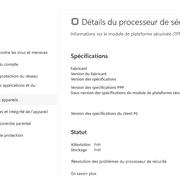
When it crashes on opening UI or checking files from RMB (right menu button) with a blank panel... it usually restarts itself in 1 minute and Defender will work again. Red X on the firewall never happened to me. Yes yellow triangles sometimes for Core Isolation can happen and are caused by the same issue.
The red X was a new thing to me. Told me to reset my firewall settings. I did that and the yellow triangels appeared all over the place. I had to re-enable a bunch of settings. Maybe it just crashed and showed whatever it wanted. Most of the time it just shows a blank white box. Event viewer complains about 2 different dll files linked to securityhealth.

EDIT: The files are ucrtbase.dll and ntdll.dll
 

My Computer My Computer

At a glance

Windows 11Ryzen 7 5700X32GB 3600MHZ CL16RTX3070TI
OS
Windows 11
Computer type
PC/Desktop
CPU
Ryzen 7 5700X
Motherboard
ASUS Crosshair VII Hero
Memory
32GB 3600MHZ CL16
Graphics Card(s)
RTX3070TI
Monitor(s) Displays
LG27GP850-B
Screen Resolution
2560x1440
PSU
Corsair RM750x
Case
Fractal Design Meshify 2
Cooling
Noctua NH-D15s
Keyboard
ASUS Strix Flare
Mouse
Glorious Model D- Wireless
Browser
MS Edge
It's all about TPM integration bugs in Windows Security Health Service/Defender...
Don't play with with TPM ON/OFF though, it could reset some important data: Troubleshoot the TPM
We can only wait for a fix...
 

My Computer My Computer

At a glance

Windows 11 HomeIntel i9-13980HX32GB DDR5 5600MHzNVidia GTX 4090 Laptop 256bit 16GB 175W
OS
Windows 11 Home
Computer type
Laptop
Manufacturer/Model
ASUS ROG SCAR 18
CPU
Intel i9-13980HX
Memory
32GB DDR5 5600MHz
Graphics Card(s)
NVidia GTX 4090 Laptop 256bit 16GB 175W
Sound Card
Realtek ALC285 + Dolby Atmos
Monitor(s) Displays
G-Sync NE180QDM-NZ2 18" 16:10, FreeSync Premium XiaoMi Mi 34" 21:9
Screen Resolution
2560x1600@240Hz (internal), 3440x1440@144Hz (external)
Hard Drives
NVMe Lexar NM790 1TB 6GB/s, NVMe Lexar NM790 4TB 6GB/s
PSU
330W (laptop PSU)
Mouse
ROG Strix Carry Wireless-BT mouse
Other Info
4K UHD USB Archgon Star Blu-Ray 4K UHD,
8BitDo Arcade Stick,
Vader 4 Pro controller
It's all about TPM integration bugs in Windows Security Health Service/Defender...
Don't play with with TPM ON/OFF though, it could reset some important data: Troubleshoot the TPM
We can only wait for a fix...
OK.. so my question is that is my pc still protected though? Or is it now vulnerable because of these issues?
 

My Computer My Computer

At a glance

Windows 11Ryzen 7 5700X32GB 3600MHZ CL16RTX3070TI
OS
Windows 11
Computer type
PC/Desktop
CPU
Ryzen 7 5700X
Motherboard
ASUS Crosshair VII Hero
Memory
32GB 3600MHZ CL16
Graphics Card(s)
RTX3070TI
Monitor(s) Displays
LG27GP850-B
Screen Resolution
2560x1440
PSU
Corsair RM750x
Case
Fractal Design Meshify 2
Cooling
Noctua NH-D15s
Keyboard
ASUS Strix Flare
Mouse
Glorious Model D- Wireless
Browser
MS Edge
Back
Top Bottom