Tracey2032
New member
- Local time
- 2:59 PM
- Posts
- 14
- OS
- Windows 11
Is there a way to stop Windows 11 from turning off USB drives (I did NOT have this same problem with Windows 7 using the same equipment)?
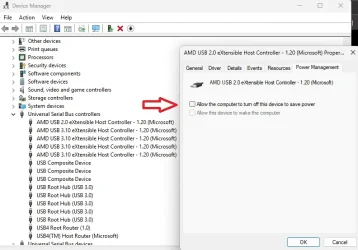
After disabling the Power Management on the USB Controllers, the drives do run a lot longer, but are hubs are still eventually turned off anyway.
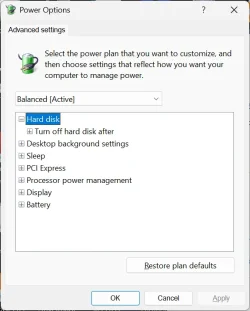
Someone has suggested: to set the 'USB selective suspend setting' → 'Set to Disabled', but this does NOT appear to be available via the GUI.
Windows 11 is still turning off the "power" to the USB devices (the hub LEDs turn off), but the drives have external power so the HDDs are still running.
Windows 11 is dropping the connection to the hubs (hence disconnecting the drives) and programs that are writing to and reading from the drive(s) state that the resource is (no longer available/has been removed from the system).
I can disconnect the hubs and re-connect them and resume or start-over whatever I am doing.
Please advise, Thanks
My USB device configuration is as follows: Windows 11 laptop → laptop-usb-port → 7-port-hub → UGEEN usb-to-sata-adapter → sata hdd
After disabling the Power Management on the USB Controllers, the drives do run a lot longer, but are hubs are still eventually turned off anyway.
Someone has suggested: to set the 'USB selective suspend setting' → 'Set to Disabled', but this does NOT appear to be available via the GUI.
Windows 11 is still turning off the "power" to the USB devices (the hub LEDs turn off), but the drives have external power so the HDDs are still running.
Windows 11 is dropping the connection to the hubs (hence disconnecting the drives) and programs that are writing to and reading from the drive(s) state that the resource is (no longer available/has been removed from the system).
I can disconnect the hubs and re-connect them and resume or start-over whatever I am doing.
Please advise, Thanks
My USB device configuration is as follows: Windows 11 laptop → laptop-usb-port → 7-port-hub → UGEEN usb-to-sata-adapter → sata hdd
- Windows Build/Version
- Windows 11 24H2
My Computers
-
At a glance
Windows 11intel core 7- OS
- Windows 11
- Computer type
- Laptop
- Manufacturer/Model
- HP Laptop 17-cn3xxx
- CPU
- intel core 7
-
At a glance
Windows 11 21H2 (10.0.22000)- Operating System
- Windows 11 21H2 (10.0.22000)
- Computer type
- Laptop
- Manufacturer/Model
- HP Laptop 17-cp1xxx