Windows turning off USB drives


Tracey2032

New member
Local time
11:01 PM
Posts
14
OS
Windows 11
Is there a way to stop Windows 11 from turning off USB drives (I did NOT have this same problem with Windows 7 using the same equipment)?

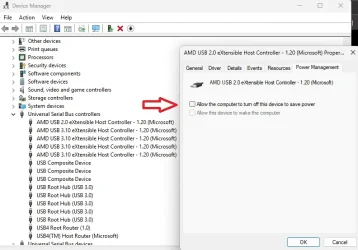
After disabling the Power Management on the USB Controllers, the drives do run a lot longer, but are hubs are still eventually turned off anyway.

Someone has suggested: to set the 'USB selective suspend setting' → 'Set to Disabled', but this does NOT appear to be available via the GUI.

Windows 11 is still turning off the "power" to the USB devices (the hub LEDs turn off), but the drives have external power so the HDDs are still running.
Windows 11 is dropping the connection to the hubs (hence disconnecting the drives) and programs that are writing to and reading from the drive(s) state that the resource is (no longer available/has been removed from the system).

I can disconnect the hubs and re-connect them and resume or start-over whatever I am doing.

Please advise, Thanks
My USB device configuration is as follows: Windows 11 laptop → laptop-usb-port → 7-port-hub → UGEEN usb-to-sata-adapter → sata hdd
 
Windows Build/Version
Windows 11 24H2

My Computer

System One

  • OS
    Windows 11
    Computer type
    Laptop
    Manufacturer/Model
    HP Laptop 17-cn3xxx
    CPU
    intel core 7
Someone has suggested: to set the 'USB selective suspend setting' → 'Set to Disabled', but this does NOT appear to be available via the GUI.
via this interface its not there?:
Code:
rundll32 shell32.dll,Control_RunDLL powercfg.cpl,,1

does the usb(s) disconnect if directly connected to the pc?
 

My Computer

System One

  • OS
    Windows 11 Pro
is it possible my external ssd broken because of this? or my sata to usb cable was defective
 

My Computers

System One System Two

  • OS
    windows 11 home 23H2 22631.6199
    Computer type
    Laptop
    Manufacturer/Model
    HP
    CPU
    Intel core i7 (2nd gen) Turbo 3.10 ghz
    Memory
    6gb
    Graphics Card(s)
    Amd Radeon HD 7400m 1GB & Intel hd graphics
    Sound Card
    BeatsAudio
    Hard Drives
    128gb SSD
  • Operating System
    macOS Sequoia
    Computer type
    PC/Desktop
    Manufacturer/Model
    iMac 24"
    CPU
    M1 3.2 ghz
    Memory
    8gb onboard
    Graphics card(s)
    igpu
    Monitor(s) Displays
    Retina 4.5K
    Screen Resolution
    4480x2520
    Hard Drives
    512gb SSD
Use externally powered usb hubs.
 

My Computers

System One System Two

  • OS
    Windows 11 Pro 25H2
    Computer type
    PC/Desktop
    Manufacturer/Model
    Dell Optiplex 7080
    CPU
    i9-10900 10 core 20 threads
    Motherboard
    DELL 0J37VM
    Memory
    32 gb
    Graphics Card(s)
    none-Intel UHD Graphics 630
    Sound Card
    Integrated Realtek
    Monitor(s) Displays
    Benq 27
    Screen Resolution
    2560x1440
    Hard Drives
    2x1tb Solidigm m.2 nvme /External drives 512gb Samsung m.2 sata+2tb Kingston m2.nvme
    PSU
    500w
    Case
    MT
    Cooling
    Dell Premium
    Keyboard
    Logitech wired
    Mouse
    Logitech wireless
    Internet Speed
    so slow I'm too embarrassed to tell
    Browser
    #1 Edge #2 Firefox
    Antivirus
    Defender+MWB Premium
  • Operating System
    Windows 11 Pro 24H2 26200.8457
    Computer type
    PC/Desktop
    Manufacturer/Model
    Beelink Mini PC SER5
    CPU
    AMD Ryzen 7 6800U
    Memory
    32 gb
    Graphics card(s)
    integrated
    Sound Card
    integrated
    Monitor(s) Displays
    Benq 27
    Screen Resolution
    2560x1440
    Hard Drives
    1TB Crucial nvme
    Keyboard
    Logitech wired
    Mouse
    Logitech wireless
    Internet Speed
    still too embarrassed to tell
    Browser
    Firefox
    Antivirus
    Defender
    Other Info
    System 3 is non compliant Dell 9020 i7-4770/24gb ram Win11 PRO 26200.8457
via this interface its not there?:
Code:
rundll32 shell32.dll,Control_RunDLL powercfg.cpl,,1

does the usb(s) disconnect if directly connected to the pc?
Yes, the interface is there, but there are no options for USB.
 

My Computer

System One

  • OS
    Windows 11
    Computer type
    Laptop
    Manufacturer/Model
    HP Laptop 17-cn3xxx
    CPU
    intel core 7
via this interface its not there?:
Code:
rundll32 shell32.dll,Control_RunDLL powercfg.cpl,,1

does the usb(s) disconnect if directly connected to the pc?
I do NOT know, I would have to try that in the next day or so.
 

My Computer

System One

  • OS
    Windows 11
    Computer type
    Laptop
    Manufacturer/Model
    HP Laptop 17-cn3xxx
    CPU
    intel core 7

My Computers

System One System Two

  • OS
    All Branches but Release
    Computer type
    Laptop
    Manufacturer/Model
    Acer Nitro ANV15-51
    CPU
    AMD Ryzen 7 7735HS 3200-4500 Mhz 8 cores x 2
    Motherboard
    Sportage_RBH
    Memory
    32 GB DDR5
    Graphics Card(s)
    Radeon Graphic / NVIDIA GeForce RTX 4060 8 GB GDDR6
    Sound Card
    AMD/Realtek(R) Audio
    Monitor(s) Displays
    Integrated Monitor (15.3"vis)
    Screen Resolution
    FHD 1920X1080 16:9 144Hz
    Hard Drives
    KINGSTON OM8SEP4512Q-AA 1TB
    Western Digital 256GB
    PSU
    19V DC 6.32 A 120 W
    Cooling
    Dual Fans
    Mouse
    MS Bluetooth
    Internet Speed
    Fiber 1GB Cox -us & 1GB Orange-fr
    Browser
    Edge Canary- Firefox Nightly-Chrome Dev-Chrome Dev
    Antivirus
    Windows Defender
  • Operating System
    Windows 11 Beta
    Computer type
    Laptop
    Manufacturer/Model
    Asus X751BP
    CPU
    AMD A9-9420
    Memory
    8 GB of DDR4
    Graphics card(s)
    AMD Radeon R5
    Screen Resolution
    1600x900
    Hard Drives
    Seagate 1 TB
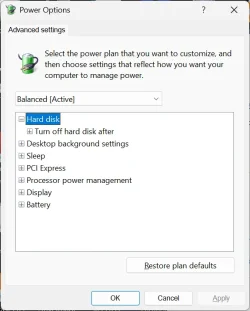
so this entire tree is missing?
View attachment 148222

what shows in your device manager for your usb hardware?

also...
Yes, this entire tree is missing.
Can I add registry settings to compensate for this?
I am not computer savvy (HP or Windows 11, just a Computer User), but I do know how to update the registry.
I contacted HP Support and they expected the "tree" to be there too, but it is not.
I did a print screen of the "Advanced" Power Options to show you what I can see.
 

Attachments

  • HP17 Win11.24H2.webp
    HP17 Win11.24H2.webp
    31.4 KB · Views: 2

My Computer

System One

  • OS
    Windows 11
    Computer type
    Laptop
    Manufacturer/Model
    HP Laptop 17-cn3xxx
    CPU
    intel core 7
Yes, this entire tree is missing.
Can I add registry settings to compensate for this?
I am not computer savvy (HP or Windows 11, just a Computer User), but I do know how to update the registry.
I contacted HP Support and they expected the "tree" to be there too, but it is not.
I did a print screen of the "Advanced" Power Options to show you what I can see.
run powershell as admin and run the attached .ps1. it will unlock/make visible all power settings:
 

Attachments

My Computer

System One

  • OS
    Windows 11 Pro
1) Please run > post share links:


2) Run the V2 log collector >post share links


3) How many are there for each:

USB ports
hubs
drives

If the drives are connected directly to the USB ports what happens?
 

My Computer

System One

  • OS
    Windows 10
    Computer type
    Laptop
    Manufacturer/Model
    HP
    CPU
    Intel(R) Core(TM) i7-4800MQ CPU @ 2.70GHz
    Motherboard
    Product : 190A Version : KBC Version 94.56
    Memory
    16 GB Total: Manufacturer : Samsung MemoryType : DDR3 FormFactor : SODIMM Capacity : 8GB Speed : 1600
    Graphics Card(s)
    NVIDIA Quadro K3100M; Intel(R) HD Graphics 4600
    Sound Card
    IDT High Definition Audio CODEC; PNP Device ID HDAUDIO\FUNC_01&VEN_111D&DEV_76E0
    Hard Drives
    Model Hitachi HTS727575A9E364
    Antivirus
    Microsoft Defender
    Other Info
    Mobile Workstation
Use externally powered usb hubs.
hello well it actually had 2nd cable which gives power to box but as far as i know SSD mechanics different than regular HDDs and they dont really rely on extra power since they dont have cd spinning inside.

Coming to my incident, During transfer around 118gb from samsung evo ssd to hp laptop, computer was idle when i arrived after i saw error, usb was disconnected. Thankfully I have the original data on imac so I dont mind clean ssd to fresh. Thing is windows doesnt even recognize drive now, tried many times to insert cable but no luck. I used terminal disk util, it sees and appears on list but when i hit command to clean all partition command it keeps giving error..

Ssd had apple partition in it, is anything to do with this? like its locked bc of security reasons? or cut in usb connection brick my perfectly working ssd? pls help :tears:
 

My Computers

System One System Two

  • OS
    windows 11 home 23H2 22631.6199
    Computer type
    Laptop
    Manufacturer/Model
    HP
    CPU
    Intel core i7 (2nd gen) Turbo 3.10 ghz
    Memory
    6gb
    Graphics Card(s)
    Amd Radeon HD 7400m 1GB & Intel hd graphics
    Sound Card
    BeatsAudio
    Hard Drives
    128gb SSD
  • Operating System
    macOS Sequoia
    Computer type
    PC/Desktop
    Manufacturer/Model
    iMac 24"
    CPU
    M1 3.2 ghz
    Memory
    8gb onboard
    Graphics card(s)
    igpu
    Monitor(s) Displays
    Retina 4.5K
    Screen Resolution
    4480x2520
    Hard Drives
    512gb SSD
hello well it actually had 2nd cable which gives power to box but as far as i know SSD mechanics different than regular HDDs and they dont really rely on extra power since they dont have cd spinning inside.

Coming to my incident, During transfer around 118gb from samsung evo ssd to hp laptop, computer was idle when i arrived after i saw error, usb was disconnected. Thankfully I have the original data on imac so I dont mind clean ssd to fresh. Thing is windows doesnt even recognize drive now, tried many times to insert cable but no luck. I used terminal disk util, it sees and appears on list but when i hit command to clean all partition command it keeps giving error..

Ssd had apple partition in it, is anything to do with this? like its locked bc of security reasons? or cut in usb connection brick my perfectly working ssd? pls help :tears:
@HarleyQuinn
Please, it is considered rude by forum standards to jump on someone else's thread in an attempt to get help for your issues.
Can you open your own thread with your very own problem please?
Thank you.
 

My Computers

System One System Two

  • OS
    All Branches but Release
    Computer type
    Laptop
    Manufacturer/Model
    Acer Nitro ANV15-51
    CPU
    AMD Ryzen 7 7735HS 3200-4500 Mhz 8 cores x 2
    Motherboard
    Sportage_RBH
    Memory
    32 GB DDR5
    Graphics Card(s)
    Radeon Graphic / NVIDIA GeForce RTX 4060 8 GB GDDR6
    Sound Card
    AMD/Realtek(R) Audio
    Monitor(s) Displays
    Integrated Monitor (15.3"vis)
    Screen Resolution
    FHD 1920X1080 16:9 144Hz
    Hard Drives
    KINGSTON OM8SEP4512Q-AA 1TB
    Western Digital 256GB
    PSU
    19V DC 6.32 A 120 W
    Cooling
    Dual Fans
    Mouse
    MS Bluetooth
    Internet Speed
    Fiber 1GB Cox -us & 1GB Orange-fr
    Browser
    Edge Canary- Firefox Nightly-Chrome Dev-Chrome Dev
    Antivirus
    Windows Defender
  • Operating System
    Windows 11 Beta
    Computer type
    Laptop
    Manufacturer/Model
    Asus X751BP
    CPU
    AMD A9-9420
    Memory
    8 GB of DDR4
    Graphics card(s)
    AMD Radeon R5
    Screen Resolution
    1600x900
    Hard Drives
    Seagate 1 TB
Sorry you are right, apologies. I am not familiar to forums I just wanted to know is my situation related to his problems about windows turning off usb powers or not. Again apologies. 🙏
 

My Computers

System One System Two

  • OS
    windows 11 home 23H2 22631.6199
    Computer type
    Laptop
    Manufacturer/Model
    HP
    CPU
    Intel core i7 (2nd gen) Turbo 3.10 ghz
    Memory
    6gb
    Graphics Card(s)
    Amd Radeon HD 7400m 1GB & Intel hd graphics
    Sound Card
    BeatsAudio
    Hard Drives
    128gb SSD
  • Operating System
    macOS Sequoia
    Computer type
    PC/Desktop
    Manufacturer/Model
    iMac 24"
    CPU
    M1 3.2 ghz
    Memory
    8gb onboard
    Graphics card(s)
    igpu
    Monitor(s) Displays
    Retina 4.5K
    Screen Resolution
    4480x2520
    Hard Drives
    512gb SSD
  • Like
Reactions: OAT
1) Please run > post share links:


2) Run the V2 log collector >post share links


3) How many are there for each:

USB ports
hubs
drives

If the drives are connected directly to the USB ports what happens?
There are 3 USB ports w/hub
hub 1 has some SSD drives
hub 2 has 3 HDDs
hub 3 has 4 HDDs
I have not tried to connect them in various configurations, I am just trying to disable ['USB selective suspend setting']
I am waiting on a reply from HP right now.
 

My Computer

System One

  • OS
    Windows 11
    Computer type
    Laptop
    Manufacturer/Model
    HP Laptop 17-cn3xxx
    CPU
    intel core 7
run powershell as admin and run the attached .ps1. it will unlock/make visible all power settings:
This has now made the USB Power Options available (I turned off all USB Power Setting when not on battery).
I think I only have 1 more question, what should the following USB setting be?:
->Hub Selective Suspend Timeout (current setting - 50 ms)
Please advise, Thanks
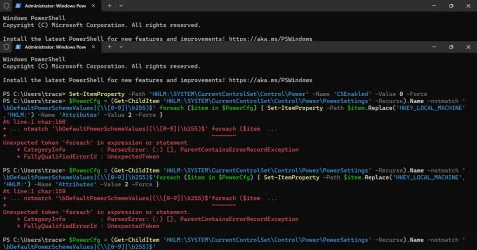
BTW the ps1 file would not work (I'm not power shell savvy either), so pasted each of the lines into the terminal to change the settings (see attached)
 

Attachments

  • UnlockALLPowerSettings.webp
    UnlockALLPowerSettings.webp
    186.9 KB · Views: 2

My Computer

System One

  • OS
    Windows 11
    Computer type
    Laptop
    Manufacturer/Model
    HP Laptop 17-cn3xxx
    CPU
    intel core 7
This has now made the USB Power Options available (I turned off all USB Power Setting when not on battery).
I think I only have 1 more question, what should the following USB setting be?:
->Hub Selective Suspend Timeout (current setting - 50 ms)
Please advise, Thanks
BTW the ps1 file would not work (I'm not power shell savvy either), so pasted each of the lines into the terminal to change the settings (see attached)
disable the selective suspend or set it to 0 to disable it
 

My Computer

System One

  • OS
    Windows 11 Pro
Another person had this issue and following Brinks tutorial they were able to restore the setting.


My Computer

System One

  • OS
    Windows 11 Pro
Back
Top Bottom