Windows update error 0x80070103


My Computers My Computers

  • At a glance

    Windows 11 23H2, 24H2i7-12700K16GB (2 x 8)Intel(R) UHD Graphics 770 with shared graphic...
    OS
    Windows 11 23H2, 24H2
    Computer type
    PC/Desktop
    Manufacturer/Model
    Dell XPS8950, Vostro5620
    CPU
    i7-12700K
    Motherboard
    Z690 : 9D2HH Foxconn, R6PCT Foxconn 2nd (XPS)
    Memory
    16GB (2 x 8)
    Graphics Card(s)
    Intel(R) UHD Graphics 770 with shared graphics memory
    Sound Card
    Integrated
    Monitor(s) Displays
    Acer CBL282K Smiiprx
    Screen Resolution
    4K UHD (3840 x 2160) @ 60 Hz
    Hard Drives
    Western Digital PC SN810 512 GB M.2 NVMe SSD, PCIe
    PSU
    750W
    Cooling
    2G44F Asetek 125W CPU liquid cooler
    Keyboard
    Arteck Wireless
    Mouse
    Victsing-mm057 wireless
    Internet Speed
    Wi-Fi 6
    Browser
    Vivaldi
    Antivirus
    Windows Defender (native)
  • At a glance

    Win 23H212th Gen Intel Core i7-1260P2 x 8 GBIntel Iris Xe Graphics
    Operating System
    Win 23H2
    Computer type
    Laptop
    Manufacturer/Model
    Dell Vostro 5620
    CPU
    12th Gen Intel Core i7-1260P
    Memory
    2 x 8 GB
    Graphics card(s)
    Intel Iris Xe Graphics
    Screen Resolution
    1920 x 1200 @ 60 Hz
    Hard Drives
    NVMe 512 GB
    Case
    Aluminum
    Mouse
    Touchpad
    Browser
    Vivaldi
    Antivirus
    Windows Defender (native)

Hey all Yll's,
win 11 did this one day and of course i did search error, when the laptop finished the other updates got few more retries and I thought like mabe it will say up to date like davec777.595 HAD HAPPEN AND NEXT MORNING IT WAS SAYING UP TO DATE
 

Attachments

  • Screenshot 2023-03-04 014930.png
    Screenshot 2023-03-04 014930.png
    76.8 KB · Views: 5

My Computer My Computer

At a glance

WINDOWS 11 HOMEAMD Ryzen 5 5625u 6 core12 GB ddr4 3200 SDRAMONBOARD AMD RADEON
OS
WINDOWS 11 HOME
Computer type
Laptop
Manufacturer/Model
HP pavilion 17.3 TOUCH SCREEN
CPU
AMD Ryzen 5 5625u 6 core
Memory
12 GB ddr4 3200 SDRAM
Graphics Card(s)
ONBOARD AMD RADEON
Monitor(s) Displays
17.3 hd touch screen
Screen Resolution
1600X900 hd supported
Hard Drives
1 TB
Mouse
cheap bluetooth
Browser
edge
Antivirus
ms
>2 years later:
Intel - Net - 12.18.9.11 error 0x80070103
Tried everything above: no success...
Any news on this front?
 

My Computer My Computer

At a glance

Windows 11 25H2Intel Core i5 10310U32 GBIntel UHD Graphics
OS
Windows 11 25H2
Computer type
Laptop
Manufacturer/Model
Dell Latitude 5310
CPU
Intel Core i5 10310U
Motherboard
Dell 01Y4K1 (U3E1)
Memory
32 GB
Graphics Card(s)
Intel UHD Graphics
Sound Card
Realtek Audio
Monitor(s) Displays
Generic PnP Monitor
Screen Resolution
1280x720
Hard Drives
Patriot M.2 P300 1024GB (SSD)
PSU
Dell 65 W
Case
Are you kidding?
Cooling
No idea
Keyboard
AZERTY
Mouse
None
Internet Speed
150 MB/s down 40 up as we speak...
Browser
Vivaldi
Antivirus
MB
Open Task Manager, go to Services section and stop the wuserv (or similar). Go in folder C:\Windows\SoftwareDistribution and delete the contents, not necessary to rename it. Start the service again and search for updates.
 

My Computers My Computers

  • At a glance

    Windows 11 Pro 23H2 (5699), 25H2 (8655)Mobile DualCore Intel Core 2 Duo T7250, 2000 MHz4GBMobile Intel(R) GMA 4500M (Mobile 4 series)
    OS
    Windows 11 Pro 23H2 (5699), 25H2 (8655)
    Computer type
    Laptop
    Manufacturer/Model
    Acer Extensa 5630EZ
    CPU
    Mobile DualCore Intel Core 2 Duo T7250, 2000 MHz
    Motherboard
    Acer Extensa 5630
    Memory
    4GB
    Graphics Card(s)
    Mobile Intel(R) GMA 4500M (Mobile 4 series)
    Sound Card
    Realtek ALC268 @ Intel 82801IB ICH9 - High Definition Audio Controller
    Monitor(s) Displays
    1
    Screen Resolution
    1280x800
    Hard Drives
    Samsung SSD 850 EVO 250GB SATA Device (250 GB, SATA-III)
    Internet Speed
    VDSL 50 Mbps
    Browser
    MICROSOFT EDGE
    Antivirus
    WINDOWS DEFENDER
    Other Info
    Legacy MBR installation, no TPM, no Secure Boot, no WDDM 2.0 graphics drivers, no SSE4.2, cannot get more unsupported ;) This is only my test laptop. I had installed Windows 11 here before upgrading my main PC. For my main PC I use everyday see my 2nd system specs.
  • At a glance

    Windows 11 Pro v25H2 (build 26200.8655)Intel Core-i7 3770 3.40GHz s1155 (3rd generat...2x Kingston Hyper-X Blu 8GB DDR3-1600GIGABYTE GeForce RTX 3050 WINDFORCE OC V2 6GB...
    Operating System
    Windows 11 Pro v25H2 (build 26200.8655)
    Computer type
    PC/Desktop
    Manufacturer/Model
    Custom-built PC
    CPU
    Intel Core-i7 3770 3.40GHz s1155 (3rd generation)
    Motherboard
    Asus P8H61 s1155 ATX
    Memory
    2x Kingston Hyper-X Blu 8GB DDR3-1600
    Graphics card(s)
    GIGABYTE GeForce RTX 3050 WINDFORCE OC V2 6GB (GV-N3050WF2OCV2-6GD)
    Sound Card
    Realtek HD audio (ALC887)
    Monitor(s) Displays
    Sony Bravia KDL-19L4000 19" LCD TV via VGA
    Screen Resolution
    1440x900 32-bit 60Hz
    Hard Drives
    WD Blue SA510 2.5 1000GB SSD as system disk, Western Digital Caviar Purple 4TB SATA III (WD40PURZ) as second
    PSU
    Thermaltake Litepower RGB 550W Full Wired
    Case
    SUPERCASE MIDI-TOWER
    Cooling
    Deepcool Gamma Archer CPU cooler, 1x 8cm fan at the back
    Keyboard
    Mitsumi 101-key PS/2
    Mouse
    Sunnyline OptiEye PS/2
    Internet Speed
    100Mbps
    Browser
    Microsoft Edge, Mozilla Firefox
    Antivirus
    Microsoft Windows Defender
    Other Info
    Legacy BIOS (MBR) installation, no TPM, no Secure Boot, WDDM 3.0 graphics drivers, WEI score 7.4
Had tried already and retried just now -> doesn't work for me
 

My Computer My Computer

At a glance

Windows 11 25H2Intel Core i5 10310U32 GBIntel UHD Graphics
OS
Windows 11 25H2
Computer type
Laptop
Manufacturer/Model
Dell Latitude 5310
CPU
Intel Core i5 10310U
Motherboard
Dell 01Y4K1 (U3E1)
Memory
32 GB
Graphics Card(s)
Intel UHD Graphics
Sound Card
Realtek Audio
Monitor(s) Displays
Generic PnP Monitor
Screen Resolution
1280x720
Hard Drives
Patriot M.2 P300 1024GB (SSD)
PSU
Dell 65 W
Case
Are you kidding?
Cooling
No idea
Keyboard
AZERTY
Mouse
None
Internet Speed
150 MB/s down 40 up as we speak...
Browser
Vivaldi
Antivirus
MB
Solved thanks to Dell's SupportAssistLauncher.exe. However, the gone WU warning has now been replaced by another one I can't get rid of: "Get the most recent Windows version to stay up-to-date. The end of support for your Windows version has come." Hey, I have Windows 11! So what I think is happening is that as I got this machine second hand and it initially was under Windows 10, the seller didn't install 11 properly. What do you think?
 

My Computer My Computer

At a glance

Windows 11 25H2Intel Core i5 10310U32 GBIntel UHD Graphics
OS
Windows 11 25H2
Computer type
Laptop
Manufacturer/Model
Dell Latitude 5310
CPU
Intel Core i5 10310U
Motherboard
Dell 01Y4K1 (U3E1)
Memory
32 GB
Graphics Card(s)
Intel UHD Graphics
Sound Card
Realtek Audio
Monitor(s) Displays
Generic PnP Monitor
Screen Resolution
1280x720
Hard Drives
Patriot M.2 P300 1024GB (SSD)
PSU
Dell 65 W
Case
Are you kidding?
Cooling
No idea
Keyboard
AZERTY
Mouse
None
Internet Speed
150 MB/s down 40 up as we speak...
Browser
Vivaldi
Antivirus
MB
Solved thanks to Dell's SupportAssistLauncher.exe. However, the gone WU warning has now been replaced by another one I can't get rid of: "Get the most recent Windows version to stay up-to-date. The end of support for your Windows version has come." Hey, I have Windows 11! So what I think is happening is that as I got this machine second hand and it initially was under Windows 10, the seller didn't install 11 properly. What do you think?
It probably means you don't have the latest version 24H2 but an older Windows 11 version. Just upgrade to 24H2. Using the ISO you can upgrade directly to 24H2 from Windows 11 21H2 or 22H2. No need to upgrade all the previous versions up to 24H2. If you already have 24H2 then probably some updates are missing. Install all updates. If I remember correctly last build is 26100.4770. Check it in Settings, System, Info.
 

My Computers My Computers

  • At a glance

    Windows 11 Pro 23H2 (5699), 25H2 (8655)Mobile DualCore Intel Core 2 Duo T7250, 2000 MHz4GBMobile Intel(R) GMA 4500M (Mobile 4 series)
    OS
    Windows 11 Pro 23H2 (5699), 25H2 (8655)
    Computer type
    Laptop
    Manufacturer/Model
    Acer Extensa 5630EZ
    CPU
    Mobile DualCore Intel Core 2 Duo T7250, 2000 MHz
    Motherboard
    Acer Extensa 5630
    Memory
    4GB
    Graphics Card(s)
    Mobile Intel(R) GMA 4500M (Mobile 4 series)
    Sound Card
    Realtek ALC268 @ Intel 82801IB ICH9 - High Definition Audio Controller
    Monitor(s) Displays
    1
    Screen Resolution
    1280x800
    Hard Drives
    Samsung SSD 850 EVO 250GB SATA Device (250 GB, SATA-III)
    Internet Speed
    VDSL 50 Mbps
    Browser
    MICROSOFT EDGE
    Antivirus
    WINDOWS DEFENDER
    Other Info
    Legacy MBR installation, no TPM, no Secure Boot, no WDDM 2.0 graphics drivers, no SSE4.2, cannot get more unsupported ;) This is only my test laptop. I had installed Windows 11 here before upgrading my main PC. For my main PC I use everyday see my 2nd system specs.
  • At a glance

    Windows 11 Pro v25H2 (build 26200.8655)Intel Core-i7 3770 3.40GHz s1155 (3rd generat...2x Kingston Hyper-X Blu 8GB DDR3-1600GIGABYTE GeForce RTX 3050 WINDFORCE OC V2 6GB...
    Operating System
    Windows 11 Pro v25H2 (build 26200.8655)
    Computer type
    PC/Desktop
    Manufacturer/Model
    Custom-built PC
    CPU
    Intel Core-i7 3770 3.40GHz s1155 (3rd generation)
    Motherboard
    Asus P8H61 s1155 ATX
    Memory
    2x Kingston Hyper-X Blu 8GB DDR3-1600
    Graphics card(s)
    GIGABYTE GeForce RTX 3050 WINDFORCE OC V2 6GB (GV-N3050WF2OCV2-6GD)
    Sound Card
    Realtek HD audio (ALC887)
    Monitor(s) Displays
    Sony Bravia KDL-19L4000 19" LCD TV via VGA
    Screen Resolution
    1440x900 32-bit 60Hz
    Hard Drives
    WD Blue SA510 2.5 1000GB SSD as system disk, Western Digital Caviar Purple 4TB SATA III (WD40PURZ) as second
    PSU
    Thermaltake Litepower RGB 550W Full Wired
    Case
    SUPERCASE MIDI-TOWER
    Cooling
    Deepcool Gamma Archer CPU cooler, 1x 8cm fan at the back
    Keyboard
    Mitsumi 101-key PS/2
    Mouse
    Sunnyline OptiEye PS/2
    Internet Speed
    100Mbps
    Browser
    Microsoft Edge, Mozilla Firefox
    Antivirus
    Microsoft Windows Defender
    Other Info
    Legacy BIOS (MBR) installation, no TPM, no Secure Boot, WDDM 3.0 graphics drivers, WEI score 7.4
Yes, I'm with 22H2 but WU doesn't help finding the upgrade. How can I do it?
 

My Computer My Computer

At a glance

Windows 11 25H2Intel Core i5 10310U32 GBIntel UHD Graphics
OS
Windows 11 25H2
Computer type
Laptop
Manufacturer/Model
Dell Latitude 5310
CPU
Intel Core i5 10310U
Motherboard
Dell 01Y4K1 (U3E1)
Memory
32 GB
Graphics Card(s)
Intel UHD Graphics
Sound Card
Realtek Audio
Monitor(s) Displays
Generic PnP Monitor
Screen Resolution
1280x720
Hard Drives
Patriot M.2 P300 1024GB (SSD)
PSU
Dell 65 W
Case
Are you kidding?
Cooling
No idea
Keyboard
AZERTY
Mouse
None
Internet Speed
150 MB/s down 40 up as we speak...
Browser
Vivaldi
Antivirus
MB
Yes, I'm with 22H2 but WU doesn't help finding the upgrade. How can I do it?
Short version:

Double click on it to launch it as a virtual DVD.​
Click Setup.​
When you get to the proper screen, choose to keep data, settings and programs.​

This may not work if you have software or drivers that are blocking the WU in the first place.

If the upgrade proceeds, you'll have a windows.old folder created. It may be 15GB or larger. It would allow you to revert to you present build if you do it withing 10 days. It can be deleted using the disk cleanup utility, when you're ready.
 

My Computers My Computers

  • At a glance

    Windows 11 26200.8728Amd Threadripper 7970X128GB (4 X 32) G.Skill DDR5 6400 (RDIMM)Gigabyte RTX 4090 OC
    OS
    Windows 11 26200.8728
    Computer type
    PC/Desktop
    Manufacturer/Model
    homebuilt
    CPU
    Amd Threadripper 7970X
    Motherboard
    Gigabyte TRX50 Aero D Rev. 1.0
    Memory
    128GB (4 X 32) G.Skill DDR5 6400 (RDIMM)
    Graphics Card(s)
    Gigabyte RTX 4090 OC
    Sound Card
    none (USB to speakers), Realtek
    Monitor(s) Displays
    Innocn 32" OLED
    Screen Resolution
    3840 X 2160 @ 60Hz
    Hard Drives
    Crucial T700 2TB M.2 NVME SSD
    WD 4TB Blue SATA SSD
    Seagate 18TB IronWolf Pro
    PSU
    BeQuiet! Straight Power 12 1500W
    Case
    Lian Li 011 Dynamic Evo XL
    Cooling
    SilverStone Technology XE360-TR5, with 3 Phanteks T30 fans
    Keyboard
    Cherry KC 500 MX LP (mechanical)
    Mouse
    Logitech M500s (wired)
    Internet Speed
    2000/250 Mbps (down/up)
    Other Info
    xFinity gateway
  • At a glance

    windows 11 26200.8728Intel I9-13900K64GB G.Skill DDR5-6000Gigabyte RTX 3090 ti
    Operating System
    windows 11 26200.8728
    Computer type
    PC/Desktop
    Manufacturer/Model
    homebuilt
    CPU
    Intel I9-13900K
    Motherboard
    Asus RoG Strix Z690-E
    Memory
    64GB G.Skill DDR5-6000
    Graphics card(s)
    Gigabyte RTX 3090 ti
    Sound Card
    built in Realtek
    Monitor(s) Displays
    Philips 27E1N8900 27" OLED
    Screen Resolution
    3840 X 2160 @60Hz
    Hard Drives
    WDC SN850 1TB
    8TB Seagate Ironwolf
    4TB Seagate Ironwolf
    PSU
    eVGA SuperNOVA 1300 GT
    Case
    Lian Li 011 Dynamic Evo
    Cooling
    Corsair iCUE H150i ELITE CAPELLIX Liquid CPU Cooler
    Keyboard
    Cherry Streaming (wired)
    Mouse
    Logitech M500s (wired)
Thank you! I saved the installer but I'll keep it for later. I have very sensitive programs and data so I don't want to take the risk. I seem to have read that MS is slowly making the update available for all. Incidently, I find it strange that WU would signal an update that it's not able to provide...
Again, thank you and 'till next time.
 

My Computer My Computer

At a glance

Windows 11 25H2Intel Core i5 10310U32 GBIntel UHD Graphics
OS
Windows 11 25H2
Computer type
Laptop
Manufacturer/Model
Dell Latitude 5310
CPU
Intel Core i5 10310U
Motherboard
Dell 01Y4K1 (U3E1)
Memory
32 GB
Graphics Card(s)
Intel UHD Graphics
Sound Card
Realtek Audio
Monitor(s) Displays
Generic PnP Monitor
Screen Resolution
1280x720
Hard Drives
Patriot M.2 P300 1024GB (SSD)
PSU
Dell 65 W
Case
Are you kidding?
Cooling
No idea
Keyboard
AZERTY
Mouse
None
Internet Speed
150 MB/s down 40 up as we speak...
Browser
Vivaldi
Antivirus
MB
Hello again,
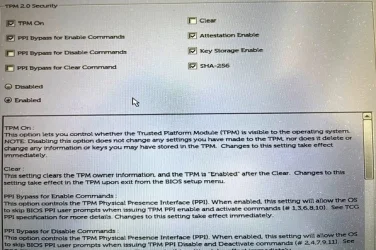
I'd like to update my machine to 24H2 but I don't know if it's eligible. It's a Dell Latitude 5310 with Service Tag: 6GK3663. I found out that to upgrade to 24H2 I need to have TPM activated. This option is currently not activated in my BIOS but if I do activate it, I have a bunch of additional options and I don't know which ones would be correct. The attached picture shows default settings. So, I have 2 questions: is service tag 6GK3663 eligible for the upgrade and if so, which additional options to TPM activation should be selected?
Any help greatly appreciated!
 

Attachments

  • IMG_3110.webp
    IMG_3110.webp
    73.8 KB · Views: 1

My Computer My Computer

At a glance

Windows 11 25H2Intel Core i5 10310U32 GBIntel UHD Graphics
OS
Windows 11 25H2
Computer type
Laptop
Manufacturer/Model
Dell Latitude 5310
CPU
Intel Core i5 10310U
Motherboard
Dell 01Y4K1 (U3E1)
Memory
32 GB
Graphics Card(s)
Intel UHD Graphics
Sound Card
Realtek Audio
Monitor(s) Displays
Generic PnP Monitor
Screen Resolution
1280x720
Hard Drives
Patriot M.2 P300 1024GB (SSD)
PSU
Dell 65 W
Case
Are you kidding?
Cooling
No idea
Keyboard
AZERTY
Mouse
None
Internet Speed
150 MB/s down 40 up as we speak...
Browser
Vivaldi
Antivirus
MB
This is the Dell support site for your Service Tag:


Clicking on the Specs top right and scrolling down you see you have a 10th generation Intel CPU, so it is Windows 11 compliant. All you need is to enable TPM and Secure Boot and upgrade from Windows 10. The TPM is needed so Setup won't complain about it. I am not sure about the Secure Boot, but enable it just in case.
 

My Computers My Computers

  • At a glance

    Windows 11 Pro 23H2 (5699), 25H2 (8655)Mobile DualCore Intel Core 2 Duo T7250, 2000 MHz4GBMobile Intel(R) GMA 4500M (Mobile 4 series)
    OS
    Windows 11 Pro 23H2 (5699), 25H2 (8655)
    Computer type
    Laptop
    Manufacturer/Model
    Acer Extensa 5630EZ
    CPU
    Mobile DualCore Intel Core 2 Duo T7250, 2000 MHz
    Motherboard
    Acer Extensa 5630
    Memory
    4GB
    Graphics Card(s)
    Mobile Intel(R) GMA 4500M (Mobile 4 series)
    Sound Card
    Realtek ALC268 @ Intel 82801IB ICH9 - High Definition Audio Controller
    Monitor(s) Displays
    1
    Screen Resolution
    1280x800
    Hard Drives
    Samsung SSD 850 EVO 250GB SATA Device (250 GB, SATA-III)
    Internet Speed
    VDSL 50 Mbps
    Browser
    MICROSOFT EDGE
    Antivirus
    WINDOWS DEFENDER
    Other Info
    Legacy MBR installation, no TPM, no Secure Boot, no WDDM 2.0 graphics drivers, no SSE4.2, cannot get more unsupported ;) This is only my test laptop. I had installed Windows 11 here before upgrading my main PC. For my main PC I use everyday see my 2nd system specs.
  • At a glance

    Windows 11 Pro v25H2 (build 26200.8655)Intel Core-i7 3770 3.40GHz s1155 (3rd generat...2x Kingston Hyper-X Blu 8GB DDR3-1600GIGABYTE GeForce RTX 3050 WINDFORCE OC V2 6GB...
    Operating System
    Windows 11 Pro v25H2 (build 26200.8655)
    Computer type
    PC/Desktop
    Manufacturer/Model
    Custom-built PC
    CPU
    Intel Core-i7 3770 3.40GHz s1155 (3rd generation)
    Motherboard
    Asus P8H61 s1155 ATX
    Memory
    2x Kingston Hyper-X Blu 8GB DDR3-1600
    Graphics card(s)
    GIGABYTE GeForce RTX 3050 WINDFORCE OC V2 6GB (GV-N3050WF2OCV2-6GD)
    Sound Card
    Realtek HD audio (ALC887)
    Monitor(s) Displays
    Sony Bravia KDL-19L4000 19" LCD TV via VGA
    Screen Resolution
    1440x900 32-bit 60Hz
    Hard Drives
    WD Blue SA510 2.5 1000GB SSD as system disk, Western Digital Caviar Purple 4TB SATA III (WD40PURZ) as second
    PSU
    Thermaltake Litepower RGB 550W Full Wired
    Case
    SUPERCASE MIDI-TOWER
    Cooling
    Deepcool Gamma Archer CPU cooler, 1x 8cm fan at the back
    Keyboard
    Mitsumi 101-key PS/2
    Mouse
    Sunnyline OptiEye PS/2
    Internet Speed
    100Mbps
    Browser
    Microsoft Edge, Mozilla Firefox
    Antivirus
    Microsoft Windows Defender
    Other Info
    Legacy BIOS (MBR) installation, no TPM, no Secure Boot, WDDM 3.0 graphics drivers, WEI score 7.4
OK thank you. And do you think I should leave the options (check boxes) for both TPM and Secure boot as they are set by default?
 

My Computer My Computer

At a glance

Windows 11 25H2Intel Core i5 10310U32 GBIntel UHD Graphics
OS
Windows 11 25H2
Computer type
Laptop
Manufacturer/Model
Dell Latitude 5310
CPU
Intel Core i5 10310U
Motherboard
Dell 01Y4K1 (U3E1)
Memory
32 GB
Graphics Card(s)
Intel UHD Graphics
Sound Card
Realtek Audio
Monitor(s) Displays
Generic PnP Monitor
Screen Resolution
1280x720
Hard Drives
Patriot M.2 P300 1024GB (SSD)
PSU
Dell 65 W
Case
Are you kidding?
Cooling
No idea
Keyboard
AZERTY
Mouse
None
Internet Speed
150 MB/s down 40 up as we speak...
Browser
Vivaldi
Antivirus
MB
Yes. In any case I would first take a full disk backup or better clone the disk on a spare one, so if everything goes wrong, just swap the disks and no harm done.
 

My Computers My Computers

  • At a glance

    Windows 11 Pro 23H2 (5699), 25H2 (8655)Mobile DualCore Intel Core 2 Duo T7250, 2000 MHz4GBMobile Intel(R) GMA 4500M (Mobile 4 series)
    OS
    Windows 11 Pro 23H2 (5699), 25H2 (8655)
    Computer type
    Laptop
    Manufacturer/Model
    Acer Extensa 5630EZ
    CPU
    Mobile DualCore Intel Core 2 Duo T7250, 2000 MHz
    Motherboard
    Acer Extensa 5630
    Memory
    4GB
    Graphics Card(s)
    Mobile Intel(R) GMA 4500M (Mobile 4 series)
    Sound Card
    Realtek ALC268 @ Intel 82801IB ICH9 - High Definition Audio Controller
    Monitor(s) Displays
    1
    Screen Resolution
    1280x800
    Hard Drives
    Samsung SSD 850 EVO 250GB SATA Device (250 GB, SATA-III)
    Internet Speed
    VDSL 50 Mbps
    Browser
    MICROSOFT EDGE
    Antivirus
    WINDOWS DEFENDER
    Other Info
    Legacy MBR installation, no TPM, no Secure Boot, no WDDM 2.0 graphics drivers, no SSE4.2, cannot get more unsupported ;) This is only my test laptop. I had installed Windows 11 here before upgrading my main PC. For my main PC I use everyday see my 2nd system specs.
  • At a glance

    Windows 11 Pro v25H2 (build 26200.8655)Intel Core-i7 3770 3.40GHz s1155 (3rd generat...2x Kingston Hyper-X Blu 8GB DDR3-1600GIGABYTE GeForce RTX 3050 WINDFORCE OC V2 6GB...
    Operating System
    Windows 11 Pro v25H2 (build 26200.8655)
    Computer type
    PC/Desktop
    Manufacturer/Model
    Custom-built PC
    CPU
    Intel Core-i7 3770 3.40GHz s1155 (3rd generation)
    Motherboard
    Asus P8H61 s1155 ATX
    Memory
    2x Kingston Hyper-X Blu 8GB DDR3-1600
    Graphics card(s)
    GIGABYTE GeForce RTX 3050 WINDFORCE OC V2 6GB (GV-N3050WF2OCV2-6GD)
    Sound Card
    Realtek HD audio (ALC887)
    Monitor(s) Displays
    Sony Bravia KDL-19L4000 19" LCD TV via VGA
    Screen Resolution
    1440x900 32-bit 60Hz
    Hard Drives
    WD Blue SA510 2.5 1000GB SSD as system disk, Western Digital Caviar Purple 4TB SATA III (WD40PURZ) as second
    PSU
    Thermaltake Litepower RGB 550W Full Wired
    Case
    SUPERCASE MIDI-TOWER
    Cooling
    Deepcool Gamma Archer CPU cooler, 1x 8cm fan at the back
    Keyboard
    Mitsumi 101-key PS/2
    Mouse
    Sunnyline OptiEye PS/2
    Internet Speed
    100Mbps
    Browser
    Microsoft Edge, Mozilla Firefox
    Antivirus
    Microsoft Windows Defender
    Other Info
    Legacy BIOS (MBR) installation, no TPM, no Secure Boot, WDDM 3.0 graphics drivers, WEI score 7.4
OK. Any suggestions for free cloning software?
 

My Computer My Computer

At a glance

Windows 11 25H2Intel Core i5 10310U32 GBIntel UHD Graphics
OS
Windows 11 25H2
Computer type
Laptop
Manufacturer/Model
Dell Latitude 5310
CPU
Intel Core i5 10310U
Motherboard
Dell 01Y4K1 (U3E1)
Memory
32 GB
Graphics Card(s)
Intel UHD Graphics
Sound Card
Realtek Audio
Monitor(s) Displays
Generic PnP Monitor
Screen Resolution
1280x720
Hard Drives
Patriot M.2 P300 1024GB (SSD)
PSU
Dell 65 W
Case
Are you kidding?
Cooling
No idea
Keyboard
AZERTY
Mouse
None
Internet Speed
150 MB/s down 40 up as we speak...
Browser
Vivaldi
Antivirus
MB

My Computers My Computers

  • At a glance

    Windows 11 Pro 23H2 (5699), 25H2 (8655)Mobile DualCore Intel Core 2 Duo T7250, 2000 MHz4GBMobile Intel(R) GMA 4500M (Mobile 4 series)
    OS
    Windows 11 Pro 23H2 (5699), 25H2 (8655)
    Computer type
    Laptop
    Manufacturer/Model
    Acer Extensa 5630EZ
    CPU
    Mobile DualCore Intel Core 2 Duo T7250, 2000 MHz
    Motherboard
    Acer Extensa 5630
    Memory
    4GB
    Graphics Card(s)
    Mobile Intel(R) GMA 4500M (Mobile 4 series)
    Sound Card
    Realtek ALC268 @ Intel 82801IB ICH9 - High Definition Audio Controller
    Monitor(s) Displays
    1
    Screen Resolution
    1280x800
    Hard Drives
    Samsung SSD 850 EVO 250GB SATA Device (250 GB, SATA-III)
    Internet Speed
    VDSL 50 Mbps
    Browser
    MICROSOFT EDGE
    Antivirus
    WINDOWS DEFENDER
    Other Info
    Legacy MBR installation, no TPM, no Secure Boot, no WDDM 2.0 graphics drivers, no SSE4.2, cannot get more unsupported ;) This is only my test laptop. I had installed Windows 11 here before upgrading my main PC. For my main PC I use everyday see my 2nd system specs.
  • At a glance

    Windows 11 Pro v25H2 (build 26200.8655)Intel Core-i7 3770 3.40GHz s1155 (3rd generat...2x Kingston Hyper-X Blu 8GB DDR3-1600GIGABYTE GeForce RTX 3050 WINDFORCE OC V2 6GB...
    Operating System
    Windows 11 Pro v25H2 (build 26200.8655)
    Computer type
    PC/Desktop
    Manufacturer/Model
    Custom-built PC
    CPU
    Intel Core-i7 3770 3.40GHz s1155 (3rd generation)
    Motherboard
    Asus P8H61 s1155 ATX
    Memory
    2x Kingston Hyper-X Blu 8GB DDR3-1600
    Graphics card(s)
    GIGABYTE GeForce RTX 3050 WINDFORCE OC V2 6GB (GV-N3050WF2OCV2-6GD)
    Sound Card
    Realtek HD audio (ALC887)
    Monitor(s) Displays
    Sony Bravia KDL-19L4000 19" LCD TV via VGA
    Screen Resolution
    1440x900 32-bit 60Hz
    Hard Drives
    WD Blue SA510 2.5 1000GB SSD as system disk, Western Digital Caviar Purple 4TB SATA III (WD40PURZ) as second
    PSU
    Thermaltake Litepower RGB 550W Full Wired
    Case
    SUPERCASE MIDI-TOWER
    Cooling
    Deepcool Gamma Archer CPU cooler, 1x 8cm fan at the back
    Keyboard
    Mitsumi 101-key PS/2
    Mouse
    Sunnyline OptiEye PS/2
    Internet Speed
    100Mbps
    Browser
    Microsoft Edge, Mozilla Firefox
    Antivirus
    Microsoft Windows Defender
    Other Info
    Legacy BIOS (MBR) installation, no TPM, no Secure Boot, WDDM 3.0 graphics drivers, WEI score 7.4
  • Helpful
Reactions: jmm
Back
Top Bottom