
Navigation
Install the app
How to install the app on iOS
Follow along with the video below to see how to install our site as a web app on your home screen.
Note: This feature may not be available in some browsers.
More options
Style variation
System
Light
Dark
You are using an out of date browser. It may not display this or other websites correctly.
You should upgrade or use an alternative browser.
You should upgrade or use an alternative browser.
App & Browser control section is completely missing from windows security center
- Thread starter klepp0906
- Start date
I would need this SecurityHealthSetup.exe file, and if it doesn't work, I would need the 1.0.2207.20002-0 folder. And the best thing to do would be to pack the entire SecurityHealth folder for me and send it to me just like that one. I will be very grateful. I will certainly repay you as soon as possible. :)
My Computer
At a glance
Win11
- OS
- Win11
Thank you for your help. The problem has been fixed. I already got the folder 1.0.2207.20002-0 and there was the actual APPX file in it. The version in the folder 1.0.2209.22001-0 was incompatible with my version of the system. Only if you can, please send me the SecurityHealthSetup.exe file, which will be useful for me to update Seciruty Health to the latest version. Hope it won't be a big problem. You don't have to send me everything, just this one file. Regards
My Computer
At a glance
Win11
- OS
- Win11
Uploaded, try the link below.Thank you for your help. The problem has been fixed. I already got the folder 1.0.2207.20002-0 and there was the actual APPX file in it. The version in the folder 1.0.2209.22001-0 was incompatible with my version of the system. Only if you can, please send me the SecurityHealthSetup.exe file, which will be useful for me to update Seciruty Health to the latest version. Hope it won't be a big problem. You don't have to send me everything, just this one file. Regards
SecurityHealthSetup.exe
 drive.google.com
My Computer
At a glance
Windows 11 Pro 25H2Intel I9-9900K64GBNVIDIA RTX 2060
- OS
- Windows 11 Pro 25H2
- Computer type
- PC/Desktop
- Manufacturer/Model
- Dell XPS 8930
- CPU
- Intel I9-9900K
- Memory
- 64GB
- Graphics Card(s)
- NVIDIA RTX 2060
- Sound Card
- NVIDIA High Definition Audio
- Monitor(s) Displays
- 4k Samsung
- Screen Resolution
- 3840 x 2160
- Hard Drives
- 512GB NVMe, ADATA SU 800, 2TB HDD
Let me know when you are done downloading, I don't like to leave files hanging on my google drive.Thank you for your help. The problem has been fixed. I already got the folder 1.0.2207.20002-0 and there was the actual APPX file in it. The version in the folder 1.0.2209.22001-0 was incompatible with my version of the system. Only if you can, please send me the SecurityHealthSetup.exe file, which will be useful for me to update Seciruty Health to the latest version. Hope it won't be a big problem. You don't have to send me everything, just this one file. Regards
Thanks.
My Computer
At a glance
Windows 11 Pro 25H2Intel I9-9900K64GBNVIDIA RTX 2060
- OS
- Windows 11 Pro 25H2
- Computer type
- PC/Desktop
- Manufacturer/Model
- Dell XPS 8930
- CPU
- Intel I9-9900K
- Memory
- 64GB
- Graphics Card(s)
- NVIDIA RTX 2060
- Sound Card
- NVIDIA High Definition Audio
- Monitor(s) Displays
- 4k Samsung
- Screen Resolution
- 3840 x 2160
- Hard Drives
- 512GB NVMe, ADATA SU 800, 2TB HDD
OK, thank you very much, I already have one. You can delete files from the server. I managed to do all of this at all, but the only thing that worries me is that Intelligent App Control is turned off. He writes that in order to enable control in evaluation mode, it is necessary to reinstall the system. Can quality be bypassed without reinstallation and enable this control in Evaluation mode? I care about it, but I don't know how to go about it. Thank you very much once again and best regards.
My Computer
At a glance
Win11
- OS
- Win11
At this point you lost me, I have no idea of what you are referring to with "enable control in evaluation mode"? Who writes?OK, thank you very much, I already have one. You can delete files from the server. I managed to do all of this at all, but the only thing that worries me is that Intelligent App Control is turned off. He writes that in order to enable control in evaluation mode, it is necessary to reinstall the system. Can quality be bypassed without reinstallation and enable this control in Evaluation mode? I care about it, but I don't know how to go about it. Thank you very much once again and best regards.
Can you show a screenshot of where you are getting these messages?
Did you manage to copy the 1.0.2209.22001-0 folder and the SecurityHealthSetup.exe to C:\Windows\System32\SecurityHealth before trying the reinstall?
My Computer
At a glance
Windows 11 Pro 25H2Intel I9-9900K64GBNVIDIA RTX 2060
- OS
- Windows 11 Pro 25H2
- Computer type
- PC/Desktop
- Manufacturer/Model
- Dell XPS 8930
- CPU
- Intel I9-9900K
- Memory
- 64GB
- Graphics Card(s)
- NVIDIA RTX 2060
- Sound Card
- NVIDIA High Definition Audio
- Monitor(s) Displays
- 4k Samsung
- Screen Resolution
- 3840 x 2160
- Hard Drives
- 512GB NVMe, ADATA SU 800, 2TB HDD

It's Smart App Control....At this point you lost me, I have no idea of what you are referring to....
No, if Smart App Control is off then the only way to turn it back on and go into evaluation mode is a clean install.... the only thing that worries me is that Intelligent App Control is turned off. He writes that in order to enable control in evaluation mode, it is necessary to reinstall the system. Can quality be bypassed without reinstallation and enable this control in Evaluation mode?
In order to ensure a more secure experience Microsoft only enables Smart App Control on a clean install of Microsoft Windows 11. Microsoft wants to be sure that there aren't already untrusted apps running on the device when they turn Smart App Control on. That's why in order to turn Smart App Control back on after it's been turned off, you'll need to reset or reinstall Windows.

Turn On or Off Smart App Control in Windows 11
This tutorial will show you how to manually turn on or off Smart App Control in Windows 11. Smart App Control (SAC) is a new security feature starting with Windows 11 build 22567. Smart App Control can work alongside your other security software, such as Microsoft Defender, for added...
 www.elevenforum.com
My Computers
-
At a glance
Windows 11 HomeAMD Athlon Silver 3050U8GBRadeon Graphics- OS
- Windows 11 Home
- Computer type
- Laptop
- Manufacturer/Model
- Acer Aspire 3 A315-23-R9VY
- CPU
- AMD Athlon Silver 3050U
- Memory
- 8GB
- Graphics Card(s)
- Radeon Graphics
- Monitor(s) Displays
- laptop screen
- Screen Resolution
- 1366x768 native resolution, up to 2560x1440 with Radeon Virtual Super Resolution
- Hard Drives
- 1TB Samsung EVO 870 SSD (from April 2026: 250GB EVO 850)
- Internet Speed
- 150 Mbps
- Browser
- Edge, Firefox
- Antivirus
- Defender
- Other Info
- UPDATE - 11 April 2026: due to lid hinges starting to break up this laptop has been retired from active duty. The OS with all software and files has been migrated to my System Seven in 'Other systems' to carry on as my general purpose 'main machine'.
I've now clean installed 25H2 and used Garlin's scripts to update Secure Boot to CA 2023 and revoke the PCA 2011 certificates. It's new role is to test secure boot issues.
Info for 2021-2026:
fully 'Windows 11 ready' laptop. Windows 10 C: partition migrated from my old unsupported 'main machine' then upgraded to 11. A test migration ran Insider builds for 2 months. When 11 was released on 5th October 2021 it was re-imaged back to 10 and was offered the upgrade in Windows Update on 20th October. Windows Update offered the 22H2 Feature Update on 20th September 2022. It got the 23H2 Feature Update on 4th November 2023 through Windows Update, 24H2 on 3rd October 2024 through Windows Update by setting the Target Release Version for 24H2, and 25H2 on 30th September 2025 through Windows Update by setting the Target Release Version for 25H2.
-
At a glance
Windows 11 ProIntel® Core™ i5-520M8GB(integrated graphics) Intel HD Graphics- Operating System
- Windows 11 Pro
- Computer type
- Laptop
- Manufacturer/Model
- Dell Latitude E4310
- CPU
- Intel® Core™ i5-520M
- Motherboard
- 0T6M8G
- Memory
- 8GB
- Graphics card(s)
- (integrated graphics) Intel HD Graphics
- Screen Resolution
- 1366x768
- Hard Drives
- 500GB Crucial MX500 SSD
- Browser
- Firefox, Edge
- Antivirus
- Defender
- Other Info
- unsupported machine: Legacy bios, MBR, TPM 1.2, upgraded from W10 to W11 using W10/W11 hybrid install media workaround.
In-place upgrade to 22H2 using ISO and a workaround.
Feature Update to 23H2 by manually installing the Enablement Package.
In-place upgrade to 24H2 using hybrid 23H2/24H2 install media.
Upgraded to 25H2 by Enablement Package.
Also running Insider Experimental 263xx and 29xxx builds and Windows 10 as native boot .vhdx.
-
My SYSTEM THREE is a Dell Latitude 5410, i7-10610U, 32GB RAM, 512GB NVMe ssd, supported device running Windows 11 Pro.
My SYSTEM FOUR was a 2-in-1 convertible Lenovo Yoga 11e (1st gen) type 20DA, Celeron N2930, 8GB RAM, 256GB ssd. Unsupported device. This has now been sold. It has been replaced by my System Eight.
My SYSTEM FIVE is a Dell Latitude 3190 2-in-1, Pentium Silver N5030, 8GB RAM, 1TB NVMe ssd, supported device running Windows 11 Pro, plus Insider Beta, Experimental 263xx and 29xxx builds (and a few others) as a native boot .vhdx.
My SYSTEM SIX is a Dell Latitude 5550, Core Ultra 7 165H, 64GB RAM, 1TB NVMe SSD, supported device, Windows 11 Pro, Hyper-V host machine. Updated to 25H2 on 30th September 2025.
My SYSTEM SEVEN is a Lenovo Thinkpad T580, 1920x1080 touchscreen, Intel Core i7-8650U, 16GB RAM, 512GB NVMe SSD + 2nd 512GB NVMe SSD, a supported device for Windows 11. This is my current general purpose 'main machine'. The installed Windows 11 Home from my System One has been migrated to this machine. As its new home has an existing digital licence for Pro I've been able to upgrade the migrated OS from Home to Pro.
29 Sept. 2026 Feature Update to 26H2 through Windows Update by setting the Target Release Version for 26H2.
My SYSTEM EIGHT is a 2-in-1 convertible Lenovo Yoga 11e (5th gen) type 20LN, Celeron N4120, 8GB RAM, 512GB NVMe ssd, a supported device for Windows 11. Currently running Windows 11 Pro, plus Insider Beta, Experimental 263xx and 29xxx builds as native boot vhdx.
I use Polish Windows because I am of Polish nationality. I don't know if you can understand Polish as in the picture, but I am pasting the image. The point is, intelligent app control is turned off and there is no way to turn it on. And my question is, can there be some way around it? I haven't copied the file to system32 \ SecurityHealth yet, but if I do, I'll share this information for sure. For now, thank you very much for your help.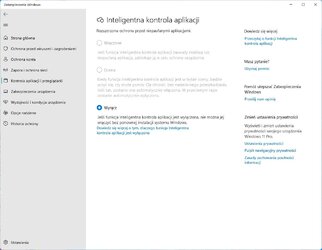
My Computer
At a glance
Win11
- OS
- Win11
In English builds the name MS use for this is 'Smart App Control'.I use Polish Windows because I am of Polish nationality. I don't know if you can understand Polish as in the picture, but I am pasting the image. The point is, intelligent app control is turned off....
My Computers
-
At a glance
Windows 11 HomeAMD Athlon Silver 3050U8GBRadeon Graphics- OS
- Windows 11 Home
- Computer type
- Laptop
- Manufacturer/Model
- Acer Aspire 3 A315-23-R9VY
- CPU
- AMD Athlon Silver 3050U
- Memory
- 8GB
- Graphics Card(s)
- Radeon Graphics
- Monitor(s) Displays
- laptop screen
- Screen Resolution
- 1366x768 native resolution, up to 2560x1440 with Radeon Virtual Super Resolution
- Hard Drives
- 1TB Samsung EVO 870 SSD (from April 2026: 250GB EVO 850)
- Internet Speed
- 150 Mbps
- Browser
- Edge, Firefox
- Antivirus
- Defender
- Other Info
- UPDATE - 11 April 2026: due to lid hinges starting to break up this laptop has been retired from active duty. The OS with all software and files has been migrated to my System Seven in 'Other systems' to carry on as my general purpose 'main machine'.
I've now clean installed 25H2 and used Garlin's scripts to update Secure Boot to CA 2023 and revoke the PCA 2011 certificates. It's new role is to test secure boot issues.
Info for 2021-2026:
fully 'Windows 11 ready' laptop. Windows 10 C: partition migrated from my old unsupported 'main machine' then upgraded to 11. A test migration ran Insider builds for 2 months. When 11 was released on 5th October 2021 it was re-imaged back to 10 and was offered the upgrade in Windows Update on 20th October. Windows Update offered the 22H2 Feature Update on 20th September 2022. It got the 23H2 Feature Update on 4th November 2023 through Windows Update, 24H2 on 3rd October 2024 through Windows Update by setting the Target Release Version for 24H2, and 25H2 on 30th September 2025 through Windows Update by setting the Target Release Version for 25H2.
-
At a glance
Windows 11 ProIntel® Core™ i5-520M8GB(integrated graphics) Intel HD Graphics- Operating System
- Windows 11 Pro
- Computer type
- Laptop
- Manufacturer/Model
- Dell Latitude E4310
- CPU
- Intel® Core™ i5-520M
- Motherboard
- 0T6M8G
- Memory
- 8GB
- Graphics card(s)
- (integrated graphics) Intel HD Graphics
- Screen Resolution
- 1366x768
- Hard Drives
- 500GB Crucial MX500 SSD
- Browser
- Firefox, Edge
- Antivirus
- Defender
- Other Info
- unsupported machine: Legacy bios, MBR, TPM 1.2, upgraded from W10 to W11 using W10/W11 hybrid install media workaround.
In-place upgrade to 22H2 using ISO and a workaround.
Feature Update to 23H2 by manually installing the Enablement Package.
In-place upgrade to 24H2 using hybrid 23H2/24H2 install media.
Upgraded to 25H2 by Enablement Package.
Also running Insider Experimental 263xx and 29xxx builds and Windows 10 as native boot .vhdx.
-
My SYSTEM THREE is a Dell Latitude 5410, i7-10610U, 32GB RAM, 512GB NVMe ssd, supported device running Windows 11 Pro.
My SYSTEM FOUR was a 2-in-1 convertible Lenovo Yoga 11e (1st gen) type 20DA, Celeron N2930, 8GB RAM, 256GB ssd. Unsupported device. This has now been sold. It has been replaced by my System Eight.
My SYSTEM FIVE is a Dell Latitude 3190 2-in-1, Pentium Silver N5030, 8GB RAM, 1TB NVMe ssd, supported device running Windows 11 Pro, plus Insider Beta, Experimental 263xx and 29xxx builds (and a few others) as a native boot .vhdx.
My SYSTEM SIX is a Dell Latitude 5550, Core Ultra 7 165H, 64GB RAM, 1TB NVMe SSD, supported device, Windows 11 Pro, Hyper-V host machine. Updated to 25H2 on 30th September 2025.
My SYSTEM SEVEN is a Lenovo Thinkpad T580, 1920x1080 touchscreen, Intel Core i7-8650U, 16GB RAM, 512GB NVMe SSD + 2nd 512GB NVMe SSD, a supported device for Windows 11. This is my current general purpose 'main machine'. The installed Windows 11 Home from my System One has been migrated to this machine. As its new home has an existing digital licence for Pro I've been able to upgrade the migrated OS from Home to Pro.
29 Sept. 2026 Feature Update to 26H2 through Windows Update by setting the Target Release Version for 26H2.
My SYSTEM EIGHT is a 2-in-1 convertible Lenovo Yoga 11e (5th gen) type 20LN, Celeron N4120, 8GB RAM, 512GB NVMe ssd, a supported device for Windows 11. Currently running Windows 11 Pro, plus Insider Beta, Experimental 263xx and 29xxx builds as native boot vhdx.
Thank you very much for all your help. Thanks to you, I was able to repair the system without reinstalling it. Thank you fg2001gf11F in particular for sending me the files I asked for. You can safely remove them from the disk. Unfortunately, SecurityHealthSetup.exe is not working. After starting it, nothing happens. Therefore, I will be patiently waiting for the latest version of Security Health in Windows Update. For now, I have to be content with the version I have. Regards
My Computer
At a glance
Win11
- OS
- Win11
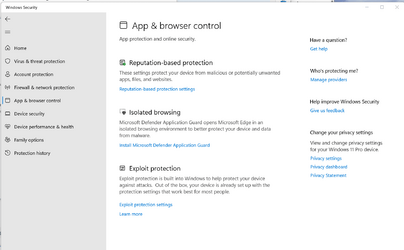
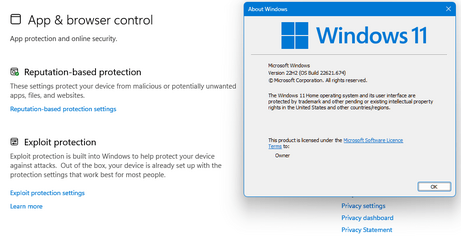
Not even showing on this one, this is the latest 22621.674 Public Build.In English builds the name MS use for this is 'Smart App Control'.
My Computer
At a glance
Windows 11 Pro 25H2Intel I9-9900K64GBNVIDIA RTX 2060
- OS
- Windows 11 Pro 25H2
- Computer type
- PC/Desktop
- Manufacturer/Model
- Dell XPS 8930
- CPU
- Intel I9-9900K
- Memory
- 64GB
- Graphics Card(s)
- NVIDIA RTX 2060
- Sound Card
- NVIDIA High Definition Audio
- Monitor(s) Displays
- 4k Samsung
- Screen Resolution
- 3840 x 2160
- Hard Drives
- 512GB NVMe, ADATA SU 800, 2TB HDD
There's no apparent logic to this. It shows on one of mine, an unsupported device. But neither of my supported devices show it. All are on the same 22621.674 public build.Not even showing on this one, this is the latest 22621.674 Public Build.
Toshiba L750 (unsupported):

My 'System One' (supported):
Dell Latitude 5410 (supported):

My Computers
-
At a glance
Windows 11 HomeAMD Athlon Silver 3050U8GBRadeon Graphics- OS
- Windows 11 Home
- Computer type
- Laptop
- Manufacturer/Model
- Acer Aspire 3 A315-23-R9VY
- CPU
- AMD Athlon Silver 3050U
- Memory
- 8GB
- Graphics Card(s)
- Radeon Graphics
- Monitor(s) Displays
- laptop screen
- Screen Resolution
- 1366x768 native resolution, up to 2560x1440 with Radeon Virtual Super Resolution
- Hard Drives
- 1TB Samsung EVO 870 SSD (from April 2026: 250GB EVO 850)
- Internet Speed
- 150 Mbps
- Browser
- Edge, Firefox
- Antivirus
- Defender
- Other Info
- UPDATE - 11 April 2026: due to lid hinges starting to break up this laptop has been retired from active duty. The OS with all software and files has been migrated to my System Seven in 'Other systems' to carry on as my general purpose 'main machine'.
I've now clean installed 25H2 and used Garlin's scripts to update Secure Boot to CA 2023 and revoke the PCA 2011 certificates. It's new role is to test secure boot issues.
Info for 2021-2026:
fully 'Windows 11 ready' laptop. Windows 10 C: partition migrated from my old unsupported 'main machine' then upgraded to 11. A test migration ran Insider builds for 2 months. When 11 was released on 5th October 2021 it was re-imaged back to 10 and was offered the upgrade in Windows Update on 20th October. Windows Update offered the 22H2 Feature Update on 20th September 2022. It got the 23H2 Feature Update on 4th November 2023 through Windows Update, 24H2 on 3rd October 2024 through Windows Update by setting the Target Release Version for 24H2, and 25H2 on 30th September 2025 through Windows Update by setting the Target Release Version for 25H2.
-
At a glance
Windows 11 ProIntel® Core™ i5-520M8GB(integrated graphics) Intel HD Graphics- Operating System
- Windows 11 Pro
- Computer type
- Laptop
- Manufacturer/Model
- Dell Latitude E4310
- CPU
- Intel® Core™ i5-520M
- Motherboard
- 0T6M8G
- Memory
- 8GB
- Graphics card(s)
- (integrated graphics) Intel HD Graphics
- Screen Resolution
- 1366x768
- Hard Drives
- 500GB Crucial MX500 SSD
- Browser
- Firefox, Edge
- Antivirus
- Defender
- Other Info
- unsupported machine: Legacy bios, MBR, TPM 1.2, upgraded from W10 to W11 using W10/W11 hybrid install media workaround.
In-place upgrade to 22H2 using ISO and a workaround.
Feature Update to 23H2 by manually installing the Enablement Package.
In-place upgrade to 24H2 using hybrid 23H2/24H2 install media.
Upgraded to 25H2 by Enablement Package.
Also running Insider Experimental 263xx and 29xxx builds and Windows 10 as native boot .vhdx.
-
My SYSTEM THREE is a Dell Latitude 5410, i7-10610U, 32GB RAM, 512GB NVMe ssd, supported device running Windows 11 Pro.
My SYSTEM FOUR was a 2-in-1 convertible Lenovo Yoga 11e (1st gen) type 20DA, Celeron N2930, 8GB RAM, 256GB ssd. Unsupported device. This has now been sold. It has been replaced by my System Eight.
My SYSTEM FIVE is a Dell Latitude 3190 2-in-1, Pentium Silver N5030, 8GB RAM, 1TB NVMe ssd, supported device running Windows 11 Pro, plus Insider Beta, Experimental 263xx and 29xxx builds (and a few others) as a native boot .vhdx.
My SYSTEM SIX is a Dell Latitude 5550, Core Ultra 7 165H, 64GB RAM, 1TB NVMe SSD, supported device, Windows 11 Pro, Hyper-V host machine. Updated to 25H2 on 30th September 2025.
My SYSTEM SEVEN is a Lenovo Thinkpad T580, 1920x1080 touchscreen, Intel Core i7-8650U, 16GB RAM, 512GB NVMe SSD + 2nd 512GB NVMe SSD, a supported device for Windows 11. This is my current general purpose 'main machine'. The installed Windows 11 Home from my System One has been migrated to this machine. As its new home has an existing digital licence for Pro I've been able to upgrade the migrated OS from Home to Pro.
29 Sept. 2026 Feature Update to 26H2 through Windows Update by setting the Target Release Version for 26H2.
My SYSTEM EIGHT is a 2-in-1 convertible Lenovo Yoga 11e (5th gen) type 20LN, Celeron N4120, 8GB RAM, 512GB NVMe ssd, a supported device for Windows 11. Currently running Windows 11 Pro, plus Insider Beta, Experimental 263xx and 29xxx builds as native boot vhdx.
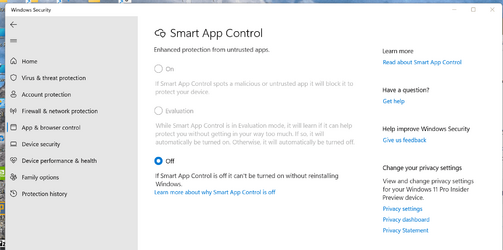
There's no apparent logic to this. It shows on one of mine, an unsupported device. But neither of my supported devices show it. All are on the same 22621.674 public build.
Thanks Bree,
I see it on Dev Build 25217, but it is turned off.
It wants a clean install to turn it on?
My Computer
At a glance
Windows 11 Pro 25H2Intel I9-9900K64GBNVIDIA RTX 2060
- OS
- Windows 11 Pro 25H2
- Computer type
- PC/Desktop
- Manufacturer/Model
- Dell XPS 8930
- CPU
- Intel I9-9900K
- Memory
- 64GB
- Graphics Card(s)
- NVIDIA RTX 2060
- Sound Card
- NVIDIA High Definition Audio
- Monitor(s) Displays
- 4k Samsung
- Screen Resolution
- 3840 x 2160
- Hard Drives
- 512GB NVMe, ADATA SU 800, 2TB HDD
Yes, it's settings are greyed out liked that on my RTM build Toshiba L750 too.Thanks Bree,
I see it on Dev Build 25217, but it is turned off.
Yes. According to Brink's tutorial...It wants a clean install to turn it on?
In order to ensure a more secure experience Microsoft only enables Smart App Control on a clean install of Microsoft Windows 11. Microsoft wants to be sure that there aren't already untrusted apps running on the device when they turn Smart App Control on. That's why in order to turn Smart App Control back on after it's been turned off, you'll need to reset or reinstall Windows.
My Computers
-
At a glance
Windows 11 HomeAMD Athlon Silver 3050U8GBRadeon Graphics- OS
- Windows 11 Home
- Computer type
- Laptop
- Manufacturer/Model
- Acer Aspire 3 A315-23-R9VY
- CPU
- AMD Athlon Silver 3050U
- Memory
- 8GB
- Graphics Card(s)
- Radeon Graphics
- Monitor(s) Displays
- laptop screen
- Screen Resolution
- 1366x768 native resolution, up to 2560x1440 with Radeon Virtual Super Resolution
- Hard Drives
- 1TB Samsung EVO 870 SSD (from April 2026: 250GB EVO 850)
- Internet Speed
- 150 Mbps
- Browser
- Edge, Firefox
- Antivirus
- Defender
- Other Info
- UPDATE - 11 April 2026: due to lid hinges starting to break up this laptop has been retired from active duty. The OS with all software and files has been migrated to my System Seven in 'Other systems' to carry on as my general purpose 'main machine'.
I've now clean installed 25H2 and used Garlin's scripts to update Secure Boot to CA 2023 and revoke the PCA 2011 certificates. It's new role is to test secure boot issues.
Info for 2021-2026:
fully 'Windows 11 ready' laptop. Windows 10 C: partition migrated from my old unsupported 'main machine' then upgraded to 11. A test migration ran Insider builds for 2 months. When 11 was released on 5th October 2021 it was re-imaged back to 10 and was offered the upgrade in Windows Update on 20th October. Windows Update offered the 22H2 Feature Update on 20th September 2022. It got the 23H2 Feature Update on 4th November 2023 through Windows Update, 24H2 on 3rd October 2024 through Windows Update by setting the Target Release Version for 24H2, and 25H2 on 30th September 2025 through Windows Update by setting the Target Release Version for 25H2.
-
At a glance
Windows 11 ProIntel® Core™ i5-520M8GB(integrated graphics) Intel HD Graphics- Operating System
- Windows 11 Pro
- Computer type
- Laptop
- Manufacturer/Model
- Dell Latitude E4310
- CPU
- Intel® Core™ i5-520M
- Motherboard
- 0T6M8G
- Memory
- 8GB
- Graphics card(s)
- (integrated graphics) Intel HD Graphics
- Screen Resolution
- 1366x768
- Hard Drives
- 500GB Crucial MX500 SSD
- Browser
- Firefox, Edge
- Antivirus
- Defender
- Other Info
- unsupported machine: Legacy bios, MBR, TPM 1.2, upgraded from W10 to W11 using W10/W11 hybrid install media workaround.
In-place upgrade to 22H2 using ISO and a workaround.
Feature Update to 23H2 by manually installing the Enablement Package.
In-place upgrade to 24H2 using hybrid 23H2/24H2 install media.
Upgraded to 25H2 by Enablement Package.
Also running Insider Experimental 263xx and 29xxx builds and Windows 10 as native boot .vhdx.
-
My SYSTEM THREE is a Dell Latitude 5410, i7-10610U, 32GB RAM, 512GB NVMe ssd, supported device running Windows 11 Pro.
My SYSTEM FOUR was a 2-in-1 convertible Lenovo Yoga 11e (1st gen) type 20DA, Celeron N2930, 8GB RAM, 256GB ssd. Unsupported device. This has now been sold. It has been replaced by my System Eight.
My SYSTEM FIVE is a Dell Latitude 3190 2-in-1, Pentium Silver N5030, 8GB RAM, 1TB NVMe ssd, supported device running Windows 11 Pro, plus Insider Beta, Experimental 263xx and 29xxx builds (and a few others) as a native boot .vhdx.
My SYSTEM SIX is a Dell Latitude 5550, Core Ultra 7 165H, 64GB RAM, 1TB NVMe SSD, supported device, Windows 11 Pro, Hyper-V host machine. Updated to 25H2 on 30th September 2025.
My SYSTEM SEVEN is a Lenovo Thinkpad T580, 1920x1080 touchscreen, Intel Core i7-8650U, 16GB RAM, 512GB NVMe SSD + 2nd 512GB NVMe SSD, a supported device for Windows 11. This is my current general purpose 'main machine'. The installed Windows 11 Home from my System One has been migrated to this machine. As its new home has an existing digital licence for Pro I've been able to upgrade the migrated OS from Home to Pro.
29 Sept. 2026 Feature Update to 26H2 through Windows Update by setting the Target Release Version for 26H2.
My SYSTEM EIGHT is a 2-in-1 convertible Lenovo Yoga 11e (5th gen) type 20LN, Celeron N4120, 8GB RAM, 512GB NVMe ssd, a supported device for Windows 11. Currently running Windows 11 Pro, plus Insider Beta, Experimental 263xx and 29xxx builds as native boot vhdx.
- Local time
- 7:56 AM
- Posts
- 3,250
- OS
- Windows 11 Pro 25H2 (RP channel)
I've made a discovery tonight, see my post here Did Microsoft mess up my Security? Strange story!There's no apparent logic to this. It shows on one of mine, an unsupported device. But neither of my supported devices show it. All are on the same 22621.674 public build.
Toshiba L750 (unsupported):
View attachment 42575
My 'System One' (supported):
View attachment 42576
Dell Latitude 5410 (supported):
View attachment 42577
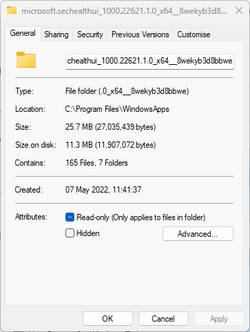
Check which versions of SecurityHealthUI are running on the machines - open the Security app, check Task Manager/Properties for the running process and it'll show the version. The 'wrong' one has no SAC (pic 1), the 'right' one does (pic 2). Both are identical RP builds. The 'right' one was done this evening as a clean install in VBox and after checking for updates the version stayed the same and no 1.2209.22001 folder has appeared.
I may be on to something here

Attachments

My Computer
At a glance
Windows 11 Pro 25H2 (RP channel)AMD Ryzen 7 9800X3D 8-core64GB Corsair Titanium 6000/CL30MSI Suprim 5080 SOC
- OS
- Windows 11 Pro 25H2 (RP channel)
- Computer type
- PC/Desktop
- Manufacturer/Model
- MSI
- CPU
- AMD Ryzen 7 9800X3D 8-core
- Motherboard
- MEG X870E Godlike
- Memory
- 64GB Corsair Titanium 6000/CL30
- Graphics Card(s)
- MSI Suprim 5080 SOC
- Sound Card
- Soundblaster AE-9
- Monitor(s) Displays
- ASUS TUF Gaming VG289Q
- Screen Resolution
- 3840x2160
- Hard Drives
- Samsung 9100 Pro 4TB (gen 5 x4, system drive/games)
Samsung 990 Pro 2TB
Samsung 980 Pro 2TB
Samsung 870 Evo 4TB
Samsung 870 Evo 2TB
Samsung T9 4TB
- PSU
- Seasonic PX-2200
- Case
- Bequiet! Dark Base Pro 901
- Cooling
- Noctua NH-D15S Chromax black
- Keyboard
- Logitech G915 X (wired)
- Mouse
- Logitech G903 with PowerPlay charger
- Internet Speed
- 900Mb/sec
- Browser
- Microsoft Edge
- Antivirus
- Windows Defender
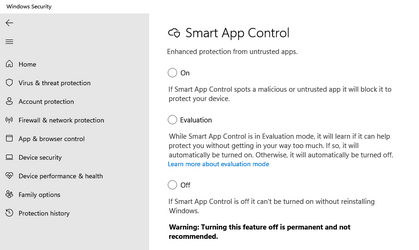
but you can access via search by typing Smart App Control. The options are then displayed but cannot be set. The latest stable version is 1.2207 and it was sent to me by a friend whom I sent after accidentally uploading 1.2109. Everything works for me now, but I don't want to mess with unknown versions.
Last edited:
My Computer
At a glance
Win11
- OS
- Win11
Interesting. For the three examples I gave in post #93 only the first one that does show Smart App Control was version 1000.22621.1.0.I've made a discovery tonight, see my post here Did Microsoft mess up my Security? Strange story!
Check which versions of SecurityHealthUI are running on the machines - open the Security app, check Task Manager/Properties for the running process and it'll show the version.
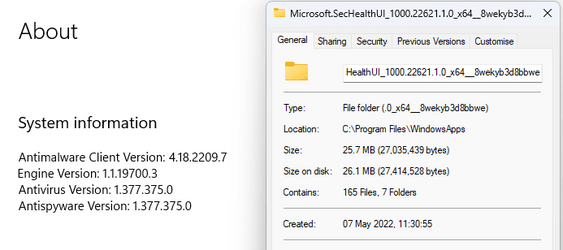
Both the others (no Smart App Control showing) were version 1000.25183.0.1000, which BTW is also shown in About for Windows Security.

Thank you, both my machines that have version 1000.25183.0.1000 show the Smart App Control when I search for it. None of the options, On, Evaluation, or Off, are selected, but all can be clicked on and will trigger the UAC prompt. But as you say, even if you click 'Yes' nothing changes.you can access via search by typing Smart App Control. The options are then displayed but cannot be set....
Last edited:
My Computers
-
At a glance
Windows 11 HomeAMD Athlon Silver 3050U8GBRadeon Graphics- OS
- Windows 11 Home
- Computer type
- Laptop
- Manufacturer/Model
- Acer Aspire 3 A315-23-R9VY
- CPU
- AMD Athlon Silver 3050U
- Memory
- 8GB
- Graphics Card(s)
- Radeon Graphics
- Monitor(s) Displays
- laptop screen
- Screen Resolution
- 1366x768 native resolution, up to 2560x1440 with Radeon Virtual Super Resolution
- Hard Drives
- 1TB Samsung EVO 870 SSD (from April 2026: 250GB EVO 850)
- Internet Speed
- 150 Mbps
- Browser
- Edge, Firefox
- Antivirus
- Defender
- Other Info
- UPDATE - 11 April 2026: due to lid hinges starting to break up this laptop has been retired from active duty. The OS with all software and files has been migrated to my System Seven in 'Other systems' to carry on as my general purpose 'main machine'.
I've now clean installed 25H2 and used Garlin's scripts to update Secure Boot to CA 2023 and revoke the PCA 2011 certificates. It's new role is to test secure boot issues.
Info for 2021-2026:
fully 'Windows 11 ready' laptop. Windows 10 C: partition migrated from my old unsupported 'main machine' then upgraded to 11. A test migration ran Insider builds for 2 months. When 11 was released on 5th October 2021 it was re-imaged back to 10 and was offered the upgrade in Windows Update on 20th October. Windows Update offered the 22H2 Feature Update on 20th September 2022. It got the 23H2 Feature Update on 4th November 2023 through Windows Update, 24H2 on 3rd October 2024 through Windows Update by setting the Target Release Version for 24H2, and 25H2 on 30th September 2025 through Windows Update by setting the Target Release Version for 25H2.
-
At a glance
Windows 11 ProIntel® Core™ i5-520M8GB(integrated graphics) Intel HD Graphics- Operating System
- Windows 11 Pro
- Computer type
- Laptop
- Manufacturer/Model
- Dell Latitude E4310
- CPU
- Intel® Core™ i5-520M
- Motherboard
- 0T6M8G
- Memory
- 8GB
- Graphics card(s)
- (integrated graphics) Intel HD Graphics
- Screen Resolution
- 1366x768
- Hard Drives
- 500GB Crucial MX500 SSD
- Browser
- Firefox, Edge
- Antivirus
- Defender
- Other Info
- unsupported machine: Legacy bios, MBR, TPM 1.2, upgraded from W10 to W11 using W10/W11 hybrid install media workaround.
In-place upgrade to 22H2 using ISO and a workaround.
Feature Update to 23H2 by manually installing the Enablement Package.
In-place upgrade to 24H2 using hybrid 23H2/24H2 install media.
Upgraded to 25H2 by Enablement Package.
Also running Insider Experimental 263xx and 29xxx builds and Windows 10 as native boot .vhdx.
-
My SYSTEM THREE is a Dell Latitude 5410, i7-10610U, 32GB RAM, 512GB NVMe ssd, supported device running Windows 11 Pro.
My SYSTEM FOUR was a 2-in-1 convertible Lenovo Yoga 11e (1st gen) type 20DA, Celeron N2930, 8GB RAM, 256GB ssd. Unsupported device. This has now been sold. It has been replaced by my System Eight.
My SYSTEM FIVE is a Dell Latitude 3190 2-in-1, Pentium Silver N5030, 8GB RAM, 1TB NVMe ssd, supported device running Windows 11 Pro, plus Insider Beta, Experimental 263xx and 29xxx builds (and a few others) as a native boot .vhdx.
My SYSTEM SIX is a Dell Latitude 5550, Core Ultra 7 165H, 64GB RAM, 1TB NVMe SSD, supported device, Windows 11 Pro, Hyper-V host machine. Updated to 25H2 on 30th September 2025.
My SYSTEM SEVEN is a Lenovo Thinkpad T580, 1920x1080 touchscreen, Intel Core i7-8650U, 16GB RAM, 512GB NVMe SSD + 2nd 512GB NVMe SSD, a supported device for Windows 11. This is my current general purpose 'main machine'. The installed Windows 11 Home from my System One has been migrated to this machine. As its new home has an existing digital licence for Pro I've been able to upgrade the migrated OS from Home to Pro.
29 Sept. 2026 Feature Update to 26H2 through Windows Update by setting the Target Release Version for 26H2.
My SYSTEM EIGHT is a 2-in-1 convertible Lenovo Yoga 11e (5th gen) type 20LN, Celeron N4120, 8GB RAM, 512GB NVMe ssd, a supported device for Windows 11. Currently running Windows 11 Pro, plus Insider Beta, Experimental 263xx and 29xxx builds as native boot vhdx.
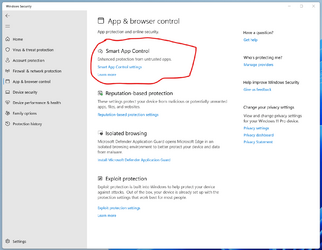
@Bree,There's no apparent logic to this. It shows on one of mine, an unsupported device. But neither of my supported devices show it. All are on the same 22621.674 public build.
Hi again,
Here it is after a clean install of 22621.525 with the MS official ISO.
Edition Windows 11 Pro
Version 22H2
Installed on 10/17/2022
OS build 22621.525
Experience Windows Feature Experience Pack 1000.22634.1000.0
Same after updating to 22621.674.
Microsoft.SecHealthUI Microsoft.SecHealthUI_1000.22621.1.0_x64__8wekyb3d8bbwe
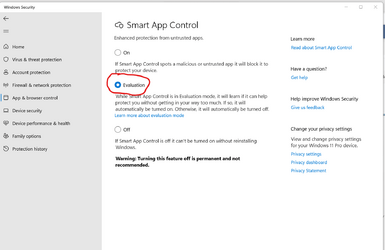
Last edited:
My Computer
At a glance
Windows 11 Pro 25H2Intel I9-9900K64GBNVIDIA RTX 2060
- OS
- Windows 11 Pro 25H2
- Computer type
- PC/Desktop
- Manufacturer/Model
- Dell XPS 8930
- CPU
- Intel I9-9900K
- Memory
- 64GB
- Graphics Card(s)
- NVIDIA RTX 2060
- Sound Card
- NVIDIA High Definition Audio
- Monitor(s) Displays
- 4k Samsung
- Screen Resolution
- 3840 x 2160
- Hard Drives
- 512GB NVMe, ADATA SU 800, 2TB HDD
Mi Windows Upate does not detect version 1.2209. The official version I have is 1.2207. I got this version after updating Windows to 22H2, but due to problems with the leftover after the old update I was forced to install version 1.2109. And that was my mistake, because it was enough to delete the folder in system32 \ SecurityHealth. But it turns out that version 1.2207 is the last stable version of the application. I discovered it thanks to you and I am grateful for your help
My Computer
At a glance
Win11
- OS
- Win11
Similar threads

- Replies
- 20
- Views
- 2K

- Replies
- 2
- Views
- 6K


- Article
Privacy and Security
Hide or Show App and Browser Control page in Windows Security
- Replies
- 4
- Views
- 14K

Latest Support Threads
-
-
Solved can i share my vibe coded utility app here ? Windot
- Started by bdxoul
- Replies: 0
-
Mouse cursor is not behaving properly on Windows 11 25H2
- Started by gaffar
- Replies: 2
-
Downsides to upgrading to Windows 11 26H2?
- Started by tidozonoada
- Replies: 27
-
 need to convert replace true HD in an mkv file with AC3 or similar
- Started by JAK
- Replies: 1

Latest Tutorials
-

-
 Personalization Change Category for App in Start Menu All Apps on Windows 11
- Started by Brink
- Replies: 7
-
 Accessibility Enable or Disable Auto Zoom Out for Narrator Math Reading Navigation in Windows 11
- Started by Brink
- Replies: 0
-
 Accessibility Change Narrator Math Reading Navigation Verbosity in Windows 11
- Started by Brink
- Replies: 0
-
 Accessibility Change Narrator Math Reading Navigation Mode in Windows 11
- Started by Brink
- Replies: 0