
Solved Black screen - not sure why


bigseb

Well-known member
Member
VIP
Local time
12:29 AM
Posts
66
OS
Windows 11
Looking for some insight...

Working on my PC editing some photos, music playing too. Screen goes black but music is still playing in the background. I press Ctrl Alt Delete and it brings up the menu i.e. it shows on the screen. I select log out and the log in screens shows as normal.

I think maybe it needs a clean so I power off, unplug and open it up. Remove graphics card and memory and clean. Put it all together but now the screen gets no signal.

Open it up again and check everything's seated properly. Plug in and try again, still no signal on monitor.

PC appears to be running properly, just the screen isn't showing anything. For all I know it's waiting me to log-in.

Is this a failing graphics card? Not sure because it worked fine after using ctrl alr delete to end the session. Stumped on this one. Any ideas what it might be?
 

My Computer My Computer

At a glance

Windows 11AMD Ryzen 7 2700X 3.70 GHz32 Gb4095MB NVIDIA GeForce RTX 2070
OS
Windows 11
Computer type
PC/Desktop
Manufacturer/Model
Own build
CPU
AMD Ryzen 7 2700X 3.70 GHz
Motherboard
ASUS B450M-A
Memory
32 Gb
Graphics Card(s)
4095MB NVIDIA GeForce RTX 2070
Monitor(s) Displays
AOC Q3279WG5B
Screen Resolution
2560x1440
Hard Drives
465GB Western Digital WDC SSD
1863GB Seagate HDD
Is this a failing graphics card?


The RAM probably needs re-seated, again. Use an LED flashlight. Make sure it's properly seated.
Otherwise... you need to double check all the graphics card and monitor connections as well.
And make sure it's fully re-seated.
 

My Computers My Computers

  • At a glance

    Win 11 Home ♦♦♦26200.8655 ♦♦♦♦♦♦♦25H2AMD Ryzen 7 3700XG.Skill (F4-3200C14D-16GTZKW)EVGA RTX 2070 (08G-P4-2171-KR)
    OS
    Win 11 Home ♦♦♦26200.8655 ♦♦♦♦♦♦♦25H2
    Computer type
    PC/Desktop
    Manufacturer/Model
    Built by Ghot® [May 2020]
    CPU
    AMD Ryzen 7 3700X
    Motherboard
    Asus Pro WS X570-ACE (BIOS 5302)
    Memory
    G.Skill (F4-3200C14D-16GTZKW)
    Graphics Card(s)
    EVGA RTX 2070 (08G-P4-2171-KR)
    Sound Card
    Realtek ALC1220P / ALC S1220A
    Monitor(s) Displays
    Dell U3011 30"
    Screen Resolution
    2560 x 1600
    Hard Drives
    2x Samsung 860 EVO 500GB,
    WD 4TB Black FZBX - SATA III,
    WD 8TB Black FZBX - SATA III,
    DRW-24B1ST CD/DVD Burner
    PSU
    PC Power & Cooling 750W Quad EPS12V
    Case
    Cooler Master ATCS 840 Tower
    Cooling
    CM Hyper 212 EVO (push/pull)
    Keyboard
    Ducky DK9008 Shine II Blue LED
    Mouse
    Logitech Optical M-100
    Internet Speed
    300/300
    Browser
    Firefox (latest)
    Antivirus
    Bitdefender Total Security
    Other Info
    Speakers: Klipsch Pro Media 2.1
  • At a glance

    Windows XP Pro 32bit w/SP3AMD Athlon 64 X2 5000+ (OC'd @ 3.2Ghz)TWIN2X2048-6400C4DHX (2 x 1GB, DDR2 800)EVGA 256-P2-N758-TR GeForce 8600GT SSC
    Operating System
    Windows XP Pro 32bit w/SP3
    Computer type
    PC/Desktop
    Manufacturer/Model
    Built by Ghot® (not in use)
    CPU
    AMD Athlon 64 X2 5000+ (OC'd @ 3.2Ghz)
    Motherboard
    ASUS M2N32-SLI Deluxe Wireless Edition
    Memory
    TWIN2X2048-6400C4DHX (2 x 1GB, DDR2 800)
    Graphics card(s)
    EVGA 256-P2-N758-TR GeForce 8600GT SSC
    Sound Card
    Onboard
    Monitor(s) Displays
    ViewSonic G90FB Black 19" Professional (CRT)
    Screen Resolution
    up to 2048 x 1536
    Hard Drives
    WD 36GB 10,000rpm Raptor SATA
    Seagate 80GB 7200rpm SATA
    Lite-On LTR-52246S CD/RW
    Lite-On LH-18A1P CD/DVD Burner
    PSU
    PC Power & Cooling Silencer 750 Quad EPS12V
    Case
    Generic Beige case, 80mm fans
    Cooling
    ZALMAN 9500A 92mm CPU Cooler
    Keyboard
    Logitech Classic Keybooard 200
    Mouse
    Logitech Optical M-BT96a
    Internet Speed
    300/300
    Browser
    Firefox 3.x ??
    Antivirus
    Symantec (Norton)
    Other Info
    Still assembled, still runs. Haven't turned it on for 15 years?
The RAM probably needs re-seated, again. Use an LED flashlight. Make sure it's properly seated.
Otherwise... you need to double check all the graphics card and monitor connections as well.
And make sure it's fully re-seated.
Reseated everything. Now I get this:
 

Attachments

  • Screenshot_20231130_181911_Gallery.jpg
    Screenshot_20231130_181911_Gallery.jpg
    100.4 KB · Views: 2

My Computer My Computer

At a glance

Windows 11AMD Ryzen 7 2700X 3.70 GHz32 Gb4095MB NVIDIA GeForce RTX 2070
OS
Windows 11
Computer type
PC/Desktop
Manufacturer/Model
Own build
CPU
AMD Ryzen 7 2700X 3.70 GHz
Motherboard
ASUS B450M-A
Memory
32 Gb
Graphics Card(s)
4095MB NVIDIA GeForce RTX 2070
Monitor(s) Displays
AOC Q3279WG5B
Screen Resolution
2560x1440
Hard Drives
465GB Western Digital WDC SSD
1863GB Seagate HDD
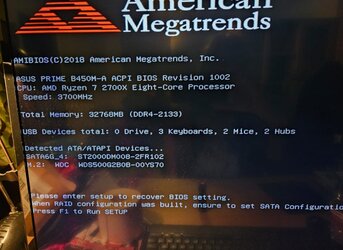
Reseated everything. Now I get this:


Just press F1 to enter the BIOS (the Setup), and do nothing in there except hit the F10 key to save and exit. :-)

Every now and then the BIOS glitches... that's the message you get when that happens.
F10 (from within the BIOS), should fix that and make your computer happy again.

Sometimes I'll get the "hit F1 to enter Setup" message after a power failure, for example.
 

My Computers My Computers

  • At a glance

    Win 11 Home ♦♦♦26200.8655 ♦♦♦♦♦♦♦25H2AMD Ryzen 7 3700XG.Skill (F4-3200C14D-16GTZKW)EVGA RTX 2070 (08G-P4-2171-KR)
    OS
    Win 11 Home ♦♦♦26200.8655 ♦♦♦♦♦♦♦25H2
    Computer type
    PC/Desktop
    Manufacturer/Model
    Built by Ghot® [May 2020]
    CPU
    AMD Ryzen 7 3700X
    Motherboard
    Asus Pro WS X570-ACE (BIOS 5302)
    Memory
    G.Skill (F4-3200C14D-16GTZKW)
    Graphics Card(s)
    EVGA RTX 2070 (08G-P4-2171-KR)
    Sound Card
    Realtek ALC1220P / ALC S1220A
    Monitor(s) Displays
    Dell U3011 30"
    Screen Resolution
    2560 x 1600
    Hard Drives
    2x Samsung 860 EVO 500GB,
    WD 4TB Black FZBX - SATA III,
    WD 8TB Black FZBX - SATA III,
    DRW-24B1ST CD/DVD Burner
    PSU
    PC Power & Cooling 750W Quad EPS12V
    Case
    Cooler Master ATCS 840 Tower
    Cooling
    CM Hyper 212 EVO (push/pull)
    Keyboard
    Ducky DK9008 Shine II Blue LED
    Mouse
    Logitech Optical M-100
    Internet Speed
    300/300
    Browser
    Firefox (latest)
    Antivirus
    Bitdefender Total Security
    Other Info
    Speakers: Klipsch Pro Media 2.1
  • At a glance

    Windows XP Pro 32bit w/SP3AMD Athlon 64 X2 5000+ (OC'd @ 3.2Ghz)TWIN2X2048-6400C4DHX (2 x 1GB, DDR2 800)EVGA 256-P2-N758-TR GeForce 8600GT SSC
    Operating System
    Windows XP Pro 32bit w/SP3
    Computer type
    PC/Desktop
    Manufacturer/Model
    Built by Ghot® (not in use)
    CPU
    AMD Athlon 64 X2 5000+ (OC'd @ 3.2Ghz)
    Motherboard
    ASUS M2N32-SLI Deluxe Wireless Edition
    Memory
    TWIN2X2048-6400C4DHX (2 x 1GB, DDR2 800)
    Graphics card(s)
    EVGA 256-P2-N758-TR GeForce 8600GT SSC
    Sound Card
    Onboard
    Monitor(s) Displays
    ViewSonic G90FB Black 19" Professional (CRT)
    Screen Resolution
    up to 2048 x 1536
    Hard Drives
    WD 36GB 10,000rpm Raptor SATA
    Seagate 80GB 7200rpm SATA
    Lite-On LTR-52246S CD/RW
    Lite-On LH-18A1P CD/DVD Burner
    PSU
    PC Power & Cooling Silencer 750 Quad EPS12V
    Case
    Generic Beige case, 80mm fans
    Cooling
    ZALMAN 9500A 92mm CPU Cooler
    Keyboard
    Logitech Classic Keybooard 200
    Mouse
    Logitech Optical M-BT96a
    Internet Speed
    300/300
    Browser
    Firefox 3.x ??
    Antivirus
    Symantec (Norton)
    Other Info
    Still assembled, still runs. Haven't turned it on for 15 years?
Just press F1 to enter the BIOS (the Setup), and do nothing in there except hit the F10 key to save and exit. :-)

Every now and then the BIOS glitches... that's the message you get when that happens.
F10 (from within the BIOS), should fix that and make your computer happy again.

Sometimes I'll get the "hit F1 to enter Setup" messages after a power failure.
That's what I did. The time was way off too. It then booted up ok but I couldn't log-in with my pin. Some error. Had to reset it via the Microsoft site. All working now. Thank you for your help.
 

My Computer My Computer

At a glance

Windows 11AMD Ryzen 7 2700X 3.70 GHz32 Gb4095MB NVIDIA GeForce RTX 2070
OS
Windows 11
Computer type
PC/Desktop
Manufacturer/Model
Own build
CPU
AMD Ryzen 7 2700X 3.70 GHz
Motherboard
ASUS B450M-A
Memory
32 Gb
Graphics Card(s)
4095MB NVIDIA GeForce RTX 2070
Monitor(s) Displays
AOC Q3279WG5B
Screen Resolution
2560x1440
Hard Drives
465GB Western Digital WDC SSD
1863GB Seagate HDD
That's what I did. The time was way off too. It then booted up ok but I couldn't log-in with my pin. Some error. Had to reset it via the Microsoft site. All working now. Thank you for your help.

Thumbs Up2.png


Yeah... if the time/date is ever wrong in the BIOS make sure you set that correctly.
Lots of software, during install, records the time/date it was installed.
So if the BIOS time/date is wrong, it can break a lot of software, Windows included.


As for all the PIN stuff... I dunno... I don't use it.
I just use an old fashioned password. :-)
 

My Computers My Computers

  • At a glance

    Win 11 Home ♦♦♦26200.8655 ♦♦♦♦♦♦♦25H2AMD Ryzen 7 3700XG.Skill (F4-3200C14D-16GTZKW)EVGA RTX 2070 (08G-P4-2171-KR)
    OS
    Win 11 Home ♦♦♦26200.8655 ♦♦♦♦♦♦♦25H2
    Computer type
    PC/Desktop
    Manufacturer/Model
    Built by Ghot® [May 2020]
    CPU
    AMD Ryzen 7 3700X
    Motherboard
    Asus Pro WS X570-ACE (BIOS 5302)
    Memory
    G.Skill (F4-3200C14D-16GTZKW)
    Graphics Card(s)
    EVGA RTX 2070 (08G-P4-2171-KR)
    Sound Card
    Realtek ALC1220P / ALC S1220A
    Monitor(s) Displays
    Dell U3011 30"
    Screen Resolution
    2560 x 1600
    Hard Drives
    2x Samsung 860 EVO 500GB,
    WD 4TB Black FZBX - SATA III,
    WD 8TB Black FZBX - SATA III,
    DRW-24B1ST CD/DVD Burner
    PSU
    PC Power & Cooling 750W Quad EPS12V
    Case
    Cooler Master ATCS 840 Tower
    Cooling
    CM Hyper 212 EVO (push/pull)
    Keyboard
    Ducky DK9008 Shine II Blue LED
    Mouse
    Logitech Optical M-100
    Internet Speed
    300/300
    Browser
    Firefox (latest)
    Antivirus
    Bitdefender Total Security
    Other Info
    Speakers: Klipsch Pro Media 2.1
  • At a glance

    Windows XP Pro 32bit w/SP3AMD Athlon 64 X2 5000+ (OC'd @ 3.2Ghz)TWIN2X2048-6400C4DHX (2 x 1GB, DDR2 800)EVGA 256-P2-N758-TR GeForce 8600GT SSC
    Operating System
    Windows XP Pro 32bit w/SP3
    Computer type
    PC/Desktop
    Manufacturer/Model
    Built by Ghot® (not in use)
    CPU
    AMD Athlon 64 X2 5000+ (OC'd @ 3.2Ghz)
    Motherboard
    ASUS M2N32-SLI Deluxe Wireless Edition
    Memory
    TWIN2X2048-6400C4DHX (2 x 1GB, DDR2 800)
    Graphics card(s)
    EVGA 256-P2-N758-TR GeForce 8600GT SSC
    Sound Card
    Onboard
    Monitor(s) Displays
    ViewSonic G90FB Black 19" Professional (CRT)
    Screen Resolution
    up to 2048 x 1536
    Hard Drives
    WD 36GB 10,000rpm Raptor SATA
    Seagate 80GB 7200rpm SATA
    Lite-On LTR-52246S CD/RW
    Lite-On LH-18A1P CD/DVD Burner
    PSU
    PC Power & Cooling Silencer 750 Quad EPS12V
    Case
    Generic Beige case, 80mm fans
    Cooling
    ZALMAN 9500A 92mm CPU Cooler
    Keyboard
    Logitech Classic Keybooard 200
    Mouse
    Logitech Optical M-BT96a
    Internet Speed
    300/300
    Browser
    Firefox 3.x ??
    Antivirus
    Symantec (Norton)
    Other Info
    Still assembled, still runs. Haven't turned it on for 15 years?

Latest Support Threads

Back
Top Bottom




