Broken PC after last nights windows update


Despite ticking wushowide to hide all the updates windows continued updating and despite doing a system restore this morning and using it to restore just now I am still getting stuck on a black screen. Please no reinstall I have hundreds of programs on it.

To be honest, if you do a reinstall now, you'll be over this sooner. Just reinstall your program one at a time when you need them. Then when you think you have everything back, create an image back up so you can restore your system like nothing happened when you encounter future problems. As it stands right now, this is your fastest resolution. Don't prolong your agony.
Before doing a clean install I would try a repair install which keeps programs and data. Repair Install Windows 11 with an In-place Upgrade Tutorial
 

My Computer My Computer

At a glance

Windows 10 version 22H2 and W11 Dev.i7 7500U8GBNVIDIA Geforce 940MX
OS
Windows 10 version 22H2 and W11 Dev.
Computer type
Laptop
Manufacturer/Model
HP
CPU
i7 7500U
Motherboard
HP
Memory
8GB
Graphics Card(s)
NVIDIA Geforce 940MX
Screen Resolution
1920x1080
Hard Drives
Internal 256GB Samsung SSD plus UB3/2 attached 500GB Samsung SSD, 256GB WD SSD, 3TB WD HDD, 2TB WD HDD. 1.5TB Samsung HDD, and 7GB Network storage
Mouse
Logitech M705
Internet Speed
200Mb/sec
Browser
Chrome, FF, Opera, Edgium.
Antivirus
MS Defender, Malwarebytes
I found the uninstall recent windows update from the blue screen and now up and running. Updates paused for 4 weeks.
 

My Computer My Computer

At a glance

Windows 10 PROIntel(R) Core(TM) i7-8700 CPU @ 3.20GHz 3.20 GHz64 GBNVIDIA GeForce GTX 1070
OS
Windows 10 PRO
Computer type
PC/Desktop
Manufacturer/Model
HP Omen
CPU
Intel(R) Core(TM) i7-8700 CPU @ 3.20GHz 3.20 GHz
Motherboard
Board: HP 8437 1.3 Serial Number: PGUCR0HP1B90LD Bus Clock: 100 megahertz UEFI: AMI F.53 10/23/2020
Memory
64 GB
Graphics Card(s)
NVIDIA GeForce GTX 1070
Sound Card
NVIDIA High Definition Audio Realtek High Definition Audio
Monitor(s) Displays
AOC 2778X [Monitor] (27.2"vis, s/n GJGJ7HA027112, July 2018) DELL U2412M [Monitor] (24.0"vis, s/n XX-00FFXD-XXXXX-529-64AS, February 2015)
Hard Drives
c: (NTFS on drive 0) * 999.21 GB 857.61 GB free
d: (NTFS on drive 1) 1984.45 GB 741.65 GB free
e: (NTFS on drive 1) 15.95 GB 1.78 GB free
h: (NTFS on drive 2) 239.93 GB 231.23 GB free
i: (NTFS on drive 2) 14.81 GB 1.71 GB free
Keyboard
Omoton
Mouse
Omoton
Internet Speed
9Gbps
Browser
Chrome Edge and Firefox
Antivirus
Kaspersky
Other Info
Have discovered 31/01/2022 Internet speed at router 41 mbps. At this PC 9. Internet is via wired ethernet.
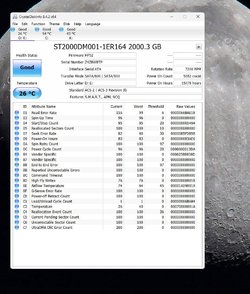
This look OK?
 

Attachments

  • Clipboard01.jpg
    Clipboard01.jpg
    133.9 KB · Views: 2

My Computer My Computer

At a glance

Windows 10 PROIntel(R) Core(TM) i7-8700 CPU @ 3.20GHz 3.20 GHz64 GBNVIDIA GeForce GTX 1070
OS
Windows 10 PRO
Computer type
PC/Desktop
Manufacturer/Model
HP Omen
CPU
Intel(R) Core(TM) i7-8700 CPU @ 3.20GHz 3.20 GHz
Motherboard
Board: HP 8437 1.3 Serial Number: PGUCR0HP1B90LD Bus Clock: 100 megahertz UEFI: AMI F.53 10/23/2020
Memory
64 GB
Graphics Card(s)
NVIDIA GeForce GTX 1070
Sound Card
NVIDIA High Definition Audio Realtek High Definition Audio
Monitor(s) Displays
AOC 2778X [Monitor] (27.2"vis, s/n GJGJ7HA027112, July 2018) DELL U2412M [Monitor] (24.0"vis, s/n XX-00FFXD-XXXXX-529-64AS, February 2015)
Hard Drives
c: (NTFS on drive 0) * 999.21 GB 857.61 GB free
d: (NTFS on drive 1) 1984.45 GB 741.65 GB free
e: (NTFS on drive 1) 15.95 GB 1.78 GB free
h: (NTFS on drive 2) 239.93 GB 231.23 GB free
i: (NTFS on drive 2) 14.81 GB 1.71 GB free
Keyboard
Omoton
Mouse
Omoton
Internet Speed
9Gbps
Browser
Chrome Edge and Firefox
Antivirus
Kaspersky
Other Info
Have discovered 31/01/2022 Internet speed at router 41 mbps. At this PC 9. Internet is via wired ethernet.
Last edited:

My Computer My Computer

At a glance

Windows 10 version 22H2 and W11 Dev.i7 7500U8GBNVIDIA Geforce 940MX
OS
Windows 10 version 22H2 and W11 Dev.
Computer type
Laptop
Manufacturer/Model
HP
CPU
i7 7500U
Motherboard
HP
Memory
8GB
Graphics Card(s)
NVIDIA Geforce 940MX
Screen Resolution
1920x1080
Hard Drives
Internal 256GB Samsung SSD plus UB3/2 attached 500GB Samsung SSD, 256GB WD SSD, 3TB WD HDD, 2TB WD HDD. 1.5TB Samsung HDD, and 7GB Network storage
Mouse
Logitech M705
Internet Speed
200Mb/sec
Browser
Chrome, FF, Opera, Edgium.
Antivirus
MS Defender, Malwarebytes

My Computers My Computers

  • At a glance

    Windows 11 HomeAMD Athlon Silver 3050U8GBRadeon Graphics
    OS
    Windows 11 Home
    Computer type
    Laptop
    Manufacturer/Model
    Acer Aspire 3 A315-23-R9VY
    CPU
    AMD Athlon Silver 3050U
    Memory
    8GB
    Graphics Card(s)
    Radeon Graphics
    Monitor(s) Displays
    laptop screen
    Screen Resolution
    1366x768 native resolution, up to 2560x1440 with Radeon Virtual Super Resolution
    Hard Drives
    1TB Samsung EVO 870 SSD (from April 2026: 250GB EVO 850)
    Internet Speed
    150 Mbps
    Browser
    Edge, Firefox
    Antivirus
    Defender
    Other Info
    UPDATE - 11 April 2026: due to lid hinges starting to break up this laptop has been retired from active duty. The OS with all software and files has been migrated to my System Seven in 'Other systems' to carry on as my general purpose 'main machine'.

    I've now clean installed 25H2 and used Garlin's scripts to update Secure Boot to CA 2023 and revoke the PCA 2011 certificates. It's new role is to test secure boot issues.

    Info for 2021-2026:
    fully 'Windows 11 ready' laptop. Windows 10 C: partition migrated from my old unsupported 'main machine' then upgraded to 11. A test migration ran Insider builds for 2 months. When 11 was released on 5th October 2021 it was re-imaged back to 10 and was offered the upgrade in Windows Update on 20th October. Windows Update offered the 22H2 Feature Update on 20th September 2022. It got the 23H2 Feature Update on 4th November 2023 through Windows Update, 24H2 on 3rd October 2024 through Windows Update by setting the Target Release Version for 24H2, and 25H2 on 30th September 2025 through Windows Update by setting the Target Release Version for 25H2.
  • At a glance

    Windows 11 ProIntel® Core™ i5-520M8GB(integrated graphics) Intel HD Graphics
    Operating System
    Windows 11 Pro
    Computer type
    Laptop
    Manufacturer/Model
    Dell Latitude E4310
    CPU
    Intel® Core™ i5-520M
    Motherboard
    0T6M8G
    Memory
    8GB
    Graphics card(s)
    (integrated graphics) Intel HD Graphics
    Screen Resolution
    1366x768
    Hard Drives
    500GB Crucial MX500 SSD
    Browser
    Firefox, Edge
    Antivirus
    Defender
    Other Info
    unsupported machine: Legacy bios, MBR, TPM 1.2, upgraded from W10 to W11 using W10/W11 hybrid install media workaround.

    In-place upgrade to 22H2 using ISO and a workaround.
    Feature Update to 23H2 by manually installing the Enablement Package.
    In-place upgrade to 24H2 using hybrid 23H2/24H2 install media.
    Upgraded to 25H2 by Enablement Package.

    Also running Insider Dev, and Canary builds and Windows 10 as native boot .vhdx.
  • My SYSTEM THREE is a Dell Latitude 5410, i7-10610U, 32GB RAM, 512GB NVMe ssd, supported device running Windows 11 Pro.

    My SYSTEM FOUR was a 2-in-1 convertible Lenovo Yoga 11e (1st gen) type 20DA, Celeron N2930, 8GB RAM, 256GB ssd. Unsupported device. This has now been sold and replaced by System Eight.

    My SYSTEM FIVE is a Dell Latitude 3190 2-in-1, Pentium Silver N5030, 8GB RAM, 1TB NVMe ssd, supported device running Windows 11 Pro, plus Insider Beta, Dev, and Canary builds (and a few others) as a native boot .vhdx.

    My SYSTEM SIX is a Dell Latitude 5550, Core Ultra 7 165H, 64GB RAM, 1TB NVMe SSD, supported device, Windows 11 Pro 24H2, Hyper-V host machine. Updated to 25H2 on 30th September 2025.

    My SYSTEM SEVEN is a Lenovo Thinkpad T580, Intel Core i7-8650U, 16GB RAM, 512GB NVMe SSD + 2nd 512GB NVMe SSD, a supported device for Windows 11. This is my current general purpose 'main machine'. The installed Windows 11 Home from my System One has been migrated to this machine.

    My SYSTEM EIGHT is a 2-in-1 convertible Lenovo Yoga 11e (5th gen) type 20LN, Celeron N4120, 8GB RAM, 512GB NVMe ssd, a supported device for Windows 11. Currently running Windows 11 Pro, plus Insider Dev, Beta, and Canary builds as native boot vhdx.
Yes, and the Current Pending Sector Count (sectors awaiting testing and possible reallocation).

Both yours are zero, so it looks OK.
OK Many thanks
 

My Computer My Computer

At a glance

Windows 10 PROIntel(R) Core(TM) i7-8700 CPU @ 3.20GHz 3.20 GHz64 GBNVIDIA GeForce GTX 1070
OS
Windows 10 PRO
Computer type
PC/Desktop
Manufacturer/Model
HP Omen
CPU
Intel(R) Core(TM) i7-8700 CPU @ 3.20GHz 3.20 GHz
Motherboard
Board: HP 8437 1.3 Serial Number: PGUCR0HP1B90LD Bus Clock: 100 megahertz UEFI: AMI F.53 10/23/2020
Memory
64 GB
Graphics Card(s)
NVIDIA GeForce GTX 1070
Sound Card
NVIDIA High Definition Audio Realtek High Definition Audio
Monitor(s) Displays
AOC 2778X [Monitor] (27.2"vis, s/n GJGJ7HA027112, July 2018) DELL U2412M [Monitor] (24.0"vis, s/n XX-00FFXD-XXXXX-529-64AS, February 2015)
Hard Drives
c: (NTFS on drive 0) * 999.21 GB 857.61 GB free
d: (NTFS on drive 1) 1984.45 GB 741.65 GB free
e: (NTFS on drive 1) 15.95 GB 1.78 GB free
h: (NTFS on drive 2) 239.93 GB 231.23 GB free
i: (NTFS on drive 2) 14.81 GB 1.71 GB free
Keyboard
Omoton
Mouse
Omoton
Internet Speed
9Gbps
Browser
Chrome Edge and Firefox
Antivirus
Kaspersky
Other Info
Have discovered 31/01/2022 Internet speed at router 41 mbps. At this PC 9. Internet is via wired ethernet.
Same disk, but mine has 3x power on hours.
 

Attachments

  • Screenshot 2023-01-14 192433.jpg
    Screenshot 2023-01-14 192433.jpg
    203.4 KB · Views: 1

My Computer My Computer

At a glance

Windows 11 Pro 25H2Intel Alder lake i7 12700K32 Gb Corsair Vengeance LPX DDR4 3200 XMP2EVGA 3070ti FTW3 Ultra Gaming & Intel Arc
OS
Windows 11 Pro 25H2
Computer type
PC/Desktop
Manufacturer/Model
My Self
CPU
Intel Alder lake i7 12700K
Motherboard
Asus z690 Gaming WiFi D4, Bios Ver 4505
Memory
32 Gb Corsair Vengeance LPX DDR4 3200 XMP2
Graphics Card(s)
EVGA 3070ti FTW3 Ultra Gaming & Intel Arc
Sound Card
Via Display port
Monitor(s) Displays
Dell AW2723DF
Screen Resolution
2560 x 1440 @ 280Hz G-Sync mode
Hard Drives
WD Black SN850 1Tb NVME (Boot Drive)
WD BLACK SN850X + Heatsink 1Tb NVME
Samsung 870 Qvo 1Tb SSD,
Pioneer DVD-RW DVR-219L
WD Black SN850x NVME 2Tb x3
PSU
Corsair RM850
Case
Phanteks Enthoo Pro M Tempered Glass
Cooling
Be Quiet Shadow Rock 3
Keyboard
Logitech G Pro
Mouse
Logitech G903, Lightspeed + Powerplay Mat
Internet Speed
900Mb/900Mb Fritz!Box 7590ax v2
Browser
Firefox
Antivirus
MS Defender
Other Info
Logitech C930e webcam
Synology DS218 play 2 x 4Tb Synology HAT3300-4T

My Computer My Computer

At a glance

Windows 10 PROIntel(R) Core(TM) i7-8700 CPU @ 3.20GHz 3.20 GHz64 GBNVIDIA GeForce GTX 1070
OS
Windows 10 PRO
Computer type
PC/Desktop
Manufacturer/Model
HP Omen
CPU
Intel(R) Core(TM) i7-8700 CPU @ 3.20GHz 3.20 GHz
Motherboard
Board: HP 8437 1.3 Serial Number: PGUCR0HP1B90LD Bus Clock: 100 megahertz UEFI: AMI F.53 10/23/2020
Memory
64 GB
Graphics Card(s)
NVIDIA GeForce GTX 1070
Sound Card
NVIDIA High Definition Audio Realtek High Definition Audio
Monitor(s) Displays
AOC 2778X [Monitor] (27.2"vis, s/n GJGJ7HA027112, July 2018) DELL U2412M [Monitor] (24.0"vis, s/n XX-00FFXD-XXXXX-529-64AS, February 2015)
Hard Drives
c: (NTFS on drive 0) * 999.21 GB 857.61 GB free
d: (NTFS on drive 1) 1984.45 GB 741.65 GB free
e: (NTFS on drive 1) 15.95 GB 1.78 GB free
h: (NTFS on drive 2) 239.93 GB 231.23 GB free
i: (NTFS on drive 2) 14.81 GB 1.71 GB free
Keyboard
Omoton
Mouse
Omoton
Internet Speed
9Gbps
Browser
Chrome Edge and Firefox
Antivirus
Kaspersky
Other Info
Have discovered 31/01/2022 Internet speed at router 41 mbps. At this PC 9. Internet is via wired ethernet.
Can you explain 3x power on hours? Is that age?
It's how long the disk has been powered up, and the power on count the number of times it has been powered up.
 

My Computer My Computer

At a glance

Windows 10 version 22H2 and W11 Dev.i7 7500U8GBNVIDIA Geforce 940MX
OS
Windows 10 version 22H2 and W11 Dev.
Computer type
Laptop
Manufacturer/Model
HP
CPU
i7 7500U
Motherboard
HP
Memory
8GB
Graphics Card(s)
NVIDIA Geforce 940MX
Screen Resolution
1920x1080
Hard Drives
Internal 256GB Samsung SSD plus UB3/2 attached 500GB Samsung SSD, 256GB WD SSD, 3TB WD HDD, 2TB WD HDD. 1.5TB Samsung HDD, and 7GB Network storage
Mouse
Logitech M705
Internet Speed
200Mb/sec
Browser
Chrome, FF, Opera, Edgium.
Antivirus
MS Defender, Malwarebytes
O right don't you switch yours off at night then?
 

My Computer My Computer

At a glance

Windows 10 PROIntel(R) Core(TM) i7-8700 CPU @ 3.20GHz 3.20 GHz64 GBNVIDIA GeForce GTX 1070
OS
Windows 10 PRO
Computer type
PC/Desktop
Manufacturer/Model
HP Omen
CPU
Intel(R) Core(TM) i7-8700 CPU @ 3.20GHz 3.20 GHz
Motherboard
Board: HP 8437 1.3 Serial Number: PGUCR0HP1B90LD Bus Clock: 100 megahertz UEFI: AMI F.53 10/23/2020
Memory
64 GB
Graphics Card(s)
NVIDIA GeForce GTX 1070
Sound Card
NVIDIA High Definition Audio Realtek High Definition Audio
Monitor(s) Displays
AOC 2778X [Monitor] (27.2"vis, s/n GJGJ7HA027112, July 2018) DELL U2412M [Monitor] (24.0"vis, s/n XX-00FFXD-XXXXX-529-64AS, February 2015)
Hard Drives
c: (NTFS on drive 0) * 999.21 GB 857.61 GB free
d: (NTFS on drive 1) 1984.45 GB 741.65 GB free
e: (NTFS on drive 1) 15.95 GB 1.78 GB free
h: (NTFS on drive 2) 239.93 GB 231.23 GB free
i: (NTFS on drive 2) 14.81 GB 1.71 GB free
Keyboard
Omoton
Mouse
Omoton
Internet Speed
9Gbps
Browser
Chrome Edge and Firefox
Antivirus
Kaspersky
Other Info
Have discovered 31/01/2022 Internet speed at router 41 mbps. At this PC 9. Internet is via wired ethernet.
Despite ticking wushowide to hide all the updates windows continued updating and despite doing a system restore this morning and using it to restore just now I am still getting stuck on a black screen. Please no reinstall I have hundreds of programs on it.
You could do a Repir Install with an In-place Upgrade, which gives you the option of saving your current data & apps.
 

My Computer My Computer

At a glance

Windows 11 Pro 25H2 (Build 26200.8973)Intel Core Ultra 9 285 5.6 GHz32.00 GBIntel Integrated Graphics (128 MB)
OS
Windows 11 Pro 25H2 (Build 26200.8973)
Computer type
PC/Desktop
Manufacturer/Model
Dell Pro Max Tower T2 FCT2250
CPU
Intel Core Ultra 9 285 5.6 GHz
Motherboard
64-bit operating system, x64-based processor
Memory
32.00 GB
Graphics Card(s)
Intel Integrated Graphics (128 MB)
Sound Card
Realtek Audio
Monitor(s) Displays
Dell P2714H Monitor
Screen Resolution
1920 x 1080
Hard Drives
1 x 512GB M.2 XG10d SED KIOXIA PCIe solid state drive (Internal)
1 x 2TB Seagate ST2000DM008-2UB102 HDD (Internal)
1 x 4TB Seagate STGX4000400 External HDD
1 x 6TB WD Elements AE 2689 External HDD
PSU
500 Watts
Cooling
Air
Keyboard
Microsoft Wired Keyboard 600
Mouse
Microsoft USB Basic Optical Mouse v2.0
Browser
Firefox
Antivirus
Windows Defender + Malwarebytes Premium
Other Info
BaseBoard Manufacturer Dell Inc.
BaseBoard Product 022RY57
BaseBoard Version A01

My Computer My Computer

At a glance

Windows 10 version 22H2 and W11 Dev.i7 7500U8GBNVIDIA Geforce 940MX
OS
Windows 10 version 22H2 and W11 Dev.
Computer type
Laptop
Manufacturer/Model
HP
CPU
i7 7500U
Motherboard
HP
Memory
8GB
Graphics Card(s)
NVIDIA Geforce 940MX
Screen Resolution
1920x1080
Hard Drives
Internal 256GB Samsung SSD plus UB3/2 attached 500GB Samsung SSD, 256GB WD SSD, 3TB WD HDD, 2TB WD HDD. 1.5TB Samsung HDD, and 7GB Network storage
Mouse
Logitech M705
Internet Speed
200Mb/sec
Browser
Chrome, FF, Opera, Edgium.
Antivirus
MS Defender, Malwarebytes
Matrix - Patch Tuesday.png
 

My Computers My Computers

  • At a glance

    Win 11 Home ♦♦♦26200.8973 ♦♦♦♦♦♦♦25H2AMD Ryzen 7 3700XG.Skill (F4-3200C14D-16GTZKW)EVGA RTX 2070 (08G-P4-2171-KR)
    OS
    Win 11 Home ♦♦♦26200.8973 ♦♦♦♦♦♦♦25H2
    Computer type
    PC/Desktop
    Manufacturer/Model
    Built by Ghot® [May 2020]
    CPU
    AMD Ryzen 7 3700X
    Motherboard
    Asus Pro WS X570-ACE (BIOS 5302)
    Memory
    G.Skill (F4-3200C14D-16GTZKW)
    Graphics Card(s)
    EVGA RTX 2070 (08G-P4-2171-KR)
    Sound Card
    Realtek ALC1220P / ALC S1220A
    Monitor(s) Displays
    Dell U3011 30"
    Screen Resolution
    2560 x 1600
    Hard Drives
    2x Samsung 860 EVO 500GB,
    WD 4TB Black FZBX - SATA III,
    WD 8TB Black FZBX - SATA III,
    DRW-24B1ST CD/DVD Burner
    PSU
    PC Power & Cooling 750W Quad EPS12V
    Case
    Cooler Master ATCS 840 Tower
    Cooling
    CM Hyper 212 EVO (push/pull)
    Keyboard
    Ducky DK9008 Shine II Blue LED
    Mouse
    Logitech Optical M-100
    Internet Speed
    300/300
    Browser
    Firefox (latest)
    Antivirus
    Bitdefender Total Security
    Other Info
    Speakers: Klipsch Pro Media 2.1
  • At a glance

    Windows XP Pro 32bit w/SP3AMD Athlon 64 X2 5000+ (OC'd @ 3.2Ghz)TWIN2X2048-6400C4DHX (2 x 1GB, DDR2 800)EVGA 256-P2-N758-TR GeForce 8600GT SSC
    Operating System
    Windows XP Pro 32bit w/SP3
    Computer type
    PC/Desktop
    Manufacturer/Model
    Built by Ghot® (not in use)
    CPU
    AMD Athlon 64 X2 5000+ (OC'd @ 3.2Ghz)
    Motherboard
    ASUS M2N32-SLI Deluxe Wireless Edition
    Memory
    TWIN2X2048-6400C4DHX (2 x 1GB, DDR2 800)
    Graphics card(s)
    EVGA 256-P2-N758-TR GeForce 8600GT SSC
    Sound Card
    Onboard
    Monitor(s) Displays
    ViewSonic G90FB Black 19" Professional (CRT)
    Screen Resolution
    up to 2048 x 1536
    Hard Drives
    WD 36GB 10,000rpm Raptor SATA
    Seagate 80GB 7200rpm SATA
    Lite-On LTR-52246S CD/RW
    Lite-On LH-18A1P CD/DVD Burner
    PSU
    PC Power & Cooling Silencer 750 Quad EPS12V
    Case
    Generic Beige case, 80mm fans
    Cooling
    ZALMAN 9500A 92mm CPU Cooler
    Keyboard
    Logitech Classic Keybooard 200
    Mouse
    Logitech Optical M-BT96a
    Internet Speed
    300/300
    Browser
    Firefox 3.x ??
    Antivirus
    Symantec (Norton)
    Other Info
    Still assembled, still runs. Haven't turned it on for 15 years?
For ages, MS Updates have been killing computers. After having way too many service calls for that very problem, as a PC repair tech, I made up my mind to just "86 the updates". No more updates and no more problems.
Today, right after I install either Win-10 or Win-11 I run a little program called, "Stop Updates 10". It can permanently BLOCK MS Updates. But, it can re-install them if you ever want.
JFYI

TM :cool:
 
This is my first update problem since I started with W98.
 

My Computer My Computer

At a glance

Windows 10 PROIntel(R) Core(TM) i7-8700 CPU @ 3.20GHz 3.20 GHz64 GBNVIDIA GeForce GTX 1070
OS
Windows 10 PRO
Computer type
PC/Desktop
Manufacturer/Model
HP Omen
CPU
Intel(R) Core(TM) i7-8700 CPU @ 3.20GHz 3.20 GHz
Motherboard
Board: HP 8437 1.3 Serial Number: PGUCR0HP1B90LD Bus Clock: 100 megahertz UEFI: AMI F.53 10/23/2020
Memory
64 GB
Graphics Card(s)
NVIDIA GeForce GTX 1070
Sound Card
NVIDIA High Definition Audio Realtek High Definition Audio
Monitor(s) Displays
AOC 2778X [Monitor] (27.2"vis, s/n GJGJ7HA027112, July 2018) DELL U2412M [Monitor] (24.0"vis, s/n XX-00FFXD-XXXXX-529-64AS, February 2015)
Hard Drives
c: (NTFS on drive 0) * 999.21 GB 857.61 GB free
d: (NTFS on drive 1) 1984.45 GB 741.65 GB free
e: (NTFS on drive 1) 15.95 GB 1.78 GB free
h: (NTFS on drive 2) 239.93 GB 231.23 GB free
i: (NTFS on drive 2) 14.81 GB 1.71 GB free
Keyboard
Omoton
Mouse
Omoton
Internet Speed
9Gbps
Browser
Chrome Edge and Firefox
Antivirus
Kaspersky
Other Info
Have discovered 31/01/2022 Internet speed at router 41 mbps. At this PC 9. Internet is via wired ethernet.
My PC just locked on a black screen after last nights 11 update. Fortunatley there WAS a system restore from 2 days ago and fortunaetly it WORKED. My previous experience of this is there often isn't a stsem restore and if there is it doesnt work.
Anyone else have problems?

Running 22H2 on an HP Omen Desktop.
When I got the black screen on my dual boot system, @woldsweather I resorted to a hard shutdown. When I restarted the computer, I was greeted with: Undoing changes made to your computer. I tried the update twice, and got the same, so I gave up. Each time, I was taken back to my prior working system.

This is one of the rare instances an update goes awry. :(
 

My Computers My Computers

  • At a glance

    Windows 11 23H2 22631.2861Intel(R) Core(TM) i7-10700 CPU @ 2.90GHz 2.90...16384 MBytesIntel UHD Graphics 630
    OS
    Windows 11 23H2 22631.2861
    Computer type
    PC/Desktop
    Manufacturer/Model
    HP Envy TE01-1xxx
    CPU
    Intel(R) Core(TM) i7-10700 CPU @ 2.90GHz 2.90 GHz
    Motherboard
    16.0GB Dual-Channel Unknown @ 1463MHz (21-21-21-47)
    Memory
    16384 MBytes
    Graphics Card(s)
    Intel UHD Graphics 630
    Sound Card
    Realtek High Definition Audio
    Monitor(s) Displays
    Monitor 1 - Acer 27" Monitor 2 - Acer 27"
    Screen Resolution
    1920 x 1080
    Hard Drives
    WDC PC SN530 SDBPNPZ-512G-1006 (SSD)
    Seagate ST1000DM003-1SB102
    Seagate BUP Slim SCSI Disk Device (SSD)
    PSU
    HP
    Case
    HP
    Cooling
    Standard
    Keyboard
    Logitech Wave K350
    Mouse
    Logitech M705
    Internet Speed
    500 mbps
    Browser
    Firefox
    Antivirus
    Windows Defender
    Other Info
    That's all Folks!
  • At a glance

    Windows 11Intel Core i7 (10th gen) 1070016 GBIntel UHD Graphics 630
    Operating System
    Windows 11
    Computer type
    PC/Desktop
    Manufacturer/Model
    HP
    CPU
    Intel Core i7 (10th gen) 10700
    Motherboard
    Intel
    Memory
    16 GB
    Graphics card(s)
    Intel UHD Graphics 630
    Sound Card
    Built-in
    Monitor(s) Displays
    Acer 27" & Samsung 24"
    Screen Resolution
    1920 x
    Hard Drives
    SSD (512 GB)
    HDD (1 TB)
    Seagate
    PSU
    Intel i7 10th Generation
    Case
    HP
    Cooling
    HP/Intel?
    Keyboard
    Logitech Wave K350
    Mouse
    Logitech M705
    Internet Speed
    50 mbps
    Browser
    Firefox 90.2
    Antivirus
    Windows Defender
    Other Info
    Headphone/Microphone Combo
    SuperSpeed USB Type-A (4 on front)
    HP 3-in-One Card Readr
    SuperSpeed USB Type-C
    DVD Writer
No more updates and no more problems.
I totally disagree with turning off updates altogether. Most of the time, problems caused by WU are not the fault of the update but from a given condition on one's system. (corruption, 3rd party apps, drivers, hardware, etc, etc)Occassionally a bad update will come down the pike but not often. When it does, it affects thousands. Something that these responses has NOT touched on is the why of this OP's problem. Since there has not been mass reports of any of the latest updates black screening anyone else, IMO the root of the problem is not windows update, but with his system.
Once his system is as it should be, the update(s) won't cause black screen.
 

My Computers My Computers

  • At a glance

    Windows 11 Pro 25H2 26200.8875i9-10900 10 core 20 threads32 gbnone-Intel UHD Graphics 630
    OS
    Windows 11 Pro 25H2 26200.8875
    Computer type
    PC/Desktop
    Manufacturer/Model
    Dell Optiplex 7080
    CPU
    i9-10900 10 core 20 threads
    Motherboard
    DELL 0J37VM
    Memory
    32 gb
    Graphics Card(s)
    none-Intel UHD Graphics 630
    Sound Card
    Integrated Realtek
    Monitor(s) Displays
    Benq 27
    Screen Resolution
    2560x1440
    Hard Drives
    2x1tb Solidigm m.2 nvme /External drives 512gb Samsung m.2 sata+2tb Kingston m2.nvme
    PSU
    500w
    Case
    MT
    Cooling
    Dell Premium
    Keyboard
    Logitech wired
    Mouse
    Logitech wireless
    Internet Speed
    so slow I'm too embarrassed to tell
    Browser
    #1 Edge #2 Firefox
    Antivirus
    Defender+MWB Premium
  • At a glance

    Windows 11 Pro 24H2 26200.8875AMD Ryzen 7 6800U32 gbintegrated
    Operating System
    Windows 11 Pro 24H2 26200.8875
    Computer type
    PC/Desktop
    Manufacturer/Model
    Beelink Mini PC SER5
    CPU
    AMD Ryzen 7 6800U
    Memory
    32 gb
    Graphics card(s)
    integrated
    Sound Card
    integrated
    Monitor(s) Displays
    Benq 27
    Screen Resolution
    2560x1440
    Hard Drives
    1TB Crucial nvme
    Keyboard
    Logitech wired
    Mouse
    Logitech wireless
    Internet Speed
    still too embarrassed to tell
    Browser
    Firefox
    Antivirus
    Defender
    Other Info
    System 3 is non compliant Dell 9020 i7-4770/24gb ram Win11 PRO 26200.8875
I have 24 hours before I have to imnmstall last months windows update which caused my PC to hang up on a black screen. I am making an image with Macrium reflect. Once I have that and the windows update is run, how do I get out of the black screen to reinstall the back up image?
 

My Computer My Computer

At a glance

Windows 10 PROIntel(R) Core(TM) i7-8700 CPU @ 3.20GHz 3.20 GHz64 GBNVIDIA GeForce GTX 1070
OS
Windows 10 PRO
Computer type
PC/Desktop
Manufacturer/Model
HP Omen
CPU
Intel(R) Core(TM) i7-8700 CPU @ 3.20GHz 3.20 GHz
Motherboard
Board: HP 8437 1.3 Serial Number: PGUCR0HP1B90LD Bus Clock: 100 megahertz UEFI: AMI F.53 10/23/2020
Memory
64 GB
Graphics Card(s)
NVIDIA GeForce GTX 1070
Sound Card
NVIDIA High Definition Audio Realtek High Definition Audio
Monitor(s) Displays
AOC 2778X [Monitor] (27.2"vis, s/n GJGJ7HA027112, July 2018) DELL U2412M [Monitor] (24.0"vis, s/n XX-00FFXD-XXXXX-529-64AS, February 2015)
Hard Drives
c: (NTFS on drive 0) * 999.21 GB 857.61 GB free
d: (NTFS on drive 1) 1984.45 GB 741.65 GB free
e: (NTFS on drive 1) 15.95 GB 1.78 GB free
h: (NTFS on drive 2) 239.93 GB 231.23 GB free
i: (NTFS on drive 2) 14.81 GB 1.71 GB free
Keyboard
Omoton
Mouse
Omoton
Internet Speed
9Gbps
Browser
Chrome Edge and Firefox
Antivirus
Kaspersky
Other Info
Have discovered 31/01/2022 Internet speed at router 41 mbps. At this PC 9. Internet is via wired ethernet.
I have 24 hours before I have to imnmstall last months windows update which caused my PC to hang up on a black screen. I am making an image with Macrium reflect. Once I have that and the windows update is run, how do I get out of the black screen to reinstall the back up image?
You need to boot from your recovery media to restore your image. The method of doing that is different for each PC manufacturer. You need to check your manual.
 

My Computer My Computer

At a glance

Windows 10 version 22H2 and W11 Dev.i7 7500U8GBNVIDIA Geforce 940MX
OS
Windows 10 version 22H2 and W11 Dev.
Computer type
Laptop
Manufacturer/Model
HP
CPU
i7 7500U
Motherboard
HP
Memory
8GB
Graphics Card(s)
NVIDIA Geforce 940MX
Screen Resolution
1920x1080
Hard Drives
Internal 256GB Samsung SSD plus UB3/2 attached 500GB Samsung SSD, 256GB WD SSD, 3TB WD HDD, 2TB WD HDD. 1.5TB Samsung HDD, and 7GB Network storage
Mouse
Logitech M705
Internet Speed
200Mb/sec
Browser
Chrome, FF, Opera, Edgium.
Antivirus
MS Defender, Malwarebytes
Sometimes it makes sense to permanently block updates - like on critical systems that need to be kept permanently up and running. That's a rare need though.
 

My Computers My Computers

  • At a glance

    Windows 11 Education For 25H2Intel® Core i7 5500u8 GBIntel HD Family Graphics 5500 AMD Firepro 4150M
    OS
    Windows 11 Education For 25H2
    Computer type
    Laptop
    Manufacturer/Model
    HP ZBook G2
    CPU
    Intel® Core i7 5500u
    Motherboard
    HP
    Memory
    8 GB
    Graphics Card(s)
    Intel HD Family Graphics 5500 AMD Firepro 4150M
    Sound Card
    Realtek High Audio
    Hard Drives
    1 TB SSD
    Mouse
    HP USB Mouse
    Antivirus
    Windows Defender
  • At a glance

    Windows 11 Pro For Workstations 25H2Xeon 1535m v632 GBAMD Quadro Pro 4100
    Operating System
    Windows 11 Pro For Workstations 25H2
    Computer type
    Laptop
    Manufacturer/Model
    HP Zbook G4
    CPU
    Xeon 1535m v6
    Motherboard
    HP
    Memory
    32 GB
    Graphics card(s)
    AMD Quadro Pro 4100
    Sound Card
    Bang and Olufson Audio
    Hard Drives
    1TB SSD
    Mouse
    HP USB Mouse
    Antivirus
    Windows Defender

Latest Support Threads

Back
Top Bottom