- Local time
- 6:45 AM
- Posts
- 88
- OS
- Windows 11
I want to add another computer to my router. I have one computer that uses this router, but I am unable to log in to the new one with the password I wrote down and asked the man who installed the router to use. So, I figure there must be a way to get the computer that is using the router to give me the password. The router is an AT&T all Fi Hub.
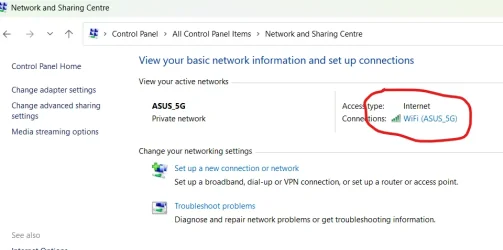
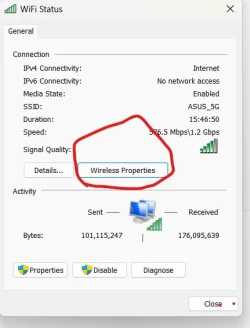
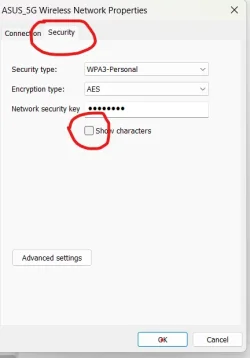
The internet told me that to find the password the computer is using for the router to go to Control Panel > Network and Sharing Center > Wireless Properties > Security, and then to click on the series of dots to reveal the password text.
On my Windows 11 Pro 25H2 I do not have exactly that path. I have Control panel>Network & Internet, which shows my router. From there I can choose > Properties, which shows many properties (but not the password) and I have no further path to Security.
I can find instructions to reset the router, but this sounds scary.
I know that MS has been moving content from the control panel. Has this task been moved somewhere else? Is there a Power Toy or some other way to accomplish this task?
Thank you so much.
The internet told me that to find the password the computer is using for the router to go to Control Panel > Network and Sharing Center > Wireless Properties > Security, and then to click on the series of dots to reveal the password text.
On my Windows 11 Pro 25H2 I do not have exactly that path. I have Control panel>Network & Internet, which shows my router. From there I can choose > Properties, which shows many properties (but not the password) and I have no further path to Security.
I can find instructions to reset the router, but this sounds scary.
I know that MS has been moving content from the control panel. Has this task been moved somewhere else? Is there a Power Toy or some other way to accomplish this task?
Thank you so much.
My Computers
-
At a glance
Windows 11- OS
- Windows 11
- Computer type
- Tablet
- Manufacturer/Model
- Microsoft Surface 7
-
At a glance
Windows 11 ProIntel32GNvidia- Operating System
- Windows 11 Pro
- Computer type
- PC/Desktop
- Manufacturer/Model
- HP Z G9
- CPU
- Intel
- Memory
- 32G
- Graphics card(s)
- Nvidia