Can't find password for AT&T router


Judy in Texas

Active member
Member
Local time
12:34 AM
Posts
82
OS
Windows 11
I want to add another computer to my router. I have one computer that uses this router, but I am unable to log in to the new one with the password I wrote down and asked the man who installed the router to use. So, I figure there must be a way to get the computer that is using the router to give me the password. The router is an AT&T all Fi Hub.

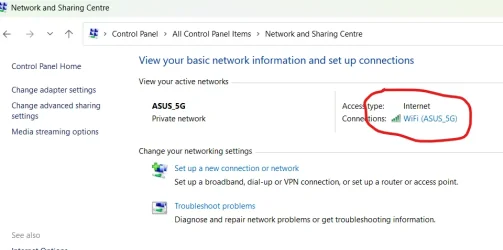
The internet told me that to find the password the computer is using for the router to go to Control Panel > Network and Sharing Center > Wireless Properties > Security, and then to click on the series of dots to reveal the password text.

On my Windows 11 Pro 25H2 I do not have exactly that path. I have Control panel>Network & Internet, which shows my router. From there I can choose > Properties, which shows many properties (but not the password) and I have no further path to Security.

I can find instructions to reset the router, but this sounds scary.

I know that MS has been moving content from the control panel. Has this task been moved somewhere else? Is there a Power Toy or some other way to accomplish this task?

Thank you so much.
 

My Computers

System One System Two

  • OS
    Windows 11
    Computer type
    Tablet
    Manufacturer/Model
    Microsoft Surface 7
  • Operating System
    Windows 11 Pro
    Computer type
    PC/Desktop
    Manufacturer/Model
    HP Z G9
    CPU
    Intel
    Memory
    32G
    Graphics card(s)
    Nvidia
Judy, I can't speak for ATT specifically, but generally when the ISPs furnish the router, The network SSID and password (Wi-Fi key) for a router is typically printed on a sticker on the bottom, back, or side of the device, labeled as "Wi-Fi Password," "Wireless Key," or "Security Key". This default password works if you have not changed it since installation.
 

My Computers

System One System Two

  • OS
    Windows 11 Pro 25H2
    Computer type
    PC/Desktop
    Manufacturer/Model
    Dell Optiplex 7080
    CPU
    i9-10900 10 core 20 threads
    Motherboard
    DELL 0J37VM
    Memory
    32 gb
    Graphics Card(s)
    none-Intel UHD Graphics 630
    Sound Card
    Integrated Realtek
    Monitor(s) Displays
    Benq 27
    Screen Resolution
    2560x1440
    Hard Drives
    2x1tb Solidigm m.2 nvme /External drives 512gb Samsung m.2 sata+2tb Kingston m2.nvme
    PSU
    500w
    Case
    MT
    Cooling
    Dell Premium
    Keyboard
    Logitech wired
    Mouse
    Logitech wireless
    Internet Speed
    so slow I'm too embarrassed to tell
    Browser
    #1 Edge #2 Firefox
    Antivirus
    Defender+MWB Premium
  • Operating System
    Windows 11 Pro 24H2 26200.8457
    Computer type
    PC/Desktop
    Manufacturer/Model
    Beelink Mini PC SER5
    CPU
    AMD Ryzen 7 6800U
    Memory
    32 gb
    Graphics card(s)
    integrated
    Sound Card
    integrated
    Monitor(s) Displays
    Benq 27
    Screen Resolution
    2560x1440
    Hard Drives
    1TB Crucial nvme
    Keyboard
    Logitech wired
    Mouse
    Logitech wireless
    Internet Speed
    still too embarrassed to tell
    Browser
    Firefox
    Antivirus
    Defender
    Other Info
    System 3 is non compliant Dell 9020 i7-4770/24gb ram Win11 PRO 26200.8457
I just packed my Windows laptop away for travel. When you get to "Properties" are there any dots to click on in the upper right or left hand corner? That maybe take you to "Security".
 

My Computer

System One

  • OS
    Windows 11, Linux Mint 22.3
    Computer type
    Laptop
    Manufacturer/Model
    Asus
    CPU
    Intel(R) Core(TM) i5-6300U CPU @ 2.40GHz
    Memory
    G.SKILL Ripjaws Series 16GB (2 x 8GB)
    Graphics Card(s)
    Skylake GT2 [HD Graphics 520]
    Monitor(s) Displays
    15.6"
    Screen Resolution
    1600 x 900
    Hard Drives
    931.51 GiB (8.9% used)
    Browser
    Firefox, Chrome & Brave
The default Wi-Fi password for an AT&T router is printed on a label on the side or bottom of the device. For the router’s administration page, the default password is often "admin," "attadmin," or left blank.
 

My Computer

System One

  • OS
    Windows 11
    Computer type
    PC/Desktop
    Manufacturer/Model
    HP Pavilion
    CPU
    AMD Ryzen 7 5700G
    Motherboard
    Erica6
    Memory
    Micron Technology DDR4-3200 16GB
    Graphics Card(s)
    NVIDIA GeForce RTX 3060
    Sound Card
    Realtek ALC671
    Monitor(s) Displays
    Samsung SyncMaster U28E590
    Screen Resolution
    3840 x 2160
    Hard Drives
    SAMSUNG MZVLQ1T0HALB-000H1
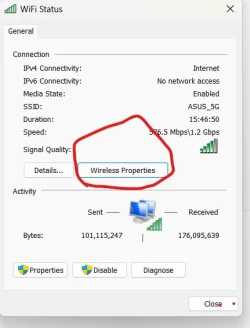
There were some steps missed out. Go to Network and Sharing Centre in Control Panel, then click on the wifi name.

1777542690342.webp

1777542742964.webp

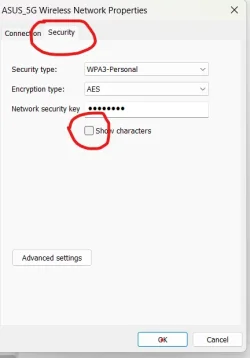
Then click on the Secuity tab and then tick the box' Show characters

1777542862358.webp
 

My Computers

System One System Two

  • OS
    Windows 11 Pro 25H2 26200.8524
    Computer type
    Laptop
    Manufacturer/Model
    Acemagic LX15PRO
    CPU
    AMD Ryzen 7 5825U with Radeon Graphics
    Memory
    16GB
    Screen Resolution
    1920 x 1080
    Hard Drives
    SSD 2TB
    Internet Speed
    30 Mbps
    Browser
    Brave
    Antivirus
    Webroot Secure Anywhere
    Other Info
    System 3

    Acer Swift SF114-34 laptop
    OS Windows 11 Pro 26200.8524
    CPU Pentium Silver N6000
    RAM 4GB
    SSD Samsung 970 EVO Plus SSD 2TB (an upgrade)
  • Operating System
    Windows 11 Pro 23H2 22631.2506
    Computer type
    Laptop
    Manufacturer/Model
    HP Mini 210-1090NR PC (bought in late 2009!)
    CPU
    Atom N450 1.66GHz
    Memory
    2GB
    Browser
    Brave
    Antivirus
    Webroot
Alternatively, in the new settings panel you can go to Network and internet > Wifi > manage known networks > click the network and choose show wifi password.

1777557069849.webp
 

My Computers

System One System Two

  • OS
    Windows 11 Pro
    Computer type
    PC/Desktop
    Manufacturer/Model
    Custom Built
    CPU
    Ryzen 7 5700 X3D
    Motherboard
    MSI MPG B550 GAMING PLUS
    Memory
    64 GB DDR4 3600mhz Gskill Ripjaws V
    Graphics Card(s)
    RTX 4070 Super , 12GB VRAM Asus EVO Overclock
    Monitor(s) Displays
    Gigabyte M27Q (rev. 2.0) 2560 x 1440 @ 170hz HDR
    Hard Drives
    2TB Samsung nvme ssd
    4TB Western Digital nvme ssd
    PSU
    CORSAIR RMx SHIFT Series™ RM750x 80 PLUS Gold Fully Modular ATX Power Supply
    Case
    CORSAIR 3500X ARGB Mid-Tower ATX PC Case – Black
    Cooling
    ID-COOLING FROSTFLOW X 240 CPU Water Cooler
    Keyboard
    Logitech G213
    Mouse
    Logitech G203
    Internet Speed
    1.2gbps Fiber 😎
  • Operating System
    Chrome OS
    Computer type
    Laptop
    Manufacturer/Model
    HP Chromebook
    CPU
    Intel Pentium Quad Core
    Memory
    4GB LPDDR4
    Monitor(s) Displays
    14 Inch HD SVA anti glare micro edge display
    Hard Drives
    64 GB emmc

[B]andrew129260[/B], bingo​


I apologize to all of you for not being clear that I did not use the default password. The installer rightly recommended I change it, and he typed it in. I wrote down what I had said and he typed a slight variance. He then proceeded to set up the two computers.

Until Andrew posted, I followed all of the recommended trails to a dead end, because my computer has the path shown by Andrew.

glasskuter, thank you for looking out for me and usually being the first to respond to me.
Kelper, from the spelling in your images, I believe you are on the British version. It is closest to what I found on "the internet" (the AI and sources such as Wikihow.) I get a Properties page that shows everything I would want to know except the password, but simply did not show the critical last step.

Thank you so much to all of you.
 

My Computers

System One System Two

  • OS
    Windows 11
    Computer type
    Tablet
    Manufacturer/Model
    Microsoft Surface 7
  • Operating System
    Windows 11 Pro
    Computer type
    PC/Desktop
    Manufacturer/Model
    HP Z G9
    CPU
    Intel
    Memory
    32G
    Graphics card(s)
    Nvidia
Try again, my method does show the password.
 

My Computers

System One System Two

  • OS
    Windows 11 Pro 25H2 26200.8524
    Computer type
    Laptop
    Manufacturer/Model
    Acemagic LX15PRO
    CPU
    AMD Ryzen 7 5825U with Radeon Graphics
    Memory
    16GB
    Screen Resolution
    1920 x 1080
    Hard Drives
    SSD 2TB
    Internet Speed
    30 Mbps
    Browser
    Brave
    Antivirus
    Webroot Secure Anywhere
    Other Info
    System 3

    Acer Swift SF114-34 laptop
    OS Windows 11 Pro 26200.8524
    CPU Pentium Silver N6000
    RAM 4GB
    SSD Samsung 970 EVO Plus SSD 2TB (an upgrade)
  • Operating System
    Windows 11 Pro 23H2 22631.2506
    Computer type
    Laptop
    Manufacturer/Model
    HP Mini 210-1090NR PC (bought in late 2009!)
    CPU
    Atom N450 1.66GHz
    Memory
    2GB
    Browser
    Brave
    Antivirus
    Webroot
The default Wi-Fi password for the AT&T All-Fi Hub (BGW320/BGW530/CGW450) is printed on the sticker label located on the side or bottom of the device, often labeled as "Wi-Fi Password" or "Wireless Key". For administrative, web-based settings, the default password is often "attadmin".

To reset your AT&T All-Fi Hub (BGW530/CGW450) Wi-Fi password, use the AT&T Smart Home Manager app, log in to the web interface (192.168.1.1) with the Device Access Code, or perform a hard reset by holding the red button on the back for 10-15 seconds to restore factory credentials.

Does your AT&T All-Fi Hub support WPS? If so then you don't need the password to connect another computer to it.

The AT&T All-Fi Hub (CGW450 and BGW530 models) supports WPS (Wi-Fi Protected Setup) for easy, password-free device connection. You can activate WPS by pressing the physical button on the back of the hub until the Wi-Fi LED flashes, or via the web management interface.
 
Last edited:

My Computers

System One System Two

  • OS
    Windows 11 Pro 25H2 (26200.6901)
    Computer type
    Laptop
    Manufacturer/Model
    ASUS TUF Gaming A15 (2022)
    CPU
    AMD Ryzen 7 6800H with Radeon 680M GPU (486MB RAM)
    Memory
    Crucial DDR5-4800 (2400MHz) 32GB (2 x 16GB)
    Graphics Card(s)
    NVIDIA RTX 3060 Laptop (6GB RAM)
    Sound Card
    n/a
    Monitor(s) Displays
    15.6-inch
    Screen Resolution
    1920x1080 300Hz
    Hard Drives
    2 x Samsung 990 Evo Plus (2TB M.2 NVME SSD)
    PSU
    n/a
    Mouse
    Wireless Mouse M510
    Internet Speed
    2100Mbps/300Mbps
    Browser
    Firefox
    Antivirus
    Malwarebytes
  • Operating System
    Windows 11 Pro 25H2 (26200.8246)
    Computer type
    PC/Desktop
    Manufacturer/Model
    Custom build
    CPU
    AMD Ryzen 7 5700X3D
    Motherboard
    ASUS ROG Strix B550-F Gaming WiFi II
    Memory
    G.SKILL Flare X 32GB (2x16GB) DDR4
    Graphics card(s)
    ASUS ROG-STRIX-RTX3060TI-08G-V2-GAMING (RTX 3060-Ti, 8GB RAM)
    Monitor(s) Displays
    Samsung G50D IPS 27"
    Screen Resolution
    1440p/180Hz
    Hard Drives
    SAMSUNG 990 EVO Plus (2TB] M.2 NVME SSD
    SAMSUNG 990 EVO Plus (4TB) M.2 NVME SSD
    PSU
    Corsair RM750x (750 watts)
    Case
    Cooler Master MasterCase 5
    Cooling
    Scythe Mugen 6
    Keyboard
    Logitech K520 (MK540 keyboard/mouse combo)
    Mouse
    Logitech M310 (MK540 keyboard/mouse combo)
    Internet Speed
    2100 Mbps down / 300 Mbps up
    Browser
    Firefox, Edge, Chrome
    Antivirus
    Malwarebytes (Premium)
    Other Info
    ASUS Blu-ray Burner BW-16D1HT (SATA) || Western Digital Easystore 20TB USB 3.0 external hard drive used with Acronis True Image 2025 backup software || HP OfficeJet Pro 6975 Printer/Scanner
@Judy in Texas

Post 5 and 6 will both show you how to reveal the password.
 

My Computers

System One System Two

  • OS
    Windows 11 Pro 25H2 26200.8524
    Computer type
    Laptop
    Manufacturer/Model
    Acemagic LX15PRO
    CPU
    AMD Ryzen 7 5825U with Radeon Graphics
    Memory
    16GB
    Screen Resolution
    1920 x 1080
    Hard Drives
    SSD 2TB
    Internet Speed
    30 Mbps
    Browser
    Brave
    Antivirus
    Webroot Secure Anywhere
    Other Info
    System 3

    Acer Swift SF114-34 laptop
    OS Windows 11 Pro 26200.8524
    CPU Pentium Silver N6000
    RAM 4GB
    SSD Samsung 970 EVO Plus SSD 2TB (an upgrade)
  • Operating System
    Windows 11 Pro 23H2 22631.2506
    Computer type
    Laptop
    Manufacturer/Model
    HP Mini 210-1090NR PC (bought in late 2009!)
    CPU
    Atom N450 1.66GHz
    Memory
    2GB
    Browser
    Brave
    Antivirus
    Webroot
Back
Top Bottom