Having to Upgrade my PC


I asked so that I could look up its specs. If you can't say, I'll guess as best I can.

I see that the case already has a USB 3.0 connector (your post 10). I presume that you'll use that with the matching header on your motherboard.
Not exactly, my case when new only ever came with a 3.5" USB 2 x 2 port front hub, that was it.

I later fitted a 2 port USB 3 front hub.

The USB 2 hub no longer works so I am replacing it with a new 2 port USB 3 hub.

All the connections are simple for me to do, the only connection is the USB C port cable, I couldn't find where to connect it on the new MB.

I think I'm being told no such connection for the new hub USB C cable on my new MB exists.
 

My Computer My Computer

At a glance

Win10 ProRyzen5 4600g16Integrated
OS
Win10 Pro
Computer type
PC/Desktop
Manufacturer/Model
Custom
CPU
Ryzen5 4600g
Motherboard
Asus Tuf B550-Plus WiFi ll
Memory
16
Graphics Card(s)
Integrated
Sound Card
Integrated
Monitor(s) Displays
1
Hard Drives
2
PSU
Corsair 400w
Case
Cooler Master
I posted the mb pictures here


there is a front panel header for usb3 gen1

there are two usb3 gen2 ports on the back panel ( one type A and one type C )
 

My Computers My Computers

  • At a glance

    Win7,Win11i7-97002x16gb 3600mhz
    OS
    Win7,Win11
    Computer type
    PC/Desktop
    CPU
    i7-9700
    Motherboard
    gigabyte b365m ds3h
    Memory
    2x16gb 3600mhz
    Monitor(s) Displays
    benq gw2480
    PSU
    bequiet pure power 11 400CM
    Cooling
    cryorig m9i
  • At a glance

    win7,win11i5-84002x8gb 3200
    Operating System
    win7,win11
    Computer type
    PC/Desktop
    CPU
    i5-8400
    Motherboard
    gigabyte b365m ds3h
    Memory
    2x8gb 3200
    PSU
    xfx pro 450
(snip)

I think I'm being told no such connection for the new hub USB C cable on my new MB exists.
Correct. But you could use an adapter that would allow you to connect the cable to a USB 2.0 header. Amazon.com

I'll repeat, for the last time: you could get better help if you were more forthcoming with details of your build.
 

My Computers My Computers

  • At a glance

    Windows 11 26200.8973Amd Threadripper 7970X128GB (4 X 32) G.Skill DDR5 6400 (RDIMM)Gigabyte RTX 4090 OC
    OS
    Windows 11 26200.8973
    Computer type
    PC/Desktop
    Manufacturer/Model
    homebuilt
    CPU
    Amd Threadripper 7970X
    Motherboard
    Gigabyte TRX50 Aero D Rev. 1.0
    Memory
    128GB (4 X 32) G.Skill DDR5 6400 (RDIMM)
    Graphics Card(s)
    Gigabyte RTX 4090 OC
    Sound Card
    none (USB to speakers), Realtek
    Monitor(s) Displays
    Innocn 32" OLED
    Screen Resolution
    3840 X 2160 @ 60Hz
    Hard Drives
    Crucial T700 2TB M.2 NVME SSD
    WD 4TB Blue SATA SSD
    Seagate 18TB IronWolf Pro
    PSU
    BeQuiet! Straight Power 12 1500W
    Case
    Lian Li 011 Dynamic Evo XL
    Cooling
    SilverStone Technology XE360-TR5, with 3 Phanteks T30 fans
    Keyboard
    Cherry KC 500 MX LP (mechanical)
    Mouse
    Logitech M500s (wired)
    Internet Speed
    2000/250 Mbps (down/up)
    Other Info
    xFinity gateway
  • At a glance

    windows 11 26200.8973Intel I9-13900K64GB G.Skill DDR5-6000Gigabyte RTX 3090 ti
    Operating System
    windows 11 26200.8973
    Computer type
    PC/Desktop
    Manufacturer/Model
    homebuilt
    CPU
    Intel I9-13900K
    Motherboard
    Asus RoG Strix Z690-E
    Memory
    64GB G.Skill DDR5-6000
    Graphics card(s)
    Gigabyte RTX 3090 ti
    Sound Card
    built in Realtek
    Monitor(s) Displays
    Philips 27E1N8900 27" OLED
    Screen Resolution
    3840 X 2160 @60Hz
    Hard Drives
    WDC SN850 1TB
    8TB Seagate Ironwolf
    4TB Seagate Ironwolf
    PSU
    eVGA SuperNOVA 1300 GT
    Case
    Lian Li 011 Dynamic Evo
    Cooling
    Corsair iCUE H150i ELITE CAPELLIX Liquid CPU Cooler
    Keyboard
    Cherry Streaming (wired)
    Mouse
    Logitech M500s (wired)
What is the point of that.

Why not return the usb thing to amazon and get one more appropriate to your mb headers.

can you post a link to the exact usb3 thing you bought ?
 

My Computers My Computers

  • At a glance

    Win7,Win11i7-97002x16gb 3600mhz
    OS
    Win7,Win11
    Computer type
    PC/Desktop
    CPU
    i7-9700
    Motherboard
    gigabyte b365m ds3h
    Memory
    2x16gb 3600mhz
    Monitor(s) Displays
    benq gw2480
    PSU
    bequiet pure power 11 400CM
    Cooling
    cryorig m9i
  • At a glance

    win7,win11i5-84002x8gb 3200
    Operating System
    win7,win11
    Computer type
    PC/Desktop
    CPU
    i5-8400
    Motherboard
    gigabyte b365m ds3h
    Memory
    2x8gb 3200
    PSU
    xfx pro 450
Are you saying there is no actual connector on my MB for USB C and if I wish to use the USB C charging port, to convert it to some type of USB 3 connector?
If you need the high-speed capabilities of Type-C, then connect to the back panel with a Type-C-toType-C cable as a cheap option. The adapter still won't give you the speed that Type-C gives you. So to speak, do with little blood.
 

My Computer My Computer

At a glance

Windows 11 Stable, Beta, Dev, CanaryAMD Ryzen 9 PRO 5950X128 GbIntel(R) Arc(TM) A380 Graphics (2 ГБ)
OS
Windows 11 Stable, Beta, Dev, Canary
Computer type
PC/Desktop
Manufacturer/Model
Micro-Star International Co., Ltd. MS-7D54
CPU
AMD Ryzen 9 PRO 5950X
Motherboard
MSI MAG X570S Tomahawk Max WiFi (MS-7D54) (2 PCI-E x1, 2 PCI-E x16, 2 M.2, 4 DDR4 DIMM, Audio, Video, 2.5GbE LAN, WiFi)
Memory
128 Gb
Graphics Card(s)
Intel(R) Arc(TM) A380 Graphics (2 ГБ)
Sound Card
Устройство с поддержкой High Definition Audio
Monitor(s) Displays
HP X34 [34" LCD] (6CM1300J5J) {2021}
Screen Resolution
3440x1440
Hard Drives
KINGSTON SFYRD2000G (2000 ГБ, PCI-E 4.0 x4)
PSU
Be Quiet! Dark Rock Pro 4
Case
Cooler Master HAF XB EVO
Internet Speed
1000 Mb/s
Browser
Chrome
Antivirus
Windows Defender
A bit confused by your reply.

I am removing an old front case/panel USB 2 hub with a new front panel hub, comes with 2 x USB 3 ports, phono and mic jacks and a USB C port

Removing old, installing new is not a problem, knowing where and connecting internal cables on MB for new USB 3 hub, not a problem.

What I had forgotten was new USB 3 front hub comes with a USB C port and wondering where I connect it on MB, ( see above image ).

You may have answered the question in your reply and I'm not understanding.

Are you saying there is no actual connector on my MB for USB C and if I wish to use the USB C charging port, to convert it to some type of USB 3 connector?
Exactly. Since the motherboard doesn't seem to have this connector, you need an adapter to a USB 3.0 connector (where the blue cable goes).
 

My Computers My Computers

  • At a glance

    Windows 11 Pro 23H2 (5699), 25H2 (8875)Mobile DualCore Intel Core 2 Duo T7250, 2000 MHz4GBMobile Intel(R) GMA 4500M (Mobile 4 series)
    OS
    Windows 11 Pro 23H2 (5699), 25H2 (8875)
    Computer type
    Laptop
    Manufacturer/Model
    Acer Extensa 5630EZ
    CPU
    Mobile DualCore Intel Core 2 Duo T7250, 2000 MHz
    Motherboard
    Acer Extensa 5630
    Memory
    4GB
    Graphics Card(s)
    Mobile Intel(R) GMA 4500M (Mobile 4 series)
    Sound Card
    Realtek ALC268 @ Intel 82801IB ICH9 - High Definition Audio Controller
    Monitor(s) Displays
    1
    Screen Resolution
    1280x800
    Hard Drives
    Samsung SSD 850 EVO 250GB SATA Device (250 GB, SATA-III)
    Internet Speed
    VDSL 50 Mbps
    Browser
    MICROSOFT EDGE
    Antivirus
    WINDOWS DEFENDER
    Other Info
    Legacy MBR installation, no TPM, no Secure Boot, no WDDM 2.0 graphics drivers, no SSE4.2, cannot get more unsupported ;) This is only my test laptop. I had installed Windows 11 here before upgrading my main PC. For my main PC I use everyday see my 2nd system specs.
  • At a glance

    Windows 11 Pro v25H2 (build 26200.8875)Intel Core-i7 3770 3.40GHz s1155 (3rd generat...2x Kingston Hyper-X Blu 8GB DDR3-1600GIGABYTE GeForce RTX 3050 WINDFORCE OC V2 6GB...
    Operating System
    Windows 11 Pro v25H2 (build 26200.8875)
    Computer type
    PC/Desktop
    Manufacturer/Model
    Custom-built PC
    CPU
    Intel Core-i7 3770 3.40GHz s1155 (3rd generation)
    Motherboard
    Asus P8H61 s1155 ATX
    Memory
    2x Kingston Hyper-X Blu 8GB DDR3-1600
    Graphics card(s)
    GIGABYTE GeForce RTX 3050 WINDFORCE OC V2 6GB (GV-N3050WF2OCV2-6GD)
    Sound Card
    Realtek HD audio (ALC887)
    Monitor(s) Displays
    Sony Bravia KDL-19L4000 19" LCD TV via VGA
    Screen Resolution
    1440x900 32-bit 60Hz
    Hard Drives
    WD Blue SA510 2.5 1000GB SSD as system disk, Western Digital Caviar Purple 4TB SATA III (WD40PURZ) as second
    PSU
    Thermaltake Litepower RGB 550W Full Wired
    Case
    SUPERCASE MIDI-TOWER
    Cooling
    Deepcool Gamma Archer CPU cooler, 1x 8cm fan at the back
    Keyboard
    Mitsumi 101-key PS/2
    Mouse
    Sunnyline OptiEye PS/2
    Internet Speed
    100Mbps
    Browser
    Microsoft Edge, Mozilla Firefox
    Antivirus
    Microsoft Windows Defender
    Other Info
    Legacy BIOS (MBR) installation, no TPM, no Secure Boot, WDDM 3.0 graphics drivers, WEI score 7.4
If you need the high-speed capabilities of Type-C, then connect to the back panel with a Type-C-toType-C cable as a cheap option. The adapter still won't give you the speed that Type-C gives you. So to speak, do with little blood.
As far as I know, USB type-C is USB 3.0 with a smaller connector. So a converter from this weird looking new connector to the familiar USB 3.0 connector should work at least at USB 3.0 speed, an acceptable compromise.
 

My Computers My Computers

  • At a glance

    Windows 11 Pro 23H2 (5699), 25H2 (8875)Mobile DualCore Intel Core 2 Duo T7250, 2000 MHz4GBMobile Intel(R) GMA 4500M (Mobile 4 series)
    OS
    Windows 11 Pro 23H2 (5699), 25H2 (8875)
    Computer type
    Laptop
    Manufacturer/Model
    Acer Extensa 5630EZ
    CPU
    Mobile DualCore Intel Core 2 Duo T7250, 2000 MHz
    Motherboard
    Acer Extensa 5630
    Memory
    4GB
    Graphics Card(s)
    Mobile Intel(R) GMA 4500M (Mobile 4 series)
    Sound Card
    Realtek ALC268 @ Intel 82801IB ICH9 - High Definition Audio Controller
    Monitor(s) Displays
    1
    Screen Resolution
    1280x800
    Hard Drives
    Samsung SSD 850 EVO 250GB SATA Device (250 GB, SATA-III)
    Internet Speed
    VDSL 50 Mbps
    Browser
    MICROSOFT EDGE
    Antivirus
    WINDOWS DEFENDER
    Other Info
    Legacy MBR installation, no TPM, no Secure Boot, no WDDM 2.0 graphics drivers, no SSE4.2, cannot get more unsupported ;) This is only my test laptop. I had installed Windows 11 here before upgrading my main PC. For my main PC I use everyday see my 2nd system specs.
  • At a glance

    Windows 11 Pro v25H2 (build 26200.8875)Intel Core-i7 3770 3.40GHz s1155 (3rd generat...2x Kingston Hyper-X Blu 8GB DDR3-1600GIGABYTE GeForce RTX 3050 WINDFORCE OC V2 6GB...
    Operating System
    Windows 11 Pro v25H2 (build 26200.8875)
    Computer type
    PC/Desktop
    Manufacturer/Model
    Custom-built PC
    CPU
    Intel Core-i7 3770 3.40GHz s1155 (3rd generation)
    Motherboard
    Asus P8H61 s1155 ATX
    Memory
    2x Kingston Hyper-X Blu 8GB DDR3-1600
    Graphics card(s)
    GIGABYTE GeForce RTX 3050 WINDFORCE OC V2 6GB (GV-N3050WF2OCV2-6GD)
    Sound Card
    Realtek HD audio (ALC887)
    Monitor(s) Displays
    Sony Bravia KDL-19L4000 19" LCD TV via VGA
    Screen Resolution
    1440x900 32-bit 60Hz
    Hard Drives
    WD Blue SA510 2.5 1000GB SSD as system disk, Western Digital Caviar Purple 4TB SATA III (WD40PURZ) as second
    PSU
    Thermaltake Litepower RGB 550W Full Wired
    Case
    SUPERCASE MIDI-TOWER
    Cooling
    Deepcool Gamma Archer CPU cooler, 1x 8cm fan at the back
    Keyboard
    Mitsumi 101-key PS/2
    Mouse
    Sunnyline OptiEye PS/2
    Internet Speed
    100Mbps
    Browser
    Microsoft Edge, Mozilla Firefox
    Antivirus
    Microsoft Windows Defender
    Other Info
    Legacy BIOS (MBR) installation, no TPM, no Secure Boot, WDDM 3.0 graphics drivers, WEI score 7.4
So a converter from this weird looking new connector to the familiar USB 3.0 connector should work at least at USB 3.0 speed, an acceptable compromise.
Yes, but almost twice as slow.
 

My Computer My Computer

At a glance

Windows 11 Stable, Beta, Dev, CanaryAMD Ryzen 9 PRO 5950X128 GbIntel(R) Arc(TM) A380 Graphics (2 ГБ)
OS
Windows 11 Stable, Beta, Dev, Canary
Computer type
PC/Desktop
Manufacturer/Model
Micro-Star International Co., Ltd. MS-7D54
CPU
AMD Ryzen 9 PRO 5950X
Motherboard
MSI MAG X570S Tomahawk Max WiFi (MS-7D54) (2 PCI-E x1, 2 PCI-E x16, 2 M.2, 4 DDR4 DIMM, Audio, Video, 2.5GbE LAN, WiFi)
Memory
128 Gb
Graphics Card(s)
Intel(R) Arc(TM) A380 Graphics (2 ГБ)
Sound Card
Устройство с поддержкой High Definition Audio
Monitor(s) Displays
HP X34 [34" LCD] (6CM1300J5J) {2021}
Screen Resolution
3440x1440
Hard Drives
KINGSTON SFYRD2000G (2000 ГБ, PCI-E 4.0 x4)
PSU
Be Quiet! Dark Rock Pro 4
Case
Cooler Master HAF XB EVO
Internet Speed
1000 Mb/s
Browser
Chrome
Antivirus
Windows Defender
Does the OP has any device that would tell the difference between 3.0 and higher speed? If not, it is a good compromise. Better than using a USB 2.0 converter and connecting to a USB 2.0 header.
 

My Computers My Computers

  • At a glance

    Windows 11 Pro 23H2 (5699), 25H2 (8875)Mobile DualCore Intel Core 2 Duo T7250, 2000 MHz4GBMobile Intel(R) GMA 4500M (Mobile 4 series)
    OS
    Windows 11 Pro 23H2 (5699), 25H2 (8875)
    Computer type
    Laptop
    Manufacturer/Model
    Acer Extensa 5630EZ
    CPU
    Mobile DualCore Intel Core 2 Duo T7250, 2000 MHz
    Motherboard
    Acer Extensa 5630
    Memory
    4GB
    Graphics Card(s)
    Mobile Intel(R) GMA 4500M (Mobile 4 series)
    Sound Card
    Realtek ALC268 @ Intel 82801IB ICH9 - High Definition Audio Controller
    Monitor(s) Displays
    1
    Screen Resolution
    1280x800
    Hard Drives
    Samsung SSD 850 EVO 250GB SATA Device (250 GB, SATA-III)
    Internet Speed
    VDSL 50 Mbps
    Browser
    MICROSOFT EDGE
    Antivirus
    WINDOWS DEFENDER
    Other Info
    Legacy MBR installation, no TPM, no Secure Boot, no WDDM 2.0 graphics drivers, no SSE4.2, cannot get more unsupported ;) This is only my test laptop. I had installed Windows 11 here before upgrading my main PC. For my main PC I use everyday see my 2nd system specs.
  • At a glance

    Windows 11 Pro v25H2 (build 26200.8875)Intel Core-i7 3770 3.40GHz s1155 (3rd generat...2x Kingston Hyper-X Blu 8GB DDR3-1600GIGABYTE GeForce RTX 3050 WINDFORCE OC V2 6GB...
    Operating System
    Windows 11 Pro v25H2 (build 26200.8875)
    Computer type
    PC/Desktop
    Manufacturer/Model
    Custom-built PC
    CPU
    Intel Core-i7 3770 3.40GHz s1155 (3rd generation)
    Motherboard
    Asus P8H61 s1155 ATX
    Memory
    2x Kingston Hyper-X Blu 8GB DDR3-1600
    Graphics card(s)
    GIGABYTE GeForce RTX 3050 WINDFORCE OC V2 6GB (GV-N3050WF2OCV2-6GD)
    Sound Card
    Realtek HD audio (ALC887)
    Monitor(s) Displays
    Sony Bravia KDL-19L4000 19" LCD TV via VGA
    Screen Resolution
    1440x900 32-bit 60Hz
    Hard Drives
    WD Blue SA510 2.5 1000GB SSD as system disk, Western Digital Caviar Purple 4TB SATA III (WD40PURZ) as second
    PSU
    Thermaltake Litepower RGB 550W Full Wired
    Case
    SUPERCASE MIDI-TOWER
    Cooling
    Deepcool Gamma Archer CPU cooler, 1x 8cm fan at the back
    Keyboard
    Mitsumi 101-key PS/2
    Mouse
    Sunnyline OptiEye PS/2
    Internet Speed
    100Mbps
    Browser
    Microsoft Edge, Mozilla Firefox
    Antivirus
    Microsoft Windows Defender
    Other Info
    Legacy BIOS (MBR) installation, no TPM, no Secure Boot, WDDM 3.0 graphics drivers, WEI score 7.4
I posted the mb pictures here


there is a front panel header for usb3 gen1

there are two usb3 gen2 ports on the back panel ( one type A and one type C )
You did and I fully understood. :-)
 

My Computer My Computer

At a glance

Win10 ProRyzen5 4600g16Integrated
OS
Win10 Pro
Computer type
PC/Desktop
Manufacturer/Model
Custom
CPU
Ryzen5 4600g
Motherboard
Asus Tuf B550-Plus WiFi ll
Memory
16
Graphics Card(s)
Integrated
Sound Card
Integrated
Monitor(s) Displays
1
Hard Drives
2
PSU
Corsair 400w
Case
Cooler Master
Maybe I'm not explaining myself well, I'm sure I am but perhaps I already have the answer.

Please see image.

I know where 1 connects on my MB, I know where the HD Audio connects, I have space for both of them.

It's the cable marked 2, I'm being told there in no place on the MB to connect this and requires me buying a adapter , is this correct?

OR is it just a case of 1 & 2 doing the same thing/function and only need to connect the larger of the 2?
 

Attachments

  • 1 Cable.JPG
    1 Cable.JPG
    359.8 KB · Views: 1

My Computer My Computer

At a glance

Win10 ProRyzen5 4600g16Integrated
OS
Win10 Pro
Computer type
PC/Desktop
Manufacturer/Model
Custom
CPU
Ryzen5 4600g
Motherboard
Asus Tuf B550-Plus WiFi ll
Memory
16
Graphics Card(s)
Integrated
Sound Card
Integrated
Monitor(s) Displays
1
Hard Drives
2
PSU
Corsair 400w
Case
Cooler Master
Correct. But you could use an adapter that would allow you to connect the cable to a USB 2.0 header. Amazon.com

I'll repeat, for the last time: you could get better help if you were more forthcoming with details of your build.
Goodness Gracious! I don't think I could have been more descriptive of the details of my new build throughout this thread, I really don't.
 

My Computer My Computer

At a glance

Win10 ProRyzen5 4600g16Integrated
OS
Win10 Pro
Computer type
PC/Desktop
Manufacturer/Model
Custom
CPU
Ryzen5 4600g
Motherboard
Asus Tuf B550-Plus WiFi ll
Memory
16
Graphics Card(s)
Integrated
Sound Card
Integrated
Monitor(s) Displays
1
Hard Drives
2
PSU
Corsair 400w
Case
Cooler Master
Goodness Gracious! I don't think I could have been more descriptive of the details of my new build throughout this thread, I really don't.
You provided no make/model numbers. Makes it hard to guess exactly what you have, especially as you appear to be unfamiliar with the lexicon of PC stuff.

If I seem impatient, it's because I am.

Bye.
 

My Computers My Computers

  • At a glance

    Windows 11 26200.8973Amd Threadripper 7970X128GB (4 X 32) G.Skill DDR5 6400 (RDIMM)Gigabyte RTX 4090 OC
    OS
    Windows 11 26200.8973
    Computer type
    PC/Desktop
    Manufacturer/Model
    homebuilt
    CPU
    Amd Threadripper 7970X
    Motherboard
    Gigabyte TRX50 Aero D Rev. 1.0
    Memory
    128GB (4 X 32) G.Skill DDR5 6400 (RDIMM)
    Graphics Card(s)
    Gigabyte RTX 4090 OC
    Sound Card
    none (USB to speakers), Realtek
    Monitor(s) Displays
    Innocn 32" OLED
    Screen Resolution
    3840 X 2160 @ 60Hz
    Hard Drives
    Crucial T700 2TB M.2 NVME SSD
    WD 4TB Blue SATA SSD
    Seagate 18TB IronWolf Pro
    PSU
    BeQuiet! Straight Power 12 1500W
    Case
    Lian Li 011 Dynamic Evo XL
    Cooling
    SilverStone Technology XE360-TR5, with 3 Phanteks T30 fans
    Keyboard
    Cherry KC 500 MX LP (mechanical)
    Mouse
    Logitech M500s (wired)
    Internet Speed
    2000/250 Mbps (down/up)
    Other Info
    xFinity gateway
  • At a glance

    windows 11 26200.8973Intel I9-13900K64GB G.Skill DDR5-6000Gigabyte RTX 3090 ti
    Operating System
    windows 11 26200.8973
    Computer type
    PC/Desktop
    Manufacturer/Model
    homebuilt
    CPU
    Intel I9-13900K
    Motherboard
    Asus RoG Strix Z690-E
    Memory
    64GB G.Skill DDR5-6000
    Graphics card(s)
    Gigabyte RTX 3090 ti
    Sound Card
    built in Realtek
    Monitor(s) Displays
    Philips 27E1N8900 27" OLED
    Screen Resolution
    3840 X 2160 @60Hz
    Hard Drives
    WDC SN850 1TB
    8TB Seagate Ironwolf
    4TB Seagate Ironwolf
    PSU
    eVGA SuperNOVA 1300 GT
    Case
    Lian Li 011 Dynamic Evo
    Cooling
    Corsair iCUE H150i ELITE CAPELLIX Liquid CPU Cooler
    Keyboard
    Cherry Streaming (wired)
    Mouse
    Logitech M500s (wired)
You provided no make/model numbers. Makes it hard to guess exactly what you have, especially as you appear to be unfamiliar with the lexicon of PC stuff.

If I seem impatient, it's because I have lost it.

Bye.
I'm sorry I'm not understanding you, I have throughout this thread given complete details of my rebuild, new MB, CPU and RAM, the only thing I have not been able to provide is the actual model of my re-used PC case but I'm not sure that info was never going to be that imperative, I know the brand that's all.
 

My Computer My Computer

At a glance

Win10 ProRyzen5 4600g16Integrated
OS
Win10 Pro
Computer type
PC/Desktop
Manufacturer/Model
Custom
CPU
Ryzen5 4600g
Motherboard
Asus Tuf B550-Plus WiFi ll
Memory
16
Graphics Card(s)
Integrated
Sound Card
Integrated
Monitor(s) Displays
1
Hard Drives
2
PSU
Corsair 400w
Case
Cooler Master
I'm sorry I'm not understanding you, I have throughout this thread given complete details of my rebuild, new MB, CPU and RAM, the only thing I have not been able to provide is the actual model of my re-used PC case but I'm not sure that info was never going to be that imperative, I know the brand that's all.
How about the new hub for front panel connections?

You don't know the make and model of that? That would be useful to show exactly what sort of cabling comes off it.

Maybe the information is in the thread somewhere, but after two weeks, I'm losing track.
 

My Computers My Computers

  • At a glance

    Windows 11 26200.8973Amd Threadripper 7970X128GB (4 X 32) G.Skill DDR5 6400 (RDIMM)Gigabyte RTX 4090 OC
    OS
    Windows 11 26200.8973
    Computer type
    PC/Desktop
    Manufacturer/Model
    homebuilt
    CPU
    Amd Threadripper 7970X
    Motherboard
    Gigabyte TRX50 Aero D Rev. 1.0
    Memory
    128GB (4 X 32) G.Skill DDR5 6400 (RDIMM)
    Graphics Card(s)
    Gigabyte RTX 4090 OC
    Sound Card
    none (USB to speakers), Realtek
    Monitor(s) Displays
    Innocn 32" OLED
    Screen Resolution
    3840 X 2160 @ 60Hz
    Hard Drives
    Crucial T700 2TB M.2 NVME SSD
    WD 4TB Blue SATA SSD
    Seagate 18TB IronWolf Pro
    PSU
    BeQuiet! Straight Power 12 1500W
    Case
    Lian Li 011 Dynamic Evo XL
    Cooling
    SilverStone Technology XE360-TR5, with 3 Phanteks T30 fans
    Keyboard
    Cherry KC 500 MX LP (mechanical)
    Mouse
    Logitech M500s (wired)
    Internet Speed
    2000/250 Mbps (down/up)
    Other Info
    xFinity gateway
  • At a glance

    windows 11 26200.8973Intel I9-13900K64GB G.Skill DDR5-6000Gigabyte RTX 3090 ti
    Operating System
    windows 11 26200.8973
    Computer type
    PC/Desktop
    Manufacturer/Model
    homebuilt
    CPU
    Intel I9-13900K
    Motherboard
    Asus RoG Strix Z690-E
    Memory
    64GB G.Skill DDR5-6000
    Graphics card(s)
    Gigabyte RTX 3090 ti
    Sound Card
    built in Realtek
    Monitor(s) Displays
    Philips 27E1N8900 27" OLED
    Screen Resolution
    3840 X 2160 @60Hz
    Hard Drives
    WDC SN850 1TB
    8TB Seagate Ironwolf
    4TB Seagate Ironwolf
    PSU
    eVGA SuperNOVA 1300 GT
    Case
    Lian Li 011 Dynamic Evo
    Cooling
    Corsair iCUE H150i ELITE CAPELLIX Liquid CPU Cooler
    Keyboard
    Cherry Streaming (wired)
    Mouse
    Logitech M500s (wired)
How about the new hub for front panel connections?

You don't know the make and model of that? That would be useful to show exactly what sort of cabling comes off it.

Maybe the information is in the thread somewhere, but after two weeks, I'm losing track.
I think perhaps that's what is happening.

See Images, Posts 130, 133 & 151
 

My Computer My Computer

At a glance

Win10 ProRyzen5 4600g16Integrated
OS
Win10 Pro
Computer type
PC/Desktop
Manufacturer/Model
Custom
CPU
Ryzen5 4600g
Motherboard
Asus Tuf B550-Plus WiFi ll
Memory
16
Graphics Card(s)
Integrated
Sound Card
Integrated
Monitor(s) Displays
1
Hard Drives
2
PSU
Corsair 400w
Case
Cooler Master
Maybe I'm not explaining myself well, I'm sure I am but perhaps I already have the answer.

Please see image.

I know where 1 connects on my MB, I know where the HD Audio connects, I have space for both of them.

It's the cable marked 2, I'm being told there in no place on the MB to connect this and requires me buying a adapter , is this correct?

OR is it just a case of 1 & 2 doing the same thing/function and only need to connect the larger of the 2?
Ok. The connector marked 2 in the picture is a USB-C connector made to go on your motherboard. I looked at your motherboard, and if I am looking at the right motherboard, you have no place to plug that cable in, so the USB-C port on your front panel is not going to work.

You need to buy a USB-C card that fits in your computer with that connector on it or there is no way this is going to work. Period.

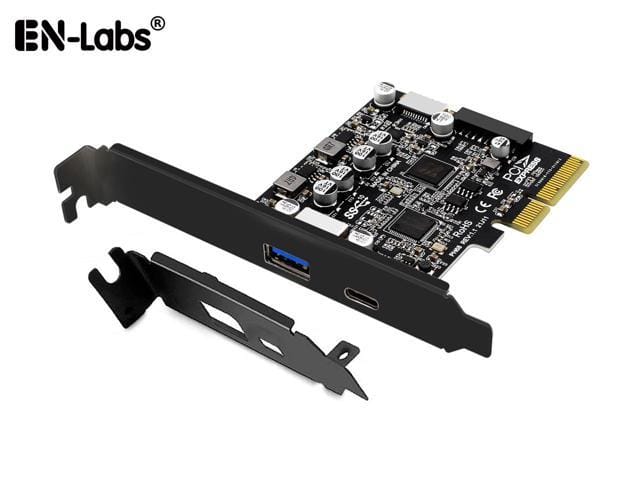
I believe that this card may work for you, since it has the connector that you need:


It will have to fit in your second PCIe x16 slot. (PCIE16_2 on the motherboard). Keep in mind that using this card may affect the bandwidth of your GPU's PCIe connector. Check your motherboard manual to find out.
 

My Computer My Computer

At a glance

Win 11 Pro 25H2Intel i7 13700KF32 GB Team Group DDR5 - 6000 CL 30ASUS TUF GAMING RTX 3070 Ti
OS
Win 11 Pro 25H2
Computer type
PC/Desktop
Manufacturer/Model
Self build
CPU
Intel i7 13700KF
Motherboard
Gigabyte Z790 UD AC
Memory
32 GB Team Group DDR5 - 6000 CL 30
Graphics Card(s)
ASUS TUF GAMING RTX 3070 Ti
Sound Card
On board Realtek
Monitor(s) Displays
ACER 34 inch
Screen Resolution
4K
Hard Drives
1 TB Samsung 980 Pro Nvme, 1 TB Samsung 970 EVO Nvme, 2 x Samsung 970 2TB SSD SATA
PSU
EVGA 1000Q
Case
Rosewill something or other
Cooling
Noctua NH-D15. A whole schwak of Noctua case fans. $$$
Keyboard
Logitech G815
Mouse
Logitech G502 Hero
Internet Speed
700 up, 600 down
Browser
Firefox
Antivirus
MalwareBytes
Your MB, again:


mb.png
Maybe you've supplied the info, eventually. The USB 3.0 cable connects to the port labelled 8. The microphone and headphones connect to the header labelled 14. Use the plug labelled "HD Audio" (post 10). There is no header for the remaining USB 3.2 cable. You could connect it to one of the USB 2.0 headers using an adapter, of the sort I mentioned earlier. You'd get USB 2.0 performance from the Type C port, though. That won't include the ability to use the C port for charging external devices.

Is the hub strictly passive, or does it have a SATA type power connector?

The USB 3.0 and 3.2 ports don't have the same specs. That sort of USB 3.0 is limited to a nominal 5Gbps. The USB 3.2 one may support up to 20Gbps (USB 3.2 Gen2X2).

There are add-in cards that could provide the header that you need. Example: PCIE to USB 3.2 Gen 2 Expansion Adapter Card 10Gbps, RIITOP PCI-e Express to USB A and USB C Controller Card with Internal Type-E and 19/20pin Header for Front Panel Mount - Newegg.com

The obvious thing to do would be to just use the USB-C port in the rear I/O panel. But the manual doesn't list any of the rear ports as having a charging capability, if I did the text search right.
 

My Computers My Computers

  • At a glance

    Windows 11 26200.8973Amd Threadripper 7970X128GB (4 X 32) G.Skill DDR5 6400 (RDIMM)Gigabyte RTX 4090 OC
    OS
    Windows 11 26200.8973
    Computer type
    PC/Desktop
    Manufacturer/Model
    homebuilt
    CPU
    Amd Threadripper 7970X
    Motherboard
    Gigabyte TRX50 Aero D Rev. 1.0
    Memory
    128GB (4 X 32) G.Skill DDR5 6400 (RDIMM)
    Graphics Card(s)
    Gigabyte RTX 4090 OC
    Sound Card
    none (USB to speakers), Realtek
    Monitor(s) Displays
    Innocn 32" OLED
    Screen Resolution
    3840 X 2160 @ 60Hz
    Hard Drives
    Crucial T700 2TB M.2 NVME SSD
    WD 4TB Blue SATA SSD
    Seagate 18TB IronWolf Pro
    PSU
    BeQuiet! Straight Power 12 1500W
    Case
    Lian Li 011 Dynamic Evo XL
    Cooling
    SilverStone Technology XE360-TR5, with 3 Phanteks T30 fans
    Keyboard
    Cherry KC 500 MX LP (mechanical)
    Mouse
    Logitech M500s (wired)
    Internet Speed
    2000/250 Mbps (down/up)
    Other Info
    xFinity gateway
  • At a glance

    windows 11 26200.8973Intel I9-13900K64GB G.Skill DDR5-6000Gigabyte RTX 3090 ti
    Operating System
    windows 11 26200.8973
    Computer type
    PC/Desktop
    Manufacturer/Model
    homebuilt
    CPU
    Intel I9-13900K
    Motherboard
    Asus RoG Strix Z690-E
    Memory
    64GB G.Skill DDR5-6000
    Graphics card(s)
    Gigabyte RTX 3090 ti
    Sound Card
    built in Realtek
    Monitor(s) Displays
    Philips 27E1N8900 27" OLED
    Screen Resolution
    3840 X 2160 @60Hz
    Hard Drives
    WDC SN850 1TB
    8TB Seagate Ironwolf
    4TB Seagate Ironwolf
    PSU
    eVGA SuperNOVA 1300 GT
    Case
    Lian Li 011 Dynamic Evo
    Cooling
    Corsair iCUE H150i ELITE CAPELLIX Liquid CPU Cooler
    Keyboard
    Cherry Streaming (wired)
    Mouse
    Logitech M500s (wired)
Your MB, again:


View attachment 115769
Maybe you've supplied the info, eventually. The USB 3.0 cable connects to the port labelled 8. The microphone and headphones connect to the header labelled 14. Use the plug labelled "HD Audio" (post 10). There is no header for the remaining USB 3.2 cable. You could connect it to one of the USB 2.0 headers using an adapter, of the sort I mentioned earlier. You'd get USB 2.0 performance from the Type C port, though. That won't include the ability to use the C port for charging external devices.

Is the hub strictly passive, or does it have a SATA type power connector?

The USB 3.0 and 3.2 ports don't have the same specs. That sort of USB 3.0 is limited to a nominal 5Gbps. The USB 3.2 one may support up to 20Gbps (USB 3.2 Gen2X2).

There are add-in cards that could provide the header that you need. Example: PCIE to USB 3.2 Gen 2 Expansion Adapter Card 10Gbps, RIITOP PCI-e Express to USB A and USB C Controller Card with Internal Type-E and 19/20pin Header for Front Panel Mount - Newegg.com

The obvious thing to do would be to just use the USB-C port in the rear I/O panel. But the manual doesn't list any of the rear ports as having a charging capability, if I did the text search right.
I think you are being a little unjust, I only got the new front port yesterday and asked questions as soon as I could after not being able to resolve the issue for myself.

As for the rest of my PC build, I have been as detailed as I could throughout this thread to get the help and advice needed.

I also accept it's a long thread, details get missed, you were missing them.

Thanks for your postings however, they are great.
 

My Computer My Computer

At a glance

Win10 ProRyzen5 4600g16Integrated
OS
Win10 Pro
Computer type
PC/Desktop
Manufacturer/Model
Custom
CPU
Ryzen5 4600g
Motherboard
Asus Tuf B550-Plus WiFi ll
Memory
16
Graphics Card(s)
Integrated
Sound Card
Integrated
Monitor(s) Displays
1
Hard Drives
2
PSU
Corsair 400w
Case
Cooler Master
Maybe I'm not explaining myself well, I'm sure I am but perhaps I already have the answer.

Please see image.

I know where 1 connects on my MB, I know where the HD Audio connects, I have space for both of them.

It's the cable marked 2, I'm being told there in no place on the MB to connect this and requires me buying a adapter , is this correct?

OR is it just a case of 1 & 2 doing the same thing/function and only need to connect the larger of the 2?
Exactly what I said. Since your motherboard doesn't have a header (connector) for number 2, you need an adapter from number 2 to number 1. I don't know how it is called, so I cannot Google and suggest one for you, but you get the idea. Hopefully your local PC store has such an adapter or can order one from their suppliers. Just show them the picture and explain what you want.

EDIT: I think I found one:


My Computers My Computers

  • At a glance

    Windows 11 Pro 23H2 (5699), 25H2 (8875)Mobile DualCore Intel Core 2 Duo T7250, 2000 MHz4GBMobile Intel(R) GMA 4500M (Mobile 4 series)
    OS
    Windows 11 Pro 23H2 (5699), 25H2 (8875)
    Computer type
    Laptop
    Manufacturer/Model
    Acer Extensa 5630EZ
    CPU
    Mobile DualCore Intel Core 2 Duo T7250, 2000 MHz
    Motherboard
    Acer Extensa 5630
    Memory
    4GB
    Graphics Card(s)
    Mobile Intel(R) GMA 4500M (Mobile 4 series)
    Sound Card
    Realtek ALC268 @ Intel 82801IB ICH9 - High Definition Audio Controller
    Monitor(s) Displays
    1
    Screen Resolution
    1280x800
    Hard Drives
    Samsung SSD 850 EVO 250GB SATA Device (250 GB, SATA-III)
    Internet Speed
    VDSL 50 Mbps
    Browser
    MICROSOFT EDGE
    Antivirus
    WINDOWS DEFENDER
    Other Info
    Legacy MBR installation, no TPM, no Secure Boot, no WDDM 2.0 graphics drivers, no SSE4.2, cannot get more unsupported ;) This is only my test laptop. I had installed Windows 11 here before upgrading my main PC. For my main PC I use everyday see my 2nd system specs.
  • At a glance

    Windows 11 Pro v25H2 (build 26200.8875)Intel Core-i7 3770 3.40GHz s1155 (3rd generat...2x Kingston Hyper-X Blu 8GB DDR3-1600GIGABYTE GeForce RTX 3050 WINDFORCE OC V2 6GB...
    Operating System
    Windows 11 Pro v25H2 (build 26200.8875)
    Computer type
    PC/Desktop
    Manufacturer/Model
    Custom-built PC
    CPU
    Intel Core-i7 3770 3.40GHz s1155 (3rd generation)
    Motherboard
    Asus P8H61 s1155 ATX
    Memory
    2x Kingston Hyper-X Blu 8GB DDR3-1600
    Graphics card(s)
    GIGABYTE GeForce RTX 3050 WINDFORCE OC V2 6GB (GV-N3050WF2OCV2-6GD)
    Sound Card
    Realtek HD audio (ALC887)
    Monitor(s) Displays
    Sony Bravia KDL-19L4000 19" LCD TV via VGA
    Screen Resolution
    1440x900 32-bit 60Hz
    Hard Drives
    WD Blue SA510 2.5 1000GB SSD as system disk, Western Digital Caviar Purple 4TB SATA III (WD40PURZ) as second
    PSU
    Thermaltake Litepower RGB 550W Full Wired
    Case
    SUPERCASE MIDI-TOWER
    Cooling
    Deepcool Gamma Archer CPU cooler, 1x 8cm fan at the back
    Keyboard
    Mitsumi 101-key PS/2
    Mouse
    Sunnyline OptiEye PS/2
    Internet Speed
    100Mbps
    Browser
    Microsoft Edge, Mozilla Firefox
    Antivirus
    Microsoft Windows Defender
    Other Info
    Legacy BIOS (MBR) installation, no TPM, no Secure Boot, WDDM 3.0 graphics drivers, WEI score 7.4
Back
Top Bottom