Kobo eReaders not being recognised properly when connected


SteveinKent

Active member
Local time
2:35 PM
Posts
68
OS
Windows 11
Both my Kobo Clara HD and my wife's Kobo Glo HD no longer connect properly when plugged in.

The taskbar shows that they connect and I get the ping as well.

They do not show up in File Explorer and are not recognised as connected by Kobo Desktop or Calibre.

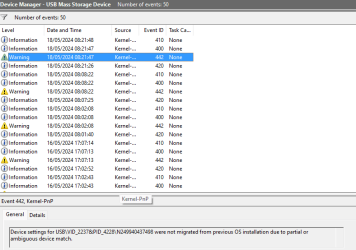
The Mass Storage Device that appears is "Linux File-Stor Gadget USB Device" and when I look at the event viewer is does show some warnings
1716020735237.png

Both eReaders connect successfully to my Win 11 laptop, so no problem there which leads me to believe it's not a problem with the eReaders, seeing as both are showing the same connections to both my PC and laptop.
 

My Computer My Computer

At a glance

Windows 11AMD Ryzen 5 3600Crucial Ballistix BL2K8G36C16U4B 3600 MHz, DD...ASUS NVIDIA GeForce RTX 3060 DUAL OC V2 12GB ...
OS
Windows 11
Computer type
PC/Desktop
Manufacturer/Model
Own build
CPU
AMD Ryzen 5 3600
Motherboard
B550 Aorus Elite AC V2
Memory
Crucial Ballistix BL2K8G36C16U4B 3600 MHz, DDR4, DRAM, Desktop Gaming Memory Kit, 16GB (8GB x2), CL16, Black
Graphics Card(s)
ASUS NVIDIA GeForce RTX 3060 DUAL OC V2 12GB GDDR6
Sound Card
None
Monitor(s) Displays
ASUS TUF Gaming VG32VQ1BR Curved Gaming Monitor – 31.5 inch WQHD (2560x1440), 165Hz(Above 144Hz),
Screen Resolution
2560 x 1440
Hard Drives
C: Crucial P3 2TB M.2 PCIe Gen3 NVMe Internal SSD (OS)
D: Crucial P3 2TB M.2 PCIe Gen3 NVMe Internal SSD (Data)
F: 2 TB HDD (Photos and Videos)
G: 2 TB HDD (C: Drive Backup)
H: 2 TB HDD (D: Drive Backup)
Keyboard
Logitech MX Keys S
Mouse
MX Master 3S
Internet Speed
45mbps
Browser
Brave
Antivirus
Bitdefender
Other Info
tp-link AX1800 WiFi adapter
Hello,

First try a different USB cable, make sure you're using the supplied cable which came with the eReader. Examine the USB port for damage, you can use your cell phone light to examine it. Next, try a different USB port. Still not working? Try disconnecting the eReader from the PC. You may have a corrupt PC driver and it's not functioning properly. To check this, go into Device Manager and look for a driver with either an 'exclamation mark' or 'question mark' over the device. If found, right click on the affected driver and choose uninstall, then reboot the PC. Windows will load a new driver. Reconnect the eReader. Check eReader functionality. Check Device Manager again to make sure there are no more driver issues. Check Device Manager look for 'Portable Devices' when the eReader is connected. It should show up there when connected. Right click on it and select properties. Should say device is working properly. If you call support for the eReader, the first thing they will suggest is to reset the eReader. But, if you have a bunch of books loaded on your devices, it may not be your first choice.
 

My Computer My Computer

At a glance

Windows 11 Homei7-13700k(2 x 16 GB) 32 GBNVIDIA FOUNDERS EDITION GEFORCE RTX 4060-Ti
OS
Windows 11 Home
Computer type
PC/Desktop
Manufacturer/Model
DELL XPS 8960
CPU
i7-13700k
Motherboard
GENUINE DELL XPS 8960 DESKTOP MOTHERBOARD INTEL SOCKET LGA1700 XD433
Memory
(2 x 16 GB) 32 GB
Graphics Card(s)
NVIDIA FOUNDERS EDITION GEFORCE RTX 4060-Ti
Sound Card
ON BOARD 7.1 CHANNEL AUDIO
Monitor(s) Displays
DELL 27 MONITOR - P2722H
Screen Resolution
FULL HD (1080p) 1920 x 1080 at 60 Hz
Hard Drives
512 GB, M.2, PCIe NVMe, SSD (boot) + 1 TB, 7200 RPM, SATA, HDD (storage)
PSU
750W
Case
DELL
Cooling
DELL PERFORMANCE CPU LIQUID COOLING
Keyboard
AZIO
Mouse
LOGITECH M650
Internet Speed
INTERNET SPEED 100 MBPS
Browser
MICROSOFT EDGE AND GOOGLE CHROME
Antivirus
NORTON 360
Other Info
ALTEC LANSING SPEAKERS
Hello,

First try a different USB cable, make sure you're using the supplied cable which came with the eReader. Examine the USB port for damage, you can use your cell phone light to examine it. Next, try a different USB port. Still not working? Try disconnecting the eReader from the PC. You may have a corrupt PC driver and it's not functioning properly. To check this, go into Device Manager and look for a driver with either an 'exclamation mark' or 'question mark' over the device. If found, right click on the affected driver and choose uninstall, then reboot the PC. Windows will load a new driver. Reconnect the eReader. Check eReader functionality. Check Device Manager again to make sure there are no more driver issues. Check Device Manager look for 'Portable Devices' when the eReader is connected. It should show up there when connected. Right click on it and select properties. Should say device is working properly. If you call support for the eReader, the first thing they will suggest is to reset the eReader. But, if you have a bunch of books loaded on your devices, it may not be your first choice.
I've tried three different cables and 5 different port, both 2.0 and 3.0

Two of the cable are ones which I know worked previously, and still work with the Win 11 laptop.

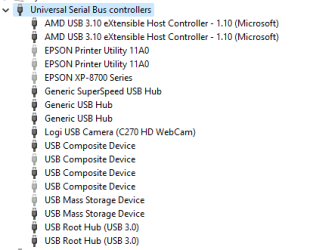
Nothing shows in Device Manage

r 1716031856465.png

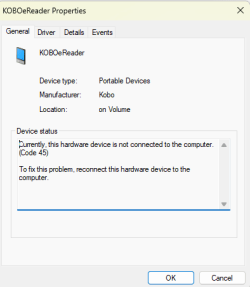
Under Portable Device, (which I haven't looked at before, so thank you for suggesting that), it shows not connected.

1716031972872.png

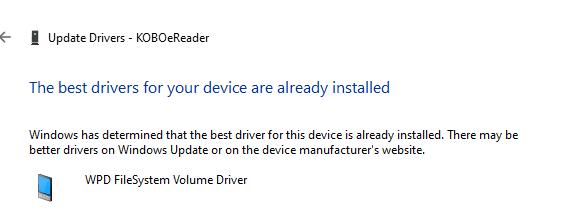
Looking at and updating the driver

1716032040073.png

And under events it shows setting not migrated again

1716032157124.png

I have no idea what that means....


Already been through Kobo support who insisted I reset my Kobo even though I told them it was working properly in my laptop and the issue affected both our Kobos.

And yes, lost all the books, but fortunately I can now load them from my laptop having had help to sort out a Local LAN so I can transfer the books form my PC to my laptop then onto my Kobo.

I think the issue may be the same one that's stopping my Logitech keyboard and mouse connecting via the receiver, I've had to connect them via Bluetooth because the Logitech receiver is not being picked up either.
 

My Computer My Computer

At a glance

Windows 11AMD Ryzen 5 3600Crucial Ballistix BL2K8G36C16U4B 3600 MHz, DD...ASUS NVIDIA GeForce RTX 3060 DUAL OC V2 12GB ...
OS
Windows 11
Computer type
PC/Desktop
Manufacturer/Model
Own build
CPU
AMD Ryzen 5 3600
Motherboard
B550 Aorus Elite AC V2
Memory
Crucial Ballistix BL2K8G36C16U4B 3600 MHz, DDR4, DRAM, Desktop Gaming Memory Kit, 16GB (8GB x2), CL16, Black
Graphics Card(s)
ASUS NVIDIA GeForce RTX 3060 DUAL OC V2 12GB GDDR6
Sound Card
None
Monitor(s) Displays
ASUS TUF Gaming VG32VQ1BR Curved Gaming Monitor – 31.5 inch WQHD (2560x1440), 165Hz(Above 144Hz),
Screen Resolution
2560 x 1440
Hard Drives
C: Crucial P3 2TB M.2 PCIe Gen3 NVMe Internal SSD (OS)
D: Crucial P3 2TB M.2 PCIe Gen3 NVMe Internal SSD (Data)
F: 2 TB HDD (Photos and Videos)
G: 2 TB HDD (C: Drive Backup)
H: 2 TB HDD (D: Drive Backup)
Keyboard
Logitech MX Keys S
Mouse
MX Master 3S
Internet Speed
45mbps
Browser
Brave
Antivirus
Bitdefender
Other Info
tp-link AX1800 WiFi adapter
I've now uninstalled all the portable devices and tried using a USB stick, which then connects correctly and pops up in the Portable Devices
Strange how it stays in Portable Devices even though I've removed it.
 

My Computer My Computer

At a glance

Windows 11AMD Ryzen 5 3600Crucial Ballistix BL2K8G36C16U4B 3600 MHz, DD...ASUS NVIDIA GeForce RTX 3060 DUAL OC V2 12GB ...
OS
Windows 11
Computer type
PC/Desktop
Manufacturer/Model
Own build
CPU
AMD Ryzen 5 3600
Motherboard
B550 Aorus Elite AC V2
Memory
Crucial Ballistix BL2K8G36C16U4B 3600 MHz, DDR4, DRAM, Desktop Gaming Memory Kit, 16GB (8GB x2), CL16, Black
Graphics Card(s)
ASUS NVIDIA GeForce RTX 3060 DUAL OC V2 12GB GDDR6
Sound Card
None
Monitor(s) Displays
ASUS TUF Gaming VG32VQ1BR Curved Gaming Monitor – 31.5 inch WQHD (2560x1440), 165Hz(Above 144Hz),
Screen Resolution
2560 x 1440
Hard Drives
C: Crucial P3 2TB M.2 PCIe Gen3 NVMe Internal SSD (OS)
D: Crucial P3 2TB M.2 PCIe Gen3 NVMe Internal SSD (Data)
F: 2 TB HDD (Photos and Videos)
G: 2 TB HDD (C: Drive Backup)
H: 2 TB HDD (D: Drive Backup)
Keyboard
Logitech MX Keys S
Mouse
MX Master 3S
Internet Speed
45mbps
Browser
Brave
Antivirus
Bitdefender
Other Info
tp-link AX1800 WiFi adapter
I've scanned the Internet for a solution for your Kobo eReader connection issue. Many people are having the same exact issue.

Question: Are your Kobo eReader's old models? The Clara HD was released in 2017, and the Glo HD in 2015.

Microsoft updates may have rendered them both incompatible with the OS. This may be the reason why you're getting the 'device not migrated' error. The problem here may just be finding a compatible driver, if available.

You could try to update the eReader operating software perhaps the driver you need is in there.

On the PC, You might try running SFC /scannow to see if it finds any problems. It was one of the recommended troubleshooting steps for the 'device not migrated' error.

Here are some links to some of the websites I visited during my search, take a look.


And here's a message I found:

Some Kobo eReaders are incompatible with Windows 11, including the Kobo Aura Edition 2 (Model N236), Kobo Touch 2.0 (Model N587), Kobo Glo HD (Model N437), and Kobo Aura ONE (Model N709). Some users have reported that their Kobo eReader is not recognized by Windows 11 after installing Bitdefender. Others have reported that their Kobo eReader is detected by Windows but not mounted as an external USB storage.

If all else fails, and your eReader are old incompatible models with Windows 11. You may need to buy the latest models available.

Also, manually check and run Windows update to make sure it's current.
 

My Computer My Computer

At a glance

Windows 11 Homei7-13700k(2 x 16 GB) 32 GBNVIDIA FOUNDERS EDITION GEFORCE RTX 4060-Ti
OS
Windows 11 Home
Computer type
PC/Desktop
Manufacturer/Model
DELL XPS 8960
CPU
i7-13700k
Motherboard
GENUINE DELL XPS 8960 DESKTOP MOTHERBOARD INTEL SOCKET LGA1700 XD433
Memory
(2 x 16 GB) 32 GB
Graphics Card(s)
NVIDIA FOUNDERS EDITION GEFORCE RTX 4060-Ti
Sound Card
ON BOARD 7.1 CHANNEL AUDIO
Monitor(s) Displays
DELL 27 MONITOR - P2722H
Screen Resolution
FULL HD (1080p) 1920 x 1080 at 60 Hz
Hard Drives
512 GB, M.2, PCIe NVMe, SSD (boot) + 1 TB, 7200 RPM, SATA, HDD (storage)
PSU
750W
Case
DELL
Cooling
DELL PERFORMANCE CPU LIQUID COOLING
Keyboard
AZIO
Mouse
LOGITECH M650
Internet Speed
INTERNET SPEED 100 MBPS
Browser
MICROSOFT EDGE AND GOOGLE CHROME
Antivirus
NORTON 360
Other Info
ALTEC LANSING SPEAKERS
I've scanned the Internet for a solution for your Kobo eReader connection issue. Many people are having the same exact issue.

Question: Are your Kobo eReader's old models? The Clara HD was released in 2017, and the Glo HD in 2015.

Microsoft updates may have rendered them both incompatible with the OS. This may be the reason why you're getting the 'device not migrated' error. The problem here may just be finding a compatible driver, if available.

You could try to update the eReader operating software perhaps the driver you need is in there.

On the PC, You might try running SFC /scannow to see if it finds any problems. It was one of the recommended troubleshooting steps for the 'device not migrated' error.

Here are some links to some of the websites I visited during my search, take a look.


And here's a message I found:

Some Kobo eReaders are incompatible with Windows 11, including the Kobo Aura Edition 2 (Model N236), Kobo Touch 2.0 (Model N587), Kobo Glo HD (Model N437), and Kobo Aura ONE (Model N709). Some users have reported that their Kobo eReader is not recognized by Windows 11 after installing Bitdefender. Others have reported that their Kobo eReader is detected by Windows but not mounted as an external USB storage.

If all else fails, and your eReader are old incompatible models with Windows 11. You may need to buy the latest models available.

Also, manually check and run Windows update to make sure it's current.
Thank you for your response

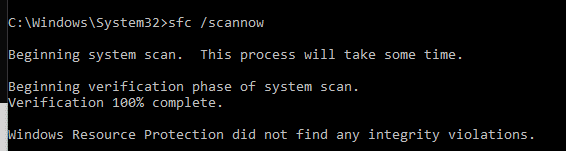
I did run scannow before, it didn't find anything, but I have run it again.
1716103511941.png


Same result as before.

The eReaders were up to date before this started, but of course I can't check them now.

I did have a long chat with Kobo support who just said reset the eReader, which didn't help, and that it must be a Windows problem that I need to sort, so very helpful then. Didn't mention that some of the eReaders were not compatible, just offered a discount for a new eReader I currently have.

It's strange that they both work on my Win 11 laptop, I suppose WIn11 is different for a PC to a laptop?

PC is up to date with Win 11, well at least that what is says...
 

My Computer My Computer

At a glance

Windows 11AMD Ryzen 5 3600Crucial Ballistix BL2K8G36C16U4B 3600 MHz, DD...ASUS NVIDIA GeForce RTX 3060 DUAL OC V2 12GB ...
OS
Windows 11
Computer type
PC/Desktop
Manufacturer/Model
Own build
CPU
AMD Ryzen 5 3600
Motherboard
B550 Aorus Elite AC V2
Memory
Crucial Ballistix BL2K8G36C16U4B 3600 MHz, DDR4, DRAM, Desktop Gaming Memory Kit, 16GB (8GB x2), CL16, Black
Graphics Card(s)
ASUS NVIDIA GeForce RTX 3060 DUAL OC V2 12GB GDDR6
Sound Card
None
Monitor(s) Displays
ASUS TUF Gaming VG32VQ1BR Curved Gaming Monitor – 31.5 inch WQHD (2560x1440), 165Hz(Above 144Hz),
Screen Resolution
2560 x 1440
Hard Drives
C: Crucial P3 2TB M.2 PCIe Gen3 NVMe Internal SSD (OS)
D: Crucial P3 2TB M.2 PCIe Gen3 NVMe Internal SSD (Data)
F: 2 TB HDD (Photos and Videos)
G: 2 TB HDD (C: Drive Backup)
H: 2 TB HDD (D: Drive Backup)
Keyboard
Logitech MX Keys S
Mouse
MX Master 3S
Internet Speed
45mbps
Browser
Brave
Antivirus
Bitdefender
Other Info
tp-link AX1800 WiFi adapter

Well,

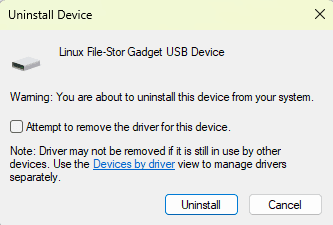
I have connected the Kobo before and uninstalled the Linux File-Stor Gadget USB Device, and I have also uninstalled the driver in the USB section of Device Manager.

What I hadn't done before is Uninstalled the device in Disk Drives in Device Manager and clicked on the "Attempt to remove the driver from the system" box

1716105337354.png

So I clicked on the box, uninstalled device and driver, plugged the Kobo in, windows came up with the "New device" box, and all is working now.

I do not really understand Win 11 that much but it appears that uninstalling device and drive separately didn't work, but uninstalling them together does.

Does that make any sense at all?
 

My Computer My Computer

At a glance

Windows 11AMD Ryzen 5 3600Crucial Ballistix BL2K8G36C16U4B 3600 MHz, DD...ASUS NVIDIA GeForce RTX 3060 DUAL OC V2 12GB ...
OS
Windows 11
Computer type
PC/Desktop
Manufacturer/Model
Own build
CPU
AMD Ryzen 5 3600
Motherboard
B550 Aorus Elite AC V2
Memory
Crucial Ballistix BL2K8G36C16U4B 3600 MHz, DDR4, DRAM, Desktop Gaming Memory Kit, 16GB (8GB x2), CL16, Black
Graphics Card(s)
ASUS NVIDIA GeForce RTX 3060 DUAL OC V2 12GB GDDR6
Sound Card
None
Monitor(s) Displays
ASUS TUF Gaming VG32VQ1BR Curved Gaming Monitor – 31.5 inch WQHD (2560x1440), 165Hz(Above 144Hz),
Screen Resolution
2560 x 1440
Hard Drives
C: Crucial P3 2TB M.2 PCIe Gen3 NVMe Internal SSD (OS)
D: Crucial P3 2TB M.2 PCIe Gen3 NVMe Internal SSD (Data)
F: 2 TB HDD (Photos and Videos)
G: 2 TB HDD (C: Drive Backup)
H: 2 TB HDD (D: Drive Backup)
Keyboard
Logitech MX Keys S
Mouse
MX Master 3S
Internet Speed
45mbps
Browser
Brave
Antivirus
Bitdefender
Other Info
tp-link AX1800 WiFi adapter

I have a Amazon membership and use a Kindle Oasis 3 eReader, which has been recently discontinued. Now looking to possibly purchase the new Kindle Scribe. I also, have a Amazon Fire HD 10, 2022 model. It's a bit on the heavy side to use when holding it vertically, but it shines as an e-reader when using it in landscape orientation.

Never any problems with either one, both work flawlessly.

Glad you were able to get your issue sorted.
 

My Computer My Computer

At a glance

Windows 11 Homei7-13700k(2 x 16 GB) 32 GBNVIDIA FOUNDERS EDITION GEFORCE RTX 4060-Ti
OS
Windows 11 Home
Computer type
PC/Desktop
Manufacturer/Model
DELL XPS 8960
CPU
i7-13700k
Motherboard
GENUINE DELL XPS 8960 DESKTOP MOTHERBOARD INTEL SOCKET LGA1700 XD433
Memory
(2 x 16 GB) 32 GB
Graphics Card(s)
NVIDIA FOUNDERS EDITION GEFORCE RTX 4060-Ti
Sound Card
ON BOARD 7.1 CHANNEL AUDIO
Monitor(s) Displays
DELL 27 MONITOR - P2722H
Screen Resolution
FULL HD (1080p) 1920 x 1080 at 60 Hz
Hard Drives
512 GB, M.2, PCIe NVMe, SSD (boot) + 1 TB, 7200 RPM, SATA, HDD (storage)
PSU
750W
Case
DELL
Cooling
DELL PERFORMANCE CPU LIQUID COOLING
Keyboard
AZIO
Mouse
LOGITECH M650
Internet Speed
INTERNET SPEED 100 MBPS
Browser
MICROSOFT EDGE AND GOOGLE CHROME
Antivirus
NORTON 360
Other Info
ALTEC LANSING SPEAKERS

Latest Support Threads

Back
Top Bottom