Solved Latest Macrium Reflect X updates


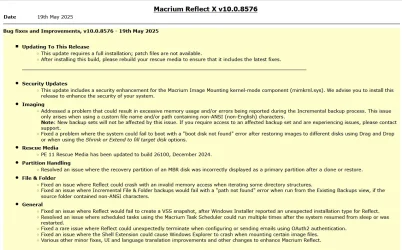
Latest Update:

v10.0.8843 - 9th April 2026

1775775187178.webp

Release notes: Macrium Reflect X Patch Details

Despite the minimal changes this is another full install.


Previous Update:

v10.0.8750 - 3rd December 2025
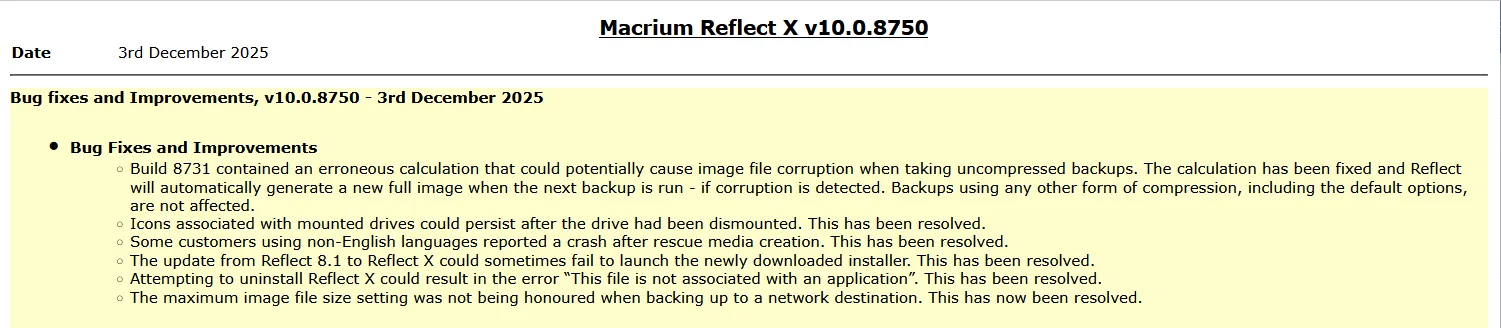
1764764947955.webp

Release notes: Macrium Reflect X Patch Details

Note: This is another full install, not just a patch.


31st March 2026: Macrium now offer the choice of purchasing a 3 year plan or an annual plan.

1775775710503.webp


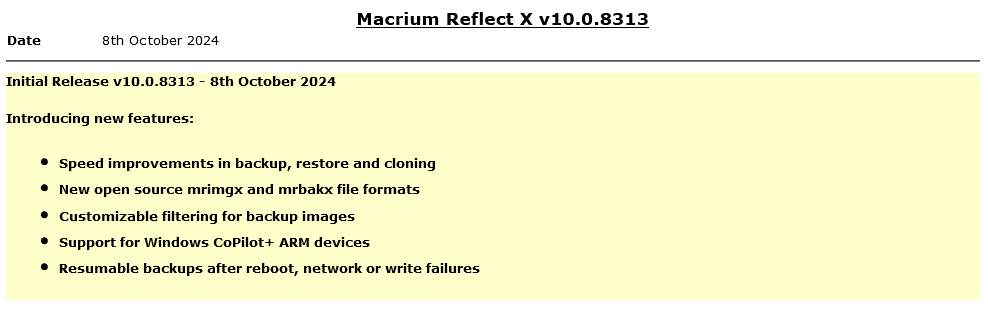
Reflect X launched on 8th October.

1728399207213.png

The Reflect X Knowledge Base is now live:


We now know the trade in offers that will be available to those with older V8, v7, and v6 one-time licences, and for recently purchased perpetual v8 licences.
Macrium said:
I purchased a one-time license
If you purchased on or after July 1st, 2024, you have three options;
  • Continue using Reflect 8 for as long as you want. You will continue to have access to 12 months technical support from the date you bought the licenses.
  • Trade in (your existing license will be deactivated after your new license is activated) your one-time license (which has one year of support from the date of purchase) and receive a 3-year Annual Plan at no extra cost. Macrium may make loyalty offers available at the end of your 3-year term. However, even without a license, Reflect always allows you to restore/recover your data (you won’t be able to make new backups). We’ve also made your backup files open-source - it’s your data and you own it.
  • NEW: Trade in (your existing license will be deactivated after your new license is activated) your one-time license (which has one year support from the date of purchase) and receive 50% off the normal annual plan price for life (must turn on auto-renew and not allow the license to expire/lapse).
Home users have 6 months from the launch of Reflect X to decide which option suits them best. Step-by-step instructions to obtain either option from the grace period will be published this week.

For Reflect Home users who purchased V8 before July 1, 2024:
You are eligible for two options. The first option is 50% off Annual plans for life. Option 2 is our “Better than Black Friday 2024 Offer:” 3 years for the price of 2:

If you choose 50% off annual plans for life, you will have to trade in your current Reflect Home V8 license.

If you choose 3 years for the price of 2, you can keep your Reflect Home V8 license. This amount must be paid up front and at the end of the plan, customers may renew based on offers available at the time (or return to your one-time license.)

For Home V6 & V7: We are offering 3 years for the price of two. This amount must be paid up front and at the end of the plan, customers may renew based on offers available at the time (or return to your one-time license.)This offer ends March 31st 2025.

If you have a Macrium Account, then the trade in offers are available there. If you don't, then you can register for a Macrium Account with the email address you used for your original purchase.
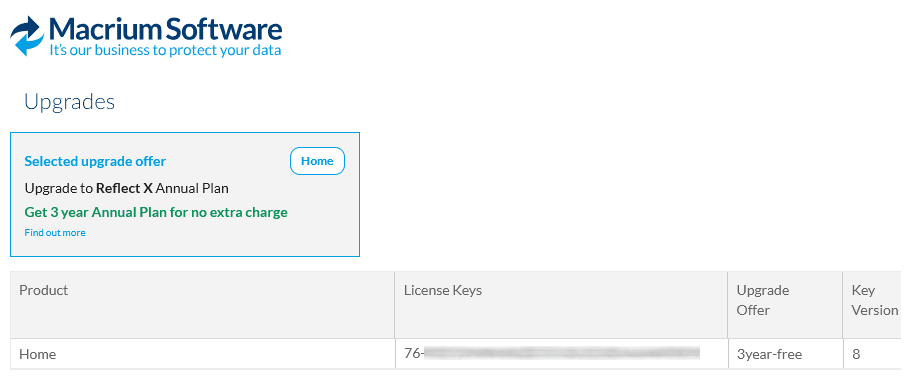
1728399141587.png

Upgrading from v8, v7 or v6

Macrium said:

Viewing your Upgrade Options​

Based on the timing of your existing license purchase and the current status of your Support and Maintenance plan, there are various personalized upgrade options available. There are multiple upgrade paths that can be accessed through the Macrium Reflect application or the Macrium Account.


Attachments

  • 1763571423325.webp
    1763571423325.webp
    132.8 KB · Views: 7
Last edited:
Like @Caledon Ken I made the upgrade to Macrium X. In the couple of backups I have done on 3 PCs, the backup speed has been 3 - 5 minutes longer than v8. X chose System Cache as the write method - not a huge issue but I was hoping for a reduction in backup time.
Is it necessary to redo the USB Rescue Media or the Boot Menu after every Reflect update or would that be stated in the Release Notes for the update? Thanks.
 

My Computer

System One

  • OS
    Windows 11 Home
Like @Caledon Ken I made the upgrade to Macrium X. In the couple of backups I have done on 3 PCs, the backup speed has been 3 - 5 minutes longer than v8. X chose System Cache as the write method - not a huge issue but I was hoping for a reduction in backup time.
Is it necessary to redo the USB Rescue Media or the Boot Menu after every Reflect update or would that be stated in the Release Notes for the update? Thanks.
It is not essential but I do it simply so the info on the app page is consistent
 

My Computer

System One

  • OS
    Windows 11 Pro + Win11 Canary VM.
    Computer type
    Laptop
    Manufacturer/Model
    ASUS Zenbook 14
    CPU
    I9 13th gen i9-13900H 2.60 GHZ
    Motherboard
    Yep, Laptop has one.
    Memory
    16 GB soldered
    Graphics Card(s)
    Integrated Intel Iris XE
    Sound Card
    Realtek built in
    Monitor(s) Displays
    laptop OLED screen
    Screen Resolution
    2880x1800 touchscreen
    Hard Drives
    1 TB NVME SSD (only weakness is only one slot)
    PSU
    Internal + 65W thunderbolt USB4 charger
    Case
    Yep, got one
    Cooling
    Stella Artois (UK pint cans - 568 ml) - extra cost.
    Keyboard
    Built in UK keybd
    Mouse
    Bluetooth , wireless dongled, wired
    Internet Speed
    900 mbs (ethernet), wifi 6 typical 350-450 mb/s both up and down
    Browser
    Edge
    Antivirus
    Defender
    Other Info
    TPM 2.0, 2xUSB4 thunderbolt, 1xUsb3 (usb a), 1xUsb-c, hdmi out, 3.5 mm audio out/in combo, ASUS backlit trackpad (inc. switchable number pad)

    Macrium Reflect Home V8
    Office 365 Family (6 users each 1TB onedrive space)
    Hyper-V (a vm runs almost as fast as my older laptop)
Well my backups over the network, wired from my machine, are about the same amount of time. One from my wife's machine, and two from mine (One the system drive and one the data drive.) not a big deal, they run in the middle of the night.

Thanks for the info Bree. Prior to seeing your note I ran fulls just to be sure. Also gave me a chance to time.
 

My Computer

System One

  • OS
    Windows 11 Pro x64 Version V23H2
    Computer type
    PC/Desktop
    Manufacturer/Model
    Custom
    CPU
    i7-8700K
    Motherboard
    Asus Maximus X Code - Z370
    Memory
    G.Skill Trident Z 3200MHz F4-3200C16D-16GTZ (2) 32GB
    Graphics Card(s)
    Intel UHD Graphics 630
    Sound Card
    Integrated ROG SupremeFX
    Monitor(s) Displays
    Asus VP279 27", Samsung BX2431 24"
    Screen Resolution
    1920 x 1080
    Hard Drives
    Samsung M.2 NVMe 960 EVO 500GB Boot,
    Samsung 840 EVO 250GB (System Copy Drive),
    Samsung 860 EVO 1TB (Primary Data Drive),
    WD Black 500GB (Data Copy Drive)
    ICY Dock 5.25 2.5/3.5 Bays MB971SP-B
    PSU
    Corsair RM 650i +Gold
    Case
    Phanteks Enthroo Primo
    Cooling
    Corsair Hydro H150i, 360mm Rad & Five Corsair 140mm Pro ML Case Fans
    Keyboard
    das Keyboard MX Brown Mechanical Switches Model DASKMKPROSIL-3G7-r1.0
    Mouse
    Logitech MX Master 3 Wireless & Bluetooth
    Internet Speed
    500Mb +
    Browser
    Chrome (Pri), Firefox (Sec)
    Antivirus
    Malwarebytes Premium, SuperAntiSpyware Pro (Licensed)
    Other Info
    Microsoft LifeCam HD,
    APC Back-UPS Pro 1500,
    Macrium (Licensed),
    Microsoft 365,
    Wise Disk Cleaner,
    Crystal Disk Info,
    Screenpresso (Licensed),
    AnyDesk (Licensed),
Like @Caledon Ken I made the upgrade to Macrium X. In the couple of backups I have done on 3 PCs, the backup speed has been 3 - 5 minutes longer than v8. X chose System Cache as the write method - not a huge issue but I was hoping for a reduction in backup time.
Is it necessary to redo the USB Rescue Media or the Boot Menu after every Reflect update or would that be stated in the Release Notes for the update? Thanks.
When it's a requirement, Macrium always mentions it in their RELEASE NOTES.
 

My Computer

System One

  • OS
    Windows 10, Linux MINT (Guests 7, 11, ZorinOS)
    Computer type
    PC/Desktop
    Manufacturer/Model
    HP Z2 G5 Workstation
    CPU
    Intel Core i7-10700
    Motherboard
    HP Model# 8751
    Memory
    32gB (DDR4)
    Graphics Card(s)
    Intel UHD Graphics 630
    Sound Card
    Realtek basic audio
    Monitor(s) Displays
    32" (Viewsonic) UHD
    Screen Resolution
    3840 x 2160
    Hard Drives
    2-NvME (mainboard), 1-NvME (PCIe), 1-SATA3 SSD
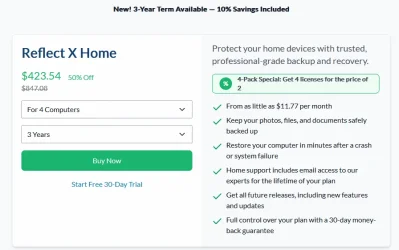
Did anyone take up the newer Reflect X Home 4 Computers 3 Year Term 50% Off offer? :unsure:
With the 50% discount, I still think it's too expensive.

Reflect X Home 4 Computers 3 Year Term Offer.webp

They're trying to win back customers.
 
Last edited:

My Computers

System One System Two

  • OS
    Windows 11 Pro
    Computer type
    PC/Desktop
    Manufacturer/Model
    Stigg's Build
    CPU
    Intel Core i9-10900X
    Motherboard
    GIGABYTE X299X DESIGNARE 10G
    Memory
    Corsair 64 GB (4 x 16 GB) CMW64GX4M4C3000C15 Vengeance RGB Pro 3000Mhz DDR4
    Graphics Card(s)
    GIGABYTE GeForce GTX 1660 Super Mini ITX 6 GB OC
    Sound Card
    Realtek ALC1220
    Monitor(s) Displays
    Samsung 27" FHD LED FreeSync Gaming Monitor (LS27F350FHEXXY)
    Screen Resolution
    1920 x 1080
    Hard Drives
    Samsung 970 Pro Series 1TB M.2 2280 NVMe SSD
    Western Digital Red Pro WD8003FFBX-68B9AN0 8 TB, 7200 RPM, SATA-III
    Western Digital Red Pro WD8003FFBX-68B9AN0 8 TB, 7200 RPM, SATA-III
    PSU
    Corsair HX1200 1200W 80 Plus Platinum
    Case
    Fractal Design Define 7 Black Solid Case
    Cooling
    Noctua NH-D15 Chromax Black
    Keyboard
    Razer Ornata V2
    Mouse
    Razer DeathAdder Essential
    Internet Speed
    FTTN 100Mbps / 40Mbps
    Browser
    Mozilla Firefox
    Antivirus
    N/A
    Other Info
    Logitech BRIO 4k Ultra HD USB-C Webcam
  • Operating System
    Windows 10 Pro
    Computer type
    Laptop
    Manufacturer/Model
    ASUS ROG Zephyrus M GM501GS
    CPU
    Core i7-8750H
    Motherboard
    Zephyrus M GM501GS
    Memory
    SK Hynix 32 GB (2 x 16 GB) HMA82GS6CJR8N-VK 16 GB DDR4-2666 DDR4 SDRAM
    Graphics card(s)
    NVIDIA GeForce GTX 1070
    Sound Card
    Realtek ALC294
    Monitor(s) Displays
    AU Optronics B156HAN07.1 [15.6" LCD]
    Screen Resolution
    1920 x 1080
    Hard Drives
    Samsung MZVKW512HMJP-00000 512 GB, PCI-E 3.0 x4
    Samsung SSD 860 QVO 4TB 4 TB, SATA-III
    PSU
    N/A
    Case
    N/A
    Cooling
    N/A
    Keyboard
    PC/AT Enhanced PS2 Keyboard (101/102-Key)
    Mouse
    Razer DeathAdder Essential
    Internet Speed
    FTTN 100Mbps / 40Mbps
    Browser
    Mozilla Firefox
    Antivirus
    N/A
    Other Info
    USB2.0 HD UVC Webcam
Did anyone take up the newer Reflect X Home 4 Computers 3 Year Term 50% Off offer? :unsure:
With the 50% discount, I still think it's too expensive.

View attachment 172622

What is not clear in your screenshot it that your $423.54 price is in Australian dollars. You can change the display currency at the top of that 'buy' page, only your local currency does not identify itself, GBP in my case, AUD in yours.

1779875573401.webp 1779875649518.webp 1779875683937.webp

They're trying to win back customers.

No, those are the standard prices. The 50% off for a 4-pack has always been there, even for the old v8 perpetual licences. What's new is that a 3-year term is now available to everyone (at a 10% discount to a 1-year plan). Previously a 3-year plan was (as I understand it) only for business customers. It was however offered at launch to those of us who had just purchased a v8 Home perpetual licence, we could trade it in at no cost for a 3-year plan. That's how I got mine.

They are, however, trying to win over existing v8 owners (perhaps in response to the psmounterex.sys issues). They've recently emailed us with two upgrade offers, a '50% off for life' trade in that's almost too good to refuse, or keep your v8 licences and buy 3 years for the price of 2.

1779306394347-webp.172094
1779306418965-webp.172097


As well as buying a v8 licence just before launch, specifically to trade in for a 3-year Reflect X plan, I have (or rather, had) a 4-pack of v8 and a single v8 licence. I have now traded in the single licence for a '50% off for life' 1-year plan. So I now have two Reflect X plans (one 3-year, one 1-year at 50% off for life) and a 4-pack of v8 perpetuals.

If I traded in my 4-pack I'd be paying £36.99 per year, over 3 years that's £110.97 (A$208.82). Or should I buy an extra 3-year 4-pack at £133.84 (A$251.87) and keep the v8? Or just wait to see what Black Friday brings? (They're still regularly making offers, there's already been a World Backup Day discount.) The jury is out.... :wink:
 
Last edited:

My Computers

System One System Two

  • OS
    Windows 11 Home
    Computer type
    Laptop
    Manufacturer/Model
    Acer Aspire 3 A315-23-R9VY
    CPU
    AMD Athlon Silver 3050U
    Memory
    8GB
    Graphics Card(s)
    Radeon Graphics
    Monitor(s) Displays
    laptop screen
    Screen Resolution
    1366x768 native resolution, up to 2560x1440 with Radeon Virtual Super Resolution
    Hard Drives
    1TB Samsung EVO 870 SSD (from April 2026: 250GB EVO 850)
    Internet Speed
    150 Mbps
    Browser
    Edge, Firefox
    Antivirus
    Defender
    Other Info
    fully 'Windows 11 ready' laptop. Windows 10 C: partition migrated from my old unsupported 'main machine' then upgraded to 11. A test migration ran Insider builds for 2 months. When 11 was released on 5th October 2021 it was re-imaged back to 10 and was offered the upgrade in Windows Update on 20th October. Windows Update offered the 22H2 Feature Update on 20th September 2022. It got the 23H2 Feature Update on 4th November 2023 through Windows Update, 24H2 on 3rd October 2024 through Windows Update by setting the Target Release Version for 24H2, and 25H2 on 30th September 2025 through Windows Update by setting the Target Release Version for 25H2.

    UPDATE - 11 April 2026: due to mechanical deterioration this PC has been retired from active duty. The OS with all software and files has been migrated to my System Seven below to carry on as my general purpose 'main machine'.

    My SYSTEM THREE is a Dell Latitude 5410, i7-10610U, 32GB RAM, 512GB NVMe ssd, supported device running Windows 11 Pro.

    My SYSTEM FOUR is a 2-in-1 convertible Lenovo Yoga 11e 20DA, Celeron N2930, 8GB RAM, 256GB ssd. Unsupported device: currently running Win10 Pro, plus Win11 Pro RTM and Insider Dev, Beta, and RP 24H2 as native boot vhdx.

    My SYSTEM FIVE is a Dell Latitude 3190 2-in-1, Pentium Silver N5030, 8GB RAM, 1TB NVMe ssd, supported device running Windows 11 Pro, plus Insider Beta, Dev, and Canary builds (and a few others) as a native boot .vhdx.

    My SYSTEM SIX is a Dell Latitude 5550, Core Ultra 7 165H, 64GB RAM, 1TB NVMe SSD, supported device, Windows 11 Pro 24H2, Hyper-V host machine. Updated to 25H2 on 30th September 2025.

    My SYSTEM SEVEN is a Lenovo Thinkpad T580, Intel Core i7-8650U, 16GB RAM, 512GB NVMe SSD + 2nd 512GB NVMe SSD, a supported device for Windows 11. This is my current general purpose 'main machine'. The installed Windows 11 Home from my System One has been migrated to this machine.
  • Operating System
    Windows 11 Pro
    Computer type
    Laptop
    Manufacturer/Model
    Dell Latitude E4310
    CPU
    Intel® Core™ i5-520M
    Motherboard
    0T6M8G
    Memory
    8GB
    Graphics card(s)
    (integrated graphics) Intel HD Graphics
    Screen Resolution
    1366x768
    Hard Drives
    500GB Crucial MX500 SSD
    Browser
    Firefox, Edge
    Antivirus
    Defender
    Other Info
    unsupported machine: Legacy bios, MBR, TPM 1.2, upgraded from W10 to W11 using W10/W11 hybrid install media workaround. In-place upgrade to 22H2 using ISO and a workaround. Feature Update to 23H2 by manually installing the Enablement Package. In-place upgrade to 24H2 using hybrid 23H2/24H2 install media. Upgraded to 25H2 by Enablement Package. Also running Insider Dev, and Canary builds and Windows 10 as native boot .vhdx.

    My SYSTEM THREE is a Dell Latitude 5410, i7-10610U, 32GB RAM, 512GB NVMe ssd, supported device running Windows 11 Pro.

    My SYSTEM FOUR is a 2-in-1 convertible Lenovo Yoga 11e 20DA, Celeron N2930, 8GB RAM, 256GB ssd. Unsupported device: currently running Win10 Pro, plus Win11 Pro RTM and Insider Dev, Beta, and RP 24H2 as native boot vhdx.

    My SYSTEM FIVE is a Dell Latitude 3190 2-in-1, Pentium Silver N5030, 8GB RAM, 1TB NVMe ssd, supported device running Windows 11 Pro, plus Insider Beta, Dev, and Canary builds (and a few others) as a native boot .vhdx.

    My SYSTEM SIX is a Dell Latitude 5550, Core Ultra 7 165H, 64GB RAM, 1TB NVMe SSD, supported device, Windows 11 Pro 24H2, Hyper-V host machine. Updated to 25H2 on 30th September 2025.

    My SYSTEM SEVEN is a Lenovo Thinkpad T580, Intel Core i7-8650U, 16GB RAM, 512GB NVMe SSD + 2nd 512GB NVMe SSD, a supported device for Windows 11. This is my current general purpose 'main machine'. The installed Windows 11 Home from my System One has been migrated to this machine.
I bought the four pack at 50% off for life by turning in mu V7 licenses. I asked about what happens at the end of the first 3 year plan and Saul (Macrium) said at the end of three years the plan goes back to full price. I didn't push. I imagine there will always be a 3 year discount of some sort, the company gets the money up front and companies love being paid in today dollars.
 

My Computer

System One

  • OS
    Windows 11 Pro x64 Version V23H2
    Computer type
    PC/Desktop
    Manufacturer/Model
    Custom
    CPU
    i7-8700K
    Motherboard
    Asus Maximus X Code - Z370
    Memory
    G.Skill Trident Z 3200MHz F4-3200C16D-16GTZ (2) 32GB
    Graphics Card(s)
    Intel UHD Graphics 630
    Sound Card
    Integrated ROG SupremeFX
    Monitor(s) Displays
    Asus VP279 27", Samsung BX2431 24"
    Screen Resolution
    1920 x 1080
    Hard Drives
    Samsung M.2 NVMe 960 EVO 500GB Boot,
    Samsung 840 EVO 250GB (System Copy Drive),
    Samsung 860 EVO 1TB (Primary Data Drive),
    WD Black 500GB (Data Copy Drive)
    ICY Dock 5.25 2.5/3.5 Bays MB971SP-B
    PSU
    Corsair RM 650i +Gold
    Case
    Phanteks Enthroo Primo
    Cooling
    Corsair Hydro H150i, 360mm Rad & Five Corsair 140mm Pro ML Case Fans
    Keyboard
    das Keyboard MX Brown Mechanical Switches Model DASKMKPROSIL-3G7-r1.0
    Mouse
    Logitech MX Master 3 Wireless & Bluetooth
    Internet Speed
    500Mb +
    Browser
    Chrome (Pri), Firefox (Sec)
    Antivirus
    Malwarebytes Premium, SuperAntiSpyware Pro (Licensed)
    Other Info
    Microsoft LifeCam HD,
    APC Back-UPS Pro 1500,
    Macrium (Licensed),
    Microsoft 365,
    Wise Disk Cleaner,
    Crystal Disk Info,
    Screenpresso (Licensed),
    AnyDesk (Licensed),
I asked about what happens at the end of the first 3 year plan and Saul (Macrium) said at the end of three years the plan goes back to full price.
When I took the launch offer to trade in v8 for a 3 year plan at no extra cost, Macrium specifically said there may be loyalty offers at the end of 3 years. I suspect the same applies however you get a 3 year plan.

Macrium said:
Trade in (your existing license will be deactivated after your new license is activated) your one-time license (which has one year of support from the date of purchase) and receive a 3-year Annual Plan at no extra cost. Macrium may make loyalty offers available at the end of your 3-year term.

---edit---

Saul Painter is 'old school' Macrium....

Saul Painter is an experienced marketing professional currently serving as the Marketing Operations Manager and previously as the Marketing Manager at Macrium Software since February 2012.
Saul Painter - Marketing Operations Manager at Macrium Software | The Org
 
Last edited:

My Computers

System One System Two

  • OS
    Windows 11 Home
    Computer type
    Laptop
    Manufacturer/Model
    Acer Aspire 3 A315-23-R9VY
    CPU
    AMD Athlon Silver 3050U
    Memory
    8GB
    Graphics Card(s)
    Radeon Graphics
    Monitor(s) Displays
    laptop screen
    Screen Resolution
    1366x768 native resolution, up to 2560x1440 with Radeon Virtual Super Resolution
    Hard Drives
    1TB Samsung EVO 870 SSD (from April 2026: 250GB EVO 850)
    Internet Speed
    150 Mbps
    Browser
    Edge, Firefox
    Antivirus
    Defender
    Other Info
    fully 'Windows 11 ready' laptop. Windows 10 C: partition migrated from my old unsupported 'main machine' then upgraded to 11. A test migration ran Insider builds for 2 months. When 11 was released on 5th October 2021 it was re-imaged back to 10 and was offered the upgrade in Windows Update on 20th October. Windows Update offered the 22H2 Feature Update on 20th September 2022. It got the 23H2 Feature Update on 4th November 2023 through Windows Update, 24H2 on 3rd October 2024 through Windows Update by setting the Target Release Version for 24H2, and 25H2 on 30th September 2025 through Windows Update by setting the Target Release Version for 25H2.

    UPDATE - 11 April 2026: due to mechanical deterioration this PC has been retired from active duty. The OS with all software and files has been migrated to my System Seven below to carry on as my general purpose 'main machine'.

    My SYSTEM THREE is a Dell Latitude 5410, i7-10610U, 32GB RAM, 512GB NVMe ssd, supported device running Windows 11 Pro.

    My SYSTEM FOUR is a 2-in-1 convertible Lenovo Yoga 11e 20DA, Celeron N2930, 8GB RAM, 256GB ssd. Unsupported device: currently running Win10 Pro, plus Win11 Pro RTM and Insider Dev, Beta, and RP 24H2 as native boot vhdx.

    My SYSTEM FIVE is a Dell Latitude 3190 2-in-1, Pentium Silver N5030, 8GB RAM, 1TB NVMe ssd, supported device running Windows 11 Pro, plus Insider Beta, Dev, and Canary builds (and a few others) as a native boot .vhdx.

    My SYSTEM SIX is a Dell Latitude 5550, Core Ultra 7 165H, 64GB RAM, 1TB NVMe SSD, supported device, Windows 11 Pro 24H2, Hyper-V host machine. Updated to 25H2 on 30th September 2025.

    My SYSTEM SEVEN is a Lenovo Thinkpad T580, Intel Core i7-8650U, 16GB RAM, 512GB NVMe SSD + 2nd 512GB NVMe SSD, a supported device for Windows 11. This is my current general purpose 'main machine'. The installed Windows 11 Home from my System One has been migrated to this machine.
  • Operating System
    Windows 11 Pro
    Computer type
    Laptop
    Manufacturer/Model
    Dell Latitude E4310
    CPU
    Intel® Core™ i5-520M
    Motherboard
    0T6M8G
    Memory
    8GB
    Graphics card(s)
    (integrated graphics) Intel HD Graphics
    Screen Resolution
    1366x768
    Hard Drives
    500GB Crucial MX500 SSD
    Browser
    Firefox, Edge
    Antivirus
    Defender
    Other Info
    unsupported machine: Legacy bios, MBR, TPM 1.2, upgraded from W10 to W11 using W10/W11 hybrid install media workaround. In-place upgrade to 22H2 using ISO and a workaround. Feature Update to 23H2 by manually installing the Enablement Package. In-place upgrade to 24H2 using hybrid 23H2/24H2 install media. Upgraded to 25H2 by Enablement Package. Also running Insider Dev, and Canary builds and Windows 10 as native boot .vhdx.

    My SYSTEM THREE is a Dell Latitude 5410, i7-10610U, 32GB RAM, 512GB NVMe ssd, supported device running Windows 11 Pro.

    My SYSTEM FOUR is a 2-in-1 convertible Lenovo Yoga 11e 20DA, Celeron N2930, 8GB RAM, 256GB ssd. Unsupported device: currently running Win10 Pro, plus Win11 Pro RTM and Insider Dev, Beta, and RP 24H2 as native boot vhdx.

    My SYSTEM FIVE is a Dell Latitude 3190 2-in-1, Pentium Silver N5030, 8GB RAM, 1TB NVMe ssd, supported device running Windows 11 Pro, plus Insider Beta, Dev, and Canary builds (and a few others) as a native boot .vhdx.

    My SYSTEM SIX is a Dell Latitude 5550, Core Ultra 7 165H, 64GB RAM, 1TB NVMe SSD, supported device, Windows 11 Pro 24H2, Hyper-V host machine. Updated to 25H2 on 30th September 2025.

    My SYSTEM SEVEN is a Lenovo Thinkpad T580, Intel Core i7-8650U, 16GB RAM, 512GB NVMe SSD + 2nd 512GB NVMe SSD, a supported device for Windows 11. This is my current general purpose 'main machine'. The installed Windows 11 Home from my System One has been migrated to this machine.
Yes him and Nick
 

My Computer

System One

  • OS
    Windows 11 Pro x64 Version V23H2
    Computer type
    PC/Desktop
    Manufacturer/Model
    Custom
    CPU
    i7-8700K
    Motherboard
    Asus Maximus X Code - Z370
    Memory
    G.Skill Trident Z 3200MHz F4-3200C16D-16GTZ (2) 32GB
    Graphics Card(s)
    Intel UHD Graphics 630
    Sound Card
    Integrated ROG SupremeFX
    Monitor(s) Displays
    Asus VP279 27", Samsung BX2431 24"
    Screen Resolution
    1920 x 1080
    Hard Drives
    Samsung M.2 NVMe 960 EVO 500GB Boot,
    Samsung 840 EVO 250GB (System Copy Drive),
    Samsung 860 EVO 1TB (Primary Data Drive),
    WD Black 500GB (Data Copy Drive)
    ICY Dock 5.25 2.5/3.5 Bays MB971SP-B
    PSU
    Corsair RM 650i +Gold
    Case
    Phanteks Enthroo Primo
    Cooling
    Corsair Hydro H150i, 360mm Rad & Five Corsair 140mm Pro ML Case Fans
    Keyboard
    das Keyboard MX Brown Mechanical Switches Model DASKMKPROSIL-3G7-r1.0
    Mouse
    Logitech MX Master 3 Wireless & Bluetooth
    Internet Speed
    500Mb +
    Browser
    Chrome (Pri), Firefox (Sec)
    Antivirus
    Malwarebytes Premium, SuperAntiSpyware Pro (Licensed)
    Other Info
    Microsoft LifeCam HD,
    APC Back-UPS Pro 1500,
    Macrium (Licensed),
    Microsoft 365,
    Wise Disk Cleaner,
    Crystal Disk Info,
    Screenpresso (Licensed),
    AnyDesk (Licensed),
@garlin

I've updated my Macrium X boot media, sometimes a real PITA. I.m just waiting for Macrium to update its software where we can make bootable winre rescue media without having to constantly manually update it with the new CA 2023 certs.
 

My Computers

System One System Two

  • OS
    Windows 11 Pro 25H2
    Computer type
    PC/Desktop
    Manufacturer/Model
    Geekom AX7 Pro
    CPU
    AMD Ryzen 9 7940HS
    Memory
    32 GB
    Graphics Card(s)
    Radeon 780M Graphics
    Monitor(s) Displays
    Dell S2425H 24"
    Screen Resolution
    1920 x 1080
    Hard Drives
    2 TB NVMe SSD
    Internet Speed
    100 Mbs
    Browser
    Microsoft Edge / Firefox
    Antivirus
    F-Secure Security Suite
  • Operating System
    Windows 11 Pro 25H2
    Computer type
    PC/Desktop
    Manufacturer/Model
    Dell Inspiron 3910
    CPU
    12th Gen Intel Core i7-12700 processor (12-Core, 25M Cache, 2.1GHz to 4.8GHz)
    Motherboard
    Dell 0KHP4K
    Memory
    16 GB
    Graphics card(s)
    Intel(R) UHD Graphics 770 with shared graphics memory
    Monitor(s) Displays
    Dell 27" Monitor S2721DS,
    Screen Resolution
    QHD 2560 x 1440 @ 75 Hz
    Hard Drives
    1TB M.2, PCIe NVMe, SSD
    Internet Speed
    100 Mbps
    Browser
    Edge
    Antivirus
    F-Secure Security Suite
Moving forward, it's not just installing the CA 2023 certs. After performing the CA 2011 revocation, UEFI will have a SVN (or version number) which mandates the lowest build version of the Windows boot manager that's allowed.

Any boot file below that SVN (8.0 in April 2026, and 9.0 after installing June 2026), will be banned. This is because MS knows there was a security hole important enough to replace the boot manager. You already have the CA 2023 certs installed, but the SVN is an additional security feature that was rolled out as a consequence of the CA 2011 revocation.

This is why I recommend providing user feedback to Macrium (and the other backup vendors):

1. Macirum must record the Secure Boot cert type and current SVN (in a config file or the registry) when you create a recovery drive.

2. Every time you open up the tool's UI, it should check the current Windows version of the SVN. If that has changed (after Windows Update), then alert the user they should recreate their recovery drive.

3. Create a new recovery drive, and again log the now-current SVN.

4. Repeat forever.

The point is Macrium can never predict when MS will patch the boot manager (and SVN which changes in lockstep). MS's rules for responsible security disclosure prevent them from sharing details with Macrium ahead of time. So the tool should learn to check, and advise the user it's time to recreate the boot media.

This also means they need to move away from the more static model of "download this PE/RE file from Macrium". Because they'll always be lagging behind, and should try what my script does (pull the files from an updated Windows system).
 
Last edited:

My Computer

System One

  • OS
    Windows 7
This also means they need to move away from the more static model of "download this PE/RE file from Macrium". Because they'll always be lagging behind, and should try what my script does (pull the files from an updated Windows system).

From what I have seen it looks like Macrium rescue media just copies files from the system when creating WinRE based media including the winre.wim from the recovery partition. Then it mounts the wim file to add the Macrium files.

I have rescue media files for Macrium on D:\boot\Macrium instead of C: so that is why the log says copying to D:\boot\macrium in the log.

Screenshot 2026-06-09 204141.webp


Log file attached.
 

Attachments

My Computer

System One

  • OS
    Windows 11 Pro

Latest Support Threads

Back
Top Bottom