Lightweight Virtual Machine Suggestions


Ok then do that?
Well, since qemu is cross-compatible, it's lighter weight than VirtualBox, I really hoped someone could recommend a good GUI to control QEMU from Windows. Instead, I keep getting asked to repeat the same exact thing over and over and over again. It gets frustrating having to repeat the same thing over and over because people choose not to read the thread.
 

My Computer

System One

  • OS
    Windows 11 Pro Insider Preview Dev
    Computer type
    PC/Desktop
    CPU
    AMD Ryzen 5 2600x
    Motherboard
    MSI MPG B550 GAMING EDGE WIFI
    Memory
    Corsair DDR4-2132
    Graphics Card(s)
    AMD B550
    Monitor(s) Displays
    Spectere C24

My Computer

System One

  • OS
    Windows 11 Pro 25H2
    Computer type
    PC/Desktop
    Manufacturer/Model
    Intel NUC12WSHi7
    CPU
    12th Gen Core i7-1260P
    Motherboard
    NUC12WSBi7
    Memory
    64 GB Micron PC4-25600
    Graphics Card(s)
    Intel Iris Xe Graphics
    Sound Card
    on-board Realtek HD Audio
    Monitor(s) Displays
    Dell U3219Q
    Screen Resolution
    3840 x 2160
    Hard Drives
    Samsung SSD 990 PRO 1TB
    Crucial MX500 2 TB
    Antivirus
    Microsoft Defender
So the third OS is the most important OS as it need to run more or less 24/7 while the other two OS's is only for when needed.

For less headache I suggest you try to get hold of a second hardware system to run that third OS on, as that is the most important one in your priority list.
I dont know what OS it is.. but if it is capable of running a hypervisor on that third OS, run that as Host and then run Windows and CatchyOS as VM's as they are less important in the priority list. This will be the most stable and less headache solution if you only have one hardware setup.

But as for a GUI for QEMU in windows... Perhaps @Bree in here have some ideas as i know he is using VM's on windows... even if he uses Hyper-V he still have the foot in the windows hypervisor world. :cool: or if solving it by running QEMU under WSL
 

My Computers

System One System Two

  • OS
    Linux: Debian, Kali-linux, Alma, Win: 7, 8.1,2012R
    Manufacturer/Model
    HP Elitebook 840, AsusX53, Aspire E1-572. AsusUX32A, HP Pro3130mt+3010mt, HP Proliant ML150, 3xCustom-PC, i3, i5, i7
    CPU
    i3, i5 and i7 From 2gen to 9th gen... Server dual Xenon
    Hard Drives
    Sata, M.2, SAS
  • Operating System
    Retro: 2003server.XPpro, Win2000, Win98SE, Win95, Win3.11, MS-DOS, IBM-DOS
    Manufacturer/Model
    Commodore, AST, Fujitsu, Compaq, etc etc. etc Around 15 desktops and 20 laptops in the collection
    CPU
    Oldest intel 8088 up to P4 dual core
    Hard Drives
    MFM, IDE, SCSI
as for a GUI for QEMU in windows... Perhaps @Bree in here have some ideas as i know he is using VM's on windows... even if he uses Hyper-V he still have the foot in the windows hypervisor world. :cool: or if solving it by running QEMU under WSL
Sorry, no experience of QEMU. I stick to using Hyper-V in Windows for most of my VMs and VirtualBox in Windows for a few old OS (eg Win '95) that Hyper-V cannot support. @cereberus may have some ideas.....
 

My Computers

System One System Two

  • OS
    Windows 11 Home
    Computer type
    Laptop
    Manufacturer/Model
    Acer Aspire 3 A315-23-R9VY
    CPU
    AMD Athlon Silver 3050U
    Memory
    8GB
    Graphics Card(s)
    Radeon Graphics
    Monitor(s) Displays
    laptop screen
    Screen Resolution
    1366x768 native resolution, up to 2560x1440 with Radeon Virtual Super Resolution
    Hard Drives
    1TB Samsung EVO 870 SSD (from April 2026: 250GB EVO 850)
    Internet Speed
    150 Mbps
    Browser
    Edge, Firefox
    Antivirus
    Defender
    Other Info
    fully 'Windows 11 ready' laptop. Windows 10 C: partition migrated from my old unsupported 'main machine' then upgraded to 11. A test migration ran Insider builds for 2 months. When 11 was released on 5th October 2021 it was re-imaged back to 10 and was offered the upgrade in Windows Update on 20th October. Windows Update offered the 22H2 Feature Update on 20th September 2022. It got the 23H2 Feature Update on 4th November 2023 through Windows Update, 24H2 on 3rd October 2024 through Windows Update by setting the Target Release Version for 24H2, and 25H2 on 30th September 2025 through Windows Update by setting the Target Release Version for 25H2.

    UPDATE - 11 April 2026: due to mechanical deterioration this PC has been retired from active duty. The OS with all software and files has been migrated to my System Seven below to carry on as my general purpose 'main machine'.

    My SYSTEM THREE is a Dell Latitude 5410, i7-10610U, 32GB RAM, 512GB NVMe ssd, supported device running Windows 11 Pro.

    My SYSTEM FOUR is a 2-in-1 convertible Lenovo Yoga 11e 20DA, Celeron N2930, 8GB RAM, 256GB ssd. Unsupported device: currently running Win10 Pro, plus Win11 Pro RTM and Insider Dev, Beta, and RP 24H2 as native boot vhdx.

    My SYSTEM FIVE is a Dell Latitude 3190 2-in-1, Pentium Silver N5030, 8GB RAM, 1TB NVMe ssd, supported device running Windows 11 Pro, plus Insider Beta, Dev, and Canary builds (and a few others) as a native boot .vhdx.

    My SYSTEM SIX is a Dell Latitude 5550, Core Ultra 7 165H, 64GB RAM, 1TB NVMe SSD, supported device, Windows 11 Pro 24H2, Hyper-V host machine. Updated to 25H2 on 30th September 2025.

    My SYSTEM SEVEN is a Lenovo Thinkpad T580, Intel Core i7-8650U, 16GB RAM, 512GB NVMe SSD + 2nd 512GB NVMe SSD, a supported device for Windows 11. This is my current general purpose 'main machine'. The installed Windows 11 Home from my System One has been migrated to this machine.
  • Operating System
    Windows 11 Pro
    Computer type
    Laptop
    Manufacturer/Model
    Dell Latitude E4310
    CPU
    Intel® Core™ i5-520M
    Motherboard
    0T6M8G
    Memory
    8GB
    Graphics card(s)
    (integrated graphics) Intel HD Graphics
    Screen Resolution
    1366x768
    Hard Drives
    500GB Crucial MX500 SSD
    Browser
    Firefox, Edge
    Antivirus
    Defender
    Other Info
    unsupported machine: Legacy bios, MBR, TPM 1.2, upgraded from W10 to W11 using W10/W11 hybrid install media workaround. In-place upgrade to 22H2 using ISO and a workaround. Feature Update to 23H2 by manually installing the Enablement Package. In-place upgrade to 24H2 using hybrid 23H2/24H2 install media. Upgraded to 25H2 by Enablement Package. Also running Insider Dev, and Canary builds and Windows 10 as native boot .vhdx.

    My SYSTEM THREE is a Dell Latitude 5410, i7-10610U, 32GB RAM, 512GB NVMe ssd, supported device running Windows 11 Pro.

    My SYSTEM FOUR is a 2-in-1 convertible Lenovo Yoga 11e 20DA, Celeron N2930, 8GB RAM, 256GB ssd. Unsupported device: currently running Win10 Pro, plus Win11 Pro RTM and Insider Dev, Beta, and RP 24H2 as native boot vhdx.

    My SYSTEM FIVE is a Dell Latitude 3190 2-in-1, Pentium Silver N5030, 8GB RAM, 1TB NVMe ssd, supported device running Windows 11 Pro, plus Insider Beta, Dev, and Canary builds (and a few others) as a native boot .vhdx.

    My SYSTEM SIX is a Dell Latitude 5550, Core Ultra 7 165H, 64GB RAM, 1TB NVMe SSD, supported device, Windows 11 Pro 24H2, Hyper-V host machine. Updated to 25H2 on 30th September 2025.

    My SYSTEM SEVEN is a Lenovo Thinkpad T580, Intel Core i7-8650U, 16GB RAM, 512GB NVMe SSD + 2nd 512GB NVMe SSD, a supported device for Windows 11. This is my current general purpose 'main machine'. The installed Windows 11 Home from my System One has been migrated to this machine.
Sorry, no experience of QEMU. I stick to using Hyper-V in Windows for most of my VMs and VirtualBox in Windows for a few old OS (eg Win '95) that Hyper-V cannot support. @cereberus may have some ideas.....
I think it is a bit unclear what the objective is.

I like @Bree mostly use Hyper-V.

Hyper-V can run pretty much any windows or Linux guests in Basic Mode.

The main problem with Basic mode is you cannot get audio.

Only guest OSs that can run an RDP servers can run in enhanced mode and get audio.

Trying to run Qemu in Windows is a bit cack handed as it kind of acts more like a type 2 hypervisor acting more like Vmware or Virtualbox, and unlikely ro give any real benefit. It cannot act as a type 1 hyervisor.

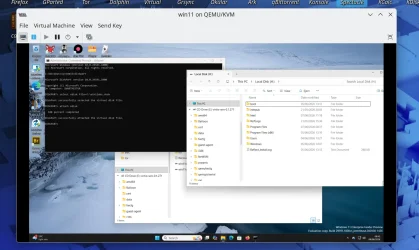
However, if you install Linux on a PC, it has an underlying KVM type 1 hypervisor component which integrates with Qemu.

So it creates a sort of hybrid virtual machine i.e. the underlying engine is type 1 but the gui is sort of type 2 (this description is a simplification but shows the principle).

So afaik, if you want to use Qemu with KVM with type 1 efficiency, you need Linux as the host OS.

Once you are running Qemu/KVM, it is fairly easy to install Windows as a VM which should be almost as fast as a native Windows Host.

The slightly tricky part is installing Windows 11 as a qemu/KVM VM. You need to setup vm so it has an emulated tpm2 and secure boot etc. There are several guides on web for this.

So realistically, there is no one size fits all solution.
 

My Computer

System One

  • OS
    Windows 11 Pro + Win11 Canary VM.
    Computer type
    Laptop
    Manufacturer/Model
    ASUS Zenbook 14
    CPU
    I9 13th gen i9-13900H 2.60 GHZ
    Motherboard
    Yep, Laptop has one.
    Memory
    16 GB soldered
    Graphics Card(s)
    Integrated Intel Iris XE
    Sound Card
    Realtek built in
    Monitor(s) Displays
    laptop OLED screen
    Screen Resolution
    2880x1800 touchscreen
    Hard Drives
    1 TB NVME SSD (only weakness is only one slot)
    PSU
    Internal + 65W thunderbolt USB4 charger
    Case
    Yep, got one
    Cooling
    Stella Artois (UK pint cans - 568 ml) - extra cost.
    Keyboard
    Built in UK keybd
    Mouse
    Bluetooth , wireless dongled, wired
    Internet Speed
    900 mbs (ethernet), wifi 6 typical 350-450 mb/s both up and down
    Browser
    Edge
    Antivirus
    Defender
    Other Info
    TPM 2.0, 2xUSB4 thunderbolt, 1xUsb3 (usb a), 1xUsb-c, hdmi out, 3.5 mm audio out/in combo, ASUS backlit trackpad (inc. switchable number pad)

    Macrium Reflect Home V8
    Office 365 Family (6 users each 1TB onedrive space)
    Hyper-V (a vm runs almost as fast as my older laptop)
Hi @cereberus :-)
Not a question for me, but for the thread. :-)

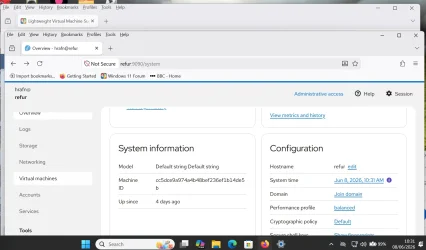
What would be easier.. trying to get QEMU and find a GUI to work native in windows, or just use WSL for an easy solution so virt-manager can be the GUI...
 

My Computers

System One System Two

  • OS
    Linux: Debian, Kali-linux, Alma, Win: 7, 8.1,2012R
    Manufacturer/Model
    HP Elitebook 840, AsusX53, Aspire E1-572. AsusUX32A, HP Pro3130mt+3010mt, HP Proliant ML150, 3xCustom-PC, i3, i5, i7
    CPU
    i3, i5 and i7 From 2gen to 9th gen... Server dual Xenon
    Hard Drives
    Sata, M.2, SAS
  • Operating System
    Retro: 2003server.XPpro, Win2000, Win98SE, Win95, Win3.11, MS-DOS, IBM-DOS
    Manufacturer/Model
    Commodore, AST, Fujitsu, Compaq, etc etc. etc Around 15 desktops and 20 laptops in the collection
    CPU
    Oldest intel 8088 up to P4 dual core
    Hard Drives
    MFM, IDE, SCSI
I want to run a bare metal VM using a Linux distro. I want it run Emby Server and Emby Server only.
 

My Computer

System One

  • OS
    Windows 11 Pro 25H2
    Computer type
    PC/Desktop
    Manufacturer/Model
    Intel NUC12WSHi7
    CPU
    12th Gen Core i7-1260P
    Motherboard
    NUC12WSBi7
    Memory
    64 GB Micron PC4-25600
    Graphics Card(s)
    Intel Iris Xe Graphics
    Sound Card
    on-board Realtek HD Audio
    Monitor(s) Displays
    Dell U3219Q
    Screen Resolution
    3840 x 2160
    Hard Drives
    Samsung SSD 990 PRO 1TB
    Crucial MX500 2 TB
    Antivirus
    Microsoft Defender
One area where I still use physical W11 machines BTW is to have them as "physical vhdx" files so they can run on external media -- that way I can test out all sorts of new builds etc - with different apps / languages etc etc and all keep the same activation !!
@jimbo45

I may be reading too much into your post here. Hope not.
Are you saying that create and run Hyper-V VM on your physical Win 11 system? Multiple VMs using just one Windows license?
 

My Computer

System One

  • OS
    Windows 11 2H25
    Computer type
    PC/Desktop
    Manufacturer/Model
    DIY
    CPU
    AMD 9900X
    Motherboard
    MSI X870E Carbon
    Memory
    64 GB
    Graphics Card(s)
    AMD 9070 XT
    Sound Card
    built-in
    Monitor(s) Displays
    Dell 24"
    Hard Drives
    Sabrent 1 TB NVMe, 4 x SSD (need to check models), 4 x 3.5" HDD, 8-16 TB, all WD
    PSU
    Seasonic 850
    Case
    Fractal Design North XL (which I likw)
    Cooling
    Corsair AIO for CPU, fans for case
    Keyboard
    Das Keyboard 4
    Mouse
    Corsair M65 (white)
    Internet Speed
    1 TB download
    Browser
    Firefox
    Antivirus
    Bitdefender
    Other Info
    Also have Lenovo T14S laptop (me) and Lenovo Slim 71 (wife)
Ok I am going to break it down real simple:

CachyOS Installed on NVME Drive
+
Win 11 Installed on NVME Drive
=
Dual Boot
+
VM (Useable under linux and Win 11)
=Desired Outcome

I have explained myself multiple times over. At this point, I don't know how to explain it any clearer. I appreciate the efforts to help, but it has left me more frustrated than when I came here. Out of 28 posts, the only useful suggestion I can see is to use VirtualBox in Linux/CachyOs and Windows 11. This is not ideal but I guess it is going to have to work.

Oh and for whoever asked, CachyOS is my primary OS. Not sure what gave you the idea Windows was. I'd ditch Windows completely if literally everything ran in Linux. 2026 has been a huge step forward, but we aren't all the way there YET. Once that time comes, I can ditch Windows and the VM and return to just good ol CachyOS.
 

My Computer

System One

  • OS
    Windows 11 Pro Insider Preview Dev
    Computer type
    PC/Desktop
    CPU
    AMD Ryzen 5 2600x
    Motherboard
    MSI MPG B550 GAMING EDGE WIFI
    Memory
    Corsair DDR4-2132
    Graphics Card(s)
    AMD B550
    Monitor(s) Displays
    Spectere C24
@jimbo45

I may be reading too much into your post here. Hope not.
Are you saying that create and run Hyper-V VM on your physical Win 11 system? Multiple VMs using just one Windows license?
That's exactly how I understood it. I just wonder if these are personal keys or volume licensing keys.
 

My Computer

System One

  • OS
    Windows 11 Pro Insider Preview Dev
    Computer type
    PC/Desktop
    CPU
    AMD Ryzen 5 2600x
    Motherboard
    MSI MPG B550 GAMING EDGE WIFI
    Memory
    Corsair DDR4-2132
    Graphics Card(s)
    AMD B550
    Monitor(s) Displays
    Spectere C24
It's not very complex. You have two choices: type 1 and type 2 hypervisors. You either find a type 1 that works in both OSes, find a type 2 that works in both OSes, or, what I would do, use kvm under Cachy, since that's your primary OS, and run Windows and whatever else as VMs.
 

My Computer

System One

  • OS
    Windows 11 Pro 25H2
    Computer type
    PC/Desktop
    Manufacturer/Model
    Intel NUC12WSHi7
    CPU
    12th Gen Core i7-1260P
    Motherboard
    NUC12WSBi7
    Memory
    64 GB Micron PC4-25600
    Graphics Card(s)
    Intel Iris Xe Graphics
    Sound Card
    on-board Realtek HD Audio
    Monitor(s) Displays
    Dell U3219Q
    Screen Resolution
    3840 x 2160
    Hard Drives
    Samsung SSD 990 PRO 1TB
    Crucial MX500 2 TB
    Antivirus
    Microsoft Defender

Latest Support Threads

Back
Top Bottom