Mind bending problem


stevem5000

Well-known member
Member
Local time
12:44 AM
Posts
86
OS
10 and 11 Linux
Client has W11.....but booting up VERY slow....about 10 minutes....
Asked client how often she turns the PC off......she says never.....always on....
Took it home and on my workbench...booted up about 10-15 minutes......
Rebooted again and went faster........booted up 5 times in a row and now the
PC is booting in a normal time......

So...took it back to my client and it won';t boot.....wont get out of POST....
I bring it home to troubleshoot.....didn't do anything and it works perfectly....
Took it back to client and will not boot....

So brought it back to my workbench......run DISM....sfc and chkdsk....everything looks good
PC is running perfectly.....
Back to client and will not boot......

Unplugged PC from surge protector.....plugged pc directly into wall outlet.......no boot....

Moved PC to clients kitchen....different 110v outlet and it booted up normal.....

So something with the 110v outlook at the normal pc location.....

Question.......maybe low voltage....but if that were the case I don;t think the pc would even start up at all....monitor would not turn on.....

So I'm thinking maybe a circuit breaker problem in the breaker box.....

Any thoughts and ideas appreciated...
Steve
 

My Computer

System One

  • OS
    10 and 11 Linux
    Computer type
    PC/Desktop
    Motherboard
    Asus Z97-ar
    Memory
    16
    Graphics Card(s)
    HIS QP3-41H-A
    Sound Card
    default
    Monitor(s) Displays
    2 Dell 22"
    Hard Drives
    M.2 for system M.2 Data and 2 - SATA for photos and music data
    PSU
    Yes...I have one
    Case
    Now sure
    Internet Speed
    650 both ways
    Browser
    Brave
    Antivirus
    Win Defender
Random thoughts...

Moved PC to clients kitchen....different 110v outlet and it booted up normal.....

So something with the 110v outlook at the normal pc location.....
You need more than one test of doing that to confirm its 100% repeatable behaviour with the suspect socket and that happens, even once on any other.

Question.......maybe low voltage....but if that were the case I don't think the pc would even start up at all....monitor would not turn on.....
That would be a curious one. All power supplies for PC's (that I am aware of anyway) are 'switching types' referred to as SMPS and essentially these are normally rated to run from around 85 to 265 volts AC input which ensures global compatibility.

Up to now it sounds like you have tried the normal socket your client uses and the kitchen. I think you need to try another socket in another room as a double check to prove that it really is just the one they use all the time that gives an issue. Try plugging something else into the suspect socket and give it a wiggle to see if anything odd happens.
 

My Computer

System One

  • OS
    W11 Pro x64 ongoing Canary 29500 latest builds
    Computer type
    Laptop
    Manufacturer/Model
    Dell 7760 Mobile Precision 17"
    CPU
    Intel i5
    Motherboard
    Unknown
    Memory
    8Gb
    Graphics Card(s)
    Intel HD Graphics
    Sound Card
    Realtek
    Monitor(s) Displays
    Internal
    Hard Drives
    2 x 256Gb SSD
    PSU
    Dell 240 watt
    Mouse
    Dell Premier Bluetooth
    Internet Speed
    50Mbps
    Browser
    Edge
    Antivirus
    Default Microsoft Security
Interesting. Is this a desktop? Can you list the specs? Can you measure the AC voltage in customer's home. Could they have some equipment generating distortion on their mains. Do you have one of those plug-in mains checkers that checks the wiring? Could the wiring in the house have live and ground reversed?
 

My Computers

System One System Two

  • OS
    Windows 11 Pro 25H2 26200.8655
    Computer type
    Laptop
    Manufacturer/Model
    Acemagic LX15PRO
    CPU
    AMD Ryzen 7 5825U with Radeon Graphics
    Memory
    16GB
    Screen Resolution
    1920 x 1080
    Hard Drives
    SSD 2TB
    Internet Speed
    30 Mbps
    Browser
    Brave
    Antivirus
    Webroot Secure Anywhere
    Other Info
    System 3

    Acer Swift SF114-34 laptop
    OS Windows 11 Pro 26200.8524
    CPU Pentium Silver N6000
    RAM 4GB
    SSD Samsung 970 EVO Plus SSD 2TB (an upgrade)
  • Operating System
    Windows 11 Pro 23H2 22631.2506
    Computer type
    Laptop
    Manufacturer/Model
    HP Mini 210-1090NR PC (bought in late 2009!)
    CPU
    Atom N450 1.66GHz
    Memory
    2GB
    Browser
    Brave
    Antivirus
    Webroot
The symptoms of intermittent connections can be both mystifying & seemingly inconsistent.
Perhaps there is a loose wire in the line to or in that problem socket causing a strange undulating pattern in the computer's supply voltage even after it's been through the PSU.


Denis
 

My Computer

System One

  • OS
    Windows 11 Home x64 Version 25H2 Build 26200.8037
So I'm thinking maybe a circuit breaker problem in the breaker box.....


If a circuit breaker "trips" the switch on the breaker will be loose. All the working breaker switches will still be tight.
That's how you know which one tripped.
Just turn it OFF then ON.
If it doesn't work then, it's either a bad breaker or a bad wall outlet.

It could be bad wiring too, but that hardly ever happens, especially if the building was built after say 1960-ish.


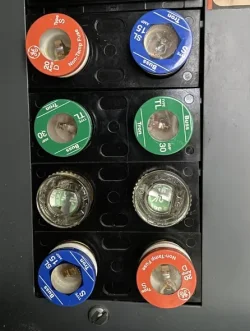
Now if there's a fuse box, instead of a breaker panel, just look at the fuses with an LED flashlight.
You'll be able to "see" which one burnt out.

It also has the fuse amperage written on the part of the fuse you can see.
Just get one with the same amperage at any hardware store.

Fuses look like this. They just screw in an out like a light bulb.

Image1.webp


All this assumes you're in the USA.
You used the term wall outlet, so I am guessing you are in the USA.
 
Last edited:

My Computers

System One System Two

  • OS
    Win 11 Home ♦♦♦26200.8655 ♦♦♦♦♦♦♦25H2
    Computer type
    PC/Desktop
    Manufacturer/Model
    Built by Ghot® [May 2020]
    CPU
    AMD Ryzen 7 3700X
    Motherboard
    Asus Pro WS X570-ACE (BIOS 5302)
    Memory
    G.Skill (F4-3200C14D-16GTZKW)
    Graphics Card(s)
    EVGA RTX 2070 (08G-P4-2171-KR)
    Sound Card
    Realtek ALC1220P / ALC S1220A
    Monitor(s) Displays
    Dell U3011 30"
    Screen Resolution
    2560 x 1600
    Hard Drives
    2x Samsung 860 EVO 500GB,
    WD 4TB Black FZBX - SATA III,
    WD 8TB Black FZBX - SATA III,
    DRW-24B1ST CD/DVD Burner
    PSU
    PC Power & Cooling 750W Quad EPS12V
    Case
    Cooler Master ATCS 840 Tower
    Cooling
    CM Hyper 212 EVO (push/pull)
    Keyboard
    Ducky DK9008 Shine II Blue LED
    Mouse
    Logitech Optical M-100
    Internet Speed
    300/300
    Browser
    Firefox (latest)
    Antivirus
    Bitdefender Total Security
    Other Info
    Speakers: Klipsch Pro Media 2.1
  • Operating System
    Windows XP Pro 32bit w/SP3
    Computer type
    PC/Desktop
    Manufacturer/Model
    Built by Ghot® (not in use)
    CPU
    AMD Athlon 64 X2 5000+ (OC'd @ 3.2Ghz)
    Motherboard
    ASUS M2N32-SLI Deluxe Wireless Edition
    Memory
    TWIN2X2048-6400C4DHX (2 x 1GB, DDR2 800)
    Graphics card(s)
    EVGA 256-P2-N758-TR GeForce 8600GT SSC
    Sound Card
    Onboard
    Monitor(s) Displays
    ViewSonic G90FB Black 19" Professional (CRT)
    Screen Resolution
    up to 2048 x 1536
    Hard Drives
    WD 36GB 10,000rpm Raptor SATA
    Seagate 80GB 7200rpm SATA
    Lite-On LTR-52246S CD/RW
    Lite-On LH-18A1P CD/DVD Burner
    PSU
    PC Power & Cooling Silencer 750 Quad EPS12V
    Case
    Generic Beige case, 80mm fans
    Cooling
    ZALMAN 9500A 92mm CPU Cooler
    Keyboard
    Logitech Classic Keybooard 200
    Mouse
    Logitech Optical M-BT96a
    Internet Speed
    300/300
    Browser
    Firefox 3.x ??
    Antivirus
    Symantec (Norton)
    Other Info
    Still assembled, still runs. Haven't turned it on for 15 years?
Disconnect all externally attached devices to see problem resolves.
 

My Computer

System One

  • OS
    Windows 11
    Computer type
    PC/Desktop
    Manufacturer/Model
    HP Pavilion
    CPU
    AMD Ryzen 7 5700G
    Motherboard
    Erica6
    Memory
    Micron Technology DDR4-3200 16GB
    Graphics Card(s)
    NVIDIA GeForce RTX 3060
    Sound Card
    Realtek ALC671
    Monitor(s) Displays
    Samsung SyncMaster U28E590
    Screen Resolution
    3840 x 2160
    Hard Drives
    SAMSUNG MZVLQ1T0HALB-000H1
If the PC turns on, the circuit breaker can't be tripped!
 

My Computers

System One System Two

  • OS
    Windows 11 Pro 25H2 26200.8655
    Computer type
    Laptop
    Manufacturer/Model
    Acemagic LX15PRO
    CPU
    AMD Ryzen 7 5825U with Radeon Graphics
    Memory
    16GB
    Screen Resolution
    1920 x 1080
    Hard Drives
    SSD 2TB
    Internet Speed
    30 Mbps
    Browser
    Brave
    Antivirus
    Webroot Secure Anywhere
    Other Info
    System 3

    Acer Swift SF114-34 laptop
    OS Windows 11 Pro 26200.8524
    CPU Pentium Silver N6000
    RAM 4GB
    SSD Samsung 970 EVO Plus SSD 2TB (an upgrade)
  • Operating System
    Windows 11 Pro 23H2 22631.2506
    Computer type
    Laptop
    Manufacturer/Model
    HP Mini 210-1090NR PC (bought in late 2009!)
    CPU
    Atom N450 1.66GHz
    Memory
    2GB
    Browser
    Brave
    Antivirus
    Webroot
Client has W11.....but booting up VERY slow....about 10 minutes....
Asked client how often she turns the PC off......she says never.....always on....
Took it home and on my workbench...booted up about 10-15 minutes......
Rebooted again and went faster........booted up 5 times in a row and now the
PC is booting in a normal time......

So...took it back to my client and it won';t boot.....wont get out of POST....
I bring it home to troubleshoot.....didn't do anything and it works perfectly....
Took it back to client and will not boot....

So brought it back to my workbench......run DISM....sfc and chkdsk....everything looks good
PC is running perfectly.....
Back to client and will not boot......

Unplugged PC from surge protector.....plugged pc directly into wall outlet.......no boot....

Moved PC to clients kitchen....different 110v outlet and it booted up normal.....

So something with the 110v outlook at the normal pc location.....

Question.......maybe low voltage....but if that were the case I don;t think the pc would even start up at all....monitor would not turn on.....

So I'm thinking maybe a circuit breaker problem in the breaker box.....

Any thoughts and ideas appreciated...
Steve
Using your post as the guideline, there is a chance that the outlet the pc is plugged into has a loose wire on one of the leads attached to the outlet. In my life experience's this has been a problem on a couple of occasions. You can test the outlet with a circuit tester; if you buy one I suggest spending an extra couple of bucks to get a better quality.
 

My Computer

System One

  • OS
    Windows 11 Professional
    Computer type
    PC/Desktop
    Manufacturer/Model
    Microcenter B677
    CPU
    Intel Core i5-9400
    Motherboard
    ASRock H310CM-HDV/M.2
    Memory
    32GB
    Graphics Card(s)
    Integrated Intel UHD Graphics 630
    Sound Card
    Intel Kaby Lake - High Definition Audio / cAVS (Audio, Voice, Speech) [A0]
    Monitor(s) Displays
    LG Model: GSM59F1
    Screen Resolution
    2560x1080
    Case
    Lian Li 205M
    Antivirus
    Kaspersky AV
The way I see it, the only way to isolate exactly what the problem is, is to use a multimeter and the process of elimination to find where in the house circuitry the connection is breaking down. You're not proving anything, other than it's not the computer, by moving the computer from room to room.

Unless you know the schematic of the way the house was wired you don't know for sure which outlets are on any given breaker/fuse leg. You can't always go by the markings on a breaker panel. One circuit breaker can control entire rooms, multiple rooms, or even only some outlets in multiple rooms. It all depends on how the house was wired and many times it is not according to Hoyle.
Unless you hit it lucky and find a defective breaker (or thrown breaker) or a bad connection to that one particular outlet, I would think it would require an electrician to go any deeper than that.
 

My Computers

System One System Two

  • OS
    Windows 11 Pro 25H2 26200.8655
    Computer type
    PC/Desktop
    Manufacturer/Model
    Dell Optiplex 7080
    CPU
    i9-10900 10 core 20 threads
    Motherboard
    DELL 0J37VM
    Memory
    32 gb
    Graphics Card(s)
    none-Intel UHD Graphics 630
    Sound Card
    Integrated Realtek
    Monitor(s) Displays
    Benq 27
    Screen Resolution
    2560x1440
    Hard Drives
    2x1tb Solidigm m.2 nvme /External drives 512gb Samsung m.2 sata+2tb Kingston m2.nvme
    PSU
    500w
    Case
    MT
    Cooling
    Dell Premium
    Keyboard
    Logitech wired
    Mouse
    Logitech wireless
    Internet Speed
    so slow I'm too embarrassed to tell
    Browser
    #1 Edge #2 Firefox
    Antivirus
    Defender+MWB Premium
  • Operating System
    Windows 11 Pro 24H2 26200.8457
    Computer type
    PC/Desktop
    Manufacturer/Model
    Beelink Mini PC SER5
    CPU
    AMD Ryzen 7 6800U
    Memory
    32 gb
    Graphics card(s)
    integrated
    Sound Card
    integrated
    Monitor(s) Displays
    Benq 27
    Screen Resolution
    2560x1440
    Hard Drives
    1TB Crucial nvme
    Keyboard
    Logitech wired
    Mouse
    Logitech wireless
    Internet Speed
    still too embarrassed to tell
    Browser
    Firefox
    Antivirus
    Defender
    Other Info
    System 3 is non compliant Dell 9020 i7-4770/24gb ram Win11 PRO 26200.8457
Not a simple low-voltage multimeter. It will almost certainly not be able to identify intermittent connections.
Use a meter that is described as having insulation testing capabilities [up to, say, 2MOhm] that can output at least as high a voltage as your electricity supply.


Denis
 
Last edited:

My Computer

System One

  • OS
    Windows 11 Home x64 Version 25H2 Build 26200.8037
Mains are extremely simple, at least here. Any electrical contact problem can only lead to one of these 3 results:

1) The appliance gets the full poles voltage. I mean 110 V if that's the voltage there.

2) The appliance doesn't get any voltage at all (for example -imaginary accidental narrowing of a conducting cable-, it's impossible that sub-200W appliances work and over-201W appliances don't, the most it can happen is that you plug several several sub-200W appliances one after the other and all work fine, then you plug a 250W one, you may hear a spark or not, but since that moment the outlet doesn't have any voltage for any appliance; this situation is imaginary b/c it's extremely difficult with copper -fuses are made of more fusable metals- and only 200/250W).

3) The appliance gets mains voltage sometimes and sometimes not at all, or intermittently (this is happening with a bulb here although the failure is in the bulb itself, it's used seldom and it has a twin one totally fine and its "resilience" amuses me).

If the ground wire is involved I would expect funny results depending on what means "ground" there. I understand well the electricity but I'm not expert in electrical installations. I once heard that in certain region(s) they connect the ground wire to one of the poles (I don't know well the practical distinction between the neutral and the live poles, maybe this is only valid with one of them) to fix problems or as a norm. Here, the entire ground wire is precisely a device anti-accidental connection of ANY of the poles to the appliances metallic casing = the real ground. If nothing else is done, the next person that touches the casing will close a "circuit" with his or her own body and the earth as conductors, and receives a cramp (the earth conductivity isn't high but seen as a cable it's very wide; one of the highest "resistors" of this "circuit" is the shoes soles, using any kind of shoes will weaken this cramp). In such situation, the ground wire will close the circuit before any person, a "differential" will detect that both poles have different currents and will break the circuit. In practice, simply plugging any affected appliance will trip this circuit breaker (when I was child I noticed that an old fridge gave cramps, afterwards I noticed that the original fridge plug had been cut and a two wires one had been attached,... later on I learnt enough to decypher the situation; a teacher showed as that the differential can break the circuit w/o the ground wire when a person touches the pole, but part of the cramp is already done).

Physically, ground wires here aren't connected to anything of the electric system. They go along with the poles, but they are all connected to a nearby "pica", metal things buried deep enough to find humidity.

---------------------------------------

In short, my bet is something wrong involving the ground wire(s) (and supposing the "ground system" is completely different from what I know).
 

My Computer

System One

  • OS
    Windows 11
    Manufacturer/Model
    MeLE Quieter 2Q (fanless miniPC)
    CPU
    Celeron J4125 (10th gen)
    Memory
    8GB DDR4
    Monitor(s) Displays
    Samsung SyncMaster T260
    Screen Resolution
    1920x1200
    Hard Drives
    256GB eMMC (Windows)
    2TB USB3 HDD Toshiba (Data)
Wow...so many responses....was not expecting this....Many thanks....
Ok.....I have a Fluke voltage tester....about $125 about 10 years ago....I know how to use it.....
So.....tomorrow I am taking another computer to the client.......One that I just finished setting up today......gonna try that.....
See if the outlet is actually at 110v........This is St Louis County and I have their reg book and I know that this house does NOT have 3 prong
outlets......and the ground wire for the house is attached to the cold water pipe.....that's how all the houses were built in the early 1950's.....
The outlet that the PC plugs into has a 3 prong outlet....but I will bet you hard money that there is no ground wire attached......so in that case a surge protector will not work......right now I have the surge protecter out of the circuit.....

I can have the client watch a lamp plugged in at the outlet in question and I will flip the breakers on/off one by one and she will tell me when I
find the breaker in question......

I did forget to tell you in my original post.......the PC starts up....fan noise.....power light at the power button.......and I get on the screen the ACER logo......i takes about 4 minutes for the logo to appear.......then nothing......I can let it sit for 15 more minutes and just the logo will be on the screen......So the PC is starting up but not doing a POST.....

Now the PC worked at this outlet before....client called me because PC was so very very slow.....she could't deal with it anymore......
The PC is an Acer desktop....and I don;'t have the specs at the moment.....about 3 years old....

Hope this additional info shines a littlel more light oon the subject...
 

My Computer

System One

  • OS
    10 and 11 Linux
    Computer type
    PC/Desktop
    Motherboard
    Asus Z97-ar
    Memory
    16
    Graphics Card(s)
    HIS QP3-41H-A
    Sound Card
    default
    Monitor(s) Displays
    2 Dell 22"
    Hard Drives
    M.2 for system M.2 Data and 2 - SATA for photos and music data
    PSU
    Yes...I have one
    Case
    Now sure
    Internet Speed
    650 both ways
    Browser
    Brave
    Antivirus
    Win Defender
If a circuit breaker "trips" the switch on the breaker will be loose. All the working breaker switches will still be tight.
That's how you know which one tripped.
I've never experienced a tripped breaker being loose. Every tripped breaker I've experienced show a red or orange bar in the little window. Turn it off then back to on to reset it.
 
Last edited:

My Computers

System One System Two

  • OS
    Windows 11 Pro 25H2
    Computer type
    PC/Desktop
    Manufacturer/Model
    PowerSpec B746
    CPU
    Intel Core i7-10700K
    Motherboard
    ASRock Z490 Phantom Gaming 4/ax
    Memory
    16GB (8GB PC4-19200 DDR4 SDRAM x2)
    Graphics Card(s)
    NVIDIA GeForce GTX 1050 TI
    Sound Card
    Realtek Audio
    Monitor(s) Displays
    #1. LG ULTRAWIDE 34" #2. AOC Q32G2WG3 32"
    Screen Resolution
    #1. 3440 X 1440 #2. 1920 x 1080
    Hard Drives
    NVMe WDC WDS100T2B0C-00PXH0 1TB
    Samsung SSD 860 EVO 1TB
    PSU
    750 Watts (62.5A)
    Case
    PowerSpec/Lian Li ATX 205
    Keyboard
    Logitech K270
    Mouse
    Logitech M185
    Browser
    Microsoft Edge and Firefox
    Antivirus
    Webroot SecureAnywhere CE 26.1
  • Operating System
    Windows 11 Canary Channel
    Computer type
    PC/Desktop
    Manufacturer/Model
    PowerSpec G156
    CPU
    Intel Core i5-8400 CPU @ 2.80GHz
    Motherboard
    AsusTeK Prime B360M-A
    Memory
    16 MB DDR 4-2666
    Monitor(s) Displays
    23" Speptre HDMI 75Hz
    Screen Resolution
    1920x1080
    Hard Drives
    Samsung 970 EVO 500GB NVMe
    Keyboard
    Logitek K270
    Mouse
    Logitek M185
    Browser
    Firefox, Edge and Edge Canary
    Antivirus
    Windows Defender
I've never experienced a tripped breaker being loose. Every tripped breaker I've experienced show a red or orange bar in the little window. Turn it off then back to on to reset it.


They may have some kind of color indicator, but a lot of the time they're dusty and what not, so I just feel the breaker switches.
I can just run my hand down a ton of them and find the loose switch.
 

My Computers

System One System Two

  • OS
    Win 11 Home ♦♦♦26200.8655 ♦♦♦♦♦♦♦25H2
    Computer type
    PC/Desktop
    Manufacturer/Model
    Built by Ghot® [May 2020]
    CPU
    AMD Ryzen 7 3700X
    Motherboard
    Asus Pro WS X570-ACE (BIOS 5302)
    Memory
    G.Skill (F4-3200C14D-16GTZKW)
    Graphics Card(s)
    EVGA RTX 2070 (08G-P4-2171-KR)
    Sound Card
    Realtek ALC1220P / ALC S1220A
    Monitor(s) Displays
    Dell U3011 30"
    Screen Resolution
    2560 x 1600
    Hard Drives
    2x Samsung 860 EVO 500GB,
    WD 4TB Black FZBX - SATA III,
    WD 8TB Black FZBX - SATA III,
    DRW-24B1ST CD/DVD Burner
    PSU
    PC Power & Cooling 750W Quad EPS12V
    Case
    Cooler Master ATCS 840 Tower
    Cooling
    CM Hyper 212 EVO (push/pull)
    Keyboard
    Ducky DK9008 Shine II Blue LED
    Mouse
    Logitech Optical M-100
    Internet Speed
    300/300
    Browser
    Firefox (latest)
    Antivirus
    Bitdefender Total Security
    Other Info
    Speakers: Klipsch Pro Media 2.1
  • Operating System
    Windows XP Pro 32bit w/SP3
    Computer type
    PC/Desktop
    Manufacturer/Model
    Built by Ghot® (not in use)
    CPU
    AMD Athlon 64 X2 5000+ (OC'd @ 3.2Ghz)
    Motherboard
    ASUS M2N32-SLI Deluxe Wireless Edition
    Memory
    TWIN2X2048-6400C4DHX (2 x 1GB, DDR2 800)
    Graphics card(s)
    EVGA 256-P2-N758-TR GeForce 8600GT SSC
    Sound Card
    Onboard
    Monitor(s) Displays
    ViewSonic G90FB Black 19" Professional (CRT)
    Screen Resolution
    up to 2048 x 1536
    Hard Drives
    WD 36GB 10,000rpm Raptor SATA
    Seagate 80GB 7200rpm SATA
    Lite-On LTR-52246S CD/RW
    Lite-On LH-18A1P CD/DVD Burner
    PSU
    PC Power & Cooling Silencer 750 Quad EPS12V
    Case
    Generic Beige case, 80mm fans
    Cooling
    ZALMAN 9500A 92mm CPU Cooler
    Keyboard
    Logitech Classic Keybooard 200
    Mouse
    Logitech Optical M-BT96a
    Internet Speed
    300/300
    Browser
    Firefox 3.x ??
    Antivirus
    Symantec (Norton)
    Other Info
    Still assembled, still runs. Haven't turned it on for 15 years?
Client has W11.....but booting up VERY slow....about 10 minutes....
Asked client how often she turns the PC off......she says never.....always on....
Took it home and on my workbench...booted up about 10-15 minutes......
Rebooted again and went faster........booted up 5 times in a row and now the
PC is booting in a normal time......

So...took it back to my client and it won';t boot.....wont get out of POST....
I bring it home to troubleshoot.....didn't do anything and it works perfectly....
Took it back to client and will not boot....

So brought it back to my workbench......run DISM....sfc and chkdsk....everything looks good
PC is running perfectly.....
Back to client and will not boot......

Unplugged PC from surge protector.....plugged pc directly into wall outlet.......no boot....

Moved PC to clients kitchen....different 110v outlet and it booted up normal.....

So something with the 110v outlook at the normal pc location.....

Question.......maybe low voltage....but if that were the case I don;t think the pc would even start up at all....monitor would not turn on.....

So I'm thinking maybe a circuit breaker problem in the breaker box.....

Any thoughts and ideas appreciated...
Steve
This reads like you have may an outlet with high resistance on the connection to the outlet. If they've installed the outlet using the backstab connectors this is pretty common. The simplest repair is to just remove the wires from the backstab holes and attach them using the screws. Frankly, I'd do this for all outlets, or at least check them all if this is the way the outlet is attached. Failure rate is pretty high compared to using the screw terminals.
 

My Computer

System One

  • OS
    Windows 11 25H2
    Computer type
    PC/Desktop
    Manufacturer/Model
    EVGA home brew
    CPU
    Broadwell-e 6850K 4.5ghz @1.36v
    Motherboard
    EVGA X99 FTW K
    Memory
    32GB Corsair LPM 3600 C16
    Graphics Card(s)
    EVGA RTX 3080Ti FTW
    Sound Card
    Asus Centurion true 7.1 headset. (5 speakers in each earpeice)
    Monitor(s) Displays
    LG C4 55"
    Screen Resolution
    4K 144hz
    Hard Drives
    Various models of SSDs ~10TB No HDDs installed.
    PSU
    be quiet! BN516 Straight Power 12-1000w 80 Plus Platinum
    Case
    Corsair 780T modified to dual 200mm intake fans
    Cooling
    Corsair H110i
    Keyboard
    Corsair K95 Platinum
    Mouse
    Corsair M65 RGB Elite
    Internet Speed
    50Mbs
If they own the house I recommend that they have a electrician check it out. If they rent they should call the landlord or apartment manager.
 
Last edited:

My Computers

System One System Two

  • OS
    Windows 11 Pro 25H2
    Computer type
    PC/Desktop
    Manufacturer/Model
    PowerSpec B746
    CPU
    Intel Core i7-10700K
    Motherboard
    ASRock Z490 Phantom Gaming 4/ax
    Memory
    16GB (8GB PC4-19200 DDR4 SDRAM x2)
    Graphics Card(s)
    NVIDIA GeForce GTX 1050 TI
    Sound Card
    Realtek Audio
    Monitor(s) Displays
    #1. LG ULTRAWIDE 34" #2. AOC Q32G2WG3 32"
    Screen Resolution
    #1. 3440 X 1440 #2. 1920 x 1080
    Hard Drives
    NVMe WDC WDS100T2B0C-00PXH0 1TB
    Samsung SSD 860 EVO 1TB
    PSU
    750 Watts (62.5A)
    Case
    PowerSpec/Lian Li ATX 205
    Keyboard
    Logitech K270
    Mouse
    Logitech M185
    Browser
    Microsoft Edge and Firefox
    Antivirus
    Webroot SecureAnywhere CE 26.1
  • Operating System
    Windows 11 Canary Channel
    Computer type
    PC/Desktop
    Manufacturer/Model
    PowerSpec G156
    CPU
    Intel Core i5-8400 CPU @ 2.80GHz
    Motherboard
    AsusTeK Prime B360M-A
    Memory
    16 MB DDR 4-2666
    Monitor(s) Displays
    23" Speptre HDMI 75Hz
    Screen Resolution
    1920x1080
    Hard Drives
    Samsung 970 EVO 500GB NVMe
    Keyboard
    Logitek K270
    Mouse
    Logitek M185
    Browser
    Firefox, Edge and Edge Canary
    Antivirus
    Windows Defender
I'm sorry that I didn't see these posts sooner!

I had a similar problem a year ago: Intermittent response on the usual outlet for my PC in my home office room. However, my PC was plugged into an uninterruptible power supply (UPS) that was plugged into the outlet in question, and the UPS had logged the temporary voltage fluctuations. So I knew I had a problem.

The cause was not the outlet in question or the circuit breaker box. The real cause was loose wires in another outlet that was upstream on the same daisy chain of outlets.

If you don't have a wiring diagram for your cilent's home/office, you have to investigate what else is usually on that branch circuit besides the outlet for the PC.

You can try shutting off the power to various circuits via the circuit breaker box to see what circuit the outlet in question is on and what other outlets are on that same branch circuit.

By throwing a heavy load on another outlet, you can use a voltmeter or a lamp that dims to see which outlets register a momentary voltage drop. Furthermore, because of the small resistance in the wires themselves, the greater the voltage drop, the further downstream that outlet is.
 

My Computer

System One

  • OS
    Windows 11
    Computer type
    PC/Desktop
    Manufacturer/Model
    Custom
    CPU
    Ryzen 9 7900X
    Motherboard
    ASUS ROG STRIX B-650 E-F
    Memory
    64 GB
    Graphics Card(s)
    Nvidia GeForce GTX 1650
    Hard Drives
    C: SSD, 500 GB
    D: HDD, 1 TB
    J: HDD, 1 TB
    Antivirus
    Norton
Wow...so many responses....was not expecting this....Many thanks....
Ok.....I have a Fluke voltage tester....about $125 about 10 years ago....I know how to use it.....
So.....tomorrow I am taking another computer to the client.......One that I just finished setting up today......gonna try that.....
See if the outlet is actually at 110v........This is St Louis County and I have their reg book and I know that this house does NOT have 3 prong
outlets......and the ground wire for the house is attached to the cold water pipe.....that's how all the houses were built in the early 1950's.....
The outlet that the PC plugs into has a 3 prong outlet....but I will bet you hard money that there is no ground wire attached......so in that case a surge protector will not work......right now I have the surge protecter out of the circuit.....

I can have the client watch a lamp plugged in at the outlet in question and I will flip the breakers on/off one by one and she will tell me when I
find the breaker in question......

I did forget to tell you in my original post.......the PC starts up....fan noise.....power light at the power button.......and I get on the screen the ACER logo......i takes about 4 minutes for the logo to appear.......then nothing......I can let it sit for 15 more minutes and just the logo will be on the screen......So the PC is starting up but not doing a POST.....

Now the PC worked at this outlet before....client called me because PC was so very very slow.....she could't deal with it anymore......
The PC is an Acer desktop....and I don;'t have the specs at the moment.....about 3 years old....


I always could never fathom out about the USA (the most advanced technological country on the planet - even now) why it has such a primitive and non robust electricity supply system -- almost anywhere after any sort of bad weather major outages regularly occur and a shambles of a banking system so why a) does it use 110 V -- that means any sensible appliance needs 2X the power that typical European systems (220 V) use - meaning thicker wires (remember Ohms Law !!) and more heat loss / generation -- more current (amperes) generates a lot more heat - plus the 60 cycles (60 Hz)AC where capacitative losses in transmission lines are higher - Europe in general uses large scale 384,000 Volt for transmission lines and 50 cycles / Hz so less lossy and b) does it still tolerate their bonkers banking system.

If the property is rented get Landlord to check and fix dubious power connection, if it's yours get an electrician P.D.Q.

Try also the PC in another building. I doubt though if it is faulty mains from the energy company. The PC will either work properly or not. No half measures.

Cheers
jimbo
 

My Computer

System One

  • OS
    Windows XP,11 Linux Fedora Rawhide pre-release 45
    Computer type
    PC/Desktop
    CPU
    2 X Intel i7
    Screen Resolution
    4KUHD X 2
This reads like you have may an outlet with high resistance on the connection to the outlet. If they've installed the outlet using the backstab connectors this is pretty common. The simplest repair is to just remove the wires from the backstab holes and attach them using the screws. Frankly, I'd do this for all outlets, or at least check them all if this is the way the outlet is attached. Failure rate is pretty high compared to using the screw terminals.
Thanks for the info, I always wondered which connector to use. I now feel exonerated by always using the screw connector.
 

My Computers

System One System Two

  • OS
    Win 11 Pro
    Computer type
    PC/Desktop
    Manufacturer/Model
    ABS (Newegg)
    CPU
    Intel(R) Core(TM) i5-10400F CPU @ 2.90GHz
    Motherboard
    ASUSTeK COMPUTER INC. PRIME B560M-A AC Rev 1.xx
    Memory
    Corsair VENGEANCE® LPX 32GB (2 x 16GB) DDR4 DRAM 3600MHz
    Graphics Card(s)
    MSI NVIDIA GeForce RTX 3060 Ti
    Sound Card
    Realtek Digital Output (Realtek(R) Audio)
    Monitor(s) Displays
    Viewsonic VS 2725 -2k 27"
    Screen Resolution
    2560x1440 100hz
    Hard Drives
    T-FORCE TM8FP800 1TB + a couple SATA SSDs
    PSU
    Gigabyte P650E
    Case
    DeepCool Matrexx 50 mid-tower
    Cooling
    Assassin X 120 Refined SE and 5 Thermalright TL-C12C case fans
    Keyboard
    Redragon K655 or K720
    Mouse
    CoolerMaster MM711 or Redragon M612
    Internet Speed
    Starlink: speed varies
    Browser
    Brave (default), Chrome (for ATG), Edge (for ATMS)
    Antivirus
    Windows Defender
    Other Info
    An assortment of "land fill, obsolete" computers all running Linux Mint 22 (at the moment).
  • Operating System
    Linux Mint 22.2 Cinnamon
    Computer type
    PC/Desktop
    Manufacturer/Model
    Hewlett-Packard HP ProDesk 600 G1 SFF
    CPU
    i5 4590
    Motherboard
    HP
    Memory
    16 GB
    Graphics card(s)
    Intel(R) HD Graphics 4600
    Sound Card
    Realtek High Definition Audio
    Monitor(s) Displays
    Generic 24"
    Hard Drives
    Samsung SSD 860 EVO 500GB
    Hitachi HUA722010CLA330
    WDC WD40EZAZ-19SF3B0
    PSU
    Factory 240 watt
    Case
    Low Profile Desktop
    Cooling
    Factory cooling
    Keyboard
    HP
    Mouse
    HP
    Internet Speed
    Starlink
    Browser
    Brave
    Antivirus
    ?
    Other Info
    This is my media server
I always could never fathom out about the USA (the most advanced technological country on the planet - even now) why it has such a primitive and non robust electricity supply system
Basically it had to do with the fact that at the time, Edison's DC voltage was only good for short distances. Tesla's AC voltage was able to solve the long distance problem. The reason for the 110 volts was because the main use for electricity was to power lights. The lights worked the best with 110 volts. The 110 voltage was later increased to 120 volts.
 

My Computers

System One System Two

  • OS
    Windows 11 Pro 25H2
    Computer type
    PC/Desktop
    Manufacturer/Model
    PowerSpec B746
    CPU
    Intel Core i7-10700K
    Motherboard
    ASRock Z490 Phantom Gaming 4/ax
    Memory
    16GB (8GB PC4-19200 DDR4 SDRAM x2)
    Graphics Card(s)
    NVIDIA GeForce GTX 1050 TI
    Sound Card
    Realtek Audio
    Monitor(s) Displays
    #1. LG ULTRAWIDE 34" #2. AOC Q32G2WG3 32"
    Screen Resolution
    #1. 3440 X 1440 #2. 1920 x 1080
    Hard Drives
    NVMe WDC WDS100T2B0C-00PXH0 1TB
    Samsung SSD 860 EVO 1TB
    PSU
    750 Watts (62.5A)
    Case
    PowerSpec/Lian Li ATX 205
    Keyboard
    Logitech K270
    Mouse
    Logitech M185
    Browser
    Microsoft Edge and Firefox
    Antivirus
    Webroot SecureAnywhere CE 26.1
  • Operating System
    Windows 11 Canary Channel
    Computer type
    PC/Desktop
    Manufacturer/Model
    PowerSpec G156
    CPU
    Intel Core i5-8400 CPU @ 2.80GHz
    Motherboard
    AsusTeK Prime B360M-A
    Memory
    16 MB DDR 4-2666
    Monitor(s) Displays
    23" Speptre HDMI 75Hz
    Screen Resolution
    1920x1080
    Hard Drives
    Samsung 970 EVO 500GB NVMe
    Keyboard
    Logitek K270
    Mouse
    Logitek M185
    Browser
    Firefox, Edge and Edge Canary
    Antivirus
    Windows Defender

Latest Support Threads

Back
Top Bottom