No Sound with reinstalled (repaired) W 11


bjhannaway

Member
Local time
2:30 AM
Posts
35
OS
Windows 11
My hard drive is partitioned. W10 in one partition, works just fine. W11 in the other. Reinstalled W11 yesterday but the sound no longer works. Version is W11 Home, version 10.0.26100 Build 26100. All tests suggest that it should work - but no sound. In the W10 partition, the specification for the sound output is Speakers (Realtek audio). This works fine. With new download of W11, the sound output is shown as VoiceMeeter (this was formerly Realtek). There is no option to change the sound output in W11. Also, if I wish to add a new output, the two choices offered do not include Realtek. How do I get my sound back (without disturbing my W10 sound). Many thanks, Brian
 

My Computer

System One

  • OS
    Windows 11
    Computer type
    Laptop
    Manufacturer/Model
    Acer Swift SF114-34
    Memory
    8Gb
    Keyboard
    Built-in QWERTY
    Mouse
    Standaard with tail
    Internet Speed
    via Fibreoptics
    Browser
    MS Edge
Windows 11 drivers here. You can enter your SN to get device specific drivers. https://www.acer.com/us-en/support/product-support/SF114-34.

Voicemeeter is an application and Virtual audio driver which you would have had to install. Completely uninstall all references of Voicemeeter software and its driver. Restart and install the Windows 11 Realtek driver.
 

My Computers

System One System Two

  • OS
    Windows 11 Pro 25H2 26200.8655
    Computer type
    PC/Desktop
    Manufacturer/Model
    Dell Optiplex 7080
    CPU
    i9-10900 10 core 20 threads
    Motherboard
    DELL 0J37VM
    Memory
    32 gb
    Graphics Card(s)
    none-Intel UHD Graphics 630
    Sound Card
    Integrated Realtek
    Monitor(s) Displays
    Benq 27
    Screen Resolution
    2560x1440
    Hard Drives
    2x1tb Solidigm m.2 nvme /External drives 512gb Samsung m.2 sata+2tb Kingston m2.nvme
    PSU
    500w
    Case
    MT
    Cooling
    Dell Premium
    Keyboard
    Logitech wired
    Mouse
    Logitech wireless
    Internet Speed
    so slow I'm too embarrassed to tell
    Browser
    #1 Edge #2 Firefox
    Antivirus
    Defender+MWB Premium
  • Operating System
    Windows 11 Pro 24H2 26200.8457
    Computer type
    PC/Desktop
    Manufacturer/Model
    Beelink Mini PC SER5
    CPU
    AMD Ryzen 7 6800U
    Memory
    32 gb
    Graphics card(s)
    integrated
    Sound Card
    integrated
    Monitor(s) Displays
    Benq 27
    Screen Resolution
    2560x1440
    Hard Drives
    1TB Crucial nvme
    Keyboard
    Logitech wired
    Mouse
    Logitech wireless
    Internet Speed
    still too embarrassed to tell
    Browser
    Firefox
    Antivirus
    Defender
    Other Info
    System 3 is non compliant Dell 9020 i7-4770/24gb ram Win11 PRO 26200.8457
Thanks guys. By going to Device Manager I deleted the two named VoiceMeeters drivers. However, when I restarted the computer the VoiceMeeter drivers were automatically put back in place. Is there a way to permanently delete them. Thanks, Brian
 

My Computer

System One

  • OS
    Windows 11
    Computer type
    Laptop
    Manufacturer/Model
    Acer Swift SF114-34
    Memory
    8Gb
    Keyboard
    Built-in QWERTY
    Mouse
    Standaard with tail
    Internet Speed
    via Fibreoptics
    Browser
    MS Edge
Thanks guys. By going to Device Manager I deleted the two named VoiceMeeters drivers. However, when I restarted the computer the VoiceMeeter drivers were automatically put back in place. Is there a way to permanently delete them. Thanks, Brian
Download Driver Explorer Version 0.12.127
Unzip then run
Look for driver(s) you want to permanently delete
Put a check mark to select
Put a check mark on Force Deletion
Click on Delete Driver(s)
d.webp
 

My Computers

System One System Two

  • OS
    Windows 11 Pro 25H2, Linux Mint 21.3
    Computer type
    PC/Desktop
    Manufacturer/Model
    Self Build Feb.2024
    CPU
    Intel Core i9-14900K @5.8GHZ
    Motherboard
    MSI MAG Z790 Tomahawk Max WiFi 7
    Memory
    64GB (2XG Skill F5-6400J3239G32G) @6800
    Graphics Card(s)
    Radeon (TM) RX 480 Graphics (8 GB)
    Sound Card
    Intergrated Realtek
    Monitor(s) Displays
    Samsung
    Screen Resolution
    3840x2160
    Hard Drives
    1 - Crucial 705 1TB GEN5
    1 - Crucial 705 2TB GEN5
    2 - Crucial T500 2TB Gen4
    PSU
    750W EVGA-G3
    Case
    Antec NX410
    Cooling
    H2O Thermalright
    Keyboard
    Logitech K800
    Mouse
    Logitech Master 2S
    Internet Speed
    600 Mbps
    Browser
    Chrome
    Antivirus
    WD
  • Operating System
    Windows 11 Pro & Linux Mint X64
    Computer type
    PC/Desktop
    Manufacturer/Model
    MSI Z77 MPower (MS-7751)
    CPU
    Intel(R) Core(TM) i7-3770K CPU @ 4.20 GHz
    Motherboard
    Z77 MPower (MS-7751)
    Memory
    32.0GB Dual-Channel CMY16GX3M2A1600C9
    Graphics card(s)
    NVIDIA GeForce GT 740
    Monitor(s) Displays
    40" Samsung
    Screen Resolution
    1920X1080
    Hard Drives
    WIN10 - 111GB Samsung SSD 840 Series
    WIN11 - 223GB Crucial CT240BX500SSD
    2X931GB Crucial CT1000BX500SSD1
    PSU
    Antec 850W
    Case
    Antec 900
    Cooling
    H20
    Keyboard
    Logitech K800 Wireless
    Mouse
    Logitech MX Master 2S
    Internet Speed
    100 Mbps
    Browser
    Chrome
    Antivirus
    Windows Defender
Many thanks. Please note that I am over 80 years old and not exactly an expert with computers.
I did manage to delete the references to VoiceMeeter from the "Sound, video and games controller". On restarting, they were still gone.
I downloaded, from the Realtek website, the download "64 bit_Win7-Win8.....Win10". A Youtube video said this also works with W11. It was very easy to "install" - just press NEXT a few time and it was done. I restarted. However, it does not show in Device Manager and the speaker icon shows that "No audio debvice is installed". I feel rather lost.
 

My Computer

System One

  • OS
    Windows 11
    Computer type
    Laptop
    Manufacturer/Model
    Acer Swift SF114-34
    Memory
    8Gb
    Keyboard
    Built-in QWERTY
    Mouse
    Standaard with tail
    Internet Speed
    via Fibreoptics
    Browser
    MS Edge
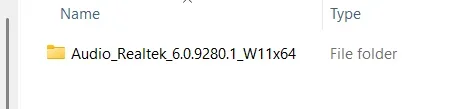
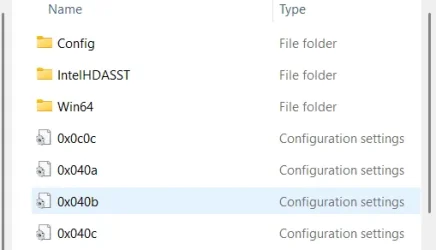
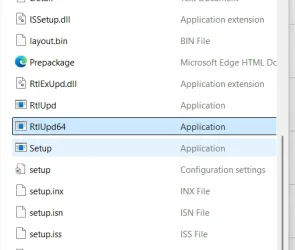
Hi Denis: I have done as you suggest but I am unable to instal it. Unlike the one I mentioned above, this one did not instal "automatically". I tried clicking a few items but nothing happened. When I click the download, I get RT1 (shown). When I click RT1 I get RT2 and RT3. However, from this point onwards , despite clicking all the "setup" items, nothing happens. I cannot find any video help on Youtube for this. I feel sure that it must be simple - but I do not know how to proceed. I'm just an old dummy !! Brian
 

Attachments

  • RT1.webp
    RT1.webp
    4.1 KB · Views: 1
  • RT2.webp
    RT2.webp
    12 KB · Views: 1
  • RT3.webp
    RT3.webp
    17.3 KB · Views: 1

My Computer

System One

  • OS
    Windows 11
    Computer type
    Laptop
    Manufacturer/Model
    Acer Swift SF114-34
    Memory
    8Gb
    Keyboard
    Built-in QWERTY
    Mouse
    Standaard with tail
    Internet Speed
    via Fibreoptics
    Browser
    MS Edge
Brian,

1 Please set File explorer to show file extensions. Without that you do not know what you're looking at.
Show or Hide File Name Extensions - ElevenForumTutorials

2 Acer provided a folder to download? Or a zip file?

3 In future, please post pictures using the picture icon on the post-editing toolbar. The way you attached them instead means that I cannot see your diagrams at the same time as seeing what you've written.
Picture icon.webp


4 I think that setup file labelled configuration settings might be an .inf file and, if so, it's that you need to right-click on then select Install.
RT3.webp
For example,​
Inf, Install.webp


Denis
 
Last edited:

My Computer

System One

  • OS
    Windows 11 Home x64 Version 25H2 Build 26200.8037
To Helmut:
The download file which I received from Acer is exactly the same as yours. However, when I click on it I have a "setup" file not a "setup.exe file" When I click on it, using either left-click or right-click I get the screen shown. RB.webp I get the same screen when I click all the other "setup" file. Brian
 

My Computer

System One

  • OS
    Windows 11
    Computer type
    Laptop
    Manufacturer/Model
    Acer Swift SF114-34
    Memory
    8Gb
    Keyboard
    Built-in QWERTY
    Mouse
    Standaard with tail
    Internet Speed
    via Fibreoptics
    Browser
    MS Edge

My Computer

System One

  • OS
    Windows 11 Home x64 Version 25H2 Build 26200.8037
Hi Denis: Thanks for your reminder ! Another dumb question from me: how do I set File Explorer to show file exctensions. (Remember, I am no genius at this !!) Brian
 

My Computer

System One

  • OS
    Windows 11
    Computer type
    Laptop
    Manufacturer/Model
    Acer Swift SF114-34
    Memory
    8Gb
    Keyboard
    Built-in QWERTY
    Mouse
    Standaard with tail
    Internet Speed
    via Fibreoptics
    Browser
    MS Edge
how do I set File Explorer to show file exctensions
By using the procedure given in the ElevenForumTutorial I gave you a link to.

When you see words in blue, they can contain a hyperlink.
Hover your cursor over a hyperlink to check [in the bottom-left corner, in Firefox & in Edge browsers] where they are going to take you and then click on the hyperlink itself to go there.
Never click on a hyperlink without first doing this check.

I hovered my cursor over the Show or Hide File Name Extensions - ElevenForumTutorials link and took this screenshot. Look in the bottom-left corner to see where the hyperlink takes you - somewhere else within ElevenForum and therefore somewhere safe.
Notice also that, in general, a hyperlink will be shown underlined while your cursor is hovering over it.
example hyperlink.webp


Denis
 
Last edited:

My Computer

System One

  • OS
    Windows 11 Home x64 Version 25H2 Build 26200.8037
Hi Denis: Very many thanks !! Brian
 

My Computer

System One

  • OS
    Windows 11
    Computer type
    Laptop
    Manufacturer/Model
    Acer Swift SF114-34
    Memory
    8Gb
    Keyboard
    Built-in QWERTY
    Mouse
    Standaard with tail
    Internet Speed
    via Fibreoptics
    Browser
    MS Edge
I have managed to get the file extensions shown and I have clicked, using both left anf right click, the setup.exe file. Thanks, guys. Each time I get the screen shown:
RB.webp In checking in my W10 hard drive partition, I can find the RealTek drivers in two files each starting with C:\\Windows\system32\etc By the way, W11 is actually in the C drive. It seems I need to somehow get W11 to go to these driver files in order for the audio to work. Is there a way to direct W11 to do this ? Brian
 

My Computer

System One

  • OS
    Windows 11
    Computer type
    Laptop
    Manufacturer/Model
    Acer Swift SF114-34
    Memory
    8Gb
    Keyboard
    Built-in QWERTY
    Mouse
    Standaard with tail
    Internet Speed
    via Fibreoptics
    Browser
    MS Edge
Brian,

Did you extract the zip file contents first [before trying to do anything with them]?
Unzip Files - ElevenForumTutorials

And, by "click" I assume you meant "double-click".


Denis
 

My Computer

System One

  • OS
    Windows 11 Home x64 Version 25H2 Build 26200.8037
Is there a way to direct W11 to do this ?
You could backup your drivers in Windows 10 then restore just that particular driver in Windows 11 but explaining how to find the specific driver to restore is difficult and that specific driver might not work correctly in Windows 11 for all I know.
Backup and Restore Device Drivers - TenForumsTutorials
Backup and Restore Device Drivers - ElevenForumTutorials
If there really is no alternative, I can try to talk you through this but I would hope that the current difficulty can be overcome instead.


Denis
 
Last edited:

My Computer

System One

  • OS
    Windows 11 Home x64 Version 25H2 Build 26200.8037
You seem to have a bad install of Windows or you have some system mods.
ZIP file extraction is part of Windows. There should be no problem.

It might help to run the DISM and SFC command line stuff, tutorial guides are on here.
Download the ZIP file again.


My Computer

System One

  • OS
    Windows 11
Hi Denis and Helmut:

Many thanks. I will give it a try. I will do this tomorrow as I'm getting tired of the strain this is causing. I will, of course, let you know how I get on. I really appreciate your patience. Brian
 

My Computer

System One

  • OS
    Windows 11
    Computer type
    Laptop
    Manufacturer/Model
    Acer Swift SF114-34
    Memory
    8Gb
    Keyboard
    Built-in QWERTY
    Mouse
    Standaard with tail
    Internet Speed
    via Fibreoptics
    Browser
    MS Edge

Latest Support Threads

Back
Top Bottom