Solved QTTabBar


.JXL support? Gotta have it!
You can get the 'thumbs' dll here.

11192.gif
 

My Computers My Computers

  • At a glance

    Windows 11 Pro
    OS
    Windows 11 Pro
    Computer type
    PC/Desktop
    Manufacturer/Model
    ASUS ROG Strix
  • At a glance

    Windows 11 Pro
    Operating System
    Windows 11 Pro
    Computer type
    Laptop
    Manufacturer/Model
    ASUS VivoBook
  • ASUS VivoBook 'Lite' ~ Windows 11 Home
.JXL support? Gotta have it!
You can get the 'thumbs' dll here.
With this dll I can have jpeg preview in windows like the one with qttabbar? It's been a long time I have wanted and searched for a way to get a mouse over image preview like qttabbar without having to install the entire software.
 

My Computer My Computer

At a glance

WindowsIntel i7-12800HX32 GB DDR5 4800 MHz dual-channelNVIDIA® GeForce RTX™ 3070 Ti
OS
Windows
Computer type
Laptop
Manufacturer/Model
Lenovo Legion 7i
CPU
Intel i7-12800HX
Memory
32 GB DDR5 4800 MHz dual-channel
Graphics Card(s)
NVIDIA® GeForce RTX™ 3070 Ti
Sound Card
Steinberg UR44
Hard Drives
1 TB SSD (M.2 NVMe PCIe 4.0 x4
2 TB SSD Samsung 980 PRO NNMe
Browser
Firefox
Antivirus
Windows Defender + Malwarebytes
With this dll I can have jpeg preview in windows like the one with qttabbar?
No. The dll, (.jxl), just makes Explorer show thumbnails instead of the default icon...

11202.webp

The mouse-over preview is handled by QT or similar.
 

My Computers My Computers

  • At a glance

    Windows 11 Pro
    OS
    Windows 11 Pro
    Computer type
    PC/Desktop
    Manufacturer/Model
    ASUS ROG Strix
  • At a glance

    Windows 11 Pro
    Operating System
    Windows 11 Pro
    Computer type
    Laptop
    Manufacturer/Model
    ASUS VivoBook
  • ASUS VivoBook 'Lite' ~ Windows 11 Home
Hello

Qttabbar also stopped to work for me after todays Windows 11 Pro update to 26200.7309

I had QTTabBar 2048 Beta2 working for years together with StartAllBack + Explorer Patcher + Open Shell.

Anybody knows a way to make Qttabbar work again? I have tried older versions from Quizo and the new fork versions from chinese developer and no luck. :(

Thanks!!!
 

My Computer My Computer

At a glance

Windows 11 Pro13900KRTX 4090
OS
Windows 11 Pro
Computer type
PC/Desktop
CPU
13900K
Graphics Card(s)
RTX 4090
Screen Resolution
4K
PSU
Corsair 2500 W
Anybody knows a way to make Qttabbar work again?
As I stated earlier..., I have 2048 Beta 2 working on 28000.1199 Canary, with a few minor residual glitches from 1038...,

I have 1038 working on 26200.7309, my production machine, flawlessly...,

I have yet to muster up the balls to put 2048 on my production machine!!! :cool:
 

My Computers My Computers

  • At a glance

    Windows 11 Pro
    OS
    Windows 11 Pro
    Computer type
    PC/Desktop
    Manufacturer/Model
    ASUS ROG Strix
  • At a glance

    Windows 11 Pro
    Operating System
    Windows 11 Pro
    Computer type
    Laptop
    Manufacturer/Model
    ASUS VivoBook
  • ASUS VivoBook 'Lite' ~ Windows 11 Home
As I stated earlier..., I have 2048 Beta 2 working on 28000.1199 Canary, with a few minor residual glitches from 1038...,

I have 1038 working on 26200.7309, my production machine, flawlessly...,

I have yet to muster up the balls to put 2048 on my production machine!!! :cool:

Wow, that's amazing news!

I didn't manage to make Qttabbar 1038 work on my Windows 11 Pro 26200.7309

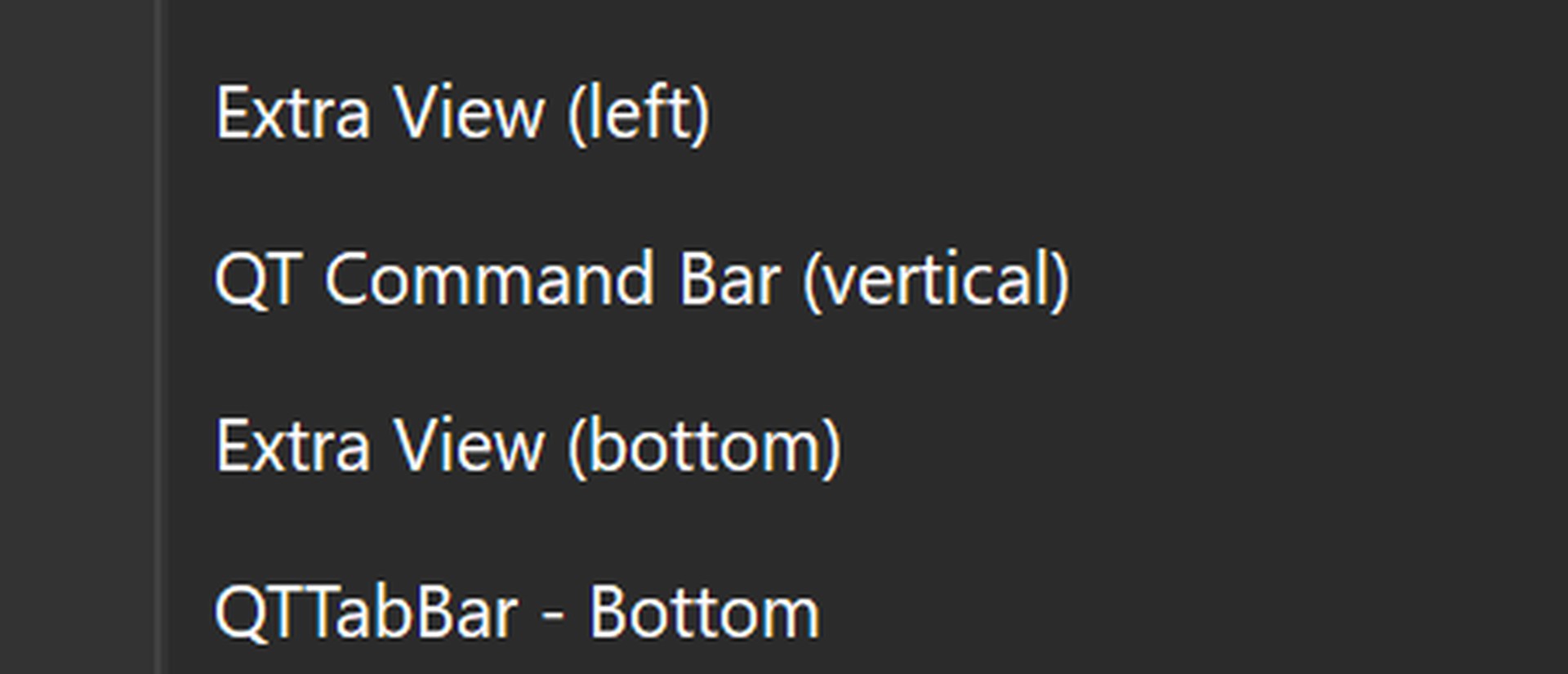
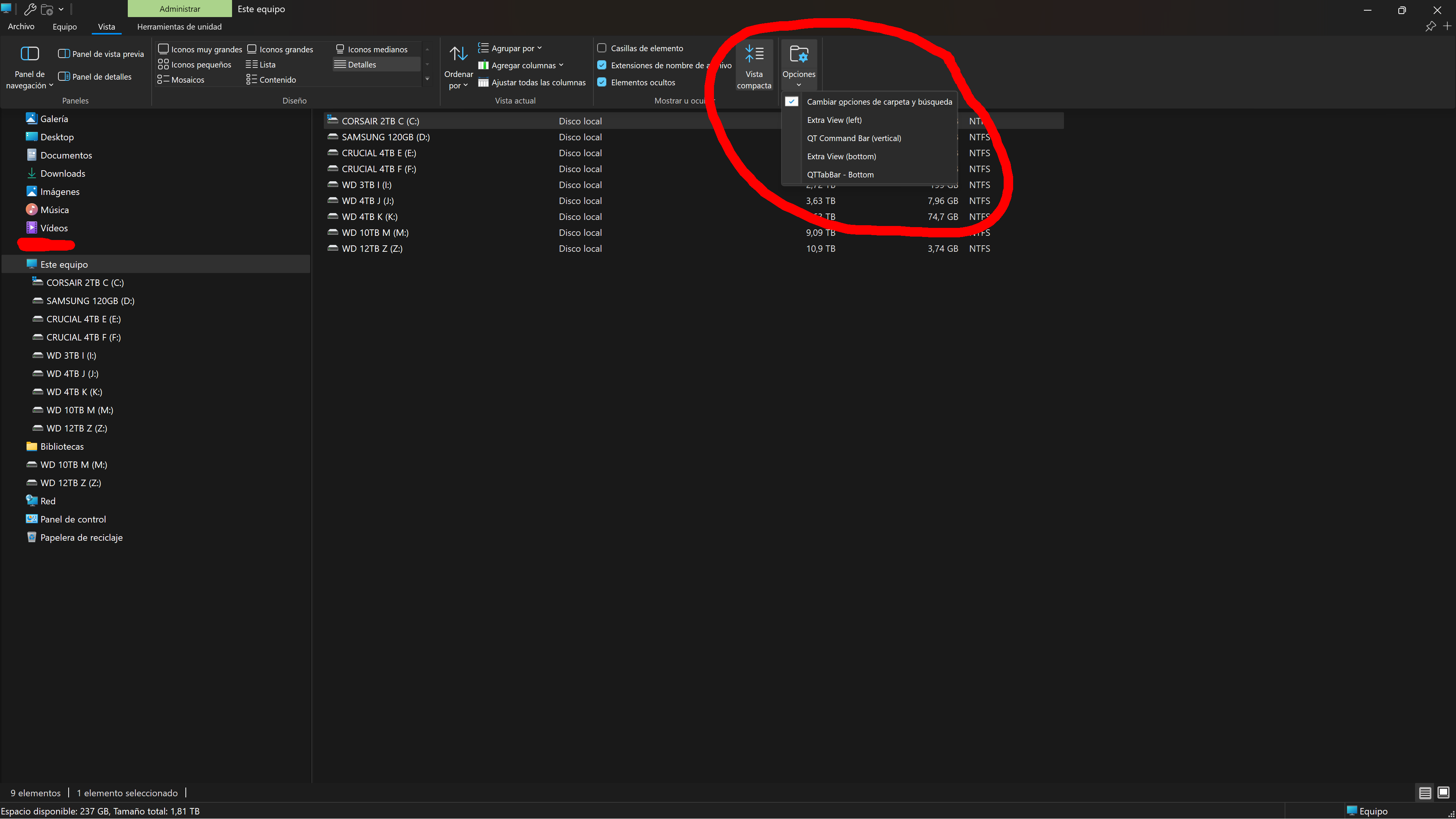
I only get this context menu on Windows Explorer and the tabs on bottom dissapear after I close the Explorer window.

FGpTnpA.jpeg


Do you have any idea what I'm doing wrong? :unsure: Will I have to format Windows?

Thanks!!!
 

My Computer My Computer

At a glance

Windows 11 Pro13900KRTX 4090
OS
Windows 11 Pro
Computer type
PC/Desktop
CPU
13900K
Graphics Card(s)
RTX 4090
Screen Resolution
4K
PSU
Corsair 2500 W
Do you have any idea what I'm doing wrong?
How are you invoking that context menu?, (please provide a larger, all-inclusive screenshot)
Are you able to open QT Options window?
 

My Computers My Computers

  • At a glance

    Windows 11 Pro
    OS
    Windows 11 Pro
    Computer type
    PC/Desktop
    Manufacturer/Model
    ASUS ROG Strix
  • At a glance

    Windows 11 Pro
    Operating System
    Windows 11 Pro
    Computer type
    Laptop
    Manufacturer/Model
    ASUS VivoBook
  • ASUS VivoBook 'Lite' ~ Windows 11 Home
How are you invoking that context menu?, (please provide a larger, all-inclusive screenshot)
Are you able to open QT Options window?

I use the Windows Explorer >> View >> Options to invoke that context menu.

I can not enter the Qttabbar options.

It's all very shoveled. :poop:

I have tried all combinations of Qttabbar + Startallback + Explorer Patcher.

I even tried all Startallback Windows Explorer styles like Windows 7, Windows 10 and Windows 11 ribbons. No luck.

Thanks

kIehN39.png
 

My Computer My Computer

At a glance

Windows 11 Pro13900KRTX 4090
OS
Windows 11 Pro
Computer type
PC/Desktop
CPU
13900K
Graphics Card(s)
RTX 4090
Screen Resolution
4K
PSU
Corsair 2500 W
Also I noticed Open Shell Explorer stopped working.

Microsoft really hit me hard this time with this update. :tears:
 

My Computer My Computer

At a glance

Windows 11 Pro13900KRTX 4090
OS
Windows 11 Pro
Computer type
PC/Desktop
CPU
13900K
Graphics Card(s)
RTX 4090
Screen Resolution
4K
PSU
Corsair 2500 W
The Explorer Alt Menu is hidden by default on 1038, for some stupid reason!
Try this, if you will:
Run StartAllBack only, in Win 7 Explorer Mode,
open Control Panel, press Alt and what ever button pops up there in the upper left corner, wiggle your mouse around it til you get a menu,
then View>Toolbars>QTTabBar..., the one I paused on, checkmark it, close and re-open Explorer.

11209.gif
 

My Computers My Computers

  • At a glance

    Windows 11 Pro
    OS
    Windows 11 Pro
    Computer type
    PC/Desktop
    Manufacturer/Model
    ASUS ROG Strix
  • At a glance

    Windows 11 Pro
    Operating System
    Windows 11 Pro
    Computer type
    Laptop
    Manufacturer/Model
    ASUS VivoBook
  • ASUS VivoBook 'Lite' ~ Windows 11 Home
The Explorer Alt Menu is hidden by default on 1038, for some stupid reason!
Try this, if you will:
Run StartAllBack only, in Win 7 Explorer Mode,
open Control Panel, press Alt and what ever button pops up there in the upper left corner, wiggle your mouse around it til you get a menu,
then View>Toolbars>QTTabBar..., the one I paused on, checkmark it, close and re-open Explorer.

View attachment 155330

Tried it and when I press "Alt" nothing appears, no menu, no context menu, nothing in Control Panel.

I'm gonna unninstall StartAllBack and Explorer Patcher and Open Shell and Qttabbar and start from zero.

Thanks for your help.

I will report back if I find the cure. :geek:
 

My Computer My Computer

At a glance

Windows 11 Pro13900KRTX 4090
OS
Windows 11 Pro
Computer type
PC/Desktop
CPU
13900K
Graphics Card(s)
RTX 4090
Screen Resolution
4K
PSU
Corsair 2500 W
I uninstalled StartAllBack and Explorer Patcher and Open Shell and Qttabbar.

Then installed Qttabbar 1038 and didn't work. Uninstalled it.

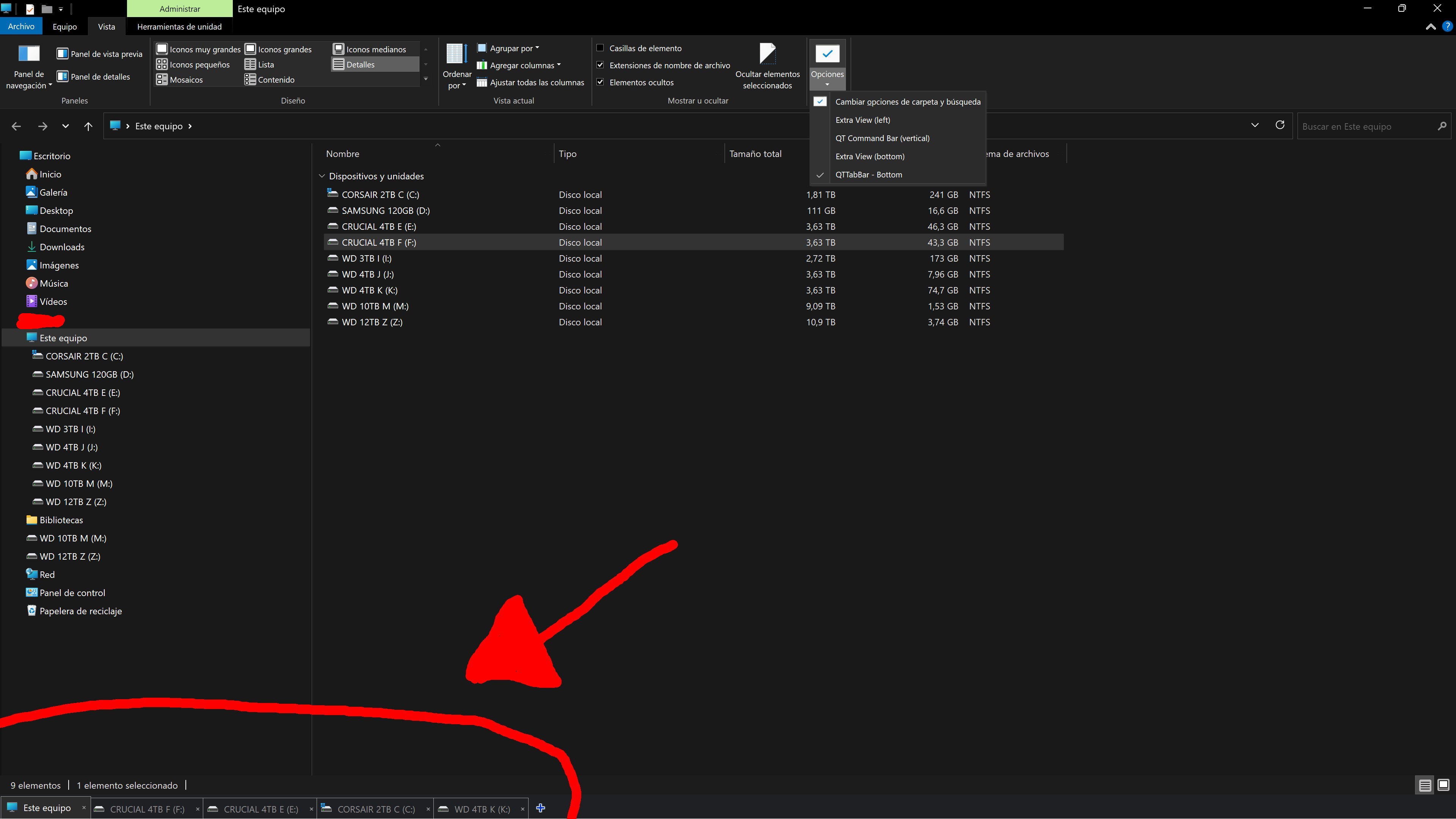
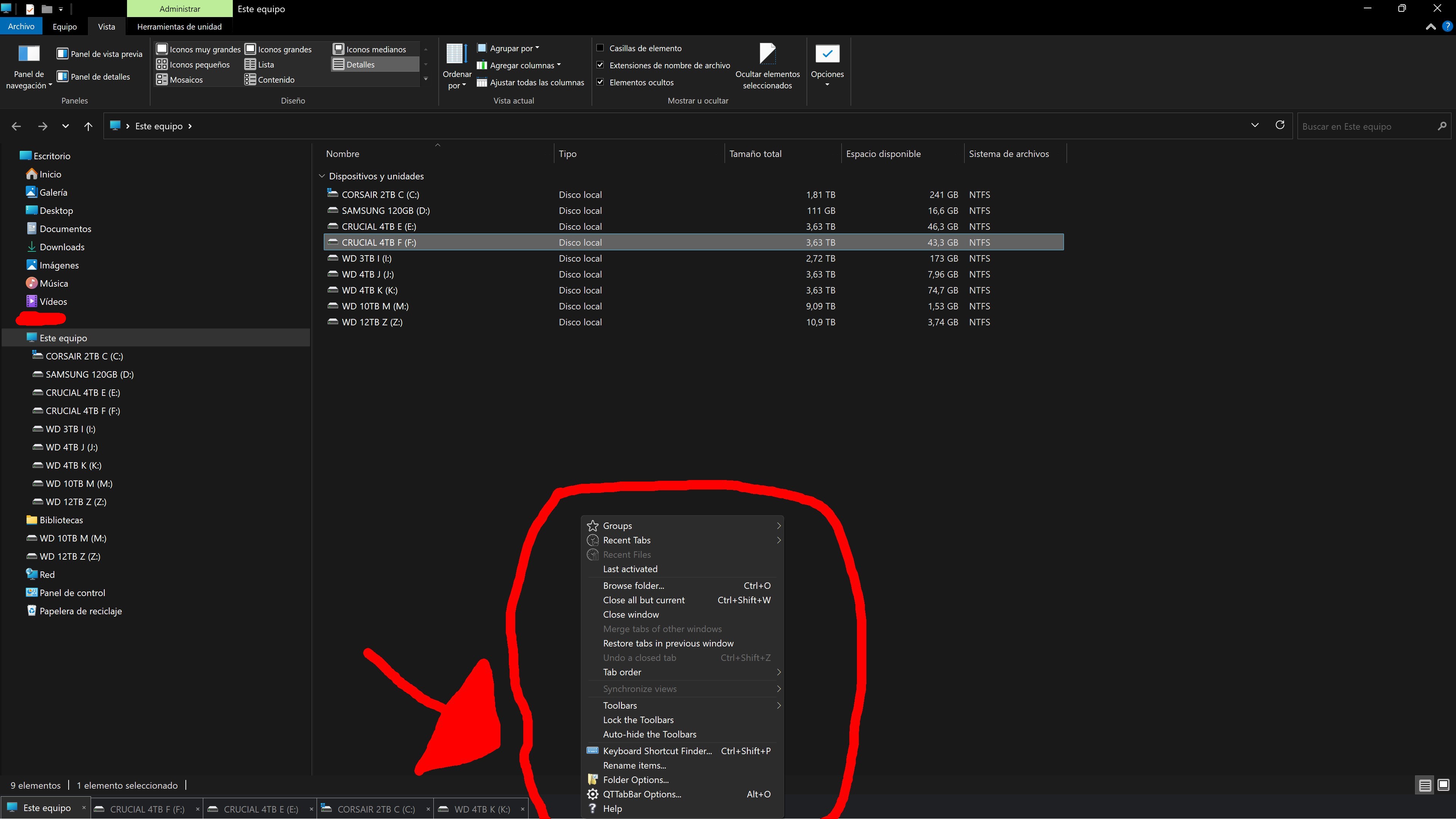
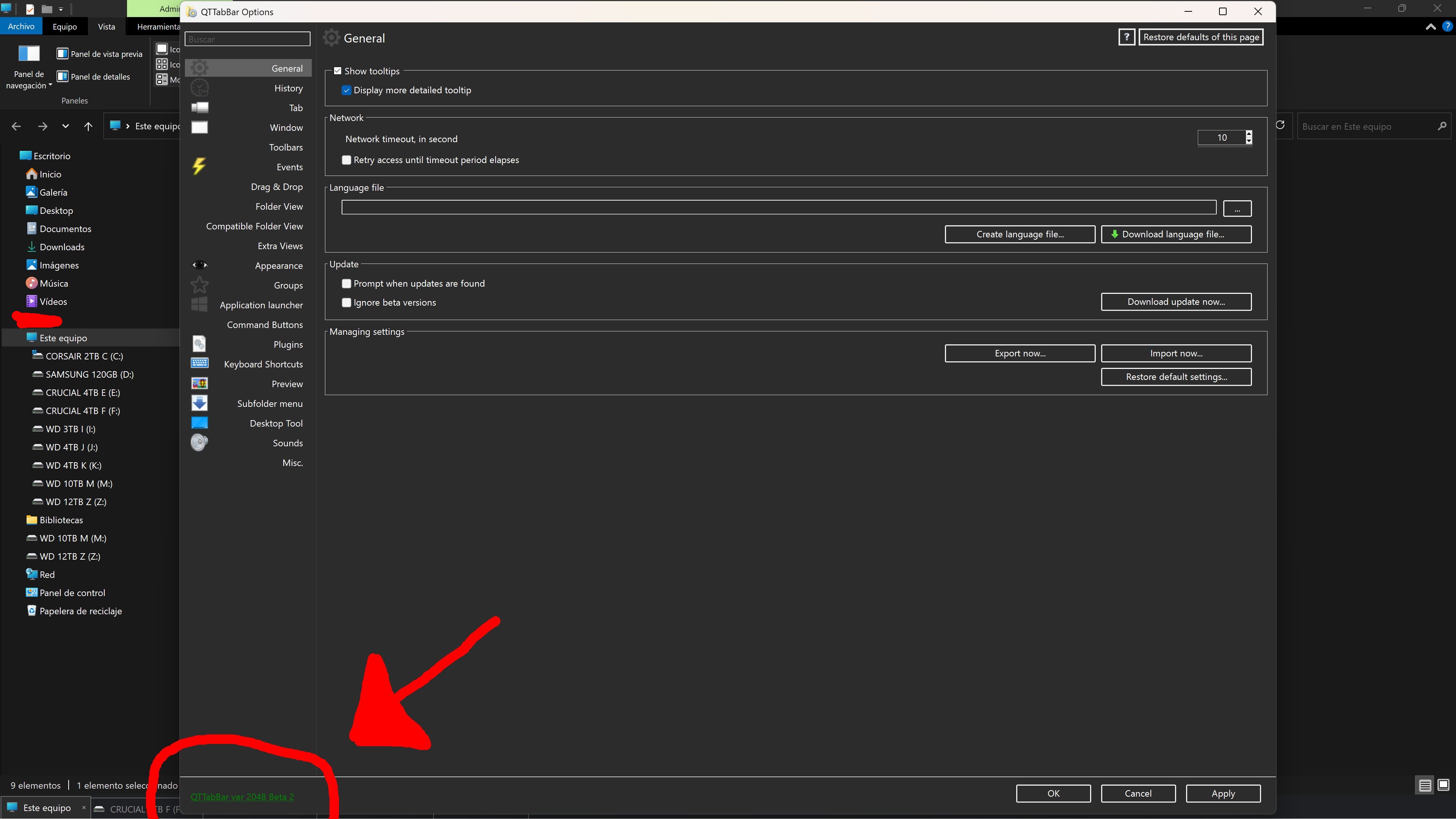
Installed Qttabbar 2048 and now is showing the tabs only on the bottom of the Windows Explorer. I can open several tabs but as soon as I close the Window Explorer the tabs dissapear and the context menu "Qttabbar bottom" has to be enabled again. Loos like Qttabar settings do not save. And I can now enter Qttabbar options.

I will keep investigating why Qttabbar does not save settings and does not allow tabs at the top of the Windows Explorer.

tSDLgGa.jpeg


zfAufx0.jpeg


4UKc7cy.jpeg
 

My Computer My Computer

At a glance

Windows 11 Pro13900KRTX 4090
OS
Windows 11 Pro
Computer type
PC/Desktop
CPU
13900K
Graphics Card(s)
RTX 4090
Screen Resolution
4K
PSU
Corsair 2500 W
I will keep investigating why Qttabbar does not save settings and does not allow tabs at the top of the Windows Explorer.
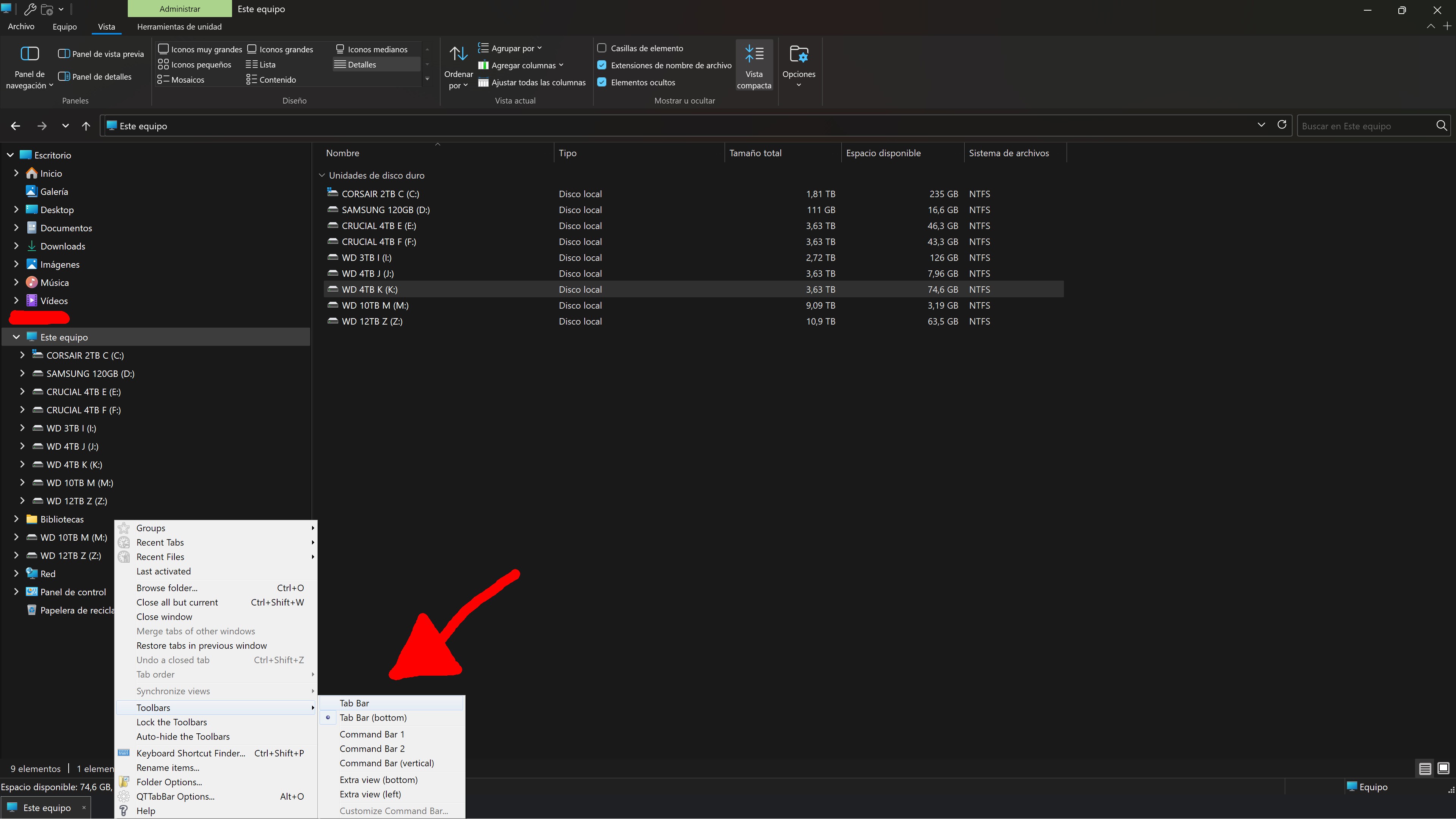
With the Tab Bar (bottom) working, open a few desired tabs, open the right click menu>Toolbars>switch it to Tab Bar...

0008230.webp

If the Tab Bar has moved to the top, open the right click menu again, expand Groups then Create a Group from All Tabs, (the active tab will be the group title)...

0008231.webp

Lock the Toolbars...,
While you have the menu open, open QTTabBar Options and go through all the Settings to see if there may be any conflicting settings.

Pay no mind to the Windows Options Menu at the top, for some reason it won't honor the choices made in the QTTabBar mother menu!

0008232.webp

Keep playing with it til you've got all the Settings the way you want and there are no conflicts.
 
Last edited:

My Computers My Computers

  • At a glance

    Windows 11 Pro
    OS
    Windows 11 Pro
    Computer type
    PC/Desktop
    Manufacturer/Model
    ASUS ROG Strix
  • At a glance

    Windows 11 Pro
    Operating System
    Windows 11 Pro
    Computer type
    Laptop
    Manufacturer/Model
    ASUS VivoBook
  • ASUS VivoBook 'Lite' ~ Windows 11 Home
I'm not sure if this will help but someone in the comments of this article on NeoWin (MS admits major Windows UI features broken) mentioned that QTTabBar was no longer showing multiple tabs. They didn't respond with this correcting, but if it's related to any UI features it might help.

What they did was force a reinstall of several AppXPackages that were broken during July/Aug Windows Updates:

Powershell:
Add-AppxPackage -Register -Path 'C:\Windows\SystemApps\MicrosoftWindows.Client.CBS_cw5n1h2txyewy\appxmanifest.xml' -DisableDevelopmentMode
Add-AppxPackage -Register -Path 'C:\Windows\SystemApps\Microsoft.UI.Xaml.CBS_8wekyb3d8bbwe\appxmanifest.xml' -DisableDevelopmentMode
Add-AppxPackage -Register -Path 'C:\Windows\SystemApps\MicrosoftWindows.Client.Core_cw5n1h2txyewy\appxmanifest.xml' -DisableDevelopmentMode

These three installs are Powershell scripts that should be done one at a time and a reboot after all completed (that's what I did).

Not sure if it helps, but wanted to share here.
 

My Computer My Computer

At a glance

Windows 11 Pro 25H2 (26200.8875)AMD Ryzen 7 7800X3D32gb Team Group (T-Force) DDR5-6000Zotac nVidia GeForce RTX 4070 SUPER - 12gb
OS
Windows 11 Pro 25H2 (26200.8875)
Computer type
PC/Desktop
Manufacturer/Model
Pre-built
CPU
AMD Ryzen 7 7800X3D
Motherboard
MSI Pro B650-VC WiFi
Memory
32gb Team Group (T-Force) DDR5-6000
Graphics Card(s)
Zotac nVidia GeForce RTX 4070 SUPER - 12gb
Sound Card
Sound BlasterX G6
Monitor(s) Displays
Koorui G2421V and ViewSonic VX2453
Screen Resolution
P:2560x1440 S:1920x1080
Hard Drives
WD Blue SN5000 - 500gb NVME
WD Blue SN580 - 2TB NVME
Seagate 4TB HDD - ST4000VN008-2DR166
Keyboard
Mountain Everest
Mouse
Logitech G502 Hero
Internet Speed
T-Mobile Home Internet
Browser
Firefox
Other Info
QNAP TS-469 Pro NAS
TP-Link W7200 (2 unit mesh network)
Elgato Streamdeck
With the Tab Bar (bottom) working, open a few desired tabs, open the right click menu>Toolbars>switch it to Tab Bar...

View attachment 155378

If the Tab Bar has moved to the top, open the right click menu again, expand Groups then Create a Group from All Tabs, (the active tab will be the group title)...

View attachment 155379

Lock the Toolbars...,
While you have the menu open, open QTTabBar Options and go through all the Settings to see if there may be any conflicting settings.

Pay no mind to the Windows Options Menu at the top, for some reason it won't honor the choices made in the QTTabBar mother menu!

View attachment 155380

Keep playing with it til you've got all the Settings the way you want and there are no conflicts.

Tried it and no luck still.

Tab bar won't move to the top and Qttabbar settings won't save.

Qttabbar is still unusable.

Mj3aJyp.jpeg
 

My Computer My Computer

At a glance

Windows 11 Pro13900KRTX 4090
OS
Windows 11 Pro
Computer type
PC/Desktop
CPU
13900K
Graphics Card(s)
RTX 4090
Screen Resolution
4K
PSU
Corsair 2500 W
I'm not sure if this will help but someone in the comments of this article on NeoWin (MS admits major Windows UI features broken) mentioned that QTTabBar was no longer showing multiple tabs. They didn't respond with this correcting, but if it's related to any UI features it might help.

What they did was force a reinstall of several AppXPackages that were broken during July/Aug Windows Updates:

Powershell:
Add-AppxPackage -Register -Path 'C:\Windows\SystemApps\MicrosoftWindows.Client.CBS_cw5n1h2txyewy\appxmanifest.xml' -DisableDevelopmentMode
Add-AppxPackage -Register -Path 'C:\Windows\SystemApps\Microsoft.UI.Xaml.CBS_8wekyb3d8bbwe\appxmanifest.xml' -DisableDevelopmentMode
Add-AppxPackage -Register -Path 'C:\Windows\SystemApps\MicrosoftWindows.Client.Core_cw5n1h2txyewy\appxmanifest.xml' -DisableDevelopmentMode

These three installs are Powershell scripts that should be done one at a time and a reboot after all completed (that's what I did).

Not sure if it helps, but wanted to share here.

Applied this PS scripts and still Qttabbar not working.
 

My Computer My Computer

At a glance

Windows 11 Pro13900KRTX 4090
OS
Windows 11 Pro
Computer type
PC/Desktop
CPU
13900K
Graphics Card(s)
RTX 4090
Screen Resolution
4K
PSU
Corsair 2500 W
Qttabbar is still unusable.
I'm at a loss! 🤷‍♂️
I was gonna install 2048 on this Build if you got yours workin..., I think I'll pass!!!
 

My Computers My Computers

  • At a glance

    Windows 11 Pro
    OS
    Windows 11 Pro
    Computer type
    PC/Desktop
    Manufacturer/Model
    ASUS ROG Strix
  • At a glance

    Windows 11 Pro
    Operating System
    Windows 11 Pro
    Computer type
    Laptop
    Manufacturer/Model
    ASUS VivoBook
  • ASUS VivoBook 'Lite' ~ Windows 11 Home
After trying everything I have given up on Qttabbar and now I'm using ExplorerTabUtility that forces new file explorer windows to open as tabs in Windows 11. It's not as complete and powerful like Qttabbar was but for my needs it's the perfect replacement.

Download: GitHub - w4po/ExplorerTabUtility: 🚀 Supercharge Windows 11's File Explorer: Auto-convert windows to tabs, duplicate tabs, reopen closed ones, and more!

68747470733a2f2f63646e2e6a7364656c6976722e6e65742f67682f7734706f2f4578706c6f7265725461625574696c697479406d61737465722f4173736574732f57696e646f77546f5461622e676966


It also has navigation back/forward/up in explorer with mouse single/double/middle clicks on any empty space in the folder like Qttabbar had.

68747470733a2f2f63646e2e6a7364656c6976722e6e65742f67682f7734706f2f4578706c6f7265725461625574696c697479406d61737465722f4173736574732f4e617669676174654261636b2e676966
 

My Computer My Computer

At a glance

Windows 11 Pro13900KRTX 4090
OS
Windows 11 Pro
Computer type
PC/Desktop
CPU
13900K
Graphics Card(s)
RTX 4090
Screen Resolution
4K
PSU
Corsair 2500 W
After trying everything I have given up on Qttabbar and now I'm using ExplorerTabUtility that forces new file explorer windows to open as tabs in Windows 11. It's not as complete and powerful like Qttabbar was but for my needs it's the perfect replacement.

Download: GitHub - w4po/ExplorerTabUtility: 🚀 Supercharge Windows 11's File Explorer: Auto-convert windows to tabs, duplicate tabs, reopen closed ones, and more!

68747470733a2f2f63646e2e6a7364656c6976722e6e65742f67682f7734706f2f4578706c6f7265725461625574696c697479406d61737465722f4173736574732f57696e646f77546f5461622e676966


It also has navigation back/forward/up in explorer with mouse single/double/middle clicks on any empty space in the folder like Qttabbar had.

68747470733a2f2f63646e2e6a7364656c6976722e6e65742f67682f7734706f2f4578706c6f7265725461625574696c697479406d61737465722f4173736574732f4e617669676174654261636b2e676966

This is fantastic, since the tabs and the double-click in space is the primary thing that helps with vanilla Windows Explorer navigation.
I'll definitely be looking at this later on. But, will keep checking in here if there's any further updates of an alternate, or if QTTabBar works again, by some miracle.
 

My Computers My Computers

  • At a glance

    Windows 11 Pro 25H2Ryzen 9 5900XG.Skill F4-3600C16D Ripjaws V 32GB (8GB x 4) ...Gigabyte Nvidia GeForce RTX 3090 Eagle 24GB
    OS
    Windows 11 Pro 25H2
    Computer type
    PC/Desktop
    Manufacturer/Model
    Custom Build
    CPU
    Ryzen 9 5900X
    Motherboard
    ASUS ROG STRIX B550-A GAMING
    Memory
    G.Skill F4-3600C16D Ripjaws V 32GB (8GB x 4) DDR4 3600MHz
    Graphics Card(s)
    Gigabyte Nvidia GeForce RTX 3090 Eagle 24GB
    Sound Card
    Onboard
    Monitor(s) Displays
    Dell P3222QE 32" UHD 4K
    Screen Resolution
    4K (3840x2160)
    Hard Drives
    Mushkin Vortex 1TB PCIe 4.0 x4 NVMe M.2 2280 SSD (Primary)
    Seagate Barracuda 2TB HDD (Secondary)
    PSU
    Super Flower Leadex III ARGB Gold 850W 80 Plus Gold Fully Modular
    Case
    Phanteks Eclipse P300A Tempered Glass Black Steel ATX Mid Tower
    Cooling
    ID-Cooling FrostFlow X 240 Lite 240mm Liquid CPU Cooler
    Keyboard
    Logitech K520 Keyboard (Combo)
    Mouse
    Logitech K520 Mouse (Combo)
    Internet Speed
    100Mbps
    Browser
    Chrome, Firefox
    Antivirus
    Windows Defender
  • At a glance

    Windows 11 Pro 25H2Ryzen 9 7900XG.Skill F5-6000J3040G32GX2-TZ5N Trident Z5 NE...Palit GeForce RTX 3080 GamingPro LHR Edition
    Operating System
    Windows 11 Pro 25H2
    Computer type
    PC/Desktop
    Manufacturer/Model
    Custom Build
    CPU
    Ryzen 9 7900X
    Motherboard
    MSI X670E GAMING PLUS WIFI
    Memory
    G.Skill F5-6000J3040G32GX2-TZ5N Trident Z5 NEO 64GB (2x32GB)
    Graphics card(s)
    Palit GeForce RTX 3080 GamingPro LHR Edition
    Sound Card
    Onboard
    Monitor(s) Displays
    Dell G2724D 27" (x 2)
    Screen Resolution
    WQHD (2560x1440) 165Hz 1ms
    Hard Drives
    Samsung 990 PRO 2TB M.2 NVMe SSD (Primary)
    XPG GAMMIX S70 BLADE 2TB M.2 NVMe (Secondary)
    Seagate Ironwolf 4TB HDD (Tertiary)
    PSU
    Super Flower SF-1000F14PE Leadex VI Platinum Pro 1000W 80 Plus Platinum
    Case
    Montech AIR 903 MAX Black RGB
    Cooling
    ID-Cooling FX360 PRO 360mm + Case Fans
    Keyboard
    Redragon Devarajas K556 RGB Mechanical Gaming
    Mouse
    Redragon M810 Taipan Pro
    Internet Speed
    150Mbps
    Browser
    Chrome, Firefox
    Antivirus
    Windows Defender
After trying everything I have given up on Qttabbar...
Bummer! :(
I might make a clean image and try to put 2048 on 26200.7309!
And, screen record it!
@Dan Dare You're on 26200.7309 right?

QTTabBar may not be the most powerfully featured utility of it's kind, but, it has a style of it's own..., comfortably powerful without being too complicated.
I've grown so accustomed to it that I can't function without it anymore!

11273.webp
 

My Computers My Computers

  • At a glance

    Windows 11 Pro
    OS
    Windows 11 Pro
    Computer type
    PC/Desktop
    Manufacturer/Model
    ASUS ROG Strix
  • At a glance

    Windows 11 Pro
    Operating System
    Windows 11 Pro
    Computer type
    Laptop
    Manufacturer/Model
    ASUS VivoBook
  • ASUS VivoBook 'Lite' ~ Windows 11 Home
Back
Top Bottom