
RoboCopy not 'seeing' the target files.


I'm guessing that @BaJohn has lost interest in this issue as there have been no updates since Wednesday :-).
NOT THE CASE - been ill with suspected Covid, and very tired.
 

My Computer

System One

  • OS
    Windows 11 Pro Version 23H2 OS build 22631.3235 (First install 22H2 ‎04/‎10/‎22)
    Computer type
    PC/Desktop
    Manufacturer/Model
    Asus Hand built to my Spec
    CPU
    Intel Core i7 9700K 3.6GHz
    Motherboard
    Asus TUF Z390-Plus Gaming WiFi
    Memory
    32GB DDR4 3.200 MHz
    Graphics Card(s)
    NVidia GeForce RTX 2060 Super 8 GB
    Sound Card
    On Motherboard
    Monitor(s) Displays
    BENQ GL2780E 27"
    Screen Resolution
    1920 x 1080
    Hard Drives
    2 SSDs and 1 HDD
    PSU
    Corsair RM750X Gold - 750w
    Case
    Fractal Design Define R6 Black/Silent Case
    Cooling
    1 CPU fan and 5 case fans
    Keyboard
    Logitech K800
    Mouse
    Logi
    Internet Speed
    200Mbps down 20Mbps up
    Browser
    Edge and Crome
    Antivirus
    Zone Alarm
    Other Info
    Upgraded from Win 10 to Win 11 on 22/10/21.
Get some rest and feel better friend.
 

My Computers

System One System Two

  • OS
    All Branches but Release
    Computer type
    Laptop
    Manufacturer/Model
    Acer Nitro ANV15-51
    CPU
    AMD Ryzen 7 7735HS 3200-4500 Mhz 8 cores x 2
    Motherboard
    Sportage_RBH
    Memory
    32 GB DDR5
    Graphics Card(s)
    Radeon Graphic / NVIDIA GeForce RTX 4060 8 GB GDDR6
    Sound Card
    AMD/Realtek(R) Audio
    Monitor(s) Displays
    Integrated Monitor (15.3"vis)
    Screen Resolution
    FHD 1920X1080 16:9 144Hz
    Hard Drives
    KINGSTON OM8SEP4512Q-AA 1TB
    Western Digital 256GB
    PSU
    19V DC 6.32 A 120 W
    Cooling
    Dual Fans
    Mouse
    MS Bluetooth
    Internet Speed
    Fiber 1GB Cox -us & 1GB Orange-fr
    Browser
    Edge Canary- Firefox Nightly-Chrome Dev-Chrome Dev
    Antivirus
    Windows Defender
  • Operating System
    Windows 11 Beta
    Computer type
    Laptop
    Manufacturer/Model
    Asus X751BP
    CPU
    AMD A9-9420
    Memory
    8 GB of DDR4
    Graphics card(s)
    AMD Radeon R5
    Screen Resolution
    1600x900
    Hard Drives
    Seagate 1 TB
NOT THE CASE - been ill with suspected Covid, and very tired.

Hello, BaJohn.

Don't push yourself. Rest, and feel better soon. ;)
 

My Computer

System One

  • OS
    Windows 10 Pro 64-bit 22H2 19045.4046
    Computer type
    PC/Desktop
    Manufacturer/Model
    Dell/Vostro 470 (Year 2012)
    CPU
    Intel i7-3770 @ 3.40GHz
    Memory
    8 GB
    Graphics Card(s)
    AMD 7500 Radeon HD Series
    Sound Card
    Realtek Hi-Def Audio
    Monitor(s) Displays
    Dell U2412M
    Hard Drives
    1 TB 7200 HDD
    Keyboard
    Dell/USB
    Mouse
    Dell/USB
    Internet Speed
    100/10
    Browser
    Edge
    Antivirus
    Windows Security/MalwareBytes Premium
I'm thinking a different USB Drive. If I understand this correctly, when robocopy copies to the USB drive, every file is copied to this drive instead of just new or changed files... correct? Something me be changing the timestamp on the USB files in which case they would be new files to robocopy. Perhaps antivirus scanning this device or some other issue with the drive.

Also, why are you wrapping the robocopy command in this batch script? Describe what it's doing as opposed to a standalone command?
"...every file is copied to this drive instead of just new or changed files." CORRECT
"...why are you wrapping the robocopy command in this batch script" Because I had similar code on another machine (Win 10), I use 6 virtual discs to make life easy with the copying. I copy to 3 places, local disc, USB external disc and NASS in the garage room. The same (or similar) code is called in a batch file. I have an Icon on the desktop that my wife can see easily which is call "BackUp and Close Down". She has been trained to end her session on the 2 PCs with using that Icon.
 

My Computer

System One

  • OS
    Windows 11 Pro Version 23H2 OS build 22631.3235 (First install 22H2 ‎04/‎10/‎22)
    Computer type
    PC/Desktop
    Manufacturer/Model
    Asus Hand built to my Spec
    CPU
    Intel Core i7 9700K 3.6GHz
    Motherboard
    Asus TUF Z390-Plus Gaming WiFi
    Memory
    32GB DDR4 3.200 MHz
    Graphics Card(s)
    NVidia GeForce RTX 2060 Super 8 GB
    Sound Card
    On Motherboard
    Monitor(s) Displays
    BENQ GL2780E 27"
    Screen Resolution
    1920 x 1080
    Hard Drives
    2 SSDs and 1 HDD
    PSU
    Corsair RM750X Gold - 750w
    Case
    Fractal Design Define R6 Black/Silent Case
    Cooling
    1 CPU fan and 5 case fans
    Keyboard
    Logitech K800
    Mouse
    Logi
    Internet Speed
    200Mbps down 20Mbps up
    Browser
    Edge and Crome
    Antivirus
    Zone Alarm
    Other Info
    Upgraded from Win 10 to Win 11 on 22/10/21.
Hi members, thanks for the kind words. Just returned to this problem after going out (first time in 4 days), and wondering how to proceed, so as to cover all points mentioned.
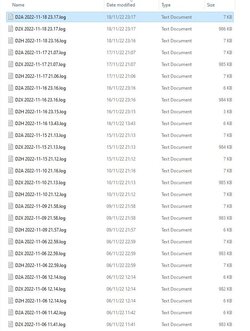
My first attachment is the top (latest) log files created from my 'Backup', including the ones from last night. It is clear that more data was recorded for the D2X (USB) files than the D2A (NASS) and D2H (Local). This massive data change started on 16/10/22 when all the files that were copied again were marked as MODIFIED. My second attachment shows this (Yes I am a fan of KIxtart).
Just to say that my PC has been 'playing up recently', having 'locked up completely' between first and second screen dumps (CTRL, ALT, DEL did nothing), and I need to fix that, so MAY not be so attentive for a while. Please be assured I need to get this fixed, although no data is lost, and the backup is fast (SSDs), I will get this solved with (hopefully) your help.
 

Attachments

  • Log Files 2022-11-19 143849.jpg
    Log Files 2022-11-19 143849.jpg
    64 KB · Views: 2
  • D2X Log 2022-11-19 151844.jpg
    D2X Log 2022-11-19 151844.jpg
    90.7 KB · Views: 2

My Computer

System One

  • OS
    Windows 11 Pro Version 23H2 OS build 22631.3235 (First install 22H2 ‎04/‎10/‎22)
    Computer type
    PC/Desktop
    Manufacturer/Model
    Asus Hand built to my Spec
    CPU
    Intel Core i7 9700K 3.6GHz
    Motherboard
    Asus TUF Z390-Plus Gaming WiFi
    Memory
    32GB DDR4 3.200 MHz
    Graphics Card(s)
    NVidia GeForce RTX 2060 Super 8 GB
    Sound Card
    On Motherboard
    Monitor(s) Displays
    BENQ GL2780E 27"
    Screen Resolution
    1920 x 1080
    Hard Drives
    2 SSDs and 1 HDD
    PSU
    Corsair RM750X Gold - 750w
    Case
    Fractal Design Define R6 Black/Silent Case
    Cooling
    1 CPU fan and 5 case fans
    Keyboard
    Logitech K800
    Mouse
    Logi
    Internet Speed
    200Mbps down 20Mbps up
    Browser
    Edge and Crome
    Antivirus
    Zone Alarm
    Other Info
    Upgraded from Win 10 to Win 11 on 22/10/21.
Just had an idea .:boom:... checked my Win 10 PC (with a similar setup) to see whether anything similar had happened there.
Over the past month there have been 7 events when the same thing happened. This affected 2 virtual source drives, 2 targets USB and local , but strangely these were isolated events, i.e. after occurring the next backup was okay. On my Win 11 the problem has been consistent since it started and it happens for only 1 source and 1 target.
I have had as I say general problems with both machines, and obviously I have thought about viruses, malware etc.
I have used 3 different virus checkers, 2 registry cleaners, chkdsk, SFC, DISM, looked at event viewer (not very good at that), swept orphan devices, and other stuff. Almost convinced there is no virus type thing. I have Zone Alarm Next Gen permanently on as well.
I have weird symptoms on this Win 11 PC. Cannot get printers working via WiFi, Chrome keeps telling me to restore previous page when no error has occurred, most websites require me to press F5 to get site displayed correctly, and other strange things.
 

My Computer

System One

  • OS
    Windows 11 Pro Version 23H2 OS build 22631.3235 (First install 22H2 ‎04/‎10/‎22)
    Computer type
    PC/Desktop
    Manufacturer/Model
    Asus Hand built to my Spec
    CPU
    Intel Core i7 9700K 3.6GHz
    Motherboard
    Asus TUF Z390-Plus Gaming WiFi
    Memory
    32GB DDR4 3.200 MHz
    Graphics Card(s)
    NVidia GeForce RTX 2060 Super 8 GB
    Sound Card
    On Motherboard
    Monitor(s) Displays
    BENQ GL2780E 27"
    Screen Resolution
    1920 x 1080
    Hard Drives
    2 SSDs and 1 HDD
    PSU
    Corsair RM750X Gold - 750w
    Case
    Fractal Design Define R6 Black/Silent Case
    Cooling
    1 CPU fan and 5 case fans
    Keyboard
    Logitech K800
    Mouse
    Logi
    Internet Speed
    200Mbps down 20Mbps up
    Browser
    Edge and Crome
    Antivirus
    Zone Alarm
    Other Info
    Upgraded from Win 10 to Win 11 on 22/10/21.
So @BaJohn, you have had the same issues on other machines, just less consistently than on W11?
The other symptoms you mention are indeed odd and quite puzzling.
I am afraid this is a little too wide of a range of issues to narrow down any credible solutions, for me, anyway.
 

My Computers

System One System Two

  • OS
    All Branches but Release
    Computer type
    Laptop
    Manufacturer/Model
    Acer Nitro ANV15-51
    CPU
    AMD Ryzen 7 7735HS 3200-4500 Mhz 8 cores x 2
    Motherboard
    Sportage_RBH
    Memory
    32 GB DDR5
    Graphics Card(s)
    Radeon Graphic / NVIDIA GeForce RTX 4060 8 GB GDDR6
    Sound Card
    AMD/Realtek(R) Audio
    Monitor(s) Displays
    Integrated Monitor (15.3"vis)
    Screen Resolution
    FHD 1920X1080 16:9 144Hz
    Hard Drives
    KINGSTON OM8SEP4512Q-AA 1TB
    Western Digital 256GB
    PSU
    19V DC 6.32 A 120 W
    Cooling
    Dual Fans
    Mouse
    MS Bluetooth
    Internet Speed
    Fiber 1GB Cox -us & 1GB Orange-fr
    Browser
    Edge Canary- Firefox Nightly-Chrome Dev-Chrome Dev
    Antivirus
    Windows Defender
  • Operating System
    Windows 11 Beta
    Computer type
    Laptop
    Manufacturer/Model
    Asus X751BP
    CPU
    AMD A9-9420
    Memory
    8 GB of DDR4
    Graphics card(s)
    AMD Radeon R5
    Screen Resolution
    1600x900
    Hard Drives
    Seagate 1 TB
Yes - very confusing.
However yesterday late, I ran "CHKDSK C: /B /V" rebooted and checked the event log to find hardware errors.
Ah I thought that must be the root cause .... NO - the problem is consistently there EVERY single backup time for D2Xxxxxx.
Perhaps I need to do some more tidying, to allow that change to trickle through somewhere somehow.
I haven't given up - I remember chasing the 'Widgets' problem for perhaps 6 months or so, and eventually it went away with an apparent windows update. Haven't said that I think it is improbable with this problem, but ......
 

My Computer

System One

  • OS
    Windows 11 Pro Version 23H2 OS build 22631.3235 (First install 22H2 ‎04/‎10/‎22)
    Computer type
    PC/Desktop
    Manufacturer/Model
    Asus Hand built to my Spec
    CPU
    Intel Core i7 9700K 3.6GHz
    Motherboard
    Asus TUF Z390-Plus Gaming WiFi
    Memory
    32GB DDR4 3.200 MHz
    Graphics Card(s)
    NVidia GeForce RTX 2060 Super 8 GB
    Sound Card
    On Motherboard
    Monitor(s) Displays
    BENQ GL2780E 27"
    Screen Resolution
    1920 x 1080
    Hard Drives
    2 SSDs and 1 HDD
    PSU
    Corsair RM750X Gold - 750w
    Case
    Fractal Design Define R6 Black/Silent Case
    Cooling
    1 CPU fan and 5 case fans
    Keyboard
    Logitech K800
    Mouse
    Logi
    Internet Speed
    200Mbps down 20Mbps up
    Browser
    Edge and Crome
    Antivirus
    Zone Alarm
    Other Info
    Upgraded from Win 10 to Win 11 on 22/10/21.
Please do keep us posted and I hope you are feeling better.
 

My Computers

System One System Two

  • OS
    All Branches but Release
    Computer type
    Laptop
    Manufacturer/Model
    Acer Nitro ANV15-51
    CPU
    AMD Ryzen 7 7735HS 3200-4500 Mhz 8 cores x 2
    Motherboard
    Sportage_RBH
    Memory
    32 GB DDR5
    Graphics Card(s)
    Radeon Graphic / NVIDIA GeForce RTX 4060 8 GB GDDR6
    Sound Card
    AMD/Realtek(R) Audio
    Monitor(s) Displays
    Integrated Monitor (15.3"vis)
    Screen Resolution
    FHD 1920X1080 16:9 144Hz
    Hard Drives
    KINGSTON OM8SEP4512Q-AA 1TB
    Western Digital 256GB
    PSU
    19V DC 6.32 A 120 W
    Cooling
    Dual Fans
    Mouse
    MS Bluetooth
    Internet Speed
    Fiber 1GB Cox -us & 1GB Orange-fr
    Browser
    Edge Canary- Firefox Nightly-Chrome Dev-Chrome Dev
    Antivirus
    Windows Defender
  • Operating System
    Windows 11 Beta
    Computer type
    Laptop
    Manufacturer/Model
    Asus X751BP
    CPU
    AMD A9-9420
    Memory
    8 GB of DDR4
    Graphics card(s)
    AMD Radeon R5
    Screen Resolution
    1600x900
    Hard Drives
    Seagate 1 TB
Please do keep us posted and I hope you are feeling better.
I am much better at the moment, THANK YOU VERY MUCH.
I initially thought it was covid because of the terrible scratchy sore throat. It has progressed through that to ordinary sore throat with terrible cold in the nose, and that is now receding. Throughout I have been quite tired but that just might be 'old age'.
YES - I will try and keep you all updated with my Win 11 problem, since I know it's nice to get closure, even on somebody else's problem.
Not given up - Just loaded 'God Mode' on the Win 11 to speed up some activities I need to try again.
 

My Computer

System One

  • OS
    Windows 11 Pro Version 23H2 OS build 22631.3235 (First install 22H2 ‎04/‎10/‎22)
    Computer type
    PC/Desktop
    Manufacturer/Model
    Asus Hand built to my Spec
    CPU
    Intel Core i7 9700K 3.6GHz
    Motherboard
    Asus TUF Z390-Plus Gaming WiFi
    Memory
    32GB DDR4 3.200 MHz
    Graphics Card(s)
    NVidia GeForce RTX 2060 Super 8 GB
    Sound Card
    On Motherboard
    Monitor(s) Displays
    BENQ GL2780E 27"
    Screen Resolution
    1920 x 1080
    Hard Drives
    2 SSDs and 1 HDD
    PSU
    Corsair RM750X Gold - 750w
    Case
    Fractal Design Define R6 Black/Silent Case
    Cooling
    1 CPU fan and 5 case fans
    Keyboard
    Logitech K800
    Mouse
    Logi
    Internet Speed
    200Mbps down 20Mbps up
    Browser
    Edge and Crome
    Antivirus
    Zone Alarm
    Other Info
    Upgraded from Win 10 to Win 11 on 22/10/21.
  • Like
Reactions: OAT
Still have the same issue with my machines (Win 11 and 10)
Since the problem on my Win 11 is confined to the external USB that is attached, and seems to be random, although 80% of the time, I am coming round to the idea that it might be a timing problem.
On the assumption that 2 files look identical time, but internally they may be milliseconds different, HOW do I check with some other tool what the internal time dates stored on files are?
Yes I know it sound kinda stupid, but I am clutching at straws here.
Suppose the accuracy of stored time data is different on my USB drive to that inside Win 11, one could image that depending on rounding we could end up with say 1 millisecond difference. Maybe this could be enough to trigger RoboCopy saying they are different.
Does anybody know if it is possible to test that 2 files are, say 1 hour different (in one direction only), instead of checking that they are not identical?
Hope that makes sense, and thanks for the kind thoughts earlier (what a nice bunch you are).
I am now well over my minor illness, so will take this opportunity to wish you all A MERRY CHRISTMAS.
 

My Computer

System One

  • OS
    Windows 11 Pro Version 23H2 OS build 22631.3235 (First install 22H2 ‎04/‎10/‎22)
    Computer type
    PC/Desktop
    Manufacturer/Model
    Asus Hand built to my Spec
    CPU
    Intel Core i7 9700K 3.6GHz
    Motherboard
    Asus TUF Z390-Plus Gaming WiFi
    Memory
    32GB DDR4 3.200 MHz
    Graphics Card(s)
    NVidia GeForce RTX 2060 Super 8 GB
    Sound Card
    On Motherboard
    Monitor(s) Displays
    BENQ GL2780E 27"
    Screen Resolution
    1920 x 1080
    Hard Drives
    2 SSDs and 1 HDD
    PSU
    Corsair RM750X Gold - 750w
    Case
    Fractal Design Define R6 Black/Silent Case
    Cooling
    1 CPU fan and 5 case fans
    Keyboard
    Logitech K800
    Mouse
    Logi
    Internet Speed
    200Mbps down 20Mbps up
    Browser
    Edge and Crome
    Antivirus
    Zone Alarm
    Other Info
    Upgraded from Win 10 to Win 11 on 22/10/21.
Can you create a new batch file for that problematic USB drive using robocopy as a single statement... not in a for-loop? Do this as a test to see if the problem lies somewhere in that for-loop.
 

My Computer

System One

  • OS
    Windows 11
    Computer type
    PC/Desktop
Back
Top Bottom


